
Overview
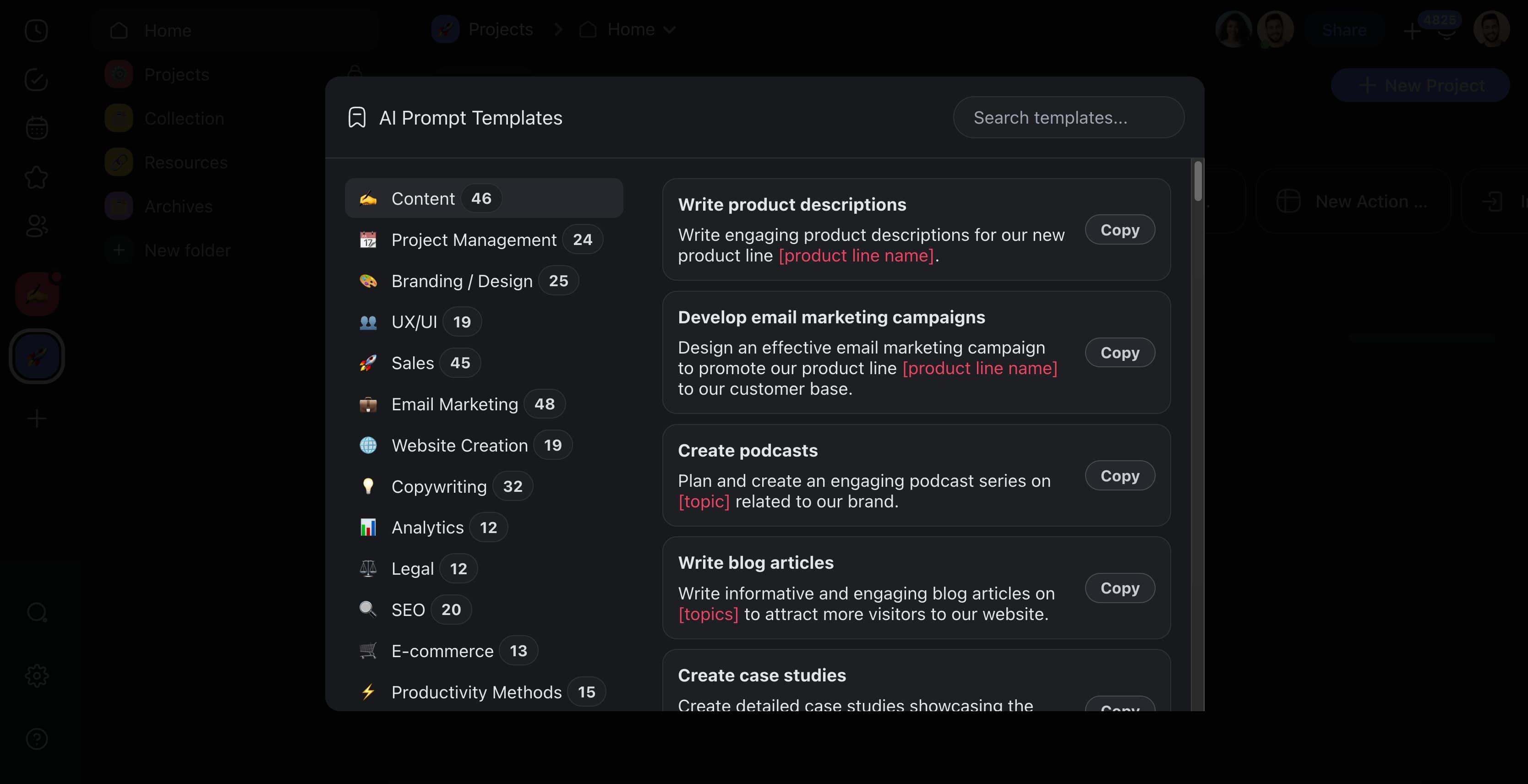
The Prompt Templates Library is a built-in catalog of ready-made AI prompts. Browse dozens of templates across 24 categories, copy the one that fits your job, and paste it anywhere you work with AI. Nothing to write from a blank page.
TL;DR: Open the AI Prompts panel from your profile avatar to browse dozens of templates across 24 categories, from Content and Sales to SEO and Legal. Copy any template and paste it into AI Project Studio, AI Chat, or a custom AI agent to reuse it instantly.
Use Prompt Templates
- Click your profile avatar in the bottom-left corner.
- Choose the AI Prompts button from the drop-down list.

- Choose a prompt and click Copy to save it to the clipboard.
- Paste the prompt into AI Project Studio, Taskade EVE, or AI Chat.
Where to Paste a Template
The same template behaves differently depending on where you drop it. Pick the surface that matches the outcome you want.
| Paste it into | What you get back |
|---|---|
| AI Chat | A one-off answer, grounded in the project you are looking at |
| AI Project Studio | A full structured project, generated from the prompt |
| Taskade EVE | Taskade EVE runs the prompt and can act on your workspace |
| A custom AI agent command | A saved /slash shortcut that runs the prompt on demand |
Turning a template you reuse into a slash command is the step most people skip. Once it is saved on an agent, you stop copying and pasting entirely. See Guide to Writing AI Prompts for how to sharpen a template before you save it.
Prompt Template Categories
Whether you are working on content creation, project management, or branching out into legal or real estate, there is a template that fits the context of your work.
| 🗂️ Category | 🔤 Description |
|---|---|
| Content | Templates to plan and structure various content types, from blog posts to video scripts. |
| Project Management | Organize tasks, milestones, and timelines with project-focused templates. |
| Productivity | Simplify your daily routines and tasks with templates that prioritize efficiency. |
| Sales | Track leads and manage sales processes from initial contact to closing. |
| Copywriting | Develop compelling messages for ads, product descriptions, and more. |
| Email Marketing | Create newsletters and promotional emails that engage and convert. |
| Social Media | Plan your content calendar and strategize your social engagement. |
| Branding / Design | Outline branding concepts and design projects from logos to layouts. |
| UX/UI | Sketch out user interface designs and user experience flows. |
| E-commerce | Manage your online business, from product listings to customer service. |
| Entrepreneurship | Brainstorm business ideas and plan startup ventures. |
| Influencer Marketing | Coordinate influencer campaigns and content collaborations. |
| Legal | Prepare legal documents and manage case information. |
| Website Creation | Outline webpages and plan site architectures and content. |
| Analytics | Set up data tracking and analyze performance indicators. |
| SEO | Plan content and technical changes to improve search engine rankings. |
| Engineering | Plan engineering projects with technical specs and diagrams. |
| Research | Organize academic or market research with structured methodology. |
| Strategy | Define business and marketing strategies with clear objectives. |
| Advertising | Plan ad campaigns, from concept to execution and analysis. |
| Education | Develop lesson plans, educational content, and learning activities. |
| Agency | Manage client projects, briefs, and creative processes. |
| Real Estate | Organize property listings, client meetings, and market analysis. |
| Support | Structure customer support workflows and response templates. |
Related guides
- Prompt Templates: Pre-built prompt scaffolds
- Guide to Writing AI Prompts: General prompting principles
- Agent Prompts: Agent-specific prompt library
- Project Prompts: Prompts for project creation
- A Maker's Guide to Taskade Genesis Prompts: Taskade Genesis-specific prompt patterns
- Starter Prompts: 100+ tested Taskade Genesis prompts