
Overview
Taskade AI credits power app building, chat, AI agents, automations, image generation, and file analysis. The Usage page separates credits that reset from credits that stay available.
TL;DR: AI credits power app building, chat, AI agents, automations, image generation, and file analysis. Paid plans can include Monthly credits that reset each billing cycle. Usage credits come from purchases or rewards and do not expire. Taskade uses Monthly credits first. Measure both pools on the Usage page.

Key insight: Published apps run free. After you publish, visitors can use the app without using your credits. Credits are used only when you build or edit in the Taskade Genesis editor, chat with agents, or run AI automations.
Note: See current plans at taskade.com/pricing
Compare the Credit Pools
Compare the two credit pools on the Usage page. Taskade uses Monthly credits before Usage credits.
| Credit pool | Where it comes from | Reset behavior |
|---|---|---|
| Monthly credits | The allowance included with an eligible plan | Resets each billing cycle |
| Usage credits | Credits that you buy or earn | Does not expire |
| Earned credits | The Usage credit pool shown on Free | Does not expire |
The Usage page shows a reset date when one is available. For current plan allowances, see pricing.
Understand How Credits Are Used
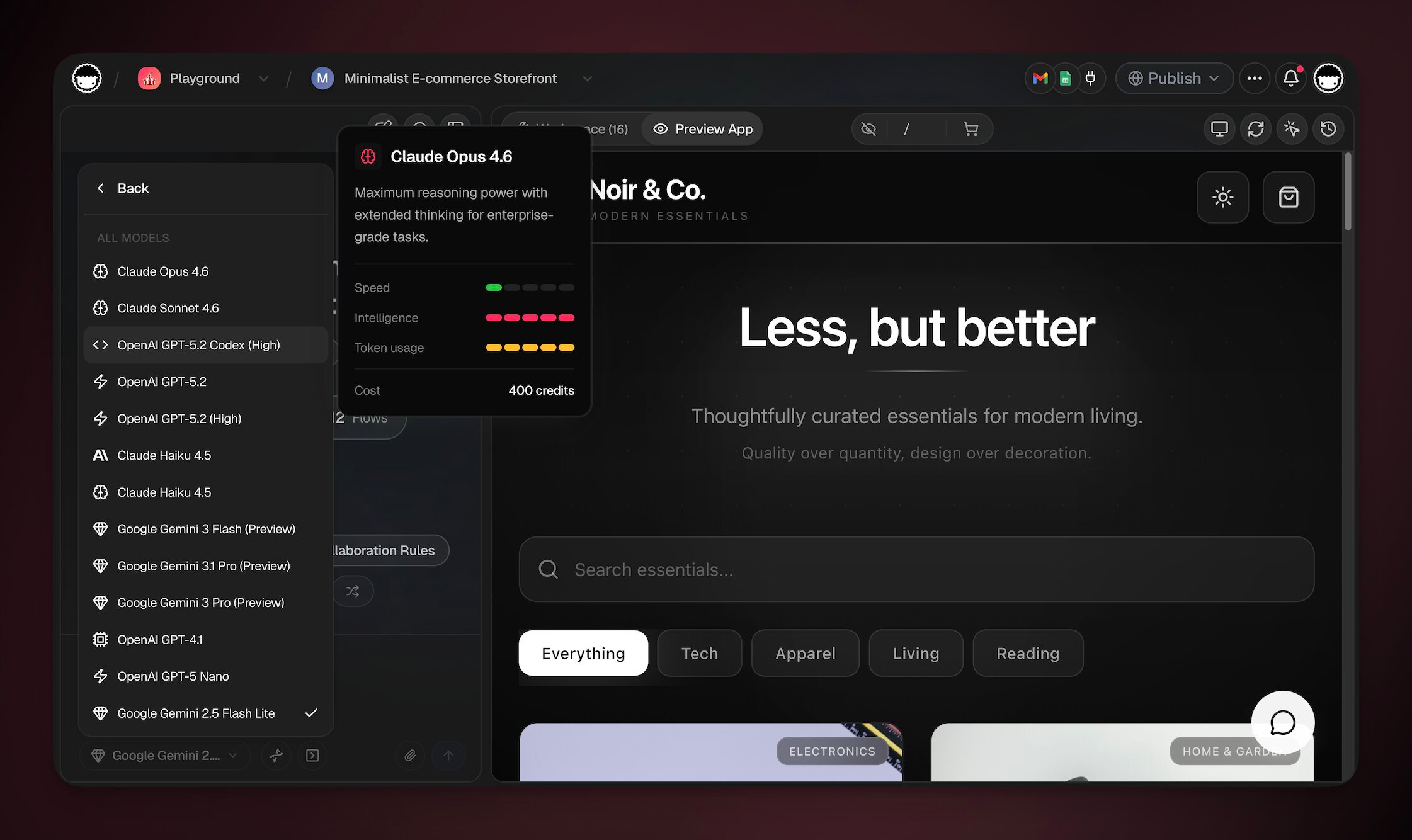
Use the model selector to see the cost before an AI action starts. Each reasoning step or action can use credits. Models with deeper reasoning usually use more credits.
Note: Check the model selector dropdown tooltip to see the credit cost for each model.
| Action | Notes |
|---|---|
| Building and editing apps | Varies by model |
| AI chat message | Varies by model (each reasoning step) |
| Agent tool call | Each integration call |
| MCP tool call | Each action an external MCP client runs through the hosted MCP server |
| Image generation | Higher cost than text actions |
| Web search | Each search performed by an agent |
| Automation AI step | Only AI-powered steps count |
| File analysis | Per file uploaded and processed |
| Multi-agent turn | Each agent uses credits independently |
Choose an AI Model
Choose from frontier models supplied by several providers. Models use different credit amounts. Deeper reasoning usually uses more credits. See AI Models for the current catalog and Model Credits for guidance.
Note: Select your preferred model from the dropdown. Taskade EVE remembers your choice for your next conversation. You can change it at any time.
Check Remaining AI Credits
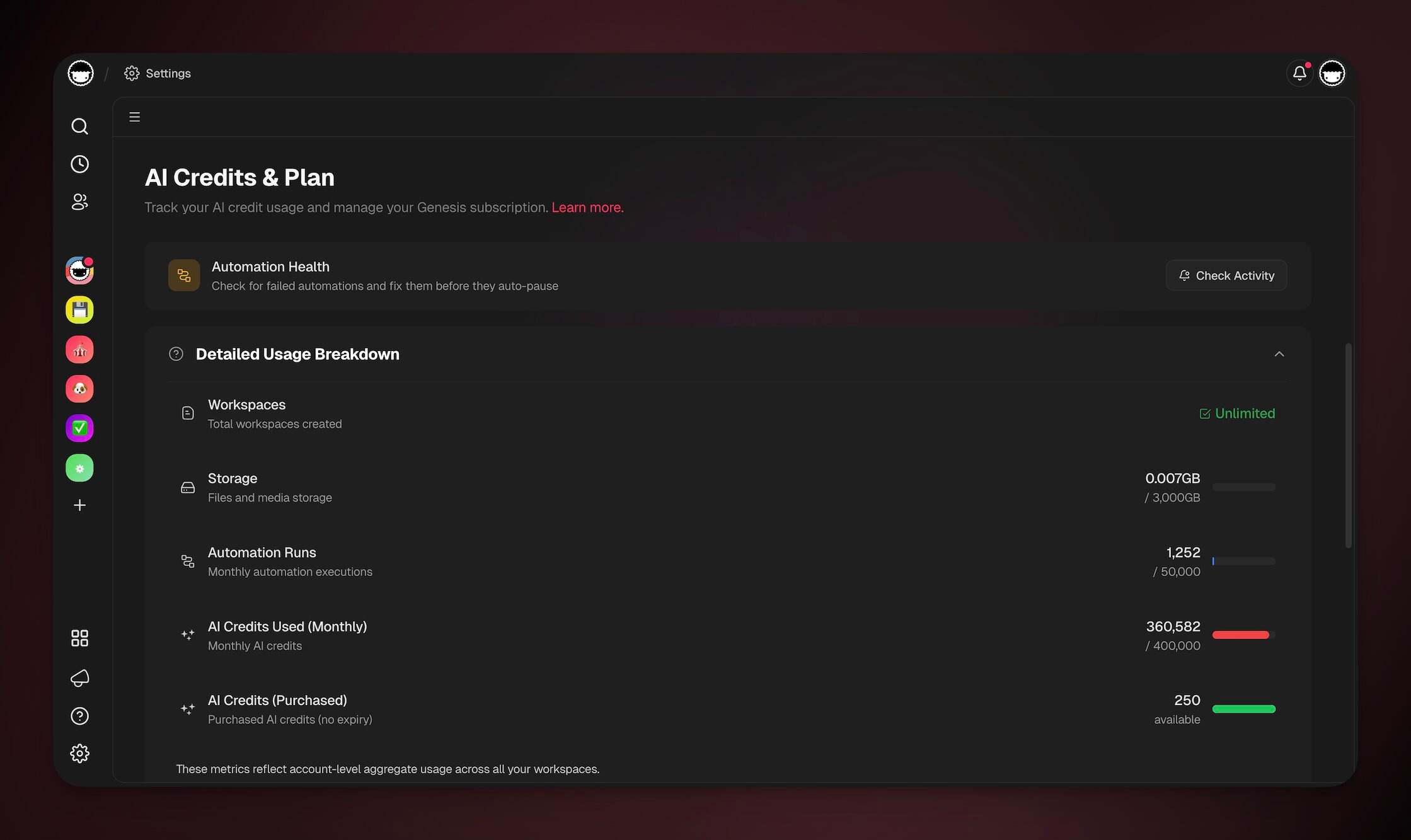
Open the Usage page to measure usage across projects, agents, automations, and storage:
- Click the gear icon in the left sidebar.
- Choose Usage in the left sidebar.
See What Used Your Credits
Open Settings → Usage, then expand Detailed Usage Breakdown. The page shows account usage by step. One complex agent run can use several credits because each reasoning turn and tool call is a separate step.
- What the breakdown shows: The Monthly credits meter shows how much of the current allowance you used. Usage credits appear as a separate balance.
- Monthly reset: Monthly credits reset each billing cycle. The page shows the next reset date when it is available.
- Usage credit balance: Purchased and earned credits do not expire. Taskade starts using them after Monthly credits run out.
- Per-model cost up front: The model selector shows the credit cost next to each model before you run an action. Lighter, faster models cost fewer credits per step. Pick the right model to stretch your credits. See Model Credits.
- Published apps stay free: Visitor activity on a published Taskade Genesis app never counts against your credits. Your usage reflects only your own building and AI runs.
Find Features That Use AI
Use Taskade AI with these features:
Related guides
- AI Models: Choose from the current model catalog
- Model Credits: Per-model credit costs
- Auto Top-Up: Refill Usage credits at a balance threshold
- Custom AI Agents: Choose a model for a specific agent
- Taskade Genesis FAQ: Review common app and AI questions