
Overview
An agent prompt is the plain-English instruction that tells Taskade EVE how to build or change an AI agent. Describe the role, the context, the task, and the format you want back, and Taskade EVE configures the agent for you. No settings to hunt for, no syntax to learn.
TL;DR: Copy these ready-made agent prompts to build and manage custom AI agents with Taskade EVE. The library covers creating specialized agents, setting behavior, adding a large built-in toolkit, training on knowledge, and cloning agents. Describe what you want in plain language and Taskade EVE configures it. Build an agent free →
You are already doing a version of this in your head every time you brief a new hire: here is the role, here is the context, here is the job, here is how I want the output. An agent prompt writes that brief down once so the work runs without you.
Related reading:
- Learn how to access and use Taskade EVE: Taskade EVE Assistant
- Build custom agents: Custom AI Agents
- Add context and knowledge: Agent Knowledge & Memory
- General prompting principles: Guide to Writing AI Prompts
Using Taskade EVE for Agents
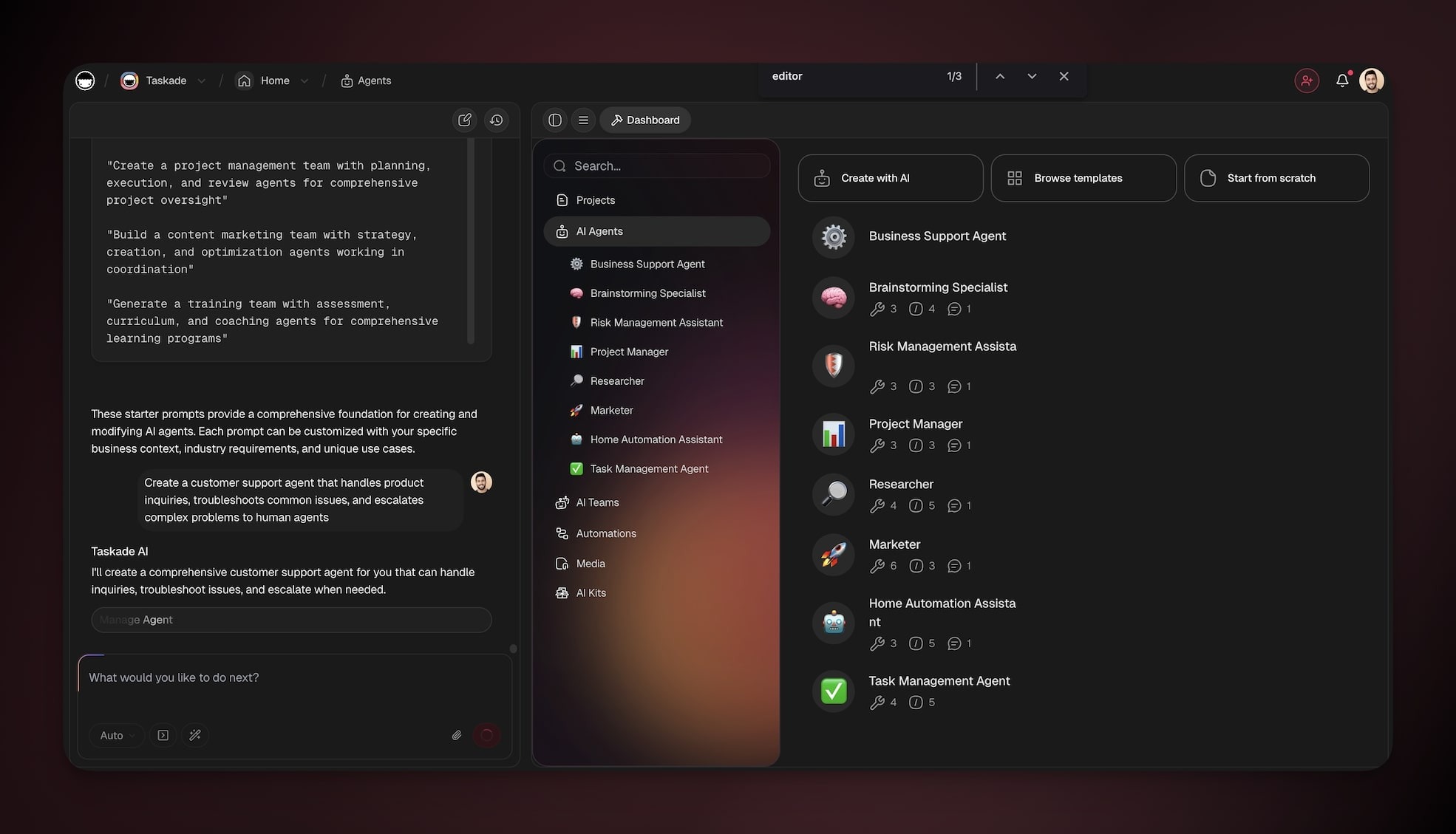
You can build and manage your agents from anywhere inside your workspace:
- Open Taskade EVE in the left panel.
- Describe the agent you want to create or modify (see prompts below).
- Customize your agents (see your guide to Custom AI Agents).
If the first result is not quite right, click Regenerate on Taskade EVE's reply to try again, or refine your prompt and send it once more.
What makes a good prompt?
A good agent prompt has four parts: the role the agent plays, the context it works from, the task it performs, and the format of its replies. You do not have to label them. Taskade EVE reads a plain sentence and fills in each part. The clearer the four parts, the closer the agent matches what you pictured.
Here is the same four-part shape inside one of the example prompts below, so you can see where each piece lands:
| Part | Example phrase | What it controls |
|---|---|---|
| Role | "a customer support agent" | The agent's job and persona |
| Context | "specialized in technical troubleshooting" | The knowledge and scope it works within |
| Task | "resolve common issues and escalate the rest" | The work it carries out |
| Format | "with a friendly, patient personality" | The tone and shape of every reply |
Taskade EVE runs on frontier models from top AI labs, and the default Auto setting picks the right model for the job. You write the brief. The model selection takes care of itself.
One sentence carries all four parts at once:
  "Create a customer support agent  ← Role
   specialized in technical          ← Context
   troubleshooting, that resolves
   common issues and escalates       ← Task
   the rest, with a friendly,        ← Format
   patient personality."
         │
         ▼
   ┌─────────────────────────────┐
   │  Taskade EVE                 │
   │  builds + configures agent   │
   └─────────────────────────────┘
         │
         ▼
   Support agent, ready to chat
Core Agent Management
Use these prompts with Taskade EVE to generate, configure, and manage agents.
Create Specialized Agents
Build AI agents with custom personalities and expertise.
| Action | Prompt example |
|---|---|
| Design agents for specific roles and functions | "Create a customer support agent specialized in technical troubleshooting with a friendly, patient personality" |
| Build discovery-focused sales agents | "Build a sales qualification agent that asks discovery questions and assesses prospect fit for our B2B software" |
| Generate brand-aligned marketing agents | "Generate a content marketing agent that creates blog posts, social media content, and email campaigns in our brand voice" |
| Create industry-specific research agents | "Create a legal research assistant agent that can analyze contracts, identify risks, and suggest improvements" |
| Financial advisory and planning agents | "Build a financial advisory agent that helps clients with budgeting, investment planning, and financial goal setting" |
| Healthcare front-desk agents | "Generate a clinic front-desk agent that answers questions about hours, directions, and what to bring, and routes visit requests to staff" |
| Real estate advisory and education agents | "Create a real estate agent that helps buyers find properties, explains market conditions, and guides through the purchase process" |
| HR onboarding and employee support agents | "Build an HR onboarding agent that guides new employees through company policies, procedures, and initial setup" |
Configure Prompts & Behavior
Define how agents think, respond, and interact.
| Action | Prompt example |
|---|---|
| Set empathetic, clarifying support behavior | "Configure my support agent to be empathetic but efficient, always asking clarifying questions before providing solutions" |
| Configure consultative sales style | "Set up my sales agent to be consultative rather than pushy, focusing on understanding customer needs first" |
| Define brand voice and tone for content | "Configure my content agent to write in a professional but approachable tone, always including actionable insights" |
| Enforce step-by-step technical guidance | "Set up my technical agent to provide step-by-step instructions and always verify user understanding" |
| Coaching style and motivational framing | "Configure my coaching agent to be encouraging and motivational while providing constructive feedback" |
| Research rigor and citation standards | "Set up my research agent to be thorough and analytical, always citing sources and providing multiple perspectives" |
Add Tools & Capabilities
Equip agents with a large built-in toolkit and connect them to 100+ bidirectional integrations. Triggers pull events in. Actions push data out.
Available tool types:
- Automation actions across 100+ connected services
- Automation triggers and orchestration
- Project and task management
- Data processing and reporting
- Communication (email, chat, notifications)
- Research and web data gathering
| Action | Prompt example |
|---|---|
| Add project and task management tools | "Add project management tools to my assistant agent so it can create tasks, assign team members, and track progress" |
| Enable email and KB access for support | "Equip my customer service agent with email sending capabilities and access to our knowledge base automation" |
| Connect CRM and follow-up automations | "Give my sales agent tools to create leads in our CRM project and trigger follow-up email sequences" |
| Add research and content gathering tools | "Add research tools to my content agent so it can gather information and create detailed articles" |
| Attach troubleshooting and ticketing automations | "Equip my support agent with troubleshooting workflows and the ability to create support tickets" |
| Enable social posting and analytics | "Give my marketing agent tools to post on social media and analyze campaign performance" |
Design Chat Experiences
Create engaging and effective user interactions.
| Action | Prompt example |
|---|---|
| Create lead-qualification starters | "Design conversation starters for my sales agent that help qualify leads: product interest, budget, timeline, and decision-making process" |
| Write empathetic support greetings | "Create a welcoming greeting for my support agent that makes customers feel heard and sets expectations for resolution" |
| Map coaching conversation flows | "Set up conversation flows for my coaching agent that guide users through goal setting and action planning" |
| Content intake prompts | "Design starter prompts for my content agent that help users specify their content needs and target audience" |
| HR onboarding flow | "Create an onboarding conversation flow for my HR agent that covers all essential new employee information" |
| Financial discovery starters | "Set up conversation starters for my financial agent that help users identify their financial goals and concerns" |
Manage Agent Visibility
Control who can interact with your agents.
| Action | Prompt example |
|---|---|
| Make an agent publicly accessible | "Make my customer support agent public so customers can access it directly from our website" |
| Publish pre-qualifying sales agent | "Create a public sales qualification agent that prospects can use before scheduling demos" |
| Public-facing HR/careers agent | "Set up my HR agent as a public resource for job candidates to learn about our company" |
| Public technical support agent | "Make my technical support agent publicly available for our software users" |
| Public consultation agent | "Create a public consultation agent for potential clients to get initial advice" |
| Educational public agent | "Set up my educational agent as a public resource for students and learners" |
Train Agents with Knowledge
Provide agents with specific information and expertise.
| Action | Prompt example |
|---|---|
| Add product docs as knowledge | "Add our product documentation project as knowledge for my support agent so it can answer detailed product questions" |
| Train on website and pricing | "Train my sales agent with information from our website, pricing pages, and case studies" |
| Provide brand guidelines and samples | "Provide my content agent with knowledge from our brand guidelines project and previous successful campaigns" |
| Add employee handbook | "Add our employee handbook project as knowledge for my HR agent to answer policy questions" |
| Add troubleshooting guides | "Train my technical agent with our troubleshooting guides and FAQ project" |
| Provide consulting methodology | "Provide my consulting agent with knowledge from our methodology documents and client success stories" |
Edit & Update Agents
Modify existing agents to improve performance.
| Action | Prompt example |
|---|---|
| Make support agent more proactive | "Update my support agent to be more proactive in asking for customer feedback after resolving issues" |
| Expand sales discovery criteria | "Modify my sales agent to include questions about budget and decision-making timeline" |
| Add new project tools | "Add new tools to my project management agent so it can also handle resource allocation" |
| Refresh knowledge bases | "Update my content agent's knowledge base with our latest brand guidelines and messaging" |
| Adjust coaching tone | "Modify my coaching agent to include more motivational language and encouragement" |
| Update technical procedures | "Update my technical agent with new troubleshooting procedures and product updates" |
Clone & Template Agents
Replicate successful agents for new use cases.
| Action | Prompt example |
|---|---|
| Clone support → technical specialization | "Clone my customer support agent and adapt it for technical support with more detailed troubleshooting capabilities" |
| One sales agent for each product line | "Create a new sales agent for our second product line, based on the instructions of my current sales agent" |
| Adapt content agent for social | "Clone my content marketing agent and modify it for social media management specifically" |
| Department-specific HR agents | "Adapt my HR onboarding agent for different departments with role-specific information" |
| Clone consulting agent for offerings | "Clone my consulting agent and customize it for different service offerings" |
| Coaching specialties | "Create a career coaching agent and a fitness coaching agent, both based on my coaching agent" |
To copy an agent exactly, with or without its knowledge, use Copy agent in the ··· menu of the agent in AI Agents.
Manage Agent Lifecycle
Maintain your agents as your work changes.
| Action | Prompt example |
|---|---|
| Move the best patterns to a new agent | "Copy the instructions that work best in my old sales agent into my new sales agent" |
| Take a seasonal agent offline | "Make my seasonal campaign agent private until next year's campaign period" |
| Remove stale rules | "Review my support agent's instructions and remove the rules about last year's pricing" |
| Merge overlapping instructions | "Combine the instructions of my two support agents into my main support agent" |
Taskade EVE does not delete agents. To delete one, click ··· next to the agent in AI Agents, then click Delete.
From prompt to customer portal
Once you have written the brief, the agent does not have to live only in your workspace. Build a client portal in Taskade Genesis: describe a support hub where customers log in with their email, ask your trained support agent a question, and get answers drawn from your product docs. The agent you scoped with these prompts becomes the front desk.
Customers see a clean help page on your own custom domain (available on Pro plans and up). Behind it, the agent answers around the clock, reliable automations log every conversation into a connected project, and you review the open threads each morning. You described the agent in one sentence. Now it runs the front of your support, on its own. Build one free →
Related guides
- Prompt Library: Taskade's full prompt catalog
- Prompt Templates: Ready-to-use prompt scaffolds
- Guide to Writing AI Prompts: General prompting principles
- Custom AI Agents: Full agent building guide
- Agent Tools: The built-in tools you can equip
- Agent Knowledge & Memory: Train an agent on your docs
- Agent Automation: Trigger agents from events
- Taskade EVE Assistant: The assistant that runs these prompts
- Prompt Engineering: The concepts behind effective prompts