Coaching CRM Without Kajabi Fees (2026): Client Progress Portal You Own
Kajabi bundles courses and marketing for creators who sell content at scale. Coaches who run 1:1 and group programs need a client progress portal without LMS fees. Here is an honest 2026 comparison.
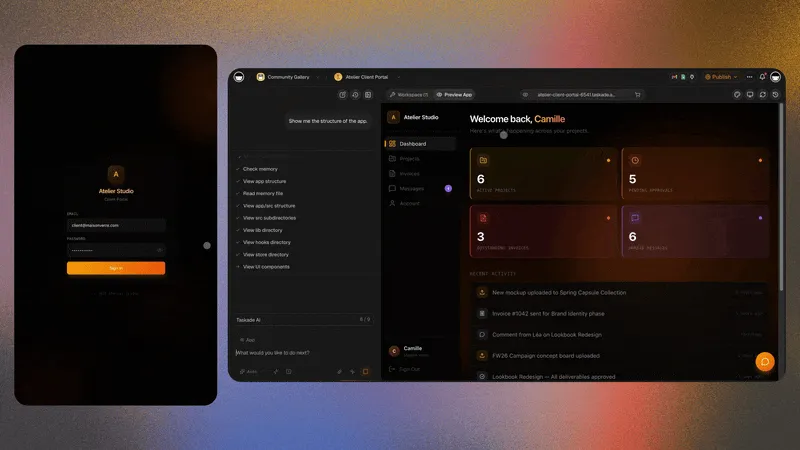
Taskade Genesis gives coaches a client progress portal, session notes, and homework tracking linked to each client record, without Kajabi LMS fees or course funnels built for creators selling pre-recorded video at scale. This guide compares honest coaching CRM paths in 2026.
TL;DR: Kajabi wins video course businesses. HoneyBook wins packaged client intake. Taskade Genesis wins coaches who want a progress portal they own for 1:1 and group programs. Generate a coaching client progress portal →
A note on prices. This guide deliberately does not print competitor dollar figures. Creator-platform and client-CRM tiers changed more than once through 2025 and 2026, and a stale number is worse than no number. Open each vendor's live pricing page the day you buy, and confirm the tier that actually contains the feature you need. Taskade figures below are current as of July 2026.
🧭 What Coaches Actually Need From a Coaching CRM
A coaching CRM needs five things: a client record with goals, a session log, homework with due dates, a check-in trail between sessions, and a login where the client sees their own progress and nothing else. Everything past that — video hosting, affiliate mechanics, launch funnels, checkout pages — is a course-business feature, not a coaching feature.
Most coaching weeks look like this:
A client books or confirms a session.
The session happens, and notes plus action items land somewhere.
Homework goes out, scoped to that one client or that one cohort week.
Something between sessions either happens or quietly does not.
The next session starts with "where did we leave off?"
Step five is the whole business. It is also the step that a course platform does not model, because a course platform assumes the content is the product and the learner is self-serve.
Daily need
All-in-one course platform default
Living progress portal you own
Client record with goals
Contact + purchase history
Linked client Project with custom fields
Session notes
Not a first-class object
Session log rows with action items
Homework per client
Course lesson for everyone
Assignment rows with owner and due date
Between-session check-ins
Email broadcast
Async prompts on the client record
Client login
Course player access
Taskade Genesis App Users, scoped per client
Pre-recorded video library
Native, strong
Not its strength — link Loom, Vimeo, Drive
Marketing funnels + affiliates
Native, strong
Not its strength — keep your stack
Who renames a field
Vendor template
You, in a sentence to Taskade EVE
If rows one through five are your week, you are shopping for ownership of the record. If rows six and seven are your week, the LMS bill is buying you something real and you should keep it.
📜 Why the LMS Bill Outlived the LMS Need
All-in-one creator platforms were priced for a launch, not for a practice. The bundle made sense when the business was "record forty lessons, run a webinar, sell a thousand seats." Video hosting, funnels, email, and checkout in one login was genuinely cheaper than assembling five tools.
Three things changed the math for coaches:
Delivery moved back to live. Group programs, cohort pods, and 1:1 retainers sell better than evergreen video for many practitioners. Live delivery needs a roster and a progress record, not a player and a funnel.
The real system of record drifted into tabs. Goals in a spreadsheet, notes in Docs, homework in chat, invoices in a third tool. The platform kept billing while the daily truth lived somewhere it could not see.
Generating a portal got cheap. In 2026 you describe a client progress portal in a sentence and get a working app with linked records and real logins. That moves the decision from "which creator platform?" to "do I rent a schema or own one?"
None of this makes Kajabi or Teachable wrong. It makes them priced for a different shape of business than the one many coaches actually run. The tell is simple: open your platform bill, then list the modules you touched last month. If the video library and the funnel builder are not on that list, you are funding capacity you do not use.
That loop is the product a coaching CRM should own. Video files and checkout pages are attachments to it.
💵 2026 Pricing Reality: What Your Coaching Stack Actually Funds
Compare pricing shapes before you compare numbers, because the shape is what stops fitting as you grow. Seat-priced tools punish adding a second coach. Contact-priced tools punish a big free cohort. Module-gated tools punish needing one feature that sits one tier up.
Platform
Pricing shape
What the price bundles
What coaches often never open
Kajabi
Tiered plan, limits on products and contacts
Video hosting, funnels, email, checkout, community
Affiliate mechanics, funnel builder, upsell pages
Teachable
Tiered plan plus transaction handling on lower tiers
Course player, checkout, basic email
Coaching-specific progress fields, session logs
HoneyBook / Dubsado
Per-user or flat plan
Contracts, invoices, intake forms, scheduling
Long-horizon progress tracking across months
Notion / Airtable
Per-editor seat
Flexible database, docs, views
Real client logins without permission gymnastics
Taskade Genesis
Workspace plan, not per-client
Projects, AI agents, automations, published apps
Nothing you have to buy to get the portal
Then run the shape against your own next twelve months:
Growth event next year
Seat-priced tool
Contact-priced platform
Workspace plan
Add a second coach
New paid seat
Usually free
Covered by the plan's members
Add 40 free cohort members
Usually free
Can push a tier
App Users, not editor seats
Need a custom field per trade
Vendor template limits
Vendor template limits
Rename it yourself
Need one gated feature
Upgrade a tier
Upgrade a tier
Check the plan table once
Need a branded domain
Often top tiers
Often mid or top tier
Pro plan
Taskade pricing, stated plainly. Taskade starts free at $0, and on the Free plan, you earn free AI credits as you go, and you can upgrade any time. Pro is $10 per month billed annually, or $20 month to month, and adds custom domain publishing for the portal your clients open. Business is $25 per month billed annually, or $50 month to month. Your video host, checkout, and contracts stay billed wherever they are today. Full detail lives on pricing.
🧬 Workspace DNA: Projects, Agents, Automations
A Taskade Genesis coaching portal is not a static template. It runs on Workspace DNA — Memory, Intelligence, and Execution reinforcing each other.
Pillar
Component
Role in a coaching practice
Memory
Projects
Client profiles, goals, session logs, homework, check-in history
Intelligence
AI Agents
Draft check-in prompts, summarize session notes, flag missed homework
Execution
Automations
Send homework reminders, escalate a silent client, post cohort announcements
The loop: a closed session writes Memory, an agent reads that Memory and proposes the next check-in, an automation delivers it, and the client's reply writes Memory again. That is why a portal you use daily gets sharper, while a spreadsheet you maintain daily just gets longer.
Records live in Projects, so the same client data renders in whichever of the project views fits the moment — Board for program stage, Table for the homework grid, Calendar for session dates, Mind Map for a goal tree, plus List, Gantt, and Org Chart. Access uses Taskade's role model from Owner down to Viewer, so an assistant coach can edit session notes without touching billing or program structure.
🗂 The Data Model Behind a Coaching Portal
Get the nouns right and the portal survives every program redesign. Get them wrong and you rebuild in month three. Four nouns are non-negotiable: client, session, homework, check-in. Program is the fifth if you run tiers or cohorts.
Those entities become the surfaces a client actually sees when they log in:
Surface
Purpose
Example field
Client profile
Goals, start date, program tier
Program tier, renewal date
Session log
Date, notes, action items
Held on, agenda, next step
Homework
Assignments, due dates, completion
Task, due date, status
Check-ins
Async prompts between sessions
Asked on, client answer
Resources
Links to embedded videos or PDFs
Loom link, worksheet file
Goal tree
Long-horizon outcomes under a theme
Outcome, milestone, evidence
Cohort field
Which run the client belongs to
Cohort code, seat status
Billing note
Link to Stripe or HoneyBook if billing stays external
The follow-up is where coaching revenue leaks. A client goes quiet in week three, you notice in week five, and the renewal conversation is already lost. Agents fix this by watching the record instead of your calendar.
Agents in Taskade come with built-in tools and read the same Projects the portal renders, so a prep note cites real rows rather than guessing. Configure them in custom agents and agent tools, and see agent memory for how context persists across weeks.
Job
Who does it
Trigger
Weekly homework reminder
Automation
Scheduled, per cohort day
Silent-client flag
Agent
No check-in row in 10 days
Session prep summary
Agent
24 hours before a session
Renewal nudge
Automation
30 days before program end
Testimonial request
Automation
Program status set to complete
Start with one automation, not five. Automation triggers covers what can start a run, and scheduling covers recurring cadence. Taskade also connects to 100+ integrations bidirectionally — triggers pull events in, actions push data out — so a Stripe payment or a form submission can land on the right client record. Browse integrations for the current list.
✅ Who Should Switch to a Portal They Own
Switch, or dual-run, when several of these are true:
You run 1:1 retainers or live cohorts, and pre-recorded video is a supporting asset rather than the product.
Your current "CRM" is a spreadsheet plus chat, and the pain is progress visibility, not payments.
Clients keep asking "where do I see my status?" in DMs.
You want custom fields for your niche — lift numbers, interview rounds, macros, sales calls booked — without waiting on a vendor template.
You need per-client logins and your current tool only offers all-or-nothing sharing.
You want AI follow-ups grounded in your records, not a chatbot that cannot see them.
Some coaches should not move, and pretending otherwise costs credibility. Three genuine strengths per incumbent:
Stay on Kajabi when:
The video library is the product. Kajabi's hosted player, drip scheduling, and completion tracking are purpose-built for evergreen course delivery. Taskade Genesis does not host an LMS video library and is not trying to.
Launch mechanics drive revenue. Funnels, upsells, order bumps, and affiliate tracking in one login is real leverage during a launch week. Rebuilding that across three tools to save a subscription is a bad trade.
One bill, one vendor, one support queue. Consolidated billing and a single onboarding path have genuine operational value, especially for a solo creator without an ops person.
Stay on HoneyBook or Dubsado when:
Contracts and invoices are the workflow. Proposal to signature to payment, with templates and reminders, is their core competency and it is mature.
Client intake is the bottleneck. Branded inquiry forms feeding a pipeline with automated follow-up is packaged and proven.
Scheduling plus payments must live together. If booking a paid session is one flow for you, splitting it across tools adds failure points.
No hosted LMS video library. Host on Vimeo, Loom, YouTube unlisted, or Drive and link from the client record.
No marketing funnel or affiliate engine. Keep your existing launch stack.
No native e-signature or invoicing. Contracts and payments stay in HoneyBook, Dubsado, or Stripe, with a billing-note field linking out.
MCP works both ways, but the outbound call sits in an automation. The hosted MCP server is on every paid plan, so external clients can reach your workspace. To call out to a third-party MCP server, add the MCP Client step to an automation — that works on every plan, including Free. Plan it as a workflow step, because an agent will not dial a remote server on its own.
Layer
Who owns it
Note
Client progress record
Taskade Genesis
The system of record for coaching truth
Session notes and homework
Taskade Genesis
Linked to the client, not a loose doc
Client login and branded URL
Taskade Genesis
App Users plus a custom domain on Pro
Course video files
Your video host
Linked or embedded on the record
Contracts and payments
HoneyBook, Dubsado, Stripe
Link the invoice, sync status by automation
Email marketing and funnels
Your existing stack
Not a Taskade Genesis strength
If any pitch — including one from us — claims Taskade Genesis replaces an LMS video library and a funnel builder, walk away from that pitch.
📋 Migration Checklist: One Week, Nothing Burned
Do not cancel anything in week one. Run parallel, prove the portal on five real clients, then decide.
Week 0: decide the nouns
Write down the four nouns you cannot lose: client, session, homework, check-in
Add optional nouns: program tier, cohort code, goal theme, renewal date
List the tools that stay: video host, checkout, contracts, calendar
Export current client rows to CSV — CSV import covers the load
Day 2: Import five active clients with their current goals — real names, real goals, no "Client A".
Day 3: Add session notes from your last two weeks so the history is not empty on day one.
Day 4: Invite one friendly pilot client to their login, then confirm the records you matched to it are the only ones they see.
Day 5: Turn on a weekly homework reminder automation so nothing depends on you remembering.
Week 2: cohorts, agents, and the cutover rule
Add a cohort field and one shared homework template
Add a check-in agent only after two weeks of real rows exist
Publish on a custom domain if you are on Pro or higher
Freeze the old spreadsheet for new work; keep it read-only for history
Day
Focus
Done looks like
1
Generate the portal
Field names match how you talk to clients
2
Import five clients
Every client has a goal and a start date
3
Backfill sessions
Last two weeks of notes are searchable
4
Pilot login
Client sees their record and nothing else
5
One automation
Homework reminder fires on schedule
6-7
Client feedback
You rename exactly one confusing field
8-14
Parallel quiet
Old spreadsheet gains zero new rows
Cutover rule: new client work enters the portal only. A session may still start in a call and a text, but the record lands in the portal the same day.
🆚 Side-by-Side: Coaching CRM Paths in 2026
Job
Kajabi
HoneyBook / Dubsado
Notion / Airtable
Taskade Genesis
Pre-recorded course player
Strong
Weak
DIY embeds
Pair a host
Marketing funnels and affiliates
Strong
Medium
Weak
Not its strength
Contracts and invoicing
Medium
Strong
DIY
Pair a tool
Client record with custom fields
Course-shaped
Intake-shaped
Strong
Strong
Session log as a first-class object
Weak
Medium
DIY
Strong
Homework per client with due dates
Lesson-shaped
Weak
DIY
Strong
Per-client login
Player access
Client portal
Permissions get messy
App Users, scoped
AI follow-ups on your own records
Limited
Limited
Plugins and glue
Native agents
You own the schema
Vendor
Vendor
Files you own
Projects you reshape
Ownership vs packaged depth
Capability
Packaged platform
Living portal you own
Time to first working portal
Template setup
One prompt, then reshape
Changing a field mid-program
Vendor limits
Ask Taskade EVE
Video delivery depth
Excellent
Linked, not hosted
Progress and accountability depth
Shallow
Excellent when modeled
Multi-use workspace
Course-shaped
Coaching plus adjacent ops
🧪 A Day in the Life on a Coaching Portal
08:10 You open one board. Three clients have homework due today, one has been silent for nine days. No tab archaeology.
09:00 A discovery call converts. The intake form writes a client record with goal and program tier already populated.
11:30 A 1:1 session ends. Notes and two action items go on the session row while the call is still warm.
14:00 The check-in agent drafts tomorrow's prep note for a client, citing the two homework items that slipped. You edit one line and confirm.
16:20 A cohort announcement goes out through an automation. Every member sees it in their own portal; nobody sees anyone else's progress.
17:00 A renewal is 30 days out. The automation already surfaced it, so the conversation happens before the deadline instead of after.
Nothing in that day requires an LMS video library or a funnel builder. It requires a record your clients trust and you can reshape.
👥 Group Coaching Without a Second Tool
Run cohorts by adding a group field on client records rather than duplicating the whole app per run. Shared homework templates copy to each member, cohort-wide announcements go through automations, and individual progress stays private per App User login.
Cohort patterns that work:
Weekly module cohort: one homework template per week, copied to every member on the cohort day.
Exam prep pod: practice scores logged on the client record beside study plans — pair the exam prep score tracker.
Hybrid 1:1 plus group: one client record, two homework streams, one login.
Close the loop at the end of a program with a testimonial portal, which turns a completed program into social proof without a separate survey tool.
📈 What Good Looks Like After 30 Days
Signal
Before
After 30 days
"Where do I see my progress?" DMs
Weekly
Rare — clients open the portal
Session prep time
15-20 minutes of tab hunting
Under 5 minutes from the record
Missed homework noticed
At the next session
Same week, by automation
Silent clients
Found at renewal
Flagged within 10 days
Schema changes
Vendor ticket or workaround
One sentence to Taskade EVE
If those five rows do not move, the portal is not the problem — the nouns are. Revisit the data model before adding more automations.
❓ FAQ
Is Taskade Genesis cheaper than Kajabi for coaches?
Total cost depends on your stack. Kajabi bundles video hosting, funnels, and checkout into one price. Taskade starts free at $0, with Pro at $10 per month billed annually ($20 month to month), which includes a custom domain, and Business at $25 per month billed annually ($50 month to month). On Free, you earn free AI credits as you go, and you can upgrade any time. Coaches who only need progress tracking often pay less by not funding LMS modules they never open.
Can Taskade Genesis replace Kajabi entirely?
Not if the video library and launch funnels are your business. It replaces the coaching record layer: client profiles, session logs, homework, check-ins, and the login clients open. Keep your course host and checkout, and link them from the record.
How do clients log in?
Through Taskade Genesis App Users. Sign-in is email-based via Taskade Genesis Auth and works on every plan. You match each client's goals, files, messages, and session history to that login, so they open only their own and never your workspace. Pro plans at $10 per month billed annually add publishing on your own domain.
Can I embed video homework?
Yes, as links or embeds on each client record. Taskade Genesis does not replace a video CDN, so host on Vimeo, Loom, YouTube unlisted, or Drive and link from the portal. Clients open the video from the same record holding their goals and due dates.
Does Taskade Genesis handle contracts and payments?
Contracts and payments typically stay in HoneyBook, Dubsado, or Stripe beside the portal. Taskade Genesis holds the coaching progress truth. Add a billing-note field that links to the invoice, and sync status through automations if you want payment state visible next to progress.
What does the AI actually do for follow-ups?
Agents draft check-in prompts, summarize session notes, and flag clients who missed homework before the next session. They read the same Projects the portal renders, so a prep note cites real rows. Start with custom agents and add tools from the built-in tools as you need them.
How does this compare to a Notion or Airtable build?
Notion and Airtable are excellent shared databases and a reasonable place to start. They struggle at exactly one thing coaches need: a per-client login that shows one client their own records without permission gymnastics. If that is your blocker, read Notion alternative and client portal builders.
Do I need to code to build a coaching client portal?
No. You describe the portal in a prompt and get client profiles, goals, session history, homework, and check-in status. Rename fields for executive coaching, fitness, or career coaching in plain language. Logins come from App Users, so you never build authentication yourself.
Plan one week to a working pilot and two weeks to trust. Generate on day one, import five clients on day two, backfill two weeks of notes on day three, pilot one login on day four, turn on one automation on day five. Cancel nothing until the old spreadsheet has gained zero new rows for a full week.
Kajabi earned its place by making course businesses possible for people who could not build one. Coaches deserve a second question in 2026: are we buying a course platform, or renting one to store a client record we could own?
If your product is a video library and a launch funnel, stay where you are and negotiate with clear eyes. If your product is a relationship measured in sessions, homework, and follow-through, generate the portal and keep video and payments in their lanes. Memory feeds Intelligence, Intelligence triggers Execution, Execution writes new Memory — ▲ ■ ●