



Introducing TSK-1Introducing TSK-1·Taskade's intelligence layer.
taskade
PricingHelpDashboard →Dashboard →
PricingLoginSign up for free →Sign up for free →
Dashboard →Dashboard →
Sign up for free →Sign up for free →
Loved by 1M+ users·Hosting 150,000+ apps·Deploying 500K+ AI agents·Running 1M+ automations·Backed by Y Combinator·Powered by TSK-1
Taskade
AppsTSK-1AI ModelsBuilderPricingFeatures
See all▾
Contact usIntegrationsMCP ServerPressAboutConnectProductivityVideosReviewsFAQ
Learn
GenesisProjectsAI AgentsAutomationConnectorsVideo Tutorials
See all▾
Import & ExportSearch ArticlesAccount & Billing
Community Apps
FeaturedQuick AppsTools
See all▾
DashboardsWebsitesWorkflowsProjectsFormsCreators
Downloads
Mobile appsDesktop appsAndroid
See all▾
iOSMacWindowsChromeFirefoxEdge
Compare
vs Cursorvs Boltvs Lovable
See all▾
vs V0vs Windsurfvs Replitvs Emergentvs Devinvs Claude Codevs ChatGPTvs Claudevs Perplexityvs GitHub Copilotvs Figma AIvs Notionvs ClickUpvs Asanavs Mondayvs Trellovs Jiravs Linearvs Todoistvs Evernotevs Obsidianvs Airtablevs Basecampvs Mirovs Slackvs Bubblevs Retoolvs Webflowvs Framervs Softrvs Glidevs FlutterFlowvs Base44vs Adalovs Durablevs Gammavs Squarespacevs WordPressvs UI Bakeryvs Zapiervs Makevs n8nvs Jaspervs Copy.aivs Writervs Rytrvs Manusvs Crewvs Lindyvs Relevance AIvs Wrikevs Smartsheetvs Monday Magicvs Codavs TickTickvs Any.dovs Thingsvs OmniFocusvs MeisterTaskvs Teamworkvs Workfrontvs Bitrix24vs Process Streetvs Toggl Planvs Motionvs Momentumvs Habiticavs Zenkitvs Google Docsvs Google Keepvs Google Tasksvs Microsoft Teamsvs Dropbox Papervs Quipvs Roam Researchvs Logseqvs Memvs WorkFlowyvs Dynalistvs XMindvs Whimsicalvs Zoomvs Remember The Milkvs Wunderlist
AI Agents
FeaturedProject ManagementProductivity
See all▾
MarketingTranslatorContentWorkflowResearchPersonalOperations IntelligenceSalesSocial MediaTo-Do ListCRMTask AutomationCoachingCreativityTask ManagementBrandingFinanceLearning and DevelopmentBusinessCommunity ManagementMeetingsAnalyticsDigital AdvertisingContent CurationKnowledge ManagementProduct DevelopmentPublic RelationsProgrammingHuman ResourcesE-CommerceEducationLegalEmailSEODeveloperVideo ProductionDesignFlowchartDataPromptNonprofitAssistantsTeamsCustomer ServiceTrainingTravel PlanningUML DiagramER DiagramMath TutorLanguage LearningCode ReviewerLogo DesignerUI WireframeFitness CoachLead EnrichmentFounder OSSales DevelopmentBookkeepingRecruitingWebsite MonitoringField ServiceLicensingAll Categories
Automations
FeaturedAI WorkflowsLogic Automations
See all▾
AI Agent AutomationTrigger AutomationsAgentic Process AutomationAction AutomationsAI Models in WorkflowsAgentic AutomationMulti-Agent AutomationBusiness-in-a-BoxOperations IntelligenceInvestor OperationsEducation & LearningHealthcare & ClinicsReal EstateStripeSalesHR & People OpsField Service & DispatchRenewals & LicensesE-commerceContentMarketingEmailCustomer SupportHubSpotProject ManagementAgentic WorkflowsAppointment SchedulingCalendarReportsSlackWebsiteFormTaskWeb ScrapingWeb SearchChatGPTText to ActionYoutubeLinkedInTwitterGitHubDiscordMicrosoft TeamsWebflowIndustry News & RSS FeedsGoogle WorkspaceManufacturing & OperationsAI Agent TeamsNotion AutomationsProposalBookkeeping & ExpensesClient OnboardingGoogle SheetsGoogle DriveGoogle CalendarGoogle FormsShopifyAsanaAirtableTrelloTodoistMailchimpClickUpGoogle DocsGmailGoogle TasksJiraLinearMicrosoft OutlookTelegramCalendlyTypeformSalesforceMonday.comTwilioWhatsApp BusinessWordPressZoomHTTP and WebhooksMCP AutomationFacebook PagesRedditApolloAll Categories
Prompts
Client PortalsDocument IntakeField Service
See all▾
Operations IntelligenceCRMAdvertisingDesignInvoicing and PaymentsSocial MediaQuotes and EstimatesCalculatorsCodingBooking and SchedulingConsultingCustomer SupportComplianceTime TrackingRetail OperationsSaaS and SubscriptionsInsuranceGovernance and OversightNonprofitPatient IntakeBlog WritingBrandingPersonal FinanceHuman ResourcesPublic RelationsTeam CollaborationProduct ManagementSupportAgencyReal EstateMarketingResearchSalesCopywritingContentProject ManagementWebsite CreationStrategyE-commerceEngineeringSEOEducationEmail MarketingUX/UIProductivityInfluencer MarketingAnalyticsEntrepreneurshipLegalVibe CodingRecruitingAll Categories
Templates
FeaturedChatGPTTable
See all▾
PersonalProject ManagementSalesFlowchartTask ManagementEngineeringOperations IntelligenceInventory ManagementEducationDesignTo-Do ListMarketingMind MapGantt ChartOrganizationalPlanningMeetingsTeam ManagementStrategyGamingProductionProduct ManagementStartupRemote WorkY CombinatorRoadmapCustomer ServiceLegalEmailBudgetsContentConsultingE-CommerceStandard Operating Procedure (SOP)Human ResourcesProgrammingMaintenanceCoachingSocial MediaHow-TosResearchMusicTrip PlanningCRMClient OnboardingEmployee OnboardingSOPBug TrackerRecruitment TrackerFormSales PipelineContent CalendarMarketing PlanProduct RoadmapBusiness PlanSWOT Analysis30-60-90 Day PlanInterviewNotion AlternativeKPIStrategic PlanMeeting AgendaInvoiceRisk RegisterIT Asset ManagementKanban BoardChange ManagementCommunication PlanRFPScope of WorkStatement of WorkHelpdeskKnowledge BaseCreative BriefGoal SettingExecutive SummaryGap AnalysisBooking SystemEvent ManagementPortfolio TrackerCustomer Onboarding PortalsClient PortalAgency OperationsFinance TrackingAll Categories
Generators
AI SoftwareNo-Code AI AppAI App
See all▾
AI WebsiteAI DashboardAI FinanceAI Operations IntelligenceAI FormAI AgentAI Client Portal BuilderAI WorkspaceAI ProductivityAI To-Do ListAI WorkflowsAI EducationAI Mind MapsAI FlowchartAI Scrum Project ManagementAI Agile Project ManagementAI MarketingAI Project ManagementAI Social Media ManagementAI BloggingAI Agency WorkflowsAI ContentAI Software DevelopmentAI MeetingAI PersonasAI OutlineAI SalesAI ProgrammingAI DesignAI FreelancingAI ResumeAI Human ResourceAI SOPAI E-CommerceAI EmailAI Public RelationsAI InfluencersAI Content CreatorsAI Customer ServiceAI BusinessAI PromptsAI Tool BuilderAI SEOAI Gantt ChartAI CalendarsAI BoardAI TableAI ResearchAI LegalAI ProposalAI Video ProductionAI Health and WellnessAI WritingAI PublishingAI NonprofitAI DataAI Event PlanningAI Game DevelopmentAI Project Management AgentAI Productivity AgentAI Marketing AgentAI Personal AgentAI Business and Work AgentAI Education and Learning AgentAI Task Management AgentAI Customer Relations AgentAI Programming AgentAI SchemaAI Business PlanAI Pitch DeckAI InvoiceAI Lesson PlanAI Social Media CalendarAI API DocumentationAI Database SchemaAI Marketing PlanAI Sales Pipeline GeneratorAI Course BuilderInternal ToolsBooking SystemReal Estate CRMInventory ManagementAI CRM BuilderAI TimesheetAI DispatchAI NewsletterAI Clinic OperationsAI Directory BuilderAll Categories
Taskade AI
Video GuideAI App BuilderVibe Coding
See all▾
Agent BuilderDashboard BuilderCRM BuilderWebsite BuilderForm BuilderWorkflow AutomationWorkflow BuilderBusiness-in-a-BoxAI for MarketingAI for Developers
Converters
AI Featured ConvertersAI PDF ConvertersAI CSV Converters
See all▾
AI Markdown ConvertersAI Prompt to App ConvertersAI Data to Dashboard ConvertersAI Workflow to App ConvertersAI Idea to App ConvertersAI Flowcharts ConvertersAI Mind Map ConvertersAI Text ConvertersAI Youtube ConvertersAI Knowledge ConvertersAI Spreadsheet ConvertersAI Email ConvertersAI Web Page ConvertersAI Video ConvertersAI Coding ConvertersAI Task ConvertersAI Kanban Board ConvertersAI Notes ConvertersAI Education ConvertersAI Language TranslatorsAI Business → Backend App ConvertersAI File → App ConvertersAI SOP → Workflow App ConvertersAI Portal → App ConvertersAI Form → App ConvertersAI Schedule → Booking App ConvertersAI Metrics → Dashboard ConvertersAI Game → Playable App ConvertersAI Catalog → Directory App ConvertersAI Creative → Studio App ConvertersAI Agent → Agent App ConvertersAI Audio ConvertersAI DOCX ConvertersAI EPUB ConvertersAI Image ConvertersAI Resume & Career ConvertersAI Presentation ConvertersAI PDF to Spreadsheet ConvertersAI PDF to Database ConvertersAI PDF to Quiz ConvertersAI Image to Notes ConvertersAI Audio to Notes ConvertersAI Email to Tasks ConvertersAI CSV to Dashboard ConvertersAI YouTube to Flashcards ConvertersURL to NotesVideo → SummaryAI Receipts to Expense Tracker ConvertersAI Docs to Knowledge Base ConvertersAI Form to Client Portal ConvertersSpreadsheet to CRMAll Categories
Wiki
Taskade GenesisAI Agent ExamplesLiving DNA
See all▾
AI AgentsAutomationProjectsAutonomous Workspaces, Agents & AppsQuantum AI & Taskade Genesis QuantumFoundations: The Theory Under Modern AICognitive Science: Mind, Brain and AIPlatformAI InfrastructureIntegrationsProductivityMethodsProject ManagementAgileScrumAI ConceptsCommunityTerminologyFeatures
Docs
Getting StartedREST APIAction API
See all▾
MCP ServersGuides & SDKModels
Blog
Introducing Taskade TSK-1: The System Kernel Behind Every App (2026)AI Design Tools in 2026: 14 Tested, Priced, and DESIGN.md CheckedBest BYOK AI App Builders in 2026: 14 Tools That Run on Your Own Key
See all▾
Best No-Code AI App Builders for Open-Source Models in 2026 (Kimi K3, DeepSeek, Qwen, GLM)Your Customer Is Your Next Competitor: The Rise of Customer-Built Software (2026)10 Best GoHighLevel Alternatives in 2026 (Agency CRMs, Client Portals and White-Label Tools)Best AI Script Generators 2026: 15 Tools Sorted by Script TypeIntroducing TSK-Bench: The AI Task Leaderboard (October 2026)Skills AI Can't Replace: Learn to Grade the Homework (2026)Alibaba Qwen History: From Tongyi Qianwen to Qwen 3.8 (2026)LLM vs RAG vs AI Agent vs Agentic AI: The Architecture Guide (2026)DeepSeek History: From High-Flyer to V4.1 Flash (2026)Best Writing Prompt Generators 2026: 14 Tools Sorted by TypexAI and Grok History: From Grok-1 to Grok 4.7 and SpaceX (2026)History of Shopify: From a Snowboard Shop to Agentic Commerce, and How Tobi Lütke Runs It (2026)Tasks That Cascade: Ten Years of Building a To-Do ListBest AI Assignment Makers 2026: 12 Tools for TeachersReplay Simulators Explained: How AI Agents Learn From Runs They Already Paid For (2026)What 12 Production AI Agent Deployments Have in Common (2026)Run Your Whole Business in One App with Taskade Genesis (June 2026)
AIAutomationProductivityProject ManagementRemote WorkStartupsKnowledge ManagementCollaborative WorkUpdates
Changelog
Apps Tab Hotfix (Oct 20, 2026)Agent Chats in Connected AI Apps Hotfix (Oct 20, 2026)More AI Keys & One-Click App Updates (Oct 20, 2026)
See all▾
GitHub App Imports & Automation Links (Oct 19, 2026)Brand Colors for Apps & Fit-to-Screen Mind Maps (Oct 18, 2026)xAI Keys for Agents & Webhook Token Fix (Oct 17, 2026)Google AI Key Hotfix (Oct 17, 2026)
Integrations
Slack AutomationGmail AutomationGoogle Sheets Automation
See all▾
Google Calendar AutomationGoogle Drive AutomationHubSpot AutomationStripe AutomationDiscord AutomationGitHub AutomationNotionYouTube AutomationZapier
© 2026 TASKCADE INC.
PrivacyTermsSecurity
Made withTaskade AIforBuilders
BlogProductivityHow to Build a Booking System…

How to Build a Booking System Without Code (2026 Guide)

Build a booking system without code: customers book a service with a staff member, and staff get reminders. Three steps in Taskade, plus three other ways.

How to build a booking system without code: an appointment booking app built with Taskade Genesis, with services, staff and a booking calendar
October 29, 20265 min readTaskade TeamProductivity·#no-code#booking-system#appointments
On this page (10)
Quick answerBuild it in TaskadeStep 1: Clone the booking appStep 2: Add your services, staff and open slotsStep 3: Connect the staff calendar and the remindersOther ways to build a booking systemLimitations: when a Taskade booking app is not the right fitSourcesRelated readingFrequently Asked Questions

A booking system does one job: customers book a service with a staff member, and staff get reminders before each slot. This guide shows one way to build it in Taskade Genesis, three other ways, and when each one is the better fit. To compare the tools side by side, read the best AI booking systems.

TL;DR: To build a booking system without code, list your services, staff and open slots, then let a builder make the booking page, the calendar entries and the reminders. Taskade Genesis is one way: clone a working booking app and connect Google Calendar. Free has 3 apps. Pro is $10 a month billed yearly. See plans and prices

Quick answer

You can build a booking system without code the same day. Customers pick a service, a staff member and a slot on a public page. Each booking lands in a table, goes to the staff calendar and triggers a reminder. In Taskade, Google Calendar steps need Pro or higher. The full click path is in Book Classes and Schedule Clients.

Build it in Taskade

Taskade Genesis builds the booking system as a live app: a booking page, tables for services, staff and bookings, an AI agent, and automations. The fastest start is a copy of a working booking app. A copy counts as 1 of the 3 apps on the Free plan. Prompts that build or change the app use AI credits. Free starts with no AI credits, and Pro includes 50,000 a month.

Step 1: Clone the booking app

Clone the booking app and pick a workspace. Taskade copies the Appointment Booking System, its projects and its agent into that workspace. To start from a blank page instead, describe your business in Create.
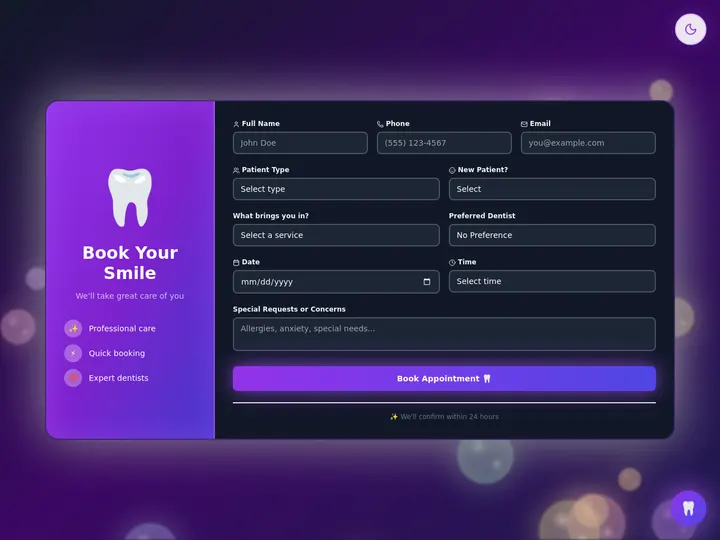
The Appointment Booking System app built with Taskade Genesis

Step 2: Add your services, staff and open slots

Open the services project in Table view. Add one row for each service, with its duration, its price and the staff member who delivers it. Add the open slots for each staff member. You can make these edits by hand, so they use no AI credits.

Step 3: Connect the staff calendar and the reminders

Open Automations. Connect Google Calendar so that each new booking creates an event on the staff member's calendar. Add a reminder email to the customer and to the staff member before the slot. Ask the AI agent to write the reminder text in your voice. Google Calendar and Gmail steps need Pro or higher.

Customer picks service + staff + slot
            |
            v
  New row in the Bookings table
            |
            +--> Google Calendar event on the staff calendar
            +--> Confirmation email to the customer
            +--> Reminder email before the slot

When you are done, a test booking from a second browser shows up in the Bookings table and on the staff calendar. Then publish the app and share the link. A custom domain needs Pro or higher (custom domains).

Other ways to build a booking system

Three other tools do the same job, and each one is the better fit for a different business. Prices were checked on each vendor's pricing page on 2026-10-18.

Option Free plan Paid from Better fit when
Calendly Yes, 1 event type $10 a seat a month (Standard, yearly) You need meeting links for yourself or a small team
Acuity Scheduling No, 7-day trial $16 a month (Starter, yearly) You take client intake forms and payments for many appointment types
Square Appointments Yes, you pay card fees $49 a month a location (Plus) You run a salon or a shop and take card payments in person
Taskade Genesis Yes, 3 apps and no AI credits to start $10 a month (Pro, yearly) Bookings also feed a client list, staff work and follow-ups in one app

Calendly is the fastest path when the whole job is "find a time with me." Calendly reads each connected calendar's busy times with no setup. Acuity adds intake forms, packages and payments, which suits coaches, clinics and studios. Square Appointments joins booking to a point-of-sale system, which suits a business that takes payment at the counter.

A custom app earns its place when the booking is the start of the work, not the end. A cleaning company, for example, books a visit, assigns a crew, sends a checklist and follows up for a review. Those steps live in one Taskade app, with the AI agent and the automations in the same place.

Limitations: when a Taskade booking app is not the right fit

A Taskade Genesis booking app is a strong fit for a service business that wants bookings, staff and follow-ups in one app. Pick a different tool in these cases:

  • You need only one meeting link. Calendly or a similar scheduler is simpler and has a free plan.
  • You want each staff calendar's busy times to block slots with no setup. A dedicated scheduler reads free and busy times out of the box. In a Taskade app, you define the open slots in a table, and an automation writes each booking to the calendar.
  • You take most payments at a counter with card hardware. Square Appointments connects booking to its point-of-sale devices.
  • You want Google Calendar sync on the Free plan. Google Calendar steps in automations need Pro or higher.

Sources

  • Calendly pricing: https://calendly.com/pricing (checked 2026-10-18)
  • Acuity Scheduling plans: https://acuityscheduling.com/signup.php (checked 2026-10-18)
  • Square Appointments pricing: https://squareup.com/us/en/appointments/pricing (checked 2026-10-18)
  • Taskade plans: pricing (checked 2026-10-18)

Related reading

  • 10 AI booking systems you can clone
  • 3 booking apps you can clone today
  • How to build a room booking dashboard
  • How to build a CRM without code
  • How to build a client portal without code
  • How to build a quote and invoice app without code
  • Booking templates, the booking system generator and booking automations

Start from a working app in the Community Gallery, see what else Taskade Genesis can build, or go back to the Taskade home page.

▲ ■ ●   Memory · Intelligence · Execution. Your bookings, your agent and your reminders in one app.

Frequently Asked Questions

How do I build a booking system without code?

List your services, the staff who deliver them and the open slots. Then use a builder that turns that list into a public booking page, a calendar entry for each booking and a reminder. In Taskade Genesis, clone the Appointment Booking System app, add your services and staff, and connect Google Calendar in an automation. Google Calendar steps need Pro or higher.

Can customers book a specific staff member?

Yes. In a Taskade Genesis booking app, each service row names the staff member who delivers it, and the booking form asks the customer to pick one. An automation then writes the booking to that staff member's Google Calendar and sends the reminder. Calendar steps need Pro or higher.

Is there a free booking system I can build?

Yes. The Taskade Free plan holds 3 apps, and a clone of the booking app counts as one. Free starts with no AI credits, so you edit the clone by hand. Google Calendar and Stripe steps need Pro, which is $10 a month billed yearly with 50,000 AI credits a month. Calendly also has a free plan with 1 event type.

When is Calendly a better choice than a custom booking app?

Calendly is the better choice when you need one meeting link for yourself or a small team, and you want it to read each calendar's busy times with no setup. A custom booking app fits better when bookings also feed a client list, a staff schedule and follow-up work in one place.

How do booking reminders work in Taskade?

An automation runs when a booking arrives. It creates the calendar event, then sends a reminder email to the customer and to the staff member before the slot. The AI agent can write the reminder text in your brand voice. Gmail and Google Calendar steps need Pro or higher.

What does a booking system cost on Taskade?

The Free plan holds 3 apps and starts with no AI credits. Pro is $10 a month billed yearly ($20 monthly), with 50,000 AI credits and 1,000 automation runs a month for up to 10 people, plus up to 10 custom domains. Business is $25 a month billed yearly. The full table is on the pricing page.

0%

On this page

Quick answerBuild it in TaskadeStep 1: Clone the booking appStep 2: Add your services, staff and open slotsStep 3: Connect the staff calendar and the remindersOther ways to build a booking systemLimitations: when a Taskade booking app is not the right fitSourcesRelated readingFrequently Asked Questions

Related Articles

Class Booking Portal app showing class listings, schedules, and participant management dashboard
February 21, 2026Productivity

3 Booking Apps You Can Clone Today — Classes, Appointments & Events

Classes, appointments, or events — three complete booking apps with signup forms, automated confirmations, reminders, an...

AI for professional teams in 2026 — no-code apps with AI agents for HR, legal, education, and property
July 3, 2026Productivity

AI for Professional Teams: Build No-Code Apps in 2026

Build real software for HR, legal, education, and property teams in 2026 — no engineers required. Taskade Genesis turns ...

Taskade Genesis app templates you can clone across 8 categories in 2026
June 28, 2026Productivity

Genesis App Templates: Clone Living Apps, Not Static Shells (2026)

Clone a working Taskade Genesis app instead of building from scratch. This roundup covers ready-to-use app templates acr...

Build a no-code AI CRM with contacts, agents, and feedback forms in Taskade
June 25, 2026Productivity

Build a No-Code AI CRM in an Afternoon (2026 Guide)

Build a no-code AI CRM in an afternoon. Track contacts in a Table or Board, let AI agents log and summarize every intera...

Best no-code client portal builders 2026: a branded client login with projects, files, and status, built without code
June 23, 2026Productivity

Best No-Code Client Portal Builders in 2026 (Honestly Compared)

The best no-code client portal builders for 2026 across three categories: database-first, all-in-one suites, and AI-nati...

A logistics fleet dashboard built with Taskade Genesis, every vehicle, route, and status on one screen, the way a small dispatch operator runs the day
June 23, 2026Productivity

How to Build a Logistics CRM With AI (No Code, 2026)

Build a logistics CRM and dispatch command center by describing it. Track loads, carriers, lanes, and documents on a fla...

View All Articles