







In December 2025, Garry Tan asked a question in a post that drew more than 1.7 million views: why pay $30 per seat for bundled software when nontechnical people could build their own? He named Taskade with Replit and Emergent. The interesting part was not the $30. It was who gets to build.
For decades, businesses adapted to the tools they could afford. Every missing feature became a workaround, a ticket or another spreadsheet. Now the person who understands the problem can build the solution, and change it when the business changes. That raises a harder question than "can anyone build software?" The harder question is this one: who keeps it running?
TL;DR: Anyone can build software now, so the hard part is vibe coded app maintenance: what happens after the first build. Measure feedback-to-fix latency, the time from a real operational problem to a verified change that people use. Taskade Genesis builds the app, and projects, agents and automations keep it working. Free includes 3 apps. Build your first tool →
| Question | Short answer |
|---|---|
| What is ending? | The wait between a business problem and a change to the tool that runs it |
| What is not ending? | The need to verify, own and pay for what you build |
| What should you measure? | Feedback-to-fix latency and iteration velocity |
| What should you build? | CRM views, client portals, dashboards, intake forms and trackers |
| What should you not maintain yourself? | Payments, payroll and tax, regulated records and security tools |
| Where do you start? | Describe the job in Taskade Genesis on any plan, or clone a kit from the app gallery (a kit with automations needs a paid plan) |
The $30 SaaS Seat
Garry Tan, President and CEO of Y Combinator, posted on December 1, 2025 (San Francisco time) that Zoho's business could be the first one competed away by people who build custom software with Replit, Emergent and Taskade. By October 19, 2026, the post had more than 1.7 million views, 1,560 likes, 426 quotes and 647 replies.
The post first said that Zoho could be the first business that customers compete away with software they build themselves. Then it asked the question that matters here:
"Why pay $30/seat/month for over bundled SaaS when soon even nontech ops ppl can vibe-code a custom solution in a weekend?"
The debate that followed, with the reply from Zoho and the reaction across the industry, is covered in Will Vibe Coding Kill SaaS?. This essay does not ask whether SaaS dies. It asks what a business does on the Monday after the weekend build, and in month six.
Two words in the post matter more than the price. The first is "ops". The post does not say "engineers". It says the operations people who run the business can build. The second is "weekend". A weekend is enough time to build a first version. It is not enough time to learn whether the version survives real customers, new requirements and new staff.
| Date | Event | Why it matters here |
|---|---|---|
| September 2023 | Vercel opens a private alpha of v0, then a beta in October after 100,000 waitlist sign-ups in three weeks | Prompt-to-interface becomes a mainstream idea (full history) |
| February 2025 | Andrej Karpathy names "vibe coding" on X | Building by description gets a name |
| March 2025 | TechCrunch reports that a quarter of the YC W25 batch has codebases that are 95% AI-generated | AI-written software reaches real startups |
| October 2025 | Taskade Genesis launches | One prompt builds a live app with its database, agents and automations |
| December 2025 | Garry Tan posts the $30 seat question | The builder moves from engineer to operator |
| June 2026 | A Taskade census of 471 paid apps finds dashboards are the largest category at 28.2% of traffic | People build operational systems, not toys |
| August 2026 | Vercel reports that its AI SDK software factory authors 25 to 35% of merged pull requests | The factory idea gets public numbers |
| October 2, 2026 | Guillermo Rauch describes signal-to-fix latency and verification engineering | The measure shifts from "can we build" to "how fast do we fix" |
The Workaround Economy
The workaround economy is every spreadsheet, copy-paste step, side inbox and unanswered feature request that a business uses to cover the gap between its tools and its work. Each workaround looks small. Together they become the real operating system of the business, and nobody owns it, tests it or improves it.
Most businesses do not run on their software. They run on the space between their software. A sales lead arrives in a form tool, gets copied into a spreadsheet, gets pasted into a CRM, and gets a follow-up email that someone writes by hand. A client asks for a status update, and an account manager searches three places to answer. A machine needs service, and the reminder lives in one person's calendar.
None of these steps is a failure of effort. They are a failure of fit. The software was built for the average customer of the vendor, and your business is not the average customer. So the people closest to the work fill the gap with what they have. Retool's 2020 State of Internal Tools survey found that Google Sheets was the most popular software for building internal tools. The spreadsheet is the oldest app builder in the office.
| Workaround | Where it lives | What it costs the business |
|---|---|---|
| A shadow spreadsheet | A shared drive, one tab per person | Two versions of the truth, and nobody knows which one is current |
| Copy and paste between tools | Browser tabs and clipboards | Hours of manual entry, and errors that nobody sees until a customer does |
| A side inbox for requests | Email folders and chat threads | Requests that wait, get lost or get answered twice |
| A feature request to the vendor | The vendor's roadmap | A wait with no date, for a change that may never fit your process |
| A ticket to the internal team | The engineering queue | Business problems compete with product work, and they usually lose |
| A reminder in one person's head | Memory and calendars | The process stops when that person is on vacation |
The cost of the workaround economy is rarely on an invoice. It shows up as slow answers, missed follow-ups, and the quiet decision to stop asking for improvements. A team that stops asking stops improving.
The backlog is the visible part of this economy. In agile teams, a backlog is a ranked list of work for a product team (see the wiki entry on the backlog). In most small and mid-size businesses, the software backlog is less formal. It is a set of complaints about the tools that people stopped saying out loud.
Who Changes the Tool When the Work Changes?
The people closest to the work are the operations leads, account managers, coordinators and owners who see each problem first. They know which field is missing, which step repeats and which customer question comes back every week. Until now, they could describe the fix but could not build it. AI app builders change who can build.
The dispatcher who moves jobs every morning knows what a field-service schedule needs. The account manager who answers the same three questions every Friday knows what a client portal must show. In the old model, their knowledge passed through a chain: a request, a meeting, a spec, a ticket, a sprint, a release. Each step lost detail and added time.
| Question | Old model | New model |
|---|---|---|
| Who sees the problem first? | The person doing the work | The person doing the work |
| Who writes the requirement? | A manager or product owner | The person doing the work, in plain language |
| Who builds the change? | A vendor or a developer | The person doing the work, with Taskade Genesis and Taskade EVE |
| Who verifies the change? | QA, if there is any | The person doing the work, with real records |
| How many handoffs? | Several | None, or one review |
The table has one honest limit. Removing handoffs removes delay, but it also removes review. A developer who ships a change also asks, "What breaks if I do this?" When an operator builds, that question still needs an owner. Most of this essay is about how to keep that question alive without bringing back the queue. For a deeper look at the operator as builder, read Agentic Engineering Without Code.
Feedback-to-Fix Latency Across Five Eras
Feedback-to-fix latency is the time from the first report of a real operational problem to a verified change that people use. For fifty years, that latency depended on someone else: the IT department, the ERP consultant, the SaaS vendor. AI-built software is the first era in which the person who reports the problem can also make the change.
The table below asks one maintenance question of each era: when a tool must change, where does the request wait, and what sets the latency? It gives no wait-time numbers, because no reliable source measures them across eras. For the dated history of build vs buy, read When Customers Build Their Own Software.
| Era | Where the change request waits | What people do while it waits | What sets the feedback-to-fix latency |
|---|---|---|---|
| Mainframe IT | The IT queue | Paper forms and manual steps | The priorities of the IT department |
| Packaged ERP | A release cycle or a change project | A spreadsheet beside the system | The release calendar and the consultant budget |
| SaaS | The vendor roadmap | Feature requests and workarounds | What the vendor builds for its average customer |
| Low-code | A builder license and an IT review | Shadow tools | How fast IT reviews each new tool |
| AI-built software | A prompt, then a verification step | They make the change and check it | How fast the owner verifies the change with real records |
Each era moved the change one step closer to the work, and each left a workaround behind: the paper form, the spreadsheet beside the ERP, the shadow tool beside the SaaS app. In 2025, the workaround and the fix can be the same thing. The person who would have built a spreadsheet can now build the tool, if they also learn to verify it.
From Feature Request to Working Software
A feature request becomes working software in five steps: describe the problem in a prompt, get a live app, connect it to real data, add an agent that reasons over that data, and add automations that run the repeat steps. Taskade Genesis builds all five layers in one workspace, so the change is live the same day.
Here is one complete example with a real kit: the Maintenance Tracker Dashboard. It tracks equipment maintenance schedules, service history and upcoming repairs with automated reminders. The kit holds 3 projects, 1 AI agent and 2 automations.
The problem. A facilities team tracks equipment service in a spreadsheet. A machine misses its service date because the reminder lived in one coordinator's calendar. The team asks the vendor of its asset tool for a reminder feature. The request goes into a roadmap with no date.
Step one, the prompt. The coordinator clones the kit from the app gallery, or describes the job in Taskade Genesis: "Track each machine, its last service date, its service interval and the technician who owns it. Remind the technician seven days before the next service is due."
Step two, the app. Taskade Genesis builds a live dashboard with machines, service history and upcoming repairs, ready to share the same day.
Step three, the data. The records live in workspace projects, not inside the app. The team can edit them as a table and use them from other apps and agents. See how projects work as a database.
Step four, the agent. An AI agent with the maintenance records as knowledge can answer "which machines are due this month?" from the same records that the dashboard shows.
Step five, the automations. An automation runs the reminder. When a service date comes within seven days, it notifies the owner. When a technician marks a job done, it logs the service to history. Taskade automations connect to 100+ integrations. Triggers pull events in, and actions push data out. See how automations run.
| Layer | What the Maintenance Tracker holds | What the team changes first |
|---|---|---|
| App | A dashboard of machines, service history and upcoming repairs | A filter for each site |
| Data | 3 projects with the records | A new "parts needed" field |
| Agent | 1 AI agent with the records as knowledge | Instructions in the team's own words |
| Automations | 2 automations for reminders and logs | A second reminder on the due date |
The important moment is not the first build. It is the first change. Two weeks later, a technician says the reminder must include the parts list. In the old model, that request starts a new wait. Here, the coordinator opens the app and asks Taskade EVE in chat: "Add a parts-needed field to each machine and include it in the reminder." Taskade EVE edits the app, and the coordinator tests it with one real machine before the next reminder goes out.
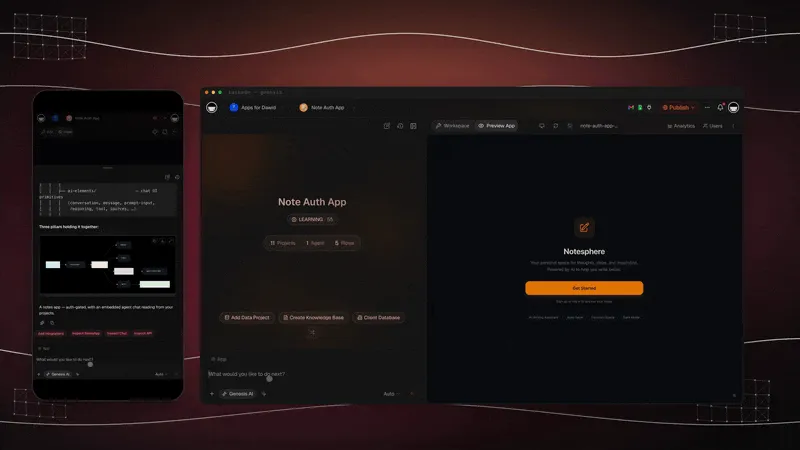
That second change is where the backlog ends. The request went from a sentence to a verified change without a ticket, a vendor or a sprint. If you want to compare builders before you start, the free AI app builders guide ranks the options with their free plans.
The New Software Factory
Guillermo Rauch, CEO of Vercel, describes a business as a software factory that turns signals into fixes, and he says the measure is the latency from signal to shipped fix. In an October 2026 interview, he separated iteration speed from iteration velocity and argued for verification, not micro unit tests, as the guardrail. For the definition, the history and the metrics of the category, see our guide to the AI software factory.
Rauch gave the interview on the David Ondrej channel on October 2, 2026. His examples come from a software company, but four of his ideas apply to any business that builds its own tools.
1. A rubric for how agentic a company is. Rauch proposed three questions. When a customer reaches out, do you reply with a high-quality response? When they report a problem, do you start an investigation? When they report a concrete, fixable thing, do you fix it? Then measure the latency from signal to shipped fix. At one end, a company reviews feedback now and then. At the other end, it becomes autonomous "in a good way", which does not mean agents that run wild.
He also kept a place for judgment. Some feedback is objective, such as an exception in production or a clear improvement. Other feedback, such as "the navigation confuses me", is good but not something you can turn into a prompt. A person still decides.
2. Speed is not velocity. Vercel separates iteration speed, how fast you turn out work, from iteration velocity, speed in a direction. Rauch warned that you can land changes "into oblivion". His advice was to pick a few problems where you have an advantage and go deep on them.
3. Verification engineering. Rauch describes verification engineering as the work of setting guardrails, a "proof system", around what you build. You and the agent agree on the axioms and the trade-offs. He is skeptical of micro unit tests that give false confidence. He would rather spend effort on the edges of the system: what must be correct, what it must feel like, and what you will not trade off.
4. Know your customer. Building is easy when you are the customer, because the test is whether you like the app. Selling to others is different. Rauch likes a metric called error-free sessions: one real visitor, start to finish, with every step working.
| Rauch's rung | The question | What Taskade does today |
|---|---|---|
| Respond | Does a customer get a good reply? | An AI agent answers from your projects and knowledge |
| Investigate | Does a report start an investigation? | An automation catches the form entry or comment, and an agent step triages it |
| Fix | Does a fixable report get fixed? | A person asks Taskade EVE for the change in chat, then verifies it |
| Measure | How long from signal to fix? | You track feedback-to-fix latency in a project, from report to verified change |
The third row needs an honest note. Taskade does not ship a fix to your app on its own when a signal arrives. A person still asks for the change, and a person still checks it. What Taskade shortens is everything around that decision: the signal reaches the right owner in seconds, the context is in one workspace, and the change is a chat request instead of a ticket.
Rauch's interviewer made the competitive point plainly: a business that fixes problems in under 30 minutes beats one that takes two days. Rauch agreed, and compared it to the companies that adopted PCs and the internet early. The companies that hired someone else to "do the internet" fell behind. The same split is coming for the tools a business runs on.
| Speed | Velocity | |
|---|---|---|
| Definition | How fast you turn out changes | How fast you move toward a goal |
| What it counts | Apps built, edits made, prompts sent | Problems solved and verified |
| How it fails | Many changes, no improvement | Rarely, because the goal is fixed first |
| What to measure | Number of changes | Feedback-to-fix latency, error-free sessions |
The Factory at Small-Business Scale
Vercel published numbers for its own factory in August 2026. In Building a software factory for AI SDK, the team reports that four weeks in, the factory authored between 25 and 35% of the pull requests it merged and closed 70 to 80% of issues. Open issues fell from a peak of 1,022 in late June to 844 by early August, and open bugs fell by roughly 25%. The post also sets one rule: "A human stays in control throughout the entire process, including merging every change."
A small business has no pull requests, but it has the same loop. Here is the translation.
| Vercel AI SDK factory | The same idea in a small business |
|---|---|
| The factory authors 25 to 35% of merged pull requests | Share of changes that start from a request record and an agent triage |
| The factory closes 70 to 80% of issues | Share of requests that end in a verified change |
| Open issues fell from 1,022 to 844 | Open requests in your requests project, counted each week |
| Open bugs fell by roughly 25% | Failed automation runs and reported errors, counted each month |
| A human merges every change | The owner approves and verifies every change |
In an August 2026 interview with a16z speedrun, Rauch put the same idea in one line. The value is in "your ability to create the verification loops", and the goal is to "keep it up to date as fast as you can". That second phrase is the whole job of maintenance.
What Happens After the Weekend?
After the weekend, an app meets real customers, changing requirements, growing data, new people who need access, and steps that must run without anyone watching. A weekend build answers "can it work?" Month six answers "does it still work?" The second answer depends on data, permissions, automations and verification, not on the first prompt.
The phrase "in a weekend" in the Garry Tan post is true. A first version in a weekend is now normal. But a business does not run on first versions. Garry Tan named the risk himself in March 2025, when TechCrunch reported on the YC W25 batch. He pictured a startup with 95% AI-generated code and 100 million users a year or two later, and asked: "Does it fall over or not?"
Here is what changes when real use begins.
Real customers. The first customer finds the case you did not think about, such as a phone number in the name field. You learn about it from a person, not a test.
Changing requirements. A new service line needs a new field, and a new rule needs an approval step. A tool you can change in chat keeps up. A tool you must request changes from falls behind again.
Persistent data. A demo can lose its data. A CRM cannot. In Taskade, the data lives in workspace projects, outside any one app, so you can rebuild a screen without losing a record.
Permissions. More people need access, and not all of them need the same access. Workspace members get role-based access from Owner to Viewer. App visitors are different. Client sign-in works on every plan. Sign-in tells the app who the visitor is. It does not hide other people's records on its own. You match records to the login, and you test it with a second account. See App Users.
Automation. The reminder, the follow-up and the weekly summary must run when nobody is looking. An app without automations is a screen. An app with automations is a process.
Verification. Every change must be checked against the outcome. Taskade Genesis keeps saved app revisions that you can preview and restore, and it can detect app errors and attempt a targeted repair. See App Revisions & Restore and AI error recovery.
| After the weekend | What it means | What to use in Taskade | How to verify it |
|---|---|---|---|
| Real customers | Messy input and new cases | Forms and app pages from Taskade Genesis | Submit a real entry with odd data |
| Changing requirements | New fields, new rules | Edits in chat with Taskade EVE | Check one real record end to end |
| Persistent data | Records outlive screens | Workspace projects | Edit a record in the project and see it in the app |
| Permissions | Different people, different access | Role-based access, App Users | Sign in as a second account |
| Automation | Steps run without a person | Automations with 100+ integrations | Confirm the run in the automation run history |
| Verification | Every change is checked | App revisions, error recovery | Keep the previous revision ready to restore |
The ASCII sketch below shows the same request in both worlds.
BEFORE: the feature request path  Ops lead sees a problem
-> writes a request to the vendor or the IT queue
-> waits for a roadmap slot (no date)
-> builds a spreadsheet workaround in the meantime
-> the workaround becomes permanent
Result: the problem is "handled", never fixed
AFTER: the build-and-verify path
  Ops lead sees a problem
-> asks Taskade EVE for the change in chat
-> tests it with a real record and a second account
-> publishes the revision, keeps the old one to restore
-> the agent and the automation use the new field
Result: a verified change the same day
Rauch's warning about slop applies here too. If anyone can one-shot an app, a one-shot app adds no value. The value comes from what you add after the first version: your data, your rules, your follow-up steps and your checks.
Vibe Coded App Maintenance: What Breaks in Month Two?
Vibe coded app maintenance is the work of keeping an AI-built app correct after real people use it. In month two, the usual failures are sign-in problems, triggers that stop, expired integration keys, used-up credits, growing data, outdated packages and edits that break another page. Most of them are quiet, so someone must look for them.
In month one, nothing has changed and the builder remembers every detail. In month two, the business changes, edge cases arrive and the builder forgets why a field exists. Two public studies show why code-level maintenance is hard.
- Security. Veracode's 2025 GenAI Code Security Report found that AI-generated code introduced security flaws in 45% of tests, across 80 coding tasks and more than 100 models. The figure is per task, not per app, but every task is a place to look.
- Code quality drift. GitClear's AI Copilot Code Quality 2025 research found that copy-pasted lines rose from 8.3% to 12.3% of changed lines from 2021 to 2024, while moved (refactored) lines fell to under 10%. More copied code means more places to fix the same bug.
Both studies describe code that someone maintains in a repository. A hosted workspace removes part of that work, but not the part about your data, your rules and your access. The ledger below lists the common failures and where the fix lives in each world.
| Failure | First sign | Who notices | Fix in a Taskade workspace | Fix in a code repository |
|---|---|---|---|---|
| Sign-in shows the wrong records | A client sees a record that is not theirs | The client | Match records to the login, then test with a second account | Debug the auth provider and the query code |
| A form or webhook stops arriving | New requests stop showing up | The owner, days later | Check the trigger in the automation run history | Read server logs and fix the endpoint |
| An integration key expires | An automation step fails | Often nobody, until a customer asks | Reconnect the account in the automation step | Rotate the key, update the settings, redeploy |
| AI credits or API quotas run out | AI steps stop working | The team | Buy a credit pack, on any plan | Raise the quota and the card limit with each provider |
| Data grows | Pages slow down, records are hard to find | Staff | Records stay in projects, so add filters and views in chat | Add indexes, pagination and migrations |
| Packages go out of date | A build fails or a library needs a security fix | A developer, if there is one | Taskade hosts the app, and Taskade EVE does not install packages, so you have no package upgrades to run | Upgrade packages and retest |
| An edit breaks another page | A page shows an error | The person who made the edit | Use AI error recovery, or restore an earlier revision | Revert the commit and redeploy |
| A surprise bill | The invoice | Finance | One workspace plan, with AI usage in credits | Separate bills for hosting, database, AI API and email |
The pattern in the ledger is simple. In a repository, most fixes need a developer and a deploy. In a workspace, most fixes need an owner and a check. That is why the owner matters more than the builder.
A Maintenance Cadence You Can Copy
A maintenance cadence is a fixed schedule of small checks that keeps an AI-built app correct: one check for each change, a short daily scan, a weekly review of open requests and a monthly review of access, cost and latency. The cadence below fits a small team and needs no developer.
Most app failures are not dramatic. A trigger stops, a key expires, a field changes meaning. A cadence turns those quiet failures into scheduled checks. Copy the table into a Taskade project and assign each row to a person.
| When | What to check | How to check it in Taskade | Done when |
|---|---|---|---|
| Each change | The change works with real data | Submit a real record, open the app as a second account, check the automation run | The record, the screen and the run all agree |
| Each change | You can go back | Note the current app revision before you publish | You know which revision to restore |
| Daily | New requests and failed steps | Scan the requests project and the automation run history | Every new request has an owner |
| Weekly | Open requests | Review the open list, close what is verified | The list is shorter or each item has a date |
| Weekly | Agent answers | Ask the agent three real questions | The answers match the records |
| Monthly | Access | Review workspace members and App Users | Only the right people have access |
| Monthly | Cost | Review your plan and AI credit use | No surprise on the next invoice |
| Monthly | Latency | Compare reported dates with verified dates | You know your feedback-to-fix latency |
The last step feeds the first one. What you see while you watch becomes the next report. Here is the same cadence as a checklist you can paste into a project:
- Before each change, note the live app revision.
- After each change, test with one real record.
- After each change, open the app as a second account.
- After each change, confirm the automation run in the run history.
- Each day, give every new request an owner.
- Each week, close the requests you verified.
- Each week, ask the agent three real questions and compare the answers with the records.
- Each month, review members, App Users and credit use.
- Each month, write down your feedback-to-fix latency.
Who Owns the App?
The owner of an AI-built app is the one person who answers for five areas: incidents, releases, access and data, recovery, and cost. In a small business, that is usually the person who built it. Name the owner before launch, because an app that everyone uses and nobody owns becomes the next workaround.
In a team of five, ownership means one name next to each question below. Without that name, nobody notices the failures in the ledger above.
| Area | The question | Typical owner in a small business | Where it lives in Taskade |
|---|---|---|---|
| Incidents | Who notices when something breaks, and who fixes it? | The app builder | Automation run history, requests project, AI error recovery |
| Releases | Who approves a change before it goes live? | The app builder, with one reviewer for big changes | App revisions and publishing |
| Access and data | Who can see and change what? | The workspace owner | Role-based access from Owner to Viewer, App Users, record matching |
| Recovery | How do we go back when a change fails? | The app builder | App Revisions & Restore |
| Cost | What does it cost each month, and who watches it? | The business owner | Your plan and AI credits on the pricing page |
Ownership also answers a question that Retool's 2026 Build vs. Buy report raises. Retool found that 60% of the builders it surveyed built something outside IT oversight in the past year. An app outside IT oversight is not a problem by itself. An app outside anyone's oversight is.
What It Costs to Keep It Running
Keeping an AI-built app running costs mostly time: the minutes to verify each change, the daily scan, the monthly review. The tool cost in Taskade is one plan, with Free to start, Pro at $10 per month billed annually and Business at $25 per month billed annually. The hidden cost is maintenance that nobody planned for.
Retool's 2026 Build vs. Buy report, a survey of 817 Retool customers and builders, found that 51% of builders have production software built with AI that their teams use. The same report adds a warning: "Time saved on one task can be offset by time lost to maintenance." It also notes that vibe coding at work looks different than on the weekend.
The table below lists the costs to plan for. It gives no hourly figure, because the time depends on how often your process changes.
| Cost | What it is | How to keep it small |
|---|---|---|
| Verification time | The minutes to test each change with real data and a second account | Use the cadence checklist, and test only what changed |
| Watching time | The daily scan of requests and failed runs | Let an agent step summarize new requests |
| Tool cost | The plan for your workspace | Free includes 3 apps, 1 agent and 2 members. Pro is $10 per month billed annually. Business is $25 per month billed annually |
| AI usage | Credits for agents, automations and app builds | Free starts with no AI credits. Earn credits with referrals and invites, or buy a credit pack on any plan |
| Custom domain | Your own web address for a client-facing app | Up to 10 on Pro, unlimited on Business and up |
| Risk cost | A wrong record, a missed step or a broken page | Keep the previous revision ready to restore |
One cost is missing from the table because a hosted workspace carries it: servers, database, deploys and package upgrades. In your own repository, those are yours too.
What Not to Maintain Yourself
Some systems carry a maintenance burden that a specialist vendor carries better: payments, payroll and tax, regulated records and security tools for your staff. Their rules change by country and by year, and each one adds what Rauch calls security debt: more attack surface to defend. Buy these, and let the vendor keep them current.
Maintain the layer around them that changes with your process: CRM views, client portals, intake forms and dashboards. Automations connect the two, because triggers pull events in from the system you bought and actions push data out to it.
The Workspace Is the Foundation
A business tool keeps running when it sits on a workspace where projects remember, agents reason, automations run and apps serve. Taskade calls this Workspace DNA: Memory, Intelligence and Execution. An app that sits alone on a server is a screen. An app on a workspace is a process the team can change.
The screen is what you see in a demo, but it is the smallest part of a business tool. The rest is the data, the reasoning and the repeat steps. If those live somewhere else, every change to the screen is a new integration project.
| Workspace DNA layer | Taskade part | Its job in a business tool |
|---|---|---|
| Memory | Projects | Keep the records, notes and history that the business runs on |
| Intelligence | AI agents | Read the records, answer questions, triage requests, draft replies |
| Execution | Automations | Run reminders, follow-ups, approvals and syncs with 100+ integrations |
| Interface | Taskade Genesis apps | Serve the right view to staff, clients and partners |
The loop is what makes the workspace a foundation. Memory feeds Intelligence. Intelligence triggers Execution. Execution creates new Memory. A form entry becomes a record. An agent reads the record and flags it. An automation sends the follow-up and logs it. The log becomes context for the next request. Each change starts from more context than the last one.
This is the argument of Software That Runs Itself and Agentic Workspaces, applied to the backlog. The workspace is what makes the second change cheap. Without it, every change is a rebuild. With it, a change is a sentence.
Build Around the Business
The fastest way to start is to clone a real kit for a job your team does every week, connect it to your data, and change one thing that the old tool never let you change. Three common starting points are a CRM, a client portal and an operations dashboard, each with real data, an agent and automations.
Every kit below includes automations, and cloning a kit with automations needs a paid plan. On Free, describe the same app in Taskade Genesis instead: the automations you build yourself get 10 runs a month.
Each example below uses a real kit from the Taskade app gallery. Clone it, then make it yours in chat. Browse more kits on AI Apps.
A CRM that follows your sales process
The Sales Pipeline Dashboard is a featured kit with 3 projects and 1 AI agent, and you shape its stages to how your team sells. Add a forms trigger so each new lead becomes a deal with an owner, and compare options in AI CRM builders.
A client portal that answers the Friday questions
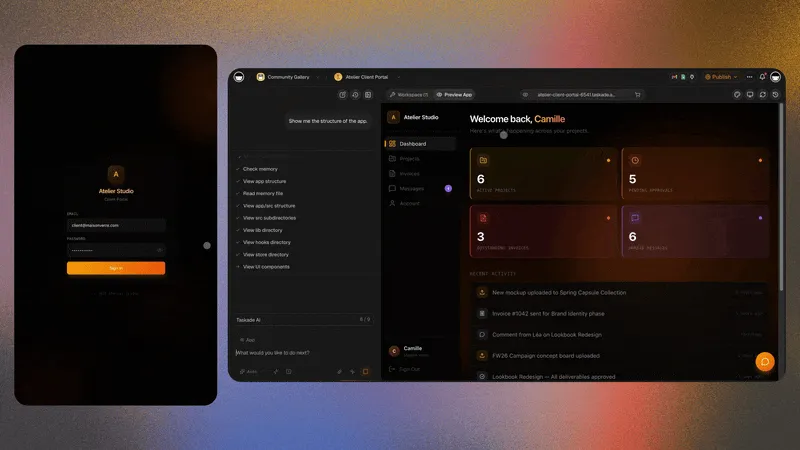
The Client Portal is a multi-page service portal with intake, profile and dashboard sections, with 3 projects, 1 AI agent and 4 automations. Match each record to the client's login and test with a second account before you share it, then see more in client portal builders.
An operations dashboard the team checks every morning
The Inventory Management Dashboard tracks stock with alerts, supplier management and reorder workflows, with 2 projects, 1 AI agent and 5 automations. For team work instead of stock, the Neon Task Management Dashboard tracks tasks, milestones and team progress, and AI dashboard builders compares the options.
| Job | Kit | Projects | Agents | Automations | First verified change |
|---|---|---|---|---|---|
| CRM | Sales Pipeline Dashboard | 3 | 1 | Add your own | A test lead reaches its owner |
| Client portal | Client Portal | 3 | 1 | 4 | The second-account test passes after you match records to the login |
| Operations | Inventory Management Dashboard | 2 | 1 | 5 | A low-stock alert reaches the buyer |
| Maintenance | Maintenance Tracker Dashboard | 3 | 1 | 2 | A reminder includes the parts list |
These are the same jobs that show up when you look at what people actually build. In a Taskade census of 471 top-traffic paid apps, dashboards and analytics were the largest category at 28.2% of traffic, and the average app had 5.9 connected projects and 2.3 AI agents. Read the full breakdown in What People Build With AI.
The Next Competitive Advantage
The next competitive advantage is not who has the most software. It is how fast a business turns a real operational problem into a working, verified change. Feedback-to-fix latency and iteration velocity are the numbers to watch. Every business can build now, so the edge goes to the one that fixes faster and checks its fixes.
When every business can build, building stops being the edge. The edge moves to the loop: how fast a signal reaches the person who can act, how fast that person can change the tool, and how sure they are that the change works. Here is a simple scorecard to start with.
| Metric | What to count | Where to track it |
|---|---|---|
| Feedback-to-fix latency | Time from the first report to a verified change | A project with one record per request, with a reported date and a verified date |
| Iteration velocity | Problems solved and verified per month | The same project, filtered by status |
| Error-free sessions | Visitors who finish a task with no failed step | Your own checks, with real records |
| Workarounds retired | Spreadsheets and manual steps you removed | A short list that the team reviews each month |
| Open requests | Problems reported but not fixed | The same project, as the backlog you can see |
Start small. Pick one workaround that annoys your team every week. Describe the job in Taskade Genesis, or clone a kit on a paid plan. Make one change, verify it with real data, and write down how long it took from the first complaint to the verified change. That number is your feedback-to-fix latency. Next month, make it smaller.
The Free plan includes 3 apps, 1 agent and 2 members, and it starts with no AI credits. You earn credits with referrals and invites, or buy a credit pack on any plan. Pro is $10 per month billed annually, and Business is $25 per month billed annually. Compare the plans on pricing.
Anyone can build software now. The businesses that win will be the ones that keep it running, change it every week, and know that each change works. Memory, Intelligence and Execution, in one workspace. ▲ ■ ●
Build your first tool in Taskade Genesis →
Related Reading
- Will Vibe Coding Kill SaaS? The Garry Tan vs Zoho Debate
- When Customers Build Their Own Software
- Software That Runs Itself
- What People Build With AI
Frequently Asked Questions
What is the software backlog?
The software backlog is the list of changes a business needs from its tools but cannot get on its own schedule. It holds feature requests sent to vendors, tickets waiting for an internal developer, and the spreadsheets and manual steps that people use in the meantime. When the person closest to the work can build and change the tool, that list gets shorter.
What is feedback-to-fix latency?
Feedback-to-fix latency is the time from the first report of a real operational problem to a verified change that people use. A report can be a customer email, a form entry, a comment or a failed step. The clock stops only when the change is live and someone has checked that it works with real data.
Can a nontechnical person build business software in a weekend?
A nontechnical person can build a working first version in a weekend. Taskade Genesis builds a live app with its database from one prompt, and Taskade EVE edits it in chat. The weekend is the start. Real customers, changing requirements, permissions and automations decide whether the app keeps working on Monday and in month six.
What happens to an AI-built app after the first version?
After the first version, the app meets real use. Records pile up, requirements change, new people need access and the business asks for new steps. In Taskade, the data stays in workspace projects, agents work with that data, automations run the repeat steps, and Taskade Genesis keeps saved app revisions that you can preview and restore.
Who fixes a vibe coded app when it breaks?
The person who owns the app fixes it, so name that owner before launch. When the app lives in a code repository, a developer usually reads logs, changes code and redeploys. In a Taskade workspace, the owner can ask Taskade EVE for the fix in chat, use AI error recovery, or restore an earlier app revision.
Can I maintain an AI-built app by re-prompting?
Yes, for most changes. In Taskade, you ask Taskade EVE for the change in chat, and it edits the app. Re-prompting is the easy half. The other half is verification: test the change with a real record and a second account, check the automation run, and keep the previous revision ready to restore.
How much does vibe coded app maintenance cost?
Most of the cost is time: checking each change, watching for failed steps and reviewing access. Retool's 2026 Build vs. Buy report warns that time saved on one task can be offset by time lost to maintenance. In Taskade, the tool cost is one plan: Free to start, Pro at $10 per month billed annually, and Business at $25 per month billed annually.
How do you verify a change to an AI-built app?
Verify a change against the outcome, not the code. Submit a real form entry, check the record in the project, confirm that the automation ran and that the agent used the new field, then open the app as a second account. Keep the previous revision so you can restore it if the change does not hold.
How does client sign-in work in a Taskade Genesis app?
Client sign-in works on every Taskade plan, including Free. Sign-in confirms who the visitor is. It does not hide other people's records on its own. You match records to the login, for example by an email field, and you test it with a second account before you share the app. Custom domains start on Pro, with up to 10, and are unlimited on Business and up.
Which systems should you not maintain yourself?
Do not maintain systems where a specialist vendor carries the burden: payments, payroll and tax, regulated records and security tools for your staff. Their rules change by country and year, and each adds security debt. Maintain the layer around them that changes every month: the CRM views, client portals, intake forms, dashboards and follow-up steps.
What is Workspace DNA?
Workspace DNA is the Taskade architecture of Memory, Intelligence and Execution. Projects remember, AI agents reason, and automations run. A Taskade Genesis app serves all three to the people who use it. Each layer writes back into the same workspace, so every change adds to the context the next change starts from.
How much does it cost to start building your own tools in Taskade?
The Free plan includes 3 apps, 1 agent and 2 members, and it starts with no AI credits. You earn credits with referrals and invites, or buy a credit pack on any plan. Pro is $10 per month billed annually, and Business is $25 per month billed annually. Custom domains start on Pro, with up to 10, and are unlimited on Business and up.
Which app kits can I clone to start?
The Taskade app gallery has kits for common operational jobs. Good starting points are the Sales Pipeline Dashboard for a CRM, the Client Portal for client intake and status, the Maintenance Tracker Dashboard for work orders and the Inventory Management Dashboard for stock and reorder steps. These kits include automations, so cloning one needs a paid plan. On Free, describe the app in Taskade Genesis instead, then change it in chat with Taskade EVE.