






Updated June 2026. Membership software should hand you a portal you control, not a tier you rent per member. Build the member portal in Taskade Genesis, then run it as a live app, gated content, a member directory, a community, and progress in one workspace, with welcome and renewal automations. Kajabi leads on all-in-one courses, Circle on community design, Skool on simple gamified groups, and Memberstack on website gating. But only Taskade Genesis turns the membership into an app you own and reshape. Try Taskade Genesis free →
Try It Live: A Member Portal You Can Actually Run
Every other tool on this list rents you a slot on its platform. This one hands you the app. The portal below was built from a single prompt in Taskade Genesis: gated content, a member directory, a community space, and progress tracking, all in one workspace you own. Click it, clone it, and watch a membership stop being a tier you rent and start being a product you ship.
Watch public agents, custom-field automation, and live knowledge run inside a Taskade app:
This is the difference the rest of the article is about. A membership tool that gives you a slot on its platform is a rental. A membership tool that gives you a running portal app is ownership. Clone this app and run your own membership →
The Evolution of Membership Software: From Locked Page to Living App
Membership software has moved through five eras, and 2026 is the start of the sixth. It began as a password-protected page bolted onto a website. It became a plugin that gated WordPress posts. It became an all-in-one course platform with built-in checkout. It became a community-first network with feeds and member profiles. And now, with Taskade Genesis, it becomes a living app, the gated content, the directory, the community, and the automations, generated from one prompt and owned outright. Each era kept the previous one's job and added a new one. The pattern is consistent: the membership got more polished, but it stayed a tier you rent on someone else's platform. The 2026 shift is the first time the output is an app you own.
Here is the whole arc, era by era:
Read the same arc as a milestone table, what changed, and what each era still left on the table:
| Era | What you ran | What members got | What it still couldn't do |
|---|---|---|---|
| 2000s — Password page | A locked URL | One gated area | No tiers, no community |
| 2010–15 — WP plugins | Gated posts + drip | Lessons on a schedule | Brittle, plugin-soup upkeep |
| 2016–20 — All-in-one | A hosted course site (Kajabi, Podia) | Courses + checkout | Per-member price, vendor-owned |
| 2021–24 — Community network | A feed + directory (Circle, Mighty) | A place to belong | Locked to their platform |
| 2025–26 — Living app | A portal app (Taskade Genesis) | Content + community + progress | — (this is the frontier) |
The plain-English takeaway: every era made the membership look better or gate faster. Only the 2026 era makes the membership an app you own and reshape. That is the whole reason Taskade Genesis tops this list. It is built for the era the rest of the category is still renting. For the conceptual deep-dive on how prompt-to-app generation works, see our Genesis Loop explainer and the Taskade Genesis overview in Learn Taskade.
What Is the Best AI Membership Site Software in 2026?
Taskade Genesis is the best AI membership site software in 2026 because it builds a live member portal app you own instead of a tier you rent. Describe your audience, your plans, and your content in one prompt, and Taskade Genesis builds a working portal, gated lessons, a member directory, a community space, and progress tracking. Then surrounds it with welcome and renewal automations. Every other tool on this list rents you a slot on its platform; Taskade Genesis hands you an app you keep, clone, and reshape for the next program.
The plain-English version: the membership that used to take a course tool, a separate forum, an email platform, and a developer to stitch them together gets built and running in an afternoon. Taskade's first self-serve Enterprise customer — an IT program manager with no engineering team — built a production field-service dashboard on Taskade Genesis and put it this way: "What I accomplished in a few weeks would have taken a team of 40+ people 18 months in a Fortune 500." He didn't rent a platform. He built the app that runs the work.
Rent a Platform vs. Own the App: Why a Templated Tier Isn't Enough
A membership platform rents you a polished tier. An app generator hands you the portal the tier was for, owned, branded, and reshapeable. That is the whole gap. Seven of the eight tools below put your members, your content, and your directory on their servers, priced per member, themed by their templates. Taskade Genesis takes the same brief and returns a working portal app, gated, community-ready, and yours to clone. That you publish on your own domain the same afternoon.
Here is the path a membership actually travels when the tool doesn't stop at the rented tier:
Most tools on this list live in the first two boxes, and they live there well. Taskade Genesis is the only one that carries the membership all the way to an app you own, automate, and reshape.
Side by side, the membership you run looks like this:
  A RENTED PLATFORM                       AN OWNED APP (Taskade Genesis)
  ─────────────────                       ──────────────────────
  [ you ] pick a template                 [ you ] describe a portal
      │                                       │
      ▼                                       ▼
  configure tiers in their UI             a live portal app you own
      │                                       │
      ▼                                       ├─ gated content by tier
  members live on their servers           ├─ member directory + community
      │                                       ├─ welcome + renewal automations
      ▼                                       ▼
  pay per member, themed by them          clone it → reshape per program
  (export when they let you)              (your domain, your data)
The left column is where seven of these tools end, and for many creators that is enough. The right column is where you own the thing outright.
Why Owning the App Is the Whole Game
The membership you own is the membership you can reshape. Hosted platforms price by member and theme by template, so the moment you outgrow their layout or their tier math, you are stuck migrating, and member data lives on their servers under their terms. An owned app does the opposite: you change the gating, add a view, wire a new automation, and publish on your own domain, all without asking a vendor for permission or paying more per head.
That is the difference between renting a tier and owning a system. Every tool on this list can spin up a decent membership in 2026; the gating and the checkout are solved problems. The unsolved problem, the one that decides whether your membership compounds, is who owns the app afterward. Taskade Genesis is built around that answer: the portal, the community, the automations, and the member data are yours. The hosted tier is table stakes. The owned app is the product.
How We Ranked
We ranked 8 AI membership site software tools on six criteria that matter to the person who has to run the membership, not just launch it:
- Build quality, how complete and on-brand the portal is from a single brief.
- Content + community in one, gated lessons and a real community space together, not two tools.
- What you own, a rented tier on their platform, or a live app you own and reshape.
- Tiered gating, control over who sees which content, files, and channels by plan.
- Automations, welcome, onboarding, renewal, and win-back without manual sending.
- Pricing, free-tier generosity and whether the cost scales per member or per workspace.
Scored against those six criteria, here is how the field stacks up at a glance, the single column that separates the leader from the pack is "What you own":
| Tool | Build | Content + community | What you own | Gating | Automations | Price model |
|---|---|---|---|---|---|---|
| Taskade Genesis | Excellent | Both in one app | Owned app | roles from Owner to Viewer | Built-in workflows | Per workspace (free) |
| Kajabi | Excellent | Both (separate areas) | Rented platform | Tiered | Strong | Per platform (high) |
| Circle | Excellent | Community-first | Rented platform | Tiered | Good | Per platform |
| Mighty Networks | Good | Community-first | Rented platform | Tiered | Good | Per platform |
| Skool | Good | Community + courses | Rented platform | Basic tiers | Light | Flat (per group) |
| Memberstack | Good | Gating only | Rented service | Strong | Via tools | Per site |
| MemberSpace | Good | Gating only | Rented service | Strong | Email seq. | Per site |
| Podia | Good | Both (simple) | Rented platform | Tiered | Basic | Per platform |
The grid tells the story before you read a word of the reviews: most tools earn "Good" or "Excellent" on building and gating, then every single one drops to "Rented platform" on ownership, except the one that hands you an app you own.
The 8 Best AI Membership Site Software
1. Taskade Genesis: Best Overall: Build the Portal, Then Own It
Taskade Genesis is the only tool on this list that builds a membership portal and hands you the app to own. Describe your audience, your tiers, and your content in one prompt, and Taskade Genesis builds a complete member portal, gated lessons, a member directory, a community space, and progress tracking, tuned to the kind of membership you run. Then that same artifact is a working app you publish on your own domain: members log in, see only the tier they paid for, post in the community, and track their progress, while welcome and renewal automations run in the background.
That is the structural gap in the whole category. Every competitor rents you a tier on its platform, prices you per member, and themes you with its templates. Taskade Genesis hands you the portal as an app you own, clone, and reshape. The membership that used to take a course tool, a forum, an email platform, and a developer gets built and running in an afternoon.
One workspace covers every membership shape. Taskade Genesis builds a member portal with gated content, a member directory, a community space, and progress on the multiple project views, List, Board, Calendar, Table, Mind Map, Gantt, and Org Chart (the Timeline lives inside Gantt). A creator runs a cohort, a coach runs a coaching circle, a SaaS runs a gated customer academy, all from the same prompt-to-app workspace. Competitors silo into community-first or course-first or website-gating; Taskade Genesis covers all of them in a single live app.
Taskade Genesis runs on 15+ frontier models from OpenAI, Anthropic, Google, and open-weight providers, so the portal copy and the welcome sequence read like your voice, not a template. The workspace ships role-based access from Owner to Viewer so each membership tier sees exactly the right content, AI Agents v2 with built-in tools to answer member questions and flag churn, and 100+ bidirectional integrations to wire Stripe, email, and your CRM around the membership. Brand the app with your logo and a custom domain on Business and above, and the portal stops looking like a template and starts looking like your own product.
Best for: Anyone, creator, coach, agency, or SaaS, who wants a membership they own and reshape, not a tier they rent per member.
Strengths: Only tool that hands you the membership as an owned app; gated content, directory, and community in one workspace; welcome and renewal automations built in; custom branding and domain; generous free tier with no per-member pricing.
Weaknesses: Native one-click payment checkout is wired through integrations rather than a built-in storefront; the polished theme gallery is younger than Kajabi's.
Pricing: Free (Free Forever plan), Pro $10/mo (the Popular tier), Business $25/mo, Max $100/mo, Enterprise $250/mo, all annual billing.
The catch: Honest one, checkout is wired through the 100+ integrations rather than baked into a native storefront, so if you need a turnkey course-store and nothing else, an all-in-one platform may feel more out-of-the-box. Everything around the membership, though, is built in and owned.
Verdict: The clear winner for anyone who wants a membership to compound, not just launch on a platform someone else controls.
2. Kajabi: Best All-in-One Course-and-Membership Platform
Kajabi is the all-in-one incumbent. It bundles courses, memberships, email marketing, landing pages, and checkout into one polished platform, so a creator can run an entire knowledge business without stitching tools together. Its January 2026 redesign sharpened the course and membership builder, and the depth of its marketing suite, funnels, email, analytics, is a genuine strength for creators who want everything under one roof and don't mind paying for it.
Best for: Established creators selling courses and memberships who want marketing, email, and checkout in one platform.
Strengths: Deep all-in-one suite; strong course and membership builder; built-in email and funnels; mature analytics; reliable checkout.
Weaknesses: Expensive, entry plan starts around $143/mo annual; the membership lives on Kajabi's platform, not an app you own; surcharges apply when using your own Stripe.
Pricing: Basic from ~$143/mo (annual), Growth ~$199/mo, Pro ~$399/mo.
The catch: You get a polished membership on Kajabi's platform, priced per platform tier, themed by their builder, not an app you own, clone, or reshape freely.
Verdict: Best if you sell courses and memberships together and want a mature all-in-one marketing suite.
3. Circle: Best Community-First Membership Design
Circle is the community-design benchmark. It uses a Slack-like model of channels, spaces, and threaded discussions with a clean, modern interface, plus a member directory with big photos and filters, paid memberships, courses, and live events. For a membership where the community is the product, Circle's design polish and engagement tools are genuinely best in class, and its access levels (public, private, secret, paid) make tiered gating straightforward.
Best for: Creators and brands whose membership is built around an active, beautifully designed community.
Strengths: Best-in-class community UX; clean member directory; tiered paid access; built-in courses, live events, and email; strong AI features.
Weaknesses: The community lives on Circle's platform, not an app you own; pricing climbs with members and features; course tooling is lighter than Kajabi's.
Pricing: Plans from around $89/mo (best branding and customization on higher tiers).
The catch: The space lives in Circle's system. You can't clone it as an app you own or reshape the gating model beyond their tiers.
Verdict: Best if your membership is a community first and you want the most polished space on the market.
4. Mighty Networks: Best Social-Network-Style Community
Mighty Networks wraps a membership in a social-network model, activity feeds, rich member profiles, and a directory built for members to find and network with each other. It pairs that with native courses, livestreaming, and tiered paid access, and its "people magic" matchmaking nudges members toward each other. For a membership where member-to-member connection is the draw, the extended profiles and grouping tools are a real differentiator over a channels-only layout.
Best for: Communities where member networking and rich profiles matter more than a channel-based feed.
Strengths: Social-network feel; rich member profiles and directory; native courses and livestreaming; member matchmaking; tiered access.
Weaknesses: The network lives on Mighty's platform, not an app you own; the busy social UI can feel heavy; launch plan starts around $95/mo with a transaction fee.
Pricing: Launch from around $95/mo (with a transaction fee), higher tiers add features.
The catch: Like Circle, it's a hosted network, great for connection, but not a portal app you own, clone, or run your own automations around.
Verdict: Best if member-to-member networking and rich profiles are the heart of your membership.
5. Skool: Best Simple, Gamified Community Membership
Skool is the simplicity-and-gamification benchmark. It combines a community feed, courses, and live calls in one stripped-down interface, with a points-and-levels leaderboard that drives engagement. Its flat pricing, a $9 Hobby plan and a $99 Pro plan, both with unlimited members, is refreshingly simple in a category that loves per-member math, and the gamification genuinely keeps groups active.
Best for: Creators who want a dead-simple, gamified community plus courses without configuration overhead.
Strengths: Extremely simple to run; built-in gamification; courses and live calls included; flat per-group pricing with unlimited members.
Weaknesses: Limited customization and branding; basic tiering; the group lives on Skool's platform; a 10% transaction fee on the Hobby plan.
Pricing: Hobby $9/mo (10% transaction fee), Pro $99/mo (lower fee), unlimited members on both.
The catch: Simplicity is the point, so there's little to reshape, no owned app, limited gating, and your community lives on Skool's servers.
Verdict: Best if you want a simple gamified group up and running today and don't need deep customization.
6. Memberstack: Best Website Gating for Webflow Builders
Memberstack is the website-gating specialist. It adds authentication, paid memberships, and content gating to a site you already built, most popularly in Webflow, with Stripe checkout supporting 40+ payment methods. For a designer or business that wants a fully custom-designed membership site rather than a templated platform, Memberstack's flexibility and design control are a real strength, and it scales cleanly as you add sites.
Best for: Designers and businesses gating a custom-built website (especially Webflow) who want full design control.
Strengths: Full design freedom; strong gating and auth; robust Stripe checkout; scales across multiple sites; developer-friendly.
Weaknesses: Gating only, no built-in community, courses, or directory; you build everything else yourself; per-site pricing with a transaction fee.
Pricing: From around $49/mo (1 site, 5% transaction fee) to ~$125/mo (3 sites, 2% fee).
The catch: It gates your site beautifully but hands you no community, courses, or directory. You assemble the rest of the membership from other tools.
Verdict: Best if you want a fully custom membership website and are comfortable building the surrounding pieces yourself.
7. MemberSpace: Best Gating for Squarespace and WordPress
MemberSpace is the no-code gating tool for non-Webflow sites. It adds member areas, content protection, custom login pages, and automated email sequences to Squarespace, WordPress, Wix, and more, without touching code. For a small business already running on Squarespace or WordPress that wants to lock content behind a paywall fast, MemberSpace's drop-in simplicity and broad site-builder support are a genuine advantage.
Best for: Squarespace, WordPress, or Wix site owners who want to gate content without code.
Strengths: Works across many site builders; no-code setup; custom login pages and content protection; built-in email sequences.
Weaknesses: Gating only, no native community or directory; per-site pricing with a transaction fee; depth depends on your underlying site builder.
Pricing: Starter ~$49/mo (1 site, 5% fee), Growth ~$125/mo (3 sites, 2% fee), Unlimited custom (1% fee).
The catch: Like Memberstack, it gates content well but leaves community, courses, and a directory to other tools, and your membership inherits your site builder's limits.
Verdict: Best if you're on Squarespace or WordPress and want a fast, no-code paywall.
8. Podia: Best Budget All-in-One for Simple Memberships
Podia is the budget-friendly all-in-one. It bundles digital products, courses, memberships, email, and a simple website at a price well below Kajabi, making it a clean starting point for creators who want everything in one place without the enterprise price tag. Its simplicity is the draw. There's little to configure, and a solo creator can launch a paid membership the same day.
Best for: Solo creators and small businesses who want a simple all-in-one membership without a big monthly bill.
Strengths: Affordable all-in-one; courses, memberships, and email together; very easy to learn; simple included website.
Weaknesses: Lighter on feature depth than Kajabi; basic community tools; the membership lives on Podia's platform, not an app you own.
Pricing: Around $33–$89/mo depending on tier.
The catch: Simplicity and price are the wins, but you trade away depth, deep customization, and any sense of owning the underlying app.
Verdict: Best if you want an affordable, easy all-in-one membership and don't need advanced community or gating.
A note on Patreon: Patreon is free to start and excellent for personality-led creators monetizing fans with simple tiers and exclusive posts, but it takes a percentage of revenue and offers limited gating, no real directory, and no owned app. So it sits adjacent to this list rather than inside the eight.
Comparison Table: What You Own, Community, and the Pricing Wedge
Feature matrices hide the one thing that actually decides the buy: whether you walk away renting a tier or owning an app. This table strips it down to the columns the rest of the category quietly skips, what you own (a rented platform or a live app), whether content and community live in one place, and the annual price model. This is where Taskade Genesis is the only green row.
| Tool | What you own | Content + community in one | Tiered gating | Live cloneable app | Price (annual) |
|---|---|---|---|---|---|
| Taskade Genesis | Owned app (portal + community) | Yes — one workspace | Roles | Yes — clone it | Free / $10 / $25 |
| Kajabi | Rented platform | Separate areas | Tiered | No | ~$143/mo+ |
| Circle | Rented platform | Community-first | Tiered | No | ~$89/mo+ |
| Mighty Networks | Rented platform | Community-first | Tiered | No | ~$95/mo+ |
| Skool | Rented platform | Yes (basic) | Basic tiers | No | $9 / $99 flat |
| Memberstack | Rented service | No (gating only) | Strong | No | ~$49–$125/mo |
| MemberSpace | Rented service | No (gating only) | Strong | No | ~$49–$125/mo |
| Podia | Rented platform | Yes (simple) | Tiered | No | ~$33–$89/mo |
Read the rows top to bottom and the wedge is obvious: a rented tier is where the others finish, and where Taskade Genesis is just getting started. On price, Taskade Genesis starts Free, then Pro $10 (the Popular ★ pick), Business $25, Max $100, and Enterprise $250, and the cost climbs by workspace, not per member. Most competitors price per member or per platform tier, so a membership that grows gets more expensive on their side and stays flat on yours. You are not paying for a prettier rented page. You are paying for a membership app you own.
Full Feature Matrix: Eight Tools, Eight Columns
This is the detailed grid the buyer's-guide pages bury or skip. It scores all eight tools on the eight capabilities that decide a membership workflow, AI build, gated content, member directory, community space, progress tracking, automations, native checkout, and an owned reusable app. Taskade Genesis is the only row that is "Yes" or "Built-in" straight across the ownership columns.
| Tool | AI build | Gated content | Member directory | Community space | Progress tracking | Automations | Native checkout | Owned app |
|---|---|---|---|---|---|---|---|---|
| Taskade Genesis | Yes | Roles | Yes | Yes | Yes (multiple views) | Built-in | Via integrations | Yes — clone it |
| Kajabi | Partial | Yes | Basic | Yes | Yes | Strong | Native | No |
| Circle | Yes | Yes | Yes | Native | Course progress | Good | Native | No |
| Mighty Networks | Partial | Yes | Rich | Native | Course progress | Good | Native | No |
| Skool | No | Basic | Basic | Native | Gamified | Light | Native | No |
| Memberstack | No | Strong | No | No | No | Via tools | Native | No |
| MemberSpace | No | Strong | No | No | No | Email seq. | Native | No |
| Podia | Partial | Yes | No | Basic | Course progress | Basic | Native | No |
The shape of the grid is the argument. Most tools earn a column of "Yes" on gating and checkout, then go blank on a directory, on automations, or, every single one, on owning a reusable app. Taskade Genesis is the only tool that fills the ownership column, which is exactly where a membership becomes a system you control.
Pricing Matrix: Per-Member Math vs the Workspace Wedge
Most membership-software pages quote a single "from" price and hide the per-member math and transaction fees. Here is the honest annual-billing picture across the field, with what you actually keep at each price. Taskade Genesis is the only one with a real free tier and a flat per-workspace climb instead of per-member or per-platform-tier inflation.
| Tool | Free tier | Entry (annual) | Mid / Top tier | Price scales by | What you keep |
|---|---|---|---|---|---|
| Taskade Genesis | Free Forever | Pro $10/mo ★ | Business $25 · Max $100 | Workspace | An owned app you clone + reshape |
| Kajabi | No | ~$143/mo | ~$199 · ~$399/mo | Platform tier + Stripe surcharge | A platform membership |
| Circle | No (trial) | ~$89/mo | Rises with members + features | Members + features | A hosted community |
| Mighty Networks | No (trial) | ~$95/mo | Rises with features | Features + transaction fee | A hosted network |
| Skool | No ($9 Hobby) | $9/mo (10% fee) | $99/mo Pro | Flat per group | A hosted group |
| Memberstack | Free dev plan | ~$49/mo | ~$125/mo | Sites + transaction fee | A gated website |
| MemberSpace | No (trial) | ~$49/mo | ~$125/mo | Sites + transaction fee | A gated site area |
| Podia | Free (limited) | ~$33/mo | ~$89/mo | Platform tier | A hosted membership |
The math is the message. Across the field you pay per member, per platform tier, or per site, plus transaction fees on most, and you walk away renting. Taskade Genesis starts free, climbs by workspace rather than by member, and every paid tier ships a live, brandable, cloneable app you own. Pro at $10/mo is the Popular ★ pick, and the Business tier at $25/mo adds the custom domain that makes the portal look like your own product.
Use-Case → Tool Matrix: Pick by What You're Actually Running
Skip the feature war and start from your job. This matrix maps the most common membership jobs to the tool that fits, and to the Taskade Genesis build that does the same job and hands you a live app you own afterward.
| Your job | Quick pick (rented platform) | Taskade Genesis route (owned app) |
|---|---|---|
| Sell courses + a membership | Kajabi (all-in-one suite) | Build a member portal with gated lessons + community |
| Run a community-first membership | Circle (best community UX) | Member portal with directory, channels, and progress |
| Member-to-member networking | Mighty Networks (rich profiles) | Taskade Genesis directory + community in one app |
| Launch a simple gamified group | Skool (flat, gamified) | Taskade Genesis community + leaderboard you own |
| Gate a custom Webflow site | Memberstack (design control) | Taskade Genesis portal + gating, no extra forum tool |
| Gate a Squarespace/WordPress site | MemberSpace (no-code gating) | Taskade Genesis gated portal you publish anywhere |
| Affordable all-in-one start | Podia (budget) | Taskade Genesis free, then $10 — owned, not rented |
| Run a SaaS customer academy | Circle or Kajabi | Taskade Genesis gated academy on your own domain |
The pattern reads in one glance: every row has a perfectly good rented-platform option, and a Taskade Genesis route that does the same job and leaves you with an owned, reshapeable app instead of a tier on someone else's servers. That is the whole reason to start on the right-hand column.
From Prompt to Production: What You Can Actually Build
The fastest way to understand the gap is to look at what people ship. These are real outcome shapes, not features, that start from one prompt in Taskade Genesis and end as a running membership app. Each is the kind of system that used to need a course tool, a forum, an email platform, and a developer.
| Outcome you want | What you prompt | What you get to run |
|---|---|---|
| Run a paid community | "Build a member portal with tiered access, a directory, and channels" | A live community app on multiple views, gated by tier |
| Sell a course membership | "Build a course portal with gated lessons and progress tracking" | A gated academy where members track their own progress |
| Coach a cohort | "Build a coaching portal with sessions, resources, and a member directory" | A branded cohort app on a custom domain |
| Gate a customer academy | "Build a gated customer academy with tiers and a knowledge base" | A SaaS academy your customers log into |
| Welcome new members | "Add a welcome sequence and a day-3 resource drop" | An onboarding automation that runs itself |
| Cut renewal churn | "Add renewal reminders and a win-back nudge when a member lapses" | A retention workflow firing on schedule |
| Showcase members | "Build a member directory with profiles and filters" | A live directory members browse and network in |
Each of these is a clone away. The member portal above is the same idea ready to run, open it, clone it, and swap in your own tiers, content, and branding. That single click is the activation event the rest of this category never reaches.
Wiring the membership end to end, Stripe checkout, email, your CRM, happens through Taskade's 100+ bidirectional integrations, so the portal isn't an island. Triggers pull member events in; actions push the welcome, the receipt, and the renewal out.
The Full Taskade Genesis Capability: What Membership Software Looks Like When It's a Platform You Own
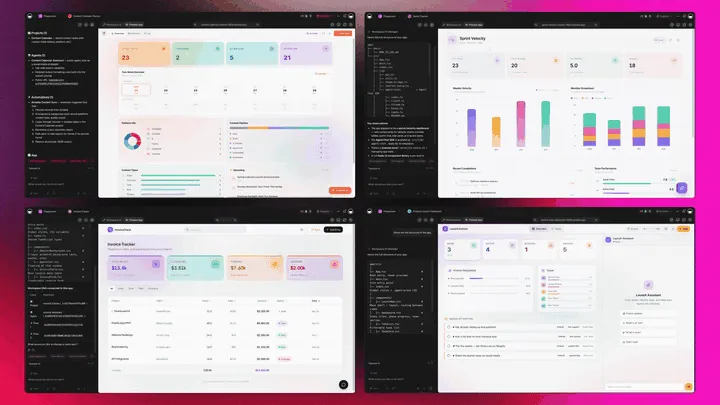
Membership software that's really a platform doesn't just gate the content. It runs the whole membership around it. Taskade Genesis builds the portal as a live web app, then surrounds it with agents that answer members and flag churn, automations that welcome and renew, and a workspace that remembers every member. Here is the capability slice that matters for memberships, told in plain language and shown in working product.
Taskade Genesis: Describe a Membership, Get a Running App
This is the core move. You describe what you want in plain words, "a member portal with three tiers, gated lessons, a directory, and a community", and Taskade Genesis returns a real, running web app, not a tier on a platform. You can publish it, put it on a custom domain, and let others clone it with one click. The membership stops being a slot you rent and becomes a product you own.
The loop, drawn out:
That dotted line back to the start is the part no rented platform has: every member the portal serves feeds the next prompt. Here is what's actually inside a Taskade Genesis membership app, the layers a templated tier can never carry:
  A GENESIS MEMBERSHIP APP (one prompt builds all of this)
  ───────────────────────────────────────────────────────
  ┌─ GATED CONTENT ────────────────────────────────┐
  │  lessons · files · channels by tier            │   ← roles, Owner → Viewer
  ├─ MEMBER DIRECTORY ─────────────────────────────┤
  │  profiles · filters · networking               │   ← members find each other
  ├─ COMMUNITY SPACE ──────────────────────────────┤
  │  channels · discussions · events               │   ← belonging, not just content
  ├─ PROGRESS TRACKING ────────────────────────────┤
  │  Board · Table · List · Calendar               │   ← 7 views, the way you think
  ├─ AGENT ────────────────────────────────────────┤
  │  answers members · flags churn · 34 tools      │   ← the teammate that runs it
  ├─ AUTOMATION ───────────────────────────────────┤
  │  welcome · renewal · win-back · Stripe sync    │   ← 100+ bidirectional integrations
  └─ MEMORY ───────────────────────────────────────┘
     every member sharpens the next portal            ← Workspace DNA, the compounding part
See the same member-portal shape running live. This is a live member portal app, generated from one prompt:
AI Agents v2: built-in tools and a Member-Success Teammate
The membership that retains is usually the one someone tends. In Taskade, that someone is an agent. AI Agents v2 ship built-in tools, web search, code, file analysis, custom slash commands, plus persistent memory, multi-agent collaboration, public embedding, and multi-model routing. Point one at your membership and it answers member questions, surfaces the right lesson, and flags a member who's gone quiet before they churn. EVE, the meta-agent, orchestrates the whole team from a single instruction.

Automation: Reliable Workflows That Welcome and Renew
Behind the portal sits reliable automation, workflows that branch, loop, and filter, and run dependably without you babysitting them. Wire 100+ bidirectional integrations so triggers pull member events in (a new Stripe subscription, a form submitted, a lesson completed) and actions push the membership out (send the welcome email, drop the day-3 resource, fire the renewal reminder, post to Slack). The membership isn't a static page; it's a workflow that runs itself.
Multiple Project Views: See the Membership the Way You Think
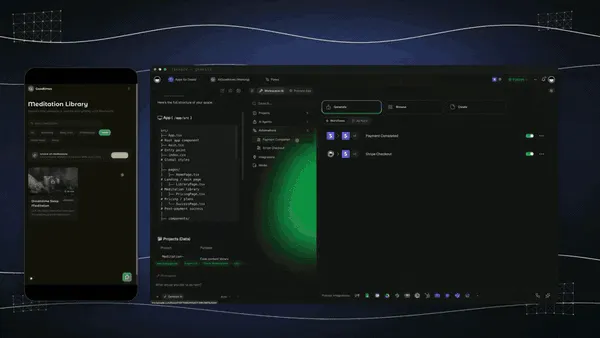
Every membership app comes with multiple project views, List, Board, Calendar, Table, Mind Map, Gantt, and Org Chart (the Timeline lives inside Gantt). Track member progress on a Board, see renewal dates on a Calendar, map your content path on a Mind Map, and manage the directory in a Table. Members see only the surface you share; you see the whole membership. A rented tier gives you their dashboard, not yours.
Workspace DNA: Memory + Intelligence + Execution
The reason the loop compounds is Workspace DNA, the self-reinforcing triad of Memory, Intelligence, and Execution (the ▲ ■ ● signature). Memory remembers every member and what works; Intelligence drafts the next lesson and the next welcome email in your voice across 15+ frontier models from OpenAI, Anthropic, Google, and open-weight providers (auto-routed, no model-picking required); Execution welcomes, renews, and retains. Each member the portal serves becomes Memory for the next program, the workspace gets smarter every time someone joins.

A Real Operator Already Runs On This
This isn't a roadmap promise. Taskade's first self-serve Enterprise customer — an IT program manager with no engineering team — built a production field-service dashboard on Taskade Genesis, a real, running app his team uses every day. His take: "What I accomplished in a few weeks would have taken a team of 40+ people 18 months in a Fortune 500." He didn't rent a platform. He built the app that runs the work, and the member portal on this page is the same idea, ready for you to clone. Browse more live, cloneable apps in the Community Gallery, or start your own from free AI app builders.
Decision Flowchart: Which Membership Tool for Your Job
The plain-English version: if you want a membership you own and reshape, every road leads to Taskade Genesis. If you only need a rented tier for one membership shape, the niche tools are fine, and several of them are excellent at exactly that.
Three Operators, One Platform: How the Same Tool Fits Different Jobs
The clearest way to see the difference is to watch three very different people use the same builder. Each starts with one prompt and ends with a membership app they own, not a tier on someone else's platform.
The Course Creator
She sells a cohort-based course and wants the community to live next to the lessons. She builds a member portal, gated modules, a member directory, discussion channels, and progress tracking, and ships it as a branded app on her own domain. Members log in to the tier you match to their account, post in the community, and watch their own progress on a Board. When someone falls behind, the member-success agent nudges them and surfaces the next lesson. The same portal clones for next term's cohort in a click, so she never rebuilds from scratch. What used to be a course tool plus a forum plus an email platform is now one app she controls.
The Community-First Coach
He runs a paid coaching circle where the connection between members is the product. He builds a community membership app, channels, a rich member directory with filters, live-session scheduling, and tiered access, and brands it on a custom domain. Automations handle the welcome sequence and the renewal reminders, and a CRM integration keeps every member record in sync without copy-paste. He gets the community feel of Circle or Mighty Networks, but the app and the member data are his.
The SaaS Customer-Academy Owner
Her team wants a gated customer academy that turns trial users into power users. She builds a gated academy app, onboarding lessons, a resource library, and a community space, with role-based access from Owner to Viewer so free, paid, and enterprise customers each see the right content. A new Stripe subscription triggers enrollment and a welcome flow; an AI agent answers product questions inside the academy. The academy lives on her company's own domain, not a vendor's, so it reads as part of the product.
The thread across all three: same platform, same one-prompt start, three completely different memberships, and in every case the output is a living app the operator owns, not a tier locked in a vendor's platform.
How to Build Your Membership App in Taskade Genesis
You don't configure a platform. You describe a membership and Taskade Genesis builds it. Here's the whole path from idea to a running, gated, automated portal:
Read it as five plain steps:
- Describe the membership. One prompt, tiers, content, directory, community, and Taskade Genesis builds the portal app.
- Gate it by tier. the role model sets who sees which lessons, files, and channels.
- Publish it. Put the portal on your own custom domain on Business and above.
- Automate onboarding and renewal. Wire welcome, drip, and renewal workflows so the membership runs itself.
- Clone and reshape. Reuse the same portal for the next program, or clone a live one to start in seconds.
For a deeper walkthrough, the Taskade Genesis overview in Learn Taskade and the Genesis Loop explainer cover the build-publish-clone cycle in full.
The Bottom Line
The best AI membership site software in 2026 is the one that hands you the membership as an app you own, not a tier you rent per member. Kajabi, Circle, Mighty Networks, and Skool are genuinely excellent at their slice, all-in-one courses, community design, member networking, and simple gamified groups, and if a rented platform fits your shape, several of them will serve you well. But Taskade Genesis is the only one that turns one prompt into a live member portal app: gated content, a member directory, a community space, and progress in one workspace, with welcome and renewal automations, on your own custom domain.
That is the difference between launching a membership on someone else's platform and owning the system that runs it. Build it free, clone a live member portal to start in seconds, and reshape it as your membership grows, the workspace remembers every member and gets smarter every time someone joins. The membership you own is the one that compounds.
▲ ■ ● Build your member portal app free in Taskade Genesis →
Related reading: Free AI App Builders · What Are AI Agents · Best AI Workflow Tools · Make Money Vibe Coding · What Is Skool?
Frequently Asked Questions
What is the best membership site software in 2026?
Taskade Genesis is the best membership site software in 2026 because it builds a live member portal app you own, not a templated page on a vendor's platform. One prompt creates gated content, a member directory, a community space, and progress tracking in a single workspace, with welcome and renewal automations. Kajabi, Circle, and Skool are polished but per-member-priced. Taskade Genesis starts free, then Pro $10 and Business $25 per month.
Is there free membership site software?
Yes. Taskade Genesis has a Free Forever plan that builds a working member portal with gated content and a community, and you keep the app you create. Skool offers a $9 Hobby plan with a 10 percent transaction fee, and Patreon is free to start but takes a percentage of revenue. With Taskade Genesis the portal you build on the free plan is yours to clone and reshape, with no per-member pricing.
How do I build a member portal app?
Describe your audience, the tiers, and the content in one prompt, and Taskade Genesis builds a live member portal app. You get gated lessons, a member directory, a community space, and progress tracking on the project view you prefer, plus welcome and renewal automations. Publish it on a custom domain, then clone the same portal for the next program. Start at the build page.
Can I gate content by membership tier?
Yes. Taskade Genesis gates content by tier using role-based access from Owner to Viewer, from Owner down to Viewer, so each plan sees only the lessons, files, and channels it pays for. You set who can view, comment, or edit per section. Kajabi, Circle, and Mighty Networks also gate content well, but their gates live on their platform while a Taskade Genesis portal is an app you own and host on your own domain.
Can a membership site take recurring payments?
Yes. A Taskade Genesis membership app collects recurring payments through 100+ bidirectional integrations, so a Stripe subscription event can unlock a tier and a failed payment can trigger a dunning automation. Kajabi, Circle, Skool, and Memberstack include native checkout. Taskade Genesis wires payment around the app you own rather than locking billing inside a vendor's platform.
Can I run community and content in one place?
Yes. Taskade Genesis puts gated content, a member directory, a community space, and progress tracking in one workspace app, so members do not bounce between a course tool and a separate forum. Circle and Mighty Networks are strong at the community half, and Kajabi at the content half. Taskade Genesis is the one that hands you both as a single live app you reshape over time.
Is member data private in a membership app?
Yes. A Taskade Genesis membership app uses role-based access from Owner to Viewer so each member sees only the surface you share, and you can publish on your own custom domain with password protection. You own the workspace and the member data inside it. That is different from a hosted platform where the directory and member records live on the vendor's servers under their terms.
What is the difference between creator and business membership software?
Creator membership tools like Patreon, Skool, and Mighty Networks optimize for a personality-led community and simple tiers. Business membership tools like Memberstack and MemberSpace add gating to an existing website. Taskade Genesis spans both because it builds the actual app, so a creator gets a portal and community while a business gets a gated client area, all from one prompt and all owned outright.
Can a membership app connect to Stripe and email tools?
Yes. Taskade Genesis connects a membership app to Stripe, email platforms, and a CRM through 100+ bidirectional integrations. Triggers pull events in, so a new Stripe subscription enrolls a member, and actions push data out, so a welcome email fires and the CRM updates. The portal becomes one node in a workflow that runs itself instead of a static page you maintain by hand.
How does AI help run a membership site?
AI drafts the portal, writes the welcome sequence, and runs an agent that answers member questions and flags churn. Taskade Genesis ships AI Agents v2 with built-in tools plus persistent memory, and runs on 15+ frontier models from OpenAI, Anthropic, Google, and open-weight providers. The result is a membership app that builds itself from a prompt and keeps improving as members use it.
Can AI automate onboarding emails for new members?
Yes. Taskade Genesis runs welcome and onboarding automations with reliable automation workflows that branch, loop, and filter. A new member signup triggers a welcome email, a resource drop on day three, and a check-in on day seven, all without manual sending. The same workflows handle renewal reminders and win-back nudges when a membership lapses.
Can I clone a membership app instead of building from scratch?
Yes. You can clone a live Taskade Genesis member portal from the Community Gallery in one click, then swap in your own tiers, content, and branding. Cloning a working portal is faster than configuring a hosted platform, and the gated content, directory, and community space arrive already wired together for you to reshape.