Introducing TSK-1Introducing TSK-1—Taskade's intelligence layer.
taskade
PricingHelpDashboard →Dashboard →
PricingLoginSign up for free →Sign up for free →
Dashboard →Dashboard →
Sign up →Sign up →
Loved by 1M+ users·Hosting 100K+ apps·Deploying 500K+ AI agents·Running 1M+ automations·Backed by Y Combinator·Powered by TSK-1
TaskadePricingFeaturesContact usIntegrationsMCP ServerDeveloper APIChangelogPressLearnAbout
ConnectProductivityKitsVideosReviewsFAQ
VibeVibe AppsVibe AgentsVibe CodingVibe WorkflowsVibe Marketing
Vibe DashboardsVibe CRMVibe AutomationVibe PaymentsVibe DesignVibe SEOVibe Tracking
Community
FeaturedQuick AppsToolsDashboardsWebsites
WorkflowsProjectsFormsCreators
DownloadsAndroidiOSMacWindows
ChromeFirefoxEdge
Compare
vs Cursorvs Boltvs Lovablevs V0vs Windsurf
vs Replitvs Emergentvs Devinvs Claude Codevs ChatGPTvs Claudevs Perplexityvs GitHub Copilotvs Figma AIvs Notionvs ClickUpvs Asanavs Mondayvs Trellovs Jiravs Linearvs Todoistvs Evernotevs Obsidianvs Airtablevs Basecampvs Mirovs Slackvs Bubblevs Retoolvs Webflowvs Framervs Softrvs Glidevs FlutterFlowvs Base44vs Adalovs Durablevs Gammavs Squarespacevs WordPressvs UI Bakeryvs Zapiervs Makevs n8nvs Jaspervs Copy.aivs Writervs Rytrvs Manusvs Crewvs Lindyvs Relevance AIvs Wrikevs Smartsheetvs Monday Magicvs Codavs TickTickvs Any.dovs Thingsvs OmniFocusvs MeisterTaskvs Teamworkvs Workfrontvs Bitrix24vs Process Streetvs Toggl Planvs Motionvs Momentumvs Habiticavs Zenkitvs Google Docsvs Google Keepvs Google Tasksvs Microsoft Teamsvs Dropbox Papervs Quipvs Roam Researchvs Logseqvs Memvs WorkFlowyvs Dynalistvs XMindvs Whimsicalvs Zoomvs Remember The Milkvs Wunderlist
Taskade GenesisVideo GuideApp BuilderVibe CodingAgent BuilderDashboard Builder
CRM BuilderWebsite BuilderForm BuilderWorkflow AutomationWorkflow BuilderBusiness-in-a-BoxAI for MarketingAI for Developers
AI Agents
FeaturedProject ManagementOperations Intelligence AgentsProductivityMarketing
TranslatorContentWorkflowResearchPersonalSalesSocial MediaTo-Do ListCRMTask AutomationCoachingCreativityTask ManagementBrandingFinanceLearning and DevelopmentBusinessCommunity ManagementMeetingsAnalyticsDigital AdvertisingContent CurationKnowledge ManagementProduct DevelopmentPublic RelationsProgrammingHuman ResourcesE-CommerceEducationLegalEmailSEODeveloperVideo ProductionDesignFlowchartDataPromptNonprofitAssistantsTeamsCustomer ServiceTrainingTravel PlanningUML DiagramER DiagramMath TutorLanguage LearningCode ReviewerLogo DesignerUI WireframeFitness CoachLead EnrichmentFounder OSSales DevelopmentBookkeepingRecruitingWebsite MonitoringField ServiceAll Categories
Automations
FeaturedBusiness-in-a-BoxOperations Intelligence AutomationsInvestor OperationsEducation & Learning
Healthcare & ClinicsReal EstateStripeSalesE-commerceContentMarketingEmailCustomer SupportHubSpotProject ManagementAgentic WorkflowsBooking & SchedulingCalendarReportsSlackWebsiteFormTaskWeb ScrapingWeb SearchChatGPTText to ActionYoutubeLinkedInTwitterGitHubDiscordMicrosoft TeamsWebflowRSS & Content FeedsGoogle WorkspaceManufacturing & OperationsAI Agent TeamsMulti-Agent AutomationNotion AutomationsAgentic AutomationProposalBookkeeping & ExpensesClient OnboardingAll Categories
Wiki
Taskade GenesisAI AgentsAutomation
ProjectsLiving DNAAutonomous Workspaces, Agents & AppsQuantum AI & Taskade Genesis QuantumPlatformIntegrationsProductivityMethodsProject ManagementAgileScrumAI ConceptsCommunityTerminologyFeatures
Templates
FeaturedChatGPTOperations Intelligence TemplatesTablePersonal
Project ManagementSalesFlowchartTask ManagementEngineeringEducationDesignTo-Do ListMarketingMind MapGantt ChartOrganizationalPlanningMeetingsTeam ManagementStrategyGamingProductionProduct ManagementStartupRemote WorkY CombinatorRoadmapCustomer ServiceLegalEmailBudgetsContentConsultingE-CommerceStandard Operating Procedure (SOP)Human ResourcesProgrammingMaintenanceCoachingSocial MediaHow-TosResearchMusicTrip PlanningCRMClient OnboardingEmployee OnboardingSOPBug TrackerRecruitment TrackerFormSales PipelineContent CalendarMarketing PlanProduct RoadmapBusiness PlanSWOT Analysis30-60-90 Day PlanInterviewNotion AlternativeKPIStrategic PlanMeeting AgendaInvoiceRisk RegisterIT Asset ManagementKanban BoardChange ManagementCommunication PlanRFPScope of WorkStatement of WorkHelpdeskKnowledge BaseCreative BriefGoal SettingExecutive SummaryGap AnalysisBooking SystemEvent ManagementPortfolio TrackerCustomer Onboarding PortalsClient PortalAgency OperationsFinance TrackingAll Categories
Generators
AI SoftwareNo-Code AI AppAI AppAI WebsiteAI Dashboard
AI Operations Intelligence GeneratorsAI FormAI AgentAI Client Portal BuilderAI WorkspaceAI ProductivityAI To-Do ListAI WorkflowsAI EducationAI Mind MapsAI FlowchartAI Scrum Project ManagementAI Agile Project ManagementAI MarketingAI Project ManagementAI Social Media ManagementAI BloggingAI Agency WorkflowsAI ContentAI Software DevelopmentAI MeetingAI PersonasAI OutlineAI SalesAI ProgrammingAI DesignAI FreelancingAI ResumeAI Human ResourceAI SOPAI E-CommerceAI EmailAI Public RelationsAI InfluencersAI Content CreatorsAI Customer ServiceAI BusinessAI PromptsAI Tool BuilderAI SEOAI Gantt ChartAI CalendarsAI BoardAI TableAI ResearchAI LegalAI ProposalAI Video ProductionAI Health and WellnessAI WritingAI PublishingAI NonprofitAI DataAI Event PlanningAI Game DevelopmentAI Project Management AgentAI Productivity AgentAI Marketing AgentAI Personal AgentAI Business and Work AgentAI Education and Learning AgentAI Task Management AgentAI Customer Relations AgentAI Programming AgentAI SchemaAI Business PlanAI Pitch DeckAI InvoiceAI Lesson PlanAI Social Media CalendarAI API DocumentationAI Database SchemaAI Marketing PlanAI Sales Pipeline GeneratorAI Course BuilderInternal ToolsBooking SystemReal Estate CRMInventory ManagementAI CRM BuilderAI TimesheetAI DispatchAI NewsletterAI Clinic OperationsAI Directory BuilderAll Categories
Converters
AI Featured ConvertersAI PDF ConvertersAI CSV ConvertersAI Markdown ConvertersAI Prompt to App Converters
AI Data to Dashboard ConvertersAI Workflow to App ConvertersAI Idea to App ConvertersAI Flowcharts ConvertersAI Mind Map ConvertersAI Text ConvertersAI Youtube ConvertersAI Knowledge ConvertersAI Spreadsheet ConvertersAI Email ConvertersAI Web Page ConvertersAI Video ConvertersAI Coding ConvertersAI Task ConvertersAI Kanban Board ConvertersAI Notes ConvertersAI Education ConvertersAI Language TranslatorsAI Business → Backend App ConvertersAI File → App ConvertersAI SOP → Workflow App ConvertersAI Portal → App ConvertersAI Form → App ConvertersAI Schedule → Booking App ConvertersAI Metrics → Dashboard ConvertersAI Game → Playable App ConvertersAI Catalog → Directory App ConvertersAI Creative → Studio App ConvertersAI Agent → Agent App ConvertersAI Audio ConvertersAI DOCX ConvertersAI EPUB ConvertersAI Image ConvertersAI Resume & Career ConvertersAI Presentation ConvertersAI PDF to Spreadsheet ConvertersAI PDF to Database ConvertersAI PDF to Quiz ConvertersAI Image to Notes ConvertersAI Audio to Notes ConvertersAI Email to Tasks ConvertersAI CSV to Dashboard ConvertersAI YouTube to Flashcards ConvertersURL to NotesVideo → SummaryAI Receipts to Expense Tracker ConvertersAI Docs to Knowledge Base ConvertersAI Form to Client Portal ConvertersSpreadsheet to CRMAll Categories
Prompts
Client PortalsDocument IntakeField Service
Operations Intelligence PromptsCRMAdvertisingDesignInvoicing and PaymentsSocial MediaCodingBooking and SchedulingConsultingCustomer SupportNonprofitPatient IntakeBlog WritingBrandingPersonal FinanceHuman ResourcesPublic RelationsTeam CollaborationProduct ManagementSupportAgencyReal EstateMarketingResearchSalesCopywritingContentProject ManagementWebsite CreationStrategyE-commerceEngineeringSEOEducationEmail MarketingUX/UIProductivityInfluencer MarketingAnalyticsEntrepreneurshipLegalVibe CodingRecruitingAll Categories
Blog
Introducing Taskade TSK-1: The System Kernel Behind Every App (2026)Estimate to Invoice Workflow for Trades (2026): One Pipeline You OwnHousecall Pro Alternative for Small Crews (2026): Own Your Dispatch Board
How LLMs Got Hands: The History of Tool Use and Function Calling (2026)HVAC Dispatch Board You Own (2026): Daily Jobs Without Enterprise PricingTaskade Genesis vs AI App Builders for Ops Systems (2026)From 4K to 1M: The History of the Context Window (2026)Missed Call Text-Back for Speed-to-Lead (2026 Playbook)Accounts Receivable Aging Tracker for Agencies (2026 Honest Ranked)Field Service Dispatch Software You Own (2026 Ranked Guide)Follow Up Boss Alternative for Solo Agents (2026 Honest Ranked)The History of the Model Context Protocol: How AI Got a Universal Plug (2026)How to Automate 99% of Nonprofit Operations with AI in 2026Speed-to-Lead CRM: Text-Back System That Closes in Minutes (2026)Student Enrollment Portal Without Kajabi (2026 Ranked)Transaction Coordinator Dashboard Without IDX (2026 Honest Guide)How to Automate 99% of Real Estate Work with AI Agents (2026)Jobber Alternative: Dispatch Board You Own (2026 Ranked)ServiceTitan Alternative for Small Crews (2026): Own Your Dispatch BoardRun Your Whole Business in One App with Taskade Genesis (June 2026)
AIAutomationProductivityProject ManagementRemote WorkStartupsKnowledge ManagementCollaborative WorkUpdates
Changelog
File Uploads for Your Apps & Saved Originals (Jul 26, 2026)Scans and Photos Become Text in Automations (Jul 25, 2026)Named Cards at a Glance & Complete Reports (Jul 25, 2026)
AI Steps Run on the Prompt Alone (Jul 24, 2026)Single Sign-On Setup Tells You What to Fix (Jul 23, 2026)Project Outlines for Taskade EVE & Reliable Runs (Jul 22, 2026)MCP Connections Do More & Signed Webhooks (Jul 21, 2026)
Wiki
Taskade GenesisAI AgentsAutomation
ProjectsLiving DNAAutonomous Workspaces, Agents & AppsQuantum AI & Taskade Genesis QuantumPlatformIntegrationsProductivityMethodsProject ManagementAgileScrumAI ConceptsCommunityTerminologyFeatures
Prompts
Client PortalsDocument IntakeField Service
Operations Intelligence PromptsCRMAdvertisingDesignInvoicing and PaymentsSocial MediaCodingBooking and SchedulingConsultingCustomer SupportNonprofitPatient IntakeBlog WritingBrandingPersonal FinanceHuman ResourcesPublic RelationsTeam CollaborationProduct ManagementSupportAgencyReal EstateMarketingResearchSalesCopywritingContentProject ManagementWebsite CreationStrategyE-commerceEngineeringSEOEducationEmail MarketingUX/UIProductivityInfluencer MarketingAnalyticsEntrepreneurshipLegalVibe CodingRecruitingAll Categories
© 2026 Taskade
PrivacyTermsSecurity
Made withTaskade AIforBuilders
BlogAIExam Prep Score Tracker No…

Exam Prep Score Tracker No Code (2026): Practice Tests You Can Ship Today

Tutors and coaches need a score tracker students actually update, not another spreadsheet. Here is how to generate an exam prep portal without code in 2026.

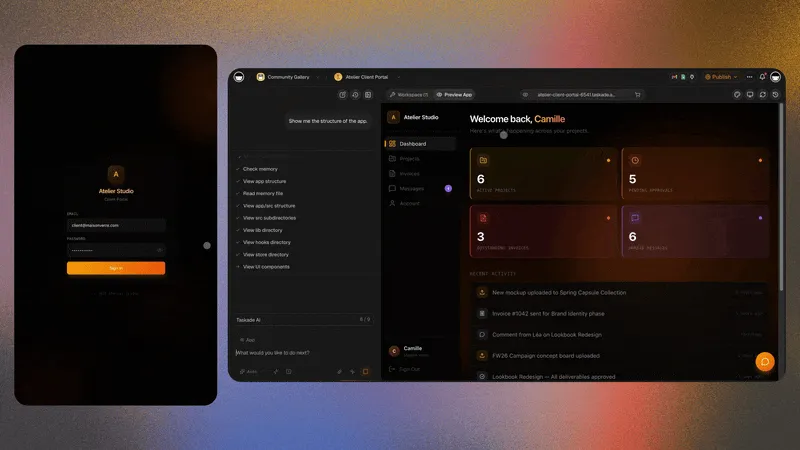
Exam prep score tracker with practice test history and study plan in Taskade Genesis
August 4, 202620 min readTaskade TeamAI·#exam-prep#education#tutoring
On this page (25)
📊 What Tutors Actually Need From a Score Tracker📜 Why Exam Prep Tracking Breaks in Spreadsheets💵 2026 Pricing Reality: Course Platforms vs a Tracker You OwnRough monthly math for a tutoring practice🎯 Taskade Genesis: The Score Tracker You Generate🧬 Workspace DNA: Projects, Agents, Automations🗂️ The Data Model Worth Getting RightFields worth including day one🧭 Who Should Switch to a Tracker They Own🛟 Who Should Stay on an LMS or a Spreadsheet🏗️ What Taskade Genesis Owns vs What You Pair📋 Migration Checklist: Spreadsheet to a Tracker You OwnWeek 0: Decide the nounsWeek 1: Generate and load real scoresWeek 2: Portal, parents, automationsDay-by-day viewCutover rules🆚 Side-by-Side: Choosing an Exam Prep TrackerCapability depth vs ownership👥 Cohort Mode for Group Prep🧪 A Day in the Life on an Owned Score Tracker🤖 AI Agents for Exam Prep❓ FAQ: No-Code Exam Prep Score Trackers📚 Related Reading🚀 Own the Score History, Link the Rest

Taskade Genesis gives tutors and exam coaches a score tracker, study plan, and student portal from one prompt, so practice test history lives beside session notes without spreadsheets students forget to update or LMS fees for video libraries you do not need. This guide covers no-code exam prep tracking in 2026.

TL;DR: Spreadsheets fail when students need a login. LMS platforms oversell video hosting. Taskade Genesis wins when you need score history and study plans with a client portal today. Generate an exam prep score tracker →

Related: coaching CRM without Kajabi fees, education client portals, Taskade Genesis vs AI app builders.

Competitor prices below are publicly listed entry tiers as of July 2026. Confirm live pricing before you budget. Course platforms re-tier often.


Building a living exam prep score tracker from one prompt in Taskade Genesis

📊 What Tutors Actually Need From a Score Tracker

An exam prep coach's week is narrower than any course platform assumes. Five things happen, over and over:

  1. A student finishes a practice test somewhere else (official test bank, third-party platform, paper drill).
  2. The score and section breakdown need to land on that student's record.
  3. Weak sections need to turn into a next-drill list before the next session.
  4. A parent or a program manager asks how the student is trending.
  5. The coach needs a cohort view to spot who has gone quiet.

That is a tracking and portal problem, not a video-hosting problem. Buying a course platform to solve it is how tutoring businesses end up paying for affiliate centers and sales funnels they never open.

Daily need Spreadsheet default Course platform default Living tracker in Taskade Genesis
Log a practice attempt Manual row, coach types it Quiz inside the platform only Student logs it on a mobile view
Section breakdown Extra columns per exam Rarely modeled Custom fields per exam type
Student login Share the whole sheet Course seat App User with scoped records
Parent visibility Emailed screenshot Usually none Read-only parent login
Cohort trend Pivot table someone maintains Course completion % Live cohort view
Who reshapes fields Whoever is brave Vendor template You, by chatting with Taskade EVE

If your week is those five steps, you are shopping for ownership of the tracker. If your product is a pre-recorded video library sold at scale, you are shopping for an LMS. Those are different purchases.


📜 Why Exam Prep Tracking Breaks in Spreadsheets

Spreadsheets did not fail because tutors are disorganized. They fail for four structural reasons that show up at almost exactly the same point in a coaching business.

Scores arrive from outside the system. Practice tests are taken on official test-bank platforms, third-party question banks, and paper. Nothing writes back to your sheet, so every score is a manual re-entry. Manual re-entry decays the moment the roster grows past a handful of students.

A spreadsheet has no row-level identity. You either share the whole file or you maintain one tab per student. One tab per student kills every cross-student view you actually wanted: who is trending down, which section is weakest across the cohort, who has not tested in two weeks.

Section breakdowns differ per exam. Bar prep wants MBE and MEE. An IT certification wants domain percentages. The SAT wants Math and Reading/Writing. One flat sheet forces you to either add 30 columns or lose the detail.

Parents and program managers are a third audience. They need a weekly picture and nothing else. Spreadsheets give you two options — full access or a screenshot — and coaches end up rebuilding a report by hand every Sunday.

Text message Vendor test bank Coach spreadsheet Owned tracker Practice test taken Where doesthe score land? Lost in chat history One exam onlyno cohort view No student loginno parent view Attempt row onstudent profile Weak sections tagged Next drills assigned

The three failure branches all share one property: the score exists but the loop does not close. A tracker earns its keep by turning an attempt into a drill list without a human remembering to.


💵 2026 Pricing Reality: Course Platforms vs a Tracker You Own

Most "exam prep software" shortlists are course platforms wearing a tutoring hat. Their pricing is built around selling video, not around tracking scores.

Product Shape Entry tier (July 2026, confirm live) What you are funding Score tracking
Teachable Course commerce ~$39/mo Basic Video hosting, checkout, affiliates Quiz results, not attempt history
Thinkific Course builder ~$36/mo Basic Video hosting, course design, free-course path Quiz results, limited analytics
Kajabi All-in-one creator suite Highest of the three; confirm live Video, funnels, email, affiliates Course progress, not section scores
Tutoring management suites Scheduling + billing Per-student or per-tutor; confirm live Scheduling, invoicing, payroll Varies; often session-centric
Google Sheets Spreadsheet Included with your Google account Nothing extra You build and maintain all of it
Taskade Genesis Living ops app Free plan available Projects, agents, automations, portals Native: attempts, sections, cohorts

Rough monthly math for a tutoring practice

Sketches, not quotes. The point is which line item grows with your roster.

Roster size Course platform path Sheets plus manual reporting Taskade Genesis path
5 students ~$36-$39/mo, mostly unused $0 plus coach hours Free plan often enough
15 students Same tier, still unused video $0 plus rising coach hours Pro $10/mo billed annually
40 students, 2 coaches Mid tier for seats and features Sunday reporting becomes a job Pro, or Business for a custom domain
100 students plus parents Upper tier plus add-ons Breaks; someone builds a second sheet Business $25/mo billed annually

How Taskade pricing differs: you are not buying a seat per student. Taskade sells workspace plans. The Free plan is $0 and every new account gets a one-time grant of 6,000 AI credits — 1,000 at signup plus 5,000 with your first build, sized to fund one complete app. Pro is $10/mo billed annually ($20 monthly) and Business is $25/mo billed annually ($50 monthly). Published app end users and AI credit usage follow Taskade plan rules, so confirm current pricing for your roster and AI usage.


🎯 Taskade Genesis: The Score Tracker You Generate

Taskade Genesis generates an exam prep score tracker with student profiles, practice test dates, total scores, section breakdowns, target scores, and next study focus. You describe it; you do not schema-migrate it.

Why tutors use it:

  • Students log scores on mobile-friendly views instead of texting them
  • Coaches see trend lines across every practice attempt
  • AI agents draft weekly study plans from recent misses
  • Automations remind students before assigned practice tests
  • Parents get a scoped read-only login rather than a rebuilt report

Pair with the rest of your coaching ops:

  • Coaching client progress portal for 1:1 session notes and homework
  • Exam prep student portal when the student-facing surface is the point
  • Practice exam dashboard for attempt-level analytics
  • Exam score calculator for pass thresholds and scaled scores
  • Practice test from notes when you author your own drills
  • Student and parent portal for family-facing progress
  • Revision timetable maker and AI flash card maker for the study side

Honest boundary: Taskade Genesis does not host full LMS video libraries. Its strength is the coaching side — score history, study plans, and student portals. Link Khan Academy, your question bank, or your PDF drills beside the tracker rather than trying to re-host them inside it.


🧬 Workspace DNA: Projects, Agents, Automations

Workspace DNA loop: projects, agents, and automations reinforcing each other

A Taskade Genesis app is not a static template. It runs on Workspace DNA: Memory, Intelligence, and Execution reinforcing each other.

Pillar Component Role on an exam prep tracker
Memory Projects Students, attempts, section scores, study plans
Intelligence AI Agents Summarize trends, draft drill lists, flag stalls
Execution Automations Test reminders, parent updates, at-risk alerts

The loop: a logged attempt writes Memory, an Agent reads the weak sections and proposes drills, an Automation notifies the student, and the next attempt writes Memory again. That is why the tracker gets sharper the longer a cohort uses it — and why living portals behave differently from a form that dumps rows into a sheet.

Log practice attempt New score and sections Tag weak sections Draft next drill list Trigger reminder Drill assigned before session Trend visible on cohort view Add session note Alert on two skipped tests Student Project Memory Study Agent Automation Coach

Add agents only after real scores flow through the tracker. An agent reasoning over sample rows is theater. Setup lives in custom agents and agent tools; triggers live in automation triggers.


🗂️ The Data Model Worth Getting Right

Four nouns carry an exam prep tracker. Everything else is a field on one of them.

STUDENT (no attributes) ATTEMPT (no attributes) PLAN (no attributes) SECTION (no attributes) DRILL (no attributes) COACH (no attributes) logs follows breaks_into contains owns

Model those relationships once and every view you wanted comes free: a student profile, a cohort roll-up, a section-weakness report, and a parent-safe read-only slice. Skip them and you rebuild the same pivot table every term. The table view and custom fields guides cover the field mechanics.

Fields worth including day one

Field Example Why it earns a column
Exam type SAT, GRE, Bar, PMP Drives which section fields appear
Attempt date Official or practice Makes trend lines possible
Total score 1420, 158, 72% The number everyone asks for
Section scores Math, Verbal, MBE, MEE Where drills actually come from
Target score Student goal Turns a number into a gap
Weak sections Auto-flagged from last 3 attempts The drill list writes itself
Study plan link Linked assignments Closes the score-to-drill loop
Next session Coach calendar note Prevents the "what do we do today" open
Source Official bank, third party, paper Keeps scores comparable
Cohort Spring SAT group Enables aggregate section weakness

Customize per exam. Bar prep carries MBE and MEE columns. An IT certification tracks domain breakdowns. Both live on the same student profile because the fields are yours to reshape.


🧭 Who Should Switch to a Tracker They Own

Switch, or dual-run for a term, when several of these are true:

  • You coach roughly 5 to 150 students and the roster is growing
  • Your system today is a spreadsheet plus group chat
  • Students take practice tests somewhere else and scores need re-entry
  • You need section-level detail, not a pass/fail flag
  • Parents or program managers ask for progress you rebuild by hand
  • You run cohorts and want aggregate section weakness
  • You want fields for your exam, not a vendor's course template

Good fits: independent test-prep tutors, bar prep coaches, medical board study groups, IT certification bootcamps, school-based prep programs, and admissions consultancies that also track score history.

Start points:

  • Exam prep score tracker
  • Exam score board
  • Cohort progress dashboard
  • Tutor cohort enrollment tracker
  • Study planner progress dashboard

Related ownership stories: study planner dashboard you own and student enrollment portal without an LMS.


🛟 Who Should Stay on an LMS or a Spreadsheet

This is the section most vendor comparisons skip. Three honest cases where switching is the wrong call.

Stay on a course platform (Kajabi, Teachable, Thinkific) when:

  • Selling a pre-recorded library is the business. Their video player, DRM, checkout, and affiliate mechanics are genuinely strong and expensive to replicate.
  • Launch mechanics drive your revenue. Email sequences, order bumps, and funnel pages are first-class there and not the point of a tracker.
  • Course completion is your metric. If nobody asks about section-level scores, an LMS progress bar is already the right instrument.

Stay on a spreadsheet when:

  • You coach fewer than five students and know every score from memory.
  • Nobody outside you ever needs to read it. A sheet with one reader has no permissions problem.
  • Your exam has one number and no sections, so there is nothing to model.

Stay on a tutoring management suite when:

  • Scheduling, invoicing, and tutor payroll are the daily pain, not score history.
  • You need billing-grade session records for a franchise or district contract.

Course platforms and tutoring suites are not wrong. They are purpose-built for delivery and billing. Taskade Genesis is a living workspace platform. Pick the constraint you refuse to compromise.

Constraint you refuse to drop Lean this way
Sell and host a big video library Kajabi / Teachable / Thinkific
Launch funnels and affiliate payouts Full creator suite
Tutor payroll and invoicing depth Tutoring management suite
Section-level score history you own Taskade Genesis
Cohort views plus scoped parent logins Taskade Genesis
Secure proctoring of the exam itself Your exam vendor, always
Yes No Yes No No Yes Is selling videothe business? Stay on acourse platform Fewer than 5 studentsand one reader? A spreadsheet is fine Need section scoresand student logins? Keep current tools Generate a trackeryou own Score tracker Student portal Cohort dashboard Pair test bank videoand proctoring

🏗️ What Taskade Genesis Owns vs What You Pair

Honest boundaries beat feature checklists.

Job Taskade Genesis Pair instead
Attempt history and section scores Owns it —
Study plans and drill assignment Owns it —
Student, parent, and coach logins Owns it via App Users —
Cohort trends and at-risk flags Owns it —
Question bank and practice tests Links to them Official bank, third-party platform
Video lessons Links to them Loom, Vimeo, your course host
Secure proctoring Not available Your exam vendor
Adaptive item-level psychometrics Not available Specialist assessment platform
Payments and invoicing Not the strength Stripe or your billing tool

If any summary tells you Taskade Genesis replaces a proctoring vendor or an adaptive item-response engine, that is overselling. Walk away from the pitch no matter who makes it, including us. The Taskade Genesis FAQ states the boundaries plainly.


📋 Migration Checklist: Spreadsheet to a Tracker You Own

Your dashboards think: cohort views that stay live as scores land

Run a two-week parallel period. Do not cut over the week before a test date.

Week 0: Decide the nouns

  • Name the four you cannot lose: student, attempt, section, study plan
  • Note the optional ones: cohort, parent, source, target score
  • Write down what stays: question bank, video host, proctoring, billing

Week 1: Generate and load real scores

  • Generate the exam prep score tracker
  • Import your students with their last known real scores, not demo rows
  • Add section fields for your exam only
  • Set target scores and current study focus per student
  • Invite two pilot students to App User logins
  • Keep the old sheet read-only for history

Week 2: Portal, parents, automations

  • Add a student and parent portal
  • Turn on one automation — a late submission reminder or a parent progress update
  • Add an at-risk student alert once statuses are trusted
  • Add a student performance tracker agent last
  • Set access with roles and permissions

Day-by-day view

Day Focus Done looks like
1 Generate the tracker Fields match how you talk about scores
2 Import students and last scores Nothing from the sheet was thrown away
3 Targets and study focus Every student has a gap and a next drill
4 Two pilot student logins A student logs an attempt unprompted
5 One reminder automation A drill lands before a session
6-7 Student feedback Rename one confusing field
8-10 Parent login for one family Parent sees only their child
11-14 Parallel quiet Old sheet gains zero new rows

Cutover rules

  • New attempts enter the tracker only.
  • The old spreadsheet stays reachable and read-only for a full term.
  • Question bank, video, and proctoring stay in their own tools; paste links onto the attempt row.

Publishing and domains are covered in publishing and custom domains when the portal goes student-facing.


🆚 Side-by-Side: Choosing an Exam Prep Tracker

Question Course platform Spreadsheet Tutoring suite Taskade Genesis
Product shape Video commerce Blank grid Scheduling and billing Living ops app
Attempt history Quiz results only Manual rows Session-centric Native, section-level
Student login Course seat All-or-nothing share Usually yes Scoped App User
Parent view Rare Screenshot Sometimes Scoped read-only login
Cohort roll-up Completion % Pivot table you maintain Roster reports Live cohort view
Reshape fields Vendor template Free but fragile Vendor template Chat with Taskade EVE
AI on your data Vendor features None Varies Agents on your Projects
Best for Selling video Five students Billing and scheduling Owning score history

Capability depth vs ownership

Capability Course platform Taskade Genesis
Video hosting and DRM Excellent Not a strength; link out
Checkout and affiliates Excellent Pair a billing tool
Attempt and section tracking Thin First-class when modeled
Study plan automation Basic drip Agents plus automations
Custom fields per exam Template-bound Change the app in chat
Multi-use workspace Course-shaped Prep plus adjacent coaching ops

👥 Cohort Mode for Group Prep

Student and parent portal views on a living tracker

Add a cohort field and the same tracker serves group classes. Coaches see aggregate section weakness across the class, which turns next week's lesson plan into a data question rather than a guess. Individual students still log private attempts in their own portal, and shared homework templates copy to each member.

Cohort-specific starting points: cohort roster portal, cohort attendance board, and parent enrollment portal. If you already host lessons elsewhere, Kajabi alternative cohort ops covers the ops-only shape, and the portal-not-LMS guide explains the split.

Permission model: Taskade uses seven permission levels from Owner through Viewer. A lead coach keeps score edits tight while assistants read trends and add session notes. Each student and parent login sees only assigned records — see App Users for how scoping works.


🧪 A Day in the Life on an Owned Score Tracker

07:30 A student logs Saturday's practice test from their phone: total 1380, Math 700, Reading/Writing 680. The attempt lands on their profile, not in a group chat.

08:10 The coach opens the cohort view. Two students are trending down on Reading/Writing. One has not tested in 16 days.

09:00 A study agent drafts three drill lists from the last three attempts. The coach edits one and approves all three.

12:15 An automation reminds the quiet student about their assigned practice test. No coach had to notice.

16:40 A parent opens their read-only login before a check-in call and sees the trend line. The coach did not build a report.

19:00 Session notes go on the same student record as the score that prompted them. Next week's focus is already written down.

That day needs no video hosting and no proctoring engine. It needs a tracker students actually update and a cohort view a coach trusts. See how others shaped theirs in the Community Gallery, or read Google Sheets to an ops app for the general migration pattern.


🤖 AI Agents for Exam Prep

Once scores live in one place, agents have something real to reason over:

  • Summarize section trends before each coach session
  • Draft personalized drill lists from missed topics
  • Flag students who skipped two assigned practice tests
  • Write the parent-facing weekly summary for coach review

A study habit coach agent and a student performance tracker are the two most common first agents. Taskade agents ship with 34 built-in tools and work across 15+ frontier models from OpenAI, Anthropic, Google, and open-weight providers. Add them after real scores flow, never before.

For the exam-authoring side rather than the tracking side, read the best AI exam generators.


❓ FAQ: No-Code Exam Prep Score Trackers

Can students log their own practice scores?

Yes, through App Users. Each student sees only their scores, assignments, and study plan, and logs new attempts on mobile-friendly views. Coaches see cohort views across all students. Start with two pilot logins before a full cohort rollout.

Can parents see student progress?

Yes with a parent App User login or shared read-only views you configure. Each login sees only the records you assign, so one family never sees another student's history. Coach-only cohort views stay private.

Does Taskade Genesis proctor exams?

No. Log scores from official practice tests, third-party platforms, or paper drills. Taskade Genesis tracks score history, section breakdowns, and study plans. It does not replace secure proctoring software. Keep proctoring with your exam vendor.

Does Taskade Genesis host video lessons?

No. It does not replace full LMS video hosting. Embed links to Loom, Vimeo, or your existing course platform beside student records. Keep the PDF bank and drill sources you already pay for and link them next to each tracker.

Which exams fit a Taskade Genesis score tracker?

SAT, ACT, GRE, GMAT, LSAT, bar exam, medical boards, IT certifications, and any exam with repeatable practice tests and section scores. Customize fields per exam by chatting with Taskade EVE. Bar prep carries MBE and MEE columns; an IT certification tracks domain breakdowns on the same profile.

Can I track multiple exams per student?

Yes. Add exam type as a field and filter views per test. One student prepping SAT and AP exams holds both histories on one profile without a second app.

How do I keep my existing score spreadsheets and my data?

Day two of the week-one rollout is importing students with their last known scores, so nothing you tracked gets thrown away. Records live in your own Taskade workspace, so you keep ownership and can hold the old spreadsheet as a read-only archive.

How does this connect to coaching CRM?

Pair the tracker with the coaching client progress portal when the same student also has session notes and homework outside exam drills. The coaching CRM without Kajabi fees guide covers the 1:1 shape.

Can my whole coaching team work in the same tracker?

Yes. Coaches share cohort views across every student, while each student and parent login sees only assigned records. Taskade uses seven permission levels from Owner through Viewer, so a lead coach keeps score edits tight while assistants read trends.

Do I need to write code to build the tracker?

No. You describe the tracker in a prompt and Taskade Genesis generates the student profiles, practice test fields, section breakdowns, and progress views. Adjusting fields per exam type is a chat with Taskade EVE, not a schema migration.

What does an exam prep score tracker cost to run?

You can start free. The Free plan is $0, and every new account gets a one-time 6,000 credit grant: 1,000 at signup plus 5,000 with your first build, sized to fund one complete app. Paid plans are Pro at $10 per month billed annually and Business at $25 per month billed annually, or $20 and $50 on monthly billing. Adding students does not change the plan price.


📚 Related Reading

  • Coaching CRM without Kajabi fees
  • Study planner dashboard you own
  • Student enrollment portal without an LMS
  • Kajabi alternative when you only need the ops portal
  • Best AI exam generators
  • Education client portals and study dashboards
  • Client portal builders compared
  • From AI app builder to ops system
  • Exam prep score tracker generator
  • Exam prep student portal
  • Student portal generator
  • Exam prep score tracker template
  • Tutoring session scheduler automation
  • Taskade Community Gallery

Clone a living exam prep tracker into your workspace

🚀 Own the Score History, Link the Rest

Course platforms earned their place by making video businesses possible. Spreadsheets earned theirs by being free and instant. Neither was built to answer the question an exam coach asks every morning: who is trending down, on which section, and what do they drill next?

If selling a video library is the business, stay on the LMS and negotiate with clear eyes. If score history, study plans, and a portal students actually open are the daily system, generate the tracker and keep your question bank, video host, and proctoring vendor in their lanes. Memory ▲ Intelligence ■ Execution ● — the loop that makes the tracker sharper every term.


Generate an exam prep score tracker or start free at /create.

0%

On this page

📊 What Tutors Actually Need From a Score Tracker📜 Why Exam Prep Tracking Breaks in Spreadsheets💵 2026 Pricing Reality: Course Platforms vs a Tracker You OwnRough monthly math for a tutoring practice🎯 Taskade Genesis: The Score Tracker You Generate🧬 Workspace DNA: Projects, Agents, Automations🗂️ The Data Model Worth Getting RightFields worth including day one🧭 Who Should Switch to a Tracker They Own🛟 Who Should Stay on an LMS or a Spreadsheet🏗️ What Taskade Genesis Owns vs What You Pair📋 Migration Checklist: Spreadsheet to a Tracker You OwnWeek 0: Decide the nounsWeek 1: Generate and load real scoresWeek 2: Portal, parents, automationsDay-by-day viewCutover rules🆚 Side-by-Side: Choosing an Exam Prep TrackerCapability depth vs ownership👥 Cohort Mode for Group Prep🧪 A Day in the Life on an Owned Score Tracker🤖 AI Agents for Exam Prep❓ FAQ: No-Code Exam Prep Score Trackers📚 Related Reading🚀 Own the Score History, Link the Rest

Related Articles

Student and parent enrollment portal with cohort roster in Taskade Genesis
July 31, 2026AI

Student Enrollment Portal Without Kajabi (2026 Ranked)

Kajabi sells courses. Cohort programs need enrollment, parent logins, and roster ops in one owned portal. Here is a 2026...

State of AI app building 2026 — an analytics dashboard tracking app usage, market stats, and adoption data
July 15, 2026AI

The State of AI App Building 2026: Market Map, Funding League Table & the Operation Turn

The state of AI app building in 2026, compiled as an industry report: the full funding league table (SpaceX's $60B Curso...

Estimate to job to invoice pipeline with linked customer records in Taskade Genesis
August 3, 2026AI

Estimate to Invoice Workflow for Trades (2026): One Pipeline You Own

Trades lose margin when quotes, jobs, and invoices live in three tools. Here is how to run an estimate-to-invoice workfl...

Small crew dispatch board with jobs, customers, and review status in Taskade Genesis
August 3, 2026AI

Housecall Pro Alternative for Small Crews (2026): Own Your Dispatch Board

Housecall Pro fits solo operators who want packaged booking and reviews. Small crews that outgrow per-seat pricing need ...

HVAC daily dispatch board with tech assignments, job status, and customer records in Taskade Genesis
August 3, 2026AI

HVAC Dispatch Board You Own (2026): Daily Jobs Without Enterprise Pricing

HVAC shops need a daily dispatch board that matches how techs actually work. Enterprise suites oversell. Here is how to ...

Taskade Genesis ops system with projects, agents, and automations vs code-only app builders
August 2, 2026AI

Taskade Genesis vs AI App Builders for Ops Systems (2026)

Lovable and Bolt ship React fast. Taskade Genesis ships a running ops system with database, agents, and automations. Her...

View All Articles
Exam Prep Score Tracker No Code 2026: Ship Practice Tests | Taskade Blog