






In 1968, a General Electric engineer named R. W. Bemer proposed that software should be built the way cars are built: in a controlled environment, with standard tools, and with every step measured. Almost sixty years later, the idea is back under a new name. Vendors, consultancies and open-source builders now all write about the AI software factory, and Hacker News stories with "software factory" in the title went from 6 in 2025 to 77 in 2026 so far.
The new version keeps Bemer's line and replaces most of the workers with AI agents. A request goes in, agents write a spec, build, review and test, and a person approves what ships. This guide explains what an AI software factory is, where it came from, how the loop works, how to measure it and why a person still approves. The second half shows how a team that does not code can run the same loop and get a working app at the end of it, not a pull request.
TL;DR: An AI software factory is a controlled loop where AI agents spec, build, review and test each change, and people design the gates and approve what ships. It started with Bemer's 1968 proposal and Hitachi's 1969 Software Works. Teams without engineers can run the same loop in Taskade Genesis, free with 3 apps. Build your first app →
| Question | Short answer |
|---|---|
| What is it? | A repeatable loop that turns requests into shipped software, with agents at the stations and people at the gates |
| Where did it start? | R. W. Bemer (1965 to 1968, at General Electric by 1968), then Hitachi's Software Works in 1969 |
| What changed in 2026? | Agents now do the unstructured work between the automatic checks: spec, code, review and triage |
| Light or dark? | Most teams run a light factory: a person approves each change. A dark factory ships code no person has read |
| What do you measure? | Human touches, time to ship, cost per change, revert rate and eval pass rate |
| Can a team without code run one? | Yes. In Taskade the output is a live app with its database. Set the app to publish manually, and a person approves each change in chat |
What Is an AI Software Factory?
An AI software factory is a controlled, measured loop that turns requests into shipped software, with AI agents doing most of the work at each stage. People design the loop, set the gates and approve what ships. The factory is the environment and the measurement around the agents, not any single agent.
That last point matters most. A coding agent such as Devin completes a task and stops at a diff or a pull request. A factory runs the whole system around many tasks: where the work comes from, which stage checks what, who approves, how the change reaches users, and how each run gets recorded so the team can measure and improve it. The agents are the workers. The factory is the line.
Three other meanings of "factory" share the word and cause confusion:
| Term | What it means | Same thing? |
|---|---|---|
| AI software factory | A loop where agents build and people approve software changes | This article |
| AI factory (NVIDIA and others) | A data center built to train and serve AI models | No. That is hardware, not a way to ship software |
| Software factory (US Department of Defense) | Teams, tools and processes that keep delivering software to a group of users, with DevSecOps pipelines | Related. The same idea before agents |
| Factory (Factory.ai) | A company that sells coding agents called Droids and a factory platform | A vendor, not the category |
A useful one-line test: if you remove the agents and the loop still has stages, gates and a record of each step, you have a factory. If you remove the agents and nothing is left, you had an agent, not a factory.
The 2026 version also changes who does the work inside the line. AI agents now fill the gaps between the deterministic stages. Tests, linters and builds were already automatic. What stayed manual was the unstructured thinking between them: reading a vague request, writing the spec, reviewing a diff, deciding whether a change is safe. That is the work agents took over, and it is why the old factory idea came back.
Where Did the Software Factory Idea Come From?
The software factory idea is older than most of the software in use today. R. W. Bemer of General Electric proposed it in the late 1960s, Hitachi built the first one in 1969, and Japanese companies ran software factories at scale through the 1970s and 1980s. AI agents are the newest workers on a line that is almost sixty years old.
| Era | Milestone | What it added | Source |
|---|---|---|---|
| 1965 to 1968 | R. W. Bemer proposes a "software factory" (IFIP 1965, then at General Electric in 1968) | A computer-controlled environment with standard tools and data for measurement | Bemer's own page, IEEE Computer Pioneers |
| 1968 | NATO Software Engineering Conference, Garmisch | M. D. McIlroy proposes mass-produced software components | Mahoney, The History of Software Engineering |
| 1969 | Hitachi opens its Software Works | The first facility labeled and managed as a factory | Cusumano, 1991 |
| 1975 to 1985 | SDC runs a US factory experiment. Toshiba, NEC and Fujitsu build their own | Reuse, standard methods and process control at company scale | Cusumano, 1991 |
| 2003 to 2004 | Microsoft's Software Factories | Patterns, models, frameworks, tools and software product lines | Greenfield and Short, Wiley 2004 |
| 2000s to 2010s | Continuous integration and continuous delivery | The deterministic stages (build, test, deploy) run on their own | General practice |
| 2025 to 2026 | The agentic wave | Agents do the spec, code, review and triage between the automatic checks | Vendor posts listed below |
Bemer's Proposal (1965 to 1968)
R. W. "Bob" Bemer coined the term while he worked at General Electric. The usual date is 1968: an IFIP 68 position paper on the economics of program production, and a NATO working paper titled "Machine-controlled production environment". Bemer himself wrote that the idea first appeared in his 1965 IFIP paper. Historian Michael Mahoney quotes the factory as "a programming environment residing upon and controlled by a computer".
Bemer's goals read like a 2026 factory pitch: higher programmer effectiveness, less time and lower cost, all tracked with historical data. He also wrote that it must be impossible to produce programs outside the environment. That rule is the ancestor of every modern rule that says nothing merges without passing the pipeline.
Hitachi and the Japanese Software Factories (1969 to 1991)
Hitachi turned the proposal into a building. In his 1991 book Japan's Software Factories: A Challenge to U.S. Management, MIT professor Michael Cusumano writes that Hitachi in 1969 "first established a software facility labeled and managed as a factory". Chapters on SDC, Toshiba, NEC and Fujitsu follow. The Japanese factories treated software as a product with a set cost and a set quality, and they measured reuse, defects and output per person.
The lesson that carried forward: a factory is a management system before it is a tool. The same people, with the same skills, produced more and better software when the process was standard and measured.
Product Lines and CI/CD (2003 to the 2010s)
Jack Greenfield and Keith Short of Microsoft revived the term in 2004 with Software Factories: Assembling Applications with Patterns, Models, Frameworks, and Tools. Their factory was a kit for one family of applications that share an architecture, which the field calls a software product line.
Then continuous integration and continuous delivery made the deterministic stages automatic. Every commit could build, test and deploy with no person in the middle. The factory line existed. What it lacked was a worker that could handle the parts between the checks.
The Agentic Wave (2025 to 2026)
Agents filled that gap. In 2025 and 2026, many teams published their own factory designs within a few months of each other.
| Who | What they published | Date |
|---|---|---|
| Spotify | Honk, a background coding agent inside its fleet management system, on the Claude Agent SDK. 1,500+ merged pull requests by November 2025 (Spotify Engineering) | Nov 2025 |
| Dan Shapiro | Five levels of AI coding, from "spicy autocomplete" to the dark factory (post) | Jan 23, 2026 |
| StrongDM | A three-person "Software Factory" where humans do not write or review code (StrongDM) | Feb 6, 2026 |
| OpenAI | Harness engineering: a small team drove Codex for five months with zero hand-written code (OpenAI) | Feb 11, 2026 |
| Factory.ai | Missions for long multi-agent runs, then "Factory 2.0", a loop from outside signals to plan, build, test, review, secure, ship and monitor (Factory) | Jun 15, 2026 |
| Vercel | A factory for the AI SDK that authored 25 to 35% of weekly merged pull requests after four weeks, with a human merging every change (Vercel) | Aug 12, 2026 |
| Warp | Warp Factories: open infrastructure, factories defined in code, a foreman agent, scoring and self-improvement (Warp) | Aug 18, 2026 |
| Uber | More than 70% of pull requests are attributed to local or cloud agents (Uber Engineering) | Aug 2026 |
Two building blocks made the do-it-yourself version possible. The first is harness engineering, the work of shaping the environment an agent runs in: docs in the repository, a git worktree per agent, linters and tests the agent can read. Our guide to the agent harness covers that layer. The second is Claude Code subagents and skills. A subagent is a Markdown file with its own instructions and its own model, and a skill is a packaged workflow that you call with a slash command. Put a skill in charge of a few subagents and you have a small factory. Our review of Claude Code skills shows how teams use them.
This wave is what people mean by agentic software factory: the same line Bemer drew, now staffed by agents. The broader practice behind it is agentic engineering, where engineers design the system that the agents work in instead of writing every line.
How Does an AI Software Factory Work?
An AI software factory works as an eight-stage loop: intake, spec, build, review, approve, deploy, monitor and improve. Agents do most of the work inside each stage, automatic checks run between stages, and a person sits at the approval gate. Every run is stored, so the team can measure the loop and make it better.
The diagram shows one pass. In a real factory, stage 8 feeds stage 1: a production error becomes a new request, and a repeated review failure becomes a change to the factory itself.
| Stage | What happens | Who does it | Output |
|---|---|---|---|
| 1. Intake | A request arrives from an issue tracker, chat, a form or a monitoring alert | People and systems | One job with context |
| 2. Spec | An agent turns the request into a plan with acceptance criteria | Agent, a person can edit | A spec file |
| 3. Build | An agent implements the change on its own branch or worktree | Agent | A diff and a build log |
| 4. Review | Reviewer agents check security, design and code, and tests run | Agents and CI | Findings, then fixes |
| 5. Approve | A rule or an approver decides: ship, rework or escalate | Agent or a person | A decision |
| 6. Deploy | The change merges and ships | CI/CD | A live change |
| 7. Monitor | Error trackers and metrics watch the change | Systems | Signals |
| 8. Improve | Failed runs and repeat problems change the factory definition | Agents and people | A better line |
Three design rules show up in almost every serious factory:
- Spec before code. An agent that starts from a written spec builds the right thing more often, and a person can check the spec in a minute instead of a diff in an hour.
- Agents in the gaps, machines at the checks. Deterministic steps such as tests, lint and builds stay deterministic. Agents handle only the parts that need judgment.
- Store every run. A factory that does not record its runs cannot measure itself, and a factory that cannot measure itself is a set of scripts.
The position of the person in this loop has a name: human in the loop. The rest of this article returns to that position, because it is where factories differ most.
Two Ways to Build a Software Factory
Two factory talks from October 2026 show the two main ways to build one. ZazenCodes builds a small factory inside one repository with Claude Code skills, subagents and Markdown files. Zach Lloyd of Warp describes the factory as infrastructure: defined in code, measured, scored and improved by agents. The first fits one developer. The second fits a company.
| Do-it-yourself factory in Claude Code | Factory as infrastructure (Warp's view) | |
|---|---|---|
| Who it is for | One developer with an existing project | An engineering organization |
| Orchestrator | A project skill, called with /factory |
A foreman agent with central config: tools, secrets, model, triggers and prompt |
| Workers | Subagents: a spec writer, a builder, four reviewers and an approver, each with its own model | Agents for triage, spec, implementation and code review, on any model and any harness |
| State | Plain Markdown files: a backlog and one file per job | Stored runs and transcripts, defined in code and versioned |
| Review | Security, UX, UI design and code reviewers, with a cap of two review rounds | LLM-as-judge scoring on a sample of runs, with pass and fail criteria in code |
| Approval | An approver agent merges safe changes and escalates risky ones to a person | Human gates in the orchestration layer |
| Parallel work | Git worktrees, one job per worktree, in several sessions | Cloud runs, sliced by source, user, agent and model |
| Measurement | A small local dashboard with a "needs human" column | Flow metrics: human touches per PR, time to ship, cost per PR |
| Improvement | The developer edits the factory, and the factory can build its own changes | Agents read failed scores and open pull requests against the factory definition |
| Model choice | A smart orchestrator with cheaper, faster subagents | Benchmark suites on your own tasks, then model routing |
The Do-It-Yourself Factory in Claude Code
In Build Your Own AI Software Factory with Claude Code (ZazenCodes, October 7, 2026, sponsored by Anthropic), the host builds a factory inside his own website repository with one long prompt. The result is one skill, a set of subagents, a backlog file and a dashboard.
The loop is easy to copy:
- A spec writer turns the request into a spec file.
- A builder checks out a factory branch, builds the feature and writes a build file.
- Four reviewers (security, UX, UI design and code) run in parallel and send findings back.
- The review loop stops after two rounds, so a stuck job cannot burn money forever.
- An approver merges a safe change and escalates anything risky. In his case, billing and course access always go to a person.
His first job shows why the approver matters. The approver escalated the change, he read the reason in the dashboard, and he approved it by hand. He then asked Claude Code to add git worktree support so that several jobs could run at once, and he noted that the factory itself was able to build that change. His advice is the best line in the talk: build a small factory and understand it, instead of copying a large one you cannot read. If you want to compare this style of tool, see our list of Claude Code alternatives.
The Factory as Infrastructure
In the Warp talk below, Zach Lloyd defines a cloud software factory as "a measurable, improvable system": ideas come in, agents triage and spec, agents implement and review, agents verify, the change ships through CI/CD, and the factory monitors the result. A person can join at each stage.
Lloyd gives four properties for a factory platform: it is infrastructure that plugs into your tools, it is open to any model and any harness, it is defined in code and versioned, and it keeps your data on your own systems. He then splits engineering into two jobs. Product engineering builds value for customers, now through the factory. Factory engineering tunes the factory itself: which skills, which model mix, which workflow.
The measurement layer is what makes this view different. Every agent run is stored. An LLM-as-judge scores a sample of runs on criteria such as redundant tests. Agents read the failed scores, find repeat problems and open pull requests against the factory definition. Benchmark suites replay real tasks across model and harness settings and plot correctness against cost. For a wider view of the platforms in this space, see our guide to agentic engineering platforms.
Warp's launch post dates the product to August 18, 2026. Its later rollout post of October 15, 2026 reports cost per pull request down from $80 to $20 over six weeks, with a lower revert rate and 40% higher PR throughput. The talk quotes different dollar figures, so cite the post, not the talk.
Light Factory vs Dark Factory: Why a Person Still Approves
A dark factory is a software factory where no person writes or reviews the code, and only machines verify it. A light factory keeps a person at the approval gate, at least for changes where a wrong call is costly. In 2026 most teams that publish their factory designs run a light factory, and the reasons are about trust, not about what agents can type.
The term comes from manufacturing. A "lights-out" plant runs with no people inside, so nobody needs the lights on. Dan Shapiro made it the top level of AI coding in his January 23, 2026 post on the five levels of AI coding, which borrows the levels of driving automation.
| Level | Shapiro's driving analogy | What the developer does |
|---|---|---|
| 0 | "Your parents' Volvo" | Writes the code. AI is at most a search tool |
| 1 | Lane keeping and cruise control | Hands AI small tasks, such as "write a unit test for this" |
| 2 | Autopilot on the highway | Pairs with AI like a colleague |
| 3 | Waymo with a safety driver | Manages the agent as the human in the loop. "Your life is diffs" |
| 4 | Robotaxi | Writes specs, leaves for hours, then checks whether the tests pass |
| 5 | Dark Factory | "A black box that turns specs into software" |
What a Dark Factory Looks Like
StrongDM published the best-known example on February 6, 2026. A three-person team set two rules: humans do not write code, and humans do not review code. Scenario tests that the agents cannot see, and a simulated copy of the outside services, replace review. Two days later, a Stanford CodeX post asked the obvious question in its title: built by agents, tested by agents, trusted by whom?
That question is the whole debate. A dark factory can be fast and correct on a narrow, well-specified problem. It can also build the wrong thing at scale, because no person reads what it ships. When the code touches money, personal data or a customer promise, someone has to answer for it, and "the tests passed" is not an answer a customer accepts.
Why Most Factories Stay Light
Addy Osmani's essay Software Factories, Light and Dark (July 20, 2026) frames the choice well. In his words, a lit factory is "the same pipeline with the lights left on where judgment lives." He does not argue for all dark or all light. He argues that people move to the outer loop, where they choose the approach, check the work and approve changes, and that "the hard, skilled job is deciding where to put each switch."
The public factory designs agree with him:
- Vercel's AI SDK factory states that a human stays in control "including merging every change".
- GitHub's Copilot coding agent does not let the person who asked for a pull request approve it.
- The ZazenCodes factory has an approver that escalates risky changes to a person.
- Warp's stack puts human gates in its orchestration layer.
| Light factory | Dark factory | |
|---|---|---|
| Who approves | A person, at least for high-risk changes | Nobody. Automatic checks only |
| Best for | Products with customers, money, data or access rules | Narrow, well-specified problems that are cheap to verify |
| Main risk | The person becomes the bottleneck | The factory ships the wrong thing at scale |
| What limits speed | Review time | Spec quality and test coverage |
| Who answers for a bad change | The approver | Unclear, which is the Stanford CodeX question |
For a business that builds its own tools, the answer is simple: keep the lights on. The person who runs the work is also the best reviewer of the tool that runs it. We made a similar argument in software that runs itself: the software can run on its own, but a person still decides what "right" means.
How Do You Measure a Software Factory?
You measure a software factory per change, not per agent. The five numbers that matter are human touches per change, time to ship, cost per change, revert rate and eval pass rate. Together they show how automated, how fast, how cheap and how safe the line is, and whether the agents still do the job well.
| Metric | What it measures | What it tells you | Warning sign |
|---|---|---|---|
| Human touches per change | How many times a person had to step in, from intake to ship | How automated the line really is | Touches rise while volume stays flat: the agents are creating work |
| Time to ship | Hours from request to a change that users have | Whether the factory makes you faster | Fast builds, slow approvals: review is the bottleneck |
| Cost per change | Model and compute spend for one shipped change | Whether the model mix and the workflow are efficient | Cost climbs on simple changes: too many review rounds or the wrong model |
| Revert rate | Share of shipped changes that get rolled back | Quality after release | Reverts rise as touches fall: the gate is too loose |
| Eval pass rate | Share of scored runs that meet your criteria | Whether the agents still do your tasks well after a model or prompt change | A drop after a model swap: re-run your benchmark before you switch |
Cost per change replaced total token spend as the headline number in 2026. A team that spends more on tokens but ships twice as many good changes is doing better, not worse. Our guide to AI cost per task explains how to compute that number for your own work.
The eval number needs the most care. Public benchmarks measure general skill. A factory needs evals on its own tasks, because a model that wins a public leaderboard can still fail the job you give it. Taskade applies the same idea to app work in TSK-Bench: a model passes only when it builds a working app, and it is tested again after one follow-up change.
A team without engineers can track the same five numbers in a project. One row per request, with the date it arrived, the date the change went live, how many times a person stepped in and whether the change was rolled back, is enough to see the trend after a month.
Can a Business Without Engineers Run a Software Factory?
Yes, if the factory makes working apps instead of pull requests. A software factory changes a codebase for developers, and its output is a merged pull request. An app factory makes running business apps with their data, for the people who run the work, and its output is a live app that customers and staff use. The loop is the same one layer up.
Every factory in the history above assumes a repository, a CI pipeline and an engineer who tunes the line. Most businesses have none of those. They have a backlog of tool requests that nobody builds: a better client intake, a dashboard the team checks each morning, a tracker that replaces a shared spreadsheet. We wrote about that list in the end of the software backlog, and about the build-or-buy choice it creates in build vs buy software.
The factory levels in the search results stop at the developer. A business needs one more rung:
| Rung | Who asks | What the factory produces | Who approves |
|---|---|---|---|
| Coding assistant | A developer | Suggestions in an editor | The developer, line by line |
| Coding agent | A developer | A pull request | A reviewer |
| Software factory | An engineering team | Merged changes to a codebase, at volume | An approver agent or a person, by risk |
| Dark factory | A spec writer | Shipped code no person has read | Nobody |
| App factory | A business owner or team | A live app with its database, agents and automations | The person who runs the work |
Here is the difference in one picture. The first flow is how most businesses get a tool change today. The second is the same request through an app factory.
BEFORE: a feature request in a backlog
────────────────────────────────────────────────────────────
 Staff member   "We need a field for the client's budget"
      │
      ▼
 Email or ticket to the vendor or an internal developer
      │
      ▼
 Backlog  (waits days to months, competes with other requests)
      │
      ▼
 Workaround in the meantime: a spreadsheet, a copy-paste step
      │
      ▼
 Change ships, maybe. The workaround often stays.AFTER: a request to a working app in one loop
────────────────────────────────────────────────────────────
Staff member submits the request form
│
▼
Requests project records it   (memory)
│
▼
AI agent triages it: what, why, which app   (intelligence)
│
▼
Automation assigns the owner and notifies them   (execution)
│
▼
Owner asks Taskade EVE for the change, tests it, publishes
│
▼
Working app with the new field. The request row closes.
The second flow is not a dark factory. A person still approves the change. What disappears is the wait between the request and the person who can make the change, because the person closest to the work can now make it. Our census of what people build with AI shows which tools businesses build first, and our guide to internal tools dashboards shows the most common one.
How to Run an App Factory in Taskade Without Code
You can run an app factory in Taskade with five steps: set up an intake, build the app from one prompt in Taskade Genesis, add AI agents and automations to run it, approve each change in chat with Taskade EVE, then publish and measure. The output is a live app with its database. The Free plan includes 3 apps, so you can start without a card.
Taskade frames the loop as Workspace DNA: projects are memory, agents are intelligence, and automations are execution. Each run writes back into the same workspace, so the next change starts with more context than the last one.
Step 1: Set Up the Intake
Give every request one way in. The intake is a form that adds a row to a Requests project, with fields for who asked, what they need, why, and which app it touches. In Taskade, an AI form can collect the request and start an automation the moment someone submits it.
Keep the intake to one place. A factory with three intakes (email, chat and a form) spends its first hour each day on sorting. If requests already arrive by email or in another tool, an automation can copy them into the same project, because Taskade automations connect to 100+ integrations: triggers pull events in, and actions push data out.
The Requests project is the factory's memory. It holds the history of every change: what was asked, what was built and how long it took. That history is what you measure in Step 5.
Step 2: Build the App From One Prompt in Taskade Genesis
Describe the app in plain words, and Taskade Genesis builds a live app with its database from that one prompt. A good factory prompt names the job, the people who use the app, the records it keeps and the steps it runs. For example:
Build a request tracker for a 12-person operations team.
Staff submit requests with a title, the app it affects,
a priority and a due date. Show a board with To Do,
In Progress, Review and Done columns, plus counts per column
and a list of requests that wait more than 3 days.
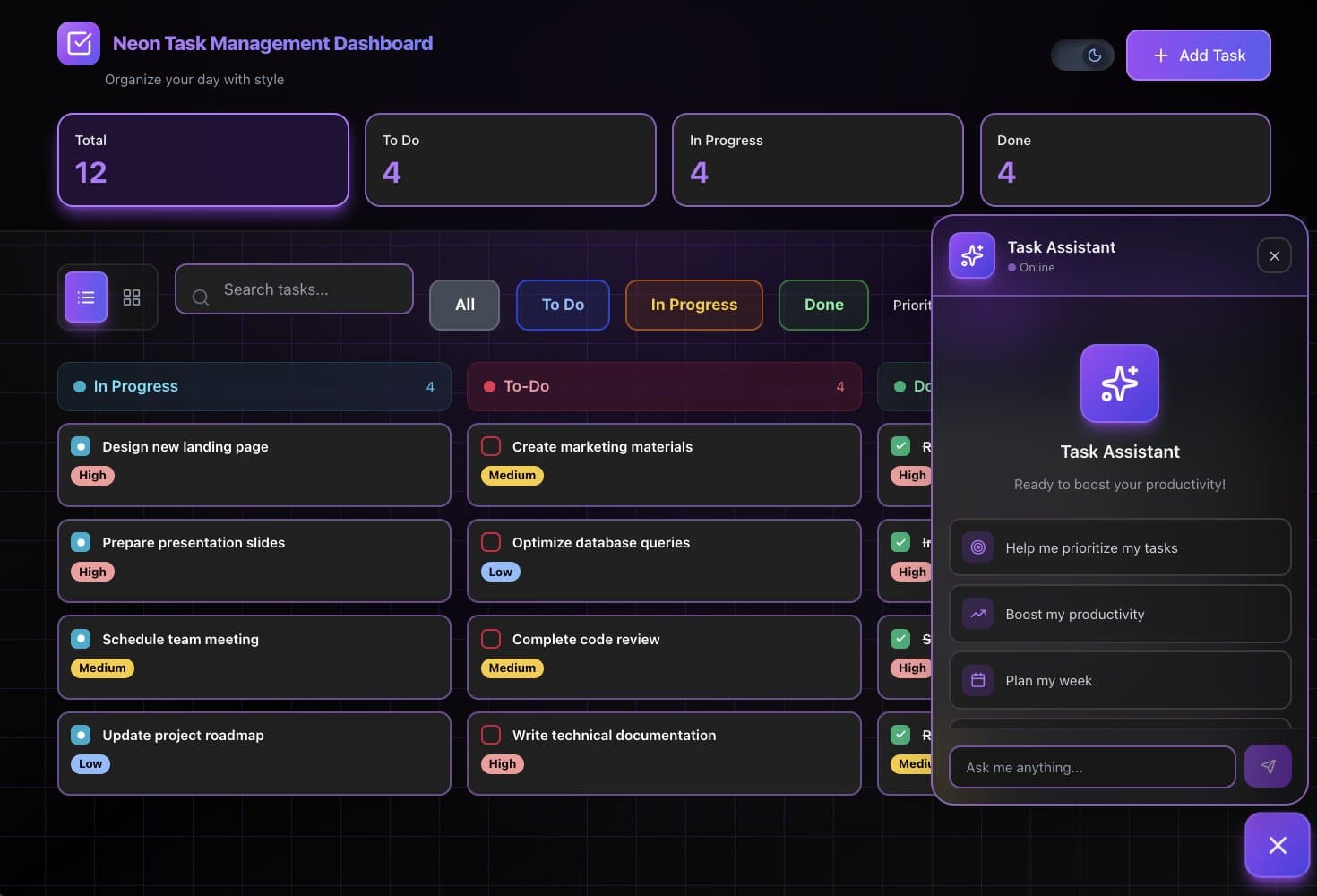
You can also start from a kit. The Neon Task Management Dashboard below is a real Taskade Genesis app kit, not a mockup. It tracks tasks, owners and progress on one board, which is the shape of a factory work queue. Click around in it.
▲ ■ ● This app is live. The board, the counts and the records all come from the workspace behind it.
The kit includes automations, so cloning it needs a paid plan. On Free, describe the app in Taskade Genesis instead and build the automations yourself. More kits for common jobs are in the Taskade app gallery. To learn how the builder works, read the Taskade Genesis guide.
Step 3: Add the Workers: AI Agents and Automations
A factory needs workers at the stations. In Taskade, AI agents are the workers that think, and automations are the workers that act.
| Station | Worker | What it does |
|---|---|---|
| Triage | AI agent with knowledge of your apps and rules | Summarizes the request, names the app it affects and sets a priority |
| Routing | Automation | Assigns the owner and sends a notification when a new request arrives |
| Follow-up | Automation on a schedule | Lists the requests that wait longer than your limit |
| Answers | AI agent | Replies to the person who asked, with the status from the project |
Give the triage agent knowledge it can use: a short document that lists your apps, who owns each one and which requests are urgent. AI agents in Taskade work with knowledge and tools, and they can read the web for research. They do not drive a browser or click through other sites.
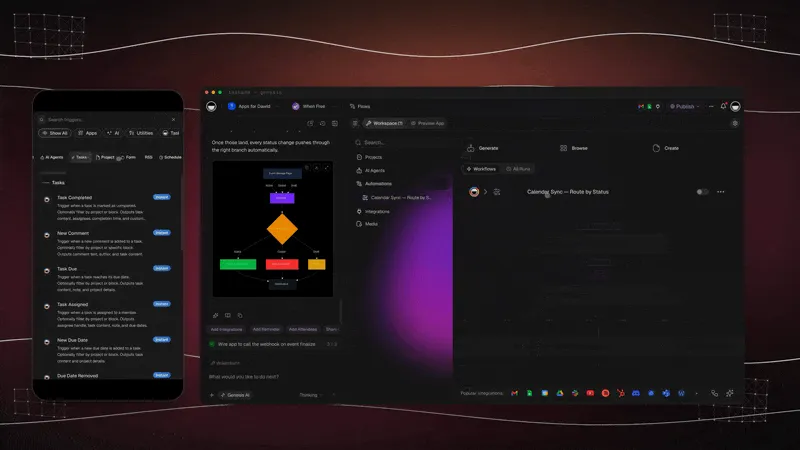
A multi-stage approval, such as manager then finance, is the same pattern with more stations. Our approval workflow tutorial builds one with built-in steps.
Step 4: Review and Approve in Chat With Taskade EVE
The review gate is where a person decides. Before you ask for a change to a live app, set the app to publish manually. With automatic publishing, a saved change reaches visitors right away. The owner opens the app and asks Taskade EVE for the change in chat, for example "add a Budget field to the request form and show it on the board". Taskade EVE builds and edits the app in the same chat, and with manual publishing on, the owner sees the preview before anyone else does.
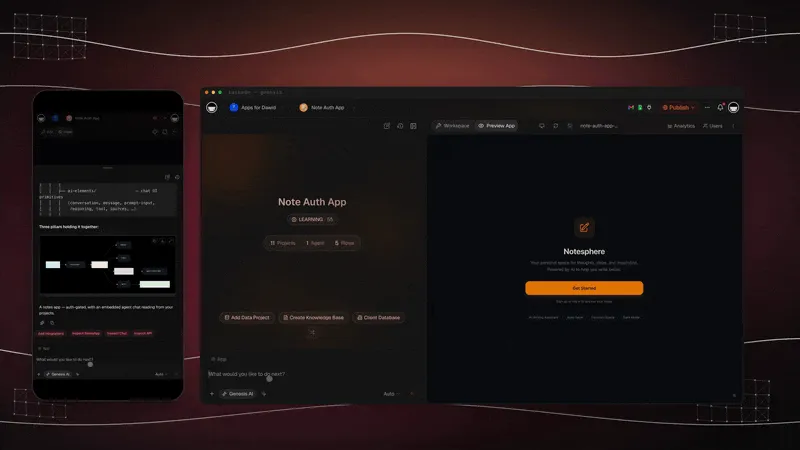
Then the owner verifies the outcome, not the code:
- Submit a real request through the form.
- Check the new row and the new field in the Requests project.
- Confirm that the automation ran and that the agent used the new field.
- Open the app as a second account, to see what other people see.
If the app has client sign-in, remember what it does. Client sign-in works on every Taskade plan, Free included, and it confirms who the visitor is. It does not hide other people's records on its own. You match records to the login and test that with the second account.
Taskade Genesis keeps saved app revisions that you can preview and restore, and a Live badge shows which revision visitors use. Set the app to publish manually if you want every change to wait for this approval. That one setting is what keeps your factory light.
Step 5: Publish, Measure and Repeat
Publish the approved revision, then close the request row with the date. That row is your factory's record. After a few weeks, the Requests project answers the factory questions from the metrics section:
| Factory metric | How to track it in the Requests project |
|---|---|
| Time to ship | Date the request arrived and date the change went live |
| Human touches | A number field: how many times a person had to step in |
| Revert rate | A checkbox: was the change restored to an earlier revision? |
| Open requests | A count of rows not in Done, checked each week |
Ask an AI agent to read the project each Friday and summarize the trend: which apps get the most requests, which requests wait longest, and which changes needed a restore. That summary is your improvement stage. Fix the slowest station first, then take the next request.
For a longer walkthrough of a first build, see our guide on how to build an internal tool without code. Plans and limits are on the pricing page.
Factory Primitives: Code Factory vs Taskade App Factory
Every factory primitive in the two talks has an app-factory version, but not every one has a Taskade feature today. The table maps each primitive to what Taskade ships, so you can see where the app factory is complete and where a person or a workaround fills the gap.
| Primitive | In a code factory | In a Taskade app factory |
|---|---|---|
| Intake | Issues, Slack, Linear, Jira, GitHub | A form, a project, a chat with Taskade EVE, or a trigger from 100+ integrations |
| Spec | A spec-writer agent | You describe the app, and Taskade EVE plans it in chat. A project can hold the requirements |
| Build | A builder agent on a branch | Taskade Genesis builds a live app with its database from one prompt |
| Review | Reviewer agents and CI | A person tests the preview. A custom agent with knowledge can check content |
| Approve | An approver agent or a person | A person publishes the revision |
| Deploy | CI/CD to your servers | Publish to a live URL. Custom domains on Pro and up |
| Monitor | Error trackers and metrics | Automations catch app events, such as form entries, and send them to an agent |
| Improve | Pull requests against the factory definition | You change the agents and automations, and track the trend in a project |
| Model choice | Benchmark suites and model routing | Taskade picks a model for each task. On Pro and up, agents and automation AI steps can use your own OpenAI, Anthropic or Google key |
What Taskade Does Not Do
Taskade is an app factory, not a code factory, and some code-factory features have no Taskade version. Know these limits before you choose, because they decide which kind of factory fits your work.
| Code-factory feature | Taskade today | What to do instead |
|---|---|---|
| CI on your own repository | No. Taskade does not run tests or pipelines on a Git repository | Use GitHub Actions or another CI with a coding agent |
| Sandboxed code execution | No. Taskade does not run your build or your code in a container | Use a coding agent with its own sandbox |
| Browser driving and computer-use QA | No. AI agents read the web for research, but they do not drive a browser | Test the app yourself with a second account |
| A panel of reviewer agents on each change | No built-in reviewer panel | A person reviews the preview. An agent can check content against your rules |
| Automatic rollback on errors | No. Taskade does not watch app errors and undo a change by itself | Restore an earlier app revision by hand |
| Factory defined in code, with diffs and tests | No declarative factory definition | Clone and share app kits, and keep your rules in a project |
| Dark factory, no person approves | Not offered. A person approves and publishes | Keep the light gate: it is a feature, not a gap |
When to Choose a Code Factory Instead
Choose a code factory when your product is a codebase. A SaaS product, a mobile app, a public API or a large repository with tests and a release process all fit tools such as Claude Code, Factory, Warp Factories or the GitHub Copilot coding agent. Those tools speak Git, run your tests and open pull requests your engineers review.
Choose an app factory when the output is a business tool and the person who asks is the person who runs the work. A client portal, a CRM view, an intake form, a tracker or an operations dashboard does not need a repository. It needs a live app, its data, and agents and automations that keep it working. Our guide to agentic engineering without code covers the same choice from the agent side.
Many teams use both. Engineers run a code factory on the product, and the operations, sales and support teams run an app factory on the tools around it.
Related Reading
- Best software factory tools in 2026: code factories for engineers and app factories for teams who do not code
- Free AI app builders: where to start an app factory on a free plan
Frequently Asked Questions
What is an AI software factory?
An AI software factory is a controlled loop that turns requests into shipped software. AI agents do most of the work at each stage: spec, build, review and test. People design the loop, set the gates and approve what ships. The factory is the environment and the measurement around the agents, not one agent on its own.
What is a software factory in simple terms?
A software factory is a repeatable production line for software. Work comes in at one end, passes through the same stages with the same checks every time, and leaves as a working change at the other end. The term dates from R. W. Bemer at General Electric in the late 1960s. In 2026, AI agents work most of the stations.
Who invented the software factory?
R. W. (Bob) Bemer of General Electric proposed the software factory in the late 1960s. He described it in a 1968 IFIP paper and a NATO working paper, and he said the idea first appeared in his 1965 IFIP paper. Hitachi opened its Software Works in 1969, the first facility labeled and managed as a factory.
How is an AI software factory different from a coding agent?
A coding agent completes one task, such as a pull request. A software factory runs the whole system around many tasks: intake, spec, build, review, approval, deploy and monitoring, with stored runs and metrics. A coding agent is one worker. The factory is the line, the checks and the measurement that the workers run inside.
What is a dark factory in software?
A dark factory is a software factory in which no person writes or reviews the code. Dan Shapiro named it Level 5 of AI coding in January 2026: a black box that turns specs into software. The term comes from lights-out manufacturing plants. Most teams in 2026 run a light factory, where a person still approves each change.
What is the difference between a light factory and a dark factory?
In a light factory, a person reviews and approves changes before they ship, at least where a wrong call is costly. In a dark factory, code ships that no person has read, and only machines verify it. Many teams mix the two: low-risk, easy-to-check changes run unattended, and high-risk changes wait for a person.
How do you measure a software factory?
Measure five numbers per change: human touches, time to ship, cost, revert rate and eval pass rate. Human touches show how automated the line is. Time to ship shows speed. Cost per change shows efficiency. Revert rate shows quality after release. Eval pass rate shows whether the agents still do the job well.
Can a business without engineers run a software factory?
Yes, if the output is a working app instead of a pull request. In Taskade, a request arrives through a form or a project, Taskade Genesis builds the app from a prompt, AI agents and automations run it, and, with the app set to publish manually, a person approves each change in chat with Taskade EVE. No repository or code review is needed.
How do I build a software factory without code?
Start with one intake, such as a request form that adds a row to a project. Describe the app in Taskade Genesis to build it. Add an AI agent to triage requests and an automation to route them. Ask Taskade EVE for each change, test it with a real record, then publish. Track time from request to working change.
Does Taskade run a dark factory?
No. Taskade keeps a person in the loop on purpose. Taskade Genesis builds and Taskade EVE edits the app, AI agents and automations do the repeat work, and a person approves the change and publishes it. Set the app to publish manually if you want every change to wait for that approval.
When should I choose a code software factory instead of Taskade?
Choose a code factory when the product is a codebase: a SaaS product, a mobile app, an API or a large repository with tests and CI. Tools such as Claude Code, Factory, Warp Factories or the GitHub Copilot coding agent fit that work. Choose Taskade when the output is a working business app with its data, built by the people who run the work.
How much does it cost to run an app factory in Taskade?
The Free plan includes 3 apps, 1 agent and 2 members, and it starts with no AI credits. On Free, the automations you build yourself get 10 runs a month. Pro is $10 per month billed annually, and Business is $25 per month billed annually. Cloning a kit that includes automations needs a paid plan.
The software factory started as a promise that software could be built like anything else: in a controlled place, with standard steps, and with every step measured. Agents made that promise practical in 2026. For engineering teams, the factory ends at a merged pull request. For everyone else, it can end at a working app. Projects remember the requests, agents think through them and automations act on them, and a person still approves what ships.