







TL;DR: You can build a no-code AI CRM in an afternoon with Taskade Genesis. Describe it in plain English and you get a live app: contacts in a Table or Board, AI agents that log and summarize every interaction, and feedback forms that feed your pipeline automatically. 150,000+ apps have been built on Taskade since launch. No spreadsheets, no engineers.
David runs IT programs, not a sales team. He needed a way to track vendor contacts, log every call, and route feedback from three departments, all without filing a request with engineering. He described what he wanted, and in an afternoon he had a working CRM his whole team now uses. No code, no setup fee, no spreadsheet graveyard.
This guide shows you how to do the same. We will build a no-code AI CRM that holds your contacts, lets AI agents log and summarize interactions for you, and pulls customer feedback straight into the pipeline. Every step is grounded in how Taskade actually works, translated into plain English for operators, not engineers.
If you want the deeper builder reference, see the AI CRM builder wiki. If you want the click-by-click help article, see Taskade as a CRM. This post is the practical walkthrough that ties them together.
Here is the CRM we are building, the moment your contacts land in the Board view:
┌────────────────────────────────────────────────────────────────┐
│  Sales CRM  ›  Board view              ⌕ Search   ⚙ Automations │
├────────────────────────────────────────────────────────────────┤
│  New Lead (4)     Contacted (3)    Proposal (2)    Won (2)      │
│  ───────────      ────────────     ───────────     ───────      │
│  • Acme Co        • Globex         • Initech       • Umbrella   │
│  • Hooli          • Soylent        • Vandelay      • Wonka      │
│  • Stark Ind.     • Wayne Ent.                                  │
│  • Pied Piper                                                   │
│  [ + Add lead ]   AI agent: enrich + score + summarize on drop │
└────────────────────────────────────────────────────────────────┘
What is a no-code AI CRM?
A no-code AI CRM is a customer database where AI agents do the data entry, summarizing, and follow-up for you, built without writing a line of code. In Taskade, your contacts live in a project you can view as a Table or a Board, AI agents log and summarize every interaction, and customer feedback flows in through forms. You describe the CRM you want and Taskade Genesis builds the live app. 150,000+ apps have been built on Taskade this way.
The difference from a spreadsheet is the intelligence layer. A spreadsheet stores rows. An AI CRM reads your notes, writes the summary, scores the lead, tags the sentiment, and pings your team, so the busywork that used to eat your afternoon now happens on its own.
How do I build the contacts database (Table and Board)?
Start with a Table view, because a CRM is a database first. In Taskade you add a project, switch it to the Table view, and create columns that act as your contact fields. The columns you reorder, resize, and hide work exactly like a spreadsheet, except they live in a workspace your AI agents can read.
A starter contact schema looks like this. You can add a column from the button next to the last one and pick a preset or a single-select field for your pipeline stage.
| Field | Type | Example | Why it matters |
|---|---|---|---|
| Name | Text | Jordan Lee | The contact record title |
| Company | Text | Acme Co | Group deals by account |
| Text | jordan@acme.co | Powers follow-up automations | |
| Stage | Single select | Contacted | Drives the Board columns |
| Deal value | Number | $4,200 | Sort and forecast revenue |
| Last touch | Date | 2026-06-18 | Spot deals going cold |
| Owner | Person | David | Who runs the relationship |
Once your stages exist as a single-select field, switch the same project to the Board view. Each stage becomes a column, and you drag a contact card from New Lead to Contacted to Won. You are not building a second tool, you are looking at the same data a different way. Taskade gives you multiple project views in total (List, Board, Calendar, Table, Mind Map, Gantt, and Org Chart), and Timeline lives inside the Gantt view, so you can run your CRM however your brain works.
Here is what the same contact list looks like in the Table view:
┌──────────────────────────────────────────────────────────────────────┐
│  Sales CRM  ›  Table view                                             │
├────────────┬───────────┬──────────────┬───────────┬──────────┬───────┤
│  Name      │ Company   │ Email        │ Stage     │ Value    │ Owner │
├────────────┼───────────┼──────────────┼───────────┼──────────┼───────┤
│  Jordan L. │ Acme Co   │ jordan@acme  │ Contacted │ $4,200   │ David │
│  Mara P.   │ Globex    │ mara@globex  │ New Lead  │ $1,800   │ David │
│  Sam O.    │ Initech   │ sam@initech  │ Proposal  │ $9,500   │ Priya │
│  [ + Add task ]   columns = fields · drag rows · AI fills the gaps    │
└──────────────────────────────────────────────────────────────────────┘
How do AI agents log and summarize interactions?
This is where the CRM stops being a list and starts working for you. You drop a call note, a forwarded email, or a meeting transcript into a contact record, and an AI agent reads it, writes a clean summary, extracts the next steps, and updates the deal stage. Taskade agents ship with built-in tools, including web search and file analysis, so an agent can enrich a new contact and score the lead without you filling in a single field.
You assign the agent a job in plain English. Three jobs cover most CRMs:
| Agent | What you tell it | What it does |
|---|---|---|
| Interaction logger | "Summarize each note I add and pull out next steps" | Turns raw notes into a tidy timeline per contact |
| Lead scorer | "Score new leads 1 to 5 on fit and intent" | Ranks your pipeline so you call the hot ones first |
| Pipeline mover | "Update the stage when the summary shows a meeting booked" | Keeps the Board honest without manual dragging |
The agents are not generic chatbots. They carry persistent memory, so they remember the context of a deal across hundreds of records, and you can route them across frontier models from top AI labs depending on the task. For richer enrichment you can run multi-agent collaboration, where one agent researches the company while another scores the lead and a third drafts the outreach, all coordinated in orchestration mode.
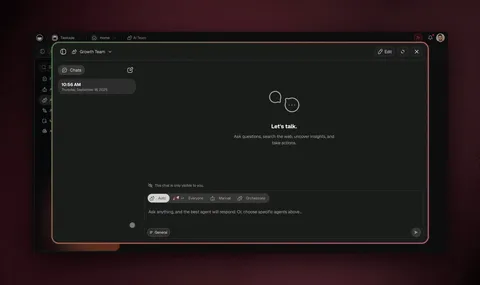
Want a head start on the agents? The CRM agents collection and the sales agents collection have ready-made agents you can add to your workspace, including a lead scoring agent and a CRM data integration agent. Drop one into your project and point it at your contacts.
How do I feed customer feedback into the pipeline?
Add a Taskade form to your CRM project, and every submission becomes a new record automatically. Each form has fields you choose (name, email, type of request, description), and when a customer submits it, an Add Task action writes their feedback straight into a Table view. No copy-paste, no missed requests. This is exactly how Taskade's own feedback workflow runs.
From there the intelligence layer takes over. An AI agent can tag the sentiment of each piece of feedback, group similar requests together, and surface the trends your product team needs to see. The customer feedback sentiment agent and the feedback collection tool are built for exactly this.
Then you close the loop with an automation. When you mark a request Done, a follow-up email goes out to the customer who asked for it, so they hear that you shipped the thing they wanted. The whole flow looks like this:
┌─────────────────────────────────────────────────────────────┐
│  Feedback Form          →   CRM Table          →  Automation │
├─────────────────────────────────────────────────────────────┤
│  Name: _______          New row created         on Status =  │
│  Email: ______          Type: Feature Req       "Done":      │
│  Type:  [Feature ▾]     Status: New      ─────► email sender │
│  Details: _________     Agent tags: 😀 positive             │
│  [ Submit ]             grouped: "exports x12"   "We shipped │
│                                                  it! 🎉"      │
└─────────────────────────────────────────────────────────────┘
| Stage | Without AI CRM | With Taskade AI CRM |
|---|---|---|
| Collect | Email inbox, scattered DMs | One form feeds the pipeline |
| Organize | Manual triage | Auto-row + AI sentiment tags |
| Prioritize | Gut feel | Agent groups + counts requests |
| Close loop | You forget to reply | Automation emails on Done |
How do I connect email, Slack, and Shopify?
Taskade offers 100+ bidirectional integrations, so your CRM talks to the tools your team already lives in. Triggers pull events in, and actions push data out. A new form submission or a Calendly booking can create a contact, and a high lead score can fire a Slack alert or a Gmail follow-up. Shopify and Stripe are native, so an order or a payment can create or update a contact without you lifting a finger.
These flows run as reliable, durable automation workflows. They can branch, loop, filter, wait minutes to days, and resume from the exact step that failed instead of starting over, so a follow-up sequence that waits three days for a reply does not break if something hiccups in the middle.

Can I just clone a CRM instead of building one?
Yes, and for most operators this is the fastest start. The Community Gallery has live, cloneable CRM and pipeline apps you can copy into your workspace in one click, then rename the fields and point your own agents at them. You are editing a working CRM in minutes instead of staring at a blank project.
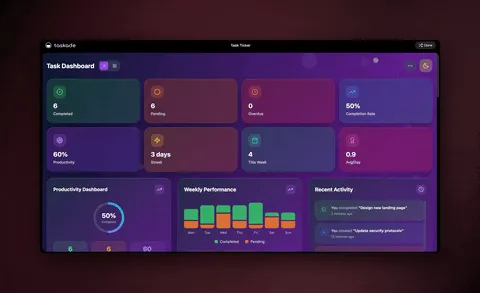
Cloning and building from a prompt both land you in the same place: a live app with a shareable URL. From there you can explore the Community Gallery to see what other operators built, or open Taskade Genesis and describe your own.
What does a no-code AI CRM cost?
You can build and run a real CRM on the free plan, with no per-contact fee and no setup cost. Paid plans add more AI usage, automation runs, and team seats. Here is the full annual-billing lineup:
| Plan | Price (annual) | Best for |
|---|---|---|
| Free | $0 | Solo operators testing a pipeline |
| Pro | $10/month (Popular) | Up to 10 users on one workspace |
| Business | $25/month | Growing sales and support teams |
| Max | $100/month | Heavy AI and automation usage |
| Enterprise | $250/month | Custom domains, sign-in, scale |
A CRM that scales is part of the deal. Your contacts live in a project that holds your full database, agents carry persistent memory across records, and you can publish the finished CRM on a custom domain with built-in sign-in when you are ready to share it with a client or your wider team.
Frequently Asked Questions
Can I build a CRM without code?
Yes. With Taskade Genesis you describe the CRM you want in plain English and it builds a live app with a contacts database, pipeline stages, and AI agents. There is nothing to install and no engineering team required. It starts free, with Pro from $10/month on annual billing.
How does an AI CRM log customer interactions for me?
An AI agent reads the notes, emails, or call transcripts you drop into a contact record and writes a clean summary, pulls out next steps, and updates the deal stage. Taskade agents ship with built-in tools, so they can enrich a contact and score a lead without you typing a single field.
What is the best view for a CRM in Taskade?
Most operators run their CRM in the Table view (a spreadsheet of contact fields) and the Board view (pipeline stages as draggable columns). You can switch between all project views on the same data at any time. See Taskade as a CRM for the click-by-click setup.
How do I collect customer feedback into my CRM?
Add a Taskade form with fields like name, email, type of request, and description. Each submission becomes a new row in a Table view automatically, an AI agent tags the sentiment and groups similar requests, and a follow-up automation emails the customer when their request is marked Done.
Do I need a separate tool for sales and customer feedback?
No. A Taskade AI CRM holds contacts, the sales pipeline, and customer feedback in one workspace. This is the Workspace DNA advantage: Memory, Intelligence, and Execution in one place, so your team works from a single source of truth.
Can my AI CRM connect to email, Slack, and Shopify?
Yes. Taskade offers 100+ bidirectional integrations. Triggers pull events in (a form submission, a Calendly booking, a Shopify order) and actions push data out (a Gmail follow-up, a Slack alert). Shopify and Stripe are native. Browse the full list of automations.
How much does a Taskade AI CRM cost?
You can build and run a CRM on the free plan. Paid plans start at Pro $10/month for 10 users (Popular), then Business $25/month, Max $100/month, and Enterprise $250/month, all on annual billing. There is no per-contact fee.
Will my AI CRM scale as my contact list grows?
Yes. Your CRM lives in a project that holds your full contact database, AI agents carry persistent memory across thousands of records, and reliable automation workflows can branch, loop, filter, wait, and resume from failure. You can also publish the CRM on a custom domain with built-in sign-in.
How is Taskade different from Salesforce or HubSpot?
Salesforce and HubSpot are mature CRMs that take weeks to set up and price by seat. Taskade Genesis builds a working AI CRM from a single prompt in an afternoon, runs AI agents on your data natively, and starts free. Choose it when you want speed, AI built in, and one workspace for contacts, projects, and feedback.
Can I clone a ready-made CRM instead of building from scratch?
Yes. The Community Gallery has live, cloneable CRM and pipeline apps you can copy into your workspace in one click, then customize with your own fields and agents. Cloning gives you a working starting point in minutes.
Build it this afternoon
You do not need a sales ops team or an engineering ticket to run a real CRM. You need a contacts database, AI agents that handle the busywork, and feedback that flows into the same place your deals live. That is a Taskade workspace.
Start by opening Taskade Genesis and describing the CRM you want, or clone one from the Community Gallery and make it yours. Add your fields in the Table view, point an agent at your contacts, and wire one automation to close the loop. For the deeper builder reference, keep the AI CRM builder wiki open in a tab.
This is Workspace DNA in action: your contacts are the Memory, your agents are the Intelligence, and your automations are the Execution, each feeding the next. ▲ ■ ●