






import IFrame from '@/components/ui/IFrame';
TL;DR: Your name, your colors, a branded login instead of a shared folder. Five free agency client portal templates, each a live Taskade Genesis app with real projects, AI agents, and automations already configured. Clone any of the five from inside this post in one click, on the Free plan. Open the first portal →
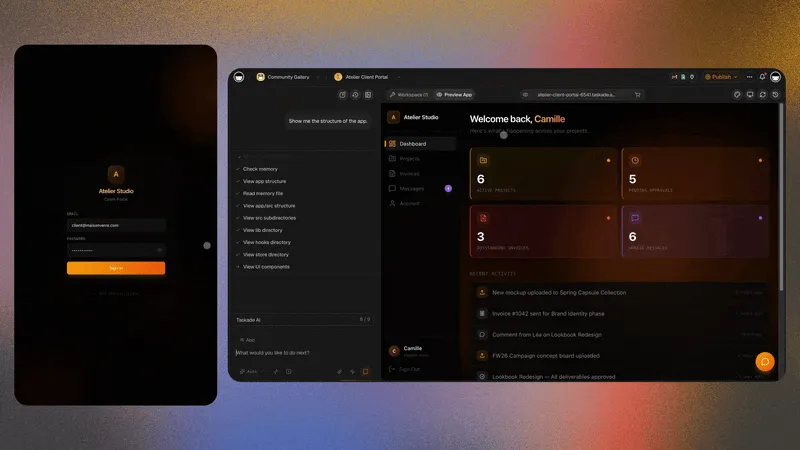
Your client opens a link, signs in, and sees their own space: what you delivered last week, what is in progress, what needs their approval by Thursday. Your name at the top. Your colors. Nothing belonging to anyone else. That is the whole idea, and it is the thing that separates an agency a client describes as "organized" from one they describe as "professional."
The five portals in this post are that thing, already built. Each is a live Taskade Genesis app with projects, an AI agent, and automations configured — embedded below so you can click through the real screens before you commit. Click Use this app inside any embed and it clones into your free workspace with everything intact. Rename the projects, drop in your logo, send the URL. Same day.
A portal earns its keep by doing things, not by looking tidy. Automations that notify the client the moment a deliverable moves to review. Agents that draft the weekly status summary from your project data so your account manager edits instead of writes. Booking built in, so a client schedules the call from inside the portal rather than from a thread. That is the difference between a place clients visit once and a place they check on Monday morning.
Every one of the five below is free to clone. The projects, the views, and the AI agent work on the Free plan; the automations that notify the client and move a deliverable switch on with Pro at ten dollars a month billed annually. For the wider landscape — including what the paid, per-seat portal products charge and where they still win — see client portal builders, best customer portal software, and 10 AI client portals you can deploy instantly.
What Every Great Client Portal Needs in 2026
Before choosing which of the five portals to clone, understand the six components that separate client portals clients actually use from portals they open once and never return to.
Component 1: Client intake form. The portal relationship begins at onboarding. An intake project that captures project goals, timeline, budget bracket, key stakeholders, brand assets, and access credentials on day one means your team never starts a project with incomplete information. The intake data also becomes the source material your AI agent reads when generating client-facing communications. It knows the client's name, their deadline, their budget constraints, and who to copy on communications.
Component 2: Shared project tracker. Clients don't need access to your internal task management system. They need a clean view of three things: what has been delivered (marked Done with a date stamp), what is currently in progress (marked In Progress with an estimated completion date), and what's next in the queue. Taskade Genesis portals surface this through Board, Calendar, Gantt, and List views, clients see the same data your team works in, filtered to what's relevant to them. The Board view is the most client-friendly: columns represent status, cards represent deliverables, and a client can assess project health in thirty seconds without asking a question.
Component 3: Deliverable library. Every approved asset, copy, design files, reports, research documents, invoices, brand guidelines, lives in a dedicated project that both agency and client can search. A searchable deliverable library eliminates the most common agency-client friction request: "Can you resend the logo from the March refresh?" When the client can find it themselves, you stop receiving that email.
Component 4: Communication thread. Email threads lose context. Slack channels are noisy. A comment system attached to the actual task or deliverable, where the conversation and the work live in the same place, keeps context intact for the entire engagement. Taskade projects have native commenting with @-mention notifications. Clients with Commenter access can annotate deliverables, ask questions on specific tasks, and approve work without editing the project structure. The comment history is permanently attached to the deliverable, not buried in an email thread dated 14 months ago.
Component 5: Billing and contract repository. Statements of work, invoices, contracts, scope change orders, and NDA documents stored in a dedicated administrative project that both parties can access. When a client asks "what was in the original scope?", they open the portal and find the SOW. When finance asks about a client's billing history, the project has every invoice with status. You stop emailing PDF attachments back and forth across a two-year engagement.
Component 6: AI status agent. The component that makes a Genesis portal different from every other client portal tool: an AI agent that reads the project data and generates a client-facing status summary on a weekly schedule or on demand. Your account manager reviews the draft and approves it. They do not write it from scratch. At a ten-client agency where each status update takes twenty minutes to write manually, the agent buys back more than three hours per week, one-third of a day, every week.
┌──────────────────────────────────────────────────────────────┐
│  ▲ MEMORY            ■ INTELLIGENCE        ● EXECUTION       │
│  Client projects     Status Agent          Weekly update auto  │
│  Deliverable lib     Intake Advisor        New-client onboard  │
│  Intake forms        Project Coordinator   Task-change alert   │
│  Contract files      Knowledge Curator     Reminder sequence   │
│  Booking records     Booking Agent         Confirmation auto   │
└──────────────────────────────────────────────────────────────┘
The Workspace DNA loop, Memory → Intelligence → Execution → Memory, runs inside every portal below. When you update a task to "In Review," the Status Agent reads the change. When the Status Agent drafts the weekly client summary, the automation delivers it. When the client approves a deliverable via the portal, that approval logs back to Memory. The loop runs itself.
The five portals below implement this architecture for five distinct agency workflows. Read the descriptions, pick the one that matches your engagement model, and clone it.
Portal 1: Client Portal (The Execution-Led Foundation)
The Client Portal is the most widely deployed agency portal in the Taskade Genesis Community. Built with three projects, one AI agent, and four automations, it is execution-heavy by design. It prioritizes making things happen and keeping clients informed over building a deep knowledge base. Intake project, profile project, and client dashboard project give the client a clean three-screen experience from first contact through ongoing retainer delivery.
This portal is the right choice for agencies running retainer relationships where the primary client need is ongoing visibility into what's being delivered, when, and by whom. Marketing agencies, content studios, and PR firms with monthly retainer clients are the primary use case.
▲ ■ ● This is live. Click "Use this app" inside to clone the Client Portal (3 projects · 1 agent · 4 automations) into your workspace.
What the Client Actually Gets
A branded login of their own. Publish the portal and turn on client sign-in — each client signs in with their email and lands on your page, not a generic tool's page. Sign-in works on every plan including Free. Put it on portal.youragency.com and the last trace of "we use a shared folder" is gone.
They see only what is theirs. Role-based access runs seven tiers from Owner down to Viewer. A client on Viewer or Commenter sees the Client Dashboard and nothing else — not the Intake project, not the Profile project, not another client's work. You do not have to remember to hide anything; the structure hides it.
Booking and tracking already built in. Sessions, milestones, and approvals live in the same app as the deliverables, so a client books the check-in call from inside the portal instead of from a separate scheduling link. See best AI booking systems for how that half compares against dedicated schedulers.
Projects, what's inside:
The Intake project is a structured form-to-table that captures new client details on onboarding day. The table has eight columns: company name, primary contact and email, project type (retainer, project-based, advisory), budget bracket, timeline start and end dates, brand assets (links to Google Drive or uploaded files), and key stakeholder contacts. When a new client fills the intake form, the automation creates the row automatically. The Status Agent reads this project to personalize every client communication. It knows the client's name, timeline, and constraints without you briefing it manually before each update cycle.
The Profile project stores the ongoing relationship record across the full engagement. Think of it as a lightweight CRM row that lives inside the same workspace as the active work. Columns include contract dates, renewal flag (90-day renewal reminder fires automatically), key stakeholder contacts with titles, historical deliverables archive (links to completed work from prior months), notes from check-in calls (brief summaries, not transcripts), and the client's current NPS score. When a new account manager joins your team, they open the Profile project and understand the relationship in ten minutes.
The Client Dashboard project is the shared workspace the client accesses. It shows active tasks in Board view across four columns: To Do, In Progress, Awaiting Client (deliverables that need client review or input), and Done. The Calendar view shows delivery dates and upcoming milestones. The List view filtered to Done gives the client a running record of everything completed in the engagement. Clients with Viewer or Commenter access see this project only. They cannot access the Intake or Profile projects. Clean separation between client-visible and agency-internal information.
The Status Agent, detail:
The Status Agent runs every Friday at 3 PM and reads the Client Dashboard project. It produces a client-facing status summary with four sections:
- Delivered this week: Every task that moved to Done this week with a one-line description of what was completed.
- In progress: Every task currently In Progress with the estimated completion date.
- Awaiting your input: Every task in Awaiting Client status with a specific request for the client (approval, feedback, asset, access credential).
- Next week: The three most significant upcoming deliverables with their scheduled dates.
Your account manager receives a Slack notification that the draft is ready, reviews it in two to three minutes, makes any adjustments for context the agent didn't have, and sends it to the client. Average total time: four minutes per client per week. Without the agent: twenty to thirty minutes.
The four automations:
- New intake submission → welcome email + dashboard scaffold: When a new client fills the intake form, the automation creates their Client Dashboard project with the standard task template, sends a welcome email via Gmail with the portal URL, and creates a calendar reminder for the 14-day check-in call.
- Task moved to Awaiting Client → client notification: When any task moves to the Awaiting Client column, an email fires to the client's primary contact with the task name, what specifically is needed, and a deadline (default: 48 hours).
- Weekly status draft → account manager alert (Friday 3 PM): Status Agent draft fires, Slack notification goes to account manager to review and send.
- Contract renewal flag (90 days before contract end date): Fires a Slack alert to the account manager with the renewal prep checklist: new SOW draft, pricing discussion flag, and renewal probability score (updated by you after the alert fires).
When to clone the Client Portal: You are running two or more active retainer clients, your account managers are spending more than one hour per week per client on status updates and check-in prep, and you want a portal clients actually open weekly, not the Notion page they bookmarked on day one and haven't visited since.
See also: self-updating client portals for how the status agent replaces the weekly update email, agency retainer tracker for keeping scope honest inside the same workspace, and custom agents for editing the Status Agent's instructions to match your house voice.
Portal 2: Client Portal Nexus (The Memory-Led Knowledge Hub)
Client Portal Nexus is the knowledge-rich variant of the Client Portal. Where the original prioritizes execution and automation throughput, Nexus prioritizes depth, six projects versus three, organized around a richer memory architecture that stores brand guidelines, competitive research, historical campaign results, and the administrative record of the full engagement. One AI agent (the Knowledge Curator), one automation (monthly digest).
This portal is built for knowledge-intensive agency relationships: brand strategy firms, content-heavy retainers, long-term SEO and inbound marketing engagements, UX research agencies, and management consultancies where the agency's core deliverable is institutional knowledge built on behalf of the client over time.
▲ ■ ● This is live. Click "Use this app" inside to clone the Client Portal Nexus (6 projects · 1 agent · 1 automation) into your workspace.
Six projects, the extended architecture:
The Nexus extends the three-project structure of the standard Client Portal with three additional projects tailored to knowledge-heavy engagements:
The Brand and Assets project is a searchable library organized by asset type: logos (all formats), color palette reference, typography guidelines, approved imagery, tone-of-voice documentation, taglines approved and rejected, and competitive messaging analysis. Every asset row has a version date so you can see what changed when. When a junior designer joins a project six months in, they search this project instead of asking the account manager for the brand guide.
The Research and Intelligence project is the cumulative knowledge base. Rows are organized by research category: competitive analysis (competitor positioning, pricing, recent moves), audience insights (persona documentation, interview notes, survey data), market data (category size, growth rates, relevant publications), and campaign intelligence (which messages resonated and why, based on previous campaign data). This is the project that makes your tenth month of engagement more valuable than your first, the Nexus compounds knowledge.
The Administrative project stores the business layer of the engagement: statements of work with signed dates, invoices with payment status, scope change orders with approval records, NDAs, and rate cards. When a client questions a scope boundary or a billing item, you open the Administrative project together, the SOW with the client's electronic signature is on the second row.
The Knowledge Curator agent, detail:
The Knowledge Curator runs a monthly audit across all six projects. The output is a knowledge health report:
- Stale assets: Brand or research documents last updated more than 90 days ago that may need a freshness review. Flag to account manager with update recommendation.
- Conflicting data: Research rows where newer data contradicts older data (identified by comparing date-stamped rows on the same topic). Flag both rows with a "reconcile" tag and a note identifying the conflict.
- Archive candidates: Deliverables from more than 120 days ago in the Client Dashboard that are Done and have no dependency on current work. Recommendation to move to the Research and Intelligence archive to keep the active dashboard clean.
- Knowledge gaps: Topics the account manager has referenced in check-in notes or Status Agent summaries that don't have a corresponding entry in the Brand and Assets or Research and Intelligence projects. Flag as "document this."
The Knowledge Curator report prevents the most common knowledge-base failure: six months into an engagement, the portal has become a digital junk drawer, half the documents are outdated, the useful ones are buried under old drafts, and nobody knows which competitive analysis was the one you presented to the client's CMO. The monthly audit keeps the Nexus clean and usable for the full engagement lifecycle.
When to clone the Nexus: You are running a long-term strategic engagement (six months or longer), the client relationship involves multiple stakeholders who need access to institutional knowledge across the full relationship history, or your core deliverable is intellectual work that accumulates value over time rather than discrete task completion.
See also: Client Onboarding Templates for onboarding-specific Genesis apps that pair with the Nexus structure, agent knowledge for how the Knowledge Curator reads your files, and AI agency workspaces for ten more agency-shaped apps you can clone.
Portal 3: Project Portal (The Automation-First Delivery System)
The Project Portal is the most automation-heavy option in this post, five automations across three projects, making it the right choice when your agency's workflow involves formal approval gates, multiple handoffs, and status transitions that currently require manual communication at each step.
Built for agencies doing project-based (not retainer) work: web development shops, creative studios delivering discrete campaigns, branding firms where each engagement has a defined scope and a formal sign-off requirement, and consulting firms where deliverable approvals are contractually significant.
▲ ■ ● This is live. Click "Use this app" inside to clone the Project Portal (3 projects · 1 agent · 5 automations) into your workspace.
Three projects, the project lifecycle:
The Intake project captures the initial brief and scope definition with more detail than the retainer-oriented Client Portal. It includes fields for: project deliverables (numbered list from the SOW), milestone dates, technical requirements, third-party dependencies (vendor access, API keys, external approvals), and the client's definition of done for each deliverable. The Project Coordinator agent reads this project at project kick-off and generates a structured launch brief for the internal team, every team member sees the same scope understanding from day one.
The Active Work project is the shared Kanban board tracking every deliverable through its lifecycle. Five columns:
- Not Started: Committed deliverables that haven't entered production yet.
- In Progress: Active work with assignee and estimated completion date.
- Internal Review: Completed internally but awaiting agency QA before client exposure.
- Client Review: Sent to client for review, awaiting approval with a deadline.
- Approved/Done: Client-approved with the approval date, approver name, and approval channel (email, portal comment, meeting) logged.
The Handoff project is the structured sign-off record, the legal and contractual layer. Every approved deliverable from the Active Work project generates a corresponding row in Handoff with: deliverable name, client-approved date, approver name and title, delivery format, and a link to the final asset. The Handoff project is the document you produce if a client ever disputes whether something was delivered or approved. It is also the document you present at project close as the "completion certificate". Here is every item from the SOW, here is when it was approved, here is who approved it.
The Project Coordinator agent, detail:
The Project Coordinator agent watches the Active Work board and generates a daily internal briefing:
- Stage movements (last 24 hours): Every task that changed stage yesterday, with the current stage and next recommended action.
- Overdue items: Every task past its estimated completion date, with the day count and a flag for whether it's on the critical path.
- Client Review bottleneck: Any task that has been sitting in Client Review for more than 72 hours. This is the single most common project delivery failure. The client has not responded. The agent flags it with a recommended escalation action: email reminder, account manager call, or executive escalation based on the delay length.
- External dependency status: Any third-party dependency from the Intake project that hasn't been confirmed in the last 48 hours (API key provided? Vendor access granted? Third-party deliverable received?).
The Project Coordinator brief is delivered to a Slack channel every morning. An account manager scans it in two minutes. Issues are visible before they become emergencies.
Five automations, the complete project delivery sequence:
- New intake submission → project scaffold + kick-off email: Creates the Active Work board with the deliverable list from the Intake project, sends the client a kick-off email with portal URL and first milestone dates.
- Task moved to Client Review → client notification with deadline: Emails the client's primary contact with the deliverable name, review link, and a 48-hour deadline. Subject line: "[Deliverable name] ready for your review, response requested by [date]."
- Task in Client Review 72+ hours → account manager Slack alert: If no movement in Client Review after 72 hours, fires an escalation alert to the account manager with the client name, deliverable, and days elapsed.
- Task approved → Handoff project entry: Moves the task to Done in Active Work and creates the sign-off row in Handoff with the approval date, approver, and final asset link.
- All deliverables in Handoff with approval stamps → project-close sequence: When every row in Handoff shows a completion stamp, fires the project-close email to the client with the full Handoff record as a PDF attachment and the invoice link via Stripe.
The fifth automation, the automatic project-close sequence, is the one most agencies build manually, one email at a time. The portal fires it without human initiation. Your account manager receives a Slack notification that it fired and reviews the Handoff record for completeness. If everything looks correct, the close email is already on its way.
When to clone the Project Portal: You are doing project-based engagements with formal approval gates, your team frequently loses track of what's waiting on the client versus what's waiting on internal resources, or you want a documented approval chain for every deliverable without building a custom workflow tool.
See also: Gantt view for milestone-shaped delivery, branch actions for the approve-versus-escalate fork in automation 3, Stripe checkout for the invoice link in automation 5, and AI invoice generators for the billing half of project close.
Portal 4: Onboarding Guide Portal (The Knowledge Journey System)
The Onboarding Guide Portal is purpose-built for agencies and service businesses where the client themselves needs to be onboarded into a structured body of knowledge before or alongside the delivery. SaaS implementation agencies, training program providers, professional certification services, enterprise software consultants, and digital transformation firms, any service where the client needs to learn something, not just receive something.
It is also the right template for agencies that want to systematize their own internal client-onboarding process. Four projects, one AI agent (the Onboarding Guide agent), and three automations.
▲ ■ ● This is live. Click "Use this app" inside to clone the Onboarding Guide Portal (4 projects · 1 agent · 3 automations) into your workspace.
Four projects, the structured learning architecture:
The Welcome project is the client's first screen, a curated orientation experience that replaces the fifteen-email welcome sequence most agencies send. It is structured as a guided checklist: "Step 1: Watch the 4-minute intro video," "Step 2: Meet your team," "Step 3: Complete the intake form," "Step 4: Review your onboarding schedule." Each item links to the appropriate project or resource. The Welcome project is temporary and sequential, once the client completes it, they graduate to the Learning Path.
The Learning Path project organizes the onboarding content into structured modules. Each module is a parent task with child tasks for the sub-components. Modules have target completion dates and an explicit "unlock" logic, Module 2 is visible only after Module 1 is marked complete. The Learning Path mirrors a phased implementation timeline: Module 1 (orientation and access), Module 2 (core workflow training), Module 3 (integration configuration), Module 4 (advanced features and edge cases), Module 5 (go-live certification). The client works through the path at their own pace; the portal tracks their position without requiring your team to check in manually.
The Resources project is the evergreen reference library, the permanent knowledge base the client returns to throughout the engagement and beyond. Organized by topic category: getting started, core workflows, integrations, troubleshooting, advanced configurations, FAQs, and release notes. Unlike the Learning Path (which is sequential and temporary), the Resources project is searchable and permanent. When a client asks "how do I configure the Slack integration again?" six months after onboarding, they search the Resources project, not your inbox.
The Progress project tracks each client's onboarding journey with a milestone completion record: module name, target completion date, actual completion date, time delta (ahead or behind schedule), and a notes column for obstacles or questions that came up during that module. The Onboarding Guide agent reads this project to generate the weekly onboarding health briefing.
The Onboarding Guide agent, detail:
The agent reads the Learning Path and Progress projects and produces a weekly onboarding health briefing for your account team:
- On-track clients: Clients who completed their current module on or ahead of schedule. Recommended action: send a congratulatory message, prepare for the next module unlock.
- At-risk clients: Clients with one or more modules overdue by more than three days. Recommended action: schedule a check-in call, identify the specific blocker, escalate if the pattern continues.
- Completed clients: Clients who have finished all onboarding milestones and are ready to transition from onboarding to active delivery (or ongoing support). Recommended action: trigger the transition email and move the client from the Onboarding Guide Portal to the standard Client Portal for ongoing engagement management.
- Time-delta analysis: Are clients consistently getting stuck on the same module? If Module 3 (integration configuration) shows an average five-day delay across eight clients, the module may need to be redesigned or split into two shorter modules. The agent surfaces this pattern before you identify it in a quarterly review.
Three automations:
- New client added → welcome sequence: A five-email onboarding sequence fires over the first five days: Day 1 (welcome + portal URL), Day 2 (team introduction), Day 3 (first module reminder), Day 5 (check-in prompt asking about any friction). Each email is drafted by the Onboarding Guide agent based on the client's Intake data. They receive personalized content, not a generic blast.
- Module completion → unlock + congratulations: When a client marks a module complete in the Learning Path, the next module unlocks and a congratulatory Slack message fires to the account manager ("Client X completed Module 2, 3 of 5 modules done"). The account manager can choose to send a personal email; the automation handles the module unlock without human intervention.
- Final milestone completion → graduation + transition: When all modules are complete, the "onboarding graduation" email fires with a summary of what was covered, a link to the Resources project (their permanent knowledge base), and instructions for transitioning to the ongoing support or delivery relationship.
Why onboarding completion is a retention signal: Research in SaaS consistently shows that customers who complete structured onboarding retain at 2–3x the rate of customers who self-onboard. The same pattern holds in agency services: clients who complete a structured knowledge journey are more likely to see ROI in the first 90 days, less likely to generate support burden, and more likely to expand their engagement after the initial term. The Onboarding Guide Portal is a retention investment, not just a logistics tool.
When to clone the Onboarding Guide Portal: You are running a service where clients need to learn something before they get full value, your current onboarding relies on ad-hoc Zoom calls and email forwards, or you want to track which clients are successfully onboarded versus at churn risk within the first 30 days.
See also: Employee Onboarding Templates for the internal team onboarding variant of this architecture, AI customer onboarding software for how this compares to dedicated onboarding tools, and scheduled automations for wiring the five-day welcome sequence.
Portal 5: Class Booking Portal (The Scheduling-First Operations Hub)
The Class Booking Portal is purpose-built for service businesses where scheduling is a core operational function, not a secondary administrative task. Fitness studios, yoga and wellness centers, dance schools, tutoring services, music teachers, workshop organizers, professional development programs, coaching practices, and any service business that sells time-bounded sessions requiring booking, confirmation, reminder, and rescheduling workflows.
This portal solves a specific and quantifiable problem: the email back-and-forth that consumes 20–30 minutes per booking when you manage scheduling manually. At ten bookings per day, that's three to five hours of daily scheduling overhead. The Class Booking Portal automates the full booking lifecycle, confirmation, reminder, reschedule, and cancellation, leaving your team free to focus on the service itself.
▲ ■ ● This is live. Click "Use this app" inside to clone the Class Booking Portal (3 projects · 1 agent · 3 automations) into your workspace.
Three projects, the booking lifecycle:
The Schedule project is a Calendar view of all classes, sessions, and appointments. Each event is color-coded by type: group class (blue), one-on-one session (green), consultation (orange), special event (purple). Each event row has: title, instructor/host, date and time, capacity (for group sessions), current enrollment count, location or video call link, and a "waitlist" flag for sold-out sessions. The Booking Agent reads this project to check availability before confirming any booking request. The instructor or admin sees every slot in Calendar view without switching to a separate scheduling tool.
The Members project is the client CRM, the longitudinal record of every person who has ever booked with you. Each row has: name, email, phone, membership tier (Free Trial, Monthly, Annual, Drop-In), booking history (total sessions, last session date), attendance record (attended vs. no-show, percentage), emergency contact, health notes (relevant to fitness or wellness services), and payment status. The Members project is what makes the Booking Agent intelligent: it personalizes confirmations based on booking history ("See you Saturday, your 23rd session this year"), flags expired memberships before confirming a booking, and surfaces at-risk members (anyone who hasn't booked in 30 days) for a re-engagement reach-out.
The Administrative project tracks the business layer: membership types and pricing, active subscriptions with renewal dates, expired or cancelled memberships, gift certificates with redemption status, and billing history. The Booking Agent reads the Administrative project to verify membership status before confirming bookings, a client with an expired membership receives a different confirmation flow (renew first, then book) than a client with an active annual plan.
The Booking Agent, detail:
The Booking Agent manages the booking lifecycle across all three projects:
On new booking request (via form submission, direct message, or webhook from a booking form):
- Reads the Schedule project to confirm availability.
- Reads the Members project to verify membership status, check for scheduling conflicts, and retrieve personalization data.
- If available: confirms the booking, updates the enrollment count in Schedule, updates the last-booking date in Members, and drafts the confirmation email.
- If unavailable: offers the nearest available slot in the same time block and adds the client to the waitlist in the Schedule project.
On membership expiry check (runs daily):
- Reviews Administrative project for memberships expiring in the next seven days.
- Drafts a renewal reminder for each expiring member and queues it for account manager review.
On no-show detection (fires four hours after a session end time if the client didn't check in):
- Updates the Members attendance record.
- Drafts a "We missed you" email with an easy rebooking link for the same slot next week.
Three automations:
- Booking confirmation (fires immediately on confirmed booking): Sends confirmation email with session details, location or video link, add-to-calendar button (Google Calendar and Apple Calendar links), and the studio's cancellation/reschedule policy. For group sessions, includes the number of remaining spots (so the client knows the class fills up).
- 24-hour reminder (fires the day before the session): Reminder email with session time, location, what to bring, and a one-click reschedule link. For clients who have a no-show history in their Members record, the agent adds a personal note from their instructor.
- No-show follow-up (fires four hours after session end if no check-in logged): "We missed you" email with the client's name, the session they missed, and a rebooking link for the same time slot next week. Keeps the re-engagement warm without requiring a manual follow-up.
The retention math: A studio with 200 members and a 10% monthly churn rate loses twenty members per month. If the 24-hour reminder automation and no-show follow-up automation together prevent four cancellations and two no-show churn events per month, the retention improvement at a typical $150/month membership is nine hundred dollars of monthly recurring revenue preserved, on a portal that costs ten dollars a month to run.
When to clone the Booking Portal: You are handling more than five bookings per day by email or direct message, your rescheduling rate exceeds 10% and each reschedule requires a thread, or you want a booking system that remembers every client's history without maintaining a separate spreadsheet.
See also: 9 best AI booking systems for how this stacks up against Calendly, Cal.com, and Acuity, 3 booking apps you can clone today for two more starting points, and booking automations for the confirmation and reminder chain in isolation.
Comparison: Client Portal in Notion vs Airtable vs Taskade Genesis
| Capability | Notion | Airtable | Taskade Genesis |
|---|---|---|---|
| Shared client workspace | ✅ Guest pages | ✅ Interface Designer | ✅ Live app URL, custom domain |
| Native intake form | ❌ Needs Typeform/Tally | ✅ Airtable Forms | ✅ Taskade Genesis intake projects |
| Automation engine | ❌ Zapier required | ⚠️ 25 runs/month on free | ✅ 100+ bidirectional integrations, retries on failure |
| AI status agent | ❌ AI Assist only | ❌ | ✅ agent tools, persistent memory |
| White-label / custom domain | ❌ | ❌ | ✅ Business plan, twenty-five dollars billed annually |
| role-based access per client | ⚠️ 3 guest roles | ⚠️ 4 permission levels | ✅ Owner → Viewer, per-client |
| Clone-in-one-click live demo | ❌ | ❌ | ✅ Live iframe embed |
| 15+ frontier AI models | ❌ | ❌ | ✅ OpenAI, Anthropic, Google + open-weight |
| Auto-clone per new client | ❌ (manual only) | ❌ (manual only) | ✅ Via webhook automation |
| Password-protected client portal | ❌ | ❌ | ✅ Native password protection |
| Per-client sign-in | ❌ | ❌ | ✅ Built-in, every plan including Free |
| Workspace SSO / SAML | ⚠️ Enterprise | ⚠️ Enterprise | ✅ Business plan and above |
| Free tier with AI credits | ❌ | ❌ | ✅ Free plan: up to 6,000 one-time AI credits |
| Pro plan cost | $16/seat | $20/seat | $10/month billed annually, flat (up to 10 seats) |
The table above highlights the structural difference: Notion and Airtable are data tools that require you to assemble the portal experience from parts. You pay for the data layer, then separately purchase the form tool, the automation tool, and the AI tool, with three different billing relationships and an integration architecture that requires ongoing maintenance.
What the Dedicated Portal Products Charge
The purpose-built client-portal category is genuinely good at what it does — polished onboarding, mature file permissions, and support teams who understand agencies. It is also priced for a different kind of buyer. Clinked lists eighty-three dollars per month. Copilot bills forty-nine dollars per seat, which is the number that hurts: every client you add is a line item. Moxo starts around five hundred dollars per month at the agency tier. Assembled from parts, Notion plus Zapier plus Typeform lands near seventeen dollars per seat plus nineteen plus twenty-nine, across three logins and an integration that needs attention whenever one of the three ships an API change.
Taskade Genesis ships the data layer, the form layer, the agent layer, and the automation layer pre-assembled in one workspace at ten dollars a month billed annually for up to ten seats, with client sign-in on the Free plan. The five portals in this post let you clone that assembly without writing a prompt and without a configuration call. Where the dedicated products still win: deep document-management features like watermarking and granular file-level audit trails, and compliance packages for regulated industries. If those are contractual requirements for you, buy the dedicated tool. If they are not, you are paying per client seat for a shared folder with a login screen.
For the full field, see client portal builders, best customer portal software, and the Softr alternative breakdown. On the productivity-suite side, Taskade vs Notion and Taskade vs Airtable go feature by feature.
Role × Stack × Outcome
The portal is one layer. What makes a client stay is the loop it closes. Here is how five agency shapes wire it up.
| Agency shape | Portal | CRM layer | Invoicing | Retention outcome |
|---|---|---|---|---|
| Design agency | Project Portal | Neon CRM Dashboard | Invoice Generator | Every approval is date-stamped, so scope disputes end in ten seconds |
| Dev shop | Project Portal + Gantt view | Sales Agent Studio | Invoice on Handoff completion | Milestone billing fires itself; no invoice sits unsent for a week |
| Consultancy | Client Portal Nexus | Insight Analyst | Retainer schedule | Month ten is worth more than month one, because the knowledge compounds |
| Coach or trainer | Class Booking Portal | Customer Health | Membership renewals | Bookings, attendance, and renewal all read from one member record |
| Fractional exec | Onboarding Guide Portal | Client Connect | Monthly retainer | Onboarding completion becomes the renewal signal you can actually see |
The pattern in the right column is the same every time: the record created by one step is the input to the next. That is why running the whole business in one workspace beats a best-in-class tool per verb — see business in one workspace for the longer argument and AI CRM builders for the pipeline layer specifically.
When to Clone vs Build From Scratch
Use the decision framework below to choose your path:
Clone when: The portal structure matches your engagement type within 80% and the projects, agent, and automations cover your core workflow. Customization required is surface-level: renaming projects, updating branding, and adjusting the agent instructions to reference your agency's methodology or deliverable standards.
Customize when: You need different project views for your workflow (Gantt chart for a development agency, Org Chart for a consulting firm), additional projects for a use case the template doesn't cover (a separate billing project, a client communication log), or custom agent instructions that reference your specific terminology, standards, or client communication voice. Cloning a portal and customizing it typically takes 30–60 minutes. The projects and automation logic stay intact; you adjust the specifics.
Build from scratch when: Your portal architecture is fundamentally different from any of the five, for example, a multi-client aggregate dashboard that compares status across fifty simultaneous client engagements, a portal for a regulated industry requiring specific compliance documentation workflows, or a service business with a multi-tier reseller model that needs nested client-sub-client access structures. In these cases, open Taskade Genesis and describe what you need to EVE. Describe the clients you serve, the deliverables you ship, the approval workflows you need, and the integrations you use. EVE scaffolds the architecture from your description, usually in under two minutes.
Scale decision guide:
- Under 5 active clients: Clone Portal 1 (retainer) or Portal 3 (project-based). Customize as you learn what your clients actually need.
- 5–20 active clients: Clone Portal 2 (Nexus) as your default for depth. Add auto-clone via webhook on new client contract. Assign a dedicated project manager as Maintainer in each client workspace.
- 20+ active clients: Build a master template portal in Genesis, publish it at your internal share URL, and trigger auto-clone on each new Stripe subscription or contract signature. The master template inherits every update you make going forward, one change propagates to every new client workspace automatically.
FAQ
What is the best free agency client portal template in 2026?
Taskade Genesis ships five free agency client portal templates, Client Portal, Client Portal Nexus, Project Portal, Onboarding Guide Portal, and Class Booking Portal. Each is live and cloneable from the embedded demo in this article. No credit card required. Free plan includes up to 6,000 one-time AI credits and unlimited app cloning. Pro is ten dollars a month billed annually for up to ten seats; custom domains are on Business at twenty-five dollars a month billed annually. Clone your first portal →
What should a great agency client portal include?
A great agency client portal needs six components: client intake form, shared project tracker, deliverable library, communication thread attached to tasks, billing and contract repository, and an AI status agent that generates client-facing summaries automatically. Taskade Genesis portals ship all six, intake projects, Board and Gantt views for tracking, commenting with role-based access from Owner to Viewer, and agents that draft weekly status summaries.
How does a Taskade Genesis client portal compare to Notion for agencies?
Notion gives agencies a blank canvas but no native automation engine, no AI agents, and no live public app URL. Building a client portal in Notion requires Zapier (nineteen dollars per month), Typeform (twenty-five dollars per month), and manual status update writing. Taskade Genesis Pro is ten dollars a month billed annually, flat for ten seats, and includes 100+ bidirectional integrations, AI agent tools, and live shareable portal URLs; custom domains are on Business at twenty-five dollars a month billed annually. Zero additional tools required. Full breakdown: Taskade vs Notion.
Can I white-label a Taskade Genesis client portal?
Yes. Taskade Genesis apps support custom domains (portal.youragency.com), password protection, and built-in client sign-in so each client gets their own login. Sign-in works on every plan including Free. White-labeling and custom domains are available on the Business plan at twenty-five dollars a month billed annually; workspace-level SSO and SAML start on Business as well.
How many clients can I manage with one Taskade workspace?
Unlimited. One workspace manages unlimited clients using separate Genesis apps per client. Each app signs its own clients in and reads only its own projects, which is what keeps each client's view isolated — clients see only their own portal, not other clients' data.
What automations can I set up in a client portal?
Taskade Genesis supports 100+ bidirectional integrations. Common agency automations: new intake form → welcome email sequence (Gmail), task moved to Client Review → client notification with deadline, weekly status → auto-drafted by agent and sent to client, invoice due → Stripe payment reminder, file upload → client notification via Slack or email. Each automation runs once per item — one task change produces one notification — and retries on failure rather than silently dropping a step. Start from triggers and actions.
Can I clone a client portal for each new client automatically?
Yes. Taskade Genesis apps clone in under ten seconds manually or auto-clone via webhook trigger on a new client form submission. Standard setup: client signs intake form, webhook fires, Genesis automation clones the portal template, sets the client email as Viewer, sends the portal URL via Gmail, no manual steps from your team.
How do I give each client their own login?
Publish the portal, then turn on client sign-in. Each client signs in with their email and sees only the projects you shared with them — this works on every plan including Free. Inside the workspace, role-based access controls what each person can change, so a client comments on a deliverable without editing the project structure. Putting that login on your own domain starts on Business at twenty-five dollars a month billed annually.
What does an agency client portal cost to run?
Nothing to start. The Free plan covers building and publishing a portal, unlimited cloning, and up to 6,000 one-time AI credits (1,000 on email verification plus 5,000 on your first build). Pro is ten dollars a month billed annually for up to ten seats. Business is twenty-five dollars a month billed annually and adds the custom domain that makes the portal read as yours. Compare that to per-seat portal products that bill forty-nine dollars for every client seat you add.
Which portal should a design agency clone first?
Clone the Project Portal. Design work moves through formal approval gates, and the Project Portal is the automation-heavy option — five automations covering kick-off, client review notification, a 72-hour review escalation, sign-off logging, and the project-close sequence. Retainer-shaped agencies (content studios, PR firms) should clone the Client Portal instead, where the weekly Status Agent matters more than approval gates. See best agency management software for the wider category.
Can clients book sessions inside the client portal?
Yes. The Class Booking Portal above is a full booking lifecycle inside the same workspace: schedule, member record with attendance history, confirmation emails, 24-hour reminders, and no-show follow-up. Coaches and consultancies commonly clone it alongside a delivery portal so clients book, attend, and see their work in one place. Comparison against dedicated schedulers: 9 best AI booking systems.
Clone & Run: Your Agency Portal Today
Five portals, five workflows, all live and free:
- Client Portal, retainer-ready, execution-first, status agent + 4 automations
- Client Portal Nexus, knowledge-rich, 6 projects, monthly knowledge audit agent
- Project Portal, formal approval gates, 5 automations, project-based delivery
- Onboarding Guide Portal, structured learning path, 4 projects, graduation automation
- Class Booking Portal, booking lifecycle automation, member CRM, 3 automations
Two of them are the fastest starting points if you are choosing right now. Clone the Client Portal if you run retainers and the thing you want back is your account manager's Friday afternoon. Clone the Onboarding Portal if your first thirty days decide whether the client renews — a structured onboarding path is the earliest retention signal you can actually measure.
All five portals live in the Taskade Genesis Community Gallery. Browse 150,000+ apps built by agencies, founders, and teams worldwide.
Need a portal that isn't on this list? Open Taskade Genesis → and describe your ideal client portal to Taskade EVE — the service you provide, the clients you serve, the deliverables you ship, and the automations you need. Taskade EVE scaffolds the full architecture from your description in under two minutes. Start with your first app if you have never built one.
👉 Build your portal → · 👉 Clone a live one →
Portals and the rest of the stack:
- Generate AI Client Portals, full curation of Genesis portal apps
- Client Portal Templates, portal structures ready to customize
- Client Onboarding Templates, 13+ onboarding-focused Genesis apps
- Agency Operations Templates, the internal side of the same workspace
- Automate Client Workflows, browse 100+ integration automations for agencies
- Client Onboarding Automations, the intake-to-welcome chain
- AI Agents for Customer Service, agent catalog for client-facing workflows
- Build a Customer Portal, the official step-by-step
- Community Gallery, browse live Genesis apps from 150,000+ builders
Keep reading:
- Client Portal Builders, the full builder comparison
- Build a Client Portal Without Code, start from an empty prompt
- AI Client Portal Examples, ten more live portals to clone
- Best Customer Portal Software, the paid category reviewed
- Self-Updating Client Portals, status without the status call
- Client Portal Builder Walkthrough, one portal built end to end
- AI CRM Builders, the pipeline layer behind the portal
- AI Invoice Generators, billing the work the portal delivered
- 9 Best AI Booking Systems, the scheduling layer compared
- Automate Client Work, the loop between intake and delivery
- Agency Retainer Tracker, keeping scope honest
- AI Agency Workspaces, ten agency-shaped apps to clone
- AI Tools for Freelancers, the solo-operator version
- Business in One Workspace, why one system beats five tools
- Run Your Whole Business in One App, the full picture
- AI Sales Pipeline Template, connect your portal to outbound
- Add Client Logins, Connect Your Domain, the sign-in and CNAME steps in full
- Track Hours, Bill Clients, Get Paid, the billable half of the same workspace
▲ ■ ● Memory, Intelligence, Execution. The portal remembers what you delivered, the agent turns it into a client-facing summary, the automation sends it — and the client's reply becomes the next thing the portal remembers. Clone one and the loop starts on day one.