






Hi Taskaders! 🎉
Taskade just got faster, smarter, and easier to use with new workspace navigation, instant AI Kit creation, AI Reasoning Agents, and task automations to help you get more done.
Let's explore these and other upgrades to 10x your productivity. 👇
TL;DR: Taskade introduces redesigned workspace navigation, instant AI Kit creation from any folder, reasoning agents powered by OpenAI o3, and a Task Added trigger for one-click automations. Package and share complete workflows with your team in seconds. Try it free →
📍 New Workspace Navigation
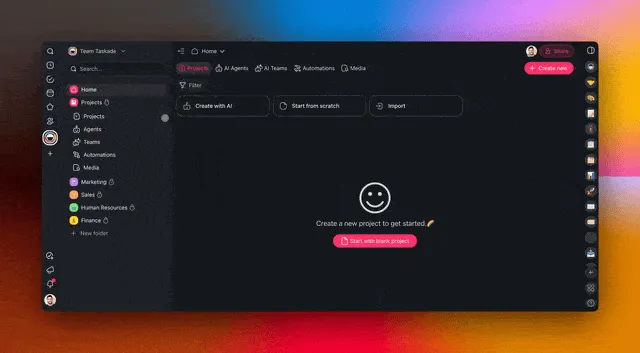
The new Workspace Navigation makes it easier than ever to create, manage, and switch between team workspaces while keeping everything within reach. Learn more.
✅ Quick access → Jump between Projects, AI Agents, Automations, and Media & Files.
✅ One-Click navigation → Move between folders and workspaces in one click.
✅ Decluttered layout → Expand and collapse sections to focus on what matters.
👉 How to use:
Click ⌄ next to a workspace or folder to expand it.
Click a section to view its contents.
Click ⌄ again to collapse sections.
🎁 Instant AI Kit Creation
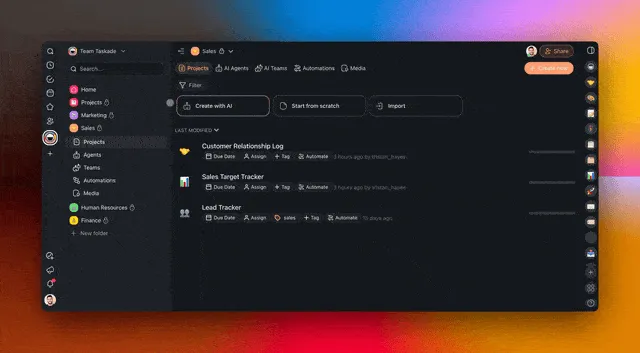
You can now turn entire folders into AI Kits in one click! Right-click any folder to instantly package your Projects, AI Agents, Automations, and Templates. Learn more.
✅ One-click AI Kit creation → Package your entire workspace into reusable AI Kits.
✅ Easy sharing → Share AI Kits with teams, clients, and followers.
✅ Reusable templates → Set up once, use forever.
👉 How to use:
Right-click a folder in the left sidebar.
Click Create AI Kit.
Customize settings and share anywhere.
✨ Featured AI Kits of the Week:
Get started with these ready-to-use AI Kits!
📬 AI Status Reports Kit → Automate key project updates via email.
📊 AI Content Audit Kit → Scrape and analyze any content for new insights.
🎭 AI Content Tone Kit → Analyze content tone/sentiment.
📝 Daily Blog Generator Kit →
Generate and publish blog articles.📈 SEO Evaluator Kit → Optimize SEO content with Google's EEAT guidelines.
🦾 AI Marketing Team Kit → Automate content creation/competitor research.
🔗 → Explore More AI Kits | → Request an AI Kit | → Build Your Own
🧠 AI Reasoning Agents with o3 Model
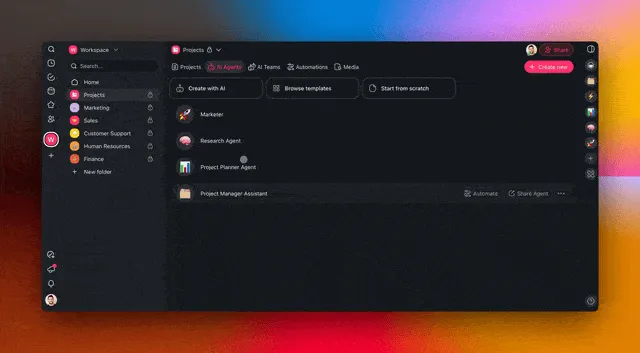
Fine-tune the reasoning and speed of your AI Agents with the new o3 models! Alongside OpenAI GPT (frontier models), o3-mini strikes the perfect balance between fast responses and deeper thinking. Learn more.
✅ Better logic & reasoning → Optimized for STEM, coding & reasoning.
✅ Three intelligence levels → Balanced for speed and power.
Basic (o3-mini-low) → Fast and lightweight for simple tasks.
Standard (o3-mini-medium) → Balanced speed for most use cases.
Advanced (o3-mini-high) → Reasoning for complex problem-solving.
👉 How to use:
Click ··· next to an agent in the Agents tab → ✏️ Edit agent
Scroll down in the General tab.
Select your preferred AI Model.
✅ Easier Task Automation
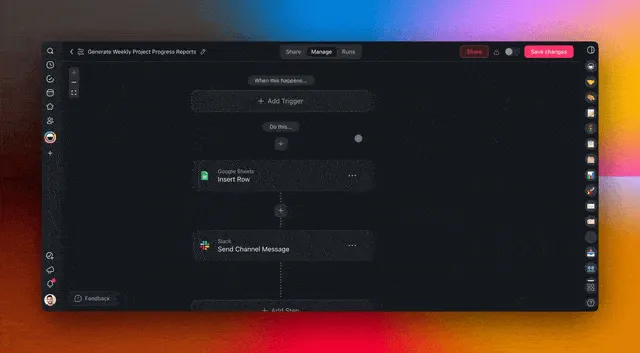
The Task Added Trigger automates workflows whenever new tasks are created in projects. Notify team members about updates and keeping your team productive without manual work. Learn more.
✅ Auto-assign tasks → Automatically route work to the right people.
✅ Immediate action → Ensure no task slips through the cracks.
✅ Hands-free updates → Keep projects up to date.
👉 How to use:
Add the Task Added trigger to your automation flow.
Choose the projects you want to monitor for updates.
🚀 Other Improvements
Coming Soon: Taskade Marketplace — The official hub for Taskaders, AI creators, and automation pros to share, discover, and monetize Taskade AI Kits.
Early Access: Be among the first to hare your AI Kits! Sign up for early access on LinkedIn, Twitter / 𝕏, Facebook Group, and Reddit. Reply "Marketplace" for details!
1-Click Deployment: Install AI-powered workflows, projects, and agents in one click.
For Creators & Teams: Build, preview, and get ready to share your AI Kits — marketing automation, productivity setups, and more.
New: Taskade AI Kits — Share & Deploy Agentic Workflows
- Popular Kits:
AI Lead Generation Kit → Organize and follow up on leads.
AI Customer Requests Kit → Manage customer requests.
AI Email Campaign Kit → Create custom email campaigns.
AI News Digest Kit → Collect info from multiple sources.
AI RSS Feed Kit → Gather research automatically.
AI Marketing Team Kit → Automate content creation.
- Popular Kits:
Instant Setup: Deploy ready-to-use AI workflows effortlessly.
Everything Connected: AI Agents, Automations, and Projects.
Easily Share with Teams & Clients: No setup required.
How to: Create AI Kits | Browse Featured Kits | Explore by Industry 💭
New: Train AI Agents with Unlimited Web Links
Use Projects as AI Knowledge: Store and organize useful links for learning.
Real-time Sync: AI Agents refresh as projects change.
Automate Learning: Connect RSS feeds, AI Forms, and more.
Try the AI Agent Training Kit: Install Now 👈
-
New: OpenAI o3-mini reasoning model is now supported.
New: AI chat conversations can now be exported as markdown.
New: System prompts now include knowledge for better agent responses.
New: Support for adding new file types when uploading knowledge to agents.
New: Onboarding flow to help users browse and discover AI agents.
Improved: Real-time AI chat experience when multiple instances are open.
Improved: Team permission visibility and control in project AI chat.
Improved: AI agent sharing and embedding options are now visible.
Fixed: Dropped tool calling when structured output was not agentic.
Fixed: Issues with private DM permissions in AI agent conversations.
Fixed: Various styling and usability fixes for AI agent interactions.
New: AI Automation Enhancements
New: AI Forms now support end-screen.
New: RSS trigger now supports multiple feeds.
New: RSS feeds will continue processing even if one feed hits an error.
New: Workflows now refetch web content older than one day.
New: Google Drive triggers for new folders and new files.
New: Google Drive actions to create, duplicate, search, and trash files.
New: Google Drive now supports using the root of a shared drive.
New: Upload Google Docs from Drive directly into Taskade.
New: File upload automation for downloading and re-uploading documents.
New: Easily filter options with date and time formats in automations.
New: Automation now supports custom date values in task creation.
New: Single Text Block Output support for agent tool triggers.
Improved: Faster Google Drive and Google Docs integration.
Improved: Find Task automation now generates more expected results.
Improved: Redesigned action/trigger selection menu for better UX.
Improved: More flexible automations with structured file processing.
Improved: Smarter fallback options for triggers and actions.
Improved: Clearer error messages when no document is found.
Improved: Smoother UI navigation with better dropdowns and filters.
Fixed: Google Drive triggers now correctly expose file IDs.
Fixed: Google Docs document search is now fully functional.
Fixed: Deleted actions no longer leave behind selected areas in the automation builder.
Fixed: Discord message trigger no longer activates on empty channels.
Fixed: Various UI issues with dropdown menus, date filters, and automation settings.
Fixed: Improved automation engine performance for faster task execution.
New: Taskade Mobile Updates for iOS and Android
New: AI Agent shortcuts – add to your home screen for quick access.
New: Long-press the floating action button (FAB) for quick actions.
New: Smarter navigation with icons and notification counts.
New: Home screen icons – choose Dark or Tinted themes.
New: Create new projects directly from AI Agent chats.
Improved: Undo accidental changes with one tap.
Improved: Filter tasks by assignees and tags for better sorting.
Improved: Updated chat design for a smoother experience.
Improved: Ability to sort and filter projects.
Fixed: Resolved disappearing messages and project sorting issues.
Fixed: Faster app performance and reduced loading times.
Fixed: Various optimizations for iOS 18 and Android 15.
Improved: Import Anything into Taskade
Convert to Taskade: Create structured docs, tables, and projects.
Summarize with AI: Generate outlines from files, articles, or videos.
Import from Webpages: Extract web data with "Scrape Webpage" tool.
New: Edit Workspace Media file names, web link names, and descriptions.
Improved: Cleaner navigation with improved sidebar visual hierarchy.
Improved: Optimized primary navigation performance for faster access.
Improved: Faster load times, improved automations, and better real-time updates.
Improved: Mobile web experience is now more responsive.
Fixed: Various UI improvements for forms, templates, and more.
Fixed: Stability improvements across mobile and desktop apps.
Check out all the latest updates on our Changelog Forum.
🚀 Join the Community
Join us every Thursday at 4 PM (US PT) for our weekly Taskade Live Stream, featuring demos, advanced use cases, and live Q&A with the Taskade team.
📺 Missed a session? Watch all past episodes on our YouTube channel.
🎥 Latest episode: Taskade LIVE: AI Kits Preview, Agent History & AI Forms.
🤝 Let's connect: Official Forum | Official Subreddit | Facebook Group | X (Twitter)
📢 Stay on top of the latest product updates and share your feedback — we'd love to hear from you!
Have questions? Visit our Help Center or contact us.
Here's to 2025 — The Age of AI Agents & Agentic Workflows. Taskade is building AI Agents that think, learn, and act—so you can focus on what matters.
John Xie, Co-founder & CEO, Taskade
— Team Taskade 🐑
💌 P.S. Love Taskade? We’d love to hear from you! Share your experience on our testimonials page and get featured, or check out our Affiliate Partnership program.

Frequently Asked Questions
What are AI Reasoning Agents with o3 in Taskade?
Taskade supports OpenAI's o3 reasoning models for AI Agents, optimized for STEM, coding, and complex problem-solving. You can choose from three intelligence levels: Basic (o3-mini-low) for fast, lightweight tasks; Standard (o3-mini-medium) for balanced everyday use; and Advanced (o3-mini-high) for deep reasoning on complex problems.
How do Taskade AI Kits work?
Taskade AI Kits let you package your entire workflow — Projects, AI Agents, Automations, and Templates — into a single shareable bundle. You can create a Kit by right-clicking any folder and selecting 'Create AI Kit.' Recipients install with one click, getting a fully connected workspace with pre-trained agents and ready-to-run automations.
What changed in Taskade's workspace navigation?
The redesigned workspace navigation provides quick access to Projects, AI Agents, Automations, and Media & Files from a collapsible sidebar. You can jump between folders and workspaces in one click, expand or collapse sections to focus on what matters, and switch between team workspaces without losing context.
How does the Task Added automation trigger work?
The Task Added Trigger automatically fires a workflow whenever new tasks are created in specified projects. It can auto-assign tasks to the right team members, send notifications, and trigger downstream actions — keeping projects up to date without manual intervention. You select which projects to monitor, and the trigger handles the rest.