







Most productivity methods are like candy. They look and taste awesome, but they’re not good for you, especially in large quantities. So, how do you choose a select few that not only work as advertised but also bring tangible results?
Here’s the thing. We’re all constantly chasing after big and small improvements to our daily routines. Heck, you’ve probably fantasized about getting a degree, changing your job, and upping your salary, ten times, in the last hour.
In this article, we’re going through some of the most effective productivity methods—sorry, no “hacks” and “shortcuts”— that’ll help you achieve your goals.
💡 Before you start… This article is part of our “no-nonsense productivity” series. Be sure to check other similar guides on the blog when you’re done reading!
🍅 The Pomodoro Technique: Complete Guide to Focused Productivity
⏱️ The Flowtime Technique: A Flexible Alternative to Pomodoro
How to Get the Most Out of Productivity Methods ✋
Let’s make one thing clear. Most productivity “hacks” you can find online don’t work. The reason? They either completely ignore the importance of building lasting habits or are too dependent on internal motivation.
All the methods from this article work because they A) address underlying psychological mechanisms that make us tick and B) prioritize habitual, incremental changes. Oh, and they’re flexible enough for any kind of project.
Here are a few tips that’ll help you implement the methods from this article.
Take Things One Step at a Time 🐌
Multitasking—read: jumping between tasks—sucks. Reading emails while drafting a document and chatting with teammates is impressive, but not really productive.
“The more we multitask, the less we actually accomplish, because we slowly lose our ability to focus enough to learn. If we’re constantly attempting to multitask, we don’t practice tuning out the rest of the word to engage in deeper processing and learning.”
Cynthia Kubu, Center for Neuro-Restoration, Cleveland Clinic(1)
The lesson for today? Multitasking induces a cognitive cost that saps your ability to focus on the work that really matters. Prioritize single-tasking instead.
Don’t Be Afraid to Experiment 👩🔬
There’s no productivity method that works for everybody. We can only give you hints and tips, but it’s up to you which tools you will end using.
“What works for one artist doesn’t necessarily work for another - try anything and everything and go with what works for you.”
Paul Dixon, television personality and entertainer
Cycle through the following productivity methods and apply them to projects, tasks, and admin work. All the tools complement each other so feel free to mix and match.
But…
Treat All Productivity Methods Like Habits 🧠
Remember what we said about building habits that stick? Use the following techniques as often as possible and weave them into your daily routines.
“As people strengthened their willpower muscles in one part of their lives—in the gym, or a money management program—that strength spilled over into what they ate or how hard they worked. Once willpower became stronger, it touched everything.”
Charles Duhigg, The Power Of Habit(2)
Don’t get discouraged if you don’t see immediate results. Most techniques from our list require a long-term investment of time and effort.
And now for the main course.
11 Classic Productivity Techniques and How to Use Them 🚀
1. Outlining 📝
🤔 What is outlining?
Outlining is a process of creating hierarchical structures that contain whatever you’re thinking or working on. It’s the framework for all things creative.
“I’m a great planner, so before I ever write chapter 1, I work out what happens in every chapter and who the characters are. I usually spend a year on the outline.”
Ken Follet
While not exactly a productivity technique, outlining is one of the most underappreciated organizations and prioritization tools. Trust us, it’s da bomb.
⚡️ What are the benefits of outlining?
You can use outlining to take notes, organize information, plan out documents, create high-level checklists, and connect the dots between concepts and ideas.
👉 Outlining instructions
Choose a topic, concept, or problem to analyze.
Break to process into key stages (tasks) and write them down.
Use indentation to add sub-tasks for more granularity.
Expand the outline by adding subsequent levels.
Analyze and reassemble the elements of your outline.
If writing the next War and Peace is not on your to-do list, you can use the power of outlining to structure your days, weeks, and months. Like so. 👇
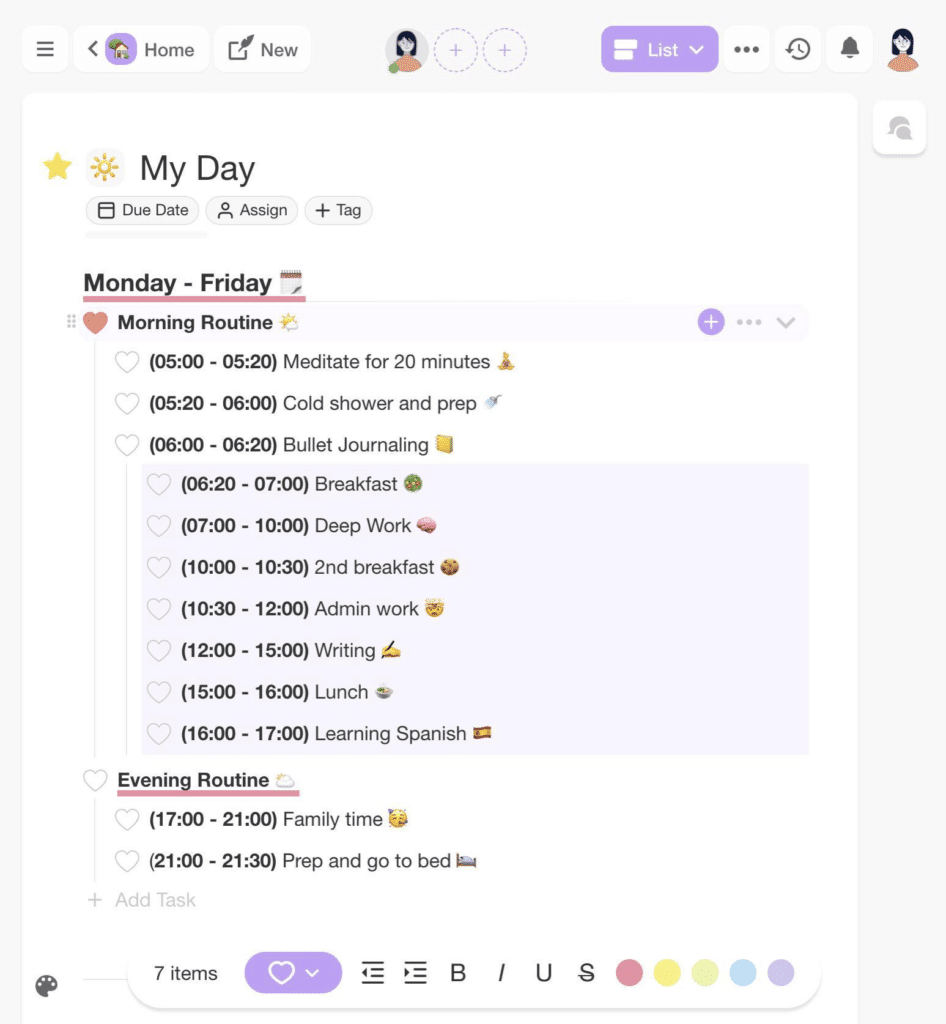
A simple daily schedule outlined in Taskade
2. Francesco Cirillo’s Pomodoro Technique 🍅
🤔 What is the Pomodoro Technique?
The Parkinson’s Law states that work expands to fill the time allotted. Well, if that's how your typical workday looks like, the Pomodoro Technique is exactly the thing you need.
“I discovered that you could learn how to improve your effectiveness and be better able to estimate how long a task will take to complete by recording how you utilize your time.”
Francesco Cirillo, creator of the Pomodoro Technique(3)
Created by Francesco Cirillo in the 1980s, the Pomodoro Technique breaks work sessions into smaller chunks and applies time pressure to maximize focus.
⚡️ What are the benefits of the Pomodoro Technique?
The Pomodoro Technique is a great way to resist distractions, become more mindful of how you spend your time, and get into a state of creative flow. Speaking of flow, check out the Flowtime Technique to check out an alternative to the Pomodoro Technique!
👉 The Pomodoro Technique instructions
Pick a task or project to work on.
Set the timer (25 minutes).
Work on the task until the time’s up.
Take a 5-minute break.
Take a longer break (15-30 minutes) every four sessions.
Rinse and repeat.
3. The Pareto Principle or the 80/20 Rule 💯
🤔 What is the Pareto principle?
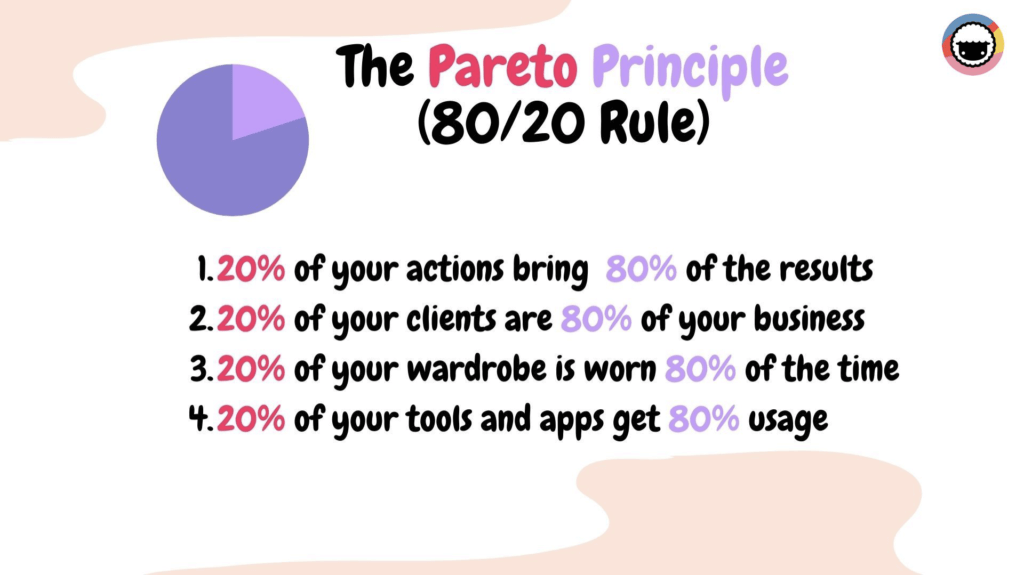
Named after a 19th-century economist Vilfredo Pareto, the Pareto principle states that 20% of our actions bring in 80% of the overall results.
“It is not a shortage of time that should worry us, but the tendency for the majority of time to be spent in low-quality ways.”
Richard Koch, The 80/20 Principle: The Secret to Achieving More with Less(4)
The Pareto principle is a direct opposite of the Law of triviality—dedicating time, effort, and attention to unimportant stuff—also known as “bikeshedding.”
⚡️ What are the benefits of the Pareto principle?
You can use the 80/20 Rule to identify actions, habits, or tasks that bring in the majority of your desired work results, just like diet and exercises do for your health.
👉 The Pareto principle instructions
Write down your goals for the day/week.
You can also make a list of the problems you’re facing.
Score each item on the list by its priority/importance.
Focus on the top 20% of items that bring 80% of the overall results.
Use a time-tracking tool to identify time-intensive, low-yield tasks.
Try to automate or delegate the remaining 80% of your work.
4. Time Blocking 🗓
🤔 What is time blocking?
Time blocking is a more sophisticated take on scheduling. Instead of simply putting tasks on your to-do list, you bundle them in time-limited “blocks.”
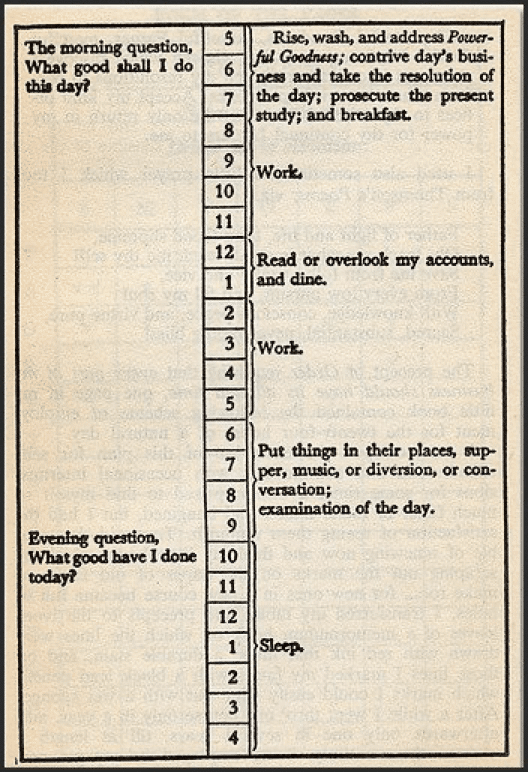
Benjamin Franklin’s famous daily routine
Time blocking is a great way to counter the planning fallacy, a human tendency to overestimate or underestimate the time you need to complete work.
⚡️ What are the benefits of time blocking?
Time blocking improves the way you structure your days and prevents your calendar from getting out of control. It also helps account for the time lost on procrastination.
👉 Time blocking instructions
Every evening, spend 10 minutes planning your next day.
Identify key tasks and objectives you need to complete.
Estimate the time needed to complete each task.
“Block” the required amount of time in your calendar.
Use a time-tracking tool to log the time you spend on those activities.
Review the data to improve your next estimates.
Rinse and repeat.
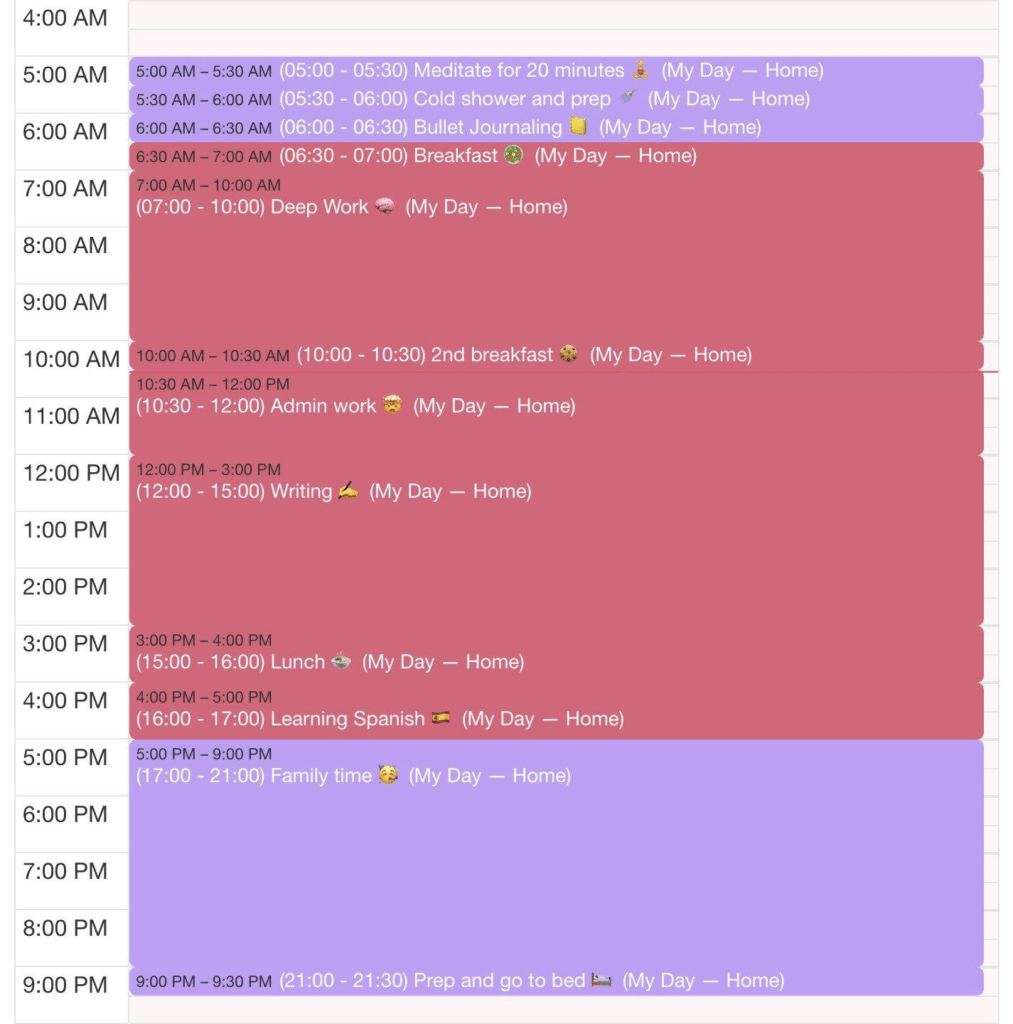
A time-blocked day in Taskade calendar
5. Cal Newport’s Deep Work 🧘♂
💡 What is Deep Work?
According to Cal Newport, the author of Deep Work, the ability to focus and work without interruptions is becoming exceedingly rare.
“If you service low-impact activities, therefore, you’re taking away time you could be spending on higher-impact activities. It’s a zero-sum game.”
Cal Newport, Deep Work: Rules for Focused Success in a Distracted World(5)
Newport’s Deep Work productivity method is geared toward maximizing focused, valuable work and curbing “shallow,” low-value, repetitive tasks.
⚡️ What are the benefits of Deep Work?
Deep Work helps improve focus and reap better results in cognitively demanding tasks like programming, writing, or learning a new language.
👉 Deep work instructions
Schedule time for deep work (early morning works best).
Tune out all distractions (turn off notifications, sign out of social media).
Decide on the length of the session (1-3 hours).
Focus on the most important task for the day.
Use focus boosters like Lo-Fo music or white noise.
Increase the ratio of deep-shallow work.
Don’t forget to unplug and rest when you’re done.
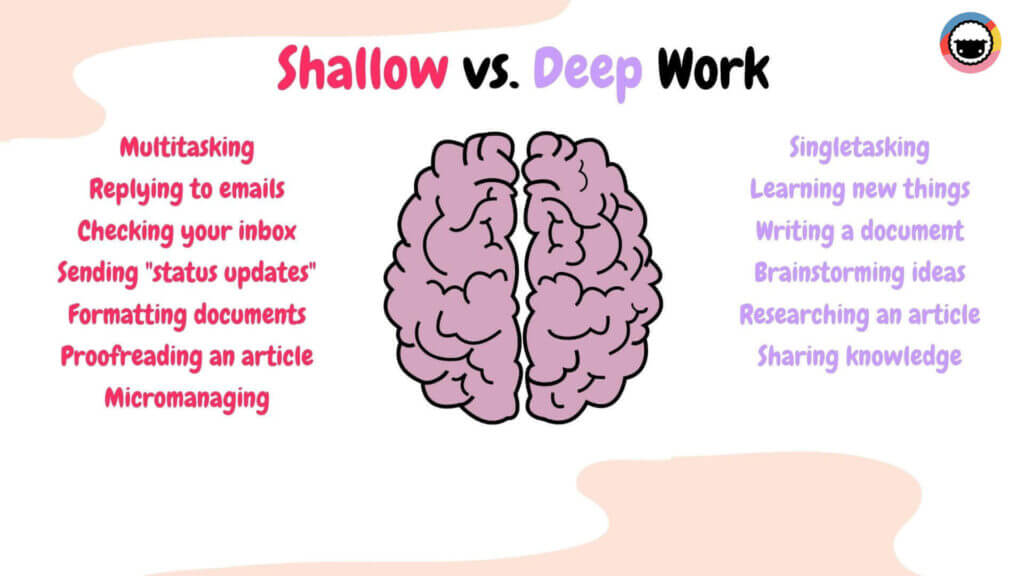
image6
To reap all the benefits of Deep Work, be sure to read our article Losing to Distractions? Boost Team Focus With Deep Work for an in-depth look.
6. Ryder Carroll’s Bullet Journal (BuJo) ✍️
💡 What is the Bullet Journal?
Created by a New York designer Ryder Carroll, the bullet journal is a system for organizing, planning, and note-taking. But it comes with a twist.
“The Bullet Journal will help you declutter your packed mind so you can finally examine your thoughts from an objective distance.”
Ryder Carroll(6)
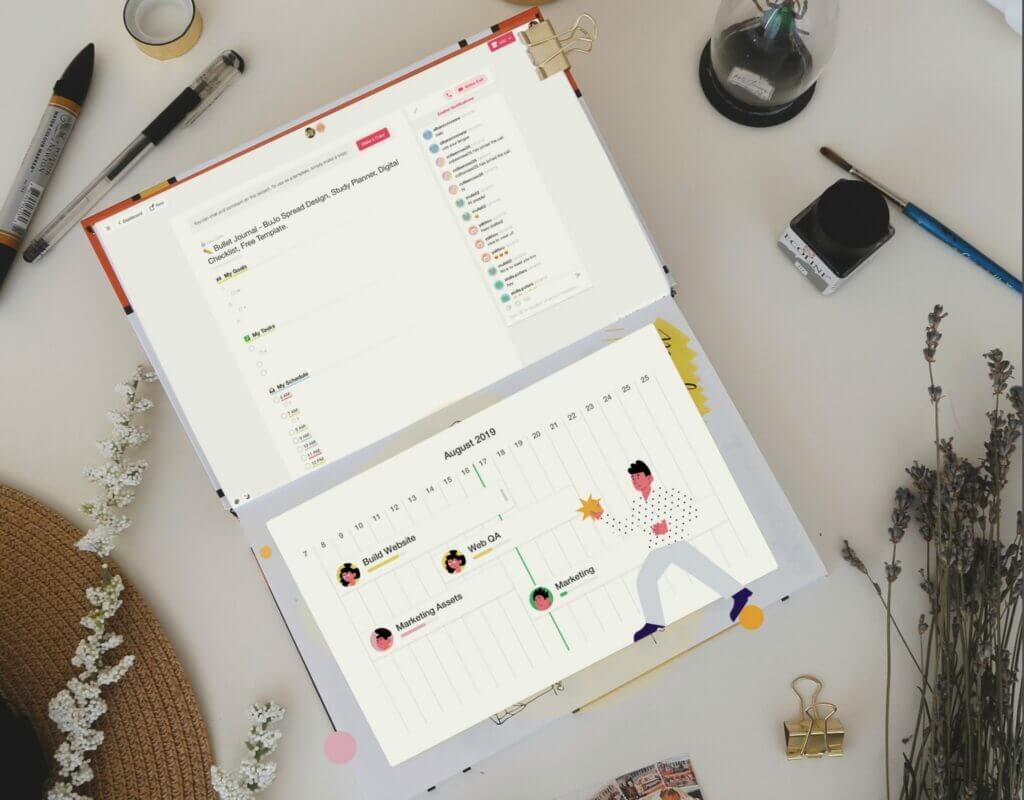
The Bullet Journal uses what’s called “Rapid Logging” which is essentially a method of collecting information in the form of bulleted lists.
⚡️ What are the benefits of the bullet journal?
The Bullet Journal is a minimalist approach to organization. It speeds up the process of capturing information, helps evaluate progress, and see the bigger picture.
👉 Bullet Journal instructions
Here’s an official Bullet Journal video introduction.
While the Bullet Journal is a primarily analog method, you can (re)create a fully functional digital BuJo in Taskade.
👉 Jump over here to learn how.
8. The Rule of 3 🏆
🤔 What is the Rule of Three?
If your daily commitments are too much to chew, the Rule of Three will help you take a step back and zero in on the critical part of your work.
“Rather than get overwhelmed by your tasks, you get intentional about your three victories that you want to accomplish.”
J.D. Meier, director of innovation at Microsoft Digital Advisory Services(7)
A small number of intentional commitments are much more rewarding and easier to accomplish than an assorted to-do list with 100+ miscellaneous tasks.
⚡️ What are the benefits of the Rule of Three?
Settling on three major objectives reduces the analysis paralysis effect. At the same time, it makes you more selective about what you should and shouldn’t do.
👉 The Rule of Three instructions
Each morning, write down three key objectives for the day.
Track the time it takes you to complete each task.
At the end of the day, reflect on your results.
9. The Ivy Lee Method 🔄
🤔 What Is the Ivy Lee method?
Dating back to the 1900s, the Ivy Lee method was initially used to increase productivity at Charles M. Schwab’s Bethlehem Steel Corporation.
“Don’t worry if you don’t complete everything on the schedule. At least you will have completed the most important projects before getting to the less important ones.”
Ivy Lee, pioneer of 20th-century public-relations methods
Similar to the Rule of Three, this simple productivity approach reduces the number of daily commitments to ensure the most important work gets done first.
⚡️ What are the benefits of the Ivy Lee method?
The Ivy Lee method is very simple. It leaves no room for ambiguity or procrastination. All tasks are completed in the shortest timeframe possible.
👉 The Ivy Lee method Instructions
Every evening, write down six key objectives for the next day.
Prioritize the objectives starting with the most important one.
Start your workday with the first task and work on it until it’s completed.
Tackle the next task on the list in the same manner.
Transfer incomplete tasks to the list for the next day.
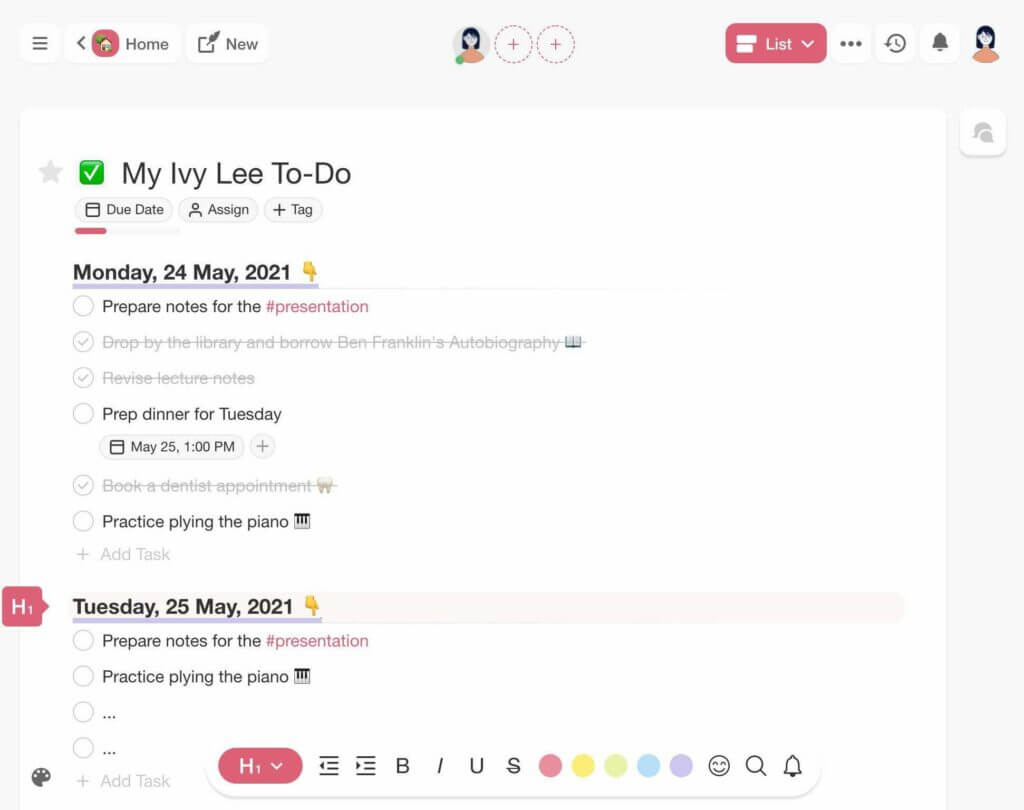
The Ivy Lee method in a Taskade project
10. The S.M.A.R.T. Framework 🎯
🤔 What is the S.M.A.R.T. framework?
Setting relevant, meaningful goals is hard. Without a direction, we either fall for the trap of analysis paralysis or fail to get started in the first place.
“It’s important to understand the human side of the objective-setting process. It can be a difficult task, it requires scarce time, and to some it is an unpleasant experience that generates much stress.”
George T. Doran(8)
S.M.A.R.T.—an acronym for Specific, Measurable, Achievable, Realistic, and Time Bound—is a goal-setting framework that helps set clear and realistic objectives.
Check out our article on SMART goals to find out everything you need to know about setting SMART goals! You can also download our SMART Goals worksheet to get started quickly.
⚡️ What are the benefits of the S.M.A.R.T. framework?
S.M.A.R.T. is the Swiss army knife of goal setting. It makes it much easier to break big, intimidating projects into manageable chunks.
👉 S.M.A.R.T. Instructions
Here’s a great S.M.A.R.T. video tutorial by The Art of Improvement (6 minutes).
10. Atul Gawande’s The Checklist Manifesto ✅
🤔 What is the Checklist Manifesto?
“[…] checklists seem able to defend anyone, even the experienced, against failure in many more tasks than we realized.”
Atul Gawande, The Checklist Manifesto: How to Get Things Right(9)
Checklist proper, as opposed to simple to-do lists, are reusable lists of critical actions that need to be performed as part of a larger, more complex process.
Created by a surgeon and public health researcher Atul Gawande, The Checklist Manifesto is an all-encompassing homage to the intricate world of checklists.
⚡️ What are the benefits of using checklists?
Checklists help automate repetitive work and prevent common errors and mistakes. They also ensure that you always know what the next step is.
👉 The Checklist Manifesto instructions
Decide on a process you want to improve.
Outline and draft a list of staple, repetitive steps.
Stick to 5-9 items per checklist.
Indent items to create sub-tasks if needed.
Reuse the list every time you repeat the process.
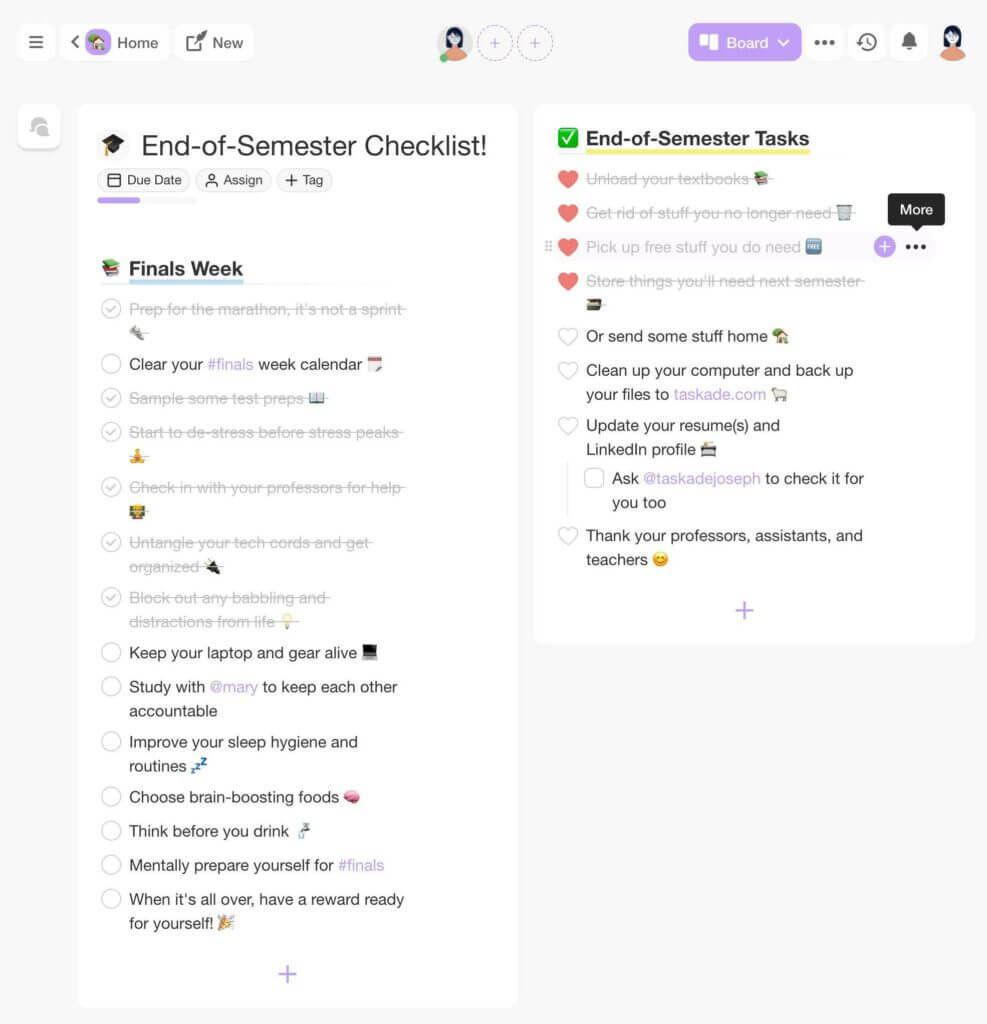
image10
A reusable checklist in Taskade’s Board view
Interested in the backstory of The Checklist Manifesto? Be sure to read our article The Power of Checklists in Distributed Teams to learn more.
11. Merlin Mann’s Inbox Zero 📥
🤔 What is Inbox Zero?
Created by writer and blogger Merlin Mann, the Inbox Zero productivity method propagates a more mindful and healthy approach to digital communication.
“Although your time and attention are finite, the demands on your time and attention are infinite.
Merlin Mann
Based on David Allen’s Getting Things Done, Mann’s method is a simple system for dealing with the overwhelming volume of email correspondence.
⚡️ What are the benefits of Inbox Zero?
Inbox Zero puts boundaries on your inbox and helps cultivate good email habits. It makes it much easier to curb email usage and resist addictive behaviors.
👉 Inbox Zero instructions
Unsubscribe from the newsletters you don’t read.
Set an autoresponder when you’re taking time off.
Automate your inbox with filtering rules.
Take immediate action on emails (archive, delegate, respond, do)
If you can afford it, limit your email usage to three checks a day.
Turn off email notifications on your phone and computer.
Here’s Merlin Mann’s original 2007 presentation at Google.
Email can be a tyrant or a helpful companion. Be sure to check our article Email in Remote Workflows: A Complicated Relationship to regain balance.
Conclusion 🐑
Starting on the path to self-improvement is difficult. We hope that the productivity methods we described in this article will help you make the first step and create a frictionless and minimalist workflow for years to come.
Because simplicity is the ultimate form of sophistication.
Sign up and transform your work with Taskade AI 🤖
🤖 Custom AI Agents: Integrate AI agents into your core workflow to enhance productivity and automate routine tasks in the background.
🪄 AI Generator: Describe what you're working on, sit back, and watch Taskade AI generate a complete workflow tailored to your needs.
✏️ AI Assistant: Write emails, articles, and other documents with OpenAI GPT (frontier models). Need help with editing? The assistant will handle that too.
🗂️ AI Prompt Templates Library: Dive into hundreds of AI prompts for personal and business projects, available anywhere in Taskade.
💬 AI Chat: Discuss productivity methods and improvements with AI. Leverage historical wisdom while embracing future possibilities.
📄 Media Q&A: Break down documents, spreadsheets, and other resources to discover hidden patterns or summarize key points.
And much more...
🧬 Productivity Method Tools Built with Genesis
Put classic productivity methods into practice with these ready-to-clone apps:
| App | Method | Clone |
|---|---|---|
| Study/Work Timer + Music | Pomodoro Technique with ambient sounds | Clone → |
| Time Tracker | Time blocking and tracking | Clone → |
| Minimalistic ToDo | Eat the Frog / Priority-based tasks | Clone → |
| Neon Task Dashboard | Kanban-style task visualization | Clone → |
| Kanban Board | Visual Kanban workflow with drag-and-drop | Clone → |
🔍 Explore All Community Apps →
Build your own productivity system with Taskade Genesis — describe what you need, and watch it come to life.
Your living workspace includes:
- 🤖 Custom AI Agents — The intelligence layer
- 🧠 Projects & Memory — The database layer
- ⚡️ 100+ Integrations — The automation layer
Get started:
- Create Your First App → — Step-by-step tutorial
- Learn Workspace DNA → — Understand the architecture
Which Method Is Right for You?
Not sure where to start? Match your biggest productivity challenge to the right method:
| Your Challenge | Try This Method | Why It Works |
|---|---|---|
| "I procrastinate on big tasks" | Eat the Frog | Forces you to tackle the hardest task first, before willpower fades |
| "I can't focus for long" | Pomodoro Technique | Short 25-min sprints make starting easy; breaks prevent burnout |
| "I hyperfocus on the wrong things" | Eisenhower Matrix | Visual urgency/importance grid makes priorities obvious |
| "I have too many projects" | GTD (Getting Things Done) | Captures everything in a trusted system so nothing falls through cracks |
| "I lose flow when timers interrupt me" | Flowtime Technique | No fixed timers — work as long as focus lasts, track patterns over time |
| "I switch between tasks too often" | Context Switching Reduction | Batching + time blocking + notification management |
| "I need to go deeper on one skill" | Deep Work | Ritualized blocks of distraction-free, cognitively demanding work |
Most people find that combining 2–3 methods works better than committing to a single system. For example, use GTD for organization + Pomodoro for execution + Eisenhower for prioritization.
Frequently Asked Questions About Productivity Methods
What is the best productivity method for beginners?
Start with the Pomodoro Technique — it's the simplest method on this list with zero setup cost. Set a 25-minute timer, work on one task, take a 5-minute break, repeat. Once you're comfortable with single-tasking, layer in the Eisenhower Matrix to decide what to work on during each Pomodoro session, and eventually graduate to a full GTD system for comprehensive workflow management.
Can you combine multiple productivity methods?
Absolutely — the best productivity systems are hybrids. Use GTD (Getting Things Done) as your operating system for capturing and organizing everything, the Eisenhower Matrix for prioritization, and the Pomodoro or Flowtime Technique for execution. The methods in this article are designed to complement each other — outlining feeds into GTD capture, time blocking supports deep work, and the Pareto Principle guides your Eisenhower priorities.
Which productivity method is best for ADHD?
People with ADHD often benefit from methods that provide external structure without being too rigid. The Pomodoro Technique works well for shorter focus bursts, though many neurodivergent users prefer the Flowtime Technique because it allows natural focus periods instead of forced 25-minute cutoffs. For organization, a simplified GTD system with AI-assisted task management can help externalize the executive function demands that ADHD makes harder.
Do classic productivity methods work in the age of AI?
Yes — and AI makes them more powerful. Classic methods like GTD, Pomodoro, and the Eisenhower Matrix provide the framework for thinking about work; AI provides the execution layer. For example, AI Agents can automate GTD's "clarify" step by processing inbox items, the AI Generator can break big projects into Pomodoro-sized tasks, and AI Chat can help you apply the Eisenhower Matrix to a messy task list. The human still sets the direction — AI handles the grunt work.
How do I know which productivity method is right for me?
Experiment with one method at a time for at least 2 weeks before judging it. Start with the method that addresses your biggest pain point: if you can't focus, try Pomodoro; if you're overwhelmed by tasks, try GTD; if you work on the wrong things, try the Eisenhower Matrix; if you're always distracted, try Deep Work. Track your results and adjust — there's no single method that works for everyone, which is why this article covers 11 options.