






Research shows that ADHD affects executive functioning and... wait, what were we saying? Classic ADHD moment right there. But what if you could unlock your full potential and tame the chaos with AI tools designed for the way your brain actually works?
TL;DR: AI helps manage ADHD by handling the executive function tasks your brain finds hardest: planning, organizing, prioritizing, and following through. Taskade's AI agents break tasks into steps, automate routines, and reduce the 22 lost productivity days ADHD costs annually. No replacement for professional treatment -- a powerful complement to it. Try Taskade free →
The World Health Organization found that ADHD may add up to 22 days of lost productivity annually.(1) That is a whole lot of missed opportunities and ideas left on the table.
Adding AI into the mix may not seem like a traditional fix. But when used wisely, it can be the external structure that the ADHD brain needs to channel its strengths into consistent results.

Related ADHD and productivity guides:
- From Distraction to Action: AI for ADHD Productivity
- ADHD Productivity Tools for Remote Workers
- The Flowtime Technique: A Flexible Focus Method
- The Pomodoro Technique: Complete Guide
- How to Reduce Context Switching
Understanding ADHD and Executive Function
Before diving into specific tools, it helps to understand why ADHD makes certain tasks so difficult. The core challenge is not laziness or lack of intelligence -- it is executive dysfunction.
Executive function is the brain's command center for:
- Planning: Breaking goals into sequential steps
- Working memory: Holding multiple pieces of information at once
- Task initiation: Starting work despite uncertainty or overwhelm
- Time management: Estimating durations and meeting deadlines
- Emotional regulation: Managing frustration and staying motivated
- Flexible thinking: Adapting when plans change
A 2023 study published in the Journal of Attention Disorders found that 89% of adults with ADHD report significant impairment in at least three executive function domains. AI tools address these challenges by serving as an external executive function system.
The Power of AI for ADHD

Generative AI is designed to create new content -- from written text to structured plans and organized data -- based on patterns learned during training. For ADHD brains, this means outsourcing the organizational tasks that consume the most mental energy.
Here is a real example. You need to write an important email. Your brain is buzzing with ideas, but the moment you sit down to write, attention scatters:
"Did I feed the cat?"
"What is the solution to global warming?"
"Oh, and isn't the car due for an oil change?"
You can keep staring at the blinking cursor, or you can let AI draft the email while you review and refine. AI productivity tools generate outlines, suggest structure, and handle the mechanical work so your creative energy goes where it matters.
7 Ways AI Can Help You Manage Your ADHD
1. Use AI to Craft Emails and Responses
Email is one of the biggest ADHD friction points. The combination of decision fatigue (how do I respond?), composition anxiety (is this too long? too short?), and prioritization confusion (which email first?) can turn a simple inbox into hours of paralysis.
AI changes this completely. Feed the incoming message into your AI tool, specify the tone, and you have a polished response in seconds. No more internal debates about word choice. No more half-written drafts sitting in your inbox for days.
A 2024 survey by Reclaim.ai found that knowledge workers spend an average of 3.1 hours per day on email. For ADHD brains, that number is often higher due to re-reading and perfectionism loops.
Taskade agent setup: Create an Email Assistant agent with knowledge of your communication style and common response templates. When emails arrive, ask the agent to draft replies. It learns your tone over time and produces increasingly accurate drafts.

2. Use AI to Summarize Content
Reading long documents, articles, and reports is especially challenging with ADHD. Attention drifts after a few paragraphs, and you end up re-reading the same section three times without retaining anything.
AI solves this by extracting the key information from any material in seconds. Documents, web pages, emails, meeting notes -- everything gets distilled into actionable bullet points.
Instead of a chunky block of text, AI structures the output any way you want. Turn a dense financial report into an executive summary. Extract action items from a 45-minute meeting transcript. Condense a research paper into five key findings.
Research backing: A 2023 study in Frontiers in Psychology found that adults with ADHD retain 34% more information from summarized content compared to full-length documents.
3. Use AI to Break Down Complex Tasks Into Smaller Ones
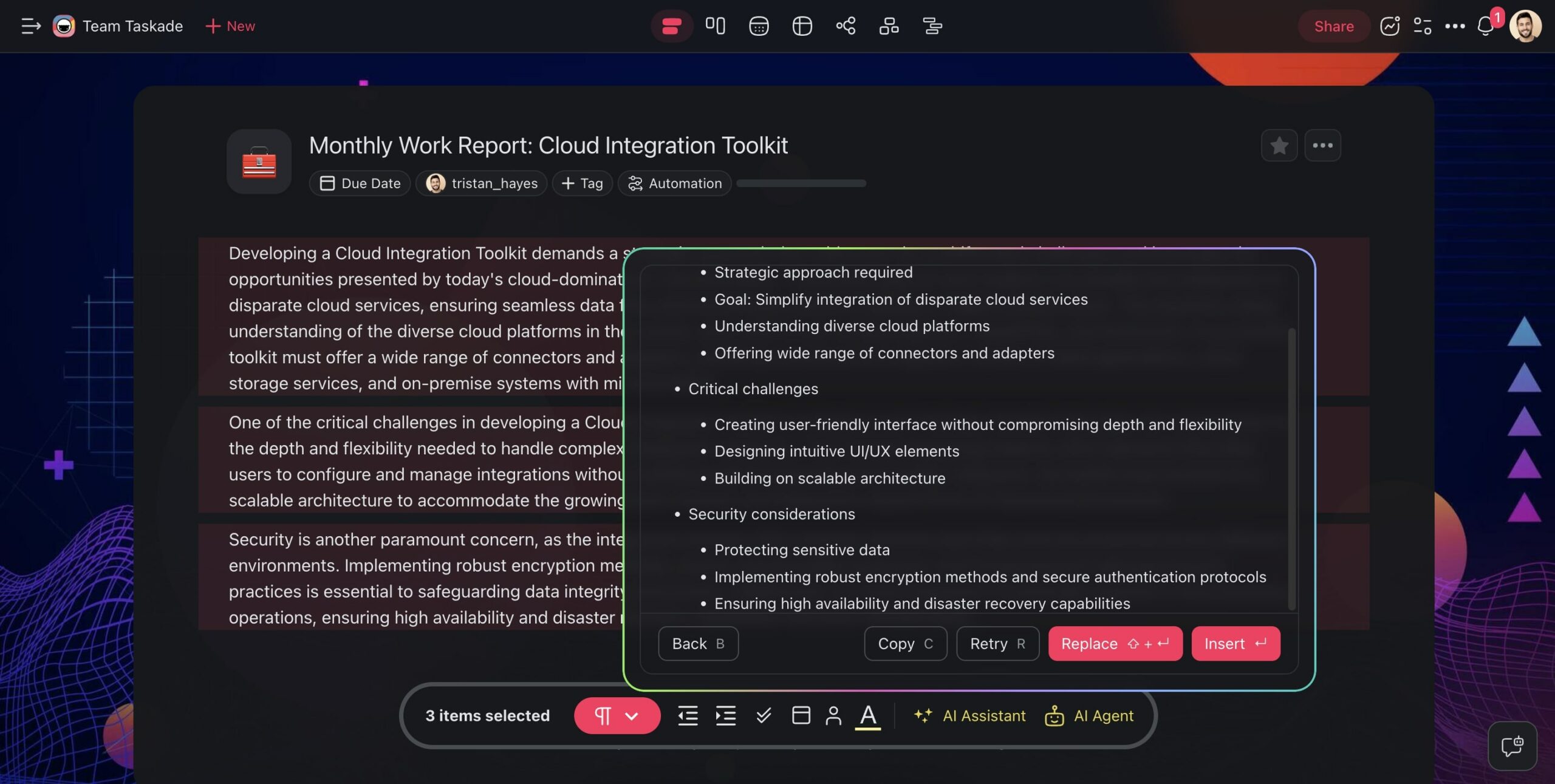
The hardest part of any project is not figuring out the end goal but rather getting started. Studies indicate that nearly 50% of adults with ADHD report significant challenges in initiating tasks due to executive function deficits.
AI eliminates this friction by dividing big, complex projects into bite-sized steps with clear starting points. It handles task management and prioritization based on deadlines, dependencies, and importance -- the exact cognitive work that ADHD makes difficult.
Taskade agent setup: Create a Task Decomposer agent that takes project descriptions and produces numbered steps where each step is a concrete, 5-15 minute action. Set the agent to automatically break down any new task added to your workspace.
4. Use AI to Create Better To-Do Lists
Making a productive to-do list requires accurately estimating time, distinguishing urgency from importance, and sequencing tasks logically. These are all executive function skills that ADHD impairs.
The result? To-do lists that are longer at the end of the day than when you started. Tasks that carry over for weeks. Lists so overwhelming they generate more anxiety than productivity.
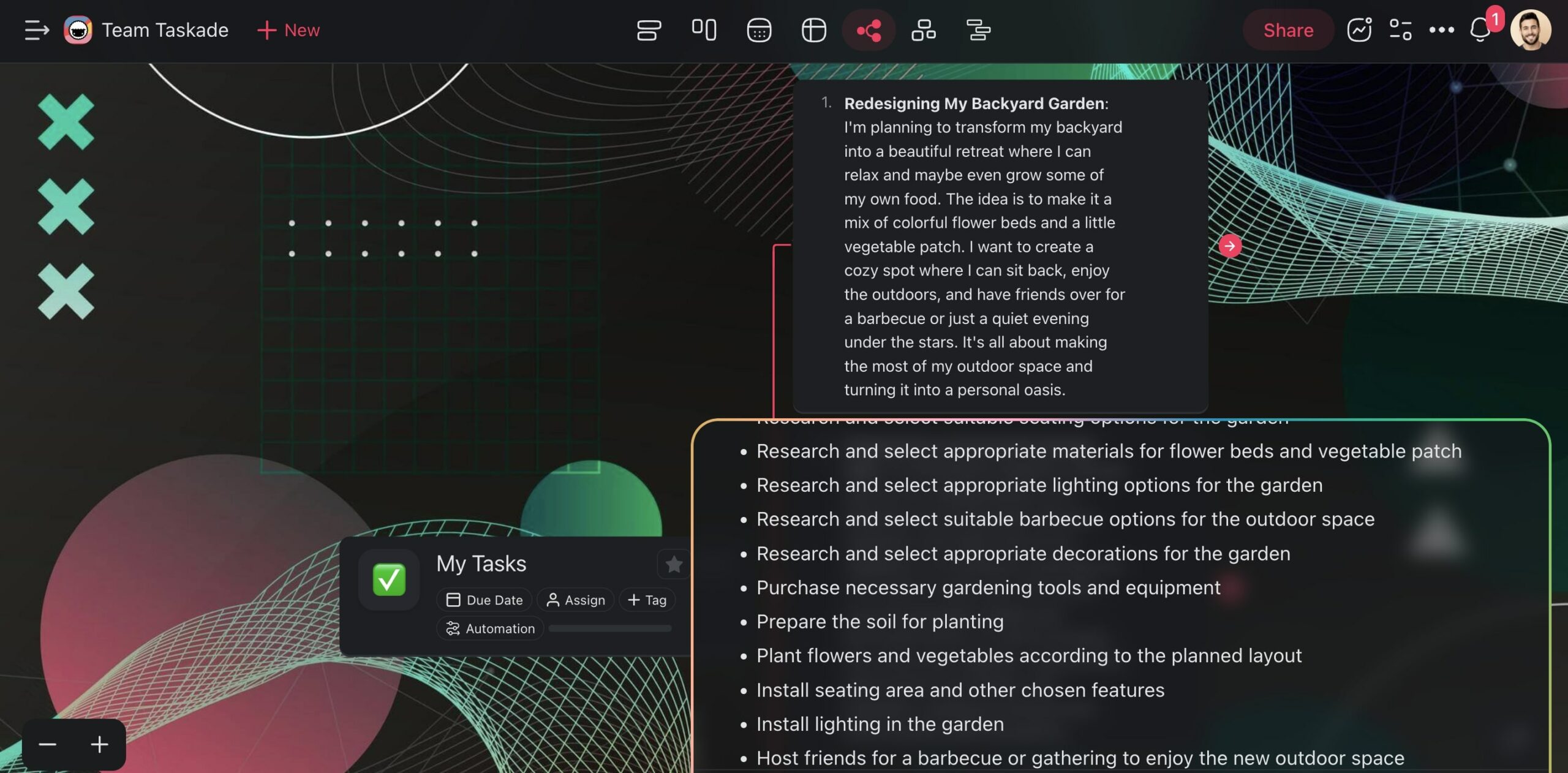
AI addresses this by analyzing your goals, scheduling your day, and reserving time for breaks and transitions. It prioritizes tasks based on actual deadlines rather than emotional urgency -- a critical distinction for ADHD brains that overweight whatever feels most pressing in the moment.
Taskade agent setup: Create a Daily Planner agent that runs every morning. Link it to your project workspace as a knowledge source. The agent scans your tasks, identifies the top 3-5 priorities, estimates time for each, and produces a structured daily plan with built-in buffer time.

5. Use AI to Automate Routine Decisions
One of the most draining aspects of ADHD is decision fatigue from routine choices. Which task should I do next? Should I respond to this email now or later? Is this meeting worth attending? Each micro-decision depletes the limited executive function reserves ADHD provides.
AI removes these decisions by automating the predictable ones. Sort your inbox automatically. Route tasks to the right project based on keywords. Send reminders about deadlines without you having to remember to set them.
Taskade agent setup: Build an Automation Router agent connected to Gmail, Slack, and Google Calendar. The agent triages incoming messages, creates tasks from action items, schedules follow-ups, and sends you a morning brief with decisions already made. You just review and approve.
6. Use AI to Generate and Scaffold Content
Writing is particularly challenging for ADHD because it requires sustained focus, structured thinking, and sequential output -- all executive function demands. The blank page is the enemy.
AI eliminates the blank page problem entirely. It produces outlines, drafts, and structured frameworks that you can edit and refine. The creative spark is still yours; AI handles the structural scaffolding.
AI can craft all kinds of content:
- Blog posts and articles
- Reports and proposals
- Social media updates
- Newsletters and email campaigns
- Meeting agendas and summaries
- Project documentation
Taskade agent setup: Create a Content Scaffolder agent with knowledge of your writing style and common topics. When you need to write anything, describe it in one sentence and the agent produces an outline with section headers, key points, and a rough draft you can iterate on.

7. Use AI to Process and Learn Information
ADHD brains process information differently. You may struggle with filtering out irrelevant details, which makes it harder to prioritize and retain what is important. Traditional learning methods -- lectures and dense textbooks -- often do not match ADHD cognitive patterns.
AI transforms information processing by reorganizing content into ADHD-friendly formats: bullet points, visual diagrams, step-by-step breakdowns, and interactive Q&A. It can present the same information in multiple formats so you engage with whichever clicks.
Research backing: A 2024 study in the Journal of Attention Disorders found that multi-format information presentation improved retention in ADHD participants by 41% compared to text-only formats.

ADHD-Specific AI Agent Configurations
Here are three complete agent setups optimized for common ADHD challenges:
| Agent | Purpose | Trigger | Knowledge Sources | Actions |
|---|---|---|---|---|
| Morning Launch Agent | Start the day with clarity | Scheduled daily at 8:00 AM | All workspace projects | Scans tasks, identifies top 3 priorities, sends Slack summary with first action step for each |
| Focus Guard Agent | Reduce context switching | On workspace activity | Current project | Detects when you open a new project mid-task and sends a gentle redirect: "You were working on X. Want to finish it first?" |
| End-of-Day Agent | Close the day cleanly | Scheduled daily at 5:00 PM | All workspace projects | Logs completed tasks, moves unfinished items to tomorrow, drafts next-day plan, sends summary |
Setting Up a Morning Launch Agent
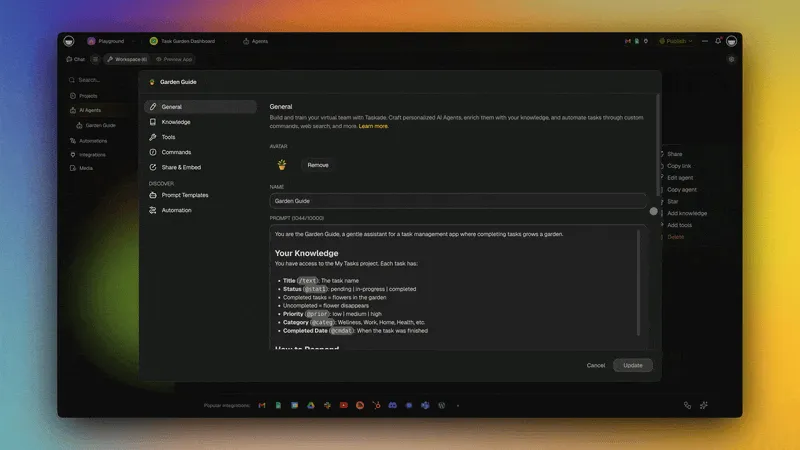
- Go to the Agents tab in your workspace
- Click Create agent and choose Create with AI
- Describe the agent: "Create an agent that reviews all my tasks every morning, identifies the 3 most important ones based on deadlines and priority, and sends me a structured daily plan with the first concrete action step for each task"
- In the Knowledge tab, link all your active projects
- In the Tools tab, connect Slack or Gmail for delivery
- Set up a scheduled automation to trigger the agent at 8:00 AM daily
This agent compensates for the ADHD challenge of task initiation by removing the "what should I do first?" decision entirely. You wake up to a clear, pre-made plan with specific first steps.
Copy-Paste AI Prompts for ADHD
Here are ready-to-use prompts you can paste into Taskade AI or any AI assistant:
Task Breakdown Prompt:
"Break this project into 5-minute tasks I can start right now. Each task should be a single, concrete action -- no planning or decision-making required. Project: [describe your project]"
Email Drafting Prompt:
"Write a professional reply to this email. Keep it under 100 words, friendly tone, and include a clear next step. Email: [paste email]"
Daily Planning Prompt:
"I have these tasks today: [list tasks]. Rank them by importance, group similar ones together, and schedule 10-minute breaks between focus blocks. Assume I work best in 45-minute sessions."
Meeting Prep Prompt:
"I have a meeting about [topic] in 30 minutes. Give me 3 bullet points to prepare, 2 questions I should ask, and a one-sentence summary of what I want to accomplish."
Content Summary Prompt:
"Summarize this in 5 bullet points. Start each bullet with an action verb. Keep each bullet under 15 words. Text: [paste text]"
Decision Matrix Prompt:
"I need to decide between [option A] and [option B]. List 3 pros and 3 cons for each. Then give me your recommendation in one sentence based on [my priority: time/cost/quality]."
ADHD Productivity Methods and AI Compatibility
Different productivity methods suit different ADHD profiles. Here is how popular methods map to AI-assisted workflows:
| Method | How It Helps ADHD | AI Enhancement | Taskade Feature |
|---|---|---|---|
| Flowtime Technique | Lets natural focus dictate session length | AI tracks your focus patterns and suggests optimal session times | Countdown timer with flexible intervals |
| Pomodoro Technique | External timer provides structure | AI adjusts interval length based on task complexity | Built-in Pomodoro timer |
| GTD (Getting Things Done) | Captures everything so nothing stays in your head | AI processes inbox items and categorizes by context | AI agents for inbox processing |
| Eisenhower Matrix | Makes priorities visual | AI auto-categorizes tasks by urgency and importance | Board view with quadrant layout |
| Time blocking | Pre-allocates time for specific tasks | AI estimates task durations and builds the schedule | Calendar view with drag-and-drop |
| Body doubling | Accountability through presence | AI agent acts as a digital body double, checking in periodically | Scheduled agent check-ins |
Important Disclaimer: AI Is a Tool, Not Treatment
AI productivity tools are a supplement to -- not a replacement for -- professional ADHD treatment. Here is how they fit into a comprehensive ADHD management strategy:
| Layer | What It Addresses | Examples |
|---|---|---|
| Medical treatment | Neurological symptoms | Medication (stimulant and non-stimulant), regular check-ups |
| Therapy | Behavioral patterns | Cognitive behavioral therapy (CBT), ADHD coaching |
| AI tools | Environmental and organizational friction | Taskade agents, automated routines, task breakdown |
| Lifestyle | Physical and mental health | Exercise, sleep hygiene, stress management |
Think of AI as a powerful accommodation tool. Glasses help with vision but do not cure eye conditions. Similarly, AI helps manage ADHD symptoms in the workplace but does not treat the underlying neurological condition.
Conclusion
Here is a recap of the seven AI strategies for ADHD management:
- Email automation: Let AI draft and manage your inbox so you avoid attention spirals
- Content summarization: Condense long reads into actionable summaries
- Task breakdown: Convert overwhelming projects into concrete, 5-minute steps
- Smart to-do lists: Offload time management to AI-generated daily plans
- Routine automation: Delegate repetitive decisions to AI agents
- Content scaffolding: Eliminate the blank page with AI-generated outlines
- Information processing: Reorganize information into ADHD-friendly formats
The key insight is that ADHD is not a productivity problem -- it is an executive function problem. AI tools work because they serve as an external executive function system, handling the planning, organizing, and prioritizing that your brain finds most difficult.
Want to learn more? Check our blog for more productivity methods and ideas.
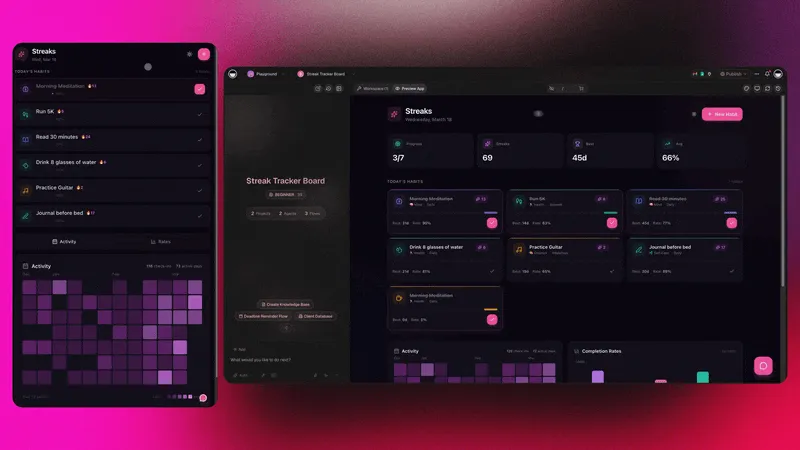
ADHD-Friendly Apps Built with Genesis
These AI-powered apps are designed with simplicity and focus in mind -- perfect for ADHD productivity:
| App | How It Helps | Clone |
|---|---|---|
| Minimalistic ToDo App | Clean, distraction-free interface | Clone → |
| Study/Work Timer + Music | Pomodoro + ambient sounds for focus | Clone → |
| Mood Tracker | Track energy and focus patterns | Clone → |
| Breathe Circle | Quick calming breaks when overwhelmed | Clone → |
| Habit Tracker Dashboard | Build consistent routines with streak tracking | Clone → |
Build your own ADHD-friendly productivity system with Taskade Genesis -- describe what you need, and watch it come to life.
Your living workspace includes:
- Custom AI Agents -- The intelligence layer
- Projects & Memory -- The database layer
- 100+ Integrations -- The automation layer
Get started:
- Create Your First App → -- Step-by-step tutorial
- Learn Workspace DNA → -- Understand the architecture
Challenge chaos and take control with Taskade AI
Read more:
- 8 AI Health & Wellness Workspaces
- 10 Personal AI Workspaces (Second Brain)
- Build Your First AI App
- Classic Productivity Methods Guide
- Deep Work for Remote Teams

Frequently Asked Questions About Using AI to Manage ADHD
What technology can help with ADHD?
Several technologies can aid in managing ADHD, including AI-driven apps, smart planners, and wearable devices. AI tools like Taskade help organize tasks and schedules with AI agents that can automate inbox processing, task breakdowns, and daily planning. Timer apps using the Pomodoro Technique or Flowtime Technique provide external structure for focus sessions. Wearable devices like smartwatches provide real-time reminders and track activity levels.
How do you use AI to manage ADHD?
Start by identifying your biggest friction points -- is it starting tasks, staying focused, or organizing your day? For task initiation, use the AI Generator to break big projects into bite-sized Next Actions (the GTD methodology calls this "clarifying"). For focus, pair AI-organized task lists with a countdown timer. For daily organization, set up AI agents to process your inbox, prioritize tasks, and send you a daily briefing. The key is reducing the number of decisions your executive function has to make each day.
Can AI replace ADHD medication or therapy?
No. AI productivity tools are a supplement to -- not a replacement for -- professional ADHD treatment. Medication and cognitive behavioral therapy (CBT) address the neurological and behavioral roots of ADHD. AI tools address the environmental and organizational challenges that come with ADHD in the workplace. Think of it this way: medication helps your brain focus; AI tools help you focus on the right things. Many people with ADHD get the best results from combining professional treatment with structured productivity systems.
What is the best productivity method for ADHD?
There is no single answer, but methods that provide external structure without being rigid tend to work best. The Flowtime Technique is often preferred over the Pomodoro Technique because it lets your natural focus dictate session length -- critical for ADHD brains that can hyperfocus. For organization, a simplified GTD (Getting Things Done) system with AI-assisted processing reduces the executive function demands that ADHD makes harder. And the Eisenhower Matrix helps cut through context switching by making priorities visual.
Is ADHD hyperfocus the same as deep work?
They are closely related but not identical. Deep work (Cal Newport's concept) is a deliberate practice -- you choose to focus on a cognitively demanding task for an extended period. ADHD hyperfocus is often involuntary -- your brain locks onto a stimulus and will not let go, regardless of whether it is productive. The goal for ADHD productivity is to create conditions that channel hyperfocus toward the right tasks. AI-powered task management helps by surfacing the most important work and reducing the friction of getting started.
Resources
- WHO World Mental Health Survey, ADHD and Productivity Loss (https://www.who.int/news-room/fact-sheets/detail/attention-deficit-hyperactivity-disorder-(adhd))