






“Why can't I get things done?” This is a common question that bounces around productivity forums and communities like r/gtd. And we can understand why.
David Allen’s Getting Things Done® (GTD®) is not the easiest productivity system to bite into. But maybe the crux of the matter is that you’re simply thinking about GTD as “just another to-do list?”
Whether you're new to the Getting Things Done® (GTD®) methodology or just want to give it another shot, you should know a couple of things before we start.
💡 Related productivity guides:
📥 What Is Getting Things Done and How Does It Work?
Getting Things Done® (GTD®) is a personal productivity methodology created by productivity consultant David Allen. GTD is also one of the “classic” productivity systems that has been around long enough to build a cult-like following. And for all the good reasons.
Implementing Getting Things Done® (GTD®) will help you:
⏰ Effectively manage your time and available resources.
🤹♂️ Deal with personal and professional commitments.
🧘♀️ Clear your mind and focus on the work that matters.
🗓️ Plan your days so you always know what to do next.
🌱 Establish a productivity routine that’ll serve you for life.
The overarching goal of GTD is to “extract” tasks, obligations, reminders, ideas, and (mental) notes out of your head and into a foolproof, reliable system. Moving all those items to an external medium lets you free up your cognitive bandwidth and, well… get things done.
⚡ Getting Things Done® (GTD®) Cheat Sheet
David Allen’s methodology is built on five pillars—capture, clarify, organize, reflect, engage— corresponding to steps in the workflow. You can think of the five pillars as powerful work habits you can improve and reflect on each time you repeat the GTD cycle.
Here’s a bite-sized overview of the methodology:
- 📥 Capture: According to Allen, the human brain is excellent at generating new ideas, but it’s not designed to store those ideas ad infinitum. First, you need to transfer everything you normally marinate in your mind—ideas, tasks, observations, goals—into a (digital) in-tray or inbox. This could be a task management or note-taking app.
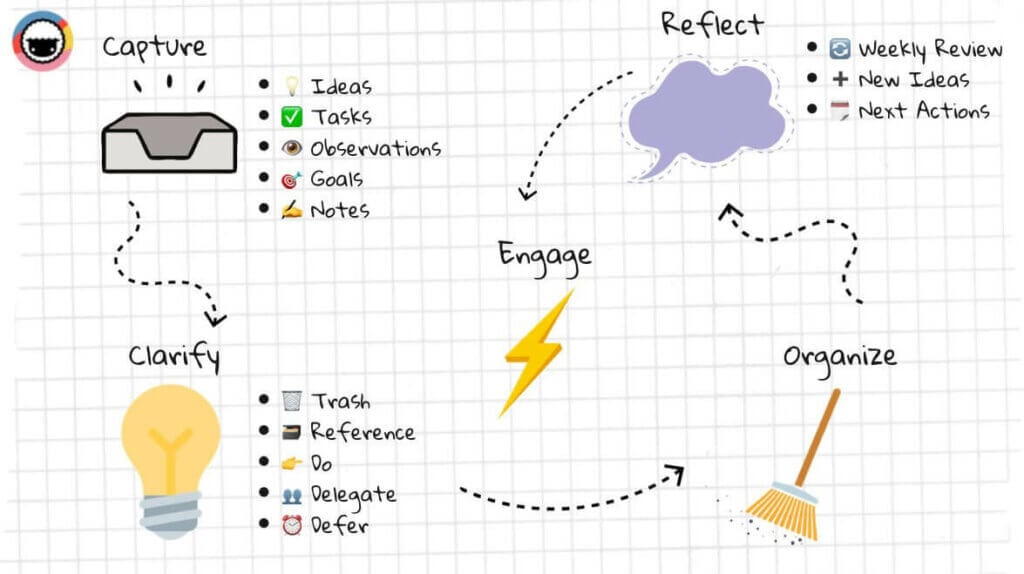
- 💡 Clarify: Next, your job is to “clarify” what to do with the things in your inbox and, eventually, turn them into Next Actions. Unlike regular to-dos, next actions are precise and actionable items. For instance, “finish the draft” is pretty ambiguous, but “finish the 1st draft of my next novel by 24th March 2022” makes everything clear.
You can process your Inbox items in several ways:
🗑️ Trash: If no action is needed (now or in the future).
🗃️ Store in reference files: If you need it for current or future projects.
👉 Do: Complete the action if it takes less than 2 minutes.
👥 Delegate: Assign the item to someone else (if possible).
⏰ Defer: Add to a calendar (set date) or Someday/Maybe folder (no date).
🧹 Organize: GTD leaves nothing to chance. You need to regularly review and organize every item you add to the system. You can do this by using subject-specific lists, folders, or tags. At this stage, you also should continue removing any non-actionable items.
🧘♂️ Reflect: GTD encourages you to regularly review and reflect on your workflow. Allen suggests running Weekly Review sessions to review all GTD lists, add any tasks and documents that slipped through the cracks, get creative, and capture fresh ideas.
⚡ Engage: Finally, once your system is up and running, you can start getting things done and check off tasks from your task lists as you use your GTD setup.
Effective? Absolutely!
Simple? Not Really…
🤯 Common GTD Obstacle or Why You Can't Get Things Done
To say that Getting Things Done® (GTD®) is popular would be an understatement. When Allen published his book Getting Things Done in 2001, he singlehandedly created the personal productivity space. Over 20 years later, GTD is still alive and kicking.
But that doesn’t mean it’s for everybody.
Many new GTD users look at Allen’s Next Actions and say: “Hey, aren’t those just like my crumpled to-dos but in a fancy marketing wrapping?” And we get it. After all, both to-dos and next actions are meant to be “completed,” so the endgame is pretty much the same, right?
Well, not really. As we’ve already explained, to-dos and next actions are two different animals. According to Allen, to-do lists lack context. They’re just shapeless blobs of mismatched tasks and calendar reminders that lack priority and detail to be actionable.
Ambiguous actions/tasks like “send the report urgently” are not enough to warrant actionability. Who should you send it to? How are you supposed to send the report? What exactly does “urgently” mean? Which report should you send in the first place?
Getting those items out of your mind and onto a to-do list is relieving, but not for long. Simply because an incomplete system is not reliable. And if you can’t trust the system you’re using, you’re bound to fall back on old habits and continue storing tasks and ideas all over the place.
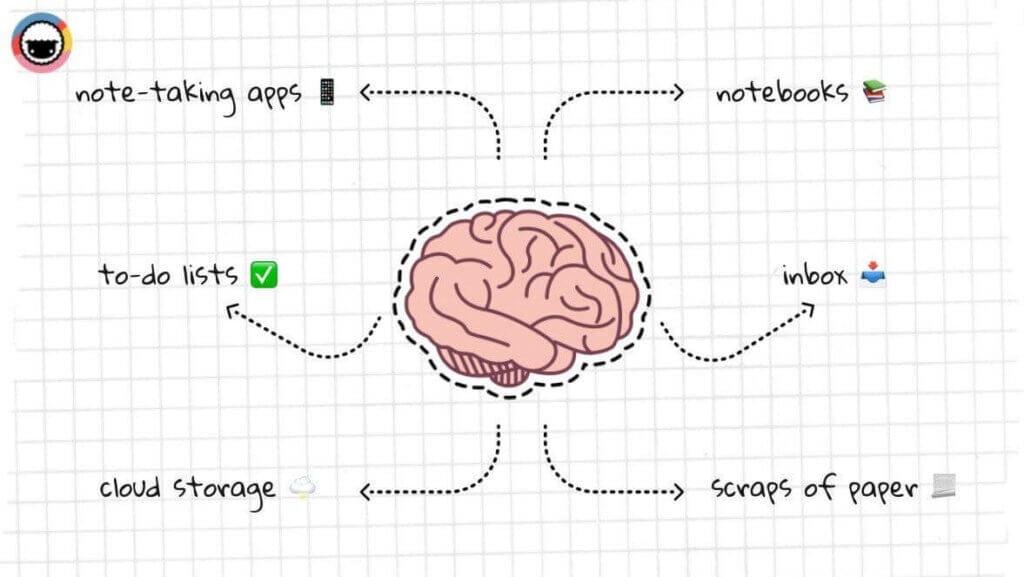
Chances are your current workflow involves both analog and digital tools that may include a calendar, notebook, to-do apps, note-taking apps, cloud storage, and even your bottomless inbox. Using several tools to manage your workflow creates a severely fragmented workflow.
Those problems compound with each new variable. You complete fewer tasks from your task lists and move more items to the backlog. The next day, you add new tasks and the list grows instead of getting shorter. As Nietzsche wrote, “if you gaze for long into an abyss, the abyss gazes back.”
This vicious cycle is a common problem for many to-do users. And a meaningless list of tasks is too ambiguous to see closure. GTD won’t work for you unless you learn how to drop that “to-do mentality” and get intentional about your work and personal life.
Finally, let’s not forget that Getting Things Done® is a life-long investment. It requires commitment—trimming the grass, watering the plants, fertilizing the soil—to see lasting effects. Treating your fledgling GTD setup like “just another to-do list” defeats the purpose.
But hey, we’re here to help you fix that! 🥳
🛠️ How to Make Getting Things Done Work For You
1. Keep Everything Out of Your Head and Trust the System
Did you know that the popular “trust the process” mantra comes from the world of professional sports? It was coined in 2013 by Philadelphia 76es general manager Sam Hinkie who mentioned it to journalists to describe his team’s newly-implemented strategy.
💬 "We talk a lot about process—not outcome—and trying to consistently take all the best information you can and consistently make good decisions. Sometimes they work and sometimes they don't, but you reevaluate them all."
If you want GTD to work for you, you need to trust the process AND trust the system. That’s not easy. When you can’t process information fast enough, you start bouncing between tools that happen to be around—notebooks, post-it notes, or note-taking apps.
The whole purpose of your GTD is to become your single source of truth (SSOT). Whether it’s work or personal stuff you want to manage, you need to have ONE system to manage all your notes, next actions, ideas, thoughts, observations, and reminders.
And this is where Taskade comes into place!
Taskade is a project and task management platform that makes it easier to capture, organize, and process all your GTD items. Taskade lets you store notes, tasks, projects, reminders, and documents in one place so you don’t have to waste time switching between apps.
Many people drop off GTD because there’s too much friction in capturing information. Taskade allows you to view and add items to your GTD workflow on desktop (Mac, Windows), mobile (iOS, Android), and in a web browser, all with secure, real-time sync over the cloud. Manage your project lists with Taskade today!
2. Create Context-Rich, Bite-Sized Next Actions
Actionability is key in Getting Things Done®. But how do you make big, complex projects like “launch a successful app”, “learn programming,” or “get in shape” actionable rather than intimidating? You can use the power of outlining to break those rocks into pebbles!
Haven’t heard about outlining? In a nutshell, outlining is the process of creating hierarchical lists to contain whatever you’re thinking or working on. An outline lets you break complex tasks or projects into smaller, more manageable bits and see all the moving parts easily.
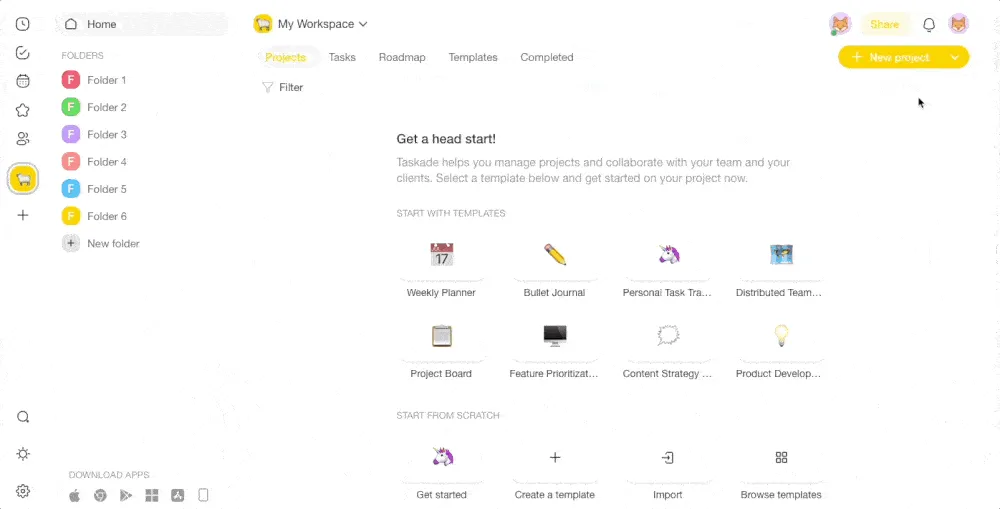
Outlining your project lists will help you create precise and context-rich next actions. It’ll also give you clearly defined starting points for all the tasks you’re working on. Plus, bite-sized tasks are less intimidating which means you’re less likely to procrastinate on them.
💬 ”Things rarely get stuck because of lack of time. They get stuck because the doing of them has not been defined.”
― David Allen, Getting Things Done: The Art of Stress-Free Productivity
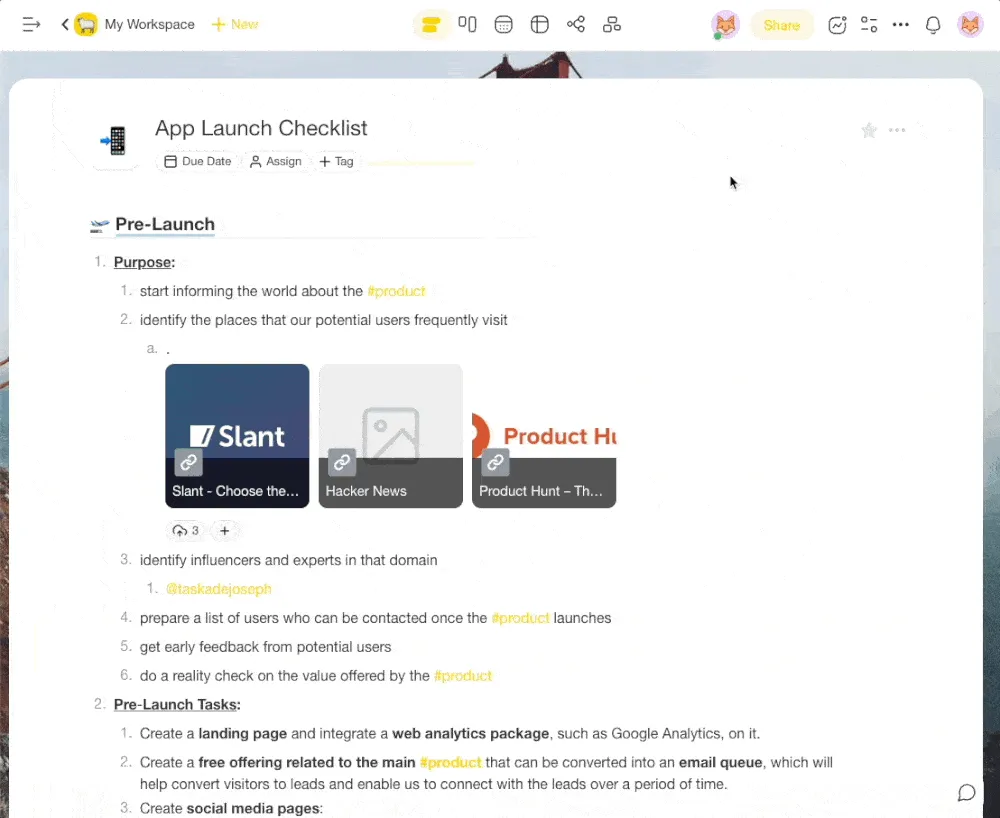
Whenever you add items to your GTD system, you need to visualize major tasks as a series of actionable steps, or sub-tasks if you will, you’ll complete in a sequence. Going back to our example, you can easily break “launching an app” into the following sections:
🛫 Pre-launch
🛩 During launch
🛬 Post-launch
But our list still lacks context. Taskade lets you add depth to next actions in several ways. You can use #tags to categorize items or define their priority, add due dates to time-sensitive items, and even upload images and other documents to see all resources in one place. Schedule a weekly review into your project list to make sure that you're on track!
3. Adjust Your Work Habits and Test-Run GTD Before Going All In
We all have some positive work habits. But chances are you also have a fair share of bad habits that stand between you and productivity. This can be anything from disorganization, putting things off, or procrastinating on a project at the slightest hint of resistance.
If you want to make GTD stick, you need to replace those bad habits with new ones that’ll help you cultivate your system. The beauty of habit-building is that small changes compound over time and make it much easier to roll out improvements across other aspects of your life.
💬 “As people strengthened their willpower muscles in one part of their lives—in the gym, or a money management program—that strength spilled over into what they ate or how hard they worked. Once willpower became stronger, it touched everything.”
—Charles Duhigg, The Power Of Habit
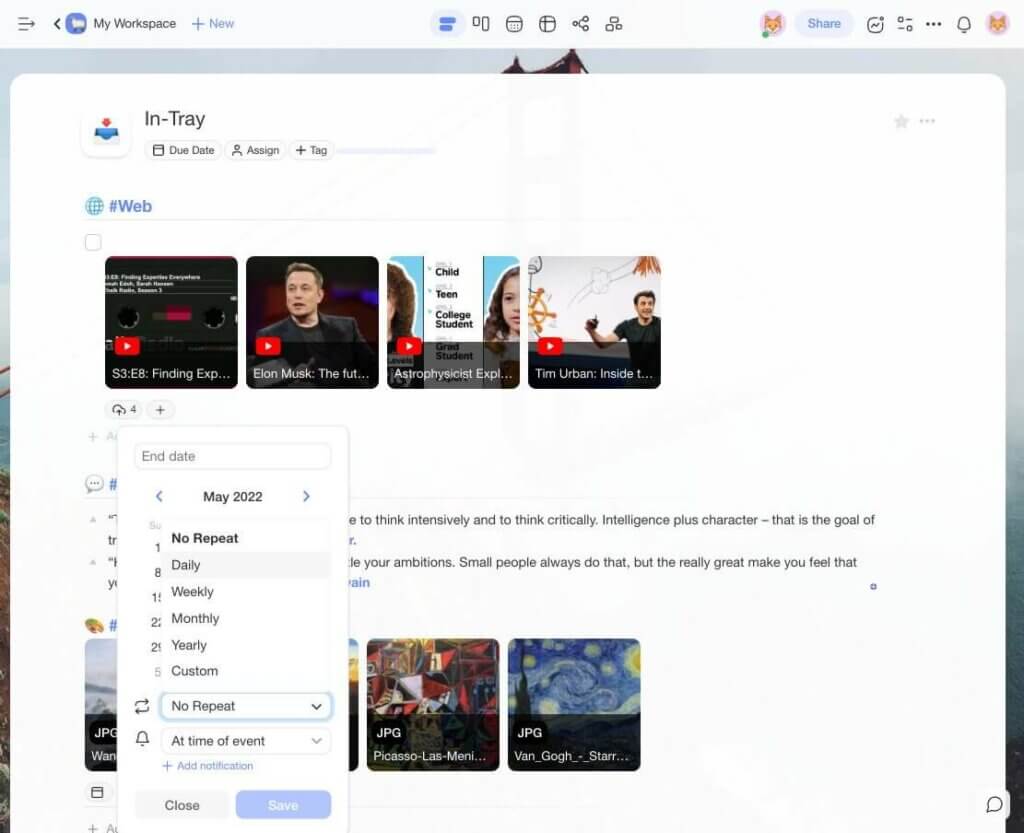
Not sure where to start? Focus on the areas of GTD that are the most problematic, like daily note-taking and Weekly Reviews. You can create recurring tasks in Taskade to remind you when it’s time to sit down and review your system or fill the Inbox with new, exciting ideas.
But that’s not all. Trying to tackle all your life errands, and all your work responsibilities can be too much to handle if you’re new to GTD. No matter how organized you are or how good your task management software is (not pointing fingers!), you need to do some field testing.
Don’t just jump on GTD as if your life depended on it. We recommend that you stick to your current routine while building a GTD setup in the background. Keep reading and rereading the book, highlighting passages, and implementing GTD in increments.
For instance, you may want to create a new Folder in Taskade and start building a GTD setup separately from the rest of your workflow. Once you have the framework in place, you can begin filling your in-tray with tasks and ideas connected to a single, small-scale project.
Building a GTD setup in the background will help you A/B test the setup without interfering with how you currently get things done. It’ll also make it easier to patch any holes as you keep coming back to the book by David Allen and implementing new Getting Things Done® mechanics. Also, don't forget to add in a weekly review to make keep track of your GTD setup.
🔬 The GTD Decision Flowchart
One of the most powerful mental models in GTD is the "clarify" step — the decision tree that determines what happens to every item that enters your inbox. Here's the complete flowchart:
    GTD Inbox Processing Flowchart┌──────────────────────┐
│   NEW ITEM ARRIVES   │
│   in your Inbox      │
└──────────┬───────────┘
           │
           ▼
┌──────────────────────┐
│  Is it actionable?   │
└───┬──────────────┬───┘
    │              │
   YES             NO
    │              │
    ▼              ▼
┌────────┐    ┌─────────────────────┐
│ What's │    │  • Trash / Delete    │
│ the    │    │  • Someday / Maybe   │
│ next   │    │  • Reference file    │
│ action?│    └─────────────────────┘
└───┬────┘
    │
    ▼
┌──────────────────────┐
│  < 2 minutes?        │──YES──▶ DO IT NOW
└───┬──────────────────┘
    │
    NO
    │
    ▼
┌──────────────────────┐
│  Am I the right      │
│  person?             │──NO──▶ DELEGATE IT
└───┬──────────────────┘
    │
   YES
    │
    ▼
┌──────────────────────┐
│  Specific date?      │──YES──▶ CALENDAR
└───┬──────────────────┘
    │
    NO
    │
    ▼
┌──────────────────────┐
│  NEXT ACTIONS LIST   │
│  (context: @phone,   │
│   @computer, @home)  │
└──────────────────────┘
This flowchart is the engine that makes GTD reliable. Every item in your inbox gets processed through the same decision tree — nothing falls through the cracks. The two-minute rule alone can dramatically reduce your backlog: if it takes less than two minutes, just do it right now.(1)
📊 What Research Says About GTD and Task Management
GTD was ahead of its time. Modern cognitive science has since validated many of Allen's core principles — from the "open loops" concept to the weekly review. Here's what the data shows:
| Research Finding | Source |
|---|---|
| Unfinished tasks occupy working memory and reduce performance (the "Zeigarnik effect") | Masicampo & Baumeister (2011), Florida State University(2) |
| Simply making a plan to complete a task eliminates the Zeigarnik effect — even before doing it | Masicampo & Baumeister (2011)(2) |
| Workers spend 1.8 hours/day searching for information across fragmented tools | McKinsey Global Institute (2012)(3) |
| Writing tasks down frees up cognitive resources for better problem-solving | Pennebaker, J. (1997), University of Texas(4) |
| Implementation intentions ("I will do X at Y time in Z context") increase follow-through 2-3x | Gollwitzer, P. (1999)(5) |
| It takes 23 minutes to refocus after a single interruption | Mark, G. (2008), UC Irvine(6) |
The takeaway? GTD works because it addresses real cognitive bottlenecks. The "capture" step resolves the Zeigarnik effect. The "clarify" step creates implementation intentions. The "organize" step prevents the 1.8 hours/day of information hunting. And the "weekly review" prevents the 23-minute context switching penalty by keeping your system trustworthy.
👌 Build Your GTD Workflow with Taskade AI
Getting Things Done was designed for analog tools — paper inboxes, manila folders, physical filing cabinets. In 2026, you can run the entire GTD system inside Taskade — a single living workspace that handles capture, clarify, organize, reflect, and engage in one place. No more fragmented tools.
To make your job easier, start with the free Getting Things Done template — add it to your Workspace, customize it, and share it with your team.
Clone These GTD & Task Management Apps
| App | What It Does | Link |
|---|---|---|
| Minimalistic ToDo | Clean Next Actions list for your GTD workflow | Clone → |
| Monochrome Project Dashboard | Single-pane project overview for Weekly Reviews | Clone → |
| Team Capacity Planner | Manage delegated tasks (the "Waiting For" list) across your team | Clone → |
| Study/Work Timer + Music | Pomodoro timer with ambient sounds for focused GTD sessions | Clone → |
Taskade AI Features for GTD
🤖 Custom AI Agents: Set up AI agents to process your inbox, classify items, and route tasks into the right GTD lists automatically.
🪄 AI Generator: Turn vague ideas into structured Next Actions with context, priority, and due dates — in seconds.
✏️ AI Assistant: Let the AI Assistant help you clarify, organize, and refine items during your GTD processing sessions.
🗂️ Prompt Templates: Pre-built GTD workflows for inbox processing, weekly reviews, and project planning.
💬 AI Chat: Quick Q&A when you're stuck on how to process an item — no need to leave your GTD workspace.
📄 Media Q&A: Summarize meeting recordings and documents to extract actionable items for your GTD inbox.
Sign up for free and master your GTD workflow with Taskade AI! 🤖
Frequently Asked Questions About Getting Things Done (GTD)
What are the 5 steps of GTD?
The 5 steps of Getting Things Done are: (1) Capture — collect everything that has your attention into a trusted inbox, (2) Clarify — process each item by deciding if it's actionable and what the next action is, (3) Organize — sort items into context-specific lists like Next Actions, Waiting For, Someday/Maybe, and Projects, (4) Reflect — conduct regular reviews (especially the Weekly Review) to keep the system current, and (5) Engage — confidently choose what to work on, knowing your system has everything accounted for. The key insight is that these steps form a cycle, not a one-time setup.(1)
What is the two-minute rule in GTD?
The two-minute rule states: if the next action on any item will take less than two minutes to complete, do it immediately during the "clarify" step rather than organizing it into a list. This prevents small tasks from piling up and becoming psychological weight. Research on implementation intentions supports this — simply deciding to act on a task (and acting) eliminates the cognitive load of tracking it.(5) The two-minute threshold is a guideline; David Allen notes you can adjust it based on how much processing time you have available.
How often should you do a GTD Weekly Review?
David Allen recommends a Weekly Review every 7 days — ideally at the same time each week so it becomes habitual. The review involves: (1) clearing all inboxes to zero, (2) reviewing every active project and Next Actions list, (3) checking the Someday/Maybe list for items that should become active, (4) reviewing your calendar for upcoming commitments, and (5) capturing any new ideas or tasks that surface. The Weekly Review is what keeps GTD trustworthy — without it, the system decays and you fall back to keeping things in your head.(1) Many GTD practitioners set a Friday afternoon recurring task to trigger their review.
Is GTD still relevant in 2026?
Absolutely. While GTD was published in 2001, its core principles — externalize everything, process systematically, review regularly — are more relevant than ever. The average knowledge worker now uses 9+ apps daily and toggles between them 1,200 times per day, creating exactly the kind of fragmented workflow GTD was designed to fix. What's changed is the tooling: AI-powered task management platforms can now automate the "clarify" and "organize" steps that used to require manual processing. The GTD framework provides the mental model; AI Agents provide the execution.
How does GTD compare to the Eisenhower Matrix?
GTD and the Eisenhower Matrix solve different problems. The Eisenhower Matrix is a prioritization framework — it helps you decide what to work on by sorting tasks into urgent/important quadrants. GTD is a workflow management system — it helps you capture, process, and organize everything so nothing falls through the cracks. They work best together: use GTD to capture and organize all your commitments, then use the Eisenhower Matrix to prioritize which Next Actions to tackle first during your focus blocks.
Can you use GTD with the Pomodoro Technique?
Yes, and it's a powerful combination. Use GTD to maintain your organized system of Next Actions, then use the Pomodoro Technique (or the more flexible Flowtime Technique) to execute those actions in timed focus sprints. During each Pomodoro session, pick the most important Next Action from your GTD list and work on it exclusively. The built-in countdown timer in Taskade makes this seamless — you never have to leave your GTD workspace to start a timer.
🔗 Resources
Allen, D. (2001). Getting Things Done: The Art of Stress-Free Productivity. Penguin Books. https://gettingthingsdone.com/
Masicampo, E. J., & Baumeister, R. F. (2011). Consider it done! Plan making can eliminate the cognitive effects of unfulfilled goals. Journal of Personality and Social Psychology, 101(4), 667-683.
McKinsey Global Institute. (2012). The social economy: Unlocking value and productivity through social technologies.
Pennebaker, J. W. (1997). Writing about emotional experiences as a therapeutic process. Psychological Science, 8(3), 162-166.
Gollwitzer, P. M. (1999). Implementation intentions: Strong effects of simple plans. American Psychologist, 54(7), 493-503.
Mark, G., Gudith, D., & Klocke, U. (2008). The cost of interrupted work: more speed and stress. Proceedings of CHI 2008, ACM.