



Introducing TSK-1Introducing TSK-1·Taskade's intelligence layer.
taskade
PricingHelpDashboard →Dashboard →
PricingLoginSign up for free →Sign up for free →
Dashboard →Dashboard →
Sign up for free →Sign up for free →
Loved by 1M+ users·Hosting 150,000+ apps·Deploying 500K+ AI agents·Running 1M+ automations·Backed by Y Combinator·Powered by TSK-1
Taskade
AppsTSK-1BuilderPricingFeaturesContact us
See all▾
IntegrationsMCP ServerPressAboutConnectProductivityVideosReviewsFAQ
Learn
GenesisProjectsAI AgentsAutomationConnectorsVideo Tutorials
See all▾
Import & ExportSearch ArticlesAccount & Billing
Community Apps
FeaturedQuick AppsTools
See all▾
DashboardsWebsitesWorkflowsProjectsFormsCreators
Downloads
Mobile appsDesktop appsAndroid
See all▾
iOSMacWindowsChromeFirefoxEdge
Compare
vs Cursorvs Boltvs Lovable
See all▾
vs V0vs Windsurfvs Replitvs Emergentvs Devinvs Claude Codevs ChatGPTvs Claudevs Perplexityvs GitHub Copilotvs Figma AIvs Notionvs ClickUpvs Asanavs Mondayvs Trellovs Jiravs Linearvs Todoistvs Evernotevs Obsidianvs Airtablevs Basecampvs Mirovs Slackvs Bubblevs Retoolvs Webflowvs Framervs Softrvs Glidevs FlutterFlowvs Base44vs Adalovs Durablevs Gammavs Squarespacevs WordPressvs UI Bakeryvs Zapiervs Makevs n8nvs Jaspervs Copy.aivs Writervs Rytrvs Manusvs Crewvs Lindyvs Relevance AIvs Wrikevs Smartsheetvs Monday Magicvs Codavs TickTickvs Any.dovs Thingsvs OmniFocusvs MeisterTaskvs Teamworkvs Workfrontvs Bitrix24vs Process Streetvs Toggl Planvs Motionvs Momentumvs Habiticavs Zenkitvs Google Docsvs Google Keepvs Google Tasksvs Microsoft Teamsvs Dropbox Papervs Quipvs Roam Researchvs Logseqvs Memvs WorkFlowyvs Dynalistvs XMindvs Whimsicalvs Zoomvs Remember The Milkvs Wunderlist
AI Agents
FeaturedProject ManagementProductivity
See all▾
MarketingTranslatorContentWorkflowResearchPersonalOperations IntelligenceSalesSocial MediaTo-Do ListCRMTask AutomationCoachingCreativityTask ManagementBrandingFinanceLearning and DevelopmentBusinessCommunity ManagementMeetingsAnalyticsDigital AdvertisingContent CurationKnowledge ManagementProduct DevelopmentPublic RelationsProgrammingHuman ResourcesE-CommerceEducationLegalEmailSEODeveloperVideo ProductionDesignFlowchartDataPromptNonprofitAssistantsTeamsCustomer ServiceTrainingTravel PlanningUML DiagramER DiagramMath TutorLanguage LearningCode ReviewerLogo DesignerUI WireframeFitness CoachLead EnrichmentFounder OSSales DevelopmentBookkeepingRecruitingWebsite MonitoringField ServiceLicensingAll Categories
Automations
FeaturedAI WorkflowsLogic Automations
See all▾
AI Agent AutomationTrigger AutomationsAgentic Process AutomationAction AutomationsAI Models in WorkflowsAgentic AutomationMulti-Agent AutomationBusiness-in-a-BoxOperations IntelligenceInvestor OperationsEducation & LearningHealthcare & ClinicsReal EstateStripeSalesHR & People OpsField Service & DispatchRenewals & LicensesE-commerceContentMarketingEmailCustomer SupportHubSpotProject ManagementAgentic WorkflowsAppointment SchedulingCalendarReportsSlackWebsiteFormTaskWeb ScrapingWeb SearchChatGPTText to ActionYoutubeLinkedInTwitterGitHubDiscordMicrosoft TeamsWebflowIndustry News & RSS FeedsGoogle WorkspaceManufacturing & OperationsAI Agent TeamsNotion AutomationsProposalBookkeeping & ExpensesClient OnboardingGoogle SheetsGoogle DriveGoogle CalendarGoogle FormsShopifyAsanaAirtableTrelloTodoistMailchimpClickUpGoogle DocsGmailGoogle TasksJiraLinearMicrosoft OutlookTelegramCalendlyTypeformSalesforceMonday.comTwilioWhatsApp BusinessWordPressZoomHTTP and WebhooksMCP AutomationFacebook PagesRedditApolloAll Categories
Prompts
Client PortalsDocument IntakeField Service
See all▾
Operations IntelligenceCRMAdvertisingDesignInvoicing and PaymentsSocial MediaQuotes and EstimatesCalculatorsCodingBooking and SchedulingConsultingCustomer SupportComplianceTime TrackingRetail OperationsSaaS and SubscriptionsInsuranceGovernance and OversightNonprofitPatient IntakeBlog WritingBrandingPersonal FinanceHuman ResourcesPublic RelationsTeam CollaborationProduct ManagementSupportAgencyReal EstateMarketingResearchSalesCopywritingContentProject ManagementWebsite CreationStrategyE-commerceEngineeringSEOEducationEmail MarketingUX/UIProductivityInfluencer MarketingAnalyticsEntrepreneurshipLegalVibe CodingRecruitingAll Categories
Templates
FeaturedChatGPTTable
See all▾
PersonalProject ManagementSalesFlowchartTask ManagementEngineeringOperations IntelligenceEducationDesignTo-Do ListMarketingMind MapGantt ChartOrganizationalPlanningMeetingsTeam ManagementStrategyGamingProductionProduct ManagementStartupRemote WorkY CombinatorRoadmapCustomer ServiceLegalEmailBudgetsContentConsultingE-CommerceStandard Operating Procedure (SOP)Human ResourcesProgrammingMaintenanceCoachingSocial MediaHow-TosResearchMusicTrip PlanningCRMClient OnboardingEmployee OnboardingSOPBug TrackerRecruitment TrackerFormSales PipelineContent CalendarMarketing PlanProduct RoadmapBusiness PlanSWOT Analysis30-60-90 Day PlanInterviewNotion AlternativeKPIStrategic PlanMeeting AgendaInvoiceRisk RegisterIT Asset ManagementKanban BoardChange ManagementCommunication PlanRFPScope of WorkStatement of WorkHelpdeskKnowledge BaseCreative BriefGoal SettingExecutive SummaryGap AnalysisBooking SystemEvent ManagementPortfolio TrackerCustomer Onboarding PortalsClient PortalAgency OperationsFinance TrackingAll Categories
Generators
AI SoftwareNo-Code AI AppAI App
See all▾
AI WebsiteAI DashboardAI FinanceAI Operations IntelligenceAI FormAI AgentAI Client Portal BuilderAI WorkspaceAI ProductivityAI To-Do ListAI WorkflowsAI EducationAI Mind MapsAI FlowchartAI Scrum Project ManagementAI Agile Project ManagementAI MarketingAI Project ManagementAI Social Media ManagementAI BloggingAI Agency WorkflowsAI ContentAI Software DevelopmentAI MeetingAI PersonasAI OutlineAI SalesAI ProgrammingAI DesignAI FreelancingAI ResumeAI Human ResourceAI SOPAI E-CommerceAI EmailAI Public RelationsAI InfluencersAI Content CreatorsAI Customer ServiceAI BusinessAI PromptsAI Tool BuilderAI SEOAI Gantt ChartAI CalendarsAI BoardAI TableAI ResearchAI LegalAI ProposalAI Video ProductionAI Health and WellnessAI WritingAI PublishingAI NonprofitAI DataAI Event PlanningAI Game DevelopmentAI Project Management AgentAI Productivity AgentAI Marketing AgentAI Personal AgentAI Business and Work AgentAI Education and Learning AgentAI Task Management AgentAI Customer Relations AgentAI Programming AgentAI SchemaAI Business PlanAI Pitch DeckAI InvoiceAI Lesson PlanAI Social Media CalendarAI API DocumentationAI Database SchemaAI Marketing PlanAI Sales Pipeline GeneratorAI Course BuilderInternal ToolsBooking SystemReal Estate CRMInventory ManagementAI CRM BuilderAI TimesheetAI DispatchAI NewsletterAI Clinic OperationsAI Directory BuilderAll Categories
Taskade AI
Video GuideAI App BuilderVibe Coding
See all▾
Agent BuilderDashboard BuilderCRM BuilderWebsite BuilderForm BuilderWorkflow AutomationWorkflow BuilderBusiness-in-a-BoxAI for MarketingAI for Developers
Converters
AI Featured ConvertersAI PDF ConvertersAI CSV Converters
See all▾
AI Markdown ConvertersAI Prompt to App ConvertersAI Data to Dashboard ConvertersAI Workflow to App ConvertersAI Idea to App ConvertersAI Flowcharts ConvertersAI Mind Map ConvertersAI Text ConvertersAI Youtube ConvertersAI Knowledge ConvertersAI Spreadsheet ConvertersAI Email ConvertersAI Web Page ConvertersAI Video ConvertersAI Coding ConvertersAI Task ConvertersAI Kanban Board ConvertersAI Notes ConvertersAI Education ConvertersAI Language TranslatorsAI Business → Backend App ConvertersAI File → App ConvertersAI SOP → Workflow App ConvertersAI Portal → App ConvertersAI Form → App ConvertersAI Schedule → Booking App ConvertersAI Metrics → Dashboard ConvertersAI Game → Playable App ConvertersAI Catalog → Directory App ConvertersAI Creative → Studio App ConvertersAI Agent → Agent App ConvertersAI Audio ConvertersAI DOCX ConvertersAI EPUB ConvertersAI Image ConvertersAI Resume & Career ConvertersAI Presentation ConvertersAI PDF to Spreadsheet ConvertersAI PDF to Database ConvertersAI PDF to Quiz ConvertersAI Image to Notes ConvertersAI Audio to Notes ConvertersAI Email to Tasks ConvertersAI CSV to Dashboard ConvertersAI YouTube to Flashcards ConvertersURL to NotesVideo → SummaryAI Receipts to Expense Tracker ConvertersAI Docs to Knowledge Base ConvertersAI Form to Client Portal ConvertersSpreadsheet to CRMAll Categories
Wiki
Taskade GenesisAI Agent ExamplesLiving DNA
See all▾
AI AgentsAutomationProjectsAutonomous Workspaces, Agents & AppsQuantum AI & Taskade Genesis QuantumFoundations: The Theory Under Modern AIPlatformAI InfrastructureIntegrationsProductivityMethodsProject ManagementAgileScrumAI ConceptsCommunityTerminologyFeatures
Docs
Getting StartedREST APIAction API
See all▾
MCP ServersGuides & SDKModels
Blog
Introducing Taskade TSK-1: The System Kernel Behind Every App (2026)History of Shopify: From a Snowboard Shop to Agentic Commerce, and How Tobi Lütke Runs It (2026)Tasks That Cascade: Ten Years of Building a To-Do List
See all▾
What 12 Production AI Agent Deployments Have in Common (2026)Best AI Assignment Makers 2026: 12 Tools for TeachersReplay Simulators Explained: How AI Agents Learn From Runs They Already Paid For (2026)Image to Prompt Generators 2026: 10 Tools, One Real Photo TestThe Product We Didn't Know We Were Building: How Taskade Became Taskade Genesis (2026)The Agentic AI Glossary (2026): 200+ AI Agent, LLM, and Brain Terms ExplainedAI Sycophancy Explained: Why Chatbots Agree With You, the Science Behind It, and How to Stop It (2026)When Was Claude Released? Every Claude Release Date, 2023 to 2026Structure Beats Instruction: Why AI Agent Prompt Rules Fail (2026)AI Subagents vs Agent Teams: When to Use Each (2026)Always-On AI Agents: Dots, Muse, Grok Bot Explained (2026)Claude Models Explained: Opus vs Sonnet vs Haiku, Every Version to Sonnet 5.5 (2026)Best AI Game Generators 2026: 21 Tools Sorted by What They Actually MakeAI Cost per Task (2026): What AI Work Really Costs to RunA Year of AI Agent Memory Experiments: Four Negative Results (2026)What Is GPT? GPT vs LLM vs ChatGPT, and Why Models Come in Tiers (2026)Run Your Whole Business in One App with Taskade Genesis (June 2026)
AIAutomationProductivityProject ManagementRemote WorkStartupsKnowledge ManagementCollaborative WorkUpdates
Changelog
Builds That Keep Going & App Kit Remix (Oct 9, 2026)Copy Shared Projects After Sign-Up (Oct 8, 2026)Pick Your App's Address & Edit Code in Your App (Oct 8, 2026)
See all▾
App Sign-In Codes & Workspace Activity (Oct 7, 2026)Account Deletion & Automation Save Hotfix (Oct 6, 2026)Import Media From Links & Larger Files in Chat (Oct 5, 2026)Code Tab File Protection & Clearer Import Errors (Oct 5, 2026)
Integrations
Slack AutomationGmail AutomationGoogle Sheets Automation
See all▾
Google Calendar AutomationGoogle Drive AutomationHubSpot AutomationStripe AutomationDiscord AutomationGitHub AutomationNotionYouTube AutomationZapier
© 2026 TASKCADE INC.
PrivacyTermsSecurity
Made withTaskade AIforBuilders
BlogProductivityReverse-Engineering…

Reverse-Engineering Productivity for Remote Teams. Do More With Less

What makes remote and distributed teams (mind the emphasis) genuinely productive? Is it the ability to churn out as much as possible in the shortest amount of t...

Reverse-Engineering Productivity for Remote Teams. Do More With Less
February 12, 2020Updated July 3, 20259 min readJohn XieProductivity·#productivity-tips#remote-work
On this page (10)
🤔 Wait, isn’t that prohibited?Learn How to Set Rockstar Goals and PrioritiesGet Your House Workspace in OrderStop Juggling Inefficient ProcessesFollow the Bread Crumbs With Mind MappingWhat’s a Mind Map?What Are the Benefits of Mind Mapping?Take Some Time Away for (Intentional) Procrastination👋 Parting WordsFrequently Asked Questions

What makes remote and distributed teams (mind the emphasis) genuinely productive? Is it the ability to churn out as much as possible in the shortest amount of time? Or is the long hours and all-nighters they put in to wrap projects before deadlines hit?

Well, if those things stack up to anything, it’s a heck of a productivity slump.

We get it. Time seems to run faster when we’re busy. But as good ‘ol Hemingway once said:

“Never confuse movement with action.”

Sacrificing quality to maximize the output just doesn’t feel like an optimal solution.  

Taskade’s minimalist approach to getting things done very much reflects this philosophy. We believe that productivity can be fun but only if digested in healthy, bite-sized chunks. 

If you feel productivity slump is hot on the heels of your remote team, maybe it’s time to do more with less?

🤔 Wait, isn’t that prohibited?

The good news is, it’s not. In fact, it may just be the pill the modern distributed workforce needs. 

Taskade’s experience shows that many workers prefer to focus on one task at a time and complete the work at their own pace. In defiance to the culture of multitasking, it allows them to keep up the attention span for longer, prevent costly mistakes and focus on delivering exceptional quality of work. 

engineering 1

Workers that preach (and practice) this holistic approach also gain a new perspective on work. Thanks to the limited number of distractions, they can see details that often go unnoticed.

For instance, by evaluating historical data from previous projects, remote teams can better estimate the resources needed to deliver on a specific task.

In the spirit of “measure twice, cut once”, it’s much easier to manage time and avoid scope creep when work follows diligent preparation. 

Productivity Fun Fact: According to British historian Cyril Parkinson “work expands so as to fill the time available for its completion.” The adage has come to be known as Parkinson’s law and serves as a gentle reminder that we should not ‘let’ work dictate our schedule. 

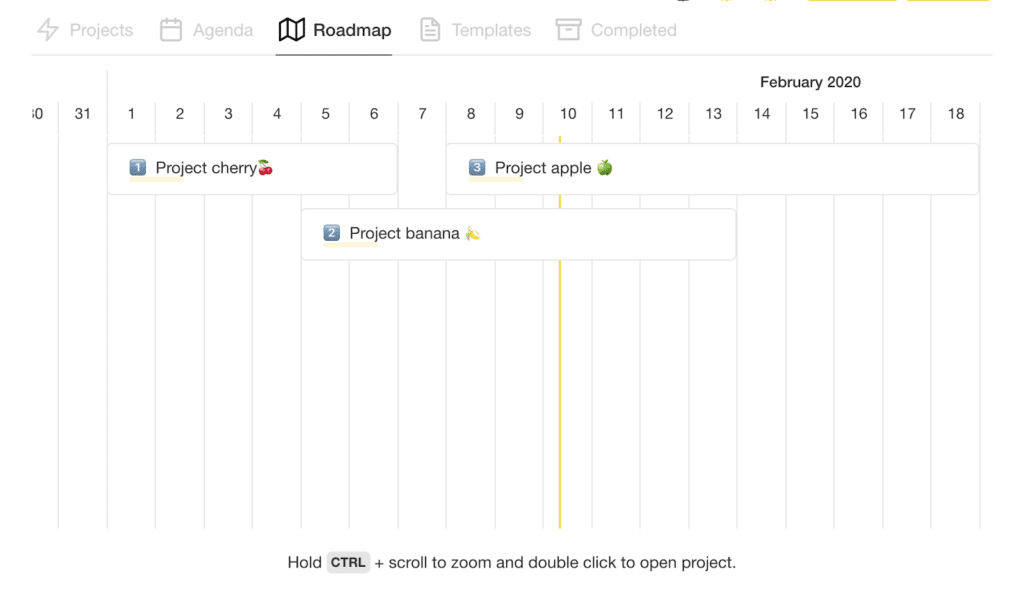
Taskade’s 🎯 Roadmap visualizes past, current and upcoming projects on one timeline and shows how long they take to move from initial idea to completion. 
engineering 2

Taking a step back makes it much easier to see the big picture and allocate manpower when planning similar projects in the future.

Learn How to Set Rockstar Goals and Priorities

Every successful project starts with clear goals and correct priorities (here’s a Taskade template for that). Whether you’re creating a marketing strategy or working on website design, it’s key to first decide on an optimal work order. 

If a project has too many collateral goals or its priorities are upside-down, it’ll likely encounter a number of problems before completion. 

To avoid falling down that rabbit hole, make sure that you and your team:

  • ☑️ Analyze historical data to better allocate time and resources

  • ☑️ Create a list of clear goals and priorities

  • ☑️ Pinpoint potential problems and obstacles that may delay delivery 

  • ☑️ Break down complex goals into chunks of small tasks 

  • ☑️ Set attainable milestones and visualize progress on a timeline 

  • ☑️ Monitor performance (daily/weekly/monthly) and correct course when falling behind

A sizable portion of project-related obstacles happens when remote teams start with too many collateral goals and upside-down priorities. In distributed teams, these obstacles tend to escalate and compound quicker than in centralized organizations.
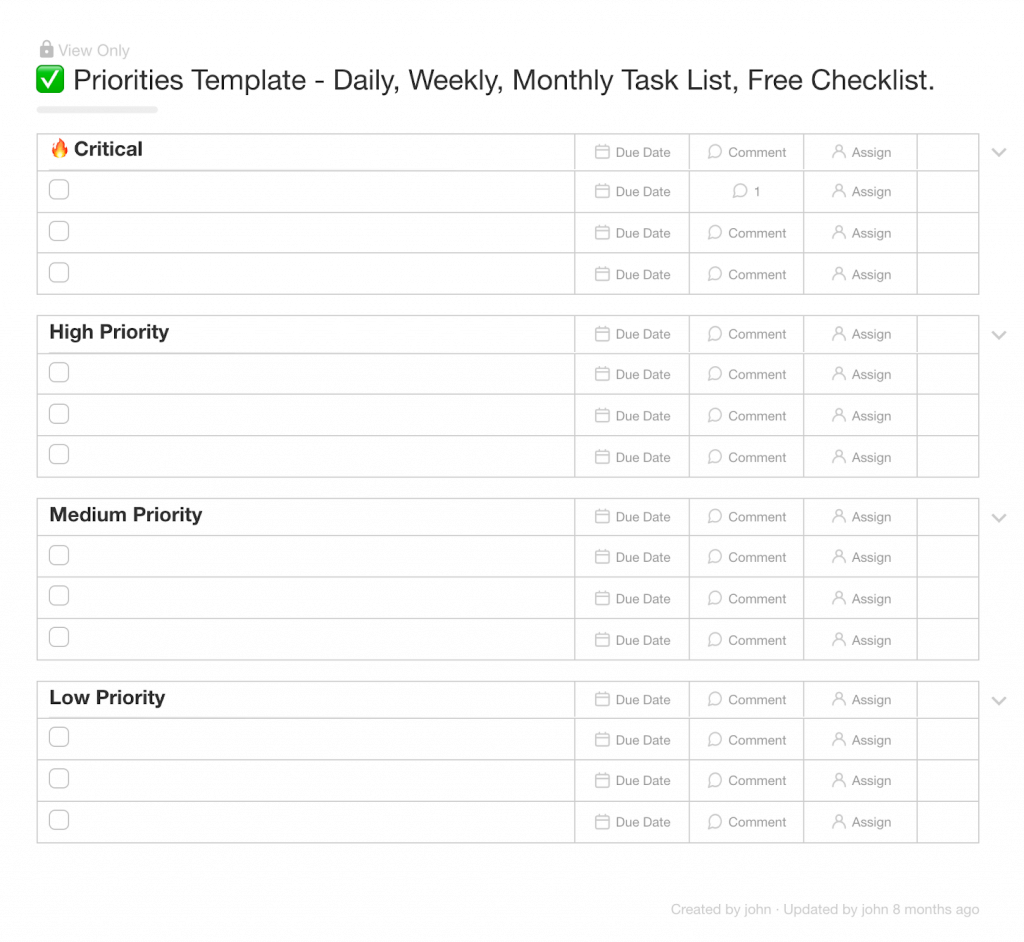
Taskade’s Priorities Template

Get Your House Workspace in Order

When it comes to workplace hygiene, the popular belief is that the way we shape our immediate environment reflects the state of our mind. But the reverse is also true. Our workplace environment can affect productivity and quality of work too.

Keeping your workspace in order:

  • 🧹 Removes distractions and helps you focus on the important stuff. When your desk is cluttered with crumpled paper, assorted documents and post-it notes, it’s difficult to keep up the attention span you need for completing the work that really matters 

  • 😖 Reduces stress and keeps you motivated.  If you’ve ever tried to find an important document 5 minutes before a deadline, you know what we’re talking about!

  • 🧙 Gives you control over space and time. While not quite a true superpower, keeping your stuff in order lets you reclaim a chunk of the time that normally goes to never-ending cleanup

engineering 4

Productivity Tip: In IT, GIGO (garbage in, garbage out) is a concept that observes the correlation between the quality of input and quality of output. In simple terms, using messy data inevitably results in equally messy results. How’s that for a no-nonsense cleanliness argument?

Stop Juggling Inefficient Processes

Have you ever been to a circus show? Between acts like juggling and unicycling, there are contortionists, sword-swallowers and daredevils who walk on broken glass. It’s a true celebration of agility and showmanship. 

Now think of the way your team handles projects. Sounds familiar?

If your process involves several different workflows and tools that require the team to constantly switch between them, it may be high time for a change. 

“But if it ain't broke, why fix it?”

For starters, tackling projects in a decentralized way leads to duplicating tasks, miserable performance, and a lack of focus on the real work. This is especially visible in remote, distributed teams that often have to face compounding time-zone differences, subpar communication, and a great deal of guesswork.


Most of the time, it’s difficult to see the flaws in a workflow that has become a part of the “that’s how we do things around here” culture. We just take it for granted. Teams and individuals should regularly step back from the rut and see how a process can be improved. 


Taskade aims to streamline productivity by combining a master recipe (workflow) and the finest ingredients (tools) in one, aesthetic package. There’s no complex interface or superficial functionality. Whether you want to create notes, assign tasks, or communicate with the team in real-time, Taskade has you covered. 

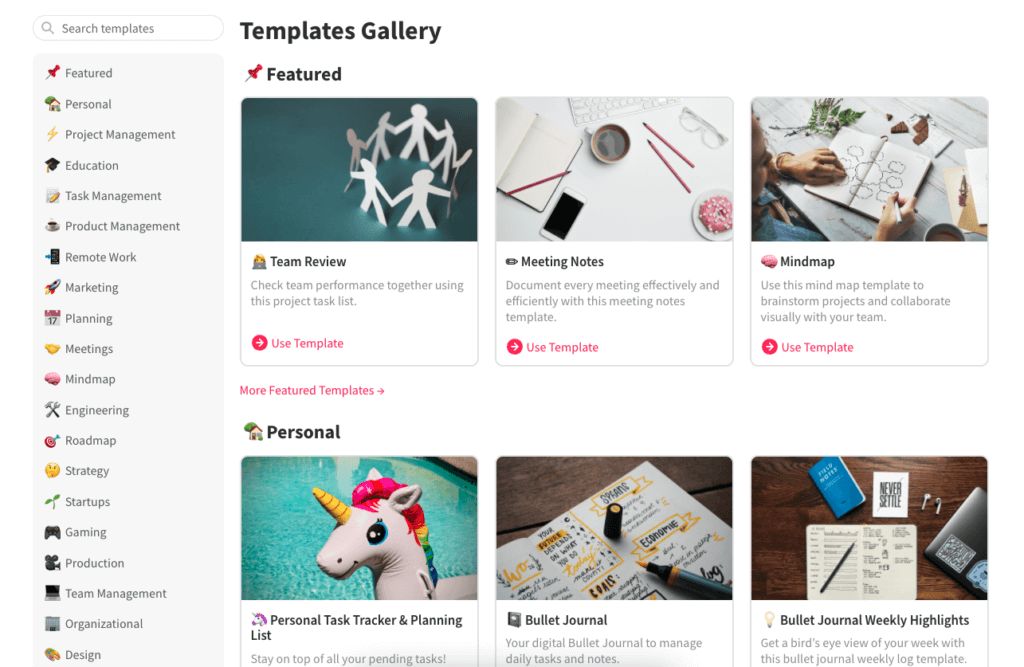
And the best part? You can customize the workflow any way you want, either by creating workspaces and projects from scratch or choosing from pre-defined, editable templates. 
taskade templates

A small sample of Taskade templates

Follow the Bread Crumbs With Mind Mapping

One of the prerequisites of healthy productivity is learning how to detach from the daily buzz and organize thoughts. To do this, you can either go radio silent in a retreat somewhere in Alaska or…create a mind map!

engineering 5

What’s a Mind Map?

In a nutshell, a mind map is a simple diagram organized around a central theme that branches out into associated concepts. For instance, a mind map for a “healthy lifestyle” could branch out into “daily exercises” or “eating kale ” 🥬 (yuck).
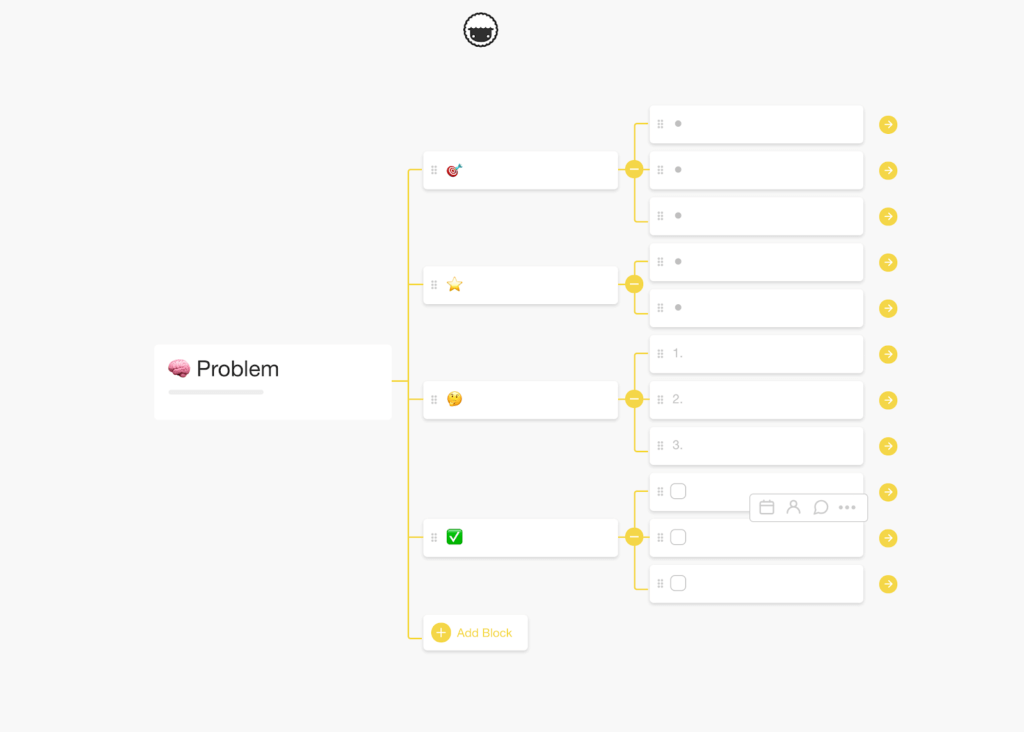
engineering 7

Taskade mind map template

What Are the Benefits of Mind Mapping?

Apart from its aesthetic treat, mind mapping can positively impact team productivity in several ways. By leveraging a clear and easy-to-read structure, it helps transparently organize projects, with stages, goals and tasks laid out neat and tidy.

  • ⚙️ mind mapping makes it easier to break down complex concepts and problems

  • 💡 it’s especially effective for generating fresh, unusual ideas during brainstorming sessions

  • 🔨 It has a clean and uncomplicated structure that makes it a versatile tool for every venture

Take Some Time Away for (Intentional) Procrastination

The outrageous idea of “procrastinating” doesn’t seem to sit well with productivity, does it? 

The thing is, if it’s done intentionally, procrastination can actually be beneficial. The key is not only to learn how to say “YES” to positive off-work activities and “NO” to those that don’t add value but also to PLAN for the downtime. 

Productivity Fun Fact: Did you know that Leonardo Da Vinci was a chronic procrastinator? Despite being a prolific artist and inventor, he’d often leave many of his works unfinished. His notoriety for missing deadlines forced some of his patrons to put formal agreements in place to ensure master Leonardo delivered work on time (which didn’t help much). 

According to clinical Psychologist Dr. Josn Klapow, unearthing the positive side of procrastination requires a thoughtful, active approach. In other words, you need to strategically plan to delay tasks instead of going with the flow every time the YouTube algorithm tickles your curiosity.


Deliberate procrastination means that you reschedule work in a calculated manner, with firm deadlines and reasonable arguments for spending time away from the hustle. 


From a freelance writer’s perspective, strategic procrastination can mean scheduling a daily walk in the park. Not only does it help collect thoughts and alleviate the dreaded writer’s block, but it also absolves you from the “I should be working now” guilt. 

👋 Parting Words

Sometimes, the best strategy to overcome a productivity recession is to reverse-engineer the process and reflect on what caused the problem in the first place.

If you feel like your remote team has been chasing its tail for too long, slow down and sign up for a free Taskade account to get more done with less.


Achieve peak productivity with Taskade AI! 🤖

🤖 Custom AI Agents: Develop AI agents to dissect remote workflows, identify inefficiencies, and automate routine activities.

🪄 AI Generator: Describe your team's challenges to generate strategies, workflows, project outlines, and frameworks.

✏️ AI Assistant: Tap into the power of OpenAI GPT (frontier models) to research, outline, write, and edit documents using handy /AI commands.

🗂️ AI Prompt Templates Library: Use AI prompt templates to make the most of Taskade AI features, available anywhere inside Taskade.

💬 AI Chat: Engage in discussions with AI on productivity pitfalls and strategies, drawing from collective intelligence to enhance productivity.

📄 Media Q&A: Dive into documents and spreadsheets to extract actionable insights and stay ahead in the competitive business landscape.

And much more...

Taskade AI banner.

Frequently Asked Questions

What does it mean to reverse-engineer productivity for remote teams?

Reverse-engineering productivity means starting from the desired outcome and working backward to identify what processes, tools, and habits are actually needed — eliminating everything that doesn't contribute. For remote teams, this means stripping away busy work, excessive meetings, and tool overload to focus on what genuinely moves the needle.

How can remote teams do more with less?

Focus on outcome-based work instead of hours logged, consolidate tools into a single workspace like Taskade, automate repetitive tasks with AI, reduce meetings to only those requiring live discussion, and give team members autonomy to work during their peak productivity hours.

What are the biggest productivity mistakes remote teams make?

The biggest mistakes are adding too many tools, scheduling too many meetings to compensate for lack of visibility, micromanaging remote workers, confusing activity with output, and failing to document processes — leading to repeated questions and information silos.

How do you measure productivity in a distributed team?

Measure output and impact rather than hours or activity. Track deliverables completed, project milestones hit, and cycle time from start to finish. Use a shared workspace with clear task tracking so progress is visible without requiring status update meetings.

0%

On this page

🤔 Wait, isn’t that prohibited?Learn How to Set Rockstar Goals and PrioritiesGet Your House Workspace in OrderStop Juggling Inefficient ProcessesFollow the Bread Crumbs With Mind MappingWhat’s a Mind Map?What Are the Benefits of Mind Mapping?Take Some Time Away for (Intentional) Procrastination👋 Parting WordsFrequently Asked Questions

Related Articles

Time tracking app built in Taskade Genesis showing logged hours tagged to a client and a rate, with billable totals rolling up toward an invoice
August 25, 2026Productivity

Track Hours. Bill Clients. Get Paid. (Clone a Working Time Tracker in 2026)

Turn logged hours into a paid invoice in one workspace. Log time against a client and a rate, watch billable totals roll...

Automate grading and lesson prep with AI — build a teaching app from one prompt in Taskade Genesis
August 7, 2026Productivity

How to Automate 99% of Grading and Lesson Prep with AI (2026)

Teachers reclaim about 5.9 hours a week with AI. Automate grading, lesson prep, and admin with AI agents — and build a l...

Run your whole day on AI autopilot with Taskade — morning briefing, inbox triage, and end-of-day report
July 21, 2026Productivity

How to Run Your Whole Day on AI Autopilot with Taskade (Full Guide, 2026)

A plain-English full guide to running your day on AI autopilot with Taskade. Set up Projects, AI agents, and scheduled a...

Automate reporting and dashboards with AI in 2026 — a living reporting system built from one prompt in Taskade Genesis
July 20, 2026Productivity

How to Automate 99% of Reporting and Dashboards with AI (2026)

Stop assembling status reports by hand. AI agents pull data, build weekly and monthly reports, and keep live dashboards ...

AI for professional teams in 2026 — no-code apps with AI agents for HR, legal, education, and property
July 3, 2026Productivity

AI for Professional Teams: Build No-Code Apps in 2026

Build real software for HR, legal, education, and property teams in 2026 — no engineers required. Taskade Genesis turns ...

Taskade Genesis app templates you can clone across 8 categories in 2026
June 28, 2026Productivity

Genesis App Templates: Clone Living Apps, Not Static Shells (2026)

Clone a working Taskade Genesis app instead of building from scratch. This roundup covers ready-to-use app templates acr...

View All Articles