






If the ongoing work-from-home experiment had a tagline, this quote—erroneously attributed to Abe Lincoln—would be it: “Give me six hours to chop down a tree and I will spend the first four sharpening the ax.” So, what do you say we sharpen that (metaphorical) ax of yours and learn how to focus while working from home?

Here are some of the questions we answer in this article:
💡 Related deep work and focus guides:
🤯 Here's Why You Can’t Focus at Home
“If you know the enemy and know yourself, you need not fear the result of a hundred battles. If you know yourself but not the enemy, for every victory gained you will also suffer a defeat. If you know neither the enemy nor yourself, you will succumb in every battle.”
Sun Tzu, The Art of War
Poor Work Schedule
Are you an early bird or a night owl?
Do you know when you’re the most productive?
Do you have a daily ritual of recurring tasks to stay on track?
It turns out, the way you set your schedule may be affecting your ability to focus while working from home.
According to Daniel Pink, the author of a New York Times bestseller When: The Scientific Secrets of Perfect Timing, the best time to tackle concentration-intensive, analytical work is during what’s called a “Peak.”
For early risers, the Peak usually occurs in the morning and is followed by an afternoon “Trough”—best for admin work—and evening “Recovery” when we excel in creative pursuits. If you’re a night owl, the order is reversed.(1)
“So, what if I don’t have a fixed schedule?”
If you notoriously ignore your natural inclinations and follow an erratic, unpredictable schedule, you fail to capitalize on your most productive moments. And that means you can’t focus on the work that really matters, when it matters.

Home/Virtual Office Distractions
There’s a reason why some of the world’s greatest minds prefer to work in seclusion. Writers like Thoreau, Hemingway, and Twain all penned some of their best works barricaded in remote retreats, far from civilization and pesky distractions.
Unfortunately, most of us telecommuters aren’t so lucky.
Kids playing tag, family members asking for another “favor,” or friends dropping by with a social call—the modern “home office” isn’t the most focus-friendly environment.
And it only gets worse:
🛠 Hardware/software issues
🐌 Slow internet connection
🧹 Mounting household chores
🙇 Poor workplace ergonomics
Should we continue? And if that wasn’t enough, your distributed team is bound to hack your attention even further:
⏰ Long, unproductive video meetings
🟢 The expectation to stay connected 24/7
💬 Misuse of sync vs. async communication
🌗 Not observing time-zones differences
📥 Unsolicited emails and calls
It doesn’t matter how disciplined you are. Even if you filter out most of the home/office distractions, the trickle that gets through can effectively kill your focus.
Prolonged Home-Office Isolation
Sounds crazy, right? After all, is there better nourishment for deep focus than a blissful time alone, far from the office chatter and nosy co-workers?
The thing is, you can only defy the social animal in you for so long.
When you don’t have the organic, micro-distractions—watercooler chit-chat, coffee breaks, talkative co-workers—you’re bound to invite other, more intrusive companions:
💭 Racing thoughts and anxiety
🖱️ Aimless web browsing
🌋 Doom scrolling (negative news)
👥 Compulsive social media use
Should we add that none of these activities encourage a deep, intensive focus on the real work? As Cal Newport explains in his interview for Daily Stoic:
“This hardness is especially manifest during those periods of downtime when you’re alone with your thoughts. People avoid these confrontations through constant, low-quality digital distraction much in the way that people of another era might have dealt with these difficulties with heavy drinking.”(2)
Of course, those false companions don’t only chip away your concentration. They also affect the way you feel about yourself and your work. When you have too much time to think, you can easily fall into the limbo of doubt and self-criticism.
🧠 3 Tips to Improve Focus While Working From Home
“I fear not the man who has practiced 10,000 kicks once, but I fear the man who has practiced one kick 10,000 times.”
Bruce Lee
1. Embrace Mindfulness
As cheesy as this may sound, meditation and mindfulness are one of the most effective ways to regain laser-sharp focus while working from home.
According to the American Psychological Association(3), mindfulness practices help:
✋ Suppress distractions
🏃♀️ Fends off racing thoughts
🧠 Improve working memory
🙉 Boost emotional resilience
So, what’s mindfulness anyway? 🤔
In simple terms, mindfulness is a state of absolute focus on a task, thought, action, object… you get the idea. It’s total immersion in the singular, to the point where everything else is pushed to the margin of your perception.
Jon Kabat-Zinn, a renowned expert on meditation and founder of the Center for Mindfulness (CFM), defines mindfulness as “awareness that arises through paying attention, on purpose, in the present moment, non-judgementally.”(4)
Jon Kabat-Zinn’s talk on mindfulness at Google.
While mindfulness is a complex, multi-layered concept, you can become more aware of your work and improve your focus by following these simple steps:
⛅️ Plan your day in advance. Dedicate each evening to plan your next day. Decide on the three most important tasks and write them down.
⏳ Block time. Anchor your obligations in space and time. Estimate the duration based on previous projects and put the tasks on your calendar.
📭 Remove distractions. Clean up your home office and enable Do Not Disturb mode on your phone. Make sure nothing interferes with your work.
🌊 Get under the surface. Take a moment to deconstruct and deeply understand each task. Can you break it down into smaller steps? What makes it easy/difficult?
🤹♂️ Don’t multitask! Multitasking is a myth so stop trying. Instead, prioritize work and tackle the most difficult and challenging bits first.
✍️ Get into journaling. Whenever you feel stuck or start walking in circles, take a step back and write down your thoughts. Use this template for some ideas.
2. Practice Mindfulness Meditation
In a 2016 book Tools of Titans, Tim Ferris, author and the creator of a record-smashing podcast The Tim Ferriss Show, asked some of the world’s most successful people about their daily habits.
It turns out that 80% of the interviewees—including the “Governator” Arnold Schwarzenegger and writer Maria Popova—mentioned meditation as one of the driving factors behind their success.(5)
While the benefits of meditation are not easily measurable, Mayo Clinic suggests it may positively affect physical and mental health as well as work performance:
💡 Boosts creativity
🔎 Improves concentration
👋 Increases self-awareness
💤 Alleviates sleep disorders
♥️ Helps manage health conditions
You can think of meditation as a maintenance program for mindfulness. It’ll help you prime yourself for the day and gain fully clarity and focus while working from home.
Here’s a simple recipe:
🍼 Start small. Set aside a couple of minutes each day. You can meditate in the morning, before work, or in the evening. Consistency matters more than timing.
👌 Get comfortable. Sit on a chair, pillow, carpet, bed, or on the floor. Whatever works for you. Rest your hands on your knees and relax.
📻 Tune in. Start tuning in to the rhythm of your breath. Notice how the air enters and exits your body with each inhalation and exhalation. Close your eyes.
💨 Continue breathing. Slowly tune out your surroundings. If your mind starts to wander, bring your attention back to your breath. Let thoughts come and go.
⚡️ Reboot to life. After a few minutes, move your focus from the breath to physical sensations and your surroundings. Gently open your eyes.
Of course, mindfulness meditation takes consistent practice. While you may not discover your life’s purpose after the first session, you will slow down for a moment and start noticing the things that usually escape your attention.
And that’s a solid start.
If you want to make meditation a part of your daily routine, test-run apps like Waking Up, Headspace, or Calm that come with narrated guided meditation sessions.
3. Build up a Creative Flow
“The idea is that flowing water never goes stale, so just keep on flowing.”
Bruce Lee
Have you ever been so absorbed by a task that you stopped noticing the passing of time? If so, you experienced what’s known as the state of “flow.”
The concept of flow became a subject of intensive research in the 1970s, most notably by psychologists Mihaly Csikszentmihalyi and Jeanne Nakamura.
Mihaly Csikszentmihalyi’s TED talk on Flow (2004)
In a 1996 interview with Wired, Csikszentmihalyi described the state of flow as:
“Being completely involved in an activity for its own sake. The ego falls away. Time flies. Every action, movement, and thought follows inevitably from the previous one, like playing jazz. Your whole being is involved, and you're using your skills to the utmost.”(6)
When you enter a state of flow, you:
🔬 Immerse in a singular activity
🎭 Detach from the troubles of life
👉 Gain a clear sense of purpose and direction
📈 Expect a positive outcome of the activity
🔁 Are motivated by the activity itself
⌛️ Stop noticing the passing of time
According to Nakamura and Csikszentmihalyi(7), achieving a state of flow is only possible when the following conditions are met:
🎯 A clear set of goals. Avoid ambiguity. Make sure to break complex tasks into incremental steps so you always know what to do next.
🏋️♀️ Difficulty/skills match. Work should be mildly challenging. Make it too easy and you’ll get bored. If you set the bar too high, you’ll quickly get discouraged.
📊 Instant feedback. You need to “see” the progress you’re making. You can elicit instant feedback by using to-do lists or completing sets of instructions.
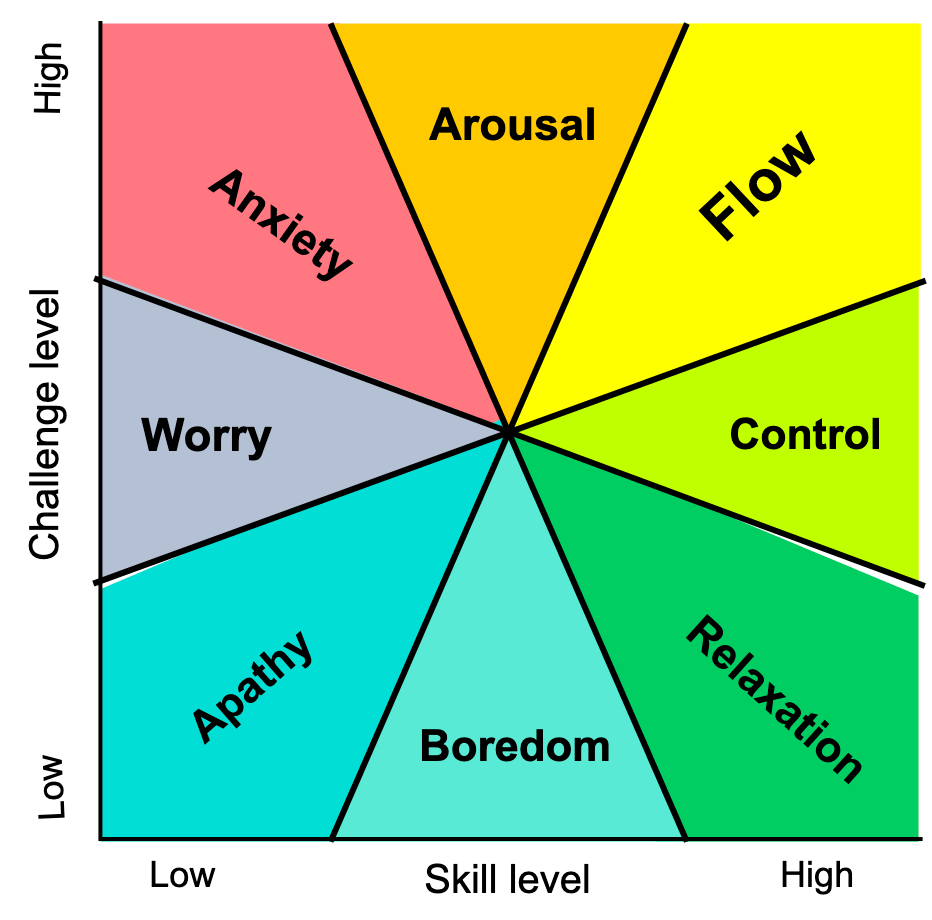
Mihaly Csikszentmihalyi’s model of Flow via Wikipedia
Bonus Tip: Use a Pomodoro Timer
Created by Francesco Cirillo in the 1980s, the Pomodoro Technique breaks work sessions into intensive, 25-minute sprints. It’s a perfect solution if you’re notoriously distracted and can’t focus long enough to build up the flow.
Here’s how it works:
Set up a timer for 25 minutes
Work on a single task without stopping
When the time’s up, take a 5-minute break
After completing 4 cycles, rest for 15-30 minutes
Tackling tasks in short, productive bursts will make work more challenging and fun. The self-imposed deadlines will also make you less likely to procrastinate. Once your focus improves, you can experiment a bit and make your Pomodoro sessions longer.
And that’s it! 👌
📊 The Research Behind Deep Work and Focus
Cal Newport's concept of "deep work" — professional activities performed in a state of distraction-free concentration that push your cognitive capabilities to their limit — has become the gold standard for knowledge work productivity. Here's what the research shows:
    Cal Newport's Deep Work Framework┌────────────────────────────────────────────────┐
│              DEEP WORK                         │
│  Cognitively demanding, distraction-free       │
│  ─────────────────────────────────────         │
│  • Writing, coding, strategizing               │
│  • Problem-solving, research                   │
│  • Learning new skills                         │
│  • Creates value, rare & meaningful            │
├────────────────────────────────────────────────┤
│              SHALLOW WORK                      │
│  Non-cognitively demanding, often distracted   │
│  ─────────────────────────────────────         │
│  • Email, Slack messages                       │
│  • Status meetings, admin tasks                │
│  • Easy to replicate, low value                │
│  • Tends to expand to fill the day             │
└────────────────────────────────────────────────┘

The 4 Rules of Deep Work:
1. Work Deeply    → Schedule deep work blocks
2. Embrace Boredom → Train focus like a muscle
3. Quit Social Media → Audit digital tools
4. Drain the Shallows → Minimize shallow work
| Research Finding | Source |
|---|---|
| A 10-year McKinsey study found executives are 5x more productive in flow state | McKinsey Quarterly (2013)(8) |
| It takes 23 minutes to refocus after an interruption | University of California, Irvine(9) |
| 80% of the typical workday is spent on shallow tasks | RescueTime (2019)(10) |
| Only 2.5 hours/day of deep work produces top-tier output | Newport, Cal. Deep Work (2016)(11) |
| Mindfulness meditation increases grey matter in the prefrontal cortex after 8 weeks | Harvard/Mass General (2011)(12) |
The takeaway is clear: deep work is not a luxury — it's the primary way we create value in the knowledge economy. And the tools, techniques, and habits in this article are designed to help you unlock it, even from your home office.
👌 Build Your Deep Focus Workflow with Taskade AI
Whether you prefer Pomodoro sprints or the Flowtime Technique, Taskade has everything you need to protect deep work in a single living workspace. Use the built-in countdown timer to protect focus blocks, organize tasks across multiple project views, and let AI Agents handle shallow work so you can stay in deep focus.
Clone These Focus & Deep Work Apps
| App | What It Does | Link |
|---|---|---|
| Study/Work Timer + Music | Pomodoro timer with ambient sounds for deep work sessions | Clone → |
| Breathe Circle | Guided breathing exercises for pre-session centering | Clone → |
| Mood Tracker | Daily mood and energy logging to optimize your Peak hours | Clone → |
| Minimalistic ToDo | Distraction-free task list for deep work Next Actions | Clone → |
Taskade AI Features for Deep Work
🤖 Custom AI Agents: Delegate shallow tasks — email drafts, meeting summaries, status updates — so you can protect deep work hours.
🪄 AI Generator: Turn natural-language descriptions into structured project outlines in seconds.
✏️ AI Assistant: Let the AI handle clarifying, organizing, and refining tasks while you focus on cognitively demanding work.
🗂️ Prompt Templates: Kick off deep work sessions with ready-made prompts for research, writing, and analysis.
💬 AI Chat: Quick Q&A to unblock yourself without breaking flow — no tab switching required.
📄 Media Q&A: Summarize meeting recordings, notes, and reports so you can skip the shallow review.
Sign up for free and start your deep work practice with Taskade AI! 🤖
Deep Work vs. Shallow Work: Quick Comparison
| Dimension | Deep Work | Shallow Work |
|---|---|---|
| Examples | Writing code, drafting a report, strategic planning, learning a new skill | Email replies, Slack messages, scheduling meetings, status updates |
| Cognitive Demand | High — requires sustained, undivided attention | Low — can be done while distracted or multitasking |
| Value Created | High — produces rare, hard-to-replicate results | Low — necessary but easily replaceable by others or AI |
| Replicability | Difficult — requires expertise and focused effort | Easy — anyone with basic training can perform these tasks |
| Impact on Career | Compounds over time, builds expertise and competitive advantage | Keeps the lights on but rarely leads to breakthroughs |
| Ideal Environment | Quiet, distraction-free, notifications off, single-tasking | Open floor plan, chat-first communication, batch processing |
| Recommended Duration | 1–4 hours per session (90 min is the cognitive sweet spot) | Batch into designated time blocks between deep work sessions |
The goal isn't to eliminate shallow work entirely — it's to protect your deep work hours and batch shallow tasks into designated time blocks. Most knowledge workers spend only 2–3 hours per day in deep work mode; the rest is shallow. Even small improvements to that ratio compound dramatically over weeks and months.
Frequently Asked Questions About Deep Work and Focus
What is deep work and why does it matter?
Deep work, a concept popularized by Georgetown professor Cal Newport, refers to professional activities performed in a state of distraction-free concentration that push your cognitive abilities to their limit. It matters because deep work is what produces the most valuable output in knowledge work — writing, coding, strategizing, learning new skills — yet most workers spend only 2.5 hours per day in this state.(11) The rest is consumed by shallow work and context switching.
How do you achieve deep focus while working from home?
Achieving deep focus at home requires three layers: (1) Environment design — a dedicated workspace free from interruptions with Do Not Disturb mode enabled, (2) Time structure — scheduled focus blocks using techniques like the Pomodoro timer or Flowtime method, and (3) Mental training — mindfulness meditation to strengthen your attention muscle. Research shows that even 10 minutes of daily meditation can measurably improve focus within 8 weeks.(12)
How long should a deep work session last?
Most research suggests that deep work sessions between 60-90 minutes produce optimal results, though beginners may start with shorter 25-minute Pomodoro sessions and build up. Cal Newport recommends working up to 4 hours of deep work per day as a maximum — beyond that, diminishing returns set in. The Flowtime Technique is ideal for finding your natural deep work rhythm because it lets your focus dictate session length rather than an arbitrary timer.
Can you do deep work with ADHD?
Yes, but it requires adaptation. People with ADHD often experience "hyperfocus" — an intense concentration state that's closely related to flow. The key is creating the right conditions to trigger it: clear goals, immediate feedback, and a task that's challenging but achievable. AI-powered tools can help by breaking down overwhelming projects into actionable steps and sending gentle nudges to maintain momentum. The Flowtime Technique is often preferred over rigid timer methods for neurodivergent users.
What are the best tools for deep work?
The best deep work setup minimizes context switching by consolidating your workflow into as few tools as possible. Look for an all-in-one workspace that combines tasks, notes, chat, and project management — like Taskade — rather than juggling separate apps for each function. Add a countdown timer for focus sessions, use AI Agents to automate shallow tasks, and prioritize with the Eisenhower Matrix to ensure you're spending deep work time on what truly matters.
🔗 Resources
Pink, D. (2018). When: The Scientific Secrets of Perfect Timing. Riverhead Books. https://www.npr.org/2018/01/17/578666036/daniel-pinks-when-shows-the-importance-of-timing-throughout-life
Newport, C. Cal Newport Interview. Daily Stoic. https://dailystoic.com/cal-newport-interview/
American Psychological Association. (2012). What are the benefits of mindfulness? https://www.apa.org/monitor/2012/07-08/ce-corner
Kabat-Zinn, J. Defining Mindfulness. https://www.mindful.org/jon-kabat-zinn-defining-mindfulness/
Ferriss, T. (2016). Tools of Titans. Houghton Mifflin Harcourt.
Csikszentmihalyi, M. (1996). Creativity: Flow and the Psychology of Discovery. Wired. https://www.wired.com/1996/09/czik/
Nakamura, J., & Csikszentmihalyi, M. (2002). The Concept of Flow. https://academic.udayton.edu/jackbauer/csikflow.pdf
Cranston, S., & Keller, S. (2013). Increasing the 'meaning quotient' of work. McKinsey Quarterly.
Mark, G., Gudith, D., & Klocke, U. (2008). The cost of interrupted work. Proceedings of CHI 2008.
RescueTime. (2019). Screen Time & Productivity Report.
Newport, C. (2016). Deep Work: Rules for Focused Success in a Distracted World. Grand Central Publishing.
Holzel, B. K., et al. (2011). Mindfulness practice leads to increases in regional brain gray matter density. Psychiatry Research: Neuroimaging.