






The Flowtime technique (a.k.a. Flowmodoro) is a flexible time management technique that helps you maximize your productivity by staying in a creative state of mind. It allows you to work in natural, uninterrupted intervals until you need a break. This technique derives its name from the word "Flow," as it encourages you to be in a flow state to help ideas flow better. A flow state is achieved when you’re fully immersed in a task(1), losing track of time.
TL;DR: The Flowtime Technique replaces Pomodoro’s rigid 25-minute timers with natural focus blocks — work until focus fades, then take proportional breaks (5 min after 25 min, 8 min after 50 min, 10 min after 90+ min). Best for creative and deep work. Use Taskade Genesis to build a custom focus dashboard and track sessions with AI agents that learn your flow patterns.
The Flowtime technique or Flowmodoro is essentially a twist on the Pomodoro Technique, which is another famous method to help boost your productivity. While the latter works in strict time intervals, the Flowtime technique is more customizable and helps maximize your focus periods.
In today's article, you'll learn how to use the Flowtime Technique and why it can help you get more done. But first, let's recap what the Pomodoro Technique is and how the two differ. 👇
🍅 What Is the Pomodoro Technique?
The Pomodoro Technique is a productivity method developed by Francesco Cirillo. He created this simple tool with the aim of enhancing work efficiency and concentration. By breaking tasks into short, concentrated bursts, Cirillo believed individuals could achieve more in less time.
Each of the concentrated work sessions (there are usually four) termed a "Pomodoro", spans 25 minutes. Once this period concludes, it's essential to take a 5-minute break. This brief pause serves to refresh the mind and relax. It also helps sustain focus for the subsequent session.
Since its introduction in the late 1980s, the Pomodoro Technique has garnered significant attention and acclaim. If you want to learn more about the Pomodoro technique, check out our full guide on how to maximize your productivity by working in Pomodoros.
Why the Pomodoro Technique Isn't Working for You
The Pomodoro Technique is a wonderful tool, but the reality is that it simply won’t work for everyone. It may or may not work for you depending on your work style and use case.
Pomodoros are fixed at 25-minute time intervals. When the alarm goes off, you drop what you're working on and take a break. This can be distracting, especially if you happen to be in a flow state that could extend over the 25-minute mark (which can happen quite often).
On the flip side, the Pomodoro Technique really hinges on those set break times. If you're not taking the suggested 5-minute breaks, it might not work out as well for you. Those pauses are crucial for recharging, and if they feel too short, getting back into the groove can be a challenge.
While the Pomodoro Technique can be customized (to an extent), Flowtime is much more flexible and doesn't force you to take breaks. This flexibility allows you to work according to your natural rhythm and energy levels. So, if you find that fixed intervals disrupt your flow, or if you're someone who prefers to take breaks on your own terms, Flowtime might be a better fit for you.
Flowtime vs. Pomodoro: Quick Comparison
| Feature | Pomodoro Technique | Flowtime Technique |
|---|---|---|
| Work Intervals | Fixed 25-minute blocks | Variable — work until focus fades naturally |
| Break Timing | Mandatory 5 min after each block; 15-30 min after 4 blocks | Proportional to work duration (5-30 min) |
| Flexibility | Low — strict timer-based structure | High — adapts to your energy and task complexity |
| Best For | Repetitive tasks, overcoming procrastination, beginners | Creative work, coding, research, deep problem-solving |
| Tool Support | Any timer app; Taskade countdown timer | Session logging + timer; Taskade AI workspace with Table view and AI Agents |
⌛️ What Is the Flowtime Technique?
The Flowtime Technique is a flexible, personalized time management method designed to maximize periods of deep, uninterrupted focus, known as 'flow states.' Unlike rigid, timer-based systems like the Pomodoro Technique, Flowtime encourages you to work on a single task until your concentration naturally begins to wane, at which point you decide to take a break. The core principle is to align your work schedule with your body's and mind's natural energy cycles rather than forcing them to conform to an arbitrary clock.
The Flowtime Technique was invented by teacher and productivity expert, Zoe Read-Bivens. She developed the technique in 2016 to overcome some of the shortcomings of the Pomodoro Technique. Read-Bivens found that the Pomodoro Technique interrupted her flow state, and gave it a twist to enhance her productivity.
The difference between the Flowtime technique and the Pomodoro Technique is more than just timing. In Flowtime, you craft a detailed list, acting as your productivity roadmap. This list not only tracks your work sessions but also notes down any distractions and those essential break times. It's a structured yet personalized way to see how your day unfolds.
“When an athlete is trying to run faster or get stronger, the first thing they have to do is measure how fast they run or how much they can lift. When we are trying to become more productive, we have to measure ourselves first and foremost.”
Read-Bivens on her personal blog.(2)
With the Flowtime technique, your work intervals and breaks are not scheduled. You simply work until you’re distracted or until you feel like you need a break. According to Read-Bivens, this approach helps sustain focus and allows you to naturally enter into the "flow state."(3)
Another important point to note about Flowtime is that for it to work effectively, you’re supposed to focus on a single task at a time and not multitask. This is because focusing on one task at a time helps you to sustain your focus on that specific task until it is done.
What is the Flow State?
The flow state, often called "being in the zone," is that feeling when you're completely absorbed in what you're doing. It's like everything else fades away, and you're just fully focused, enjoying the task at hand. Psychologist Mihaly Csikszentmihalyi first identified this concept, describing it as a state of optimal experience.
“Being completely involved in an activity for its own sake. The ego falls away. Time flies. Every action, movement, and thought follows inevitably from the previous one, like playing jazz. Your whole being is involved, and you're using your skills to the utmost.”
Mihaly Csikszentmihalyi, in his book Flow: The Psychology of Optimal Experience.(4)
When you're in a flow state, you're so engaged that time seems to slip by unnoticed. Being in this state can boost your productivity and creativity. According to Csikszentmihalyi, you're most likely to reach this flow state when you're working on something that's challenging but still within your skill level.
    Csikszentmihalyi's Flow ModelHigh  ┌─────────────────────────────────┐
      │  Anxiety       Arousal          │
      │                                 │
      │                  ★ FLOW ★       │
Challenge │
│ Worry Control │
│ │
│ Apathy Boredom │
Low └─────────────────────────────────┘
Low Skill High
The Flow Channel: Flow occurs when challenge
and skill are both high and closely matched.
Flowtime keeps you in this zone by removing
artificial time constraints.
This balance helps you push your abilities without feeling overwhelmed. In the flow state, you often lose track of time because your actions and awareness merge into one seamless experience. It’s this deep focus that leads to better performance and a greater sense of satisfaction.
A study published in Frontiers in Psychology found that being in a flow state is linked to increased intrinsic motivation. In other words, you’re more likely to dive into and enjoy tasks when you’re in the zone. Neuroscientists also suggest that during a state of flow, the prefrontal cortex—the part of your brain responsible for self-reflection and critical thinking—temporarily quiets down.(5)
This quieting of the mind helps you focus even more intensely on what you're doing.
Research backs up the productivity gains. A 10-year McKinsey study found that executives reported being up to five times more productive when working in a flow state.(6) Meanwhile, a study by Qatalog and Cornell University found that it takes an average of 9.5 minutes to get back into a productive flow after switching between digital apps — highlighting why the Flowtime Technique's emphasis on uninterrupted focus is so effective compared to methods that impose artificial breaks.(7)
The Flow Deficit: Why Most Workers Never Reach Flow
Despite flow's transformational potential, most people rarely experience it. A February 2026 survey by Resume Now found that only 31% of workers feel fully focused at work every day — meaning 69% rarely or never reach a true flow state.(8) McKinsey researchers put it even more starkly: the average knowledge worker spends just 5% of working hours in flow. Yet increasing that to 15-20% could nearly double overall productivity.
The gap isn't talent or willpower. It's conditions. Flow isn't random luck — it's the predictable result of specific, repeatable triggers. Once you understand them, you can enter flow on demand.
    The Flow Productivity Gap (2026)┌────────────────────────────────────────────────┐
│                                                │
│  Workers in flow daily:   ██████░░░░░░░  31%   │
│  Not in flow:             ░░░░░░░░░████  69%   │
│                                                │
│  Time spent in flow:      █░░░░░░░░░░░░   5%   │
│  Time outside flow:       ░░░░░░░░░████  95%   │
│                                                │
│  ┌──────────────────────────────────────────┐  │
│  │  If flow time ↑ from 5% → 20%           │  │
│  │  Overall productivity nearly DOUBLES     │  │
│  │  — McKinsey 10-year study               │  │
│  └──────────────────────────────────────────┘  │
└────────────────────────────────────────────────┘
5 Conditions That Trigger Flow State
Csikszentmihalyi's research and modern flow science have identified five essential conditions. Miss one and flow becomes unlikely. Nail all five and it practically takes care of itself.
1. Clear, Actionable Goals
Your brain cannot enter flow without clarity. Vague intentions like "work on the report" create cognitive friction. A specific, measurable target — "write the first 300 words of the introduction" — eliminates ambiguity and lets your brain fully commit. The Flowtime Technique reinforces this through its unitasking principle: you select one task before starting each session.
2. The Challenge-Skill Sweet Spot
This is the heart of Csikszentmihalyi's model (see the diagram above). If a task is too easy, you get bored and disengage. If it's too hard, anxiety blocks focus. Flow emerges when the challenge is just above your current skill level — enough to stretch you without overwhelming you. A good test: does this task feel like a 7 out of 10 in difficulty? That's where you want to be. Video games use this principle perfectly — levels get progressively harder as your skills improve, keeping you in flow.
3. Elimination of Distractions
Flow is fragile. A single notification can shatter a flow state, and research shows it takes 15-20 minutes to re-enter flow after an interruption.(9) Before starting a Flowtime session: phone on silent, tabs closed, Slack on Do Not Disturb. Think of it as building a force field around your attention. Even the average employee is interrupted 31.6 times per day — each one resetting the flow clock.(9)
4. A Consistent Pre-Flow Ritual
Your brain responds to environmental cues. Athletes have pre-game routines. Musicians have warm-ups. You need a flow ritual — the same sequence of actions every time: making a cup of coffee, opening Taskade and setting the timer, putting on the same playlist. The ritual itself doesn't matter — it's the consistency. Over time, your brain learns: "When I do this, focus begins."
5. Intrinsic Motivation
Flow thrives on meaning. If you're doing something purely because it was assigned, reaching flow is harder. But connecting the task to your own growth, curiosity, or vision lowers the barrier significantly. Even reframing a mundane task — "I'm not just writing a report, I'm building the case for a project I believe in" — can shift you from compliance to genuine engagement.
How long until flow kicks in? Flow typically shows up after 10-15 minutes of sustained focus — not instantly. If the first few minutes feel clumsy, that's normal. Commit to single-tasking through the initial resistance and flow will come. This is exactly why the Flowtime Technique works: it gives you permission to push past that 10-15 minute threshold without an arbitrary timer yanking you out.
⚙️ How Can You Use the Flowtime Technique?
Before you begin, you must choose specific, singular tasks to work on. This is the principle of "unitasking," and it is non-negotiable for the technique to be effective. The tasks should be specific and have a clear endpoint. For example, instead of a vague goal like "work on the report," a better unitask would be "write the introduction section for the Q3 report". You can use frameworks like the Eisenhower Matrix to prioritize which tasks deserve your deepest focus.
If you have a large project, break it down into these smaller, manageable components. Methodologies like Getting Things Done (GTD) pair well with Flowtime — use GTD to capture and organize your tasks, then use Flowtime to execute them in deep focus sessions.
We recommend that you note down a few tasks for this to work so that it maximizes your time in flow state and prevents you being forced to stop should you run out of tasks. It's difficult to get into the flowstate so you would want to maximize your time in it.
Once you're in, the last thing you want is to lose momentum just because you didn’t plan ahead.
Here’s How to Use the Flowtime Technique:
- Break Down Your Project: Identify the project or large task you want to tackle. Make sure to break it down into smaller, manageable tasks or sub-tasks. You can use Taskade's AI Assistant and the /subtask command to divide big projects into bite-sized items.
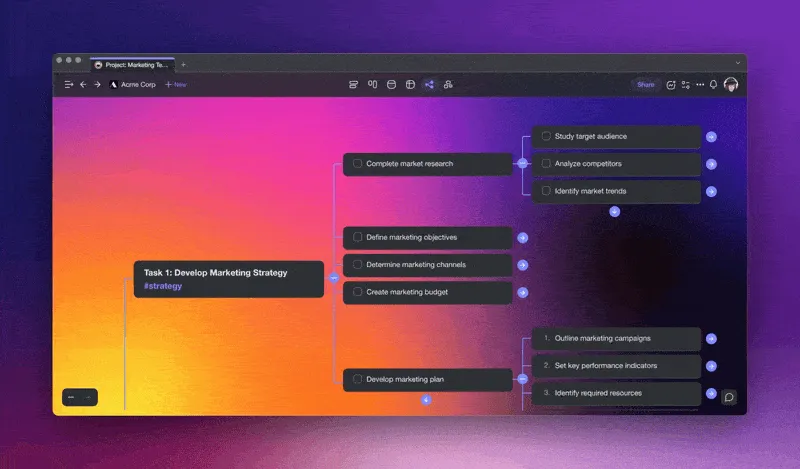
The /subtask command allows you to quickly generate lists of tasks for your Flowtime sessions
Set Clear Goals for Each Task: Define what you want to achieve by the end of each task. This will help you maintain a sense of purpose and direction.
Prepare Your Workspace: Choose a distraction-free environment. Gather all necessary resources; you need to have all your tools within your reach.
Dive into the First Task: Start working on the outline task. Let your natural focus guide the duration but don't forget to set a countdown timer to keep track of your progress. You can use the /timer command to quickly set a timer in Taskade.
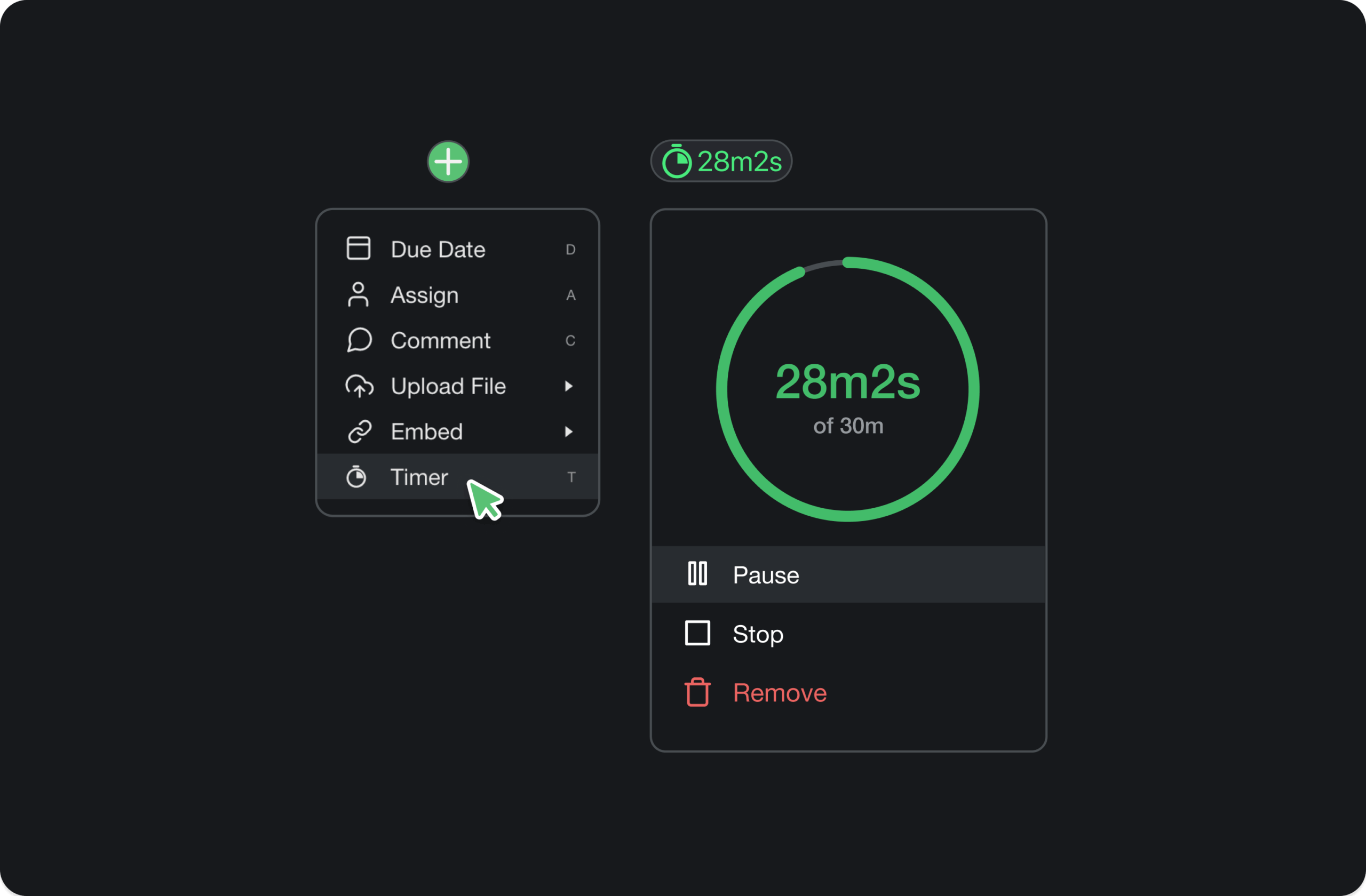
Use Taskade's built-in countdown timer to track your Flowtime sessions
Monitor Your Engagement: Pay attention to your concentration and energy levels. If you find yourself losing focus or getting tired, that's a sign to take a break.
Take Natural Breaks: Break duration is based on how you feel. It could be short or long, depending on your needs. Use this time to stretch, hydrate, or even take a short walk.
Reflect and Move On: After completing a task, jot down what you accomplished and how long you worked. Once rested, select the next task and repeat the process.
The essence of the Flowtime Technique is to blend the structured approach of task breakdown with the flexibility of working in natural intervals, allowing for organic immersion into tasks.
Unlike the Pomodoro Timer, the Flowtime Technique encourages you to work for as long as your flow state lasts. You can also choose how long you want your break to be. This gives you room to even incentivize longer flow cycles to build better habits.
It’s perfectly fine to be distracted in the middle of your work cycle. By recording these distractions, you’ll be in a better position to find common interruptions in your flow. This allows you to make tweaks to reduce distractions in future sessions.
Here are 7 actionable time management tips that pair well with the Flowtime Technique:
How Do You Know When to Take a Break?
The Flowtime Technique encourages you to be in a state of flow, meaning that your breaks are not strictly planned. Here are some signs that could be signals for you to take a break.
🤔 You’re starting to run out of ideas
😴 You’re feeling mentally tired
😤 You’re starting to feel frustrated
🥱 It’s getting harder for you to focus on your task
🤪 Distractions are happening more often than usual
🤗 You’ve successfully completed a task
Despite not having scheduled breaks, you should not be afraid to take breaks in between your work intervals. The great thing about this is that it even allows you to continue working for hours when you’re in a state of flow. Just remember to reward yourself with a longer break after that!
If you need a 15-minute break after an hour of flow, go for it! You've deserved it.
Being in a constant state of flow is good for productivity, but so is ensuring that this technique is sustainable for you in the long run.
Recommended Break Durations for Flowtime
While the Flowtime Technique doesn't prescribe fixed breaks, having a guideline helps — especially when you're starting out. Use the table below as a baseline and adjust based on what works for you:
| Work Duration | Recommended Break | Example |
|---|---|---|
| Less than 25 minutes | 5 minutes | Quick email draft (20 min) — stretch, grab water, then start the next task. |
| 25–50 minutes | 8–10 minutes | Writing a blog section (40 min) — step away from the screen for a short walk or mindful breathing. |
| 50–90 minutes | 10–15 minutes | Coding a new feature (75 min) — hydrate, move around, and give your mind a real rest before the next session. |
| 90+ minutes | 15–30 minutes | Deep research session (110 min) — take a full break, eat a snack, or go outside before starting a new task. |
The key is to log your break patterns alongside your work sessions. Over time, you'll discover your personal rhythm — some people recharge in 5 minutes, others need 15.
Why Recovery Fuels Your Next Flow State
Recovery isn't the enemy of flow — it's the fuel for it. During a flow state, your brain floods with neurochemicals: dopamine (reward and focus), norepinephrine (alertness and attention), and endorphins (well-being).(10) These chemicals are what make flow feel so good — but they don't replenish indefinitely. If you push through without recovery, you don't just stall — you crash. A February 2026 survey found that 41% of workers cite fatigue and burnout as their top productivity disruptor.(8)
The science of effective recovery between Flowtime sessions:
- Sleep resets the neural pathways that make flow easier next time — it's where your brain consolidates the skills you practiced during flow
- Movement (a walk, stretching, a workout) flushes stress hormones and primes your nervous system for the next focus session
- Boredom — those quiet moments where nothing is happening — actually recharges your attention span, which is why your best ideas often hit you in the shower or on a walk
Pro tip: When ending a Flowtime session, leave one task partially complete — a sentence unfinished, a problem half-solved. When you return, your brain instantly re-enters flow by picking up the thread, bypassing the 10-15 minute warm-up period. Ernest Hemingway used this exact technique, stopping mid-sentence so he could start writing the next day without resistance.
Sample Flowtime Tracking Sheet
Tracking your sessions is what separates Flowtime from simply "working without a plan." Here's an example of a simple Flowtime log you can recreate in Taskade or a spreadsheet:
| Task | Start Time | End Time | Duration | Break Taken | Distractions |
|---|---|---|---|---|---|
| Write blog introduction | 9:00 AM | 9:45 AM | 45 min | 8 min | Email notification at 9:20 |
| Design landing page mockup | 9:53 AM | 11:15 AM | 82 min | 15 min | Slack message at 10:30 |
| Review pull requests | 11:30 AM | 12:05 PM | 35 min | 10 min | None |
| Draft project proposal | 12:15 PM | 1:40 PM | 85 min | 30 min (lunch) | Phone call at 1:10 |
After a week of tracking, look for patterns: when is your focus strongest? What distracts you most? Which tasks produce the longest flow sessions? These insights are what make Flowtime a system you can continually optimize — unlike static techniques that never adapt to you.
You can use Taskade's built-in timer and table view to track your Flowtime sessions alongside your tasks in one place.
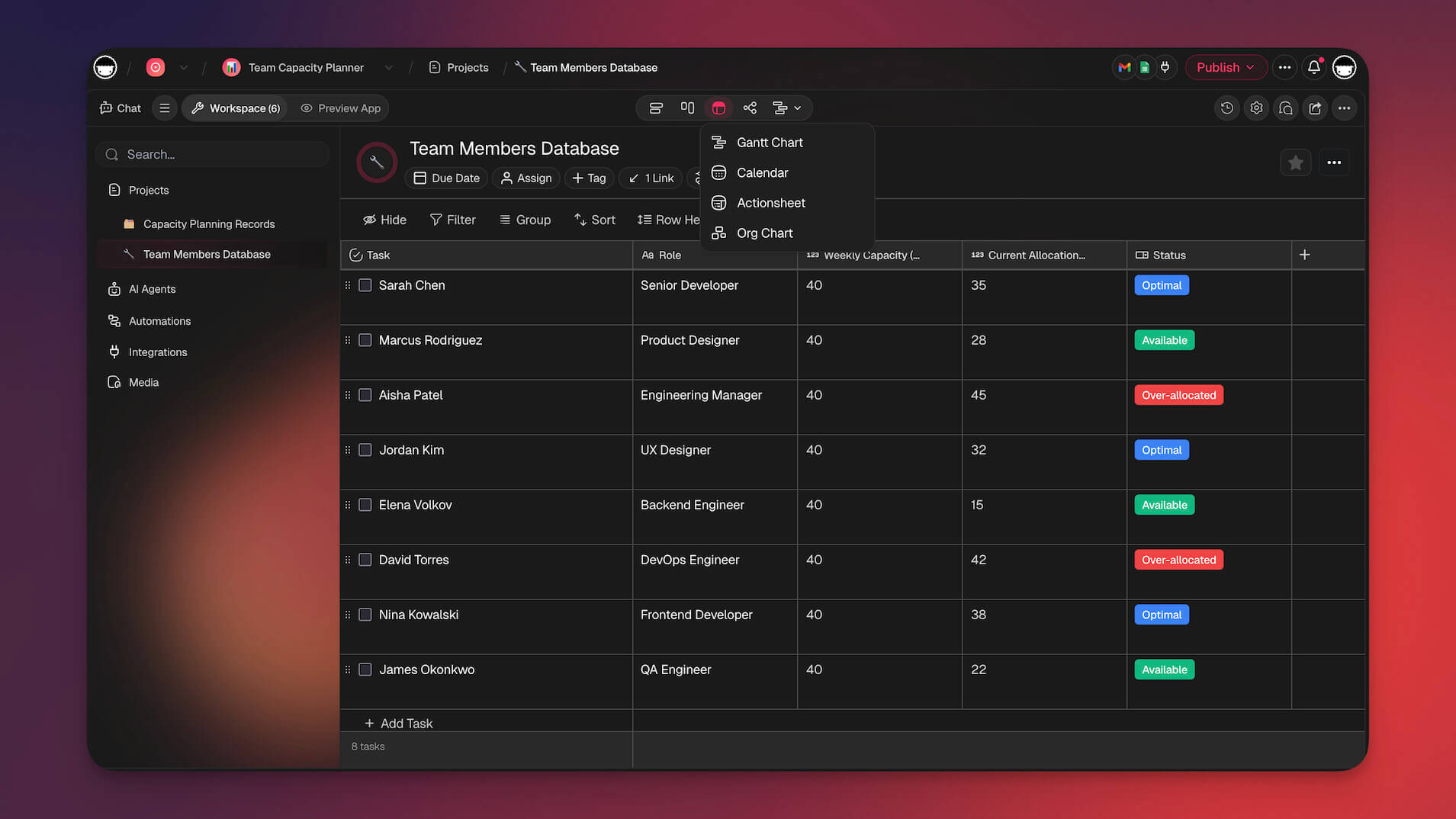
Taskade offers multiple project views — List, Board, Calendar, Table, Mind Map, Gantt, and Org Chart — to organize and track your Flowtime sessions
👍👎 Pros and Cons of the Flowtime Technique
Like any productivity system, the Flowtime Technique has a distinct set of strengths and weaknesses. Understanding both is key to determining if it is the right method for you and how to implement it successfully.
Advantages of the Flowtime Technique
Ideal for Deep Work: Allows for long, uninterrupted periods of focus crucial for complex or creative tasks.
Reduces disruptions in workflow. With no scheduled breaks, Flowtime will not interrupt your train of thought when you’re in the flow state.
Aligns with Natural Rhythms: Adapts to your unique energy and focus cycles throughout the day.
Encourages task focus. Flowtime encourages you to work on one task at a time. Focusing on specific tasks and not multitasking helps you get into the flow state.
Reduces Workflow Disruptions: Prevents a jarring alarm from breaking your concentration when you are "in the zone".
Flexibility to take breaks. You can take longer or shorter breaks with the Flowtime Technique. Start work only when you feel ready.
Personalized to you. You can personalize the Flowtime Technique to your liking, making it less rigid than the Pomodoro Timer.
Disadvantages of the Flowtime Technique
It requires planning. The Flowtime Technique requires you to plan ahead for it to work. You will need to break down projects into specific tasks and create a sheet to note down your Flowtime cycles.
Interrupted by meetings. It can be hard to use the Flowtime Technique if your day is stacked with meetings. This technique assumes that you have most of your day free to work on tasks.
Time-Consuming to Optimize: Finding your ideal work/break patterns requires an initial period of trial and error.
Difficult in Chaotic Environments: Unpredictable interruptions and meetings can make sustained Flowtime sessions impossible.
Flowtime requires discipline. Flowtime gives you the freedom to take longer breaks with unscheduled work intervals. Make sure you don't take longer breaks than you need to.
Who Should Use the Flowtime Technique? (Best Use Cases)
The Flowtime Technique is not a one-size-fits-all solution, but it is exceptionally powerful for certain types of work and specific kinds of individuals.
For Creatives, Writers, and Researchers
Creative and intellectual work rarely fits into neat 25-minute boxes. For writers, designers, artists, and researchers, the process often involves long periods of immersion where ideas connect and breakthroughs occur.
The Pomodoro Technique's timer can be a major hindrance, abruptly halting a train of thought just as it gains momentum.
Flowtime is purpose-built for this kind of work. It allows creatives and researchers to dive deep into their projects, explore rabbit holes, and ride the wave of inspiration for as long as it lasts, leading to more innovative and higher-quality output.
For Software Developers and Complex Problem-Solvers
Software development and other forms of complex problem-solving require sustained, deep concentration. Loading a complex problem into one's mental workspace takes time, and frequent context switching forced by a timer can be incredibly inefficient.
Flowtime allows developers to become fully engrossed in a coding challenge or system design without the jarring interruption of a mandatory break. This sustained focus is crucial for debugging complex issues, designing elegant architecture, and maintaining a coherent mental model of the system they are building.
The technique's flexibility accommodates the variable nature of development tasks, which can range from a quick 15-minute fix to a multi-hour feature implementation.
For People with ADHD and Neurodivergent Minds
The Flowtime Technique can be a powerful tool for individuals with ADHD and other neurodivergent conditions. Traditional time management systems like the Pomodoro Technique often conflict with how neurodivergent brains work — the rigid timer can feel punishing when you've finally locked into focus, and the mandatory breaks can make it nearly impossible to re-enter a flow state.
ADHD brains are often characterized by difficulty initiating tasks but an extraordinary capacity for hyperfocus once engaged. Flowtime respects this pattern. Instead of fighting against your brain's wiring, it lets you ride the wave of hyperfocus for as long as it lasts and take breaks when your attention naturally shifts — rather than when an arbitrary timer demands it.
That said, the self-monitoring aspect of Flowtime is key for neurodivergent users. Without the external structure of a timer, it's important to track your sessions and set gentle reminders to check in with yourself. Tools like Taskade's AI Agents can help by sending nudges and keeping your task list organized, providing just enough structure without the rigidity that traditional methods impose.
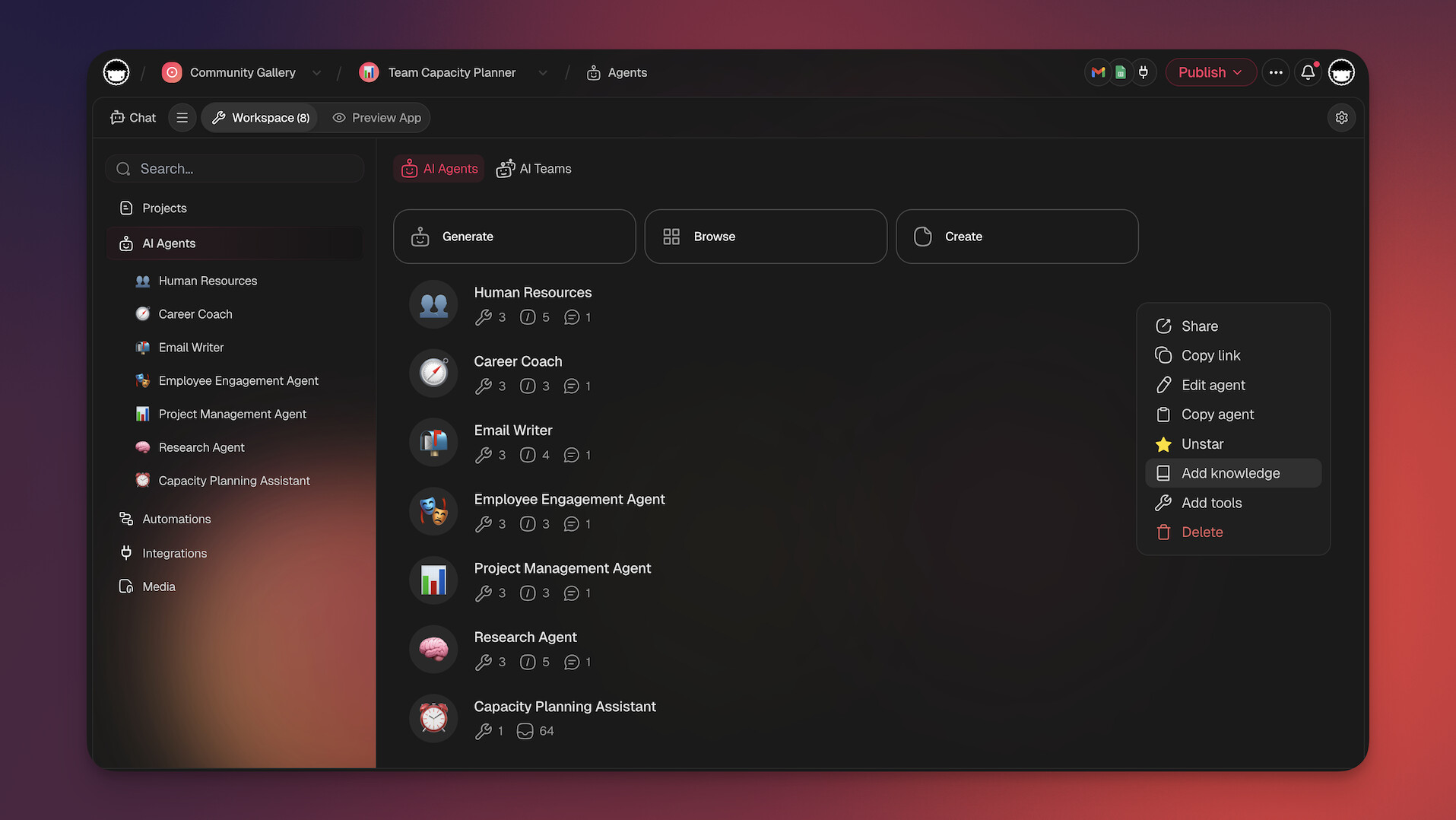
Taskade AI Agents can track your Flowtime sessions, send break reminders, and keep your task list organized autonomously
🥊 Pomodoro Technique vs. Flowtime Technique
The main difference between flowtime and the Pomodoro technique lies in their approach to managing time and achieving productivity. Flowtime emphasizes maximizing focus and concentration on a task by eliminating distractions and working in a state of flow, with longer work sessions of typically 90 minutes followed by breaks. In contrast, the Pomodoro technique breaks work into smaller chunks of time, with 25-minute work sessions followed by short breaks.
Here's how a typical morning looks under each method:
  🍅 Pomodoro Technique                 ⌛ Flowtime Technique  9:00  ┌──────────┐  25 min            9:00  ┌──────────────────┐
9:25  └──────────┘                           │                  │
9:25  ░░░░ 5 min break                       │   Deep focus     │
9:30  ┌──────────┐  25 min                   │   (47 min)       │
9:55  └──────────┘                           │                  │
9:55  ░░░░ 5 min break                9:47  └──────────────────┘
10:00 ┌──────────┐  25 min            9:47  ░░░░░░░ 8 min break
10:25 └──────────┘                    9:55  ┌────────────────────────┐
10:25 ░░░░ 5 min break                      │                        │
10:30 ┌──────────┐  25 min                  │   Deep focus            │
10:55 └──────────┘                          │   (82 min)             │
10:55 ░░░░░░░░░░░░░░░░ 15 min               │                        │
long break                      11:17 └────────────────────────┘
11:17 ░░░░░░░░░░░ 15 min break
Total: 100 min work, 30 min break
Sessions: 4 equal blocks              Total: 129 min work, 23 min break
Breaks: forced at fixed intervals     Sessions: 2 natural blocks
Breaks: taken when focus wanes
Here's a table that will help you decide which one may be better for your work style:
| 🍅 Pomodoro Technique | ⌛️ Flowtime Technique | |
|---|---|---|
| Work Interval | Rigid; fixed 25-minute intervals (a "Pomodoro"). | Flexible; determined by individual focus and energy levels. Work until concentration wanes. |
| Break Schedule | Rigid; mandatory 5-minute short breaks and a 15-30 minute long break after four intervals. | Flexible; taken when needed. Break length is often proportional to the work session. |
| Core Philosophy | Break down large tasks into manageable chunks to build momentum and prevent burnout. | Protect and maximize the "flow state" of deep immersion. |
| Flexibility | Low. Follows a strict, predetermined structure. | High. Adapts to the user's natural rhythms, the task's complexity, and energy fluctuations. |
| Best For | Short, repetitive, or daunting tasks where getting started is the main hurdle. | Complex, creative, or unpredictable tasks (e.g., writing, coding, research, strategic planning). |
| Key Drawback | The timer can interrupt a productive flow state, disrupting deep concentration. | Requires high self-awareness and discipline to know when to take a break and to avoid overworking. |
A table comparing the Pomodoro technique and the Flowtime technique
Best Applications of the Flowtime Technique
Although Flowmodoro is a productivity method born from Pomodoro's limitations, it does not necessarily make it better than the latter. We are all wired differently, and it's impossible to find a universal productivity technique that will work for everyone.
Both techniques have their own strengths and weaknesses, and it’s perfectly normal for you to find that one works better than the other.
You should use the Flowtime Technique for tasks that require more thought and concentration. For example, here are some instances of when the Flowtime Technique can work for you
🎨 You’re doing creative work
❌ Trying to find solutions to problems
🧠 During brainstorming sessions
🍅 Pomodoro cycles are too short for you
These are things that require you to be in a state of flow. The rigidity of the Pomodoro Timer does not support tasks that require higher levels of concentration. But that doesn’t mean that the Pomodoro Timer is inferior.
Best Applications of the Pomodoro Technique
The Pomodoro Timer is perfect for tasks that require less of your brain’s processing power. These can include updating spreadsheets, sustained periods of reading, or even when you’re creating simple outlines.
The Pomodoro Technique is effective as it encourages you to work in sprints and plan your breaks accordingly. Think of it as breaking down your day into a few sets with staggered breaks in between. It could be beneficial, especially in these two instances.
You’re having a slow day. If you’re having a slow day at work, looking at the workday as a whole might prove to be a daunting task. Breaking down your day into Pomodoros could help plan your day more effectively and break it up into manageable blocks of focus. Scheduled breaks will ensure that you don't end up running out of steam.
You’re a complete beginner. If you’re a beginner who’s starting to learn more about productivity habits, it can be a good primer for you to start cultivating good productivity habits. It’s easy to start and can be a healthy habit as it teaches you to focus when working and take short breaks in between to conserve your energy throughout the day.
Finally, Pomodoros could be used on days when you don't feel motivated to do work. Working in short bursts can be the catalyst that you need to kickstart a project.
If you’re interested in trying out the Pomodoro Technique, simply use this Pomodoro template on your Taskade project and you’ll be up and running in no time!
👌 Create Your Flowtime Workflow with Taskade AI
Whether you're team Pomodoro or team Flowtime, Taskade has the tools to support your workflow. Taskade is an AI-powered productivity workspace with frontier models from top AI labs built in. Use the countdown timer to track your flow sessions, break projects into tasks with the AI Assistant, and log your sessions in Table view — all in one workspace.

The Taskade home dashboard gives you a bird's-eye view of all your projects, tasks, and Flowtime sessions
Here's how Taskade supercharges the Flowtime Technique:
- AI Agents — Deploy autonomous agents that track your focus patterns, send break reminders, and organize tasks based on your energy levels throughout the day.
- Automations — Set up workflows that automatically log your Flowtime sessions, calculate break durations, and surface your most productive time blocks.
- AI Apps — Build custom Flowtime dashboards, habit trackers, and productivity analytics tools from a single prompt with Taskade Genesis.
- Community Templates — Browse thousands of ready-made productivity templates from the Taskade community, including Flowtime trackers and deep work planners.
Sign up for free and start your first Flowtime session with Taskade AI!
Turn Flow State Into a System With AI
The Flowtime Technique works best when your tools enforce the rhythm. Taskade Genesis lets you build a custom focus dashboard — Pomodoro timer, task queue, distraction log, and flow-state tracker — from a single prompt. Your workspace remembers your patterns and AI agents learn when you are most productive.
Unlike static timer apps, a Genesis-built focus system connects to your actual projects. Set a Flowtime automation that starts a focus session, blocks notifications, and logs your deep work hours — all triggered by a single slash command.
Frequently Asked Questions About the Flowtime Technique
Is the Flowtime Technique better than the Pomodoro Technique?
Neither technique is inherently "better"; they are suited for different purposes and work styles. The Pomodoro Technique is excellent for structured work and overcoming procrastination with short, manageable tasks. Flowtime is superior for complex, creative, or unpredictable work that benefits from long, uninterrupted periods of deep focus. Many people find success alternating between the two depending on the task at hand.
How long should my Flowtime sessions be?
There is no set length — that's the entire point. The technique is designed for you to work for as long as your natural focus lasts. Beginners may find their sessions are 20–40 minutes long, while more experienced practitioners working on immersive tasks might sustain focus for 90 minutes or more. The key is to track your times and learn your own patterns. Use the recommended break duration table above as a starting point.
Can I multitask during a Flowtime session?
No. The principle of "unitasking" — focusing on a single, specific task — is fundamental to the technique. Multitasking, or context switching, prevents the deep immersion required to achieve a flow state. Research shows that even brief mental blocks caused by shifting between tasks can cost as much as 40% of your productive time.
What if I get interrupted during a Flowtime session?
If an unavoidable interruption occurs, stop your timer and make a note of the interruption in your log. Handle the interruption, and then decide whether you can realistically return to your original task or if you need to start a new Flowtime session. The data on interruptions is valuable for identifying and reducing future distractions.
Does the Flowtime Technique work for people with ADHD?
Yes — many people with ADHD find Flowtime more effective than rigid timer-based methods. ADHD brains often struggle with externally imposed time constraints but excel during hyperfocus episodes. Flowtime respects this by letting you work for as long as your focus holds, without an alarm breaking your concentration. The tracking component also helps build self-awareness around focus patterns. For more strategies, see our guide on AI tools for ADHD productivity.

🔗 Resources
https://medium.com/@UrgentPigeon/the-flowtime-technique-7685101bd191
Csikszentmihalyi, M. (1990). Flow: The psychology of optimal experience. Harper & Row.
Ulrich, B., & Schellenberg, B. J. (2017). The neuroscience of flow. Frontiers in Psychology, 8, 819.
Cranston, S., & Keller, S. (2013). Increasing the 'meaning quotient' of work. McKinsey Quarterly. https://www.mckinsey.com/capabilities/people-and-organizational-performance/our-insights/increasing-the-meaning-quotient-of-work
Qatalog & Cornell University. (2022). Workgeist Report: The hidden cost of context switching. https://assets.qatalog.com/language.work/qatalog-2021-workgeist-report.pdf
Resume Now. (2026). National workplace productivity survey: Only 31% of workers reach a true flow state. https://www.cpapracticeadvisor.com/2026/02/11/only-31-of-workers-reach-a-true-flow-state-new-data-finds/177933/
Reclaim.ai. (2025). Task management statistics: 31.6 interruptions per day and 15-20 minutes to re-enter flow. https://reclaim.ai/blog/task-management-statistics
Weber, R., et al. (2021). The locus coeruleus norepinephrine system and its role in flow state. Frontiers in Psychology, 12, 645498. https://doi.org/10.3389/fpsyg.2021.645498