






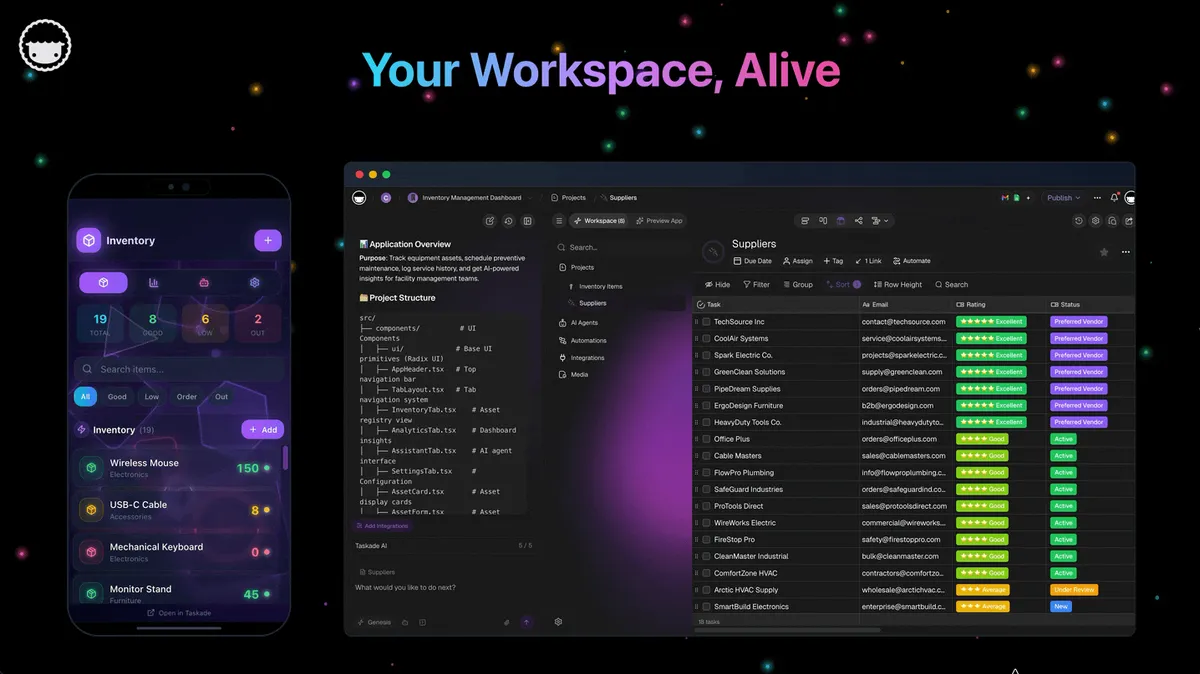
Three layers. One workspace. Memory remembers. Intelligence thinks. Execution ships.
TL;DR: The Taskade Genesis Multi-Agent Workspace is live across 150,000+ apps already built. Memory captures every project, doc, and customer in a shared knowledge graph. Intelligence deploys collaborating agents with custom tools and auto-routed frontier models. Execution runs 100+ two-way integrations with durable workflows. Start a workspace → · Clone and remix →
   ▲ MEMORY            ■ INTELLIGENCE         ● EXECUTION
   Projects · Docs     Agents · Models        Integrations · Flows
   Calls · Customers   Tools · Hand-offs      Triggers · Actions
        │                    │                      │
        └──── feeds ────────►│                      │
                             └──── triggers ───────►│
        ◄────────────── writes back ────────────────┘
The loop closes itself. Every action enriches the graph. The next agent run reads a richer Memory. Code generators write a file once and stop. This gets smarter every cycle.
Real Apps. Yours Today.
Four production-grade Taskade Genesis apps to clone right now. Polished and ready. Customize freely. Make them yours.
Client Connect Dashboard
Pipeline value, revenue, open deals, all at a glance.
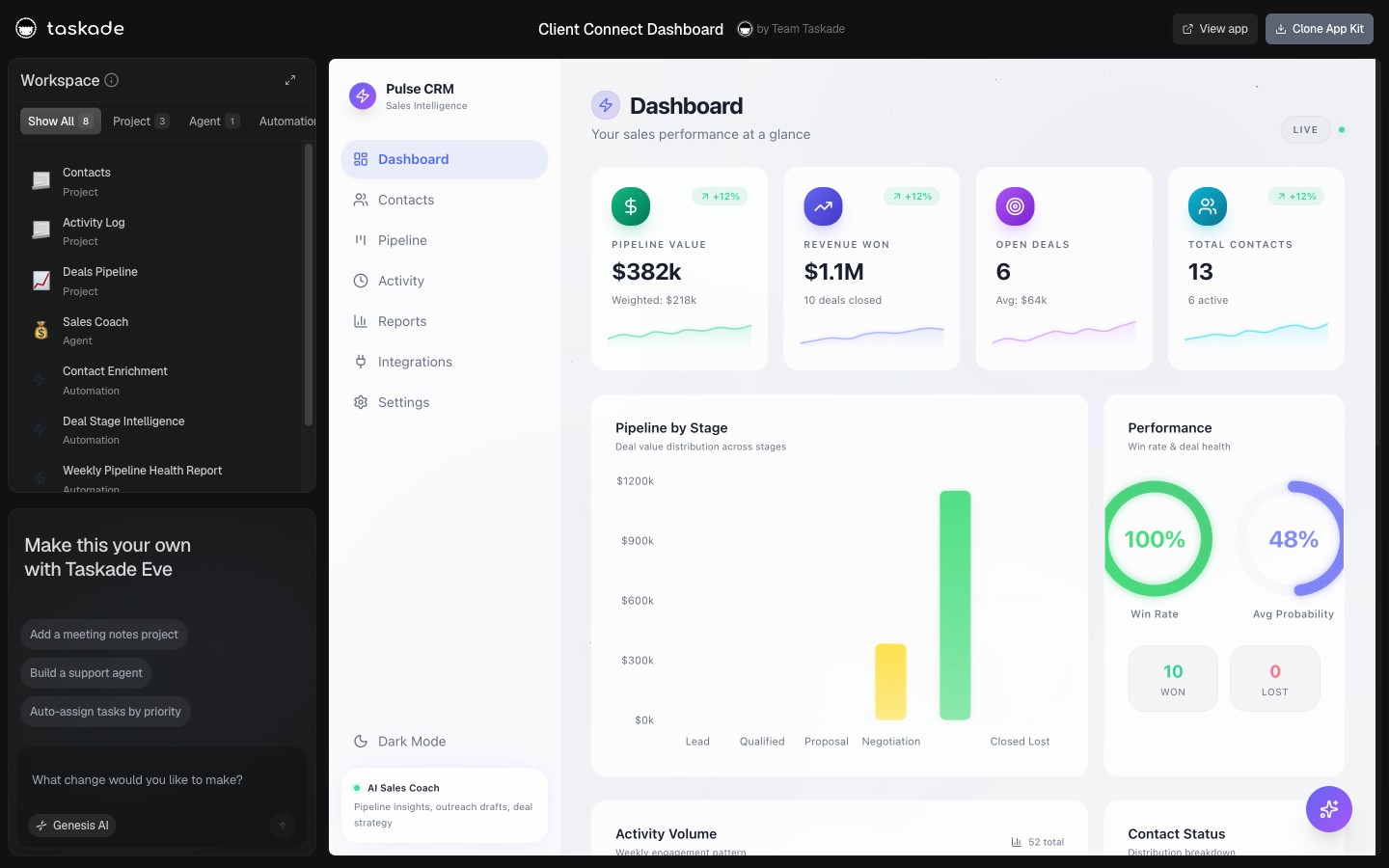
Pipeline. Revenue. Live. Built to give a founder or account lead the answer to "where are we?" in three seconds. Every deal row links to the underlying project, agent log, and follow-up automation. Clone Client Connect Dashboard →
Invoice Tracker
Track hours, rates, and earnings across every project.
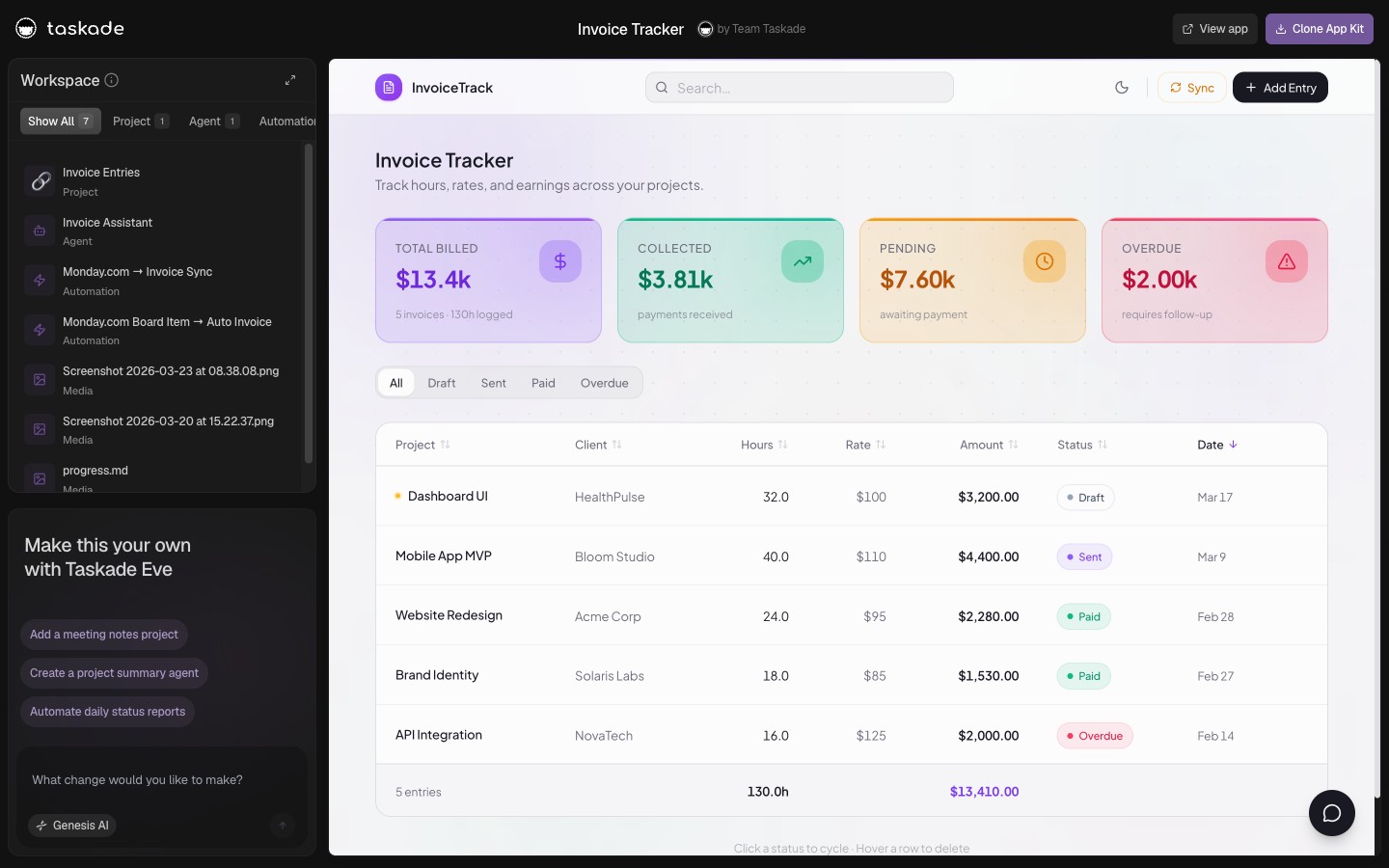
Hours. Rates. Earnings. The end of "what did I bill that client last month?" Each project row tracks hours logged, billable rate, and earnings. Stripe-ready when you are. Clone Invoice Tracker →
Neon CRM Dashboard
Track leads, manage deals, close more, in one visual map.
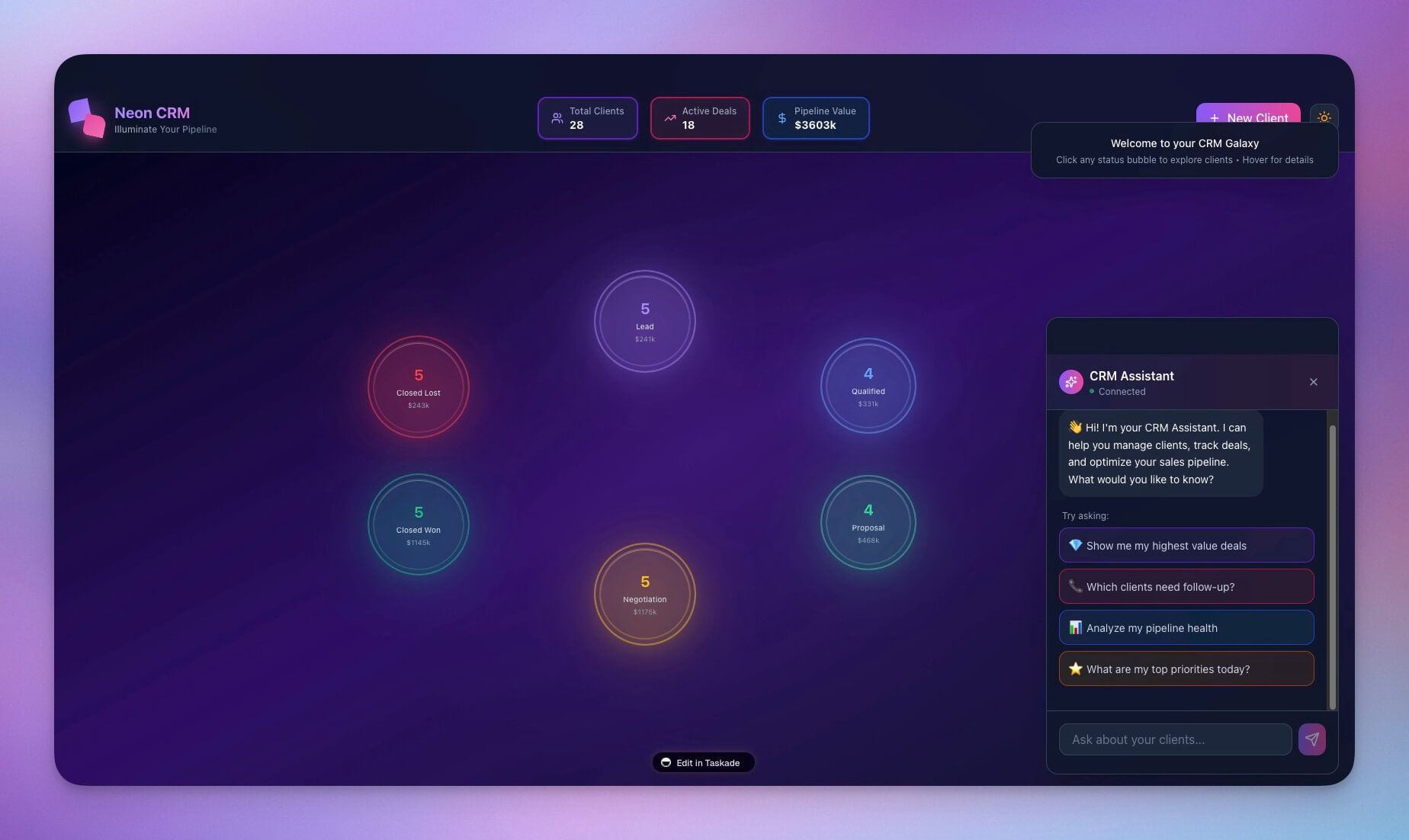
Track leads. Close deals. A visual CRM with the pipeline, the lead source attribution, and the AI agent that drafts the next follow-up. One workspace, no tab-juggling. Clone Neon CRM Dashboard →
Sales Pipeline Workflow
Lead qualification to close with AI assistance.
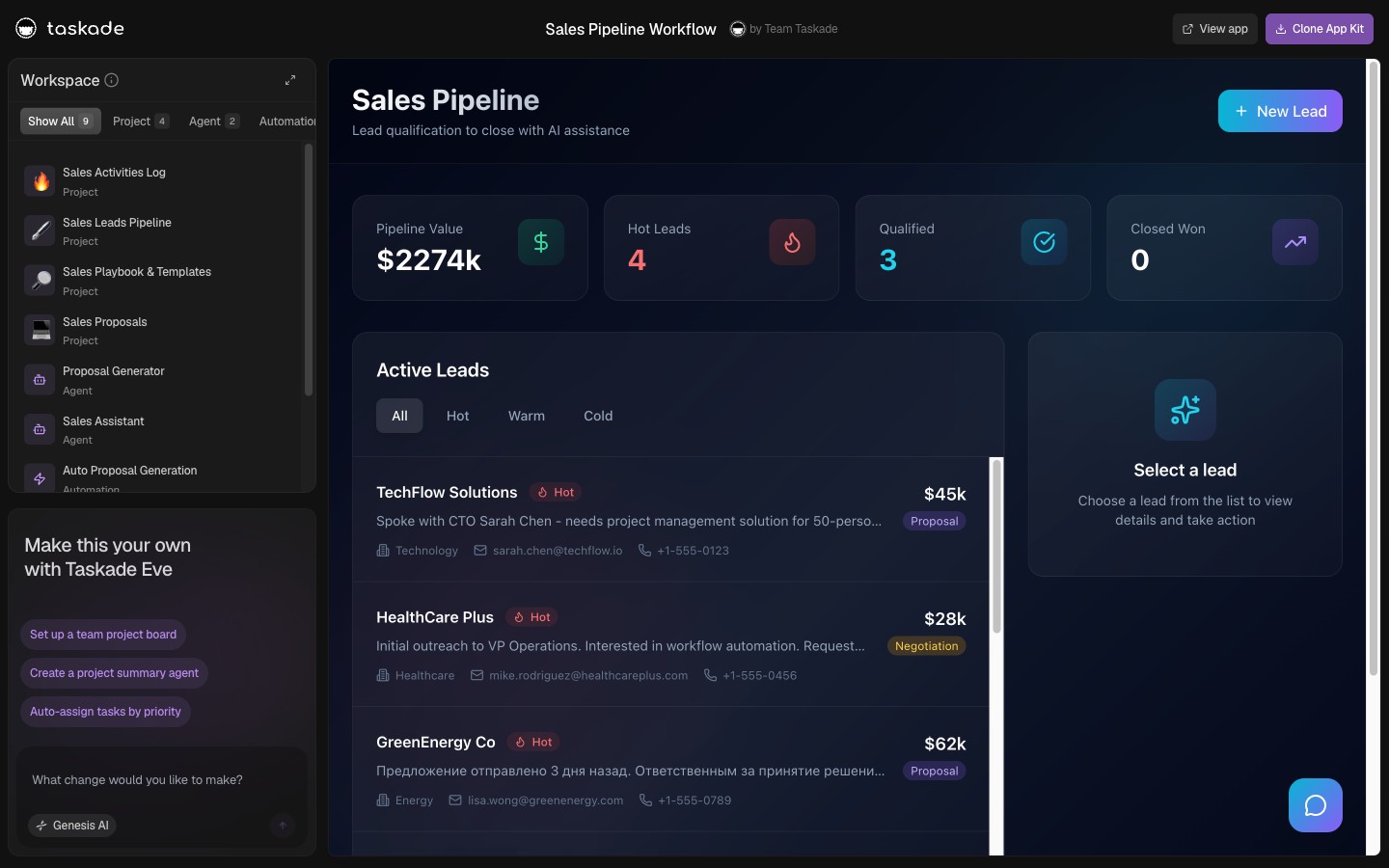
Qualify. Nurture. Close. Designed for AEs and SDRs running real pipeline. Stages, scoring, and the agent that drafts the next outreach for every stalled deal in your pipeline. Clone Sales Pipeline Workflow →
▲ Memory · Capture Memory. Train Agents.
The Memory Layer is the knowledge-graph foundation of every Taskade Genesis workspace. Projects, documents, call transcripts, and customer records live as connected nodes, every relationship mapped, every update linked. Walkthrough: View Your Workspace DNA Graph →.
- 📚 Knowledge graph, Every relationship mapped. Every update linked.
- 🔍 Search every layer, Full-text, semantic meaning, even what is inside a PDF.
- 🧠 Persistent agent memory, Agents read the graph for context. They remember last week's customer this week without re-prompting.
■ Intelligence · Deploy Agents. Run Workflows.
The Intelligence Layer is where AI agents live. Each agent runs on the best frontier model auto-routed per task, has access to built-in tools, holds persistent memory backed by Taskade Projects, and collaborates with other agents through first-class hand-offs. Build a team, CFO, CMO, COO, CEO, and ship work together.
- 🧩 Multi-agent collaboration, Tune each agent for any role. Hand-offs are first-class.
- 🤖 15+ frontier models, auto-routed, OpenAI, Anthropic, Google, plus open-weight providers via gateway routing, the right model picked per task automatically.
- ⚡ Slash + @ to call anything,
/build,/automate,/publishfor verbs.@project,@agent,@automationfor nouns.
A real team has roles and hand-offs. So does the Intelligence Layer, each agent owns a step, reads shared Memory, and passes work to the next.
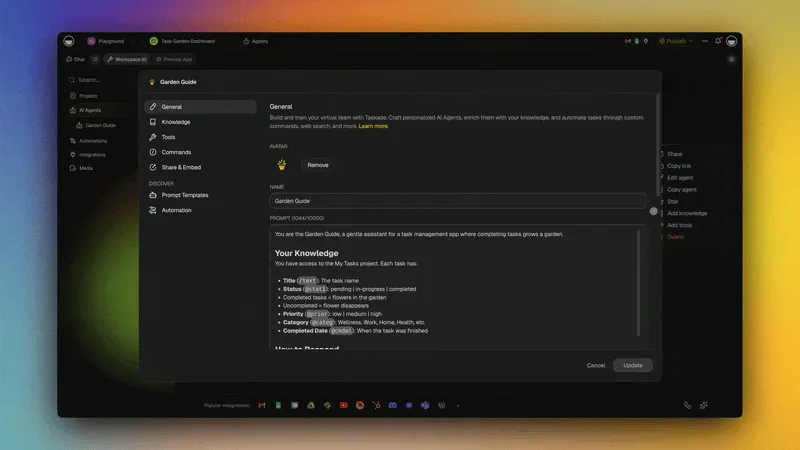
Learn more about Taskade Genesis Agents →
● Execution · Connect Workflows. Ship Apps.
The Execution Layer ships work to the outside world. 100+ two-way integrations pull events in as triggers and push data out as actions, Slack, Stripe, GitHub, Notion, Salesforce, Google Sheets, Gmail, Calendly, and more. Durable workflows branch, loop, filter, and retry; they recover from failure rather than silently dropping a step.
- 🔌 100+ two-way integrations, Slack, Stripe, GitHub, Notion, Salesforce, Sheets, more.
- 🔁 Branch, loop, filter, retry, Durable workflows that recover from failure.
- 🛠️ Hosted MCP server, External AI clients connect in (Claude Desktop, Cursor, VS Code), on every paid plan.
Learn more about Integrations →
Start in 60 Seconds. Make It Yours.
Step 1, Prompt it. Type what you want. Get a working app. Start →
Step 2, Clone it. Click an app. Clone it. Yours. Browse 150,000+ apps →
Step 3, Hire a role. CFO, CMO, COO, CEO. Pre-built and ready. Follow @taskade for app drops →
Single-Shot Tools vs the Multi-Agent Workspace
A code generator hands you a file. The Multi-Agent Workspace hands you a system that keeps working after the prompt ends.
| Capability | Single-shot code generators | Multi-Agent Workspace |
|---|---|---|
| Output | A file or repo, once | A living app + agents + workflows |
| Memory | Forgets between sessions | Shared knowledge graph, persistent |
| Agents | One model, one turn | Multiple roles, first-class hand-offs |
| Models | Fixed | 15+ frontier models, auto-routed per task |
| Execution | You wire it up | 100+ two-way integrations, durable workflows |
| After the prompt | Stops | Gets smarter every loop |
What It Replaces
Here's the part that matters if you run operations instead of writing code. One operator with a Multi-Agent Workspace does the work that used to need a stack of tools and a stack of people:
| The old way | The Multi-Agent Workspace |
|---|---|
| A CRM, a BI tool, a help desk, a Zapier account | One workspace, one prompt |
| An analyst to pull the weekly report | An agent that drafts it on schedule |
| A coordinator to chase every follow-up | An automation that fires on the trigger |
| Weeks of setup and a per-seat bill per tool | Clone an app, customize, ship — today |
Builders tell us the same thing again and again: work that would have taken a Fortune 500 team a year and a half ships in a few weeks. Not because the AI is magic, because the loop compounds.
The Loop
Memory feeds Intelligence. Intelligence triggers Execution. Execution feeds Memory. The loop closes itself.
That is what makes a Taskade Genesis workspace feel alive instead of static. Code generators write a file once and stop. The Multi-Agent Workspace gets smarter every loop.
🎯 Start Building
- Build with AI →, one prompt to a deployed app
- View Your Workspace DNA Graph →, see how Memory, Intelligence, and Execution interconnect
- Browse 100+ Integrations →, Slack, Stripe, GitHub, Notion, Salesforce
- Browse the Community Gallery →, 150,000+ apps already live
- See pricing →, Free, Pro $10/mo, Business $25/mo, Max $100/mo, billed annually
- Previous: Clone Apps. Add Login. Run Agents. Automate Flows. (May 11 2026)
John Xie
Co-founder & CEO, Taskade
▲ ■ ● Memory remembers. Intelligence thinks. Execution ships.
See Also
- Clone Apps. Add Login. Run Agents. Automate Flows. (May 11 2026), App Users, slash commands, GitHub triggers, Google Calendar
- Workspace Memory, Agent Workflows, App Payments (May 3 2026), Workspace memory, Stripe checkout, JSON-schema agent output
- Integrations Ecosystem (April 19 2026), The full 100+ integration grid
- Workspace DNA: Living System, The architectural manifesto
- Taskade Genesis: Origin of Living Software, Why "apps that ship apps" matters
Connect external AI clients (the Execution layer, extended):
- Taskade MCP Server, connect Claude Desktop, Cursor, and VS Code to this workspace
- MCP Server Comparison, Taskade vs Notion, Linear, GitHub, Sentry, Slack
Clone a real app built on this architecture:
- AI Customer Onboarding Templates, five live customer-success apps
- SaaS Metrics Dashboard Templates, KPI dashboards that auto-draft updates
- AI Investor CRM & Fundraising Tracker, research agent + quarterly-update drafter
- AI Recruiting Pipeline Templates, sourcing, screening, and scheduling agents
- Event CRM & Founder Dinner Template, RSVP capture plus an AI follow-up concierge
Frequently Asked Questions
What is the Taskade Genesis Multi-Agent Workspace?
The Multi-Agent Workspace is the three-layer Taskade Genesis architecture for shipping real work, not just code. Memory captures projects, docs, calls, and customers in a shared knowledge graph. Intelligence deploys multiple AI agents that collaborate, each with its own role, custom tools, persistent memory, and the right frontier model for the job. Execution connects 100+ two-way integrations and reliable durable workflows that branch, loop, filter, and retry. Memory feeds Intelligence, Intelligence triggers Execution, Execution writes back to Memory, the loop closes itself.
What does multi-agent collaboration mean in Taskade Genesis?
Multi-agent collaboration is how a Taskade Genesis workspace ships work the way a real team does. You tune each agent for a specific role, researcher, writer, reviewer, salesperson, sourcer, support, and hand-offs between agents are first-class operations rather than ad-hoc prompt chaining. The agent layer routes automatically to 15+ frontier models from OpenAI, Anthropic, Google, plus open-weight providers via gateway routing so each task gets the best available model. Use slash commands (/build, /automate, /publish) for verbs and @ mentions (@project, @agent, @automation) for nouns.
What is the Memory Layer in Taskade Genesis?
The Memory Layer is the knowledge-graph foundation of every Taskade Genesis workspace. Projects, documents, call transcripts, and customer records are stored as connected nodes, every relationship mapped, every update linked. Full-text search, semantic meaning, and even content inside attached PDFs are searchable in one query. AI agents connect to the Memory Layer for persistent context, so an agent that worked on a customer last week remembers them this week without re-prompting.
What is the Intelligence Layer in Taskade Genesis?
The Intelligence Layer is where AI agents live. Each agent runs on the best frontier model auto-routed per task, OpenAI, Anthropic, Google, plus open-weight providers via gateway routing, and has access to built-in tools, holds persistent memory backed by Taskade Projects, and collaborates with other agents through first-class hand-offs. Build a team of agents, CFO, CMO, COO, CEO, and they ship work together. Address any agent, project, or automation from chat using @ mentions.
What is the Execution Layer in Taskade Genesis?
The Execution Layer ships work to the outside world. 100+ two-way integrations, Slack, Stripe, GitHub, Notion, Salesforce, Google Sheets, Gmail, Calendly, and more, pull events in as triggers and push data out as actions. Durable workflows branch, loop, filter, and retry; they recover from failure rather than silently dropping a step. MCP (Model Context Protocol) opens the workspace to external AI clients, so Claude Desktop, Cursor, and VS Code can read and edit your projects, on every paid plan.
What apps can I clone today from the May 16 newsletter?
Four production-ready Taskade Genesis apps are featured in the May 16 newsletter: Client Connect Dashboard (pipeline value, revenue, open deals at a glance), Invoice Tracker (hours, rates, and earnings across projects), Neon CRM Dashboard (lead tracking, deal management, visual close map), and Sales Pipeline Workflow (lead qualification through close with AI assistance). Each clones into your workspace in roughly ten seconds via the Community Gallery at /apps. The Free plan includes 11,000 AI credits and 3 Genesis apps.
How does MCP work in Taskade Genesis?
Taskade Genesis runs a hosted MCP (Model Context Protocol) server. External AI clients like Claude Desktop, Cursor, and VS Code connect to https://www.taskade.com/mcp via OAuth2 and can list spaces, inspect content, and edit files. That hosted server is available on every paid plan. The other direction runs from your automations: the MCP Client step points at an external MCP server, lists the tools it publishes, and calls one, on every plan including Free. An agent cannot dial a remote server on its own, so it triggers the automation and reads the result. Agents also reach 100+ two-way integrations and carry built-in tools.
How does Workspace DNA make the loop self-reinforcing?
Workspace DNA is the architectural principle that makes Taskade Genesis feel alive instead of static. Memory feeds Intelligence, agents read the knowledge graph for context. Intelligence triggers Execution, agents fire automations to ship work. Execution writes back to Memory, every completed action enriches the graph. The next agent run reads a richer Memory. Each cycle compounds. Code generators write a file once and stop. The Multi-Agent Workspace gets smarter every loop.