






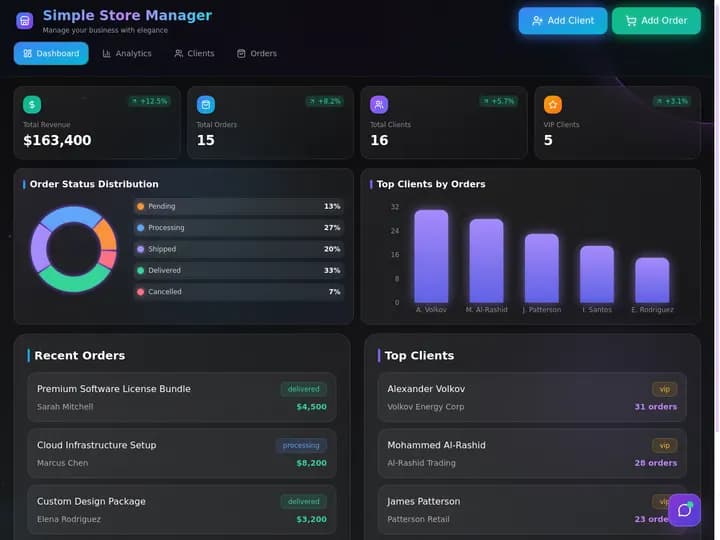
Taskade Genesis gives HVAC shops a daily dispatch board, customer records, and client portal shaped for service calls and install jobs, without ServiceTitan-scale contracts or spreadsheets that break when two techs claim the same slot. This guide shows how to own HVAC dispatch in 2026.
TL;DR: Enterprise suites win call centers. Spreadsheets win until they do not. Taskade Genesis wins HVAC crews who want a living dispatch board they reshape. Generate an HVAC daily dispatch board →
Related: ServiceTitan alternative for small crews, Housecall Pro alternative, Jobber alternative dispatch board, field service dispatch you own.
Competitor figures below are publicly listed or widely reported ranges as of July 2026. Confirm live quotes before you buy — field-service vendors repackage tiers often, and add-ons move the real number more than the sticker does.
❄️ What HVAC Shops Actually Need From a Dispatch Board
An HVAC shop with three to twelve techs does not need a field-service suite. It needs one board that survives a 96-degree Tuesday. The daily loop is narrow and repeats:
- A homeowner calls or texts with no cool air.
- Somebody triages: emergency today, or a slot Thursday morning.
- A tech gets the address, gate code, equipment model, and filter size before the van leaves.
- The tech closes with photos, refrigerant readings, and parts used.
- Office staff sends the invoice and books the next maintenance visit.
- An owner asks "what is still open?" and gets an answer without opening four apps.
That spine is a dispatch board. It is not a call center, a price book engine, or a fleet telematics platform. Confusing the two is how five-truck shops end up paying per-tech enterprise rates for a whiteboard replacement.
| Daily need | Enterprise suite default | Spreadsheet reality | Living board in Taskade Genesis |
|---|---|---|---|
| Today's truck roll | Dispatch board module | Tab with color fills | Board view with tech columns |
| Customer + equipment history | CRM + asset registry | Second tab nobody updates | Linked customer records |
| Maintenance contracts | PM module, often upper tier | Third tab, forgotten | PM schedule board |
| Invoice status beside the job | Native billing module | Manual copy from accounting | Estimate to invoice pipeline |
| Homeowner status updates | Customer portal add-on | Phone calls to the office | Home services portal |
| Parts on the truck | Inventory module | Nobody knows | Pair a parts tool. Not a warehouse |
| Fleet GPS breadcrumbs | Vendor or partner add-on | None | Not available. Keep your telematics |
| Who changes a field | Vendor template request | Anyone, chaotically | You, by chatting with Taskade EVE |
If your week is the six steps above, you are shopping for ownership of the board. If your week is call-center scripting, marketing attribution, and technician commission plans, stay in a full field-service suite.
📜 Why HVAC Dispatch Breaks on Generic Tools
HVAC work mixes emergency no-cool calls, seasonal tune-ups, install days, warranty callbacks, and duct work. A board built for generic "jobs" misses the five fields that decide whether a truck roll succeeds: equipment model, serial, filter size, refrigerant type, and permit status. A tech who has to phone the office for a filter size has already lost fifteen minutes of billable time.
Three structural things went wrong, and none of them are anybody's fault:
- Field-service suites were priced for call centers. Per-technician licensing made sense when the vendor funded a deep mobile app, a price book engine, marketing attribution, and a dispatcher's console. A shop with one owner-dispatcher funds all of that and uses a third of it.
- Spreadsheets have no concurrency model. Two people editing the same Tuesday afternoon slot is not an error a shared sheet can catch. It is a callback, an angry homeowner, and a tech driving across town for nothing.
- The pain moved from scheduling to context. In 2026 the bottleneck is rarely "who is free at 2pm." It is "does this tech know the unit is a 2011 heat pump in a crawlspace with a locked gate." Context lives in records, not in calendar blocks.
Spreadsheets fail specifically when:
- Two techs grab the same emergency slot and nobody notices until dispatch
- Office staff cannot see invoice status beside the job
- Homeowners call because there is no client-facing status page
- Maintenance contracts live in a separate tab nobody opens
- Equipment history is tribal knowledge that leaves when a tech leaves
Enterprise suites fix some of that but charge for modules a five-truck shop never opens. Here is the loop a shop actually runs, and the point where each tool breaks:
That loop is what Taskade Genesis is built to own. Parts warehouses, payroll, and GPS trails are adjacent systems that stay in their own lanes.
💵 2026 Pricing Reality for HVAC Software
Use this as a budget sketch, not a contract. These are approximate public or widely reported ranges as of July 2026 — confirm live pricing before you sign, because add-ons move the real number more than the tier does.
| Product | Reported range | Pricing shape | Fit for a 3-8 truck HVAC shop |
|---|---|---|---|
| ServiceTitan | ~$245-$500+ per tech/mo plus implementation | Per tech + modules + onboarding | Usually oversized until you have office staff |
| Jobber | ~$39-$249/mo across entry to growth tiers | Plan tier + team size | Common default for small crews |
| Housecall Pro | ~$59-$199+ base, add-ons extra | Plan + add-ons (GPS, proposals, price book) | Strong if polished homeowner UX is the priority |
| Spreadsheets | $0 | Free until a double-booking costs you a callback | Fine at one truck, painful at three |
| Taskade Genesis | Free plan, then Pro $10/mo billed annually | Workspace plan, not per-tech field-service seats | Own the board, pair parts and GPS elsewhere |
Taskade pricing in full: Free is $0. Pro is $10 per month billed annually, or $20 billed monthly. Business is $25 per month billed annually, or $50 billed monthly. On Free, you earn free AI credits with referrals and invites, and you can upgrade any time. Paid plans include a monthly credit allowance.
Rough monthly software cash at HVAC crew sizes
| Techs | Enterprise suite (~$300 avg/tech) | Packaged mid-tier | Taskade Genesis |
|---|---|---|---|
| 3 | ~$900+ | ~$99-$199 | Workspace plan, not per tech |
| 5 | ~$1,500+ | ~$149-$249 | Workspace plan, not per tech |
| 8 | ~$2,400+ | ~$199-$349 | Workspace plan, not per tech |
| 12 | ~$3,600+ | ~$249-$449+ | Workspace plan, not per tech |
The point of that table is not that cheaper wins. A shop billing $900k with a full-time dispatcher and a marketing budget can absolutely justify enterprise software. The question is whether your fifth truck should cost you another software license before it books its first job.
How Taskade Genesis changes the shape: you are not buying dispatch seats per technician. You buy a workspace that holds Projects, Agents, and Automations, then invite the people who run the board. Homeowners read status from a published portal and never need a workspace seat. Published app usage and AI credit consumption follow Taskade plan rules, which is a different meter than "every tech is a licensed dispatcher."
🧭 Who Should Switch to an Owned HVAC Board
Switch, or dual-run, when several of these are true:
- You run 1 to 12 techs, not a multi-branch operation with a call center.
- Your dispatch today is a spreadsheet plus a group text, and the pain is context, not calendaring.
- You already have accounting and payments somewhere you trust and do not want to migrate them.
- You want HVAC-specific fields — refrigerant type, filter size, permit number, warranty end date — without filing a vendor template request.
- You want AI triage that reads your actual board, not a chatbot bolted on that cannot see your columns.
- Your quote climbs every time you hire, faster than the revenue that hire brings in.
Good starting points, in the order most HVAC shops add them:
- HVAC daily dispatch board — the board itself
- HVAC service dispatch tracker — if service calls dominate installs
- Technician daily run sheet — what each tech sees before the van leaves
- Preventive maintenance schedule board — contract renewals and seasonal tune-ups
- After-hours callout dispatch log — the 11pm no-heat call
- Callback queue board — warranty returns you need to see, not bury
🛟 Who Should Stay on ServiceTitan, Jobber, or Housecall Pro
This is the section that earns trust. Stay on the packaged product when the packaged product is the product you actually operate.
ServiceTitan is genuinely strong at:
- Price book and options presentation. Good/better/best selling on the tablet with real margin math built in. This is a revenue tool, not a convenience feature, and shops that run it well see the ticket average move.
- Call-center and marketing attribution. Booked-call rate per campaign, recorded calls tied to jobs, and dispatcher scorecards. If you employ someone whose whole job is answering the phone, that instrumentation pays for itself.
- Technician commission and payroll depth. Multi-rate pay plans, spiffs, and job costing built into the same record the tech closes.
Jobber is genuinely strong at:
- Time to first job, measured in hours. Quoting, scheduling, invoicing, and payment collection work on day one with no schema decisions.
- Client communications that just work. Automated on-the-way texts, quote follow-ups, and review requests without wiring anything.
Housecall Pro is genuinely strong at:
- Homeowner-facing polish. The booking and tracking experience is the best in the small-shop tier, and consumers notice.
- Sales and upsell workflows. Proposals, financing options, and membership plans are packaged, not projects.
| Constraint you refuse to drop | Lean this way |
|---|---|
| Price book with margin math on the tablet | ServiceTitan or a full field-service suite |
| Certified GPS fleet tracking in one login | Packaged suite plus its telematics module |
| Offline truck app for dead-zone basements | Packaged suite built for offline sync |
| Fastest path to invoicing this week | Jobber or Housecall Pro |
| Consumer booking polish and financing offers | Housecall Pro |
| Own the schema, agents, and automations | Taskade Genesis |
| Parts inventory with costing and purchase orders | Dedicated inventory tool beside the board |
None of those tools are wrong. They are purpose-built field-service suites with real engineering behind them. Taskade Genesis is a living workspace platform. Honest buyers pick the constraint they refuse to compromise, then accept the tradeoff on the rest.
Honest gaps on our side: no native fleet GPS, no offline truck app, no enterprise price book engine, no technician commission calculator. Office dispatch, customer and equipment history, maintenance scheduling, and homeowner visibility are where Taskade Genesis is strongest today. If any pitch tells you otherwise — including ours — walk away from it.
🧬 Workspace DNA on an HVAC Board
Taskade Genesis apps are not static templates. They run on Workspace DNA — Memory, Intelligence, Execution — and that loop is why the board gets sharper the longer you use it.
| Pillar | Component | Role on an HVAC board |
|---|---|---|
| Memory | Projects | Customers, equipment, open calls, PM contracts, permits |
| Intelligence | AI Agents | Triage no-cool calls, draft job briefs, flag overdue PM |
| Execution | Automations | On-the-way texts, parts-hold alerts, invoice reminders |
The loop in practice: a homeowner call writes Memory, an Agent proposes priority and the right tech, an Automation texts the homeowner a window, the tech closes with readings, and completion writes Memory again. Next season, that equipment history is the reason a tech shows up with the right filter.
Agents worth adding once the board holds real jobs — not before, because an agent on sample rows is theater:
- Dispatch triage agent for priority and assignment suggestions
- HVAC job brief agent for the pre-roll equipment summary
- PM reminder agent for contract renewals and seasonal visits
- Parts stock agent for jobs stuck waiting on a part
- Estimate follow-up agent for quotes going cold
- Callback agent for warranty returns that need a human
Agents use built-in tools and read your Projects directly, so a triage suggestion is grounded in your board rather than a generic HVAC prompt. Automations fire from project triggers or on a schedule.
🗄️ The Data Model Behind an HVAC Dispatch Board
Most dispatch failures are modeling failures. If equipment hangs off the job instead of the customer, you lose history the moment the job closes. Model it once, correctly, and the board answers questions you did not think to ask. Seven record types carry an HVAC shop, and the arrows are what keep history from evaporating:
Three modeling rules that save you a rebuild:
- Equipment belongs to the customer, not the job. A 2011 heat pump outlives fifty service calls. Hang it off the address and every future tech inherits the history.
- PM visits are their own records. A maintenance contract is a promise; a visit is a truck roll. Keep them separate so the daily board stays readable and the contract stays auditable.
- Estimates convert, they do not duplicate. One record moves quote to job to invoice so nobody re-types a price. That is what the estimate to invoice pipeline and job to invoice flow exist for.
Set fields up once in table view and read the same records in board view for dispatch or calendar view for windows. Taskade ships multiple project views — List, Board, Calendar, Table, Mind Map, Gantt, and Org Chart, with Timeline part of Gantt — over the same underlying records, so office staff and techs read the shape that suits them without duplicating data.
🏗️ What Taskade Genesis Owns vs What You Pair
Honest boundaries matter more than feature checklists. Pair, do not reinvent.
| Job to be done | Owned in Taskade Genesis | Pair with your existing tool |
|---|---|---|
| Today's dispatch and status | Yes — dispatch board | — |
| Customer and equipment history | Yes — linked records | — |
| Maintenance contracts and visits | Yes — PM schedule board | — |
| Quote to invoice tracking | Yes — estimate to invoice | Your accounting system of record |
| Homeowner status visibility | Yes — customer portal | — |
| Crew hours per job | Yes — daily crew timesheet | Payroll processor |
| Aging receivables | Yes — AR aging board | Accounting, for the ledger |
| Parts on the truck | Partial — parts inventory board | Supplier ordering system |
| Fleet GPS breadcrumbs | No | Keep your telematics vendor |
| Offline truck app | No | Packaged field-service mobile app |
| Price book with margin math | No | Enterprise field-service suite |
| Card processing | No | Your payment processor |
Two more surfaces most HVAC shops add by month two: a quote request form so install leads land as records instead of voicemails, and a post-job review request board so a good install turns into a review while the homeowner is still happy. Shops that field a lot of missed calls also wire a missed-call text-back flow — the fastest revenue fix in the trades, covered in speed-to-lead text-back systems.
📋 Migration Checklist: Spreadsheet or Suite to Taskade Genesis
Run two weeks in parallel. Do not cut over on the first 100-degree Monday of the season.
Week 0: Name the nouns
- Write the five nouns you cannot lose: customer, equipment, service call, assigned tech, invoice status
- Note the HVAC-specific fields: refrigerant type, filter size, serial, permit number, warranty end
- List tools that stay: accounting, payments, payroll, GPS, supplier ordering
- Decide who owns each noun, so nothing is authoritative in two places
Week 1: Generate and load real work
- Generate the HVAC daily dispatch board — see your first app
- Add job types your techs already say: no-cool, no-heat, tune-up, install, warranty
- Import 5 to 20 real customers via CSV import, not demo rows
- Link equipment records for repeat-visit addresses only
- Mirror status language techs already use: "Waiting on parts," "Permit hold," "Done"
- Set permissions — office edits, techs view or comment
Week 2: Contracts, portal, one automation
- Add the PM schedule board and import maintenance contracts
- Move recurring agreements into the recurring service agreement tracker
- Link the estimate to invoice pipeline for jobs awaiting approval
- Publish the homeowner portal — custom domains are available on Pro plans and above
- Turn on exactly one automation: on-the-way text, or overdue-invoice ping
- Add a triage agent only after statuses are trusted
Day-by-day, with a definition of done
| Day | Focus | Done looks like |
|---|---|---|
| 1 | Generate the board | Columns match how dispatch talks |
| 2 | Job types and status columns | No tech asks "which column?" |
| 3 | Import real customers | Every open call has an owner and a window |
| 4 | Equipment records | Two repeat addresses show prior visits |
| 5 | One automation | Homeowners get a window without a phone call |
| 6-7 | Tech feedback | You rename one confusing field |
| 8-10 | PM contracts imported | Next 30 days of maintenance is visible |
| 11-12 | Portal published | A homeowner checks status without calling |
| 13-14 | Parallel quiet | Old spreadsheet gains zero new rows |
Cutover rules
- New calls enter Taskade Genesis only. The old sheet goes read-only for history.
- Emergencies can still page by phone. The record lands on the board within the hour.
- Accounting, payroll, and GPS stay put. Paste references into job notes when needed.
- One system is authoritative per noun: the board owns call status, accounting owns the ledger.
Moving off a spreadsheet specifically? Excel job log to dispatch app walks the same path with a spreadsheet as the starting point, and the Excel dispatch board starts from your existing column names.
🆚 Side-by-Side: HVAC Dispatch Options in 2026
| Question | ServiceTitan | Jobber | Housecall Pro | Taskade Genesis |
|---|---|---|---|---|
| Product shape | Enterprise field-service suite | Small-business suite | Consumer-polished suite | Living ops app platform |
| Pricing shape | Per tech + implementation | Plan tier + team size | Plan + add-ons | Workspace plan |
| Own the schema? | Vendor-configured | Limited | Limited | Yes, reshape by chatting |
| HVAC-specific fields | Deep, vendor-defined | Some defaults | Some defaults | Whatever you describe |
| AI on your own data | Vendor AI features | Vendor features | Vendor features | Agents on your Projects |
| Price book engine | Excellent | Basic | Good with add-on | Not a strength |
| Fleet GPS | Module or partner | Add-on | Add-on | Not available |
| Offline truck app | Yes | Yes | Yes | Not available |
| Homeowner portal | Yes | Yes | Best in tier | Yes, publishable |
| Best for | Shops with a call center | Fastest packaged start | Consumer-facing polish | Shops owning the board |
Capability depth vs ownership
| Capability | Packaged suite | Taskade Genesis living board |
|---|---|---|
| Daily dispatch | Excellent | Excellent when modeled |
| Equipment history | Excellent | Strong via linked records |
| Maintenance scheduling | Excellent on paid tiers | Strong via Projects + Automations |
| Invoicing | Native module | Tracked, paired to accounting |
| Price book and options selling | Vendor strength | No parity today |
| Offline and GPS | Vendor strength | No parity today |
| Custom workflows | Configuration inside vendor rules | First-class: change the app |
| Adjacent ops in one workspace | Field-service shaped only | Dispatch, hiring, marketing, finance |
That last row is the one shops underrate. The same workspace that runs dispatch also runs your hiring pipeline, your install checklists, and your seasonal marketing calendar. Browse live patterns in the Community Gallery before you generate yours, and read living software if you want the concept behind why the board keeps changing shape.

🧪 A Day in the Life on an Owned HVAC Board
06:50 Overnight left two no-heat calls. The board shows both with age and priority. Nobody scrolls a group text.
07:15 The owner opens the technician daily run sheet. Each tech has three stops, travel order, and the equipment brief already attached.
08:05 A homeowner texts about no cool air on a 2011 heat pump. Intake becomes a service call. The triage agent proposes "emergency / heat pump / crawlspace access" and pulls last year's filter size. A human confirms the assignment.
09:40 Tech arrives with the right filter because the equipment record said so. Fifteen minutes of driving back to the supply house never happens.
11:20 A blower motor is on order. The job moves to "Waiting on parts." An automation notifies the homeowner and the office, and the callback queue board stays empty because nothing silently stalls.
13:00 Tech closes the morning tune-up with photos and refrigerant readings. Equipment history gains a row. The invoice moves into the estimate to invoice pipeline.
14:30 The PM schedule board lists four contract visits due this week. Creating each work order takes seconds because the customer and equipment already exist.
16:45 The owner opens the field service ops dashboard once. Open calls, waiting-on-parts count, overdue maintenance, and unpaid invoices are visible without exporting anything.
21:10 A no-heat call arrives after hours. It lands on the after-hours callout log with a timestamp, so morning dispatch inherits it instead of discovering it.
That day needs no GPS breadcrumbs and no parts ledger inside Taskade. It needs a board the crew trusts and a homeowner who stopped calling the office for status.
🌡️ Seasonal Surge Without Buying a Second Tool
Summer no-cool spikes and winter no-heat waves overwhelm shared calendars. A single owned board absorbs peak season by adding views and automations, not by buying a second product in July.
| Surge pressure | What you add | Where it lives |
|---|---|---|
| Call volume triples | Filtered views by job type and priority | Same board, new view |
| Homeowners calling for status | Published portal | Home services portal |
| On-the-way texts eat dispatch time | Status-change automation | Automation triggers |
| Jobs stall on parts | Flag automation plus a parts view | Parts inventory board |
| Install crews vs service crews collide | Separate crew board | Crew work orders |
| Job profitability unclear after the rush | Costing view | Job costing board |
| Quotes go cold during peak | Follow-up agent | Estimate follow-up agent |
Checklists your techs can carry into the season: the HVAC maintenance checklist, the HVAC service call log, and the work order dispatch board template if you want a starting shape before you generate a custom one.
❓ FAQ
What is the fastest way to start an HVAC dispatch board on Taskade?
Open the HVAC daily dispatch board generator, replace sample jobs with five real customers, then refine columns by chatting with Taskade EVE. Most shops have a usable board in one session and a trusted board within two weeks of parallel running.
Can clients see HVAC appointment status?
Yes. Publish the home services customer portal so homeowners see their window without calling the office. It reads the same customer record dispatch uses, so a schedule change is visible without double entry. Custom domains are available on Pro plans and above.
How do maintenance contracts connect to daily dispatch?
Use the preventive maintenance schedule board for upcoming tune-ups and the daily board for today's truck roll. Link both to the same customer and equipment records, so repeat-visit history survives while the daily board stays readable. Contract terms live in the recurring service agreement tracker.
Does Taskade Genesis track tech GPS locations?
No. There is no GPS fleet tracking and no offline truck app today. The strength is the office side: dispatch truth, customer and equipment history, maintenance schedules, and homeowner visibility. Keep your telematics vendor if map-tracking techs is non-negotiable, and do not plan a migration around a feature we do not ship.
Should a three-truck shop buy ServiceTitan?
Usually not yet. ServiceTitan earns its price when you have a dedicated dispatcher, a marketing budget you measure, and a price book you sell from on the tablet. A three-truck residential shop with an owner still running calls rarely uses a third of it. Read ServiceTitan alternative for small crews for the full math.
What if we already pay for Jobber or Housecall Pro?
Dual-run rather than rip out. Keep quoting and payments where they work, and put dispatch truth, equipment history, and maintenance visibility on the board. Make one system authoritative per noun. When you are ready to move fully, Housecall Pro alternative and Jobber alternative dispatch board cover both paths.
How do office staff and techs get the right access?
Taskade uses role-based access from Owner through Viewer. Office staff edit dispatch, techs get view or comment access on the boards you share, and homeowners never need a workspace seat because they read the published portal. See project permissions for the exact mapping.
Can we track job profitability?
Yes, at the board level. Pair the daily crew timesheet with the job costing board to see hours and materials against the invoice. It is not a general ledger — accounting stays authoritative for the books — but it answers "did that install make money" without exporting anything.
What about aging invoices?
Put them on the AR aging board beside dispatch, so a tech does not roll a truck to an address that owes you for three months. Accounts receivable aging for service businesses covers the full pattern.
What does an HVAC dispatch board cost on Taskade?
Taskade is free to start at $0, with Pro at $10 per month billed annually and Business at $25 per month billed annually. On monthly billing those plans are $20 and $50. On Free, you earn free AI credits as you go, and you can upgrade any time. A custom domain for the client portal starts on Pro.
📚 Related Reading
- ServiceTitan alternative for small crews
- Housecall Pro alternative for small crews
- Jobber alternative dispatch board
- Field service dispatch software you own
- Preventive maintenance for small crews
- Recurring service agreements for field ops
- Estimate to invoice workflow for trades
- Excel job log to dispatch app
- Home services customer CRM
- Work order status dashboard
- Browse field-service apps in the Community Gallery
- AI agents for field service
- Automation library
🚀 Own the Board, Pair the Rest
ServiceTitan, Jobber, and Housecall Pro all earned their place by making field-service software approachable. HVAC shops still deserve a second question in 2026: are we buying a dispatch suite, or renting seats for a board we could own?
If you need a price book engine, certified GPS, and an offline truck app, stay packaged and negotiate with clear eyes. If you need dispatch truth, equipment history, maintenance discipline, and homeowner visibility on a board you reshape yourself, generate it and keep accounting, payroll, and telematics in their lanes. Memory feeds Intelligence, Intelligence triggers Execution, and Execution writes better Memory back — that is the loop that makes next season's tune-up easier than this one. ▲ ■ ●
Ready to own HVAC dispatch? Generate an HVAC daily dispatch board or browse field-service apps in the Community Gallery.