






From getting work done efficiently, getting along with colleagues, to getting to meetings on time. These are some of the things we all struggle with on a typical workday. But what if you have ADHD and you work remotely?
366 million adults suffer from ADHD globally(1). If you’re one of them, chances are you’ve been facing a fair share of time management, focus, and organization challenges ever since work from home became the new normal.
At Taskade, our mission is to create a more sustainable work environment. With a simple yet effective system to structure your time and tasks, we're confident that you can thrive in a remote workplace and slay 🗡 the double-headed monster of ADHD and procrastination.
💡 Related ADHD and productivity guides:
🤔 A Quick Introduction to ADHD
Attention-deficit/hyperactivity disorder (ADHD) is a neurodevelopmental disorder that stems from underdeveloped or impaired executive function and self-regulation skills. This results in difficulties in planning, focusing attention, and remembering instructions.(2)
Diagnosis
Symptoms of ADHD tend to appear at an early age and may become more noticeable when children start school.(3) Symptoms usually improve with age, but many adults who are diagnosed with the condition continue to experience problems throughout their lives.
Signs
Do you tend to start multiple tasks and not finish any of them? Maybe you can’t sit still and constantly ramble around the (home) office. Adult ADHD comes in many flavors, but some of the telltale signs include difficulties with:
⏰ Organization/time management
👉 Following instructions
🤹♂️ Focusing and completing tasks
🤯 Stress management
🤝 Social interactions
ADHD Myths
ADHD is not caused by watching too much television, eating too much sugar, bad parenting, or social and environmental issues (poverty, family dysfunction). These factors might make symptoms worse, but there’s little evidence that they are the primary causes of ADHD.(4)
Treatment
ADHD can be treated with education, therapy, and medication if necessary. Individual strategies can supplement professional support. This can include using productivity tools, both digital and analog, that support your work and personal life.
🌟 Why ADHD Employees Are Valuable Team-Players
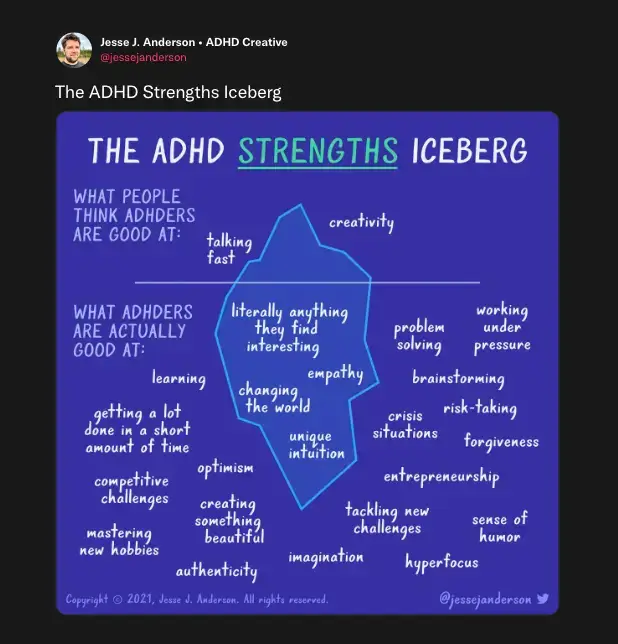
Many folks with ADHD have remarkable abilities, such as exceptional creativity and hyperfocus.(5) That’s why companies like SAP, HP, and Microsoft, among others, have transformed their HR practices to include neurodiverse people. The result? Increased productivity, improved efficiency, enhanced innovative skills, and higher employee engagement.
But that’s not all.
Creative Insights
Adults with ADHD have unique experiences that translate into valuable skills and perspectives. They prevent groupthink and diversify organizations' outlook. A 2017 study also found that people with ADHD were more creative in performance and scientific domains.(6)
For example, a neurodiverse analyst at SAP invented a system that lets customers solve common problems themselves. Today, thousands of customers use the resources he created!
Hyperfocus
Under the right conditions, people with ADHD are quick to get “in the zone” and hyperfocus on tasks.(7) This means that they can work deeply on tasks without breaking focus. That’s nothing short of a superpower in the increasingly superficial world.
Managers should support neurodiverse team members by providing them with the right tools (more on that below) and adjusting schedules to accommodate deep work.
Untapped Talent
Market experts report significant talent shortages in fast-developing fields like data analytics and IT, which are exactly the sectors that could benefit from the abilities of those with ADHD.
The case for hiring neurodiverse talent becomes even more compelling as labor shortages continue to grow. In January 2022, there were 11.3 million jobs to fill in the US alone.(8) With the growth of remote work, the untapped potential of ADHD professionals is now within reach.
🚧 Remote Work Challenges of ADHD Professionals
Of course, remote work comes with its own challenges, even more so when you have ADHD. While some of those obstacles can be easily fixed, others need external and support.
Overwhelming Distractions
Millions of adults with ADHD are still relatively new to working remotely. Many struggle to manage a workday that now includes additional distractions like child care, household chores, and in-home entertainment. After all, who can say no to Netflix, Wordle, and cats 🐱?
Lack of Structure
Workplaces can be stressful, but they offer community and structure. Having a designated workstation and a supervisor to keep you accountable helps those with ADHD stay on the course. Working from home means that you have to do a lot of this self-regulation yourself.
Remote Disconnect
People with ADHD may struggle with keeping track of typical organizational details like agendas and workflows. This can translate into miscommunication and underestimation of the time needed to complete tasks. All that has a knock-on effect on performance and job satisfaction.
🐑 Support Remote ADHD Workers With Taskade
As you can see, ADHD affects remote job performance in various ways. The good news is that with counseling, support, and the right tools, neurodiverse team members can get over obstacles and thrive in a fully remote workspace. And speaking of tools…
Taskade is an AI-powered productivity tool that takes the stress out of planning, communication, and collaboration. You can chat, take notes, manage tasks, and get work done without having to shuffle multiple tools.
🌱 Outline Everything
Do you find it hard to organize thoughts? How many times have you tried to take useful notes but couldn’t focus long enough? Outlining can make your life easier in surprising ways:
🔗 It helps visualize connections between ideas
🧶 It makes it easier to untangle complex ideas/problems
🌟 It simplifies planning and task management
And much more!
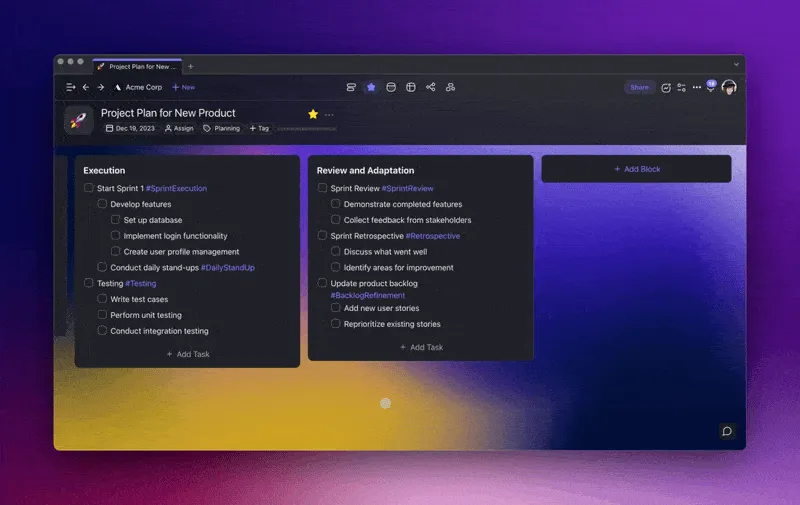
Outlining is a quick and super-simple way of taking detailed notes and tracking tasks using a visual hierarchy. To create an outline in Taskade, simply open a new Project, add a few key ideas, and indent ➡ (move to the right) a few details for each point by pressing the ⌨️ Tab key.
💡 Pro Tip: Did you know that you can quickly created spanning outlines with the power of Taskade AI? Jump over here to learn how!
👁️ Work Visually
Folks with ADHD are creative wizards 🧙♂️. With the right tools, there are no boundaries to their innovative potential. And Taskade has everything that's needed to harness that creativity.
Every Project you create in Taskade is like an Origami piece. It can be “folded” and “unfolded” in many different ways, so you can work the way you feel the most productive.
There are multiple Project views that let you instantly transform and reshape your ideas:
🟡 Lists View: Create and manage checklists and to-do lists
🟣 Boards View: Visualize tasks on Kanban-style boards and cards
🟢 Calendar View: View tasks with due dates on a calendar
🔵 Action View: Track action items in a table format
🟤 Mind Map View: Solve problems and brainstorm ideas visually
🟠 Org Chart View: Map out hierarchical structures
Watch this short video guide to learn how to use Project Views in Taskade. 👇
🐑 Harness Hyperfocus
If you have ADHD, you can still tap into your hyperfocus superpowers with the right strategy.
Research shows that techniques like Pomodoro and Flowtime are an effective way to manage ADHD symptoms. They can also and can help you concentrate and complete tasks.(9)
Taskade features countdown timers so you can set up custom timers for every Project. Simply open the Add-On menu and click the timer icon ⏲️ (or press T) to add a timer.
💡 Pro-tip: Try tuning in to productivity music or soothing nature sounds to boost focus. Read our article 🎵 Music Helps You Focus. And Science Proves It! to learn more.
💬 Communicate Without Stress
The pressure to stay in the loop 24/7 can be overwhelming and distracting for folks with ADHD. And having to switch between multiple communication and collaboration tools throughout the day adds insult to injury. Unfortunately, those practices are all too common in the remote world.
But effective communication is still essential in achieving team success. So, wouldn’t it be great if you could communicate the way you want, at your own pace, and when you really need it?
With Taskade, you can! 🥳
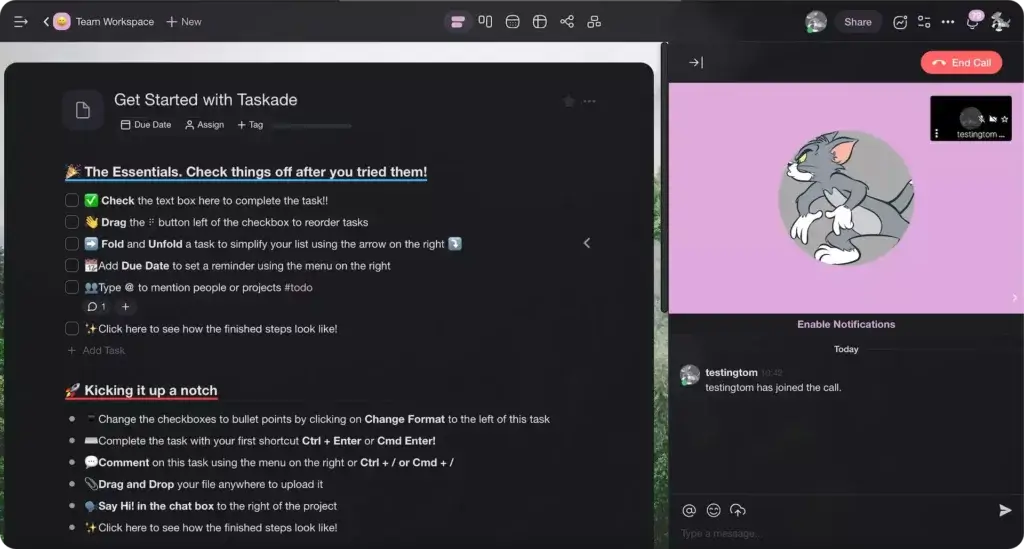
💬 Asynchronous communication: Add comments to tasks or use the chat built into Projects to ask questions, discuss project details, and give your team updates. Need some breathing room to think or get in the zone? Click the chat icon 💬 to hide the chat window.
🗣️ Calls and video conferencing: Real-time communication has its merits. And sometimes a quick video chat can help you get your bearings much quicker than an email thread. All you have to do is open a Project and click the phone icon 📞 to start a call.
💬 Notifications settings: Even if you’re not facing typical ADHD challenges, notifications can be distracting. Taskade lets you control what updates you receive on the Project, Workspace, and Folder level as well as across your app, web browser, or mobile.
👋 Parting Words
Workers with ADHD are often misunderstood and isolated because of misconceptions about the condition. That’s why it’s so important to create an inclusive work culture and provide the right tools to help neurodiverse professionals thrive in the global, remote workplace
To all our colleagues and remote work heroes with ADHD, Taskade sees you, and we celebrate your efforts! 🥳 We are continuously improving Taskade to give you the best tool for focused, stress-free, and sustainable productivity in a hybrid or fully remote work environment.
👌 Build an ADHD-Friendly Workspace with Taskade AI
The key to ADHD productivity is reducing friction — fewer tools to juggle, fewer decisions to make, fewer opportunities for context switching. Taskade consolidates tasks, notes, chat, video, and docs in one living workspace so you never have to leave your focus zone.
Clone These ADHD-Friendly Productivity Apps
| App | How It Helps | Link |
|---|---|---|
| Study/Work Timer + Music | Pomodoro timer with ambient sounds for ADHD focus sessions | Clone → |
| Breathe Circle | Quick calming breaks when overwhelmed between tasks | Clone → |
| Mood Tracker | Track energy and focus patterns to find your best work windows | Clone → |
| Minimalistic ToDo | Clean, distraction-free task list for one project at a time | Clone → |
| Time Tracker | See where your time actually goes — essential for ADHD self-awareness | Clone → |
Taskade AI Features for ADHD Professionals
🤖 Custom AI Agents: Automate inbox processing, task breakdowns, and daily briefings so your executive function can rest.
🪄 AI Generator: Turn vague project ideas into structured, bite-sized action plans — bypassing the "where do I start?" paralysis.
✏️ AI Assistant: Draft emails, refine writing, and organize notes inline — no more staring at a blank page.
🗂️ Prompt Templates: Pre-built workflows for daily planning, meeting agendas, and weekly reviews.
💬 AI Chat: Quick answers to unblock yourself without switching apps or losing your train of thought.
📄 Media Q&A: Summarize meeting recordings and long documents into key takeaways — skip the re-reading.
Create a free Taskade AI account and start today! 🤖
Frequently Asked Questions About ADHD Productivity Tools
What are the best productivity tools for ADHD remote workers?
The best ADHD productivity tools consolidate your workflow into a single workspace to minimize context switching — which is especially costly for ADHD brains. Look for tools with visual project views (board, mind map, list), built-in countdown timers for focus sessions, and AI Agents that can handle routine organization. The fewer apps you need to juggle, the less executive function demand on your brain.
How can managers support ADHD employees working remotely?
Managers can support ADHD remote workers by: (1) providing clear, written expectations with specific deadlines rather than vague instructions, (2) offering flexible scheduling that allows employees to work during their peak focus hours, (3) using async communication tools to reduce interruption pressure, (4) breaking projects into small deliverables rather than large milestones, and (5) providing access to AI-powered task management tools that reduce organizational overhead. The Flowtime Technique is particularly helpful for ADHD employees who need flexibility in their focus sessions.
Is the Pomodoro Technique good for ADHD?
The Pomodoro Technique can help ADHD workers by providing external time structure and forced breaks. However, the rigid 25-minute cutoff can be frustrating during hyperfocus episodes. Many ADHD professionals prefer the Flowtime Technique — which preserves the timer concept but lets you work for as long as natural focus lasts. Experiment with both to find what works for your brain.(9)
How does ADHD hyperfocus differ from deep work?
ADHD hyperfocus and deep work are related but distinct states. Deep work is a deliberate practice where you choose to focus without distraction on cognitively demanding tasks. Hyperfocus is often involuntary — your ADHD brain locks onto a stimulus regardless of whether it's the most important task. The productivity goal is to create conditions that channel hyperfocus toward high-value work: clear priorities (Eisenhower Matrix), a distraction-free environment, and structured task lists from your GTD system.
Can AI agents help with ADHD executive function challenges?
Yes. Executive function — planning, organizing, prioritizing, and initiating tasks — is the core challenge of ADHD. AI Agents can offload many of these demands: they can process your inbox and extract action items, break large projects into bite-sized Next Actions, set priority order using frameworks like the Eisenhower Matrix, and send daily briefings so you always know what to work on next. This reduces the number of decisions your executive function needs to make each day — freeing up cognitive resources for the actual work.