






TL;DR: ClickUp launched in 2017 when Zeb Evans and Alex Yurkowski, tired of juggling 15 tools at their marketing agency, set out to build "one app to replace them all." It packs tasks, docs, chat, whiteboards, and goals into one interface, reaching a $6B valuation and 20M users. To build your own project system, try Taskade Genesis.
Introduction
ClickUp emerged in 2017 with an audacious promise: replace every productivity app your team uses with a single platform. Founded by Zeb Evans and Alex Yurkowski after struggling to manage 15 different tools across their 25-person marketing agency, ClickUp reimagined project management as an all-in-one work operating system—combining tasks, docs, chat, whiteboards, goals, and time tracking in one interface. What began as an internal tool to solve their own productivity pain has become a $6 billion company serving 20 million users worldwide, including Netflix, Spotify, and thousands of fast-growing startups. With 15+ customizable views, native automations, and now AI-powered "Brain" capabilities, ClickUp represents a new category: the Converged AI Workspace where humans and autonomous agents collaborate seamlessly. This article explores the complete history of ClickUp, from its bootstrapped origins to becoming one of the fastest-growing SaaS companies in productivity software.
🚀 What Is ClickUp?
ClickUp is a comprehensive all-in-one project and work management platform designed to replace multiple productivity tools with a single, unified workspace. Unlike traditional project management software that focuses narrowly on tasks or timelines, ClickUp provides an integrated suite of work tools including task management, documentation, chat, whiteboards, goals, time tracking, dashboards, and AI assistance.
The platform's tagline—"One app to replace them all"—reflects its founding mission: eliminate tool sprawl by providing every work function teams need in one place. Whether you're managing software development sprints, marketing campaigns, sales pipelines, or creative projects, ClickUp adapts to your workflow rather than forcing you into a rigid structure.
Key achievements that define ClickUp:
- $6 billion estimated valuation (2026), up from $4 billion in 2021
- 20 million+ users worldwide across startups, enterprises, and everything between
- 100,000+ paying customers including Netflix, Spotify, Uber, and Google
- $500 million projected revenue in 2026, up from $278.5 million in 2024
- 15+ customizable views (Kanban, Gantt, Calendar, Timeline, Table, List, Map, etc.)
- 1,000+ integrations with Slack, GitHub, Figma, Salesforce, and more
- Converged AI Workspace combining work apps, data, workflows, and AI agents
- Zero to unicorn in 4 years (2017 founding → $4B valuation in 2021)
ClickUp's vision extends beyond project management to become the operating system for work itself—a single platform where teams plan, collaborate, execute, and measure everything they do. With AI capabilities through "ClickUp Brain," the platform is evolving from a tool humans use to a workspace where humans and autonomous agents work together.
📜 The History of ClickUp
🌱 The Tool Sprawl Problem (Pre-2017)

Zeb Evans, founder and CEO of ClickUp, built the company from a bootstrapped side project into a $4B+ project management platform.
Before ClickUp, Zeb Evans and Alex Yurkowski ran a social media marketing agency managing 25 employees. Like most modern teams, they cobbled together a fragmented tech stack:
Their productivity stack (circa 2016):
- Basecamp for project management
- Trello for kanban boards
- Google Docs for documentation
- Slack for communication
- Harvest for time tracking
- Asana for task management
- Evernote for note-taking
- GitHub for code management
- Invision for design feedback
- Zoom for video calls
- Email for external communication
- Spreadsheets for reporting
- Toggl for time tracking
- JIRA for dev tickets
- Monday.com for client projects
Total: 15+ different tools for a 25-person team.
The problems this created:
- Context switching: Constantly jumping between apps destroyed productivity
- Information silos: Critical information scattered across disconnected tools
- Duplicated work: Copying data between systems (Trello → Asana → Spreadsheet)
- Onboarding nightmare: New team members had to learn 15 different tools
- Integration hell: Zapier workflows to keep tools in sync broke constantly
- Cost explosion: $50/user/month × 15 tools × 25 people = $18,750/month
Evans and Yurkowski realized something fundamental: the productivity tools themselves had become a productivity problem. Each tool solved one narrow use case beautifully, but together they created cognitive overload and workflow chaos.
The insight: what if one platform could do everything these 15 tools did—but natively integrated, not glued together with APIs?
🎯 Founding and Building (2017-2019)
In 2017, Zeb Evans and Alex Yurkowski decided to build the productivity platform they wished existed. Initially, it was an internal tool for their agency—a way to eliminate the 15-app tech stack and consolidate work into one interface.
Founding principles:
- Everything view: Provide every way teams want to view work (list, board, timeline, calendar, etc.)
- Infinite customization: Let teams configure workflows exactly how they work, not prescriptive templates
- All work types: Support all work functions (tasks, docs, chat, goals, time) natively
- No integrations needed: Build deep functionality rather than shallow API integrations
- Radical transparency: Everything visible, nothing hidden in silos
Early development (2017-2018):
Evans and Yurkowski bootstrapped ClickUp with their own capital, hiring a small engineering team to build the initial product. The first version focused on the core hierarchy:
- Workspaces → top-level organization
- Spaces → departments or major projects
- Folders → sub-projects or categories
- Lists → specific work streams
- Tasks → individual work items
This nested hierarchy allowed infinite organizational flexibility—teams could structure work exactly how they thought about it.
Public launch (2018):
ClickUp launched publicly in 2018 with a freemium model:
- Free Forever plan: Unlimited tasks and users, 100MB storage
- Paid plans: Advanced features, unlimited storage, custom fields, automations
The response was immediate. Teams frustrated with tool sprawl—especially startups and SMBs tired of paying for 10+ SaaS subscriptions—flocked to ClickUp.
Early traction (2018-2019):
- 100,000+ users in first year
- 4.7/5 rating on G2 and Capterra
- Organic growth through word-of-mouth and comparison content
- Zero paid marketing—growth driven by product quality and "all-in-one" positioning
📈 Explosive Growth and Series A (2019-2020)
Series A (2019):
In 2019, ClickUp raised an undisclosed Series A from Craft Ventures and Georgian Partners. The funding enabled:
- Expanding the engineering team (10 → 50+ engineers)
- Building advanced features (Custom Fields, Automations, Dashboards)
- Launching ClickUp API for third-party integrations
- Creating ClickUp University for training and certification
Product expansion (2019-2020):
ClickUp shipped features at breakneck speed:
- 10+ views: List, Board, Calendar, Gantt, Timeline, Workload, Activity, Map, Table
- Custom Fields: Add any data type to tasks (dropdowns, labels, currency, formulas)
- Automations: Visual automation builder for trigger-based workflows
- Dashboards: Customizable widgets for reporting and analytics
- Goals: OKR and goal tracking with automatic progress updates
- Time Tracking: Native time tracking with billable hours and integrations
- Docs: Rich-text documentation with nested pages and real-time collaboration
- Whiteboards: Visual collaboration for brainstorming and planning
User growth (2019-2020):
- 1 million+ users by mid-2020
- 500+ integrations launched
- Enterprises like Uber, Google, and Nike adopting ClickUp
- Expansion into Europe, APAC, and Latin America
🦄 Series B and Unicorn Status (2020-2021)
Series B (September 2020):
ClickUp raised $100 million in Series B led by Georgian Partners at an undisclosed valuation (estimated $1-1.5 billion). The funding fueled:
- Enterprise features (SSO, advanced permissions, API rate limits)
- Mobile app development (iOS and Android)
- Security certifications (SOC 2 Type II, GDPR compliance)
- Global expansion (localization in 10+ languages)
Series C and Unicorn (October 2021):
Just 13 months after Series B, ClickUp raised a massive $400 million Series C led by Andreessen Horowitz and Tiger Global Management at a $4 billion valuation—officially achieving unicorn status.
This represented one of the fastest zero-to-unicorn trajectories in SaaS history:
- 2017: Founded with personal capital
- 2019: Series A (undisclosed)
- 2020: Series B at ~$1.5B valuation
- 2021: Series C at $4B valuation
Total funding: $537.5 million raised across four rounds.
Why the explosive valuation growth?
- Revenue growth: ClickUp hit $100M+ ARR by 2021, growing 200%+ year-over-year
- Product depth: 15+ views and 50+ features made ClickUp genuinely comprehensive
- Market timing: Remote work boom (COVID-19) accelerated demand for unified collaboration tools
- Enterprise adoption: Fortune 500 companies replacing Monday/Asana/JIRA with ClickUp
- Category creation: ClickUp wasn't "better project management"—it was a new category (work OS)
🧠 The AI Transformation (2022-2026)
ClickUp Brain (2023):
In 2023, ClickUp launched "ClickUp Brain"—an AI assistant embedded throughout the platform:
- AI writing: Generate task descriptions, meeting notes, and documentation
- AI summaries: Automatically summarize long threads and comment chains
- AI standup: Auto-generate team standups from tasks and activity
- AI automation suggestions: Recommend automations based on workflow patterns
- AI search: Natural language search across all workspaces
Converged AI Workspace (2024-2026):
ClickUp rebranded itself as the "world's first Converged AI Workspace"—a platform bringing together all work apps, data, workflows, and AI agents in one place:
Key AI features (2026):
- AI Agents: Custom AI assistants that execute workflows autonomously
- Knowledge Hub: AI-powered knowledge base that learns from your workspace
- Smart Assignments: AI automatically assigns tasks based on workload and expertise
- Predictive Analytics: AI forecasts project completion and identifies bottlenecks
- Natural language commands: Type "Show me overdue tasks for marketing team in Gantt view"
Current state (2026):
- $6 billion estimated valuation (up from $4B in 2021)
- $500 million projected revenue in 2026 (up from $278.5M in 2024)
- 20 million+ users across 200+ countries
- 100,000+ paying customers including Netflix, Spotify, Uber, Google
- 3 million teams using ClickUp daily
- 1,000+ integrations with every major work tool
- 24/7 customer support with 95%+ satisfaction rating
ClickUp has evolved from project management tool to work operating system—a single platform replacing 15+ tools and now augmented with AI capabilities to automate routine work.
🌟 What Makes ClickUp Different
1. Everything View Philosophy
ClickUp's defining feature is view flexibility. While competitors offer one or two ways to visualize work, ClickUp provides 15+ views:
Project views:
- List View: Traditional hierarchical task list
- Board View: Kanban-style columns for visual workflow
- Calendar View: Date-based scheduling and deadlines
- Gantt View: Timeline dependencies and critical path
- Timeline View: Horizontal timeline for roadmapping
Team views:
- Workload View: Team capacity and resource allocation
- Team View: See work grouped by assignee
- Activity View: Real-time feed of all changes
- Map View: Geographic visualization of tasks
Data views:
- Table View: Spreadsheet-like data manipulation
- Dashboard View: Custom widgets and reporting
- Form View: Intake forms that create tasks
- Embed View: Embed external tools (Figma, Miro, etc.)
- Doc View: Long-form documentation and wikis
- Chat View: Threaded team conversations
- Whiteboard View: Visual brainstorming and planning
The advantage: Every team member can view the same work in the format that makes sense for their role. Engineers see Kanban boards, managers see Gantt charts, executives see dashboards—all reflecting the same underlying data.
ClickUp product demo — 15+ customizable views, native docs, chat, and the all-in-one workspace in action.
2. Infinite Customization
ClickUp avoids the "opinionated software" trap. Instead of prescriptive templates, it provides:
- Custom Fields: Add any data type (dropdown, label, currency, formula, relationship)
- Custom Statuses: Define workflow stages exactly as your team thinks about them
- Custom Automations: Visual automation builder for any trigger → action sequence
- Custom Dashboards: Build reporting exactly how you want to track progress
- Custom Permissions: Granular control over who sees/edits what
Example: A software company could track:
- Bug Priority: Custom field with dropdown (P0, P1, P2, P3)
- Sprint Points: Custom field with number input
- Linked PR: Custom field linking to GitHub pull request
- Customer Impact: Custom field calculating affected users
- Bug Type: Custom field categorizing (UI, API, Database, etc.)
All these custom fields can be filtered, sorted, grouped, and visualized in any view.
3. Native Integration vs API Glue
While competitors rely on Zapier/API integrations to connect tools, ClickUp builds native functionality for core work needs:
Native features (no integrations required):
- Docs: Full-fledged documentation with nested pages, real-time collaboration
- Chat: Threaded team messaging with @mentions and reactions
- Whiteboards: Infinite canvas for visual collaboration
- Goals: OKR tracking with automatic progress from tasks
- Time Tracking: Manual or automatic time logging with timesheets
- Forms: Custom intake forms that generate tasks
- Email: Send and receive emails directly in ClickUp
- Recording: Screen and video recording with transcripts
The advantage: No context switching. Everything happens in one platform with consistent UX and shared data model.
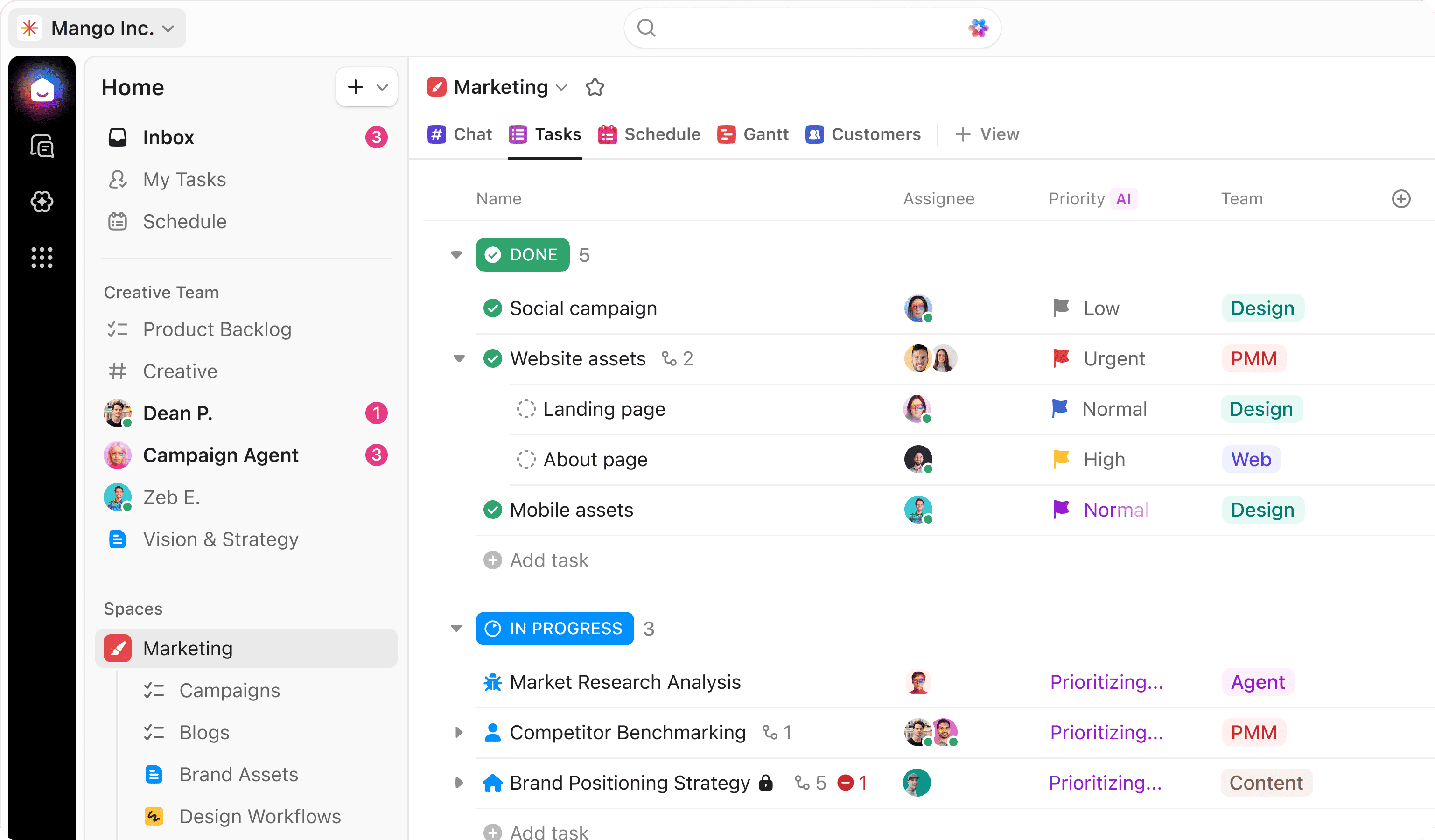
The ClickUp workspace — tasks, docs, chat, and 15+ customizable views all in one unified platform.
4. Converged AI Workspace
As of 2026, ClickUp positions itself as a "Converged AI Workspace"—not just a tool humans use, but a platform where humans and AI agents work together:
ClickUp Brain capabilities:
- AI knowledge search: Ask questions, get answers from across your entire workspace
- AI writing assistant: Generate documentation, task descriptions, meeting notes
- AI project manager: Suggest task assignments, predict delays, recommend priorities
- AI automation creator: Analyze workflows and suggest automations
- AI standup generator: Auto-create team standups from activity
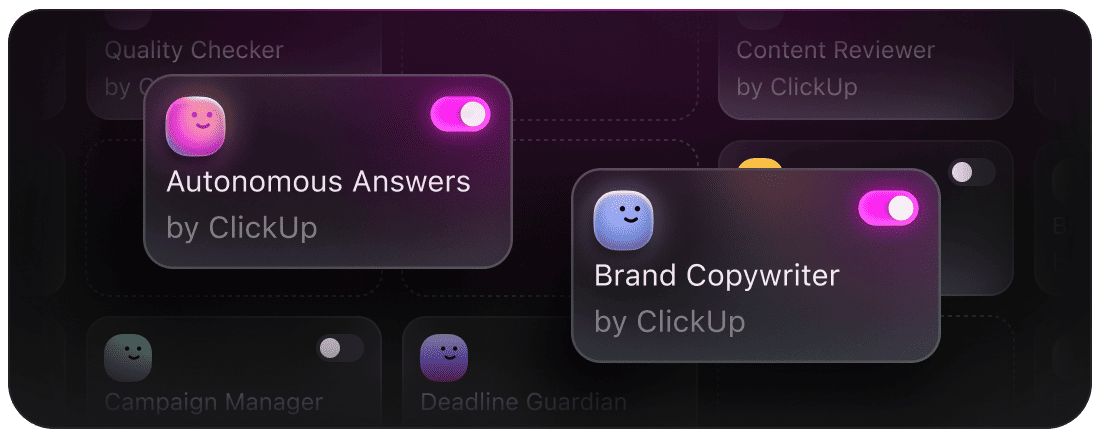
ClickUp Brain AI Agents — autonomous AI assistants for copywriting, quality checking, campaign management, and more.
Agent architecture:
- Create custom AI agents trained on your workspace data
- Agents can read tasks, update statuses, create subtasks, assign work
- Human-in-the-loop for high-stakes decisions
- Full audit trail of agent actions
💡 Potential Benefits of ClickUp
For Startups and SMBs
✅ Cost savings: Replace 10-15 tools with one platform ($200-500/month → $7-12/user/month)
✅ Fast onboarding: New hires learn one tool instead of 15
✅ Scalability: Starts simple, grows complex as team matures
✅ Flexibility: Adapts to changing workflows without switching tools
✅ Free tier: Generous free plan for bootstrapped teams
For Enterprises
✅ Consolidation: Eliminate tool sprawl across departments
✅ Governance: Centralized permissions, compliance, and auditing
✅ Integration: 1,000+ integrations for unavoidable external tools
✅ Security: SOC 2 Type II, GDPR, HIPAA compliance
✅ Support: 24/7 dedicated support and CSM for Enterprise tier
For Remote Teams
✅ Async collaboration: Comments, docs, and updates don't require synchronous meetings
✅ Visibility: Everything documented and searchable, no "hallway conversations"
✅ Time zones: Work happens 24/7 without handoff friction
✅ Mobile apps: Full-featured iOS/Android apps for on-the-go work
✅ Recording: Built-in screen recording for async explanations
📊 ClickUp Pricing (2026)
Free Forever:
- Unlimited tasks and members
- 100MB storage
- Collaborative Docs
- Kanban boards, Calendar, and List views
- 2-factor authentication
- Real-time chat
Unlimited ($7/user/month, billed annually):
- Everything in Free
- Unlimited storage
- Unlimited integrations
- Unlimited Dashboards
- Gantt and Timeline views
- Custom Fields
- Column calculations
- Email in ClickUp
Business ($12/user/month, billed annually):
- Everything in Unlimited
- Google SSO
- Unlimited teams
- Custom exporting
- Advanced automations
- Advanced Dashboards
- Workload management
- Timesheets
- Goal folders
Enterprise (Custom Pricing):
- Everything in Business
- White labeling
- Enterprise API
- Dedicated Success Manager
- Advanced permissions
- Custom capacity
- Live onboarding training
- MSA and SLAs
ClickUp Brain Add-On: $5/user/month (available for all paid plans)
Total cost example:
- 50-person team on Business: 50 × $12 = $600/month ($7,200/year)
- Replaces: Monday ($500/mo), Slack ($400/mo), Asana ($300/mo), Notion ($200/mo), etc.
- Savings: $10,800/year saved vs 4-tool stack
⚔️ ClickUp vs Competitors
Quick Comparison
| Feature | ClickUp | Monday.com | Asana | Notion | Taskade Genesis |
|---|---|---|---|---|---|
| Views | 15+ views | Multiple views | 4 views | 8+ views | Infinite (custom apps) |
| Native Docs | ✅ Full wiki | Limited | ❌ | ✅ Full wiki | ✅ Projects as memory |
| Native Chat | ✅ Threaded | ✅ Basic | ❌ | ❌ | ✅ AI-powered |
| Native Whiteboards | ✅ Infinite canvas | ✅ Basic | ❌ | ❌ | ✅ AI-assisted |
| AI Capabilities | ClickUp Brain | Monday AI | Asana AI | Notion AI | Workspace DNA |
| Pricing | $7-12/user/mo | $9-19/user/mo | $11-25/user/mo | $8-15/user/mo | $8-16/user/mo |
| Automations | ✅ Visual builder | ✅ Visual builder | ✅ Rules | ✅ Basic | ✅ Intelligent + 100+ integrations |
| Best For | All-in-one replacement | Visual workflows | Task-focused teams | Knowledge management | Living software with agents |
When to Choose Each
Choose ClickUp if:
- You want to replace 10+ tools with one platform
- You need extreme customization and view flexibility
- You have diverse teams (marketing, dev, ops, sales) needing different views
- You want native docs, chat, whiteboards, time tracking in one place
- You're cost-conscious (ClickUp is typically cheaper than competitors)
Choose Monday.com if:
- You prioritize visual aesthetics and colorful workflows
- You want simpler, more opinionated workflows
- You need extensive automations with complex conditions
- You prefer pre-built industry templates
Choose Asana if:
- You want a simpler, more focused task management experience
- You don't need docs, chat, or whiteboards (you'll use other tools)
- You prefer Asana's clean, minimalist design
- You're already invested in the Asana ecosystem
Choose Taskade Genesis if:
- You want intelligent apps powered by Workspace DNA (Memory + Intelligence + Execution)
- You need AI agents trained on your workspace data
- You want to build custom apps with one prompt (vibe coding)
- You want living software that thinks, learns, and acts autonomously
🔮 The Future of ClickUp
Under Zeb Evans' leadership, ClickUp is pursuing several strategic directions:
1. AI Agents and Autonomous Work
ClickUp is evolving from a tool humans use to a platform where AI agents execute work autonomously:
- Project manager agents: Monitor projects, identify risks, suggest reallocations
- Developer agents: Create tickets from bugs, assign based on expertise
- Marketing agents: Schedule social posts, track campaign performance
- Sales agents: Update CRM, follow up on leads, forecast revenue
Goal: Reduce manual administrative work by 80% through AI automation.
2. Consolidation as a Service
ClickUp is positioning itself as the "de-tooling" platform for enterprises:
- Replace 15-tool tech stacks with ClickUp + targeted integrations
- Audit tool usage and identify consolidation opportunities
- Migration services from legacy project management tools
- ROI calculators showing cost savings from tool consolidation
3. Vertical Expansion
ClickUp is building industry-specific versions:
- ClickUp for Construction: Jobsite management, RFIs, punch lists
- ClickUp for Healthcare: HIPAA compliance, patient workflows
- ClickUp for Legal: Case management, client intake, billable hours
- ClickUp for Education: Curriculum planning, student tracking
4. App Ecosystem
ClickUp is creating a marketplace for third-party apps built on ClickUp's platform:
- Developers build custom apps using ClickUp API
- Apps appear as native views and features in ClickUp
- Revenue sharing for popular apps
- Enables hyper-specialization while maintaining unified platform
Potential challenges:
- Complexity: Feature bloat could overwhelm new users (already 50+ features)
- Competition: Notion, Monday.com, Asana all adding AI and expanding features
- Performance: Comprehensive features can lead to slower load times
- Change fatigue: Rapid feature releases require constant re-training
- Market saturation: Project management is crowded; differentiation gets harder
Despite challenges, ClickUp's all-in-one vision and early mover advantage in AI-augmented work management position it well for continued growth.
🐑 Before you go... Looking for a work management platform that goes beyond consolidation? Taskade Genesis combines the best of ClickUp's all-in-one approach with intelligent agents that build custom apps for you.
- 💬 AI Chat: Ask questions and get instant answers about your projects, tasks, and team activity—all powered by your Workspace DNA.
- 🤖 AI Agents: Unlike ClickUp's project management focus, Taskade AI Agents can build entire custom apps from a single prompt—no configuration needed. Just describe your workflow and watch it come to life through vibe coding.
- ✏️ AI Assistant: Generate project plans, meeting notes, and task breakdowns with AI-powered templates tailored to your team's work patterns.
- 🔄 Workflow Generator: Build intelligent automations that connect your apps, tools, and data—powered by your workspace memory and 100+ integrations.
Sign up today and experience the future of work operating systems—where living software adapts to your team, not the other way around.
🔗 Resources
- ClickUp Official Website
- ClickUp University - Training & Certification
- ClickUp Help Center
- ClickUp Blog & Templates
- ClickUp API Documentation
- ClickUp Community & Forum
- Zeb Evans - Founder & CEO
- ClickUp Integrations Marketplace
Related Reading
- 14 Best AI Collaboration Tools for Remote Teams (2026)
- 8 Best AI Tools For Team Productivity in 2026 (Updated)
- ADHD Productivity Tools for Remote Workers: The Complete Guide (2026)
💬 Frequently Asked Questions About ClickUp
What is ClickUp and what does it do?
ClickUp is an all-in-one project management and work management platform that combines task management, documentation, chat, whiteboards, time tracking, goals, and dashboards in one unified workspace. The platform aims to replace 10-15 productivity tools with a single, comprehensive solution featuring 15+ customizable views (Kanban, Gantt, Calendar, Timeline, etc.). For teams looking beyond traditional project management, Taskade Genesis offers intelligent apps that adapt to your workflow through Workspace DNA.
Who founded ClickUp and when?
ClickUp was founded in 2017 by Zeb Evans (CEO) and Alex Yurkowski. Evans and Yurkowski initially created ClickUp as an internal tool for their social media marketing agency, which was using 15 different productivity tools across a 25-person team. The platform launched publicly in 2018. Like many successful SaaS founders, Evans iterated on solving his own team's pain points—similar to how Y Combinator advises startups to "make something people want."
How much is ClickUp worth?
ClickUp reached a $4 billion valuation in October 2021 following a $400 million Series C funding round led by Andreessen Horowitz and Tiger Global Management. Current market analysis estimates ClickUp's valuation at approximately $6 billion in 2026, making it one of the fastest-growing SaaS unicorns in productivity software. This rapid growth mirrors the trajectory of other AI-powered platforms that combine traditional software with intelligent automation.
How much does ClickUp cost?
ClickUp offers four pricing tiers: Free Forever (unlimited tasks and members, 100MB storage), Unlimited ($7/user/month), Business ($12/user/month), and Enterprise (custom pricing). ClickUp Brain (AI features) is available as a $5/user/month add-on for all paid plans. Most teams choose the Unlimited or Business tier. For comparison, Taskade offers similar pricing with AI features included by default, not as add-ons.
How many people use ClickUp?
As of 2026, ClickUp has over 20 million users worldwide and serves 100,000+ paying customers, including major companies like Netflix, Spotify, Uber, and Google. Approximately 3 million teams use ClickUp daily across 200+ countries. The platform has grown 200%+ year-over-year since launch, demonstrating strong product-market fit in the productivity software category.
Is ClickUp better than Monday.com or Asana?
It depends on your needs. ClickUp excels in all-in-one functionality with 15+ views, native docs, chat, whiteboards, and extreme customization—ideal for teams wanting to replace multiple tools. Monday.com is better for visually-oriented workflows with simpler setup. Asana is better for teams wanting focused task management without extra features. ClickUp is typically cheaper and more feature-rich but has a steeper learning curve. For teams seeking intelligent automation beyond traditional project management, Taskade's AI Agents can build custom apps that replace entire tool categories.
What is ClickUp Brain?
ClickUp Brain is an AI assistant embedded throughout the ClickUp platform, available as a $5/user/month add-on. Brain provides AI writing (generate task descriptions and documentation), AI search (natural language queries across your workspace), AI summaries (condense long threads), AI standups (auto-generate team updates), and AI automation suggestions based on workflow patterns. This represents ClickUp's evolution toward agentic AI capabilities, similar to how other platforms are integrating AI agents into core workflows.
Can ClickUp replace all my productivity tools?
For many teams, yes. ClickUp natively includes task management, documentation, team chat, whiteboards, time tracking, goals, forms, email integration, and dashboards—replacing tools like Asana, Notion, Slack, Miro, Toggl, Google Docs, and more. However, specialized tools (design in Figma, code in GitHub) still require integrations. ClickUp offers 1,000+ integrations for tools you can't replace, similar to how Taskade connects with popular work tools through intelligent automations.
Is ClickUp good for small teams or just enterprises?
ClickUp works for teams of all sizes. The Free Forever plan supports unlimited users, making it accessible for solo users and small teams. Startups and SMBs (10-100 people) make up a significant portion of ClickUp's customer base. Enterprise customers (1,000+ employees) use ClickUp for advanced permissions, SSO, and dedicated support. The platform scales from 1 user to 10,000+. Taskade similarly serves teams from individual creators to large organizations with flexible pricing.
What are ClickUp's main features?
ClickUp's main features include: 15+ customizable views (List, Board, Calendar, Gantt, Timeline, etc.), task management with custom fields and statuses, Docs for documentation, Chat for team messaging, Whiteboards for visual collaboration, Goals for OKR tracking, Time Tracking, Automations, Dashboards with custom widgets, Forms for intake, Email integration, Mobile apps (iOS/Android), and ClickUp Brain (AI assistant). These features represent the traditional approach to work management—assembling pre-built features into a comprehensive platform.
How does ClickUp make money?
ClickUp generates revenue through subscription pricing: Unlimited plan ($7/user/month), Business plan ($12/user/month), and Enterprise plan (custom pricing). With 100,000+ paying customers and an estimated average of 20 users per account at $10/user/month, ClickUp generates approximately $500 million in annual recurring revenue as of 2026. The ClickUp Brain AI add-on ($5/user/month) provides additional revenue. This SaaS business model mirrors successful productivity companies like Notion and emerging AI platforms.
What is a "Converged AI Workspace"?
ClickUp rebranded itself as the "world's first Converged AI Workspace"—a platform bringing together all work apps, data, workflows, and AI agents in one place. Unlike traditional tools where humans do all the work, a Converged AI Workspace enables AI agents to execute tasks autonomously (e.g., AI automatically assigns tasks, updates statuses, creates subtasks) while humans focus on strategic decisions. This vision aligns with Taskade's Workspace DNA approach—combining Memory, Intelligence, and Motion into living software.
Can I migrate from Asana/Monday/Trello to ClickUp?
Yes. ClickUp provides native importers for Asana, Monday.com, Trello, JIRA, Wrike, and other major project management tools. The import process preserves tasks, subtasks, assignees, due dates, comments, and attachments. ClickUp also offers free migration assistance for Enterprise customers through dedicated onboarding specialists. When evaluating project management migrations, consider whether you need traditional task tracking or intelligent apps that adapt to your workflow.
Is ClickUp secure for enterprise use?
Yes. ClickUp is SOC 2 Type II certified, GDPR compliant, and offers HIPAA compliance for healthcare organizations. Enterprise features include SSO/SAML integration, advanced permissions, 2-factor authentication, audit logs, data encryption at rest and in transit, custom data retention policies, and MSA/SLA agreements for large organizations. Enterprise teams should evaluate security alongside intelligent capabilities when choosing work management platforms.
🧬 Build Your Own Project Management System
While ClickUp excels at consolidating 15+ tools into one all-in-one platform, Taskade Genesis takes a fundamentally different approach: instead of assembling pre-built features, build custom intelligent apps from a single prompt.
Why teams are moving beyond traditional project management:
- Vibe Coding: Describe your ideal workflow in plain language and watch Taskade build the app instantly—no configuration, custom fields, or view setup required.
- Workspace DNA: Your projects become living memory. AI Agents learn from your work patterns, team communication, and project history to make intelligent decisions.
- Living Software: Unlike static tools that require manual updates, Taskade apps evolve with your team—adapting workflows, automating routine tasks, and suggesting optimizations based on actual usage.
- AI Agents: Train autonomous agents on your workspace data to handle research, content creation, project planning, and workflow orchestration—going far beyond ClickUp Brain's suggestions to actual execution.
Explore Taskade's intelligent work platform:
- Browse the Community Gallery to see custom apps built by teams worldwide
- Start with proven Templates and customize them with AI
- Connect your tools through 100+ Integrations with intelligent automation
- Read about Taskade vs Traditional Tools to understand the paradigm shift
