Taskadetaskade
PricingLoginSign up for free →Sign up for free →
Loved by 1M+ users·Hosting 100K+ apps·Deploying 500K+ AI agents·Running 1M+ automations·Backed by Y Combinator
TaskadeAboutPressPricingFeaturesIntegrationsChangelogContact us
GalleryProductivityKitsVideosReviewsLearnHelpDocsFAQ
VibeVibe AppsVibe AgentsVibe CodingVibe Workflows
Vibe MarketingVibe DashboardsVibe CRMVibe AutomationVibe PaymentsVibe DesignVibe SEOVibe Tracking
Community
FeaturedQuick AppsTools
DashboardsWebsitesWorkflowsProjectsFormsCreators
DownloadsAndroidiOSMac
WindowsChromeFirefoxEdge
Compare
vs Cursorvs Boltvs Lovable
vs V0vs Windsurfvs Replitvs Emergentvs Devinvs Claude Codevs ChatGPTvs Claudevs Perplexityvs GitHub Copilotvs Figma AIvs Notionvs ClickUpvs Asanavs Mondayvs Trellovs Jiravs Linearvs Todoistvs Evernotevs Obsidianvs Airtablevs Basecampvs Mirovs Slackvs Bubblevs Retoolvs Webflowvs Framervs Softrvs Glidevs FlutterFlowvs Base44vs Adalovs Durablevs Gammavs Squarespacevs WordPressvs UI Bakeryvs Zapiervs Makevs n8nvs Jaspervs Copy.aivs Writervs Rytrvs Manusvs Crewvs Lindyvs Relevance AIvs Wrikevs Smartsheetvs Monday Magicvs Codavs TickTickvs Any.dovs Thingsvs OmniFocusvs MeisterTaskvs Teamworkvs Workfrontvs Bitrix24vs Process Streetvs Toggl Planvs Motionvs Momentumvs Habiticavs Zenkitvs Google Docsvs Google Keepvs Google Tasksvs Microsoft Teamsvs Dropbox Papervs Quipvs Roam Researchvs Logseqvs Memvs WorkFlowyvs Dynalistvs XMindvs Whimsicalvs Zoomvs Remember The Milkvs Wunderlist
Genesis AIVideo GuideApp BuilderVibe Coding
Agent BuilderDashboard BuilderCRM BuilderWebsite BuilderForm BuilderWorkflow AutomationWorkflow BuilderBusiness-in-a-BoxAI for MarketingAI for Developers
AI Agents
FeaturedProject ManagementProductivity
MarketingTranslatorContentWorkflowResearchPersonalSalesSocial MediaTo-Do ListCRMTask AutomationCoachingCreativityTask ManagementBrandingFinanceLearning and DevelopmentBusinessCommunity ManagementMeetingsAnalyticsDigital AdvertisingContent CurationKnowledge ManagementProduct DevelopmentPublic RelationsProgrammingHuman ResourcesE-CommerceEducationLegalEmailSEODeveloperVideo ProductionDesignFlowchartDataPromptNonprofitAssistantsTeamsCustomer ServiceTrainingTravel PlanningUML DiagramER DiagramMath TutorLanguage LearningCode ReviewerLogo DesignerUI WireframeFitness CoachAll Categories
Automations
FeaturedBusiness-in-a-BoxInvestor Operations
Education & LearningHealthcare & ClinicsStripeSalesContentMarketingEmailCustomer SupportHubSpotProject ManagementAgentic WorkflowsBooking & SchedulingCalendarReportsSlackWebsiteFormTaskWeb ScrapingWeb SearchChatGPTText to ActionYoutubeLinkedInTwitterGitHubDiscordMicrosoft TeamsWebflowRSS & Content FeedsGoogle WorkspaceManufacturing & OperationsAI Agent TeamsMulti-Agent AutomationAgentic AutomationAll Categories
Wiki
GenesisAI AgentsAutomation
ProjectsLiving DNAPlatformIntegrationsProductivityMethodsProject ManagementAgileScrumAI ConceptsCommunityTerminologyFeatures
Templates
FeaturedChatGPTTable
PersonalProject ManagementSalesFlowchartTask ManagementEngineeringEducationDesignTo-Do ListMarketingMind MapGantt ChartOrganizationalPlanningMeetingsTeam ManagementStrategyGamingProductionProduct ManagementStartupRemote WorkY CombinatorRoadmapCustomer ServiceLegalEmailBudgetsContentConsultingE-CommerceStandard Operating Procedure (SOP)Human ResourcesProgrammingMaintenanceCoachingSocial MediaHow-TosResearchMusicTrip PlanningCRMBooking SystemAll Categories
Generators
AI SoftwareNo-Code AI AppAI App
AI WebsiteAI DashboardAI FormAI AgentClient PortalAI WorkspaceAI ProductivityAI To-Do ListAI WorkflowsAI EducationAI Mind MapsAI FlowchartAI Scrum Project ManagementAI Agile Project ManagementAI MarketingAI Project ManagementAI Social Media ManagementAI BloggingAI Agency WorkflowsAI ContentAI Software DevelopmentAI MeetingAI PersonasAI OutlineAI SalesAI ProgrammingAI DesignAI FreelancingAI ResumeAI Human ResourceAI SOPAI E-CommerceAI EmailAI Public RelationsAI InfluencersAI Content CreatorsAI Customer ServiceAI BusinessAI PromptsAI Tool BuilderAI SEOAI Gantt ChartAI CalendarsAI BoardAI TableAI ResearchAI LegalAI ProposalAI Video ProductionAI Health and WellnessAI WritingAI PublishingAI NonprofitAI DataAI Event PlanningAI Game DevelopmentAI Project Management AgentAI Productivity AgentAI Marketing AgentAI Personal AgentAI Business and Work AgentAI Education and Learning AgentAI Task Management AgentAI Customer Relations AgentAI Programming AgentAI SchemaAI Business PlanAI Pitch DeckAI InvoiceAI Lesson PlanAI Social Media CalendarAI API DocumentationAI Database SchemaAll Categories
Converters
AI Featured ConvertersAI PDF ConvertersAI CSV Converters
AI Markdown ConvertersAI Prompt to App ConvertersAI Data to Dashboard ConvertersAI Workflow to App ConvertersAI Idea to App ConvertersAI Flowcharts ConvertersAI Mind Map ConvertersAI Text ConvertersAI Youtube ConvertersAI Knowledge ConvertersAI Spreadsheet ConvertersAI Email ConvertersAI Web Page ConvertersAI Video ConvertersAI Coding ConvertersAI Task ConvertersAI Kanban Board ConvertersAI Notes ConvertersAI Education ConvertersAI Language TranslatorsAI Business → Backend App ConvertersAI File → App ConvertersAI SOP → Workflow App ConvertersAI Portal → App ConvertersAI Form → App ConvertersAI Schedule → Booking App ConvertersAI Metrics → Dashboard ConvertersAI Game → Playable App ConvertersAI Catalog → Directory App ConvertersAI Creative → Studio App ConvertersAI Agent → Agent App ConvertersAI Audio ConvertersAI DOCX ConvertersAI EPUB ConvertersAI Image ConvertersAI Resume & Career ConvertersAI Presentation ConvertersAI PDF to Spreadsheet ConvertersAI PDF to Database ConvertersAI PDF to Quiz ConvertersAI Image to Notes ConvertersAI Audio to Notes ConvertersAI Email to Tasks ConvertersAI CSV to Dashboard ConvertersAI YouTube to Flashcards ConvertersURL to NotesAll Categories
Prompts
Blog WritingBrandingPersonal Finance
Human ResourcesPublic RelationsTeam CollaborationProduct ManagementSupportAgencyReal EstateMarketingCodingResearchSalesAdvertisingSocial MediaCopywritingContentProject ManagementWebsite CreationDesignStrategyE-commerceEngineeringSEOEducationEmail MarketingUX/UIProductivityInfluencer MarketingAnalyticsEntrepreneurshipLegalVibe Coding PromptAll Categories
Blog
What Doraemon Taught Me About Building AI Agents (2026)The Customer Who Wrote Our Documentation (2026)One Week, Forty People: The First Enterprise Self-Close on Taskade Genesis (2026)
The Frontend Playground Era: Why Lovable, v0, Bolt, and Cursor Are Not the Workspace (2026)Training AI Agents Like Employees: The Reinforcement Loop Most Operators Miss (2026)Fifty Years of Computing Primitives: File to Task (2026)Memory Reanimation Protocol: Why AI Agents Forget and How to Fix It (2026)From Roles to Workflows: How AI-First Companies Redraw the Org Chart (2026)From VisiCalc to Spreadsheet-of-Thought: 47 Years of Giving Non-Engineers Power (2026)History of cPanel & WHM: From a Teenager's Bedroom to the AI Infrastructure Era (2026)The 27-Year Accident: Widrow, Hoff, and the Sigmoid That Wasn't (2026)Bring Your Own Agent (BYOA): The $1M-Per-Employee Era Just Started (2026)Doug Engelbart's 1968 Demo Was Taskade — We Just Finished It (2026)The Genesis Equation: P × A mod Ω (2026)The Execution Layer: Why the Chatbot Era Is Already Over (2026)How to Win With AI in 2026: The Workflow-First Operator's PlaybookSoftware That Runs Itself: The Taskade Genesis Thesis (2026)The Origin of Taskade Genesis: Why We Built the Execution Layer for Ideas (2026)The Micro App Economy: 150,000 Apps In, What the Category Looks Like Now (2026)
AIAutomationProductivityProject ManagementRemote WorkStartupsKnowledge ManagementCollaborative WorkUpdates
Changelog
Play-to-Learn Onboarding & Announcements (Apr 20, 2026)Smarter Model Lineup & Memory Graph (Apr 17, 2026)Export URL Action & Shareable App Kits (Apr 15, 2026)
Guided Onboarding for Cloned Apps (Apr 14, 2026)Markdown Export, MCP Auth & Ask Questions (Apr 14, 2026)GitHub Export to Existing Repo & Run Details (Apr 13, 2026)MCP Server Hotfix & Credit Adjustments (Apr 10, 2026)
Wiki
GenesisAI AgentsAutomation
ProjectsLiving DNAPlatformIntegrationsProductivityMethodsProject ManagementAgileScrumAI ConceptsCommunityTerminologyFeatures
© 2026 Taskade.
PrivacyTermsSecurity
Made withTaskade AIforBuilders
Blog›AI›From Distraction to Action:…

From Distraction to Action: AI-Powered ADHD Productivity Tools and Strategies (2026)

Not so long ago, managing ADHD was mostly about medications and therapy. But thanks to the latest AI tech, we're turning a new page. AI productivity apps can be...

April 6, 2024·Updated February 9, 2026·11 min read·Dawid Bednarski·AI·#adhd#productivity-tips#task-management
On this page (12)
The Challenges of ADHD in Productivity🤖 Understanding AI and Its Role in ADHD Management🧠🦾 AI-Powered Tools Inside Taskade Enhancing ProductivityAI AssistantCustom AI AgentsAI Project StudioAutomations🚀 The Future of AI and ADHD Management👋 Parting Words🔗 Resources💬 Frequently Asked Questions About AI for ADHD🧬 ADHD-Friendly Tools Built with Genesis

Not so long ago, managing ADHD was mostly about medications and therapy. But thanks to the latest AI tech, we're turning a new page. AI productivity apps can be a powerful ally for the ADHD brain, and we'll show you how to use them.


If you're part of the neurodiverse clan, you know the frustrations of missed deadlines, constant distractions, and car keys that sprout legs (metaphorically).

There are many ways to overcome those challenges. But offloading the grunt work to AI is one of the most effective strategies we've come to love.

Here's everything you need to know to get started. 👇

💡 Related ADHD and productivity guides:

  1. 🤖 7 Ways AI Can Help You Manage Your ADHD

  2. 🛠️ ADHD Productivity Tools for Remote Workers

  3. ⏱️ The Flowtime Technique: A Flexible Focus Method

  4. 🧠 Deep Work: How to Focus at Home

  5. 📊 The Eisenhower Matrix: How to Prioritize Tasks

The Challenges of ADHD in Productivity

Let’s start with the question of the day: “What is ADHD?”

Think of ADHD (attention deficit hyperactivity disorder) as a unique brain wiring. It's a state in which your mind constantly seeks new stimuli.

Imagine you're really into a book, totally hooked. The next thing you know, you're scrolling through your phone, with no clue how you got there.

Your brain's just hunting for the next buzz.

This may not seem like a big deal.

After all, the little distractions happen to everyone from time to time. But for someone with ADHD, the effort to focus is much greater.

Here are a few "features" (not bugs) that come with the ADHD brain:

  • ⏰ Difficulty in managing time and meeting deadlines.

  • 🔀 Struggles with organizing and prioritizing work.

  • 🔥 Task switching and starting new tasks before finishing old ones.

  • 🤷‍♀️ Misplacing things and forgetting about commitments.

  • 👀 Overlooking or hyperfocusing on details (yes, you can do both!).

The good news is an ADHD diagnosis is not the end of the world.

There are ADHD coaches and therapists who specialize in working with the neurodiverse community. You can join support groups and online forums to share your experience. Or you can turn to technology to help you out.

🤖 Understanding AI and Its Role in ADHD Management

When we talk about AI, we can mean (at least) a couple of things.

There's the Hollywood type, ready to doom the world. And there's the real deal — sophisticated large language models (LLMs) like GPT-4o, Claude, and Gemini.

An LLM is a type of artificial intelligence system that can process and generate human-like content based on extensive datasets used in its training.

The purpose?

Anything from generating documents, answering questions, and assisting with language translation, to summarizing information. LLM can also simulate human-like conversations, but we’ll get to that in a moment.

So, how does this help with ADHD?

AI can help you break down your to-dos into manageable chunks and shoot you reminders when deadlines creep up. Or it can conjure up tips and strategies for dealing with the daily overload.

Let’s say you’re working on a research paper.

One of the most daunting aspects is the planning stage — outlining key sections, brainstorming arguments, and organizing thoughts.

These tasks require a lot of sustained focus, which means there are plenty of opportunities to fall down the rabbit hole of distractions.

AI can provide you with a “scaffolding for thoughts.” It may outline key sections, generate ideas, and suggest real-world examples, just to name a few.

But that’s just the beginning.

🧠🦾 AI-Powered Tools Inside Taskade Enhancing Productivity

Are you new to Taskade? Here’s a tl;dr.

Taskade is your go-to platform for keeping all your big and small projects in perfect harmony, with a dash of AI magic sprinkled on top.
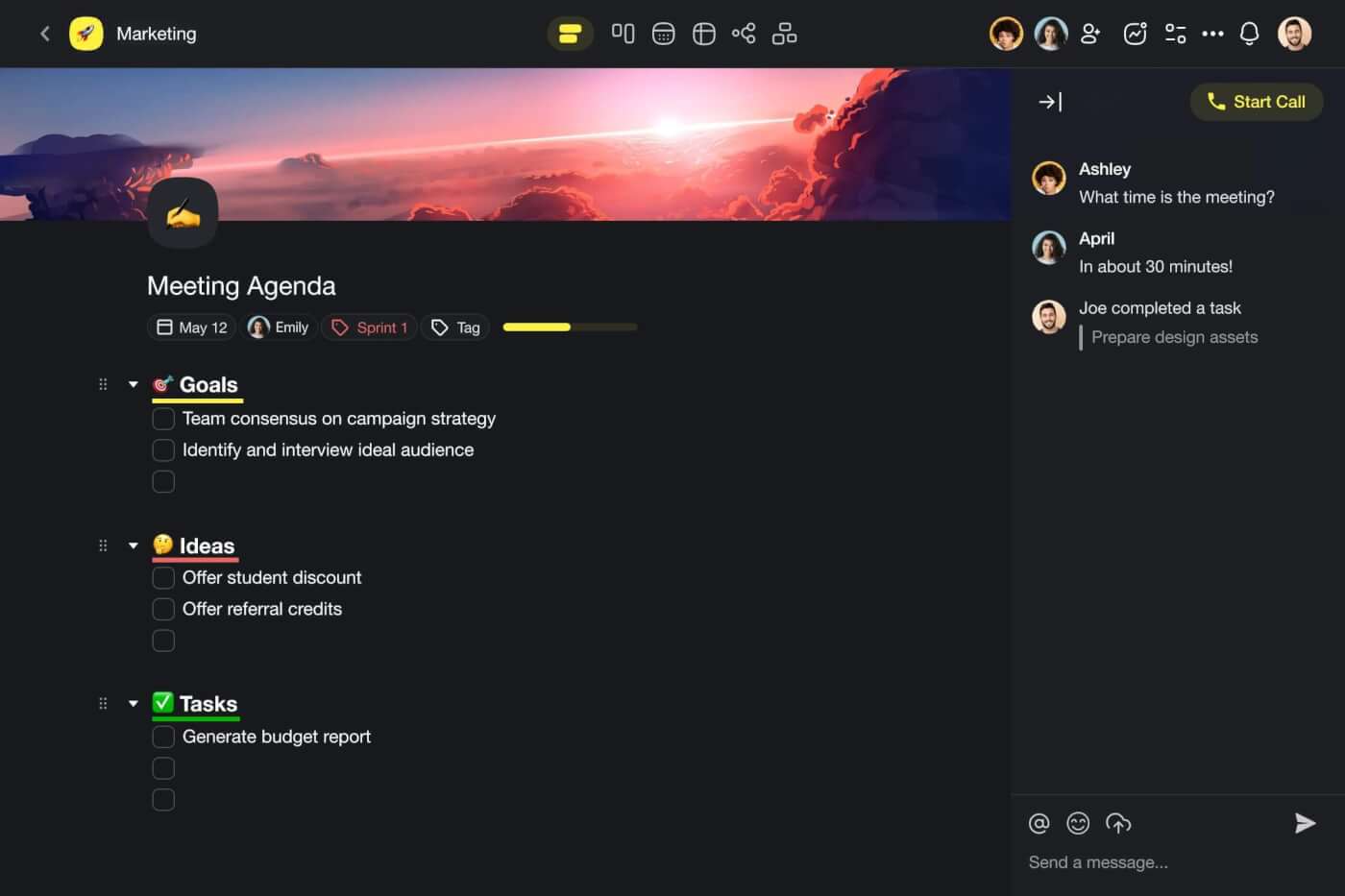
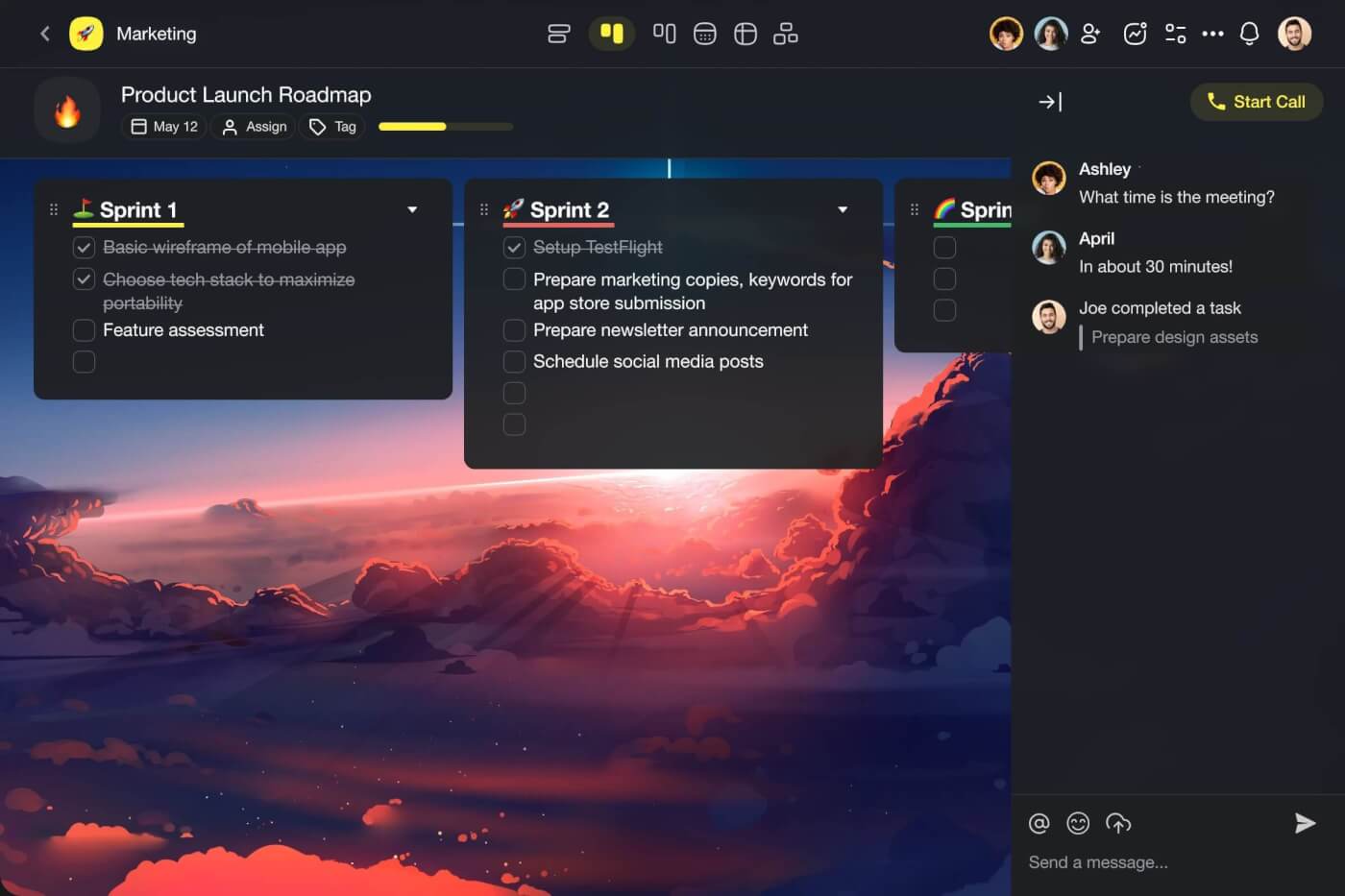
Project in Taskade in the List view.

Project in Taskade in the Board view.

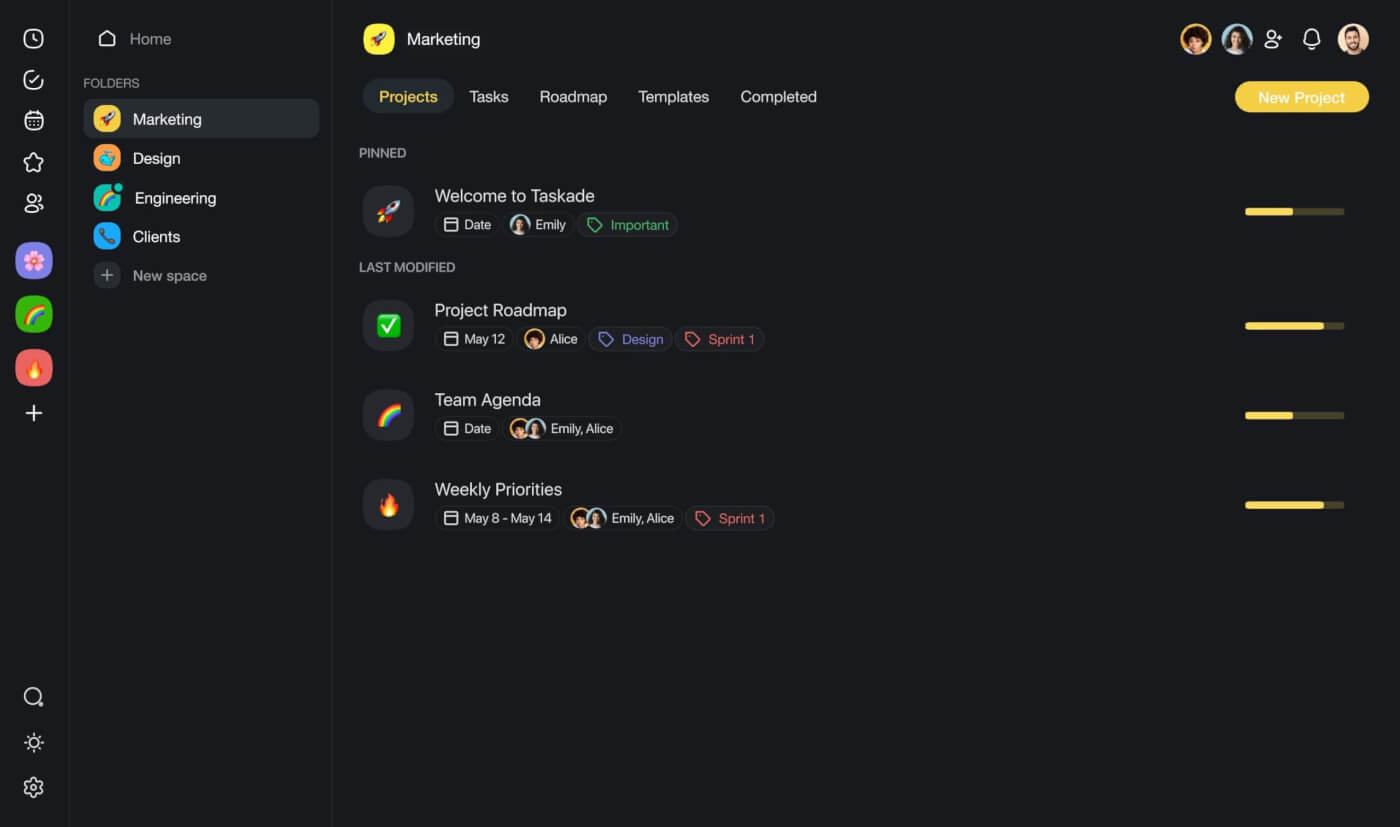
A Taskade workspace with a list of projects.

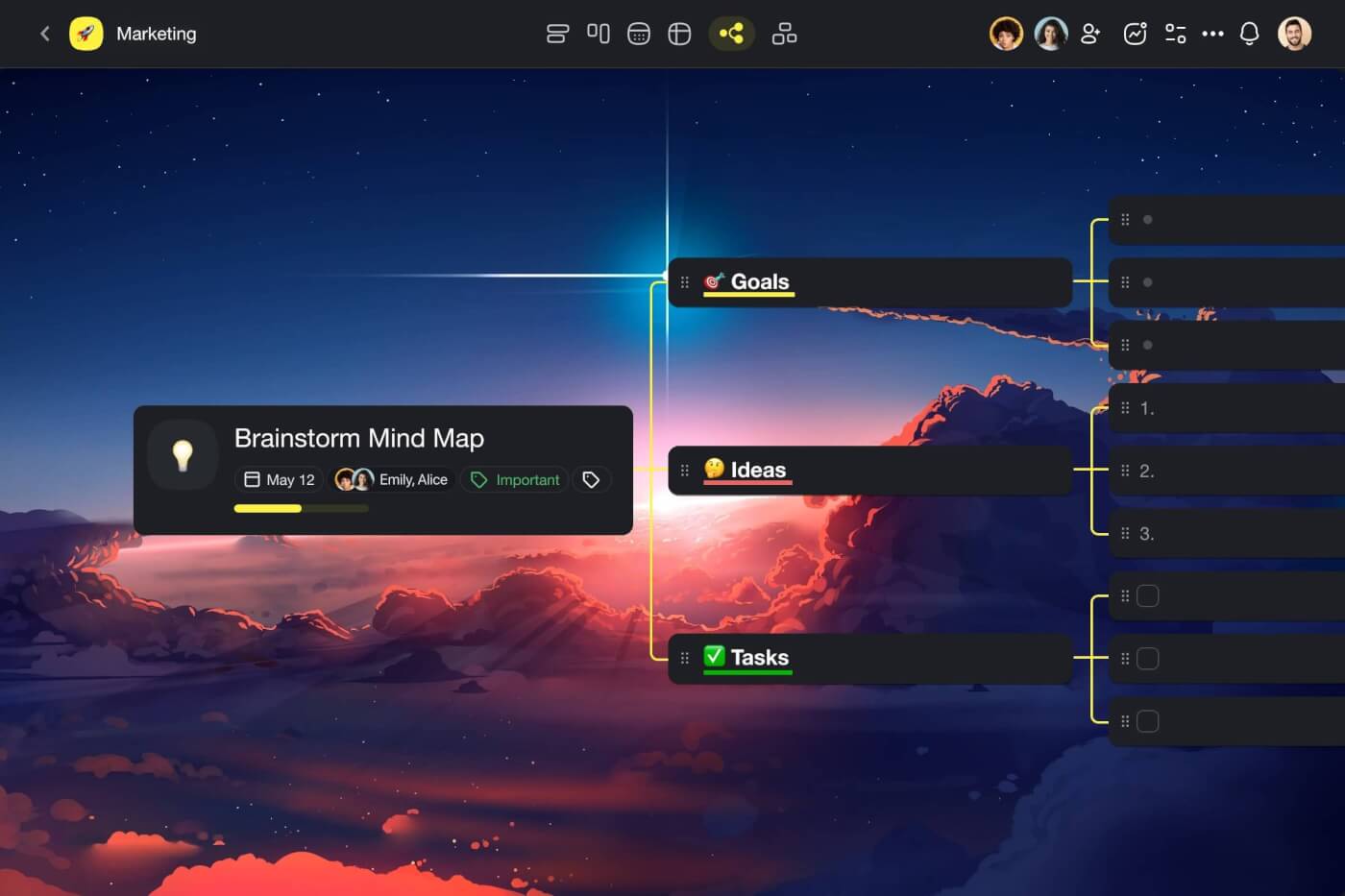
Project in Taskade in the Mind Map view.

Notes, tasks, documents, mind maps, calendars, and even video calls all come together within one unified workspace. This means that you don’t have to juggle multiple apps or switch between windows to get work done.

No app fatigue. No overcomplicated interfaces. Just simplicity.

Here are a few cool Taskade features for the busy mind. ✨

AI Assistant

Let’s start with something simple.

How many hours do you usually spend editing your writing?

If you're a creative, chances are the answer is “too many.” And even if your writing is mostly emails and reports, it probably still feels like you’re losing a part of your soul with every hour spent rehashing the same phrases.

Think of the AI Assistant as your personal editor that lives inside every project.

It can proofread your text, adjust the tone to match a specific audience, help flesh ideas, and even suggest synonyms for the words you love so much.
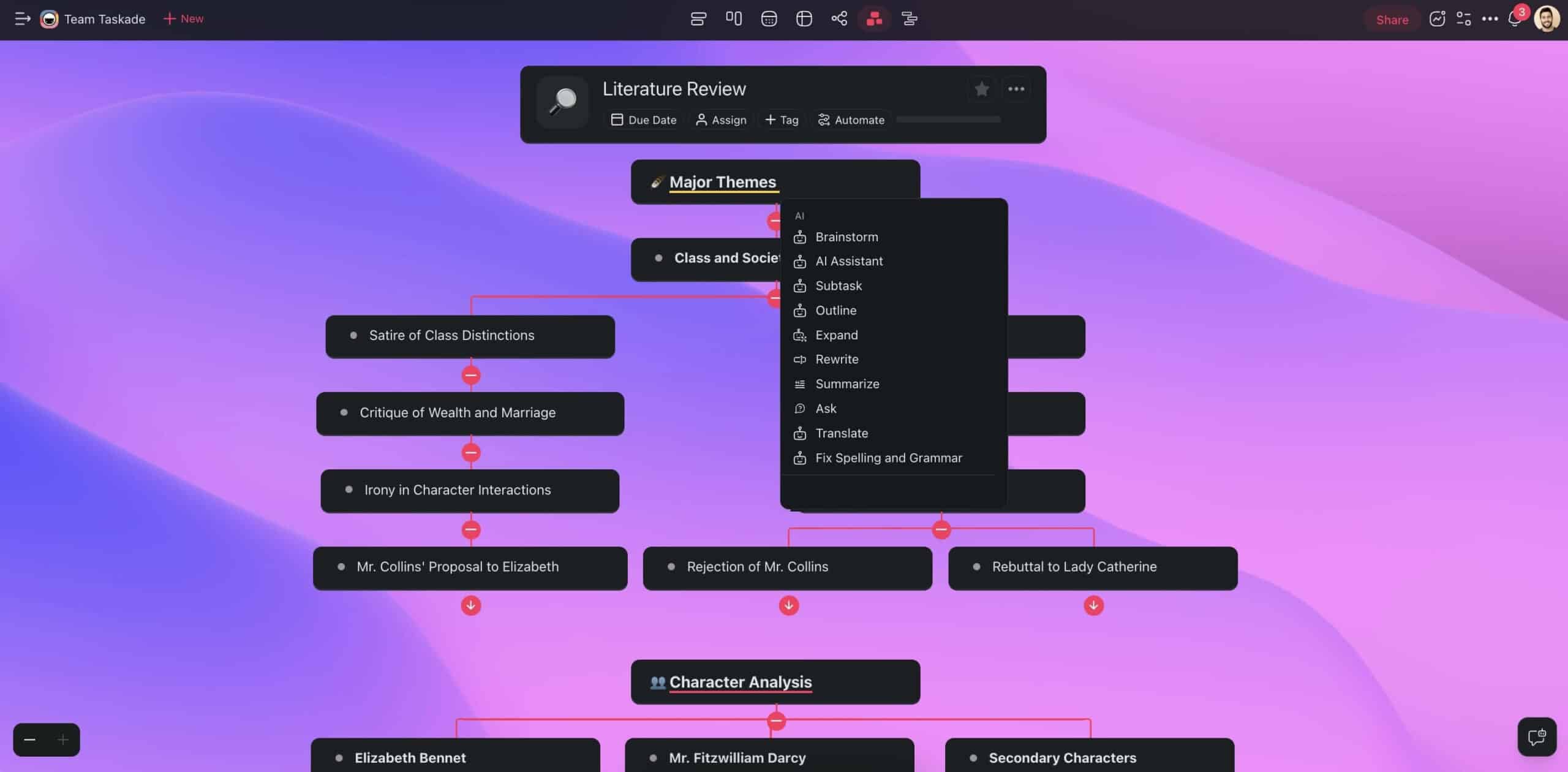
AI Assistant commands in the Taskade project editor.

That means you: A) Get back hours of your life each week, and B) conserve that precious brainpower for truly creative tasks.

The assistant can do a few other cool things.

For instance, you can use the /research command to look up concepts and topics online. Or you can run /prioritize to get your tasks in order — a particularly handy feature when your brain constantly works overtime.
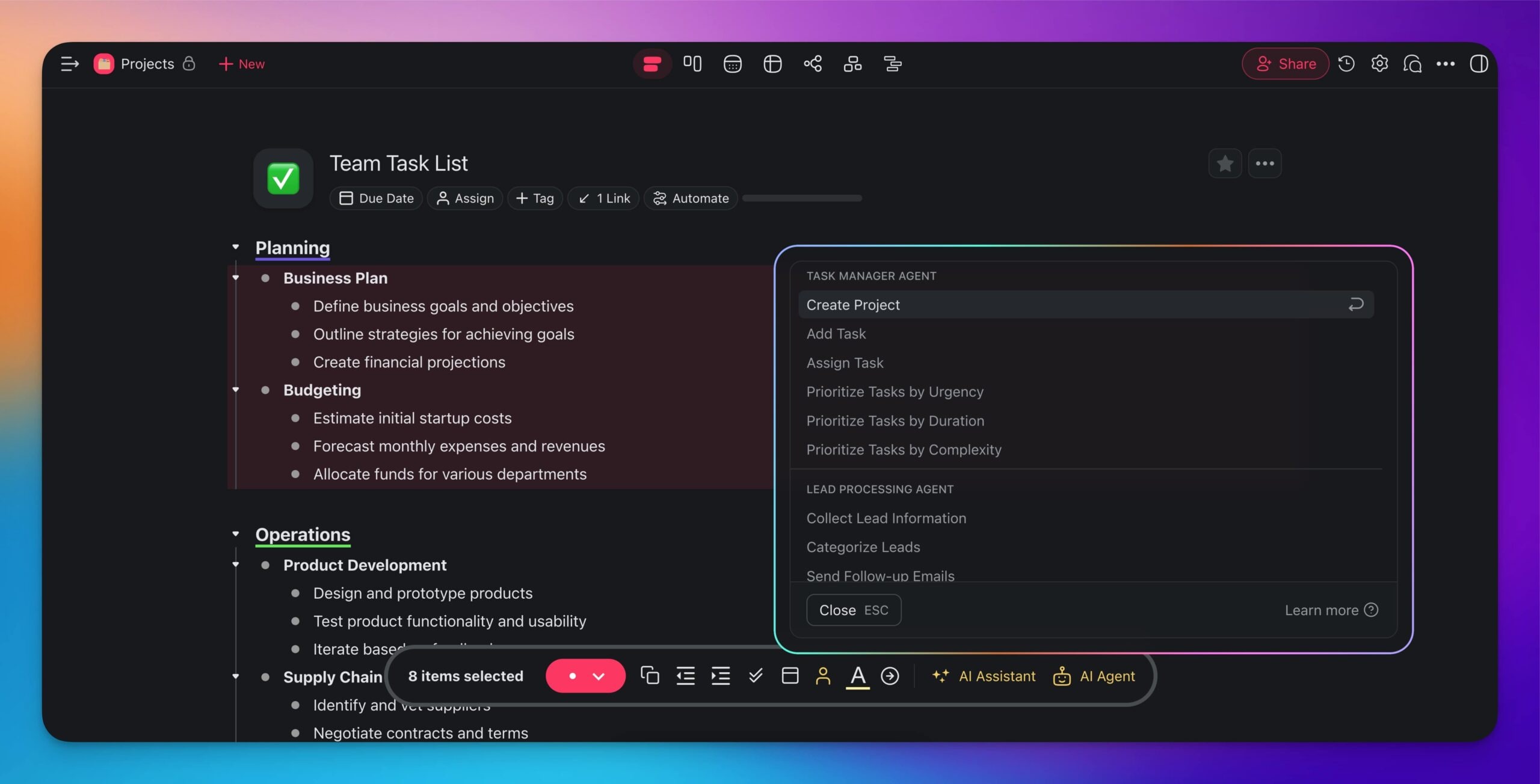
AI Assistant output in the Taskade project editor.

✏️ Check our AI Assistant guide for a full list of commands.

Custom AI Agents

The ADHD brain has a lot of things going on. Even when it shouldn’t. It jumps from thought to thought. Task to task. It forgets. Then remembers at odd times.

Custom AI Agents are your accountability buddies to keep you on track.

An agent is a small, specialized program that runs inside Taskade projects.

It can do a lot of different things, from simple task management to providing you with advice and support. Watch this short video to see for yourself. 👇

Maybe you need someone to remind you of what's up next on your plate. Or, perhaps, you're looking for a brainstorming pal to keep ideas flowing.

Setting up an agent is a breeze too.

Just over to the Agents tab in your Taskade workspace, hit Create, and pick one of the templates. If you feel adventurous, you can build one from scratch.

Pretty cool, huh?
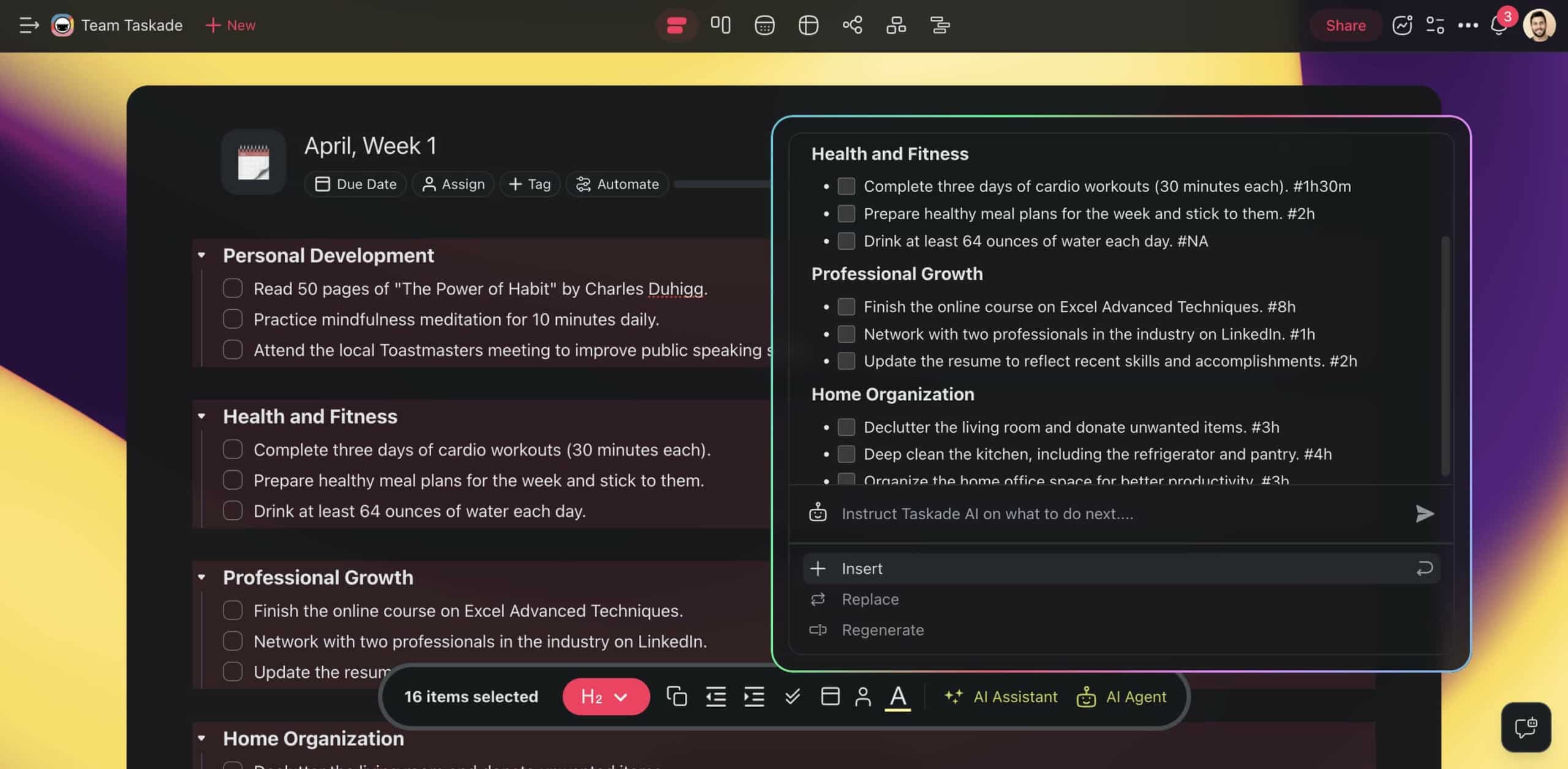
Custom AI Agent commands inside the project editor in Taskade.

Each custom agent comes with a set of commands that speed up your work. The ⚡️ Productivity Agent is used here to prioritize weekly tasks and estimate their duration.

👥 Check our Custom AI Agents guide to learn more.

AI Project Studio

Stepping into any project can feel like a marathon in a mud pit. It starts off exciting. But when you try to take a couple of steps, the energy fades fast.

It may be the first sentence, first line of code, the initial sketch, or the opening slide of a presentation. This is the task for the AI Project Studio.

To get started, head to your workspace and hit ➕ New project.

Now, describe what you’re working on.

Provide the nitty-gritty of your fledgling project, even if all you've got is a bunch of ideas in your head or scribbled on napkins. You can also upload seed documents or use online resources as context for the generator.
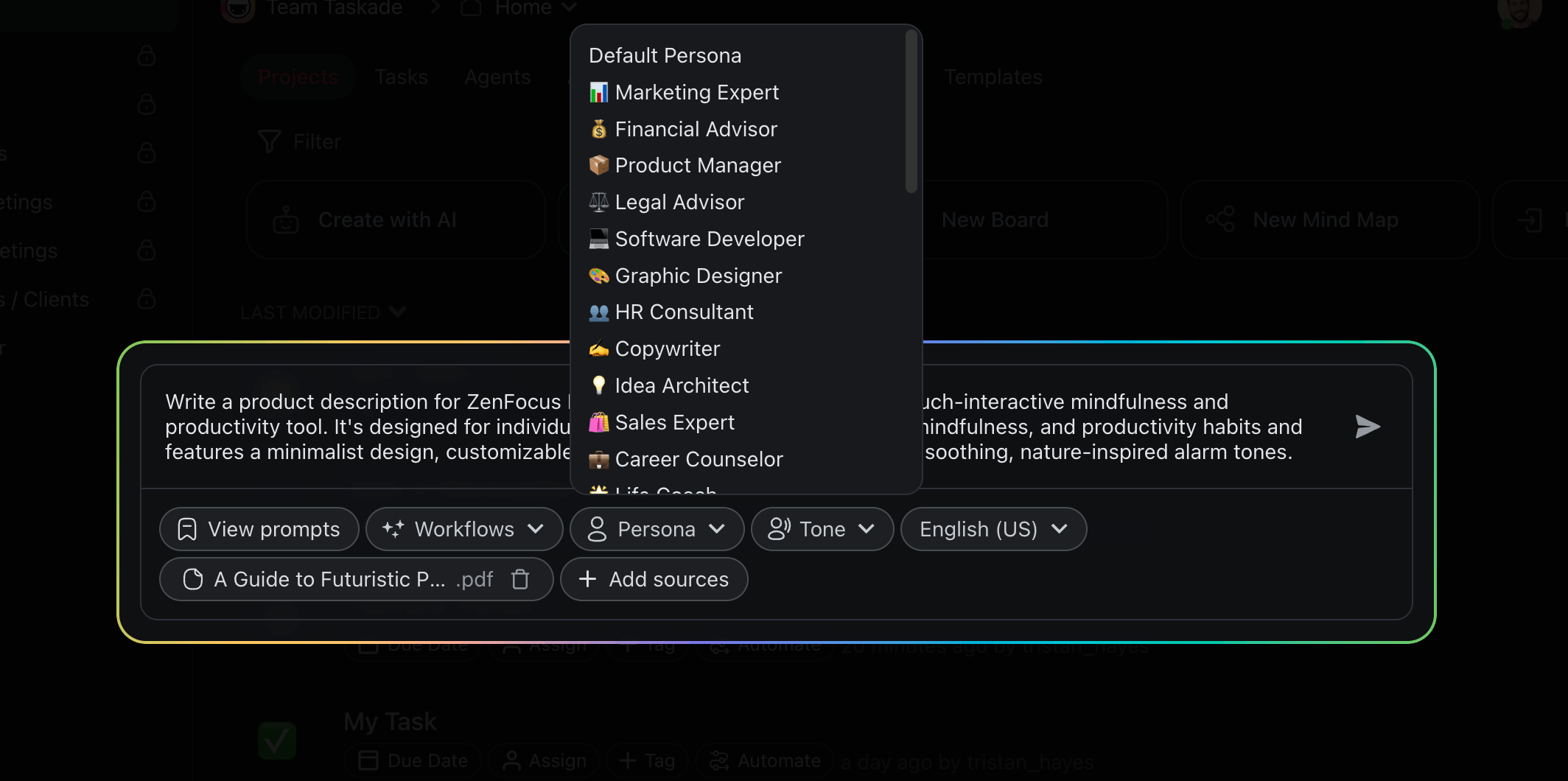
AI Project Studio interface.

And when you’re done? Sit back and relax. The AI Project Studio will take it from there and craft a clear, actionable plan for your project.

You can tweak the settings too. Choose the type of content you want to generate, set a tone that matches your goal, pick a language — make it yours.

🪄 Check our AI Project Studio guide to learn more.

Automations

Alex has ADHD. She's great at starting projects, but tracking what's next gets tricky. Her desk? A maze of sticky notes. Her computer? A jungle of tabs.

Alex needs an autopilot to keep her on track.

The automation feature in Taskade works just like one.

Automations connect your Taskade projects to the tools you use to get stuff done, including Gmail, Calendly, Slack, WordPress, and many more.

Overflowing Gmail inbox?

An automation will get Taskade AI to analyze them for you and send replies.

Client schedules a last-minute Calendly meeting?

Another automation will add a task to your project and generate an agenda.

Too many notifications from Slack channels?

Taskade will put them into a single a bite-sized report each day.

It's the small things — organizing reminders, prioritizing emails, scheduling follow-ups — that make all the difference. Automating the grunt work will reduce the mental clutter and free up your cognitive space.

🔁 Check our Automation guide to learn more.

🚀 The Future of AI and ADHD Management

Research has shown that artificial intelligence has the knack for spotting the signs of ADHD. Using machine learning algorithms, it's possible to analyze how different parts of the brain communicate, which can make diagnoses more precise.(1)

AI has the potential for managing the ADHD brain, mostly through personalized learning and therapy adjustments. That can include tool and techniques like:

  • ⚡️ Customized plans match your brain's focus cycles.

  • ⚡️ Smart distraction filters to proactively reduce distractions.

  • ⚡️ Learning tools that adapt to your attention span.

  • ⚡️ Smart environments to create the perfect setting for concentration.

Clearly, there's a lot of untapped potential. We're looking at a completely new way to handle ADHD. One that adjusts to help you through your work and life.

What new ADHD insights will AI uncover next?

How will AI redefine ADHD management in a decade?

Can AI lead us to a future where ADHD is no longer a barrier?

Only time will tell, and we're all in for the ride! 🪐

👋 Parting Words

Are you still here? Great!

Time to wrap things up.

AI is a powerful ally for the ADHD brain. It can help you brainstorm, outline documents, kickstart all kinds of projects, and organize your days. 

It won't brew coffee before you wake up (yet). But it will make your life and work much simpler. And that’s a major relief when your brain is running at 110%.

So, what are you waiting for?

Challenge chaos and take control with Taskade AI 🤖


Looking for more AI productivity resources?

  • ⭐️ Grab our AI content generators

  • ⭐️ Check some cool use cases for Taskade's automations

  • ⭐️ Explore popular productivity methods and ideas

🔗 Resources

  1. https://www.buffalo.edu/news/releases/2021/01/022.html

💬 Frequently Asked Questions About AI for ADHD

Can AI help people with ADHD?

AI can be a significant asset for individuals with ADHD. By leveraging AI-powered productivity tools, people with ADHD can improve organization, time management, and focus. These tools can automate mundane tasks, set reminders for important deadlines, and even break down larger projects into more manageable steps. This level of support can make daily life and work more manageable and productive.

What is the best AI for ADHD?

The best AI for ADHD is typically one that is fully integrated with the core tools you already use. This way, you don’t need to patch together different solutions, which is a major benefit for non-technical users. For example, Taskade uses OpenAI’s latest OpenAI GPT (frontier models) model to power project management and organization features, which means AI can fit smoothly into your daily tech ecosystem.

What is the best AI assistant for ADHD?

The best AI assistant for ADHD is one that acts like a digital partner, helping to streamline your day and keep you on track. This includes assistants that can manage calendars, remind you of upcoming tasks, assist in prioritizing your to-do list, and even suggest breaks or mindfulness exercises. AI assistants embedded in productivity apps, such as those found in Notion or Todoist, which can adapt to your habits and preferences, are often highly recommended for individuals with ADHD.

How to use AI with ADHD?

Using AI with ADHD involves integrating smart tools into your daily routine to support your needs. Start by identifying areas where you need the most help— be it task management, remembering appointments, or breaking down projects. Then, adopt AI-powered apps and tools designed to assist in these areas, and customize the AI features to suit your workflow.


🧬 ADHD-Friendly Tools Built with Genesis

These AI-powered apps are designed with simplicity and focus in mind — perfect for ADHD productivity:

App How It Helps Clone
Minimalistic ToDo App Clean, distraction-free interface Clone →
Study/Work Timer + Music Pomodoro + ambient sounds for focus Clone →
Mood Tracker Track energy and focus patterns Clone →
Breathe Circle Quick calming breaks when overwhelmed Clone →
Time Tracker See where your time actually goes Clone →

🔍 Explore All Community Apps →

Build your own ADHD-friendly productivity system with Taskade Genesis — describe what you need, and watch it come to life.

Your living workspace includes:

  • 🤖 Custom AI Agents — The intelligence layer
  • 🧠 Projects & Memory — The database layer
  • ⚡️ 100+ Integrations — The automation layer

Get started:

  • Create Your First App → — Step-by-step tutorial
  • Learn Workspace DNA → — Understand the architecture

Read more:

  • 8 AI Health & Wellness Workspaces
  • 10 Personal AI Workspaces (Second Brain)
  • Build Your First AI App

Taskade AI banner.

0%

On this page

The Challenges of ADHD in Productivity🤖 Understanding AI and Its Role in ADHD Management🧠🦾 AI-Powered Tools Inside Taskade Enhancing ProductivityAI AssistantCustom AI AgentsAI Project StudioAutomations🚀 The Future of AI and ADHD Management👋 Parting Words🔗 Resources💬 Frequently Asked Questions About AI for ADHD🧬 ADHD-Friendly Tools Built with Genesis

Related Articles

/static_images/Doraemon and Nobita — the 1969 manga that accidentally described the correct architecture for AI agents
April 27, 2026AI

What Doraemon Taught Me About Building AI Agents (2026)

I read Doraemon every day as a kid. It turns out a Japanese manga from 1969 described the right architecture for AI agen...

/static_images/When a power user becomes a platform co-author — the Genesis Debugging Framework
April 27, 2026AI

The Customer Who Wrote Our Documentation (2026)

One of our most active Genesis users has built hundreds of apps. He also wrote our debugging framework, which we adopted...

/static_images/The first enterprise self-close on Taskade Genesis — a production service dashboard built in a week
April 24, 2026AI

One Week, Forty People: The First Enterprise Self-Close on Taskade Genesis (2026)

A Fortune-500 IT program manager built a production service management system in one week. They estimate it would have t...

/static_images/Code-generation tools vs execution-layer workspaces — same demo, different architectural category
April 24, 2026AI

The Frontend Playground Era: Why Lovable, v0, Bolt, and Cursor Are Not the Workspace (2026)

Lovable, v0, Bolt, Cursor, and Replit are generating beautiful code right now. That is genuinely useful work. It is also...

/static_images/Training AI agents like employees — the reinforcement loop for onboarding, tuning, and performance-reviewing AI agents
April 24, 2026AI

Training AI Agents Like Employees: The Reinforcement Loop Most Operators Miss (2026)

You would never fire a new employee on day one for a bad draft. Most operators do exactly that to their agents. The rein...

/static_images/History of computing primitives — from the 1973 Unix file to the 2026 AI task, the atomic units that defined each era
April 24, 2026AI

Fifty Years of Computing Primitives: File to Task (2026)

The half-century history of computing primitives. Every 15–25 years, a new platform wins by naming the atomic unit every...

View All Articles
AI for ADHD Productivity: From Distraction to Action (2026 Guide) | Taskade Blog