



Taskadetaskade
PricingLoginSign up for free →Sign up for free →
Loved by 1M+ users·Hosting 100K+ apps·Deploying 500K+ AI agents·Running 1M+ automations·Backed by Y Combinator
TaskadePricingFeaturesContact usIntegrationsMCP ServerDeveloper APIChangelogPressLearnAbout
GalleryProductivityKitsVideosReviewsFAQ
VibeVibe AppsVibe AgentsVibe CodingVibe WorkflowsVibe Marketing
Vibe DashboardsVibe CRMVibe AutomationVibe PaymentsVibe DesignVibe SEOVibe Tracking
Community
FeaturedQuick AppsToolsDashboardsWebsites
WorkflowsProjectsFormsCreators
DownloadsAndroidiOSMacWindows
ChromeFirefoxEdge
Compare
vs Cursorvs Boltvs Lovablevs V0vs Windsurf
vs Replitvs Emergentvs Devinvs Claude Codevs ChatGPTvs Claudevs Perplexityvs GitHub Copilotvs Figma AIvs Notionvs ClickUpvs Asanavs Mondayvs Trellovs Jiravs Linearvs Todoistvs Evernotevs Obsidianvs Airtablevs Basecampvs Mirovs Slackvs Bubblevs Retoolvs Webflowvs Framervs Softrvs Glidevs FlutterFlowvs Base44vs Adalovs Durablevs Gammavs Squarespacevs WordPressvs UI Bakeryvs Zapiervs Makevs n8nvs Jaspervs Copy.aivs Writervs Rytrvs Manusvs Crewvs Lindyvs Relevance AIvs Wrikevs Smartsheetvs Monday Magicvs Codavs TickTickvs Any.dovs Thingsvs OmniFocusvs MeisterTaskvs Teamworkvs Workfrontvs Bitrix24vs Process Streetvs Toggl Planvs Motionvs Momentumvs Habiticavs Zenkitvs Google Docsvs Google Keepvs Google Tasksvs Microsoft Teamsvs Dropbox Papervs Quipvs Roam Researchvs Logseqvs Memvs WorkFlowyvs Dynalistvs XMindvs Whimsicalvs Zoomvs Remember The Milkvs Wunderlist
Genesis AIVideo GuideApp BuilderVibe CodingAgent BuilderDashboard Builder
CRM BuilderWebsite BuilderForm BuilderWorkflow AutomationWorkflow BuilderBusiness-in-a-BoxAI for MarketingAI for Developers
AI Agents
FeaturedProject ManagementProductivityMarketingTranslator
ContentWorkflowResearchPersonalSalesSocial MediaTo-Do ListCRMTask AutomationCoachingCreativityTask ManagementBrandingFinanceLearning and DevelopmentBusinessCommunity ManagementMeetingsAnalyticsDigital AdvertisingContent CurationKnowledge ManagementProduct DevelopmentPublic RelationsProgrammingHuman ResourcesE-CommerceEducationLegalEmailSEODeveloperVideo ProductionDesignFlowchartDataPromptNonprofitAssistantsTeamsCustomer ServiceTrainingTravel PlanningUML DiagramER DiagramMath TutorLanguage LearningCode ReviewerLogo DesignerUI WireframeFitness CoachAI Lead EnrichmentFounder OSAI SDR AgentBookkeepingRecruitingWebsite MonitoringAll Categories
Automations
FeaturedBusiness-in-a-BoxInvestor OperationsEducation & LearningHealthcare & Clinics
Real EstateStripeSalesE-commerceContentMarketingEmailCustomer SupportHubSpotProject ManagementAgentic WorkflowsBooking & SchedulingCalendarReportsSlackWebsiteFormTaskWeb ScrapingWeb SearchChatGPTText to ActionYoutubeLinkedInTwitterGitHubDiscordMicrosoft TeamsWebflowRSS & Content FeedsGoogle WorkspaceManufacturing & OperationsAI Agent TeamsMulti-Agent AutomationNotion AutomationsAgentic AutomationProposalBookkeeping & ExpensesClient OnboardingAll Categories
Wiki
Taskade GenesisAI AgentsAutomation
ProjectsLiving DNAAutonomous Workspaces, Agents & AppsQuantum AI & Taskade Genesis QuantumPlatformIntegrationsProductivityMethodsProject ManagementAgileScrumAI ConceptsCommunityTerminologyFeatures
Templates
FeaturedChatGPTTablePersonalProject Management
SalesFlowchartTask ManagementEngineeringEducationDesignTo-Do ListMarketingMind MapGantt ChartOrganizationalPlanningMeetingsTeam ManagementStrategyGamingProductionProduct ManagementStartupRemote WorkY CombinatorRoadmapCustomer ServiceLegalEmailBudgetsContentConsultingE-CommerceStandard Operating Procedure (SOP)Human ResourcesProgrammingMaintenanceCoachingSocial MediaHow-TosResearchMusicTrip PlanningCRMClient OnboardingEmployee OnboardingSOPBug TrackerRecruitment TrackerFormSales PipelineContent CalendarMarketing PlanProduct RoadmapBusiness PlanSWOT Analysis30-60-90 Day PlanInterviewNotion AlternativeKPI TemplatesStrategic Plan TemplatesMeeting Agenda TemplatesInvoiceRisk RegisterIT Asset ManagementKanban BoardChange ManagementCommunication PlanRFPScope of WorkStatement of WorkHelpdeskKnowledge BaseCreative BriefGoal SettingExecutive SummaryGap AnalysisBooking SystemEvent ManagementPortfolio TrackerCustomer Onboarding PortalsClient PortalAgency OperationsFinance TrackingAll Categories
Generators
AI SoftwareNo-Code AI AppAI AppAI WebsiteAI Dashboard
AI FormAI AgentClient PortalAI WorkspaceAI ProductivityAI To-Do ListAI WorkflowsAI EducationAI Mind MapsAI FlowchartAI Scrum Project ManagementAI Agile Project ManagementAI MarketingAI Project ManagementAI Social Media ManagementAI BloggingAI Agency WorkflowsAI ContentAI Software DevelopmentAI MeetingAI PersonasAI OutlineAI SalesAI ProgrammingAI DesignAI FreelancingAI ResumeAI Human ResourceAI SOPAI E-CommerceAI EmailAI Public RelationsAI InfluencersAI Content CreatorsAI Customer ServiceAI BusinessAI PromptsAI Tool BuilderAI SEOAI Gantt ChartAI CalendarsAI BoardAI TableAI ResearchAI LegalAI ProposalAI Video ProductionAI Health and WellnessAI WritingAI PublishingAI NonprofitAI DataAI Event PlanningAI Game DevelopmentAI Project Management AgentAI Productivity AgentAI Marketing AgentAI Personal AgentAI Business and Work AgentAI Education and Learning AgentAI Task Management AgentAI Customer Relations AgentAI Programming AgentAI SchemaAI Business PlanAI Pitch DeckAI InvoiceAI Lesson PlanAI Social Media CalendarAI API DocumentationAI Database SchemaAI Marketing PlanAI Sales PipelineAI Course BuilderInternal ToolsBooking SystemReal Estate CRMInventory ManagementAll Categories
Converters
AI Featured ConvertersAI PDF ConvertersAI CSV ConvertersAI Markdown ConvertersAI Prompt to App Converters
AI Data to Dashboard ConvertersAI Workflow to App ConvertersAI Idea to App ConvertersAI Flowcharts ConvertersAI Mind Map ConvertersAI Text ConvertersAI Youtube ConvertersAI Knowledge ConvertersAI Spreadsheet ConvertersAI Email ConvertersAI Web Page ConvertersAI Video ConvertersAI Coding ConvertersAI Task ConvertersAI Kanban Board ConvertersAI Notes ConvertersAI Education ConvertersAI Language TranslatorsAI Business → Backend App ConvertersAI File → App ConvertersAI SOP → Workflow App ConvertersAI Portal → App ConvertersAI Form → App ConvertersAI Schedule → Booking App ConvertersAI Metrics → Dashboard ConvertersAI Game → Playable App ConvertersAI Catalog → Directory App ConvertersAI Creative → Studio App ConvertersAI Agent → Agent App ConvertersAI Audio ConvertersAI DOCX ConvertersAI EPUB ConvertersAI Image ConvertersAI Resume & Career ConvertersAI Presentation ConvertersAI PDF to Spreadsheet ConvertersAI PDF to Database ConvertersAI PDF to Quiz ConvertersAI Image to Notes ConvertersAI Audio to Notes ConvertersAI Email to Tasks ConvertersAI CSV to Dashboard ConvertersAI YouTube to Flashcards ConvertersURL to NotesVideo → SummaryAI Receipts to Expense Tracker ConvertersAI Docs to Knowledge Base ConvertersAI Form to Client Portal ConvertersSpreadsheet to CRMAll Categories
Prompts
Blog WritingBrandingPersonal Finance
Human ResourcesPublic RelationsTeam CollaborationProduct ManagementSupportAgencyReal EstateMarketingCodingResearchSalesAdvertisingSocial MediaCopywritingContentProject ManagementWebsite CreationDesignStrategyE-commerceEngineeringSEOEducationEmail MarketingUX/UIProductivityInfluencer MarketingAnalyticsEntrepreneurshipLegalVibe Coding PromptCRMCustomer SupportRecruitingAll Categories
Blog
What Are Claude Skills? 2026 Beginner GuideHow to Build a Team of AI Agents (No Code): A 2026 Step-by-Step PlaybookWhat Is an AI Agent Harness? 2026 Guide
AI Agents for Project Management in 2026: Build the PM Agent Team (Live Demo)9 Best AI Event Management Software in 2026What Is AI Slop? The Term Flooding Open Source, Search, and Trust (2026)9 Best AI Inventory Management Software in 2026Claude Fable 5 & Mythos 5 Explained: Benchmarks, Pricing & the Catch (2026)The Killer App Theory: What VisiCalc, Netscape, and ChatGPT Tell Us About the Next Rupture (2026)10 Best AI Recruiting Software in 2026 (ATS Compared)25 n8n Use Cases for 2026 — and the Faster Way to Ship Each OneDORA Metrics Explained (2026): The Four Keys, Benchmarks, and How to Build a Dashboard11 Best AI Schedule Generators 2026 (Work Shifts, Study Plans, Employee Rosters)OpenAI Codex Sites Explained: What It Is, Who Can Use It & the Open Alternative (2026)Best OpenAI Codex Alternatives in 2026 (For Coders AND Non-Coders)
AIAutomationProductivityProject ManagementRemote WorkStartupsKnowledge ManagementCollaborative WorkUpdates
Changelog
Guided Onboarding & Smoother Credit Top-Ups (Jun 9, 2026)Service CRM Starter & New Automation Actions (Jun 9, 2026)Private-by-Default Apps & Reliable CSV (Jun 5, 2026)
Table View Multi-Select & Bulk Delete (Jun 4, 2026)Currency Fields & a Sharper Taskade EVE (Jun 3, 2026)Stronger Sign-In & Simpler Custom Domains (Jun 2, 2026)Custom Domains, Secured Faster (May 29, 2026)
Wiki
Taskade GenesisAI AgentsAutomation
ProjectsLiving DNAAutonomous Workspaces, Agents & AppsQuantum AI & Taskade Genesis QuantumPlatformIntegrationsProductivityMethodsProject ManagementAgileScrumAI ConceptsCommunityTerminologyFeatures
Prompts
Blog WritingBrandingPersonal Finance
Human ResourcesPublic RelationsTeam CollaborationProduct ManagementSupportAgencyReal EstateMarketingCodingResearchSalesAdvertisingSocial MediaCopywritingContentProject ManagementWebsite CreationDesignStrategyE-commerceEngineeringSEOEducationEmail MarketingUX/UIProductivityInfluencer MarketingAnalyticsEntrepreneurshipLegalVibe Coding PromptCRMCustomer SupportRecruitingAll Categories
© 2026 Taskade.
PrivacyTermsSecurity
Made withTaskade AIforBuilders
BlogProductivityHow to Organize and Manage…

How to Organize and Manage Your Tasks in Hierarchies with a Project Outliner

“What’s a project outliner?” If you’re here looking for an answer, it can only mean one thing–you need a better way to manage all your **tasks**, **projects**, ...

How to Organize and Manage Your Tasks in Hierarchies with a Project Outliner
February 3, 2022Updated July 19, 202512 min readDawid BednarskiProductivity·#outlining#task-management
On this page (16)
🌟 A Primer on Using a Project OutlinerWhat Is a Project Outliner?🤹‍♂️ What Can You Use a Project Outliner For?⚙️ How Does a Project Outliner Work?Parent/Child ElementsFolding/Unfolding#Tags and FormattingKeyboard Navigation and ShortcutsCross-Linking and Search👑 Project Outliners Are the Apex of Task Management🤖 The Rise of Collaborative Project OutlinersPlanning (Calendar) and Task Management (My Tasks)Outlining on the Go (Mobile Outliner)Team Management (Roles and Permissions)👋 Parting WordsFrequently Asked Questions About Project Outliners

“What’s a project outliner?” If you’re here looking for an answer, it can only mean one thing–you need a better way to manage all your tasks, projects, and creative exploits.

taskade outline gif

In the next chapter of “outlining” series, we cover everything you need to know to start your adventure with modern project outliner tools. You’ll master key outlining operations and learn how to visualize projects hierarchically to stay on top of every task.

🐇 Before you dive in… The rabbit hole of productivity goes deep. But you don’t have to explore it all by yourself. Check these cool guides when you’re done reading.

  1. 🧰 Think, Organize Visually: The Best Outlining Tools in 2021

  2. 💾 Past, Present, and Future of Outlining Software

  3. 👁 Visual Collaboration 101: Mind Maps, Outlines, and More

  4. 👑 A Case For Hierarchical Thinking: Solve Complex Problems The Easy Way

🌟 A Primer on Using a Project Outliner

What Is a Project Outliner?

A project outliner is a powerful tool that lets you organize information in a hierarchical way. Its core functionality is similar to that of a bulleted list you’re probably familiar with after years of using word processors like Microsoft’s Word. But there's more to outliners than meets the eye.

simple bulleted list

One of the oldest tools in the outlining flock is Org Mode. Released back in 2003, Org Mode is an advanced extension for the classic Emacs text editor. On top of Emacs’ text editing magic, it adds features like foldable hierarchical lists, to-dos, a calendar, and more.

Keeping track of every project item suddenly became that much easier. The only problem? Org Mode isn't exactly user-friendly. 👇
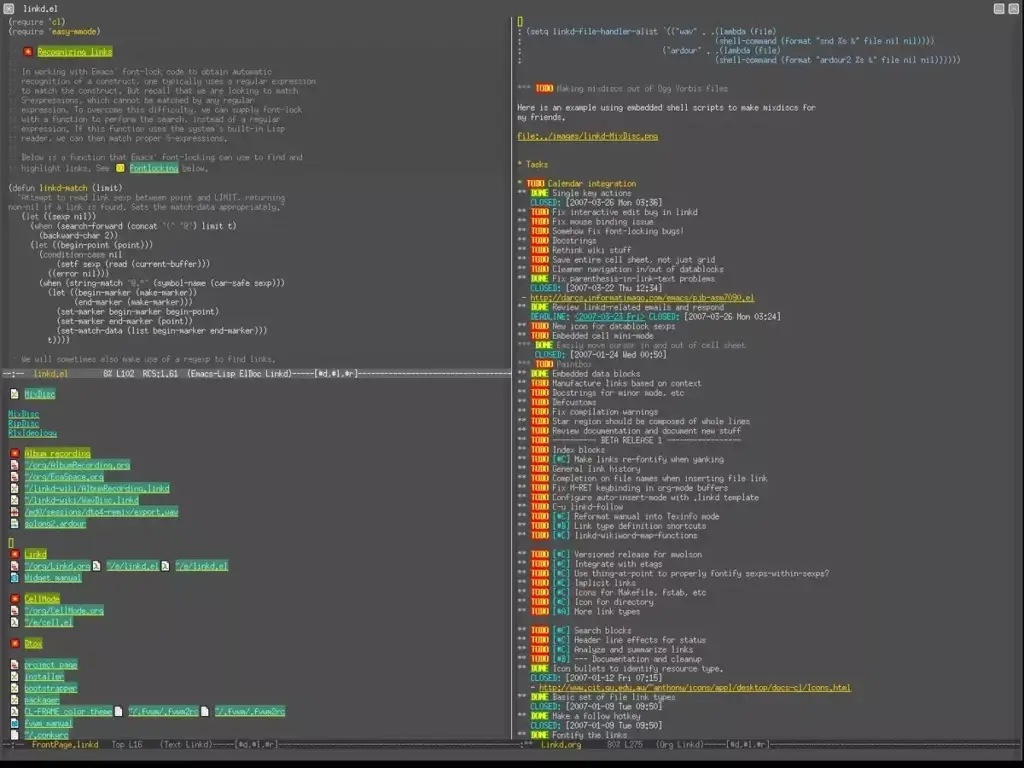
Emacs Org Mode project outliner.

The good news is an outliner is just a vessel to help manage deliverables.

Modern outliners offer a holistic, end-to-end approach to project management and cover all productivity bases, from planning through collaboration to task management. Some will even let you transform project outlines into interactive mind maps. But more on that in a bit.

image1 5

With the power of outlining, you can bite into infinitely complex projects and break them into a series of incremental steps or tasks. With project outlines, managing deadlines doesn't seem to be such a mammoth task. After all, a problem or idea is just a sum of its parts.

And now, let's get down to business.

🤹‍♂️ What Can You Use a Project Outliner For?

The overarching purpose of outlining software is to organize information in a hierarchical way. This is usually done with two outlining operations–nesting and folding/unfolding. Both let you highlight the connections between tasks and easily filter out list elements.

"Aren't outliners reserved for writers?" That's an excellent question. Writers love using outlining software for taking notes and structuring documents. But a project outliner is a much more versatile tool that’s excellent for anybody who needs a simple but powerful solution to...

  • ✅ Manage all tasks in one simple tool.

  • ✍️ Capture information/take quick notes.

  • 👑 Visualize all kinds of hierarchical systems. 

  • 📝 Plan and structure documents before drafting.

  • 👁 Plan, manage, and debrief projects.

  • 💬 Prepare a meeting agenda/talking points.

  • 🪨 Break complex ideas/problems into chunks.

  • 📍 Connect the dots between ideas.

  • 🔄 Create reusable checklists and templates.

An outliner is the Swiss Army Knife of productivity. It’s perfect for personal and professional projects of varying scope and complexity as well as any enterprise that requires a holistic approach to problem-solving and brainstorming. 

⚙️ How Does a Project Outliner Work?

Every outline starts as a linear index of elements. It can be something as simple as a grocery list or a makeshift meeting agenda. In order to transform those lists into proper outlines, you need to learn a few basic outlining concepts and operations.

But don't worry, there really isn't that much to remember so you can rest assured know that this won't eat into your project timeline.

Parent/Child Elements

The fundamental mechanic that makes a project outlines “tick” is the relationship between parent and child elements. For simplicity’s sake, let’s call them tasks and sub-tasks.

A task (parent) is a superordinate element of an outline that occupies the highest level of a hierarchy. A sub-task (child) is a lower-level element that’s “nested” under a task.
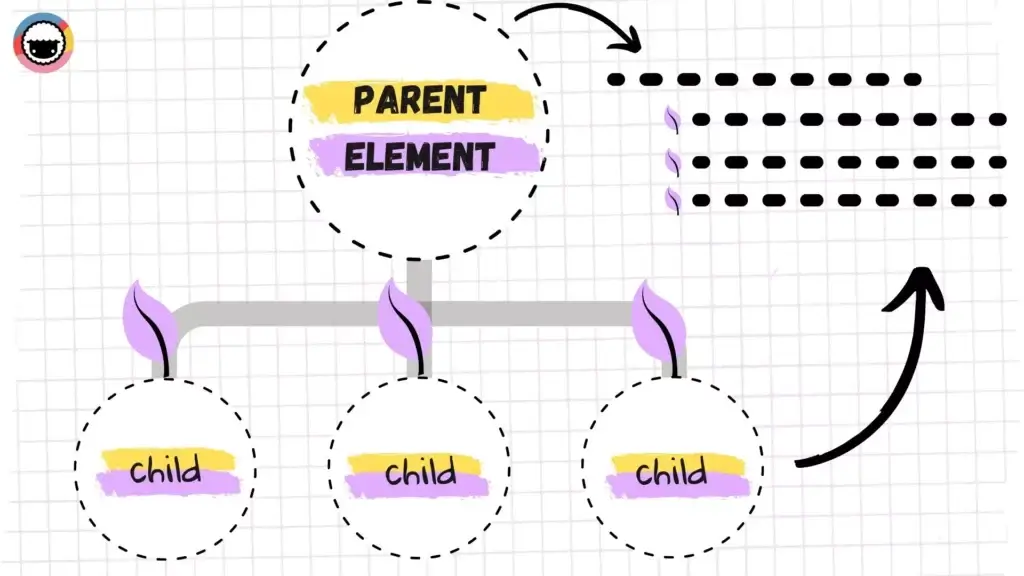
A tree diagram representing an outline hierarchy with parent and child nodes.

An outliner lets you quickly highlight the relationship between tasks and subtasks by indenting or nesting lower-level elements in a hierarchy. This simple step is actually one of the most important facets of effective project management.

But there’s more.

Folding/Unfolding

The division into higher/lower-level elements is a great way to visually identify tasks and sub-tasks and their position in a hierarchy. That brings us to folding/unfolding.

Fold/unfold is one of the most important operations in a project outliner and also something you can’t do with pen & paper. Simply put, it lets you “hide” a specific level of an outline and every child element nested inside that level. 

As a project manager, one of your tasks should be to ensure that your project team can track project goals effectively. By folding and unfolding tasks, the project timeline won't appear too clunky, making it easier for you to track progress.
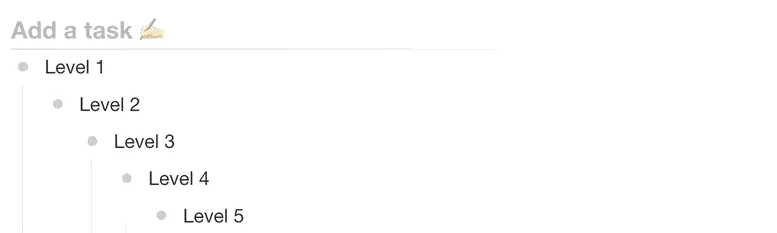
image4 8

#Tags and Formatting

Project outliners make it super easy to organize information out of the box. But why not take things up a notch with a selection of styling/formatting options and color-coded #tag?

Typical outlining tweaks include different heading and bullet types as well as basic formatting options like bold, italics, underline, and strikethrough. #Tags, on the other hand, add granularity and allow you to easily filter out project contents.
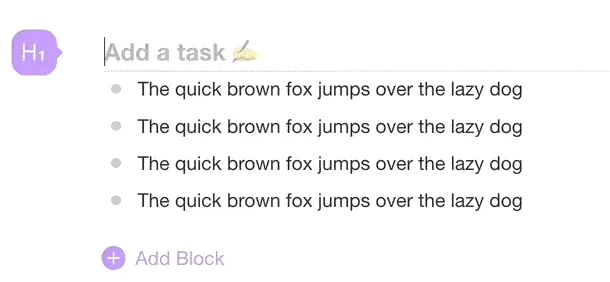
image7 2 3

#Tags and formatting options improve content organization and task management without adding unnecessary complexity. It’s as close to distraction-free productivity as it gets.

Keyboard Navigation and Shortcuts

Many outliners are optimized for keyboard use. One cool benefit of keyboard-oriented workflows is the ability to get things on the (virtual) page blazingly fast. 

We build Taskade with keyboard shortcuts in mind so you can build outline levels without taking your hands off the keyboard. You can check tasks, edit outline structure, fold/unfold levels, and apply formatting options using just your keyboard.
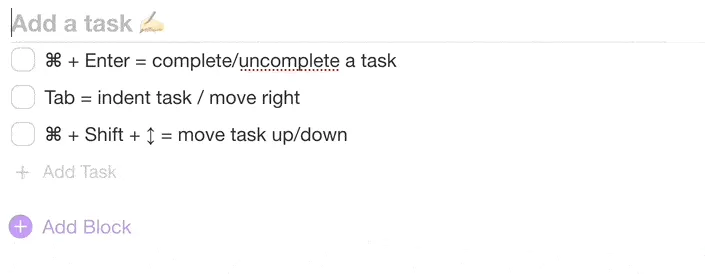
image5 3

You can visit our live demo page to test a few basic key combinations. Start with ⌨️ Tab/Shift+Tab to indent/outdent, ⌨️ Shift + ⬆/⬇ to select multiple elements, and ⌨️ ⌘ + Enter to "check" a task.

If you're a project manager that prefers intensive mouse-clicking, that's fine too. But to fully use the power of a project management tool, you should start to get familiar with keyboard shortcuts.

Cross-Linking and Search

Project outliners come with cross-linking capabilities so you can easily connect tasks, notes, documents, and insights to get a high-level overview of every project.

Internal links are also perfect for combining individual entries as well as entire projects into clusters. Connecting the dots help save time when projects get hectic.

image6 4

Taskade lets you run global searches as well as in-Project queries for a quick lookup. Simply click on search results to navigate directly to tasks and projects.

👑 Project Outliners Are the Apex of Task Management

With the productivity space as it is now (read: crowded), you may be wondering: “Do I really need another app to get work done?” And that’s a perfectly valid question.

The problem with modern productivity stacks is that they’re anything but holistic. We got to the point when there’s an app for everything. Heck, we need apps to manage all the apps we, well… supposedly need. That’s a long way from true productivity.

Project outliners, on the other hand, offer a back-to-the-roots approach to productivity based on the familiar concept of a bulleted list. They are...

  • 🌩 Fast, lightweight, and reliable (cloud synchronization)

  • ⌨️ Designed with efficiency in mind (keyboard-oriented)

  • ♾ Like an Infinite canvas for brainstorming and problem-solving

  • 🧠 Geared toward metacognition and critical thinking

  • 🧘‍♂️ The best medium for holistic task management

  • 🤝 Fit for real-time collaboration (more on that down below)

Unlike bloated, future-rich platforms that get in the way, outliners are extremely lean but still pack a powerful productivity punch. Plus, most project outliners are also modular which means you start with a list but can progress to infinitely more complex—and still blazingly fast—constructs.

🤖 The Rise of Collaborative Project Outliners

Wouldn’t it be cool if you could pair the simplicity of an outliner with powerful collaboration features to get work done with your team? The good news is you can!

Taskade is a modern project outliner and task management app that helps teams plan, work, and chat using one unified platform. And, in case you're wondering, everything syncs in real-time! ⚡️

Team Communication (Chat, Video Conferencing, Calls)

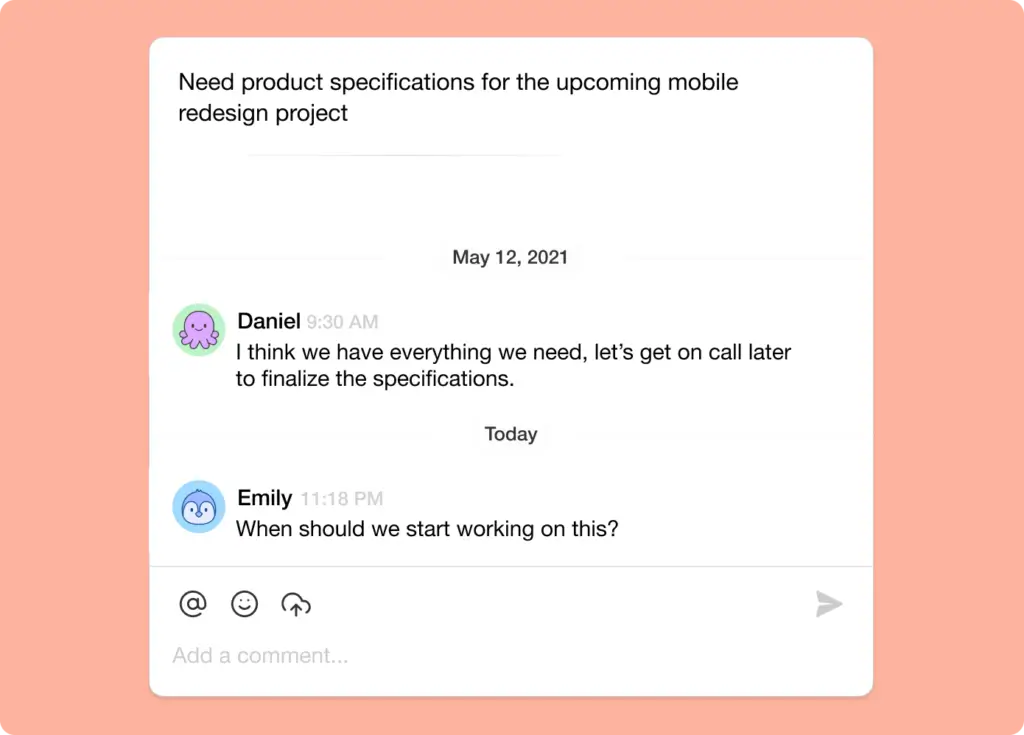
Taskade features three communication channels⁠—video conferencing, chat, and regular VoIP call⁠s— so you and your team can discuss whatever you’re working on. 

Every outline you create is essentially a self-contained team workspace with an integrated chat window. You can send direct messages, start a video meeting, or jump on a team call without shuffling windows or leaving the app.
taskade commenting 1

Planning (Calendar) and Task Management (My Tasks)

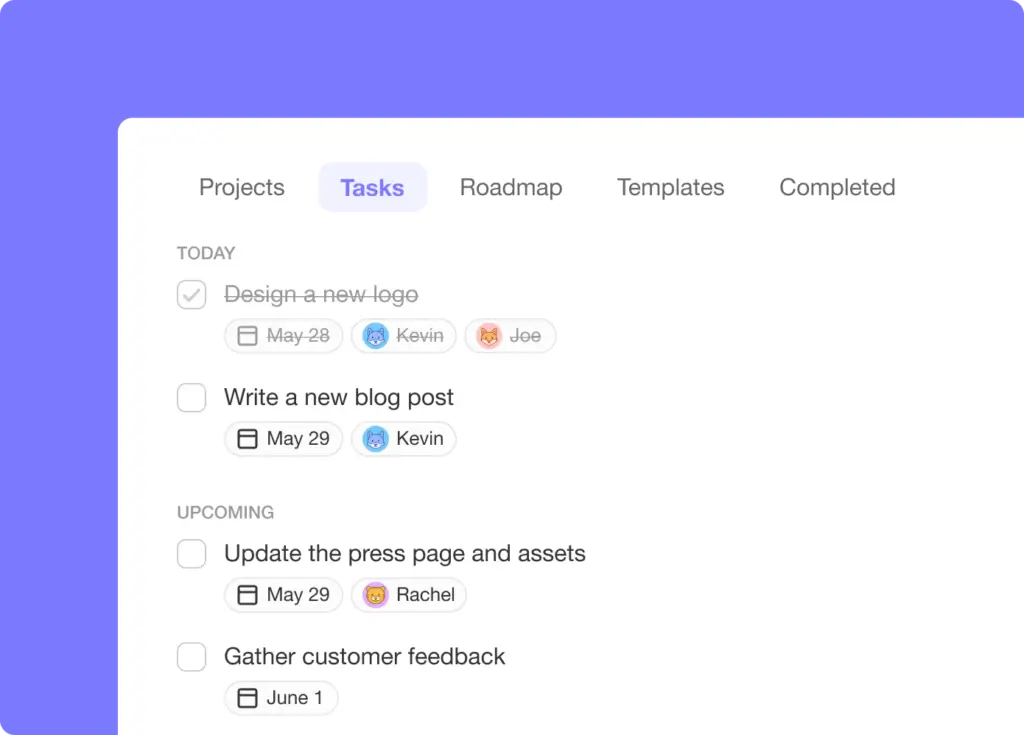
In Taskade, every outline is essentially a to-do list, complete with due dates, #tags, and task owners. All your tasks and sub-tasks are also visible in a shared Calendar and My Tasks space.

My Tasks include information like task due date and task owners. The Calendar displays all tasks and projects with due dates and/or date ranges across all Workspaces. This way, you can easily track everything that happens in your team in real-time.
my tasks checkbox 1

Want to track your tasks across different ecosystems? Taskade syncs with Apple, Google, and/or Outlook calendars so you can see all scheduled tasks and projects in your favorite calendar. 

Outlining on the Go (Mobile Outliner)

What good is a project outliner if you can’t manage tasks and chat with your team on the go? Taskade comes with fully-fledged mobile apps, ready to hit the road.
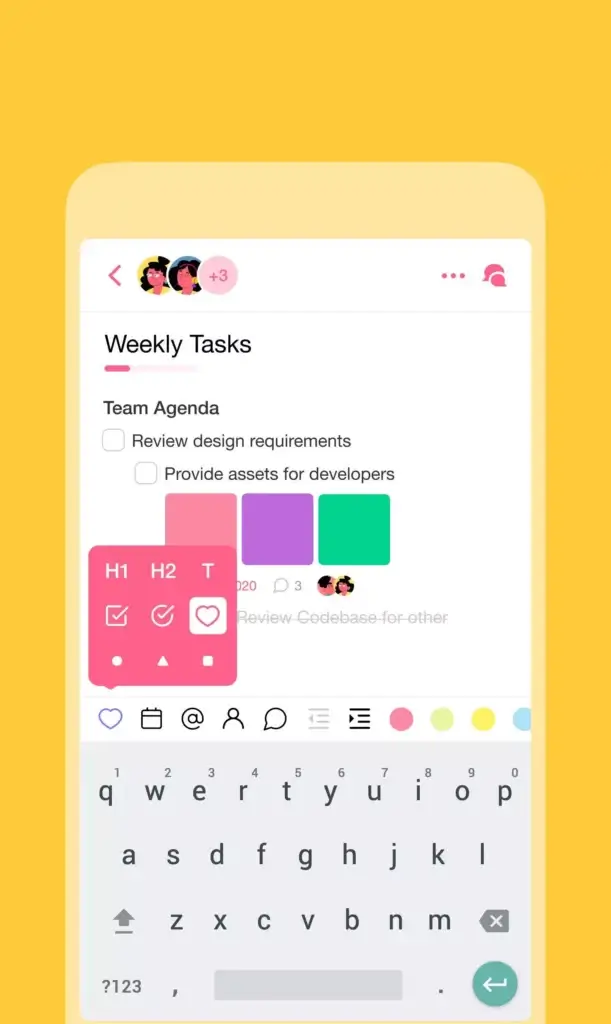
taskade mobile

Our mobile apps are available on iOS and Android and support the same powerful outlining features you can find in "big" desktop clients. Create high-level hierarchies, apply different formatting options, fold & unfold outline levels, and more. 

Visit our downloads page and pick the right app for your device! 👈

Team Management (Roles and Permissions)

Finally, let's talk about team management. Every time you invite a team member to collaborate on an outline, you get to decide what they can change by defining User Roles & Permissions. 

Taskade lets you choose between five distinct user roles—viewer, editor, admin, owner, and checker—each with its own set of editing privileges. You can set user roles when inviting new members to collaborate and modify them later in Workspace settings.
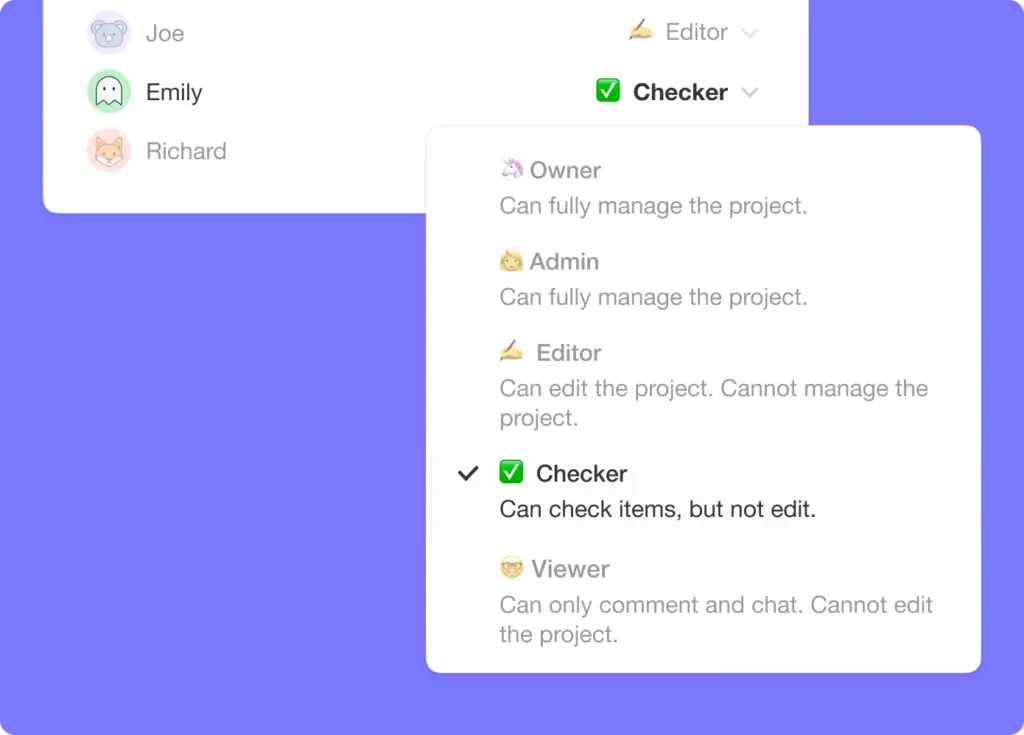
taskade checker role 1

👋 Parting Words

A project outliner is a simple but powerful tool for all kinds of projects. Using a dedicated outliner app like Taskade will help you make the most of hierarchical structures with your team.


Bring order into the chaos of task management with Taskade AI! 🤖

🤖 Custom AI Agents: Deploy AI agents to supercharge your workflows — prioritize tasks, generate content, and much more.

🪄 AI Generator: Create detailed outlines for projects — the generator will suggest hierarchical breakdowns of tasks to help you crush your goals.

✏️ AI Assistant: The assistant will help you generate content, introduce edits for clarity and impact, and prioritize tasks based on impact.

🗂️ AI Prompt Templates Library: Access a wide range of AI prompt templates designed for personal and business task management.

💬 AI Chat: Engage with AI Chat for immediate assistance in structuring projects, organizing tasks, and planning next steps.

📄 Media Q&A: Extract valuable insights from documents, spreadsheets, and other resources for more informed productivity choices.

And much more...

Frequently Asked Questions About Project Outliners

What is a project outline?

A project outline is a structured plan that highlights the main components of a project. It includes key objectives, tasks, timelines, and resources needed. The outline serves as a roadmap that helps you and your team understand the project's scope and direction. Using a project outliner tool can make this process easier by organizing and managing all the details effectively.

How to present a project outline?

To present a project outline, start with a clear introduction that explains the project's goals and objectives. Use a logical structure, breaking down the outline into main sections like tasks, timelines, and resources. Visual aids like charts, graphs, and timelines can make your presentation more engaging and easier to understand. A project outliner software like Taskade can help you create a detailed and visually appealing project outline.

How long is a project outline?

The length of a project outline can vary depending on the project's complexity. For simpler projects, a one-page outline may suffice. More complex projects might require several pages to cover all the details. The key is to be concise yet comprehensive, ensuring that all critical aspects are covered without overwhelming the reader. A project outliner tool can help find the right balance.

How do you write a good project outline?

To write a good project outline, start by clearly defining the project's goals and objectives. Break down the project into smaller, manageable tasks. Assign timelines and resources to each task. Use headings and bullet points to organize information logically. Make sure to include key milestones and deliverables. Review and revise the outline to ensure clarity and completeness. Using project outliner software can streamline the process.

Taskade AI banner.

0%

On this page

🌟 A Primer on Using a Project OutlinerWhat Is a Project Outliner?🤹‍♂️ What Can You Use a Project Outliner For?⚙️ How Does a Project Outliner Work?Parent/Child ElementsFolding/Unfolding#Tags and FormattingKeyboard Navigation and ShortcutsCross-Linking and Search👑 Project Outliners Are the Apex of Task Management🤖 The Rise of Collaborative Project OutlinersPlanning (Calendar) and Task Management (My Tasks)Outlining on the Go (Mobile Outliner)Team Management (Roles and Permissions)👋 Parting WordsFrequently Asked Questions About Project Outliners

Related Articles

What is ClickUp? Complete History of Project Management & Work OS Platform
February 4, 2026Productivity

What is ClickUp? History of the 'One App to Replace Them All' Project Management Platform

The complete history of ClickUp from Zeb Evans' 2017 founding to $6B valuation. Learn how ClickUp grew from internal too...

Build an internal tool without code in 2026 — an operations dashboard and approval workflow built on Taskade Genesis with an AI agent that runs the work, automations, and 100+ integrations, no engineering backlog
May 26, 2026Productivity

How to Build an Internal Tool Without Code in 2026 (No Engineering Backlog)

Build an internal tool without code in 2026 — an approval inbox, inventory tracker, or admin panel with an AI agent that...

Build a CRM without code in 2026 — a live sales pipeline on Taskade Genesis with an AI agent that drafts follow-ups, automations that move deals, and 100+ integrations, no developer required
May 25, 2026Productivity

How to Build a CRM Without Code in 2026 (No Developer Needed)

Build a CRM without code in 2026 — a live pipeline with an AI agent that drafts follow-ups and automations that move dea...

Build a business app without code in 2026 — a live client portal and service dashboard built on Taskade Genesis with AI agents, automations, and 100+ integrations, no engineer required
May 24, 2026Productivity

How to Build a Business App Without Code in 2026 (No Engineer Required)

Build a real business app without code in 2026 — a working dashboard, CRM, or client portal with AI agents and automatio...

SaaS metrics dashboard templates 2026 — 5 free cloneable Taskade Genesis dashboards for MRR, ARR, churn, NRR, CAC payback, LTV/CAC, and burn multiple with embedded AI agents and 100+ bidirectional integrations
May 18, 2026Productivity

SaaS Metrics Dashboard: 5 Free Templates for MRR, ARR & Churn (2026)

Five free SaaS metrics dashboard templates — live Taskade Genesis apps tracking MRR, ARR, churn, NRR, and burn multiple ...

Best AI task managers 2026 — Taskade Genesis vs Motion, Sunsama, Reclaim, Todoist AI
May 17, 2026Productivity

Best AI Task Managers 2026: 10 Apps That Plan Your Day

Best AI task managers in 2026 ranked. Taskade Genesis #1 — 7am smart-priority re-ranking, focus mode, energy-pattern awa...

View All Articles
Organize Tasks in Hierarchies With an Outliner | Taskade Blog