







Have you ever felt lost in the clutter of tasks and ideas?
Are you tired of wasting hours when starting new projects?
Do you want to look at your tasks from new angles?
The way you visualize tasks directly impacts your efficiency. And perspective is everything. But most project management tools out there serve the cookie-cutter approach. 🍪
When everybody else expects you to put in tons of manual work just to start a project, we want you to leave the heavy lifting to us. Our smart AI assistant and dynamic project workflows will help you transform your tasks and work like you never worked before.
So you can focus on what you do best.
TL;DR: Generative AI converts task lists into visual workflows — mind maps, kanban boards, Gantt charts, and more — in seconds. Taskade's project views let you switch perspectives instantly without losing data, while AI agents generate and manage the underlying tasks. Try Taskade free →
🦩 It All Starts with The Origami Method
Origami is the ancient art of folding a sheet of paper into a sculpture without cutting, gluing, or marking the paper. Every fold signifies a transformation, subtle, nuanced, and deliberate.
The Origami Method lies at the heart of Taskade’s power to transform your tasks and projects in multiple ways. From a simple to-do list, the starting point of all great projects, to high-level workflows, Taskade allows you to sculpt and refine your vision before you bring it to life.
Each project is a living document with eight unique views that give you infinite creative possibilities and a place to think. Your project data is structured and persistent across all views, so you can transform your tasks and workflows one "fold" at a time, without losing context.

Use the buttons at the top of a project to seamlessly switch between projects.
Let’s see how that works. 👇
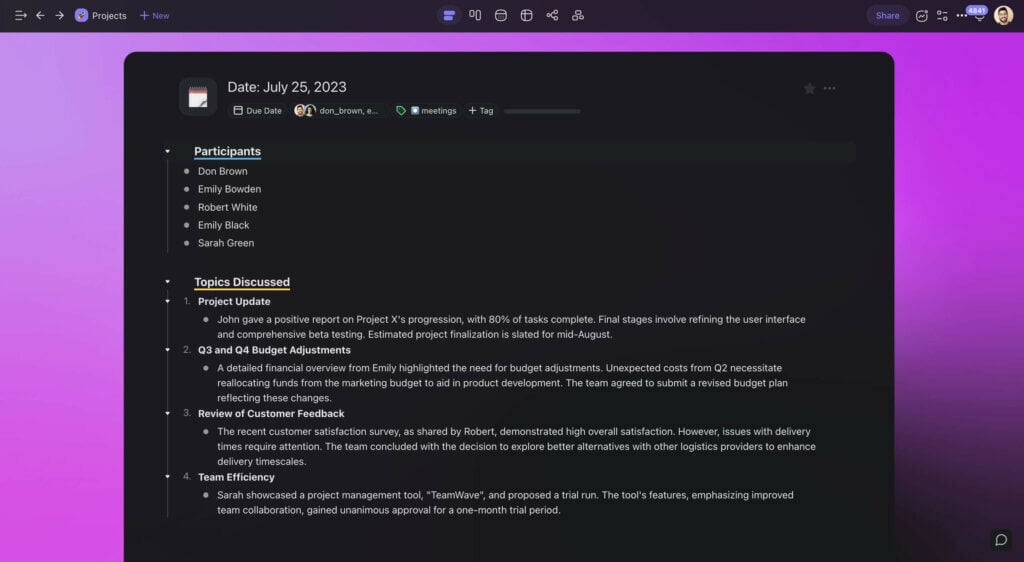
📃 List View — Organize, Outline, Manage
Every great project starts with a plan.
Ok, let us take that back.
Every great project starts with a list.
It can be as simple as a few business ideas scribbled on a napkin or thoughts jotted down in the middle of the night. Lists are the spark that drives growth.
The linear nature of the List view promotes focus, with each item, no matter how small, acting as a stepping stone toward the bigger picture. A document outline, a simple to-do, a multi-level checklist, lists set the groundwork for action.
⚙️ Who Is This View For?
Whether you're a startup founder, a novelist, or just like to keep your life and work organized, the List view will keep you on track. Here are some of the most popular use cases you can try:
| Daily Task Management | Outlining |
|---|---|
| Prioritization of Tasks | Setting Task Dependencies |
| Breaking Tasks into Steps | Project Milestones |
🌁 Top Templates / Generators
Don’t want to start from scratch? Taskade features hundreds of templates and AI generators so you can spend more time on doing. Grab these templates to get started quickly:
⚡ Pro Tip
Taskade AI is a smart assistant that lives inside the project editor. Simply type one of the /AI commands to create outlines, brainstorm ideas, and supercharge your writing. Learn more...
📋 Board View — Visualize, Prioritize, Adapt
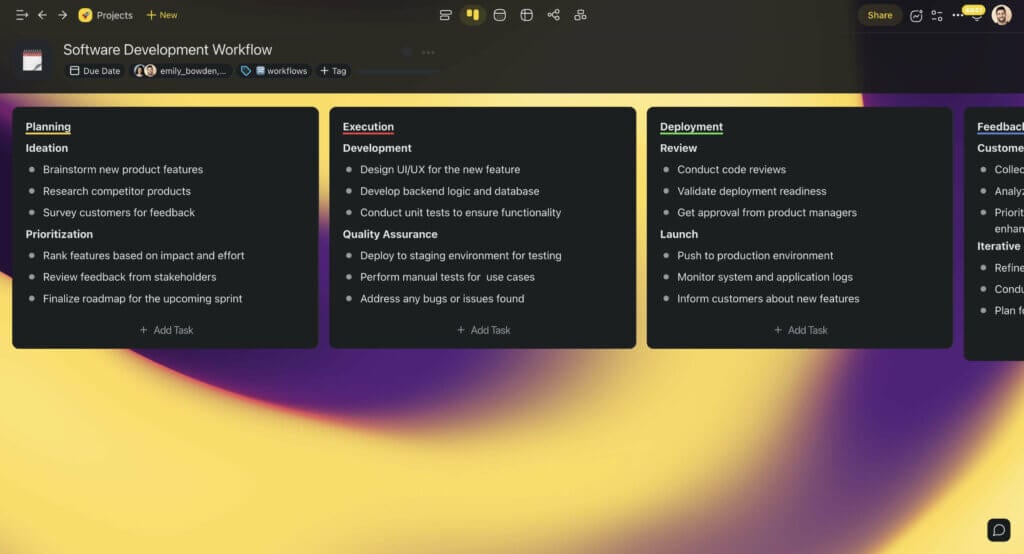
Tasks are more than just collections of items. Sometimes, a visual approach is what you need to see the bigger picture. The Board view with its Kanban heritage is the perfect tool for that.
Bring clarity and order to complex projects. Rearrange and customize board cards to mirror a project’s evolving nature and your unique work style. Drag items between cards to track progress and keep the work flowing and your team on the same page.
⚙️ Who Is This View For?
For those who love visual clarity. If you’re a project manager, designer, event planner, or team leader, you will find the Board view indispensable. Here's how our community is using it:
| Tracking Task Progressions | Visual Workflow Management |
|---|---|
| Categorizing Tasks by Status | Overview of Project Phases |
| Team Collaboration & Feedback | Milestone Checkpoints |
🌁 Top Templates / Generators
⚡ Pro Tip
Structure projects using the Workflow Generator. Click ➕ New Project to start. Learn More...
🗓️ Calendar View — Schedule, Track, Complete
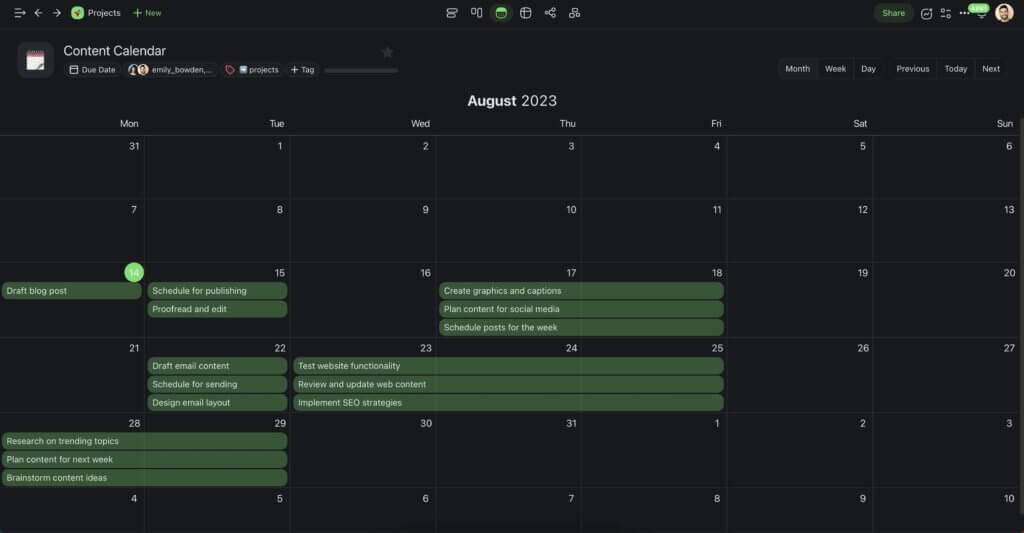
Picture your entire project timeline, every task, every deadline, all laid out in a visual calendar. That's the essence of the Calendar view. Because timing matters.
The Calendar view gives you a high-level overview of the past, the present, and the future. Set key milestones, pace your projects, and understand your team’s rhythm.
⚙️ Who Is This View For?
The essence of every project lies in its timeline. Entrepreneurs, marketers, and educators — if schedules, deadlines, and milestones define your goals, the Calendar view is your tool.
| Content Calendar | Project Milestones |
|---|---|
| Financial Cycles | Product Release Cycles |
| Team Availability | Client Touchpoints |
🌁 Top Templates / Generators
⚡ Pro Tip
Trying to set realistic deadlines for tasks? Ask Taskade AI in the project chat! Learn more...
⚡ Action View — Detail, Clarify, Act
A wise man once said, “When tasks meet detail, mastery follows.”
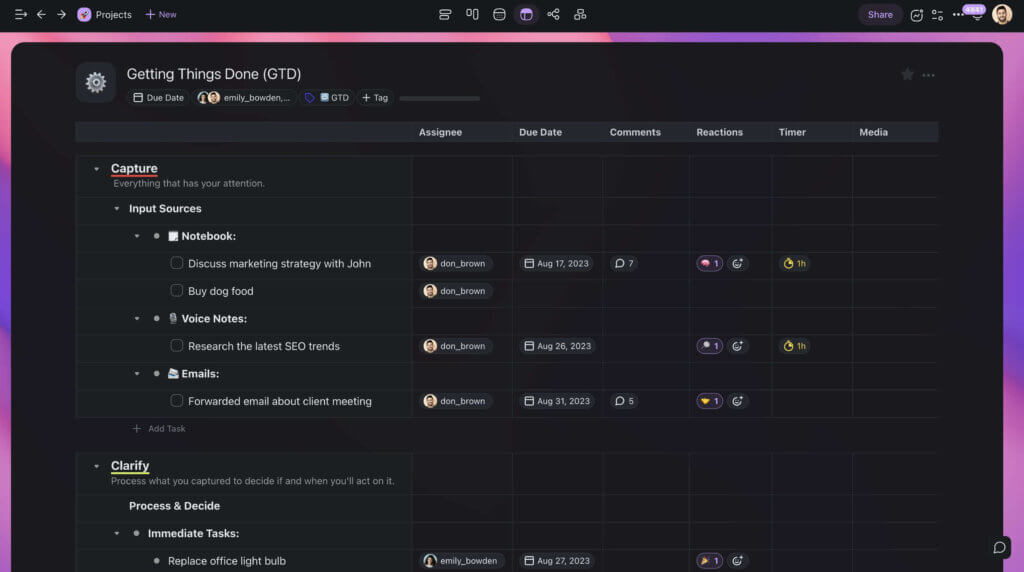
A task without context is just an item on your to-do list. It may stay there forever if you don’t make it actionable and set it in motion. This is where the Action view comes into play.
The Action view is Taskade’s answer to the boring spreadsheet format. Turn tasks into context-rich and comprehensive action items, complete with assignees, due dates, comments, and attachments. Bring clarity, direction, and momentum to your strategy.
⚙️ Who Is This View For?
If you’re a Getting Things Done (GTD) enthusiast, this workflow is for you. Detail-driven and ready for action, the Action view gives you a high-level overview of every initiative.
Use the Action view for:
| Detailed Task Breakdown | Assigning Task Ownership |
|---|---|
| Tracking Task Progress | Setting Task Dependencies |
| Gathering Task Feedback | Defining Task Milestones |
🌁 Top Templates / Generators
⚡ Pro Tip
Use the AI Spreadsheet Converter to turn spreadsheets into new projects. Learn more...
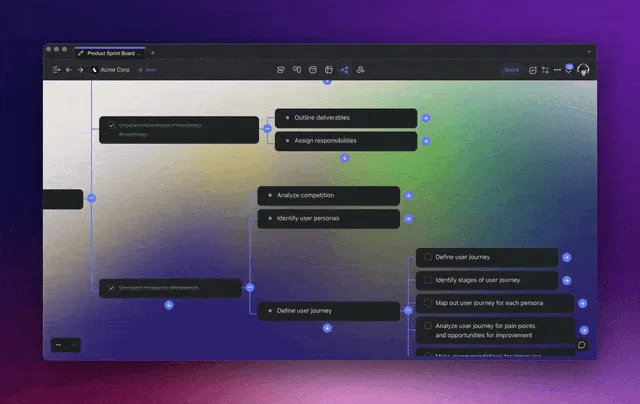
🧠 Mind Map View — Think, Connect, Expand
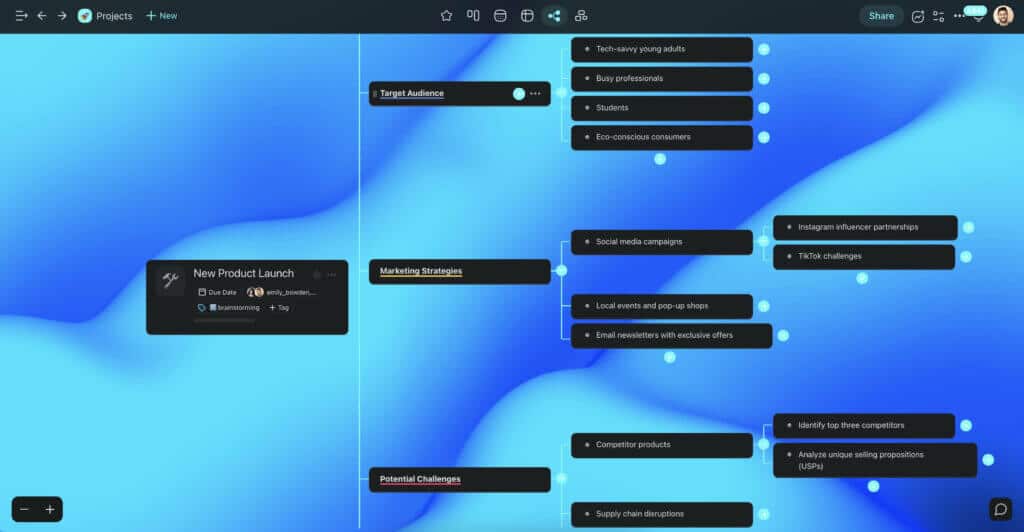
Imagine ideas branching out, connecting, forming a structured, visual hierarchy. Now imagine that you have full control of the flow of those ideas. Or you can just use the Mind Map view.
The Mind Map view is an excellent visual thinking tool. It allows you and your team to turn abstract thoughts into actionable insights while collaborating on the same project, in real time.
⚙️ Who Is This View For?
The Mind Map is a must-have tool for agencies, content creators, educators, and marketers who need an infinite, digital canvas for generating, mixing, and testing different ideas.
| Visual Brainstorming | Concept Development |
|---|---|
| Idea Branching | Creative Team Collaboration |
| Strategy Mapping | Visual Idea Representation |
🌁 Top Templates / Generators
⚡ Pro Tip
Taskade AI’s Mind Map Generator will help you build mind maps faster. Click the arrow to the right of a mind map node to generate ideas, subtasks, or questions. Learn more...
🧩 Org Chart View — Group, Classify, Structure
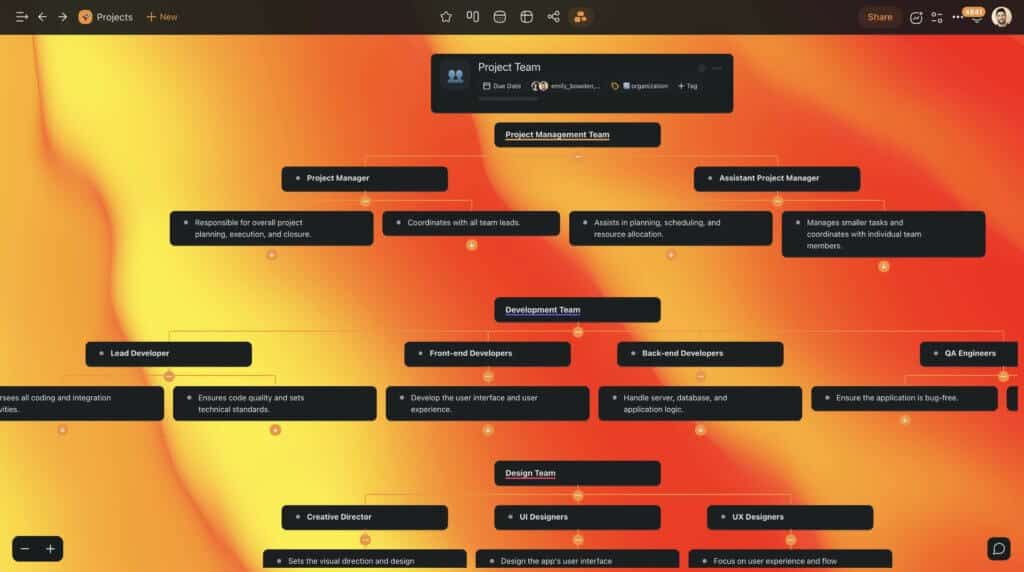
Every project has layers. Understanding how each layer interacts and functions is key. The Org Chart view unveils this hierarchy to ensure that each piece fits perfectly within the puzzle.
The top-down workflow will help you visualize dependencies, streamline communication paths, and establish clear roles and responsibilities within the project team.
⚙️ Who Is This View For?
Organizers, leaders, and planners who need a blueprint for success. The Org Chart view is the backbone of organized thinking. Use it to declutter and structure your workflow.
| Organizational Hierarchy | Project Team Structure |
|---|---|
| Vendor-Client Mapping | Cross-Functional Team Structures |
| Product Team Organization | Interdepartmental Flows |
🌁 Top Templates / Generators
⚡ Pro Tip
Taskade AI will help you supercharge all kinds of tasks. If you get stuck, click your profile avatar in the top-right corner and select AI Prompt Templates. Learn more...
Visual Workflow Tools Compared
| Feature | Taskade | Trello | Miro | Monday.com | Notion |
|---|---|---|---|---|---|
| Project Views | Multiple (List, Board, Calendar, Table, Mind Map, Gantt, Org Chart) | 1 (Board) | Whiteboard | 8+ views | 4 views |
| AI Generation | Describe project → AI builds workflow | Butler automations | AI beta | AI automations | AI blocks |
| AI Agents | built-in tools | No | No | Basic | No |
| View Switching | Instant — same data, any view | N/A | N/A | Manual setup per view | Manual setup |
| Automations | 100+ integrations | Power-Ups | Limited | 200+ integrations | Limited |
| Collaboration | Real-time + video chat | Real-time | Real-time | Real-time | Real-time |
| Starting Price | Free / $10/mo | Free / $5/user/mo | Free / $8/user/mo | $9/seat/mo | $8/user/mo |
Build custom workflow visualization systems with Taskade Genesis — describe your ideal dashboard and get a live app in seconds. Explore what the community has built, or browse 500+ templates.
Workspace DNA: Visual Workflows That Build, Think, and Run Themselves
Generative AI can create a visual workflow in seconds. But the real power comes when that workflow lives inside a system that learns from your data, adapts to your needs, and executes without manual intervention. That is exactly what Taskade's Workspace DNA framework delivers through Memory, Intelligence, and Execution.
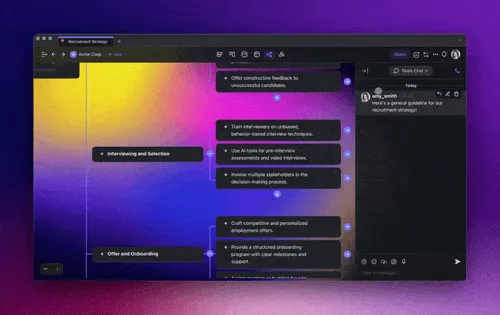
Memory means every workflow, task board, timeline, and project plan persists in one shared workspace. The project views — List, Board, Calendar, Table, Mind Map, Gantt, and Org Chart — are not separate tools but different lenses on the same data. Switch views instantly without losing structure or context. Intelligence powers the generative layer. AI agents with built-in tools and frontier models from top AI labs can generate workflows from natural language, restructure existing projects, identify bottlenecks, and suggest optimizations based on your team's historical patterns.
Execution automates the entire pipeline. Automations with 100+ integrations and durable execution handle task assignments, deadline reminders, status updates, and cross-tool syncing — all running reliably in the background. The cycle is self-reinforcing: your completed workflows feed Memory, Memory informs AI suggestions, and automations keep new workflows on track.
With Taskade Genesis, you can build custom workflow visualization apps through vibe coding — describe your ideal dashboard or project tracker in plain language and get a deployed app in seconds. Over 150,000 apps have been built this way. Explore community-built workflow tools or start with the Free plan, then Pro at $10/mo, and Business at $25/mo, both billed annually. Learn more about how Workspace DNA works and living software.
Agentic AI: From Static Boards to Self-Managing Visual Systems
Agentic AI transforms visual workflows from passive displays into active management systems. Autonomous AI agents with built-in tools, custom tool schemas, and persistent memory don't just generate visual workflows — they manage them. Agents auto-populate task boards from project descriptions, move cards between Kanban columns based on completion signals, update Gantt dependencies when timelines shift, and generate visual progress reports for stakeholders. Deploy a Board Manager agent that keeps Kanban boards current, a Timeline Agent that adjusts Gantt charts as priorities change, or a Dashboard Agent that generates executive-level visual summaries. Build custom visualization systems with Taskade Genesis — it's vibe coding for project visualization. Read the Ultimate Guide to Taskade Genesis.
Project View Selection Guide
| Project Type | Recommended Primary View | Secondary View | AI Agent Role |
|---|---|---|---|
| Sprint planning | Board (Kanban) | Calendar | Agent manages sprint backlog |
| Strategic planning | Mind Map | Table | Agent generates strategy branches |
| Content calendar | Calendar | List | Agent schedules and assigns content |
| Resource management | Table | Org Chart | Agent balances workloads |
| Product roadmap | Timeline | Gantt | Agent tracks milestones and dependencies |
| Process documentation | Mind Map | Board | Agent maps and updates processes |
| Team coordination | Org Chart | Board | Agent routes tasks by department |
| Client projects | Gantt | Timeline | Agent monitors deadlines and alerts |
🐑 Transform Your Tasks with Taskade
Assembling the right productivity toolbox is no mean feat. With thousands of apps and services out there, you may be wondering where to start. If you not only want to find a solution but also invest in the future of your brand, Taskade 🐑 has you covered.
Work smarter with Taskade AI! 🤖
🤖 Custom AI Agents: Deploy autonomous AI agents with unique knowledge and skills to transform tasks across all your projects.
🪄 AI Generator: Describe what you're working on, and Taskade AI will generate beautifully organized, prioritized lists that inspire action.
✏️ AI Assistant: Create, refine, and organize your task lists with AI to ensure they are always up to date and aligned with your goals.
🗂️ AI Prompt Templates Library: Choose from hundreds of AI prompts for all kinds of projects, accessible from anywhere inside Taskade.
💬 AI Chat: Use the AI Chat to brainstorm ways to enhance your task lists, optimize your workflows, and overcome obstacles.
📄 Media Q&A: Upload your task lists and other documents for AI-powered tips and suggestions. It's as simple as chatting with a colleague.
🧬 Taskade Genesis: Build custom workflow visualization apps from a single prompt. It's vibe coding: describe your ideal dashboard, Taskade builds it as living software. Explore the Community Gallery.
📖 Learn more: Ultimate Guide to Taskade Genesis | What Is Vibe Coding? | How Workspace DNA Works | Browse Templates
And much more...

Frequently Asked Questions
How can generative AI transform tasks into visual workflows?
Generative AI can automatically convert task lists into visual formats like mind maps, kanban boards, flowcharts, and Gantt charts. Tools like Taskade let you describe your project in natural language, and AI generates a structured visual workflow with tasks, dependencies, and timelines. You can then switch between views — list, board, mind map, or calendar — to see your work from different perspectives.
What are the benefits of visualizing tasks as workflows?
Visual workflows improve productivity by revealing task dependencies and bottlenecks, making project scope easier to understand at a glance, facilitating team communication about priorities, reducing cognitive load compared to text-only task lists, and enabling faster identification of scheduling conflicts. Different visual formats serve different needs — kanban for status tracking, mind maps for brainstorming, Gantt charts for timelines.
What types of visual workflows can AI generate?
AI can generate multiple visual workflow formats including mind maps (hierarchical idea exploration), kanban boards (status-based task tracking), flowcharts (process documentation), Gantt charts (timeline-based planning), org charts (team structure), and calendar views (date-based scheduling). The best AI tools let you switch between these views instantly without recreating your data.
How do I choose the right visual workflow format for my project?
Choose based on what you need to track: use kanban boards for status-based workflows (to-do, in progress, done), mind maps for brainstorming and planning, Gantt charts for deadline-heavy projects with dependencies, calendar views for time-based scheduling, and table views for data-heavy projects. Many AI tools let you switch between formats, so you can use multiple views for the same project.
How does Taskade Genesis help create custom visual workflow systems?
Taskade Genesis lets teams build custom workflow visualization apps from a single prompt. With 150,000+ apps already created, teams generate interactive dashboards, process trackers, and visual project management systems that deploy instantly with custom domains. Visit taskade.com/ai/apps to explore ready-made workflow tools or describe your ideal system and build it in seconds.
What is vibe coding and how does it apply to workflow visualization?
Vibe coding means building software by describing what you want in natural language rather than writing code. For workflow visualization, teams describe their ideal project dashboard — such as a system that shows tasks across Kanban, Gantt, and Calendar views with automated status updates — and Taskade Genesis builds it as a live app. This eliminates the manual configuration that traditional PM tools require.
How do AI agents enhance visual workflow management?
Taskade AI agents with built-in tools and 100+ integrations transform visual workflows from passive displays into active management systems. Agents auto-populate task boards from project briefs, move cards between columns based on completion status, generate visual progress reports, and flag bottlenecks in real time. With persistent memory, agents learn your team's workflow patterns and suggest optimizations.
What is Workspace DNA and how does it power visual workflow intelligence?
Workspace DNA is Taskade's self-reinforcing loop of Memory, Intelligence, and Execution. Memory (Projects) stores workflow configurations, task movement patterns, and completion metrics across all views. Intelligence (AI agents) analyzes which visual formats and workflows produce the best outcomes for different project types. Execution (Automations) triggers view-specific actions like moving Kanban cards or updating Gantt timelines. This loop ensures your visual workflows optimize themselves over time.