Taskadetaskade
PricingLoginSign up for free →Sign up for free →
Loved by 1M+ users·Hosting 100K+ apps·Deploying 500K+ AI agents·Running 1M+ automations·Backed by Y Combinator
TaskadeAboutPressPricingFeaturesIntegrationsChangelogContact us
GalleryProductivityKitsVideosReviewsLearnHelpDocsFAQ
VibeVibe AppsVibe AgentsVibe CodingVibe Workflows
Vibe MarketingVibe DashboardsVibe CRMVibe AutomationVibe PaymentsVibe DesignVibe SEOVibe Tracking
Community
FeaturedQuick AppsTools
DashboardsWebsitesWorkflowsProjectsFormsCreators
DownloadsAndroidiOSMac
WindowsChromeFirefoxEdge
Compare
vs Cursorvs Boltvs Lovable
vs V0vs Windsurfvs Replitvs Emergentvs Devinvs Claude Codevs ChatGPTvs Claudevs Perplexityvs GitHub Copilotvs Figma AIvs Notionvs ClickUpvs Asanavs Mondayvs Trellovs Jiravs Linearvs Todoistvs Evernotevs Obsidianvs Airtablevs Basecampvs Mirovs Slackvs Bubblevs Retoolvs Webflowvs Framervs Softrvs Glidevs FlutterFlowvs Base44vs Adalovs Durablevs Gammavs Squarespacevs WordPressvs UI Bakeryvs Zapiervs Makevs n8nvs Jaspervs Copy.aivs Writervs Rytrvs Manusvs Crewvs Lindyvs Relevance AIvs Wrikevs Smartsheetvs Monday Magicvs Codavs TickTickvs Any.dovs Thingsvs OmniFocusvs MeisterTaskvs Teamworkvs Workfrontvs Bitrix24vs Process Streetvs Toggl Planvs Motionvs Momentumvs Habiticavs Zenkitvs Google Docsvs Google Keepvs Google Tasksvs Microsoft Teamsvs Dropbox Papervs Quipvs Roam Researchvs Logseqvs Memvs WorkFlowyvs Dynalistvs XMindvs Whimsicalvs Zoomvs Remember The Milkvs Wunderlist
Genesis AIVideo GuideApp BuilderVibe Coding
Agent BuilderDashboard BuilderCRM BuilderWebsite BuilderForm BuilderWorkflow AutomationWorkflow BuilderBusiness-in-a-BoxAI for MarketingAI for Developers
AI Agents
FeaturedProject ManagementProductivity
MarketingTranslatorContentWorkflowResearchPersonalSalesSocial MediaTo-Do ListCRMTask AutomationCoachingCreativityTask ManagementBrandingFinanceLearning and DevelopmentBusinessCommunity ManagementMeetingsAnalyticsDigital AdvertisingContent CurationKnowledge ManagementProduct DevelopmentPublic RelationsProgrammingHuman ResourcesE-CommerceEducationLegalEmailSEODeveloperVideo ProductionDesignFlowchartDataPromptNonprofitAssistantsTeamsCustomer ServiceTrainingTravel PlanningUML DiagramER DiagramMath TutorLanguage LearningCode ReviewerLogo DesignerUI WireframeFitness CoachAI Lead EnrichmentFounder OSAI SDR AgentAll Categories
Automations
FeaturedBusiness-in-a-BoxInvestor Operations
Education & LearningHealthcare & ClinicsStripeSalesContentMarketingEmailCustomer SupportHubSpotProject ManagementAgentic WorkflowsBooking & SchedulingCalendarReportsSlackWebsiteFormTaskWeb ScrapingWeb SearchChatGPTText to ActionYoutubeLinkedInTwitterGitHubDiscordMicrosoft TeamsWebflowRSS & Content FeedsGoogle WorkspaceManufacturing & OperationsAI Agent TeamsMulti-Agent AutomationNotion AutomationsAgentic AutomationAll Categories
Wiki
Taskade GenesisAI AgentsAutomation
ProjectsLiving DNAAutonomous Workspaces, Agents & AppsQuantum AI & Taskade Genesis QuantumPlatformIntegrationsProductivityMethodsProject ManagementAgileScrumAI ConceptsCommunityTerminologyFeatures
Templates
FeaturedChatGPTTable
PersonalProject ManagementSalesFlowchartTask ManagementEngineeringEducationDesignTo-Do ListMarketingMind MapGantt ChartOrganizationalPlanningMeetingsTeam ManagementStrategyGamingProductionProduct ManagementStartupRemote WorkY CombinatorRoadmapCustomer ServiceLegalEmailBudgetsContentConsultingE-CommerceStandard Operating Procedure (SOP)Human ResourcesProgrammingMaintenanceCoachingSocial MediaHow-TosResearchMusicTrip PlanningCRMClient OnboardingEmployee OnboardingSOPBug TrackerRecruitment TrackerFormSales PipelineContent CalendarMarketing PlanProduct RoadmapBusiness PlanSWOT Analysis30-60-90 Day PlanInterviewNotion AlternativeKPI TemplatesStrategic Plan TemplatesMeeting Agenda TemplatesInvoiceRisk RegisterIT Asset ManagementKanban BoardChange ManagementCommunication PlanRFPScope of WorkStatement of WorkHelpdeskKnowledge BaseCreative BriefGoal SettingExecutive SummaryGap AnalysisBooking SystemEvent ManagementPortfolio TrackerCustomer Onboarding PortalsAll Categories
Generators
AI SoftwareNo-Code AI AppAI App
AI WebsiteAI DashboardAI FormAI AgentClient PortalAI WorkspaceAI ProductivityAI To-Do ListAI WorkflowsAI EducationAI Mind MapsAI FlowchartAI Scrum Project ManagementAI Agile Project ManagementAI MarketingAI Project ManagementAI Social Media ManagementAI BloggingAI Agency WorkflowsAI ContentAI Software DevelopmentAI MeetingAI PersonasAI OutlineAI SalesAI ProgrammingAI DesignAI FreelancingAI ResumeAI Human ResourceAI SOPAI E-CommerceAI EmailAI Public RelationsAI InfluencersAI Content CreatorsAI Customer ServiceAI BusinessAI PromptsAI Tool BuilderAI SEOAI Gantt ChartAI CalendarsAI BoardAI TableAI ResearchAI LegalAI ProposalAI Video ProductionAI Health and WellnessAI WritingAI PublishingAI NonprofitAI DataAI Event PlanningAI Game DevelopmentAI Project Management AgentAI Productivity AgentAI Marketing AgentAI Personal AgentAI Business and Work AgentAI Education and Learning AgentAI Task Management AgentAI Customer Relations AgentAI Programming AgentAI SchemaAI Business PlanAI Pitch DeckAI InvoiceAI Lesson PlanAI Social Media CalendarAI API DocumentationAI Database SchemaAI Marketing PlanAI Sales PipelineAI Course BuilderInternal ToolsAll Categories
Converters
AI Featured ConvertersAI PDF ConvertersAI CSV Converters
AI Markdown ConvertersAI Prompt to App ConvertersAI Data to Dashboard ConvertersAI Workflow to App ConvertersAI Idea to App ConvertersAI Flowcharts ConvertersAI Mind Map ConvertersAI Text ConvertersAI Youtube ConvertersAI Knowledge ConvertersAI Spreadsheet ConvertersAI Email ConvertersAI Web Page ConvertersAI Video ConvertersAI Coding ConvertersAI Task ConvertersAI Kanban Board ConvertersAI Notes ConvertersAI Education ConvertersAI Language TranslatorsAI Business → Backend App ConvertersAI File → App ConvertersAI SOP → Workflow App ConvertersAI Portal → App ConvertersAI Form → App ConvertersAI Schedule → Booking App ConvertersAI Metrics → Dashboard ConvertersAI Game → Playable App ConvertersAI Catalog → Directory App ConvertersAI Creative → Studio App ConvertersAI Agent → Agent App ConvertersAI Audio ConvertersAI DOCX ConvertersAI EPUB ConvertersAI Image ConvertersAI Resume & Career ConvertersAI Presentation ConvertersAI PDF to Spreadsheet ConvertersAI PDF to Database ConvertersAI PDF to Quiz ConvertersAI Image to Notes ConvertersAI Audio to Notes ConvertersAI Email to Tasks ConvertersAI CSV to Dashboard ConvertersAI YouTube to Flashcards ConvertersURL to NotesVideo → SummaryAll Categories
Prompts
Blog WritingBrandingPersonal Finance
Human ResourcesPublic RelationsTeam CollaborationProduct ManagementSupportAgencyReal EstateMarketingCodingResearchSalesAdvertisingSocial MediaCopywritingContentProject ManagementWebsite CreationDesignStrategyE-commerceEngineeringSEOEducationEmail MarketingUX/UIProductivityInfluencer MarketingAnalyticsEntrepreneurshipLegalVibe Coding PromptAll Categories
Blog
History of Spreadsheets: From VisiCalc to Taskade Genesis (2026)History of WebSockets: How the Web Got Real-Time (2026)History of Workflow Automation: From IFTTT to Bidirectional AI Agents (2026)
History of ServiceNow: From Fred Luddy's $35M Comeback to the AI Control Tower of the Enterprise (2026)Clone Apps. Add Login. Run Agents. Automate Flows. (May 2026)History of Lotus Notes: The Original Workspace App (2026)History of HyperCard: The First No-Code Builder That Predicted Taskade Genesis (2026)History of CRDTs: How Math Beat the Distributed Systems Problem (2026)History of Etherpad: How Aaron Iba's Open-Source Editor Shaped the Modern Web (2026)History of Real-Time Collaboration: From Engelbart's Mother of All Demos to AI Agents (2026)AI Thinking Modes Explained: Auto vs Standard vs Thinking vs Reasoning 2026How to Connect Claude Desktop and Cursor to Your Workspace With MCP in 20267 Best AI Content Calendar Tools That Automate YouTube & RSS in 2026How to Build an AI-Powered Team Knowledge Base in 2026 (Living Wiki Guide)$400 to $2.5M in One Year: How Jon Cheney Vibe-Coded a Business With No Code (2026)I Built 7 AI Apps in 1 Day With Live Cloneable Demos (2026)Notion vs Taskade Genesis: Static Templates vs Living Apps 2026Retool vs Taskade Genesis: AI App Builder Showdown 2026Agency Client Portal: 5 Free Templates with Real Workflows (2026)
AIAutomationProductivityProject ManagementRemote WorkStartupsKnowledge ManagementCollaborative WorkUpdates
Changelog
Use Your Own GPT & Claude Keys in Agents (May 8, 2026)Shopify One-Click Connect & App Polish (May 7, 2026)Programmatic API Hub & New Triggers (May 6, 2026)
Frontier Models Live & Secure Webhooks (May 5, 2026)Agent Citations & Pinned App Kit Items (May 4, 2026)Tidy in Bulk & Cleaner App Embeds (May 1, 2026)Structured AI & Website Summaries (Apr 30, 2026)
Wiki
Taskade GenesisAI AgentsAutomation
ProjectsLiving DNAAutonomous Workspaces, Agents & AppsQuantum AI & Taskade Genesis QuantumPlatformIntegrationsProductivityMethodsProject ManagementAgileScrumAI ConceptsCommunityTerminologyFeatures
© 2026 Taskade.
PrivacyTermsSecurity
Made withTaskade AIforBuilders
Blog›Productivity›The 9 Best To-Do List…

The 9 Best To-Do List Templates to Use in 2026

The beauty of using to-do lists is the freedom to make them as simple or as complex as you need. You can stick to the three most important tasks of the day or c...

December 29, 2022·Updated March 6, 2026·9 min read·Taskade Team·Productivity·#task-management#Templates
On this page (15)
🤔 What Are the Benefits of Using a To-Do List Template?✅ 9 Free To-Do List TemplatesTo-Do List TemplateWeekly Tasks TemplatePersonal Task Tracker TemplateGetting Things Done TemplateEisenhower Matrix TemplateMeeting Action Items Tracker TemplateTeam Task List TemplatePriority List TemplateEvent Planning To-Do List TemplateTo-Do List Templates at a GlanceWorkspace DNA: To-Do Lists That Organize, Prioritize, and Execute Themselves👋 Parting WordsFrequently Asked Questions

The beauty of using to-do lists is the freedom to make them as simple or as complex as you need. You can stick to the three most important tasks of the day or create the ultimate list, complete with notes and sub-tasks for the entire week. But why waste time starting over when you can use (and reuse) beautiful, free to-do list templates instead? 🥳

Here's a curated list of our top to-do list templates for every occasion!

TL;DR: The 9 best to-do list templates for 2026 include daily task lists, weekly planners, GTD workflows, Eisenhower matrices, and team task boards. All templates work across Taskade's 7 project views with built-in AI agents for auto-prioritization. Browse all templates -->

🤔 What Are the Benefits of Using a To-Do List Template?

Love it or hate it, the humble to-do list is still one of the most universal productivity tools around. And for all the good reasons. Here are a few benefits of using a to-do list template:

  1. ⏰ Saves time. Using a template means that you can get started immediately with pre-populated fields. Spend less time figuring out what's needed in your to-do list and get a head start by using a template.

  2. ✅ Improves organization. A to-do list template helps you organize your tasks and priorities in a clear and concise manner. It allows you to see all your tasks in one place and helps you stay on track with your goals.

  3. 🧘‍♂️ Reduces stress. A template can help reduce stress by giving you a clear idea of what needs to be done and when. This can help you feel more in control and less overwhelmed.

  4. ⚡️ Enhances productivity. By organizing your tasks and setting priorities, you can focus on the most important tasks and complete them efficiently. This can help you get more done in less time and increase your overall productivity.

  5. 📍 Helps with planning. A to-do list template can help you manage your workflow more effectively and plan ahead. By breaking your tasks down into smaller, more manageable chunks, you can better plan your day and make the most of your time.

✅ 9 Free To-Do List Templates

💡 Note: Our templates are suitable for individuals and teams. You can easily tailor each template to be more compatible with your workflow.

To-Do List Template
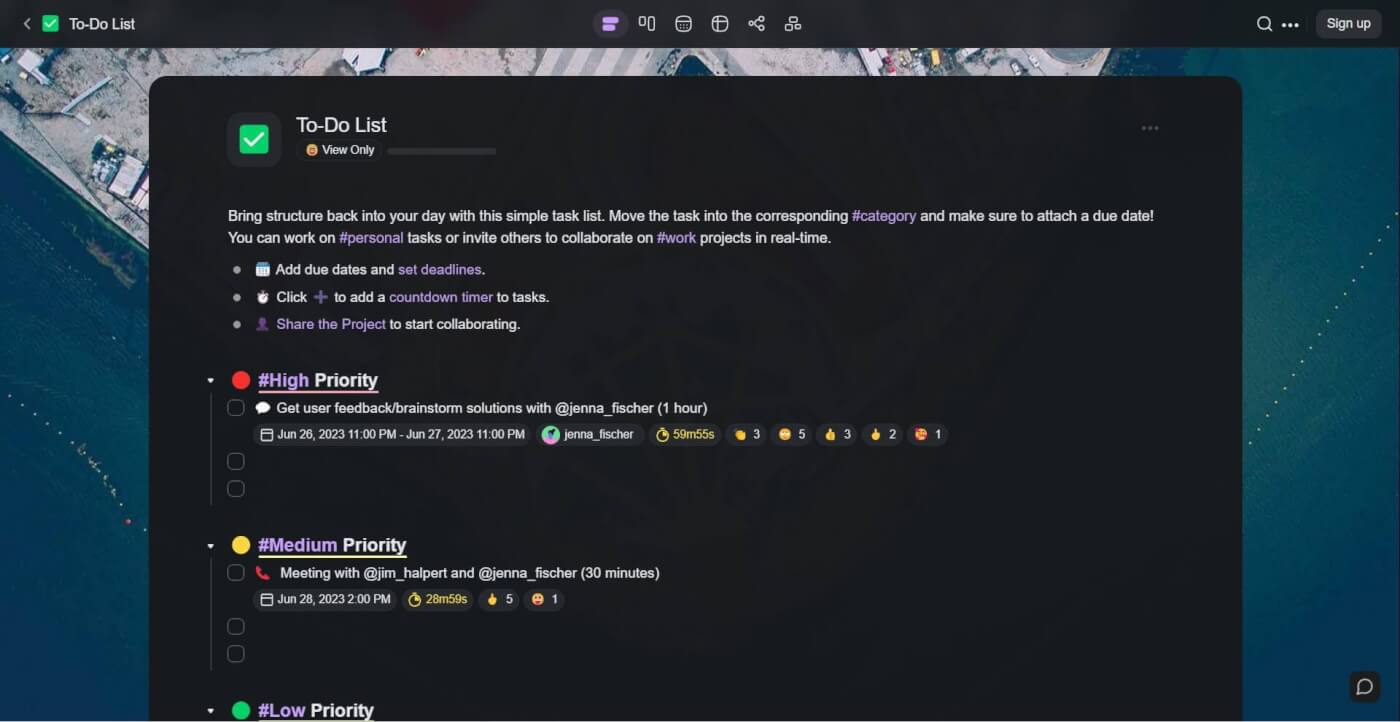
To-do list in Taskade.

To-do list template

This one's a true classic. Whether you're a beginner or a seasoned productivity guru, use this template to improve your productivity one check at a time.

Start by organizing the list by priority. List all your tasks for the day and assign them to one of the categories. Finally, add due dates and share the project to start collaborating.

Check this article if you're interested in some tips on organizing tasks based on priority.

Weekly Tasks Template
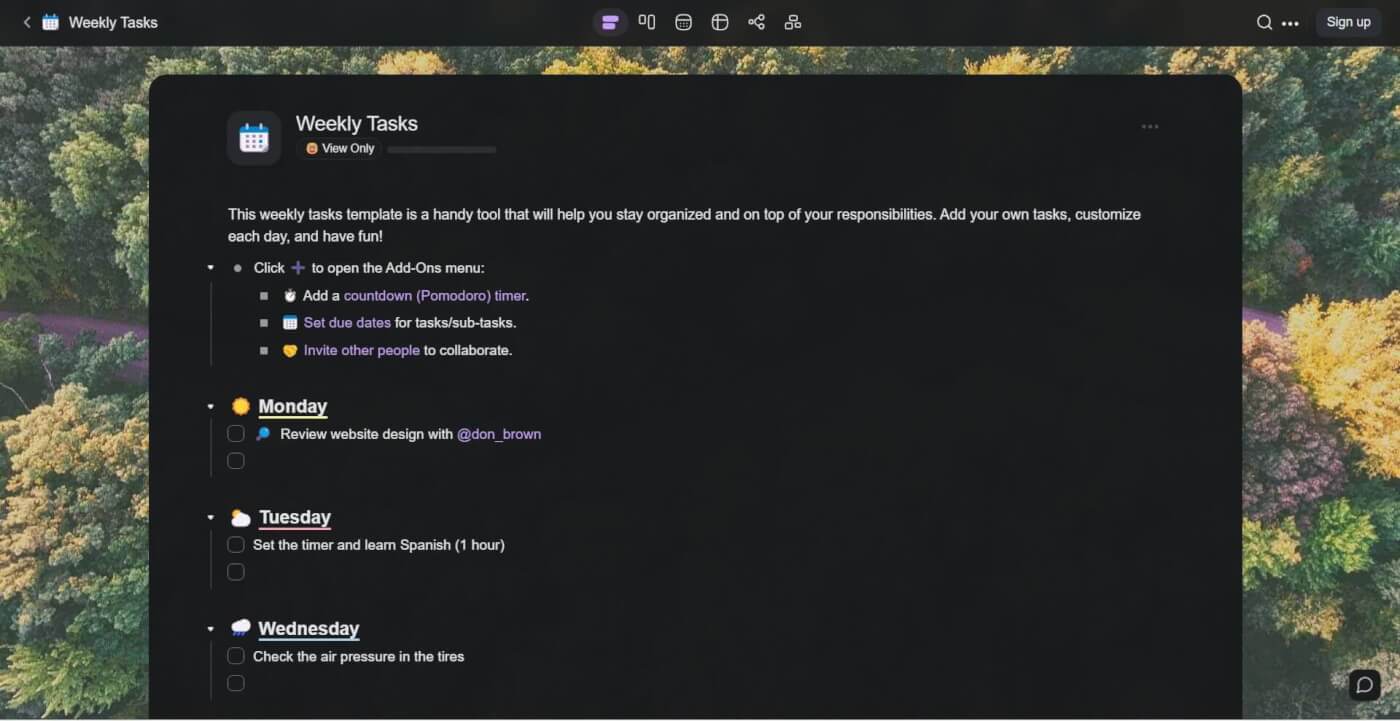
Weekly tasks checklist.

Weekly tasks template

Now that you've mastered prioritizing daily tasks, let's make some plans for an entire week.

This free weekly tasks template is fully customizable so you can jump right in or tweak a few things before adding your tasks. We've already added a few things to make it easier for you!

Start by listing your responsibilities under each day of the week. Next, set due dates for your tasks and invite others to your weekly task list to collaborate and get things done together! When done, simply check the complete tasks, rinse, and repeat! 🔂

Personal Task Tracker Template
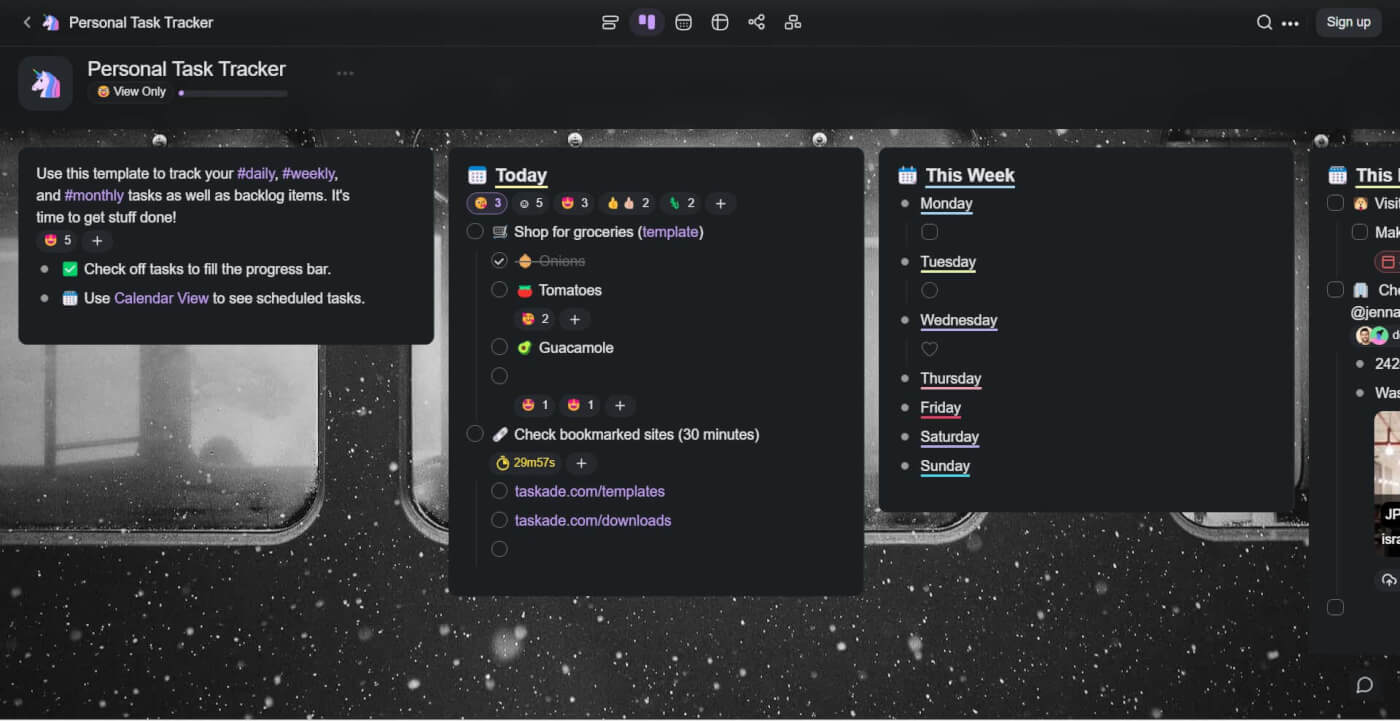
Personal task tracker template.

Personal task tracker template

If you're looking for a customizable task tracker template, look no further. We designed this task tracker template to help you manage your tasks and projects in a convenient board format.

The board includes three main cards for daily, weekly, and monthly tasks. This template is a great choice if you prefer to have a high-level overview of all your tasks in a single view.

Getting Things Done Template
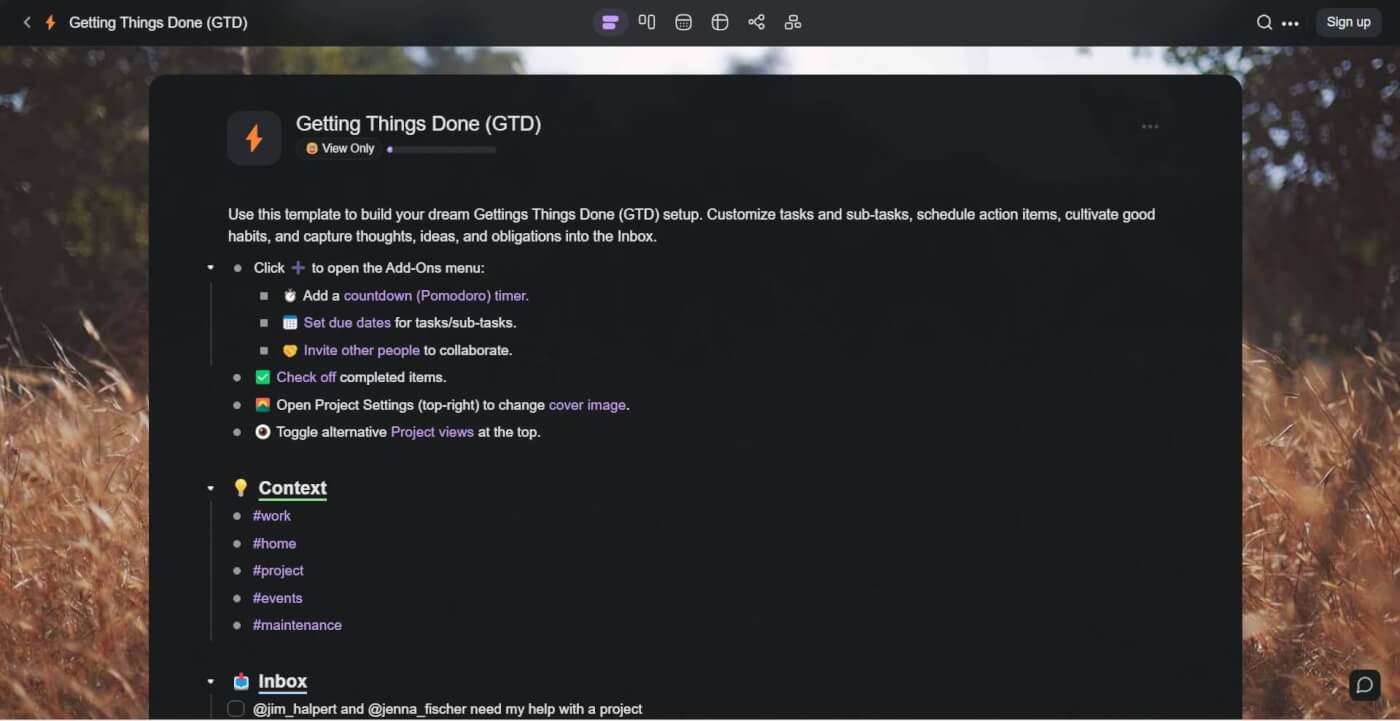
A Getting Things Done template in Taskade.

GTD template

If you're familiar with Getting Things Done, you know that this is not just another to-do list template. GTD is the Swiss Army knife of productivity tools that will help you manage anything.

To overarching goal of GTD methodology is to create a complete system for managing personal and professional workflows so that you can free up your mental energy and get stuff done.

This free Getting Things Done template does just that. We've populated it with just enough ideas to help you get started. Customize the template and create your own GTD setup today.

Eisenhower Matrix Template
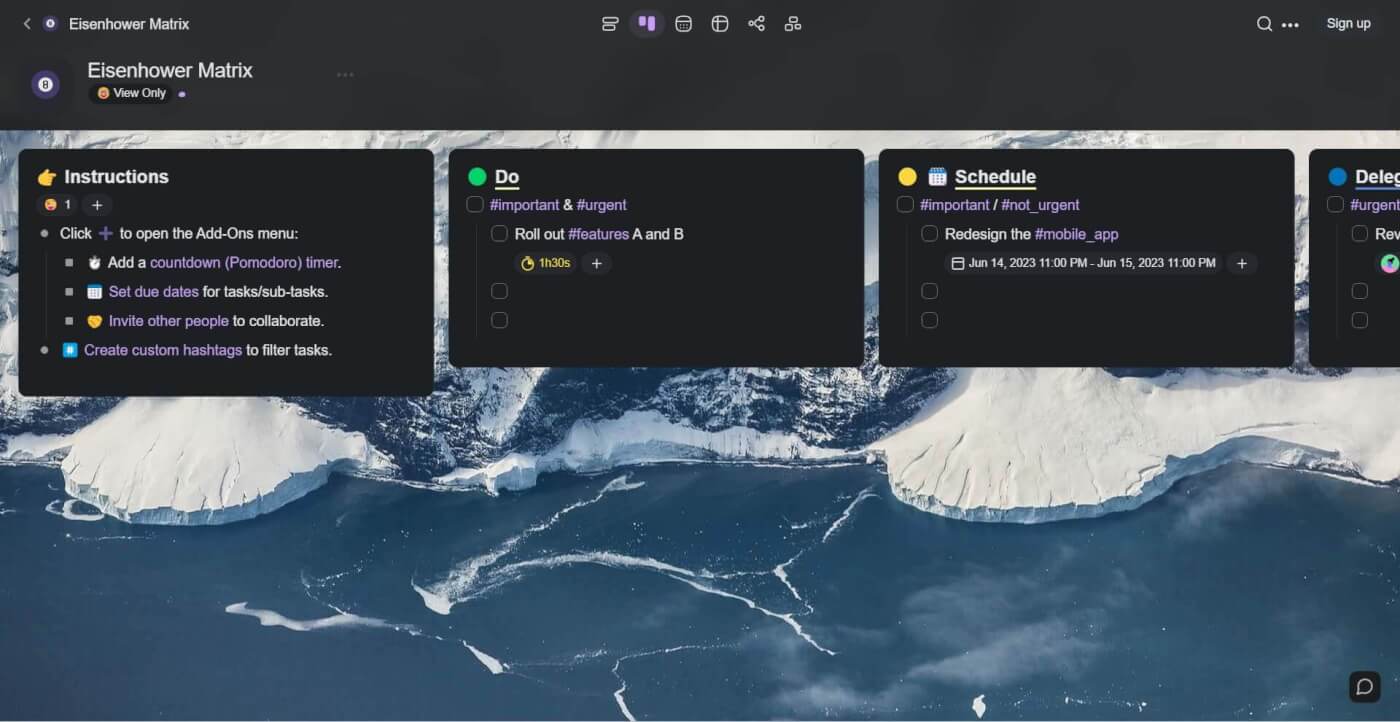
Eisenhower matrix template in Taskade.

Eisenhower matrix template

Do, Schedule, Delegate, Delete. If you can master these four quadrants of the Eisenhower Matrix, you're well on your way to achieving a presidential level of productivity.

Named after its creator, the Eisenhower Matrix was a productivity technique developed by Dwight D. Eisenhower, the 34th president of the United States to help him prioritize his tasks.

This free Eisenhower Matrix template includes everything you need to get started with this popular task management technique. Arrange your tasks based on priority, organize priorities using an intuitive drag-and-drop interface, and get work done alone or with your team!

Meeting Action Items Tracker Template
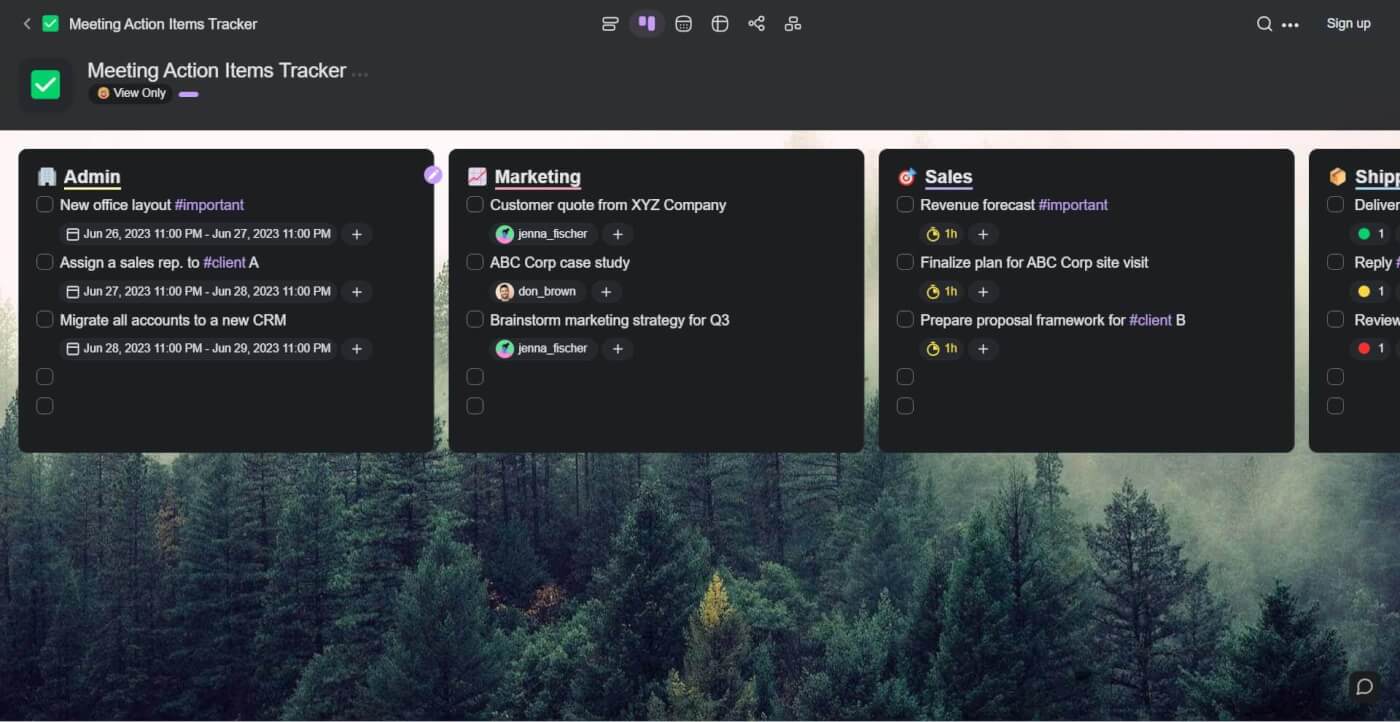
Meeting actions items tracker.

Meeting actions items tracker template

There's nothing more frustrating than an unproductive meeting. That's why we created this free meeting action items tracker template—to help you keep track of all action items in one place.

Why waste effort in trying to remember all of your assigned tasks when you can list them down here and free up some brain real estate?

Start by creating a list of action items and use the 🫂 Assign feature to distribute the workload among your team members. Just to make sure that everybody knows what to do next!

Team Task List Template
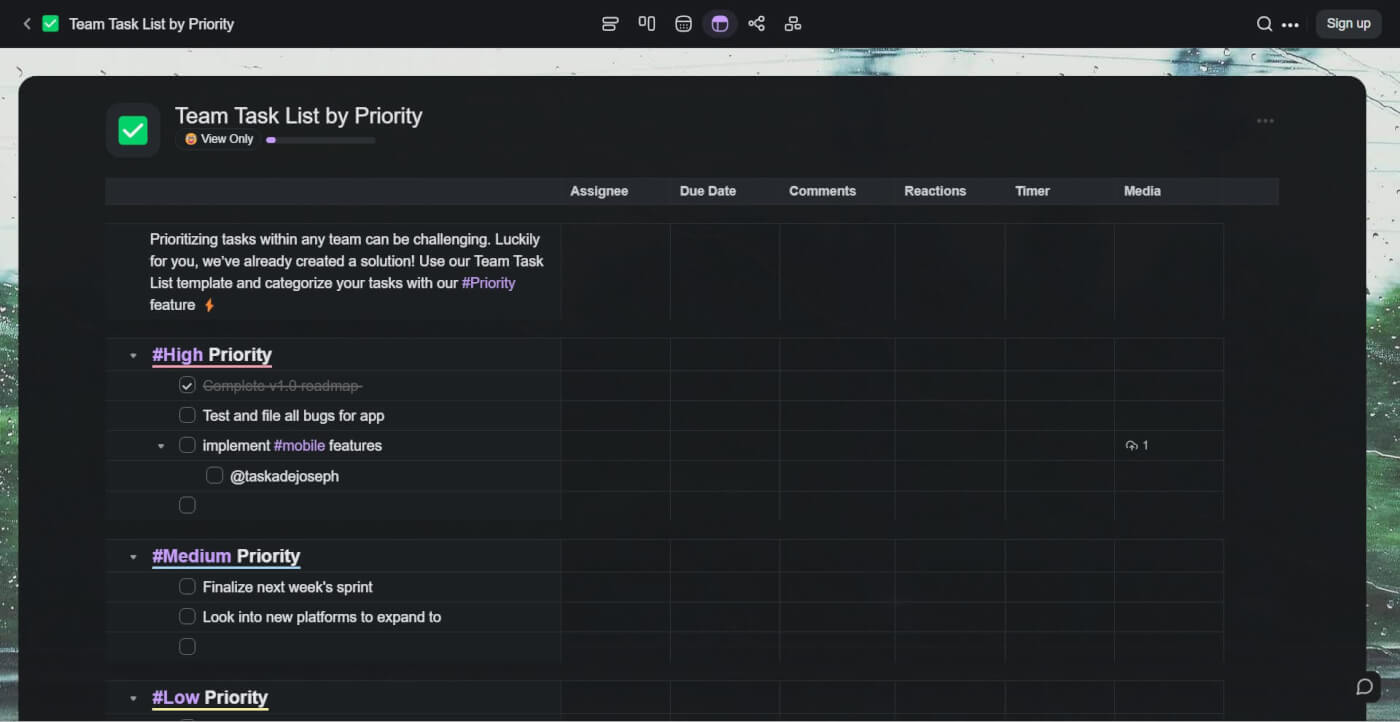
Team task list.

Team task list template

Looking for something to get your team back on track?

This free team task list template will help you manage your team's to-do list in the new, more powerful ⚡️ Action View. Action items now include additional information like assignees, due dates, comments, and attachments, all organized into customizable columns.

We divided the template into priorities—#high, #medium, #low—so you can quickly organize tasks based on their importance. Customize the columns, invite your team, and get work done!

Priority List Template
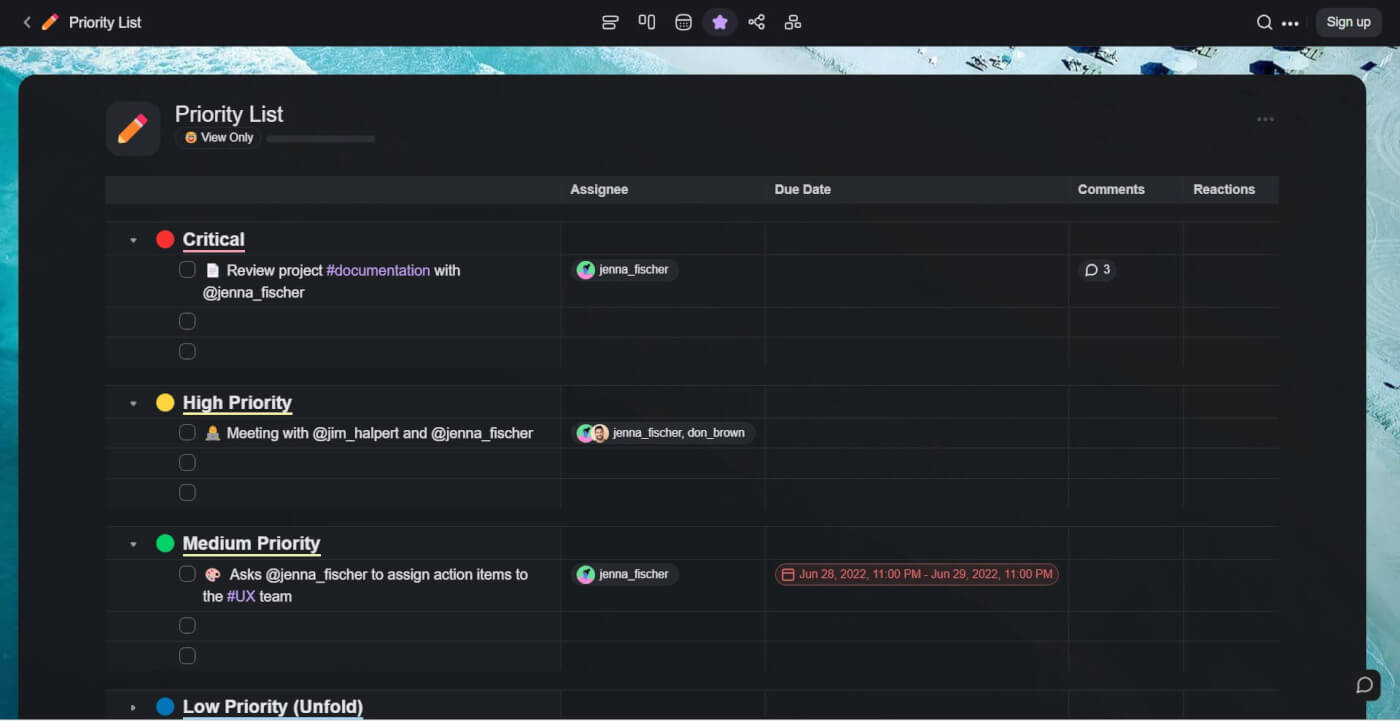
Priority list.

Priority list template

If your to-do list is filling up faster than you can clear it, it's time to go back to the drawing board. This free priority list template will help you prioritize and focus on the tasks that really matter.

Instead of mixing all your to-dos, try to organize them based on their priority level. This will help you manage your time more effectively and make your workflow much leaner.

Event Planning To-Do List Template
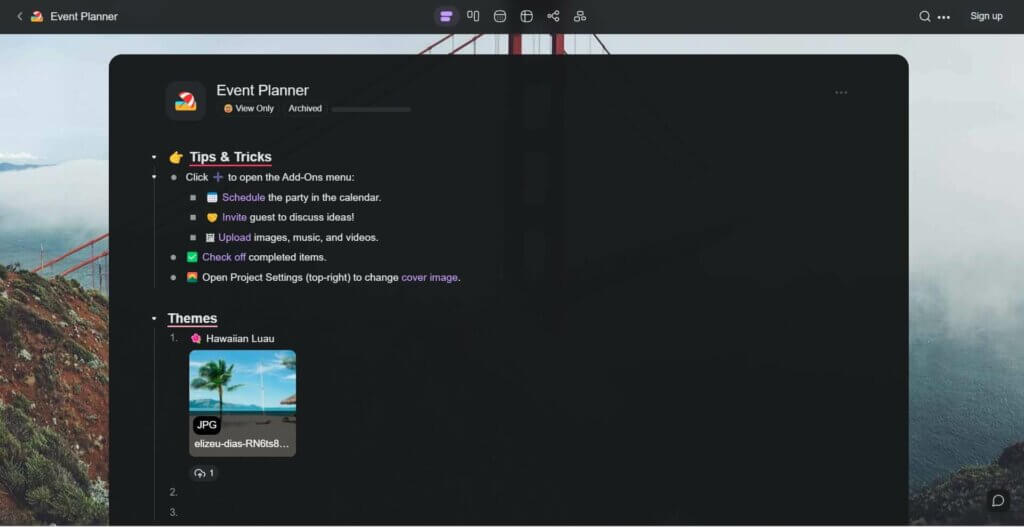
Event planner checklist.

Event planner template

Planning an event? Don't worry. Although there are multiple facets to consider when planning an event, it really isn't as complicated as it seems to be with the right online to-do list apps.

Much like any other project, planning an event is easier if you break it down into smaller and more actionable steps, and that's exactly what we've done in this free template.

Our event planner includes everything you need to organize an event, starting from potential locations and the guest list to decorations and activities.

To-Do List Templates at a Glance

Template Best For Complexity View
To-Do List Daily priorities Simple List
Weekly Tasks Weekly planning Simple List
Personal Task Tracker Kanban overview Medium Board
GTD Complex workflows Advanced List + Board
Eisenhower Matrix Prioritization Medium Board
Meeting Action Items Post-meeting tasks Simple List
Team Task List Team collaboration Medium Action
Priority List Focus on top tasks Simple List
Event Planner Event organization Advanced List + Board

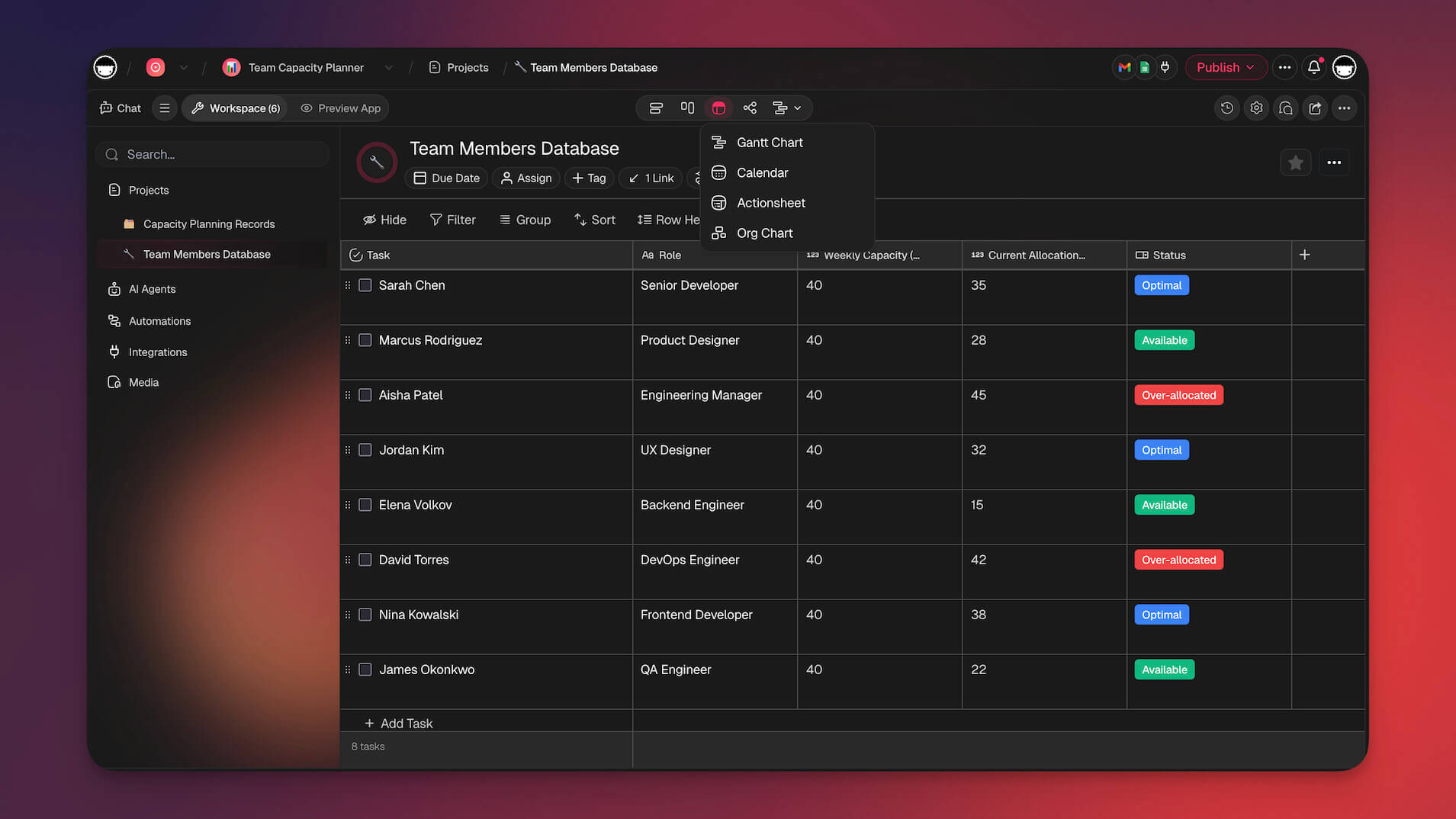
Taskade project views for task management.

Want to go beyond templates? Build custom AI-powered task workflows with Taskade Genesis, set up automations that trigger on task completion, or explore community apps.

Workspace DNA: To-Do Lists That Organize, Prioritize, and Execute Themselves

A to-do list is only as good as the system behind it. Taskade's Workspace DNA framework — Memory, Intelligence, and Execution — transforms simple checklists into dynamic task management systems that keep your work moving forward.

Memory means every task, subtask, note, and deadline lives in a persistent workspace. View your to-dos across 7 project views — List for quick capture, Board for Kanban-style progress tracking, Calendar for scheduling, and Gantt for dependencies — so the same data serves every planning need. Intelligence elevates your lists through AI agents with 22+ built-in tools powered by frontier models from OpenAI, Anthropic, and Google. These agents can auto-prioritize tasks, break complex items into actionable subtasks, suggest deadlines, and reorganize your list based on urgency and context.

Execution handles the follow-through. Automations with 100+ integrations and durable execution can send daily task digests, escalate overdue items, assign recurring tasks, and sync your to-dos with the tools your team already uses. The cycle is self-reinforcing: completed tasks feed project Memory, Memory informs AI suggestions, and automations keep everything on track.

Create a custom to-do list app with Taskade Genesis by describing your ideal workflow in plain language. Over 150,000 apps have been built this way, from personal task trackers to team sprint boards. Explore community-built productivity apps or start with the Free plan, scaling to Starter ($6/mo), Pro ($16/mo), or Business ($40/mo).

👋 Parting Words

Our to-do list templates can help you improve productivity and time management. Choose your favorite from this curated list and follow these simple steps to get started:

  1. Click “Use Template” to create a project instantly in your workspace.

  2. Click “Save Template” to create a reusable template for you and your team.

  3. Customize your project, make it your own, and get work done!

Have fun! 🥳


Take control of your to-dos with Taskade AI! 🤖

🤖 Custom AI Agents: Create AI agents tailored to your workflow preferences to automate task organization and prioritization the easy way.

🪄 AI Generator: Generate dynamic to-do lists from natural language inputs or seed documents for more structured and actionable task outlines.

✏️ AI Assistant: Leverage the AI Assistant for on-the-fly editing and organizing of your to-do lists to ensure tasks are clear and actionable.

🗂️ AI Prompt Templates Library: Explore a variety of AI prompt templates to enhance your daily task management with AI assistance.

💬 AI Chat: Use AI Chat for quick adjustments or advice on optimizing your to-do lists and keeping tasks aligned with your goals.

📄 Media Q&A: Evaluate and refine your to-do lists with insights on task completion patterns and productivity, powered by 11+ frontier AI models from OpenAI, Anthropic, and Google.

And much more...

Taskade AI banner.

Frequently Asked Questions

What is the best to-do list template for daily tasks?

The best daily to-do list template organizes tasks by priority, includes sub-tasks for complex items, and adapts to your workflow. Taskade offers free to-do list templates that work across 7 project views — List, Board, Calendar, Table, Mind Map, Gantt, and Org Chart — so you can manage the same tasks in whichever format suits your style.

How do to-do list templates improve productivity?

Templates eliminate setup time, enforce consistent structure, and reduce the mental overhead of organizing tasks from scratch. They help you focus on doing work rather than planning how to plan. With Taskade, templates also come with built-in AI agents that can auto-prioritize tasks, suggest deadlines, and break large goals into actionable steps.

Can I share to-do list templates with my team?

Yes. Collaborative to-do list templates let teams work from the same task list in real time. Taskade supports real-time collaboration with a 7-tier permission system (Owner, Maintainer, Editor, Commenter, Collaborator, Participant, Viewer), so you can control exactly who can edit, comment on, or view your shared lists.

What features should a good to-do list app have?

A good to-do list app should offer multiple views, real-time collaboration, recurring tasks, sub-tasks, and integrations. Taskade goes further with AI-powered task management — 11+ AI models from 3 providers can generate tasks, summarize notes, and automate workflows. You also get 7 project views and cross-platform sync across desktop, mobile, and web.

0%

On this page

🤔 What Are the Benefits of Using a To-Do List Template?✅ 9 Free To-Do List TemplatesTo-Do List TemplateWeekly Tasks TemplatePersonal Task Tracker TemplateGetting Things Done TemplateEisenhower Matrix TemplateMeeting Action Items Tracker TemplateTeam Task List TemplatePriority List TemplateEvent Planning To-Do List TemplateTo-Do List Templates at a GlanceWorkspace DNA: To-Do Lists That Organize, Prioritize, and Execute Themselves👋 Parting WordsFrequently Asked Questions

Related Articles

/static_images/What is ClickUp? Complete History of Project Management & Work OS Platform
February 4, 2026Productivity

What is ClickUp? History of the 'One App to Replace Them All' Project Management Platform

The complete history of ClickUp from Zeb Evans' 2017 founding to $6B valuation. Learn how ClickUp grew from internal too...

/static_images/Agency client portal templates 2026 — 5 free cloneable Genesis portals with real projects, AI agents, and automations for onboarding, project delivery, booking, and retainer management
May 5, 2026Productivity

Agency Client Portal: 5 Free Templates with Real Workflows (2026)

Five free agency client portal templates — each a live Taskade Genesis app with real projects, AI agents, and automation...

/static_images/Asana vs Taskade Genesis comparison — 4-view project tracker versus 7-view AI-powered workflow system 2026
May 5, 2026Productivity

Asana vs Taskade Genesis: The 2026 AI Workflow Showdown

Asana teaches agile methodology in its help docs then asks you to sign up. Taskade Genesis embeds the methodology as a r...

/static_images/monday.com vs Taskade Genesis comparison — boards-as-containers versus AI-powered workflows-as-running-systems 2026
May 5, 2026Productivity

monday.com vs Taskade Genesis: Better Work OS in 2026?

monday.com organizes work in boards. Taskade Genesis runs work with AI agents and automations that execute alongside eve...

/static_images/Free AI sales pipeline template — Clay alternative with lead enrichment, cold email agent, and pipeline dashboard
May 2, 2026Productivity

Free AI Sales Pipeline Template With Lead Enrichment + Cold Email Agent (2026)

Clay charges $446/mo for enrichment alone. Apollo charges $79/seat. Taskade Genesis ships the AI sales pipeline template...

/static_images/Free AI internal tools dashboard builder — Retool alternative with built-in agents, automations, and zero per-viewer cost
May 2, 2026Productivity

Free AI Internal Tools Dashboard — Retool Alternative With Zero Per-Seat Pricing (2026)

Retool charges $50/builder + $15/viewer. Tooljet and Appsmith need a JS engineer. Taskade Genesis ships 6 live cloneable...

View All Articles
The 9 Best To-Do List Templates to Use in 2026 | Taskade Blog