






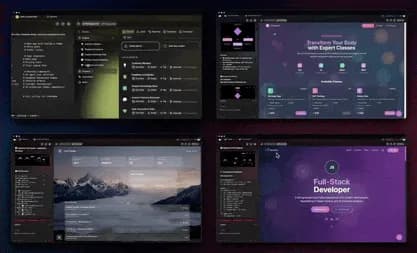
TL;DR: Taskade Genesis app templates are complete, working apps you clone in about 30 seconds, each ships with a database, AI agents, and automations already wired together. More than 150,000+ apps have been built on the platform, and the best ones are free to copy across 8 categories. Pick the closest one, clone it, then describe your changes in plain English. Start with Taskade Genesis →
Most people open an app builder expecting to start from a blank screen. That is the slow way. The fast way is to clone a working app, one that already has its database, its AI agents, and its automations connected, and reshape it into yours.
This is exactly how David, an IT program manager, shipped a production project dashboard with no engineers. He didn't design tables or wire integrations. He found the closest Taskade Genesis template, cloned it into his workspace, renamed a few fields, and pointed the automations at his team's data. The app was live the same afternoon.
This guide is a roundup of cloneable Taskade Genesis app templates across 8 categories, business and operations, productivity, finance, marketing, education, events, booking, and health. Each section tells you what you can build and gives you a live demo to clone. Pick a starting point, copy it, and customize from there.
What is a Taskade Genesis app template?
A Taskade Genesis app template is a complete, running app you copy into your workspace, not a blank canvas or a static layout. When you clone one, you get the whole thing: the Projects (databases you can read in multiple views), the AI agents with their built-in tools, and the reliable automation workflows, all already connected and working.
That is the difference between a template gallery and a clone gallery. A template gallery hands you a shape to fill in. Taskade Genesis hands you a finished app you can run today and edit by describing what you want.
┌─ Taskade Genesis · Clone an App ───────────────────────────┐
│                                                            │
│   Neon CRM Dashboard            by Team Taskade            │
│   ───────────────────────────────────────────────         │
│   ▲ Memory      2 Projects   · leads, contacts, pipeline   │
│   ■ Intelligence 1 AI Agent  · scores + summarizes leads   │
│   ● Execution   2 Automations· new lead → notify + enrich  │
│                                                            │
│   Preview ▸  List · Board · Calendar · Table · Mind Map    │
│                                                            │
│   [  ⧉  Clone into my workspace  ]   ~30 sec · free        │
│                                                            │
│   After cloning you can:                                   │
│   • rename fields and point it at your own data            │
│   • describe changes in plain English to reshape it        │
│   • publish on a custom domain with built-in sign-in       │
└────────────────────────────────────────────────────────────┘
Here is the loop every cloned app inherits, the Workspace DNA of Memory, Intelligence, and Execution that keeps an app useful instead of static:
How do I clone a Genesis app template?
Cloning a Taskade Genesis app takes one click and about 30 seconds, no code, no setup, no servers. You open a live app at its share link, click clone, and a full copy lands in your workspace with its Projects, AI agents, and automations intact. Then you rename it and point it at your own data.
The whole path looks like this:
Two starting points, one editor. You can clone the closest template, or describe a brand-new app in plain English and let Taskade Genesis build it from scratch. Most operators do both: clone the nearest match, then describe the changes. Here is when each path wins:
| You want to… | Best path | Why |
|---|---|---|
| Start from a proven layout | Clone a template | Known-good database, agents, automations on day one |
| Build something unusual | Describe from a prompt | Taskade Genesis assembles a custom app to fit |
| Tweak a clone | Describe the change | Plain English edits, no field-by-field setup |
| Ship to customers | Clone → customize → publish | Custom domain + built-in sign-in for a branded portal |

1. Business and operations apps
Business and operations templates run the back office: CRM, invoicing, client portals, inventory, and feedback. These are the apps an operations lead would otherwise stitch together from a spreadsheet, an email inbox, and three SaaS subscriptions. Here they live in one cloneable app with an AI agent and automations already attached.
What you can build by cloning:
- CRM dashboard, track leads and contacts with an AI agent that scores and summarizes the pipeline, plus automations that fire when a new lead arrives.
- Invoice generator, professional invoicing with payment tracking and billing automations, native Stripe-ready.
- Client portal, a branded space where clients log in to track project status and message your team.
- Inventory manager, stock levels with an AI agent that triggers a reorder alert when supplies run low.
- Feedback form, collects customer responses and uses an agent to read the sentiment behind them.
Explore ready-to-clone business agents in the business agents library, or browse the full Community Gallery.
See it live, then clone it
Here is a real, cloneable CRM dashboard built on Taskade Genesis. Preview it, then copy it into your own workspace.
This is the whole pitch in one frame: a working CRM with leads, an AI agent, and automations, all live. Clone it and it is yours in 30 seconds.
2. Productivity and task management apps
Productivity templates turn scattered work into a single dashboard: task boards, capacity planners, time trackers, and project overviews. The difference from a plain task list is the agent. It suggests next actions, flags overload, and keeps progress current without you nudging it.
What you can build by cloning:
- Team capacity planner, see who is overloaded and reallocate work, with AI insights that flag burnout before it happens.
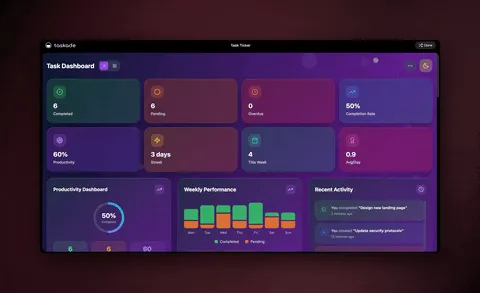
- Task dashboard, kanban boards, priority sorting, and progress tracking in one clean view.
- Minimal to-do app, natural-language task entry where an agent suggests and organizes the work for you.
- Time tracker, log time per project with automatic categorization and reporting.
- Project dashboard, milestone tracking, dependencies, and team activity at a glance.
Because every app is a Project underneath, you can flip any of these between multiple views, List, Board, Calendar, Table, Mind Map, Gantt, and Org Chart (Timeline lives inside the Gantt view). Browse more in productivity agents and the Genesis app builder wiki.
See it live, then clone it
A live task management dashboard you can clone and run today:
Clone it and your team has a working board in under a minute.
3. Finance and expense tracking apps
Finance templates handle the money work: expense tracking, budgets, bill splitting, and investor dashboards. Each one stores transaction history in a Project, uses an AI agent to spot spending patterns, and runs automations that categorize transactions and send alerts.
What you can build by cloning:
- Finance tracker dashboard, income, expenses, and savings as interactive charts with AI-generated insights.
- Personal expense tracker, log daily spend, auto-categorize it, and get AI budgeting recommendations.
- Expense splitter, divide bills across friends or a team with automated math and tracking.
- Investor dashboard, monitor performance with multiple agents handling market analysis.
These map cleanly to the three pillars: Memory stores the history, Intelligence reads the patterns, and Execution categorizes and alerts. See more in the finance agents library.
See it live, then clone it
A real finance tracker dashboard, live and cloneable:
Clone it, connect your accounts, and the agent starts surfacing insights right away.
4. Marketing apps
Marketing templates organize the work of getting attention: content calendars, campaign portals, and publishing workflows. An agent drafts and schedules, and automations push posts out and pull engagement back in across your connected channels.
What you can build by cloning:
- Content calendar planner, plan, draft, and schedule content with an agent that fills gaps in the calendar.
- Campaign planning portal, coordinate a launch across a team with shared status and tasks.
- Multi-platform publisher, push one piece of content to several channels through bidirectional integrations.
Marketing apps lean on 100+ bidirectional integrations, triggers pull engagement events in, actions push content out. Browse marketing agents for more starting points and the automation hub to see how the workflows run.

5. Education and learning apps
Education templates support studying and teaching: study portals, flashcard decks, and course trackers. An agent quizzes you, generates practice material, and tracks what you have mastered, so a study app adapts instead of sitting static.
What you can build by cloning:
- Study portal, organize a syllabus, track progress, and let an agent generate practice questions.
- Flashcard deck maker, turn notes into review cards an agent can drill you on.
- Course or cohort tracker, manage students, milestones, and feedback in one place.
Pair any of these with multi-agent collaboration so a "tutor" agent and a "quizmaster" agent hand work off to each other. See education agents for more.
6. Events and hospitality apps
Event templates run the logistics of a gathering: event portals, seating charts, and guest management. Automations send reminders and confirmations, and an agent answers attendee questions and tracks RSVPs.
What you can build by cloning:
- Event management portal, registration, schedule, and attendee communication in one app.
- Seating chart planner, arrange guests and tables with drag-and-update simplicity.
- Guest and RSVP tracker, manage confirmations and send automated reminders.
Event apps shine on the Calendar and Board views, and the durable automations mean a reminder still fires even if one step stalls, the workflow resumes from where it left off.
7. Booking and scheduling apps
Booking templates take appointments off your plate: appointment systems, meeting schedulers, and room or class booking. The app holds availability, an automation confirms the booking, and an agent answers the back-and-forth before it reaches you.
What you can build by cloning:
- Appointment booking system, let clients pick a slot and get an automatic confirmation.
- Meeting scheduler, coordinate availability across a team without the email ping-pong.
- Room or class booking portal, manage capacity and reservations for a space or session.
These are pure Execution-led apps: the automation does the confirming and reminding so you do not. Combine the Community Gallery with customer-service agents to find the closest booking app to clone.
8. Health and wellness apps
Health templates keep habits and care on track: fitness trackers, meal planners, and mood logs. An agent suggests plans and routines, and automations remind you and log streaks, so the app nudges instead of waiting to be opened.
What you can build by cloning:
- Fitness app, log workouts and track streaks with an agent that adjusts the plan.
- Smart meal planner, generate meals around your goals and build a shopping list automatically.
- Mood tracker, log how you feel and let an agent surface patterns over time.
These are personal apps you can also publish for a community or clients, clone, customize, and put it on a custom domain with built-in sign-in.
The whole clone-to-ship flow
Here is the full path from "I need an app" to "my customers are using it," across every category above:
Clone vs. build vs. buy: which path fits you?
| Approach | Time to live app | Best for | What you get |
|---|---|---|---|
| Clone a Genesis template | ~30 seconds | Operators who want a proven starting point | Full app: database + agents + automations |
| Describe from a prompt | A few minutes | Anything off the beaten path | A custom app built to your description |
| Traditional no-code builder | Hours to days | Pixel-level control over every screen | A UI you assemble manually, then wire up |
| Hire a developer | Weeks | Deeply custom requirements | Bespoke software and a maintenance bill |
For most non-technical operators, cloning is the obvious first move. You skip the blank page, start from something that works, and reshape it by talking to Taskade EVE, the AI that builds and edits your app for you.
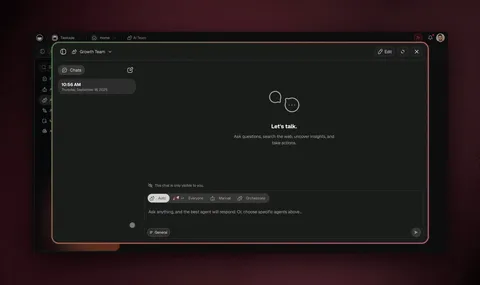
Living app templates vs. static no-code templates: what's the real difference?
The difference is what you get the moment you copy a template. A static no-code template, the kind you find in a Glide, Softr, Bubble, or Notion gallery, hands you a UI shell wired to empty data. You still build the logic: connect a spreadsheet, set up each screen, configure visibility rules, and add any automation yourself. A Taskade Genesis app template hands you a finished, running app, the database, the AI agents, and the automation workflows are already connected and working the second you clone it. One is a scaffold you assemble; the other is software you run today.
This is the angle the top-ranking no-code template galleries don't cover. Most "app template" pages count their templates (400+ here, 100+ there) and show you screenshots. But a screenshot is a layout, not a working app. The honest question for a non-technical operator like David isn't "how many templates are there?" It's "how much do I still have to build after I copy one?" With static templates, the answer is "most of the logic." With Taskade Genesis, the answer is "rename a few fields and describe your changes in plain English."
To be clear about where the established no-code platforms shine, because they genuinely do. Here is a balanced look:
| Taskade Genesis templates | Static no-code templates (Glide, Softr, Bubble, Notion) | |
|---|---|---|
| What you clone | A complete, running app | A UI shell you configure |
| AI agents included | Yes — built-in tools, ship inside the template | Usually none; add AI features separately |
| Automations included | Yes — reliable workflows already wired | Build each workflow yourself after copying |
| Database | Projects with multiple views, pre-populated structure | Connect your own spreadsheet or table first |
| How you customize | Describe changes in plain English to Taskade EVE | Click through each component and setting |
| Time to a working app | ~30 seconds, then tweak | Hours to days of configuration |
| Where the competitors are genuinely strong | — | Glide: spreadsheet-simple, fast to learn, 400+ templates. Softr: excellent client portals on top of Airtable. Bubble: pixel-level control and a deep plugin ecosystem for complex logic |
Credit where it's due: Glide is wonderfully approachable if your data already lives in a spreadsheet, and its template library is huge. Softr is a strong choice for client portals and membership sites built on Airtable. Bubble gives you the most control of any visual builder when you need bespoke logic and custom interfaces. If pixel-perfect screen design or a specific plugin is your priority, those platforms earn their place.
Where Taskade Genesis pulls ahead is the full workspace behind every template. You're not just cloning a front-end. You're cloning the database, the agents, and the automations as one living system, and you reshape it by talking instead of clicking. For a fuller side-by-side, see Taskade Genesis vs. Glide, vs. Softr, vs. Bubble, and vs. Notion.
Why Genesis templates beat static template galleries
Static template galleries give you a layout. Taskade Genesis gives you a living app. Here is the full capability set behind every clone:
| Capability | What it means when you clone |
|---|---|
| One-prompt live apps | Reshape any clone by describing changes (150,000+ apps built) |
| AI agents (built-in tools) | Agents that search, analyze, and act on your data ship inside the template |
| Multi-agent collaboration | Agents work as a team — research, draft, review, hand off |
| 15+ frontier models | OpenAI, Anthropic, Google, and open-weight, routed automatically |
| 100+ bidirectional integrations | Triggers pull events in; actions push data out (native Shopify + Stripe) |
| Reliable automations | Branch, loop, filter, wait days, resume from the failed step |
| Multiple project views | List, Board, Calendar, Table, Mind Map, Gantt, Org Chart |
| Publish & share | Custom domains, built-in sign-in, Community Gallery, app kits |
| Persistent memory | Workspace DNA so your apps and agents compound over time |
A template gallery hands you a starting point. Taskade Genesis hands you an app that already does the work, and reshapes itself when you describe what you want.
Frequently Asked Questions
What is a Taskade Genesis app template?
A Taskade Genesis app template is a complete, working app you clone in about 30 seconds, not a blank starting point. Each ships with real Projects (databases with multiple views), AI agents, and automations already wired together. You open the live demo, clone it, rename it, and it runs as your own app. 150,000+ apps have been built on Taskade Genesis since launch.
How do I clone a Genesis app template?
Open any live app at its share link, click clone, and a full copy lands in your workspace with its Projects, AI agents, and automations intact. Then rename it and point it at your own data. You can also describe a brand-new app in plain English in the app builder instead of starting from a template.
Are Taskade Genesis templates free to use?
Cloneable apps in the Community Gallery are free to clone, and Taskade Genesis is free to start. Paid plans on annual billing are Pro $10/mo (Popular), Business $25/mo, Max $100/mo, and Enterprise $250/mo.
Do Genesis app templates include AI agents and automations?
Yes. Nearly every template ships with at least one AI agent and one or more automations built in. Agents come with built-in tools and route across 15+ frontier models. Automations branch, loop, filter, wait, and resume from the failed step across 100+ bidirectional integrations.
Can I connect a Genesis app to Shopify or Stripe?
Yes. Taskade Genesis includes native Shopify and Stripe support as part of 100+ bidirectional integrations, triggers pull events in, actions push data out. Store and invoicing templates use these so a sale, payment, or refund updates your app automatically.
What is the difference between cloning a template and building from a prompt?
Cloning copies a proven app instantly. Building from a prompt lets you describe a brand-new app and Taskade Genesis assembles it from scratch. Most operators clone the closest template, then describe the changes, both paths meet in the same editor.
Can a non-technical person clone and run a Genesis app?
Yes. Cloning is one click with no code, no setup, and no servers. The app arrives complete, so a non-technical operator can run it the same day and reshape it by describing changes to Taskade EVE.
How are Genesis app templates different from Glide, Softr, or Bubble templates?
Static no-code templates from Glide, Softr, and Bubble give you a UI shell you still configure, connect a spreadsheet, set up each screen, and build the automations yourself. A Taskade Genesis template hands you a finished, running app with the database, AI agents, and automations already wired. Those platforms are genuinely strong (Glide for spreadsheets, Softr for Airtable portals, Bubble for custom logic), Taskade Genesis pulls ahead by cloning the whole living workspace, not just a layout.
Can I publish a cloned Genesis app for my customers?
Yes. Once you customize a clone, you can publish it on a custom domain with built-in sign-in so clients log in to a branded portal. Custom domains are available on Business plans and above, and sign-in works on every plan.
Stop starting from a blank screen. Browse cloneable apps, clone the closest template, and reshape it by describing what you want. Explore more in the AI agents library, the automation hub, or the Genesis app builder wiki.
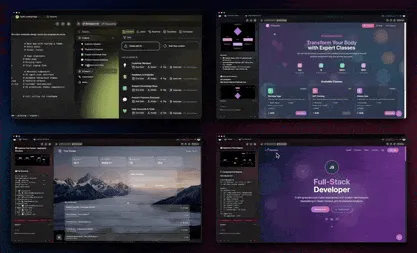
▲ ■ ● Memory, Intelligence, Execution, clone an app and you inherit all three. The database remembers, the agents reason, and the automations run. That is the difference between a template you fill in and an app you ship.