






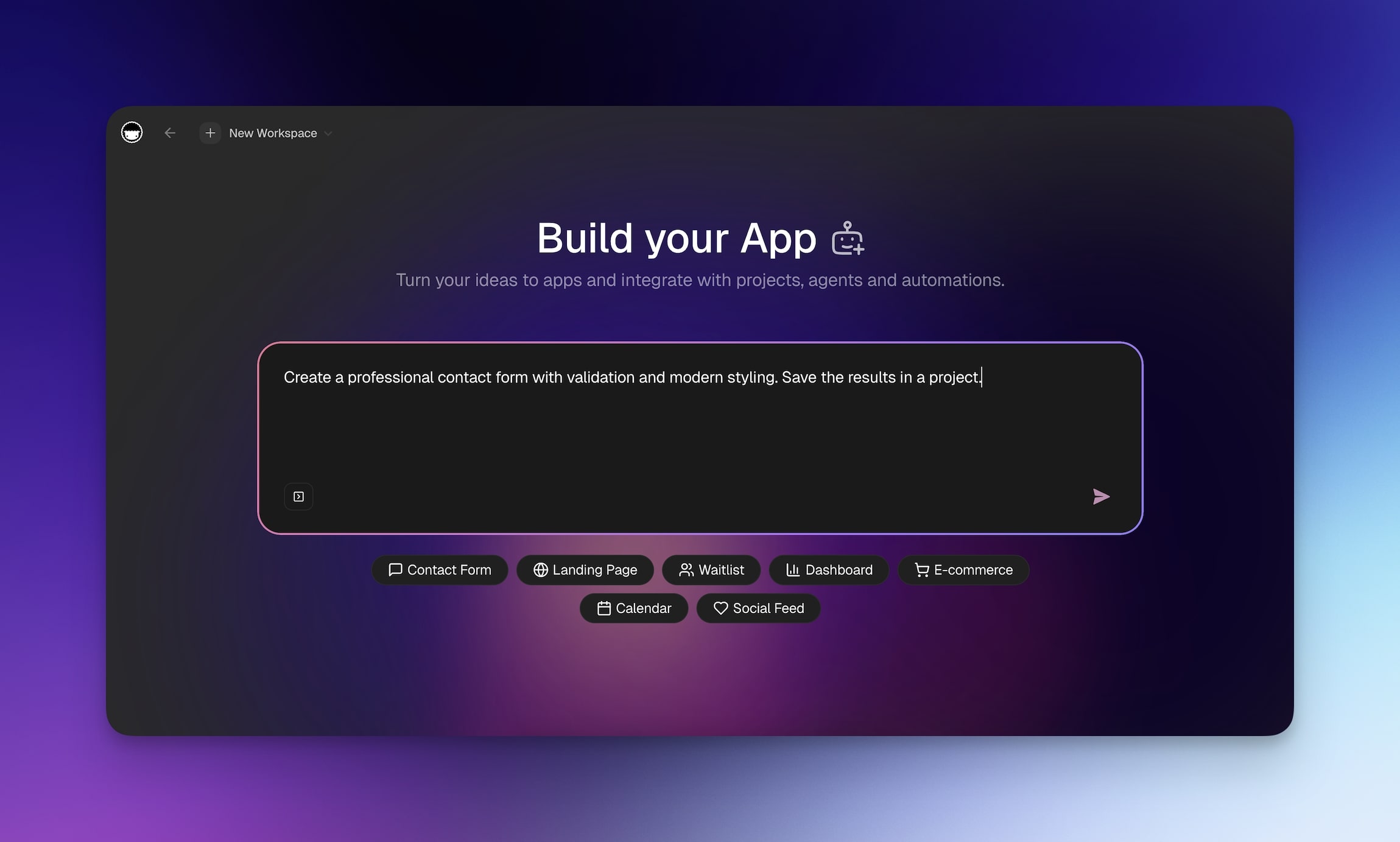
They generate code. We generate runtime.
There is a difference.
One gives you a file. The other gives you a living system — deployed, intelligent, evolving. One ends when the prompt ends. The other begins.
This is not a comparison post. This is not a review. This is a manifesto for everyone who has ever generated a React component and then spent three days trying to deploy it. For everyone who has watched an AI write beautiful code that does absolutely nothing until you wire up a database, configure a hosting provider, set up authentication, connect a payment gateway, and pray that the build pipeline does not break on the fourth commit.
The code generation era gave us faster typing. The runtime generation era gives us faster shipping.
We are done typing. We are shipping.
TL;DR: Taskade Genesis does not generate code — it generates runtime. Projects remember. Agents think. Automations execute. Every app is deployed, living software with Workspace DNA. 150,000+ apps built. One prompt → one living app. Start building free →
The Code Generation Trap Is Real and It Is Everywhere
The code generation wave is the most overhyped paradigm shift in software history. Not because the technology is bad — the technology is extraordinary. But because it solves the wrong problem.
Cursor writes code in your IDE. Bolt.new generates full-stack apps in your browser. Lovable turns designs into React components. V0 by Vercel creates UI from text prompts. Replit gives you an AI coding agent. These tools are impressive. They are also insufficient.
Here is what happens after a code generator finishes:
- You have files. Congratulations.
- You need hosting. Pick one: AWS, Vercel, Netlify, Railway, Render, Fly.io.
- You need a database. PostgreSQL? Supabase? PlanetScale? Firebase?
- You need authentication. Auth0? Clerk? NextAuth? Roll your own?
- You need environment variables. You need secrets management. You need CI/CD.
- You need to deploy. You need to monitor. You need to debug production errors.
- You need to maintain. Dependencies rot. APIs break. Security patches arrive.
The code generator helped you with step zero — writing the code. Steps one through seven are still your problem. And steps one through seven are where 99% of the work lives.
This is the code generation trap: the bottleneck in software was never typing. The bottleneck is shipping.
Every developer knows this. Every founder knows this. The hardest part of building software is not writing useState. It is getting a working system in front of users and keeping it running. Code generators automated the easiest part of the process and declared victory.
They automated the typing. They did not automate the shipping.
The File Fallacy
There is a deeper problem. Code generators operate on a fundamental assumption: software = files. You describe what you want. The AI produces files — .tsx, .py, .sql, .yaml, .env, .dockerfile. Files that represent software but are not software.
A file is a recipe. A file is not a meal.
Bill Atkinson saw the way out of this in 1987. HyperCard was, in his words, "always an authoring environment, never just a browsing" — the tool and the output were the same thing. You did not write files and then ship them somewhere to run. You built inside the running artifact. There was no recipe, only the meal. That is the idea we are finishing: generate the runtime directly, not the instructions for it.
A React component sitting in a GitHub repository is not software. It is a plan for software. It becomes software only when it is compiled, deployed, connected to data, served to users, and maintained over time. The distance between "I have files" and "I have software" is enormous — and it is precisely the distance that code generators do not cover.
We have been conditioned to think in files because that is how we built software for fifty years. Write code. Compile code. Deploy code. But that model is an artifact of the von Neumann architecture — a sequential machine that processes instructions stored in memory. The file is the instruction. The computer is the executor. The human is the glue holding it all together. The entire history of modern computing has been a long march toward eliminating that glue.
What if the AI generated the executor directly?
What if instead of producing instructions that a human must shepherd into production, the AI produced a running system?
That is what runtime generation means.
The Caching Blindspot
There is a problem that every agentic coder, every vibe coder, and even many junior developers hit eventually: caching. AI code generators almost never get caching right — because caching requires understanding your application's data access patterns, update frequencies, and user behavior. It requires choosing between strategies that sound similar but have radically different implications:
- Fully dynamic — no cache, every request hits the database. Fast for live financial data. Wasteful for a dashboard you check every ten minutes.
- Stale-while-revalidate — serve cached data instantly, refresh in the background when it expires. Perfect for user-specific views like project dashboards.
- ISR (Incremental Static Regeneration) — serve static pages for SEO performance, revalidate on a schedule without waiting for users. Ideal for marketing pages and comparison tables.
- Fully static — build once, serve forever. The fastest possible page load. The right choice for landing pages and blog content.
- Client-side — fetch from the browser after the page renders. Good for weather widgets and non-SEO data. Bad for everything else.
Each strategy has different implications for server load, user experience, SEO, and cost. A code generator will not ask you which one to use — it will guess, usually wrong, and you will not notice until your server bills spike or your Google PageSpeed score collapses.
This is not an edge case. Caching strategy is one of the most impactful architectural decisions in any web application. Get it wrong and your users wait seconds for data that should be instant. Get it right and your infrastructure costs drop by an order of magnitude. And AI code generators almost never get it right because the correct caching strategy depends on business context, not code syntax.
Runtime generation solves this structurally. When Taskade Genesis generates an app, the caching layer is platform-managed. Static content is static. Dynamic content is cached intelligently. The platform knows the data access patterns because it is the data layer. You never have to choose between ISR and stale-while-revalidate because the runtime handles it.
The Algorithm Paradox
Here is the thing that should unsettle every developer who defines their value by what they can type.
In 2025, one of the most popular data structures and algorithms courses on YouTube opens with this admission: "It's not because you'll need to write heap data structures or quicksort algorithms from scratch day-to-day as a developer. After all, Claude can do that just fine."
Read that again. The people who teach algorithms for a living now concede that AI writes them. The entire field of computer science education — Big O analysis, binary search trees, graph traversal, dynamic programming — is reframing itself around understanding rather than implementing. You don't need to write a quicksort. You need to know when O(n log n) matters versus O(n²). You don't need to implement a hash map. You need to recognize when your system's bottleneck is a lookup table versus a network call.
This is the algorithm paradox: the more AI can write code, the more the value shifts from code to systems. From syntax to architecture. From files to runtime. From typing to shipping.
Bill Atkinson understood this in 1984. MacPaint used novel region-filling algorithms that were genuine computer science contributions — but users just saw "I can paint." HyperCard used graph traversal — literally BFS and DFS through linked cards — but users just saw "I can build interactive things without code."
The best algorithm is invisible to the user. That is what runtime generation means. The algorithms are embedded in the platform. You don't write a binary search — your agent searches. You don't implement a priority queue — your automation triages. You don't configure a caching layer — the runtime caches.
Code generators give you the algorithm. Runtime generators give you the outcome.
What Runtime Actually Means
Runtime is not a marketing term. It is a technical distinction with massive consequences.
Code generation produces artifacts — source code files that must be compiled, bundled, deployed, hosted, and maintained by humans and human-configured infrastructure.
Runtime generation produces a deployed, operational system. No build step. No deployment pipeline. No infrastructure configuration. You describe what you want. The system is live.

Taskade Genesis generates runtime. When you type a prompt — "Build me a client portal for my consulting firm with intake forms, project tracking, automated follow-ups, and a knowledge base" — you do not get files. You get:
A deployed application. Live. Accessible via URL. Embeddable. Shareable. Optionally protected with a password. Optionally mapped to a custom domain. Running. Right now.
Embedded AI agents. Not a chatbot bolted onto a static page. Agents with persistent memory, built-in tools, custom slash commands, and the ability to reason over the entire context of your workspace. Agents that know your clients, your projects, your documents — because they live inside the system, not outside it.
Automation workflows. Built on durable execution — not fragile webhook chains, but workflows that survive failures, support branching and looping, and connect to 100+ integrations spanning communication, email, CRM, payments, development, and e-commerce. Workflows that trigger based on events, schedules, and conditions without human intervention.
Structured memory. Not a flat database you have to schema-design yourself. A living knowledge layer — database projects, documents, mind maps, kanban boards — multiple project views that give your data shape and your agents context.
Real-time collaboration. Multiple users, access controls (Owner to Viewer), and the workspace itself as the shared backend. No separate backend API. No REST endpoints. No GraphQL schema. The workspace is the API.
This is what runtime means. Not files. Not artifacts. Not plans for software. Software.
The Deployment Delta
There is a measurement I call the Deployment Delta — the gap between "the AI finished generating" and "users are using the product."
For code generators, the Deployment Delta ranges from hours to weeks. You need to review the generated code, set up infrastructure, configure the database, deploy, test, fix the deployment, redeploy, test again, and eventually launch.
For Taskade Genesis, the Deployment Delta is zero. The moment the AI finishes generating, the app is live. Users can access it. Agents are trained. Automations are running. The system is operational.
Zero Deployment Delta is not an incremental improvement. It is a category change. It is the difference between a blueprint and a building. Between a genome and an organism.
The Workspace DNA Loop
Every Genesis app runs on Workspace DNA — a self-reinforcing architecture with three components:
This is not a linear pipeline. It is a cycle. Every action feeds back into the system. Every automation run generates data that agents can reason over. Every agent decision creates context that future automations use.
Memory is the foundation. Structured data in database projects. Documents with rich formatting. Mind maps that capture relationships. All of it indexed, searchable — full-text plus semantic HNSW vector search plus file content OCR. Your workspace remembers everything.
Intelligence is the reasoning layer. AI agents powered by 15+ frontier models from OpenAI, Anthropic, and Google — large language models that do not just generate text — they use tools, execute commands, query databases, and make decisions based on the full context of your workspace. Custom tools. Custom slash commands. Persistent memory that survives across sessions.
Execution is the action layer. Automation workflows built on a durable execution engine that run reliably across failures. Branching. Looping. Filtering. 100+ integrations that connect your workspace to Slack, email, Stripe, Shopify, GitHub, and dozens more. Automations do not just react — they orchestrate.
The Cycle vs. The Snapshot
Here is the critical difference between code generation and runtime generation:
Code generators produce a snapshot. A frozen-in-time artifact. The code represents the state of your requirements at the moment you prompted. It does not evolve. It does not learn. It does not adapt. If your requirements change, you prompt again and get a new snapshot.
Taskade Genesis produces a cycle. The app evolves with use. As users interact, Memory accumulates. As Memory grows, Intelligence becomes more precise. As Intelligence improves, Execution becomes more targeted. As Execution runs, it generates new Memory.
| Dimension | Code Generator (Snapshot) | Taskade Genesis (Cycle) |
|---|---|---|
| Output | Files on disk | Running system |
| State | Frozen at generation time | Continuously evolving |
| Intelligence | None — static code | Embedded agents with persistent memory |
| Automation | None — manual wiring | durable execution, 100+ integrations |
| Deployment | Manual — hours to weeks | Instant — zero Deployment Delta |
| Learning | Re-prompt for updates | Self-reinforcing via Workspace DNA |
| Collaboration | Git branches | Real-time, access control |
| Maintenance | Developer responsibility | System-maintained |
The snapshot model is a holdover from the file era. You write code. You freeze it. You ship it. You patch it. You freeze it again. This is how we built software since the 1950s.
The cycle model is something new. The software is alive. It runs. It remembers. It acts. It learns. It is not a frozen artifact waiting to be thawed by a developer. It is a living system.
The Von Neumann Connection
In the 1940s, John von Neumann asked a question that consumed the last decade of his life: what is the minimum architecture required for a self-replicating system?
His answer, published posthumously in Theory of Self-Reproducing Automata (1966), was elegant and precise. A self-replicating system requires exactly three components:
- An instruction tape — information that describes what to build
- A universal constructor — a machine that reads the tape and builds accordingly
- A tape copier — a mechanism that duplicates the instruction tape for offspring
Von Neumann made these predictions before Watson and Crick discovered the structure of DNA in 1953. Biology confirmed his architecture exactly: DNA is the tape. Ribosomes are the universal constructor. DNA polymerase is the copier. Life requires computation at its foundation.
This matters for software because the same architecture distinguishes living systems from dead artifacts.
| Von Neumann Component | Biological Equivalent | Genesis App Equivalent | Code Generator Output |
|---|---|---|---|
| Instruction Tape | DNA | Memory (projects, databases, docs) | Source code files |
| Universal Constructor | Ribosomes | AI Agents (built-in tools, custom commands, persistent memory) | Nothing |
| Tape Copier | DNA Polymerase | Automations (durable execution, 100+ integrations) | Nothing |
Code generators give you the tape with no constructor and no copier. They produce the instruction set — source code — but nothing that interprets those instructions into a living system. The code sits inert until a human manually acts as the constructor (deploying, configuring, connecting) and the copier (maintaining, updating, propagating).
Taskade Genesis gives you all three. Memory is the tape. Agents are the constructor. Automations are the copier. The system is complete. It can maintain itself, adapt to new conditions, and propagate information across its own subsystems without human intervention at every step.
Von Neumann proved that self-replication — the signature of life — requires this tripartite architecture. A system missing any component is inert. Code generators are missing two out of three. They are architecturally incapable of producing living software.
They Ship Files. We Ship Organisms.
There is a metaphor that captures everything wrong with the code generation paradigm.
A rock and a bacterium are both physical objects. Both are made of atoms. Both obey the laws of physics. But a rock is dead matter. A bacterium is alive. The difference is not in the material — it is in the organization. The bacterium maintains itself against entropy. It metabolizes. It reproduces. It adapts. The rock just sits there.
Generated code is a rock. It is matter without metabolism. It exists, but it does not live. It does not maintain itself. It does not adapt. It does not respond to its environment. It sits in a repository, slowly decaying as dependencies go stale and APIs change around it.
A Genesis app is an organism. It has metabolism — automation workflows that continuously process inputs and produce outputs. It has a nervous system — AI agents that sense context and make decisions. It has memory — structured data that accumulates and gives the system history. It has homeostasis — the Workspace DNA loop that keeps the system in a functional state.
This is not poetry. This is architecture.
In Blaise Aguera y Arcas's BFF experiment at Google, self-replicating programs emerged from random bytes. No one designed them. They evolved because the environment provided the right conditions: an instruction set, a mechanism for execution, and a mechanism for reproduction. Remove any one of those three, and you get noise. Add all three, and you get life.
Code generators provide the instruction set (source code) but not the execution environment or the reproduction mechanism. They generate noise with structure — organized files that cannot run, cannot adapt, cannot evolve on their own.
Taskade Genesis provides all three. That is why we say we generate runtime, not code. Runtime is the medium in which software lives.
The Maintenance Tax
Every software team knows the maintenance tax. Generated or not, code decays. Dependencies release breaking changes. APIs deprecate endpoints. Security vulnerabilities are discovered. Frameworks ship major versions. The generated code you loved on Tuesday is a liability by Thursday.
Code generators do not solve the maintenance tax. They accelerate the creation of code that will need maintenance. More generated code means more surface area for decay. More files means more things to break.
The runtime model takes a fundamentally different approach. The system is maintained at the platform level. When Taskade ships an update — a new AI model, a new integration, a new agent capability — every Genesis app benefits automatically. Your app does not need a pull request. Your app does not need a dependency bump. Your app does not need a redeployment.
The maintenance tax on a Genesis app converges toward zero. The maintenance tax on generated code grows linearly with time and complexity.
The Vibe Coding Bridge
We respect vibe coding. Andrej Karpathy named something real when he coined the term in February 2025 — the experience of building software by describing what you want rather than writing every line. Vibe coding captured a genuine shift: the intent-to-implementation gap was shrinking.
But vibe coding, as practiced by code generators, stops at the file boundary. You vibe your way to a React app. You get files. Then the vibes end and the DevOps begins.
Taskade Genesis extends vibe coding past the file boundary into the runtime boundary. You vibe your way to a running system. You describe a client portal — you get a client portal. Not files that could become a client portal. Not a prototype that needs "just a few more things." A living system with agents, automations, databases , access controls, and a shareable URL.
We call this the vibe-to-runtime pipeline. Describe it. It exists. It runs. It evolves.
The convergence is visible in the tools themselves. Claude Desktop now ships with a built-in preview mode — a live browser window embedded in the coding environment, complete with device toggling, element selection, and visual QA. Lovable, Bolt.new, and Replit all offer similar visual previews. The entire code generation ecosystem is racing to solve the same problem: the gap between generating code and seeing a running product. They are bolting on preview layers, deployment pipelines, and hosting — retrofitting the runtime experience that Taskade Genesis provides natively. The direction is clear. The destination is runtime.
| Stage | Vibe Coding (File Output) | Vibe Coding (Runtime Output) |
|---|---|---|
| Prompt | "Build a CRM dashboard" | "Build a CRM dashboard" |
| 10 seconds later | Source code files | Live CRM with agents and automations |
| 10 minutes later | Debugging build errors | Users are onboarding |
| 10 hours later | Still configuring hosting | App has processed 200 automation runs |
| 10 days later | Finally deployed (maybe) | Workspace DNA has made the app smarter |
The prompt is the same. The paradigm is different. One ends at files. The other ends at a living system.
What Living Software Actually Looks Like
Let us be concrete. Here is what happens when someone builds with Taskade Genesis versus a code generator.
Scenario: A marketing agency needs a client reporting portal.
With a Code Generator
- Prompt: "Build a client reporting dashboard with data visualization, client login, and PDF export."
- Output: A Next.js project with 47 files — components, pages, API routes, a Prisma schema, tailwind config, package.json.
- Now you need: A PostgreSQL database. A hosting provider. An auth provider. A PDF generation service. A data pipeline to feed the dashboard. Environment variables. Secrets management. A domain. SSL. A deployment pipeline.
- Timeline to first user: 2-4 weeks (if nothing breaks).
- Maintenance: Ongoing. You own every line.
With Taskade Genesis
- Prompt: "Build a client reporting portal for a marketing agency with intake forms, campaign tracking, automated weekly reports, and a client-facing dashboard."
- Output: A live application with:
- Database projects tracking client campaigns across multiple views (List, Board, Calendar, Table, Mind Map, Gantt, Org Chart)
- AI agents trained on your reporting templates that generate weekly summaries, flag underperforming campaigns, and answer client questions
- Automation workflows that pull data from connected ad platforms, update dashboards, and send scheduled client updates via email or Slack
- Password-protected sharing per client with access control
- Custom domain mapping
- Embeddable in your existing website
- Timeline to first user: Now.
- Maintenance: Platform-managed. New AI models and integrations arrive automatically.
The code generator gave you raw materials. Taskade Genesis gave you a business.
The Intelligence Gap
There is a gap in the code generation model that no amount of better prompting will fix: generated code has no intelligence.
The output of Cursor, Bolt.new, Lovable, V0, and Replit is static. The code does what it was generated to do. Nothing more. It cannot reason about new inputs. It cannot make decisions about edge cases. It cannot learn from usage patterns. It is a fixed program.
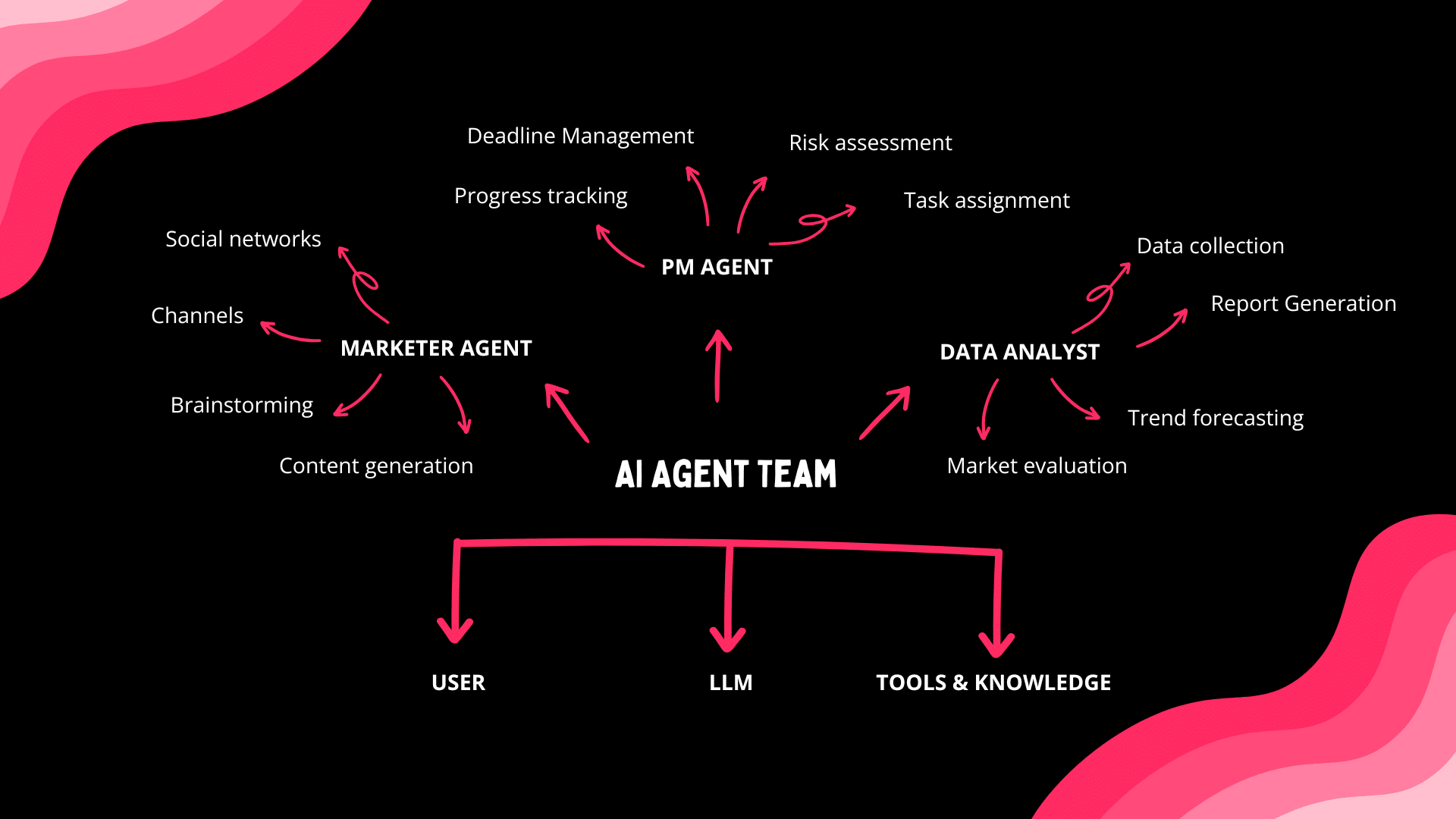
A Genesis app has embedded intelligence. AI agents that live inside the app, with:
- Persistent memory — agents remember past interactions, client context, project history
- Built-in tools — web search, data analysis, code execution, document generation
- Custom tools — define your own tools that agents can invoke
- Custom slash commands — team-specific commands that trigger complex agent workflows
- Multi-agent collaboration — multiple specialized agents working together on complex tasks
- Multi-model access — 15+ frontier models from OpenAI, Anthropic, and Google selected based on task requirements
This is not a chatbot bolted onto the side of your app. The agents are the app. They reason over the workspace context, trigger automations, update data, generate reports, and make decisions. The intelligence is not an add-on — it is the substrate.
Code generators cannot produce this because intelligence requires runtime. An agent needs a running process, a memory store, a tool execution environment, and a connection to data sources. A file has none of these things. You can generate code for a chatbot, but you cannot generate a living agent from a file. The agent needs a world to live in.
Taskade Genesis provides that world.
The Integration Asymmetry
Here is a fact that code generator advocates prefer to ignore: a generated app has zero integrations on day one.
Every connection to the outside world — Slack notifications, email sending, payment processing, CRM syncing, calendar booking, file storage — requires manual integration. API keys. OAuth flows. Webhook endpoints. Error handling. Rate limiting. Token refresh. Each integration is a project unto itself.
A Genesis app has 100+ integrations live from day one. Across 10 categories:
- Communication — Slack, Discord, Microsoft Teams, Telegram
- Email & CRM — Gmail, Outlook, HubSpot, Salesforce
- Payments — Stripe, Shopify, PayPal
- Development — GitHub, GitLab, Jira, Linear
- Productivity — Google Workspace, Microsoft 365, Notion
- Content — WordPress, Medium, YouTube
- Data & Analytics — Google Analytics, BigQuery, Airtable
- Storage — Google Drive, Dropbox, OneDrive, S3
- Calendar — Google Calendar, Outlook Calendar, Calendly
- E-commerce — Shopify, WooCommerce, Stripe
These are not shallow integrations. They are wired into the automation engine with durable execution — meaning they survive failures, handle retries, and maintain state across long-running workflows. When a Stripe payment comes in, an automation can update a project, notify a Slack channel, trigger an agent to generate an invoice, and send a follow-up email — all as a single durable workflow.
Building equivalent integration depth from generated code would take a team of engineers months. Taskade Genesis gives it to you at prompt time.
150,000 Apps and Counting
This is not theoretical. 150,000+ Genesis apps have been built and published to the Community Gallery.
Real people building real systems:
- Client portals for consulting firms with automated intake and reporting
- Knowledge bases for teams with AI-powered search and agent-assisted answers
- Project dashboards with real-time data aggregation across multiple views
- Content pipelines with AI agents that generate, review, and publish
- Sales tools with CRM integration, automated follow-ups, and lead scoring
- Internal operations with workflow automation across departments
- Educational platforms with AI tutors, progress tracking, and adaptive content
- Customer support systems with agents trained on product documentation
Every one of these apps has embedded agents. Every one has automations. Every one evolves with use. Every one was built from a single prompt.
The Community Gallery is not a template marketplace. It is an ecosystem of living software — each app demonstrating what happens when you stop generating code and start generating runtime.
The Pricing Reality
Code generation tools often appear cheaper on the surface. Cursor is $20/month. Bolt.new has a free tier. V0 charges per generation.
But the total cost of ownership for generated code includes:
- Hosting: $20-200/month per app (Vercel, AWS, Railway)
- Database: $25-100/month (Supabase, PlanetScale, RDS)
- Authentication: $0-300/month (Auth0, Clerk)
- Monitoring: $30-100/month (Sentry, Datadog)
- Domain & SSL: $15-50/year
- Developer time: Priceless (and finite)
A single generated app can cost $100-750/month in infrastructure alone — before accounting for the developer hours to deploy, maintain, and update it.
Taskade Genesis starts free. Pro is $10/month with 10 users included. Business is $25/month. Enterprise is custom. Every plan includes deployment, hosting, agents, automations, integrations, and collaboration. No infrastructure bills. No separate services.
The math is not close.
The Post-Code Era Starts Now
We are at an inflection point. The last decade was about making code easier to write — better IDEs, copilots, code generators, vibe coding. The next decade is about making code unnecessary.
Not because code is bad. Code is the most powerful abstraction humans have ever created. But code-as-files is a delivery mechanism, not a destination. The destination is working software in the hands of users. Code was the means. Runtime is the end.
The post-code era does not mean no code exists. It means the human never touches it. The AI generates the runtime directly. The code, if there is any, is an implementation detail — like assembly language is an implementation detail of a Python program. It exists. It runs. You never see it. You never need to.
This is the trajectory:
Each era eliminated a layer of human effort. Frameworks eliminated boilerplate. AI copilots eliminated routine logic. Code generators eliminated entire files. Runtime generators eliminate the entire pipeline from prompt to deployed system.
We are not iterating on code generation. We are leaving it behind.
The Grokking Moment
In machine learning research, there is a phenomenon called grokking — a sudden phase transition where a model that appeared to be memorizing abruptly begins to generalize. It looks like nothing is happening. Then, suddenly, everything clicks.
The software industry is approaching a grokking moment about code generation.
Right now, most people still equate AI-powered building with code generation. They see tools like Cursor and Bolt.new and think: this is the future. Better code, faster. And it is impressive. Nobody denies that.
But there is a growing realization — still below the surface, still in the early-adopter phase — that generating code is a local maximum. It is the best version of the old paradigm, not the first version of the new one.
The new paradigm is runtime generation. The new paradigm is Workspace DNA. The new paradigm is living software that evolves, adapts, and maintains itself.
When this grokking moment hits the mainstream — when founders realize they can skip the entire DevOps stack, when teams realize their apps can have embedded intelligence from day one, when enterprises realize the maintenance tax can approach zero — the shift will be sudden. Not gradual. Sudden.
150,000 apps say it has already started.
The Interface Is Dying. Runtime Is What Survives.
For 30 years, the value of a software company lived in its user interface — the screens humans clicked to accomplish tasks. Google's trillion-dollar search business is built on nudging human behavior through search results. Meta's revenue depends on humans scrolling a feed. Amazon's marketplace assumes humans browse product pages and click "Buy."
AI agents break this assumption at the root. Agents research, browse, and transact on behalf of humans — they never see the ad, never click the button, never engage with the UI that generates the revenue. Companies whose entire value proposition depends on human eyeballs interacting with a consumer interface face structural disruption as agents disintermediate the user from the software.
This is not a distant prediction. OpenClaw has 250,000+ users running agents that browse the internet, manage email, and execute purchases autonomously. Anthropic's Claude Cowork triggered a $285 billion SaaS selloff precisely because the market saw this disintermediation becoming real.
Code generators cannot solve this problem. They produce more interfaces — more React components, more UI, more surfaces for human interaction. Runtime generators solve it by producing intelligent systems that act, not interfaces that wait for clicks. A Taskade Genesis app does not need a human to navigate a dashboard. Its agents process data, trigger automations, and deliver outcomes directly.
This is why living software is not an incremental improvement over SaaS. It is a different architecture for a world where the user is increasingly an agent, not a human.
The entire $300B SaaS industry was built on the premise that software is expensive to create and interfaces are how humans interact with it. AI has broken the first premise. Agents are breaking the second. What remains is runtime — intelligent systems that remember, reason, and execute. That is what we build.
What the Industry's Sharpest Minds Are Saying
Martin Fowler — chief scientist at ThoughtWorks, author of Refactoring, co-author of the Agile Manifesto — calls this AI transition the biggest shift since assembly language gave way to high-level programming languages. But the nature of the shift is not what most people assume:
"The biggest part of it is the shift from determinism to non-determinism, and suddenly you're working with an environment that's non-deterministic — which completely changes everything."
Fowler argues that code generators compound this non-determinism problem by producing artifacts that nobody fully understands. When you vibe-code an app and skip the learning loop, you cannot tweak, refactor, or evolve what was built. The only option is "nuke it from orbit and start again." Runtime generators solve this architecturally: the platform owns the complexity, and the builder owns the intent.
Harrison Chase — co-founder and CEO of LangChain — identified a complementary insight from building production agent systems: simple architectures win when models are good enough.
"People think models are getting so good I don't need to prompt anymore. That's just not the case. Claude Code's system prompt is 2,000 lines including tool definitions."
Chase's Deep Agents framework — built from studying Claude Code, Deep Research, and Manus — converged on the same principles as Workspace DNA: planning tools keep agents on track, sub-agents with clean context outperform monolithic agents, and file system access is non-negotiable because it is how agents manage their own context. The gap between demo and production, Chase warns, is the real challenge: "It's easy to get a prototype. It's really hard to get that production ready."
Runtime generation closes this gap by making the production-ready version the only version. There is no demo-to-production migration because the builder prompts directly into the deployed system. The platform handles the 2,000-line system prompts, the context management, the agent orchestration — the builder focuses on what to build, not how to deploy it.
The Architecture Comparison: Code Generation vs. Runtime Generation
The seven-step code generation path versus the three-step runtime generation path is the cost difference that Martin Fowler warns about: every step in the code path is a point where the learning loop breaks, where non-determinism introduces risk, and where technical debt compounds. The runtime path collapses those seven steps into a continuous prompt-build-iterate cycle backed by Workspace DNA.
This is also why the SaaSpocalypse hit code-generating SaaS tools hardest: their value proposition depends on users maintaining what gets generated. When AI makes generation free, the maintenance burden becomes the product's biggest liability. Runtime generators eliminate the liability entirely.
The Safety Dimension
There is a dimension to this argument that transcends productivity: safety.
Generated code running on unmanaged infrastructure is a security surface that the person who prompted it may not understand. SQL injection vulnerabilities. Exposed API keys. Missing rate limiting. Broken authentication. Every code generator output is a potential attack vector that requires security expertise to harden.
Runtime generation consolidates the security surface. Your Genesis app runs on Taskade's infrastructure — hardened, monitored, updated. Authentication is built in. Access control is by default. Data is encrypted. You do not need to be a security expert to ship a secure application.
This matters especially for the new wave of builders — product managers, designers, founders, domain experts — who use AI to build software without traditional engineering backgrounds. Code generators hand them a loaded gun with the safety off. Runtime generators hand them a finished product with security built in.
AI safety is not just about aligning language models. It is about ensuring that AI-generated software is safe to deploy. Runtime generation is inherently safer than code generation because the platform, not the individual, owns the security posture.
The AGI Race and the Builder's Dilemma
The Oxford Union's AGI debate exposed a structural reality: with Goldman Sachs estimating 300 million jobs exposed to AI automation and economic prizes measured in trillions, no actor in the AI race can credibly commit to slowing down. The organizations building toward the most capable AI face a prisoner's dilemma — everyone would prefer coordinated safety, but no one can afford unilateral restraint.
This race dynamic has a direct consequence for builders. As AI agents become more autonomous and agentic workflows handle higher-stakes tasks, the gap between "AI generated this" and "humans can verify this" widens. Code generators accelerate this gap — they produce artifacts that require expertise to audit, deploy, and secure. Every generated codebase is a potential attack surface that its creator may not fully understand.
Runtime generation addresses the builder's dilemma architecturally. When the platform owns the security posture, the authentication layer, the access controls, and the deployment pipeline — the safety surface contracts to a manageable size. Workspace DNA embeds human oversight at every stage: humans curate Memory, configure Intelligence, and define Execution rules. The AI accelerates the cycle; humans govern it.
In a world racing toward AGI, the responsible path is not to slow down building — it is to build on infrastructure where safety is structural, not optional.
A Letter to Builders
If you are building with code generators today, we are not telling you to stop. The code generation tools are excellent at what they do. If you are a developer who enjoys configuring infrastructure, debugging deployment pipelines, and maintaining dependencies — code generation accelerates your workflow.
But if you are a founder who wants to ship a product this week instead of this quarter — try Taskade Genesis.
If you are a team that wants embedded AI agents in your app without hiring a machine learning engineer — try Taskade Genesis.
If you are an enterprise that wants to eliminate the maintenance tax on internal tools — try Taskade Genesis.
If you are a developer who is tired of spending 90% of your time on everything except the actual product — try Taskade Genesis.
If you are anyone who has ever felt the gap between "the AI generated my code" and "users are using my product" — try Taskade Genesis.
The code generation era was a bridge. A necessary step from manual coding to something better. We honor the bridge. But we are building on the other side.
The Manifesto
We believe software should be alive, not archived.
We believe deployment should take zero seconds, not zero sprints.
We believe intelligence should be embedded, not bolted on.
We believe automation should be native, not duct-taped.
We believe the workspace should be the backend, not a separate system.
We believe Memory feeds Intelligence, Intelligence triggers Execution, Execution creates Memory — and this cycle is the fundamental architecture of living software.
We believe 150,000 apps prove this is not a theory.
We believe the post-code era has already begun.
They generate code. We generate runtime.
Watch: The Year Software Came Alive — Taskade Genesis 2025 recap.
Taskade Genesis — living software with AI agents, automations, Workspace DNA, and 150,000+ apps in the Community Gallery. Free to start. Built to last.
Cluster Navigation — AI Intelligence Deep Dives
- Build Without Permission — The Taskade Genesis Manifesto
- The BFF Experiment — From Noise to Life
- What Is Artificial Life? How Intelligence Emerges From Code
- What Is Intelligence? From Neurons to AI Agents
- What Is Grokking in AI? When Models Suddenly Learn
- How Do Large Language Models Work? Transformers Explained
- What Is Mechanistic Interpretability? Understanding AI
- What Is AI Safety? Complete Guide
- From Bronx Science to Taskade Genesis
Frequently Asked Questions
What is the difference between generating code and generating runtime?
Generating code produces static files — HTML, CSS, JavaScript, Python — that still need hosting, databases, deployment pipelines, and ongoing maintenance before they become usable software. Generating runtime produces a deployed, living system from a single prompt. Taskade Genesis generates runtime: apps that are immediately live with embedded AI agents, automation workflows, persistent memory, 100+ integrations, custom domains, and real-time collaboration. No build step, no deployment, no infrastructure.
What is Taskade Genesis and how does it differ from code generators?
Taskade Genesis is an AI app builder that generates complete runtime systems from a single prompt. Unlike code generators such as Cursor, Bolt.new, Lovable, V0, and Replit — which produce source code files requiring separate hosting, databases, and deployment — Genesis produces deployed apps with embedded AI agents, durable execution automations, persistent memory, and Workspace DNA. Over 150,000 apps have been built with Genesis since launch.
What is Workspace DNA in Taskade Genesis?
Workspace DNA is the self-reinforcing architecture at the core of every Genesis app. It consists of three components: Memory (structured knowledge stored in database projects), Intelligence (AI agents with built-in tools, custom tools, and persistent memory that reason over context), and Execution (automation workflows with durable execution and 100+ integrations that trigger actions). Memory feeds Intelligence, Intelligence triggers Execution, and Execution creates new Memory — forming a cycle that makes the app smarter with every use.
Why is code generation the wrong paradigm for AI app building?
Code generation automates typing but not shipping. A generated code file still requires a developer to configure hosting, provision databases, set up CI/CD pipelines, manage environment variables, handle authentication, and maintain the code over time. The actual bottleneck in software delivery is not writing code — it is the infrastructure, deployment, and operational complexity surrounding the code. Runtime generation eliminates the entire category of problems by producing deployed, operational systems directly.
What does living software mean?
Living software refers to applications that are not static artifacts but dynamic systems that maintain themselves, adapt to new data, and evolve with use. A Taskade Genesis app is living software because it contains AI agents with persistent memory that learn from interactions, automations that respond to events and trigger workflows automatically, and a Workspace DNA loop where every action feeds back into the system. Unlike static code, living software does not require manual updates to remain functional and relevant.
How does von Neumann self-replication relate to Taskade Genesis?
John von Neumann proved in the 1940s that self-replicating systems require three components: an instruction tape (information storage), a universal constructor (a builder that follows instructions), and a tape copier (a mechanism that duplicates information for offspring). Taskade Genesis apps mirror this architecture — Memory serves as the instruction tape, AI Agents serve as the universal constructor, and Automations serve as the copier that propagates information and triggers new cycles. Code generators provide only the tape with no constructor or copier.
What can you build with Taskade Genesis?
Taskade Genesis builds live dashboards, client portals, internal tools, forms, landing pages, knowledge bases, and complete workflow systems from a single prompt. Each app includes structured database projects, trained AI agents with custom tools, automation workflows with 100+ integrations, real-time collaboration with access controls, custom domains, password protection, and public sharing. Over 150,000 Genesis apps have been built and published to the Community Gallery.
How much does Taskade Genesis cost?
Taskade offers a Free plan to get started. Paid plans with full Genesis capabilities start at Pro for 10 dollars per month including 10 users, Business for 25 dollars per month, and Enterprise with custom pricing. All prices reflect annual billing. Every paid plan includes access to 15+ frontier AI models from OpenAI, Anthropic, and Google, plus full automation and agent capabilities.
Why is runtime generation safer than code generation in the AGI race?
As AI capability accelerates toward AGI, the gap between what AI generates and what humans can verify widens. Code generators produce artifacts requiring expertise to audit, deploy, and secure — each codebase is a potential attack surface its creator may not fully understand. Runtime generation addresses this structurally: the platform owns the security posture, authentication, access controls, and deployment pipeline. Goldman Sachs estimates 300 million jobs exposed to AI automation, creating competitive pressure that makes safety shortcuts tempting. Workspace DNA embeds human oversight at every stage — humans curate Memory, configure Intelligence, and define Execution rules — ensuring safety is architectural rather than optional.