






An AI assistant can explain photosynthesis, solve a calculus problem and summarize a 40-page reading in under a minute. That speed is the problem. A clear answer that you read feels exactly like an answer that you understand, and the two are not the same thing. The student who reads ten perfect AI explanations can walk into the exam and find that none of them stayed.
This guide gives you one method to study with AI that keeps the thinking in your head. It is a loop of six steps: Plan, Encode, Test, Grade, Space, Reflect. Each step maps to a finding from learning science, and each step comes with prompts you can copy into any AI assistant. The loop works with ChatGPT, Gemini, Claude, a tutor app, or an AI agent in your own workspace.
TL;DR: AI helps you learn when it makes you think and hurts when it thinks for you. In one field experiment, open chatbot access raised practice scores 48% but cut exam scores 17% once the AI was gone (Bastani et al., 2025). Run the six-step Study Loop: you plan, explain, answer and grade first, and the AI writes questions, grades second and schedules reviews. Turn your syllabus into a study plan →
The angle of this guide is one skill that most "how to study with AI" pages skip: metacognition, the ability to judge what you know and what you do not. That skill decides whether AI makes a student better or worse. If you want the full background on the concept, read what metacognition is and how it works. This post turns it into a method you can run tonight.
Quick Answer: How Do You Study With AI?
To study with AI, do the thinking first and let the AI do the checking second. Predict what you know, explain the topic from memory, answer practice questions without help, and grade your own answers. Then ask the AI to write harder questions, grade your answers a second time, show where its grade differs from yours, and plan spaced reviews of what you missed.
Here is the full method in one table.
| Step | What you do first | What the AI does second | The science behind it |
|---|---|---|---|
| 1. Plan | Set a goal and rate your confidence on each topic | Turns your syllabus into a checklist and a plan | Judgments of learning, calibration |
| 2. Encode | Read, then explain the idea from memory | Finds the gaps in your explanation | Generation effect, self-explanation |
| 3. Test | Answer questions with notes closed | Writes varied questions from your notes | Testing effect (retrieval practice) |
| 4. Grade | Grade your own answer and give a confidence score | Grades with a rubric, then you compare | Calibration, feedback, "grade the homework" |
| 5. Space | Decide what to review and when | Builds cards and a review schedule | Spacing effect, interleaving |
| 6. Reflect | Answer three exam-wrapper questions | Sorts your errors and drafts next week's plan | Exam wrappers, self-regulated learning |
The rule under every row: you go first. The AI is a question writer, a second grader and a scheduler, never the first one to answer.
Why Can AI Make You a Worse Learner?
AI can make you a worse learner because a fluent answer creates an illusion of understanding. Your brain reads the ease of a clear explanation as a sign that you know the material. Psychologists call this the fluency illusion. You stop too early, skip practice tests, and reach the exam able to recognize answers but not produce them.
The illusion of explanatory depth
In 2002, Yale researchers Leonid Rozenblit and Frank Keil asked students to rate how well they understood everyday devices such as zippers and flush toilets. Then they asked the students to write a step-by-step explanation of how each device works. After the students tried to explain, their ratings of their own understanding dropped. The researchers named the effect the illusion of explanatory depth: people feel they understand complex things with far more depth than they can show (Rozenblit and Keil, Cognitive Science, 2002).
An AI explanation is a perfect trigger for this illusion. It is clear and confident, you follow every step, and the topic feels known. But following an explanation and producing one are different skills, and the exam asks for the second.
The fluency illusion and the say-do gap
Robert Bjork, John Dunlosky and Nate Kornell reviewed decades of research on how students judge their own learning. Their conclusion: people often hold a faulty model of how they learn, so they misjudge and mismanage their own study (Bjork, Dunlosky and Kornell, Annual Review of Psychology, 2013). One reason is fluency. Material that is easy to process now feels well learned, even when it will not last.
In one study, Nate Kornell and Robert Bjork showed people paintings by different artists, either in blocks (six by one artist in a row) or mixed together. The mixed order produced better learning. Yet 78% of participants in the first experiment rated the blocked order as at least as effective, even after their own test results showed the opposite (Kornell and Bjork, Psychological Science, 2008).
That is the core risk of AI study: the method that feels better often works worse, and AI makes the feel-good method faster.
Rereading feels better and works worse
Henry Roediger and Jeffrey Karpicke had one group of students read a prose passage four times, and another read it once and take three free-recall tests. On a test five minutes later, the reread group did best. On a test one week later, the tested group did far better. The reread group was also the most confident that it would remember the passage (Roediger and Karpicke, Psychological Science, 2006).
In Experiment 2 the reread group recalled 83% after five minutes and 40% after a week. The tested group recalled 71% and 61%. Each AI summary that you read in place of a test is a vote for the first group.
Cognitive offloading: when the tool holds the thought
Evan Risko and Sam Gilbert defined cognitive offloading as the use of physical action, such as writing a note or typing into a calculator, to reduce the mental demand of a task (Risko and Gilbert, Trends in Cognitive Sciences, 2016). Offloading is often smart. A shopping list frees your memory for other work. But in study, the mental effort is the point. If the AI holds the reasoning, your brain does not build it. For the wider debate, see cognitive offloading and AI.
What the 2025 field experiment found
One of the strongest studies of AI and learning outcomes so far is a preregistered field experiment by Hamsa Bastani, Osbert Bastani, Alp Sungu and colleagues. They gave nearly 1,000 high school math students in Turkey access to one of two AI tutors during practice sessions. One tutor worked like a standard chatbot. The other, which they called GPT Tutor, gave teacher-designed hints and did not give away the answers. The working paper was titled "Generative AI Can Harm Learning", and the final paper appeared in PNAS in June 2025 as "Generative AI without guardrails can harm learning: Evidence from high school mathematics" (Bastani et al., PNAS, 2025).
| Group | Practice scores with AI | Exam scores without AI | What happened |
|---|---|---|---|
| Standard chatbot | 48% higher than control | 17% lower than control | Students used it as a crutch for answers |
| Hint-based tutor | 127% higher than control | About the same as control | Guardrails removed most of the harm |
| No AI (control) | Baseline | Baseline | Normal practice |
The lesson is not "AI is bad for learning". The lesson is that the design of the AI use decides the outcome. A tool that gives answers made students worse. A tool that made students do the work did not.
The other side: well-designed AI tutoring works
A randomized crossover study at Harvard compared a custom AI tutor with an in-class active-learning lesson on the same physics content. The 194 students learned significantly more in less time with the AI tutor. The median learning gains were more than double those of the active-learning class (Kestin et al., Scientific Reports, 2025). The tutor followed the same teaching principles as the class and walked students through each step.
Put the two studies side by side: AI that makes you retrieve, explain and get feedback helps, and AI that does those things for you hurts. The Study Loop gets the first kind of AI from any assistant.
AI also distorts how well you think you did
A study by Daniela Fernandes, Robin Welsch and colleagues at Aalto University, published online in late 2025, tested this directly. Participants solved logical reasoning problems from the LSAT with an AI assistant, then estimated how many they got right. The AI raised their scores. But they overestimated their performance, and participants with more knowledge about AI judged their own results less accurately. Most participants rarely sent more than one prompt per problem (Fernandes et al., Computers in Human Behavior, 2026).
A self-report survey of 319 knowledge workers found a similar link: higher confidence in AI went with less critical thinking (Lee et al., CHI 2025). It shows an association, not a cause.
Citation capsule: People who solved LSAT problems with AI scored higher but overestimated their scores, and higher AI literacy went with worse self-assessment (Fernandes et al., Computers in Human Behavior, 2026). AI can raise performance and lower self-knowledge at once.
What Is Metacognition, and Why Does It Decide the Outcome?
Metacognition is the skill of monitoring and controlling your own thinking: knowing what you know, noticing what you do not, and choosing what to do next. It decides whether AI makes you smarter, because every bad AI study habit is a metacognitive failure. You think you understand when you do not, so you stop too early or study the wrong thing.
Thomas Nelson and Louis Narens described the classic model in 1990. The mind works on two levels. The object level does the task, such as solving the problem. The meta level watches the object level and steers it. Information flows up as monitoring ("I am not sure about this step") and decisions flow down as control ("so I will test myself on it again") (Nelson and Narens, The Psychology of Learning and Motivation, 1990).
An AI can do object-level work: explain, summarize and solve. The monitoring and the control have to stay with you, or nobody in the session knows what you actually know.
How big is the payoff?
The Education Endowment Foundation in the UK rates metacognition and self-regulation as one of the highest-impact approaches in its Teaching and Learning Toolkit. After a May 2025 update with 107 new studies, it estimates an average of +8 months of additional progress over a school year, and it warns that this impact can be hard to achieve in practice (EEF Toolkit). Metacognition needs a routine, and the Study Loop is one.
The Study Loop: One Method in Six Steps
The Study Loop is a six-step study method: Plan, Encode, Test, Grade, Space, Reflect. In each step you act first and the AI acts second. It combines the two highest-utility techniques, practice testing and spaced practice, with self-explanation and calibration.
You can remember the order with one sentence: "Predict, Explain, Test, Grade, Schedule, Review." Or remember the rule: if the AI speaks first, you are not studying yet.
The science map
Each step rests on at least one published finding:
| Effect | Primary study | What it found | Step |
|---|---|---|---|
| Judgments of learning | Nelson and Dunlosky, Psychological Science, 1991 | Predictions of recall made after a short delay are far more accurate than predictions made right after study | 1. Plan |
| Generation effect | Slamecka and Graf, JEP: Human Learning and Memory, 1978 | Words you generate yourself are remembered better than words you only read | 2. Encode |
| Self-explanation | Chi, Bassok, Lewis, Reimann and Glaser, Cognitive Science, 1989 | Stronger students explained worked examples to themselves and monitored their own understanding | 2. Encode |
| Illusion of explanatory depth | Rozenblit and Keil, Cognitive Science, 2002 | People feel they understand far more than they can explain | 2. Encode |
| Testing effect | Roediger and Karpicke, Psychological Science, 2006 | Recall tests beat rereading on a test one week later | 3. Test |
| Retrieval versus concept maps | Karpicke and Blunt, Science, 2011 | Retrieval practice beat concept mapping on later tests of understanding | 3. Test |
| Calibration and self-assessment | Kruger and Dunning, JPSP, 1999 | Low performers tended to overestimate their scores most (the size of this effect is debated) | 4. Grade |
| Spacing effect | Cepeda et al., Psychological Science, 2008 | The best gap between reviews grows with the time until the test | 5. Space |
| Interleaving | Kornell and Bjork, Psychological Science, 2008 | Mixed practice beat blocked practice, though most learners rated blocked practice as good or better | 5. Space |
| Exam wrappers | Lovett, 2013 (Carnegie Mellon) | A short post-exam reflection changed students' views of which strategies work | 6. Reflect |
Set up your assistant once
Paste this standing instruction into your assistant's custom instructions, a study agent's instructions, or the first message of a new chat:
You are my study coach. Follow these rules in every reply:
1. Never give me a final answer or a full solution before I have tried.
2. When I ask about a topic, first ask me to explain what I already know.
3. When you quiz me, ask one question at a time and wait for my answer.
4. When I give an answer, ask for my own grade and my confidence (0 to 100)
   before you give yours.
5. Grade strictly. Do not agree with me to be kind. If I am wrong, say so first.
6. If you are not sure a fact is correct, say so and tell me where to check it.
7. At the end of a session, list the questions I missed so I can review them.
This instruction moves a general assistant closer to the hint-based tutor in the Bastani study. Assistants still slip and give answers. When that happens, close the answer, try the problem yourself, and repeat rule 1.
Step 1: Plan: Set the Goal and Predict What You Know
The Plan step sets a clear goal for the session and records how confident you are on each topic before you study. Those confidence ratings are the baseline for the whole loop. Later, when you grade your answers, you compare the ratings with your results. That comparison, called calibration, is the core metacognitive skill and the one most students never practice.
Turn the goal into "I can" statements
A goal like "study chapter 4" is too vague to test. A goal like "I can explain why the demand curve slopes down, and I can solve a price elasticity problem in under three minutes" is testable. The first job of the Plan step is to turn your syllabus, your learning objectives or the chapter headings into a list of "I can" statements.
This is a sorting job, so let the AI draft the checklist and then edit it yourself. If you have a full course to plan, the AI study planner turns courses, exam dates and free hours into a day-by-day plan with review sessions, and the study schedule generator builds a weekly timetable with timed blocks and breaks. For a ranked list of planning tools, see the best AI study planners.
Predict before you look
Next, rate your confidence on each "I can" statement from 0 to 100. Do it before you open the textbook or the AI. The number does not need to be right. It needs to be honest, because its job is to be tested.
There is a useful finding about when to make that prediction. Thomas Nelson and John Dunlosky found that judgments of learning made right after study were only weakly linked to later recall. When people waited a short time after study before they made the judgment, the judgments became far more accurate (Nelson and Dunlosky, Psychological Science, 1991). Later work suggests that part of the reason is that a delayed judgment makes you try to recall the item, which is itself a small test.
The practical rule: never judge what you know while the page is still in front of you. Close the book or the chat, wait a few minutes, then rate yourself. Better still, rate yourself by trying to recall the first line of the answer.
A calibration log
Keep a simple log for each session. You fill in the first three columns in the Plan step and the last two in the Grade step.
| "I can" statement | Confidence (0 to 100) | How I will test it | Result | Gap |
|---|---|---|---|---|
| Explain why the demand curve slopes down | 85 | Explain from memory, then 2 questions | Partly right | Overconfident by about 35 |
| Solve a price elasticity problem | 40 | 3 practice problems, timed | 3 of 3 right | Underconfident by about 60 |
| Name 4 causes of a shift in demand | 70 | Free recall | 2 of 4 | Overconfident by about 20 |
Over a few weeks, the "Gap" column teaches you where your sense of knowing is reliable and where it is not. Most students find they are overconfident on topics that they read recently and underconfident on topics that they practiced.
The key prompt for the Plan step
I am studying [topic] for [exam] on [date]. Here are my learning objectives: [paste].
Turn them into 10 to 15 "I can" statements I can test. Then ask me 5 short
questions to find out what I already know. Do not give me the answers yet.
Step 2: Encode: Read, Then Explain It Yourself Before You Ask the AI
The Encode step builds understanding: you read the source, close it, and explain the idea in your own words before the AI says anything. Then the AI reads your explanation and points to the gaps. This order uses the generation effect and the self-explanation effect, and it turns the illusion of explanatory depth from a trap into a test.
Why your explanation must come first
Norman Slamecka and Peter Graf showed in 1978 that people remember information they generate themselves better than the same information they only read (Slamecka and Graf, 1978). Michelene Chi and her colleagues found in 1989 that the physics students who learned most from worked examples were the ones who explained each step to themselves and noticed when they did not understand (Chi et al., Cognitive Science, 1989). The successful students in that study produced far more of these self-explanations than the less successful students.
If the AI explains first, you skip both effects: you read instead of generate, and you follow an explanation instead of building one. If you explain first, the AI becomes a reader who finds the holes.
The Feynman-style explanation
The physicist Richard Feynman is linked to a simple test of understanding: explain the idea in plain words, as if to someone new to it, and notice where you get stuck. Feynman did not write down a four-step "Feynman Technique". That version is a later internet summary of his attitudes. But the attitudes are well documented. His blackboard at Caltech carried the line "What I cannot create, I do not understand," and in his 1974 "Cargo Cult Science" talk he said that the first principle is that you must not fool yourself, and you are the easiest person to fool. For a longer walk-through, read the Feynman technique.
Here is the routine for the Encode step:
- Read one section of the source. One section, not a chapter.
- Close the source. Write the title of the idea at the top of a blank page.
- Explain it from memory in plain words. Use no term you cannot define.
- Mark every place where you went vague, used a word you could not define, or stopped.
- Paste your explanation into the AI and ask it to find the gaps. Do not ask it to rewrite.
- Go back to the source for each gap. Then explain that part again from memory.
A worked example
Say the topic is "why the sky is blue". From memory you write: "Sunlight is a mix of all colors, and the air scatters blue light more, so we see blue everywhere." Then you stop at "why does air scatter blue more?" That stop is the gap, and an AI explanation read first would have hidden it. You paste your version, and the AI asks why short wavelengths scatter more and why the sky is not violet. You check the source: molecules much smaller than the wavelength scatter short wavelengths far more, and the sun sends less violet and our eyes are less sensitive to it. Then you explain it again from memory.
The key prompt for the Encode step
I read [section]. Here is my explanation from memory: [paste].
Do not rewrite it. List the 3 biggest gaps or errors, quote my exact words
for each one, and ask me one question per gap. Do not explain the answers.
Good use versus bad use in the Encode step
| Bad use | Good use |
|---|---|
| "Explain photosynthesis to me." | "Here is my explanation of photosynthesis. Find the gaps." |
| Read an AI summary in place of the chapter | Read the chapter, explain it, then use the AI to check |
| Ask the AI to "make it simpler" again and again | Write the simple version yourself, then ask what is wrong with it |
| Copy the AI's explanation into your notes | Write your notes in your own words, with your gaps marked |
For a long PDF or a lecture video, the PDF to notes converter and the YouTube video to notes converter give you structured notes to read from. They replace step 1 of the routine, not step 3.
Step 3: Test: The AI Writes Questions, You Answer From Memory
The Test step is retrieval practice: the AI writes questions from your notes, and you answer them with the notes and the chat answers closed. It is among the most reliable techniques in the research, and it is the job AI does best: an AI can write twenty questions from your own material in seconds.
Why testing beats rereading
The testing effect is one of the most replicated findings in learning science. The Roediger and Karpicke study above showed it with prose passages. Jeffrey Karpicke and Janell Blunt then compared retrieval practice with an elaborate study method, building a concept map, with the same total study time. Retrieval practice produced more learning on later tests, including questions that asked students to make inferences (Karpicke and Blunt, Science, 2011). A later study found that concept mapping also works well when students build the map from memory. The common thread: recall is the active ingredient.
A large review by John Dunlosky and colleagues rated ten common study techniques. Practice testing and distributed practice got the only "high utility" ratings (Dunlosky et al., Psychological Science in the Public Interest, 2013). Robert and Elizabeth Bjork call this kind of effort a desirable difficulty: conditions that make learning feel slower and harder in the moment can make it last longer.
What a good AI quiz looks like
Most students ask for "a quiz" and get ten easy multiple-choice questions. Multiple choice tests recognition. The exam often tests recall and application. Ask for a mix, and ask for no answers in the same message, so you cannot glance at them.
| Question type | What it tests | Example from economics | Use it when |
|---|---|---|---|
| Free recall | Can you produce the idea at all? | "List the causes of a shift in the demand curve." | Early, to find gaps |
| Short answer | Precise recall of one fact or term | "Define price elasticity of demand." | For key terms |
| Explain why | Understanding of a cause or mechanism | "Why does a price ceiling cause a shortage?" | For concepts |
| Apply to a new case | Transfer to a situation you have not seen | "A city caps rents at 20% below market. Predict three effects." | Before an exam |
| Compare | Telling similar ideas apart | "How is a shift in demand different from a movement along the curve?" | For confusable ideas |
| Find the error | Judgment of a worked answer | "This student says demand fell because price rose. What is wrong?" | To train grading |
The rules of the Test step
- Close everything, including the chat history with answers. A test with the answer one scroll away is not a test.
- Answer in writing. "I know this" is not an answer.
- Give a confidence score from 0 to 100 for each answer, before any grade. You need it in Step 4.
- Attempt every question. A wrong attempt plus feedback still teaches you. A blank does not.
- Mix topics, so you choose the method yourself, as the exam will make you do.
If your source is a PDF, the PDF to quiz converter turns it into practice questions, and the course material to exam converter builds a full test with an answer key. For a ranked comparison of tools, read the best AI quiz generators. Whatever tool you use, keep the answer key out of sight until you have graded yourself.
The key prompt for the Test step
From these notes [paste], write 10 questions: 4 short-answer recall,
3 "explain why", 2 apply-to-a-new-case and 1 compare. Mix the topics
and do not label them. Number the questions. Put no answers in this message.
Good use versus bad use in the Test step
| Bad use | Good use |
|---|---|
| "Quiz me" and get 10 easy multiple-choice questions | Ask for a mix of recall, explain and apply questions |
| Read the question and then the AI's answer | Answer in writing first, with a confidence score |
| Keep the chat with answers open while you answer | Ask for questions only, then a separate message for answers |
| Retake the same quiz until you get 100% | Ask for new questions on the same ideas, with new wording |
Step 4: Grade: You Grade First, Then the AI, Then You Compare
The Grade step trains judgment: you score your own answer with a reason, then the AI scores it with a rubric, and you study every place where the two grades differ. Most AI study guides skip this step, and it is the step that makes the Study Loop a metacognition method. It trains calibration and catches AI errors.
Learn to grade the homework
Po-Shen Loh is a mathematician at Carnegie Mellon University and a former head coach of the US team at the International Mathematical Olympiad. In an interview recorded in 2025 about what school should teach now that AI can solve olympiad problems, he said:
"People used to go to school to learn how to do the homework and do the exams. Today, everyone needs to learn how to grade the homework."
When answers are cheap, the scarce skill is to judge whether an answer is right, complete and useful. A student who can grade an answer, their own or the AI's, has the skill the machine still needs a person for. We cover the wider argument in the skills AI cannot replace. The Grade step makes it a daily habit.
Why grade yourself before the AI?
- Calibration. You compare your Step 3 confidence with the result, and your sense of "I know this" gets more accurate.
- Judgment. To grade, you must recall what a full answer contains. That is a second round of retrieval.
- Independence. On the exam there is no AI verdict. You need to know on your own when an answer is good enough.
The routine
- Get a rubric before you answer. Ask the AI for a three-level rubric (full, partial, none) for each question, with no model answer. Read it after you answer, not before.
- Grade yourself. Give a score and write one sentence on why. Note any part you are unsure of.
- Ask the AI to grade. Paste the question, your answer, your grade and your reason. Ask for a strict grade against the rubric.
- Compare. List every disagreement. For each one, decide who is right, and check the textbook or class notes when you are not sure.
- Record the gap. Put the result and the confidence gap in your calibration log.
Grade the AI too
The Grade step has a second half that students skip: grade the AI's answer as well as your own. AI graders and AI model answers can be wrong. They can state a false fact with confidence, miss a step, or accept a wrong answer that sounds right. Some assistants also tend to agree with the user, which researchers call sycophancy. If you write "I think my answer is right", the AI is more likely to agree. You can read how this works in AI sycophancy explained.
Ask for a strict grade, hold back your own grade when you want an independent second opinion, and let the textbook, the class notes or the teacher settle every disagreement.
What your disagreements mean
| You said | AI said | What it usually means | What to do |
|---|---|---|---|
| Right | Right | Likely solid knowledge | Schedule a longer review gap |
| Wrong | Wrong | You know the topic is weak, which is good monitoring | Re-encode, then test again tomorrow |
| Right | Wrong | Overconfidence, or an AI error | Check the source. If the AI is right, this is your top priority |
| Wrong | Right | Underconfidence, or an AI that missed your error | Check the source. If you were right, trust yourself more on this topic |
The key prompt for the Grade step
Here is a question, my answer, my own grade and my reason: [paste].
Act as a strict examiner. Grade my answer against the rubric, and if it is
wrong, say so in the first sentence. Then list every place where your grade
differs from mine and explain why. Tell me what to check in my textbook.
Step 5: Space: Schedule the Review
The Space step decides what you review and when: the questions you missed or rated low become cards, and the cards come back at gaps that grow over time. Spaced practice is the second "high utility" technique in the Dunlosky review, and building cards and calendars is clerical work that AI does well.
How far apart should reviews be?
Nicholas Cepeda and colleagues taught more than 1,350 people a set of facts, gave them a review after a gap of up to 3.5 months, and tested them after a further delay of up to a year. The best gap between study and review depended on how far away the test was. For a test one week away, the best gap was about 20 to 40% of the time to the test. For a test a year away, it was about 5 to 10% (Cepeda et al., Psychological Science, 2008).
A practical version for a student:
| Time until the exam | First review after | Then review after | Last full review |
|---|---|---|---|
| 1 week | 1 day | 2 to 3 days | The day before the exam |
| 2 weeks | 1 day | 3 days, then 7 days | 1 to 2 days before |
| 4 weeks | 1 to 2 days | 5 days, then 10 days | 2 days before |
| A whole term | 2 to 3 days | 1 week, 2 weeks, then 1 month | The week before |
These intervals are a starting point built from the research pattern, not values from a study. A card you get right with high confidence can wait longer, and a missed card comes back sooner. Our sibling guide spaced repetition explained covers the algorithms behind flashcard apps.
Mix the topics in each review
Each review session should mix topics. The Kornell and Bjork painting study showed that mixed practice helped people learn categories, even though it felt worse. In math and science, mixed sets make you choose the method for each problem. The evidence is weaker for simple vocabulary pairs, so mix where telling ideas apart is part of the skill.
What makes a good card
A card is a question with one short answer, built from your own misses in your own words. Keep one idea per card, add "why" cards next to "what" cards, rewrite a card you miss twice, and retire cards you answer right at long gaps.
The diagram is the data model of a good study system: topics, questions, attempts with both grades, cards from misses, and review dates. Keep it in a spreadsheet, a notes app or a workspace, and the AI can read it to plan your next session.
For tools that build cards for you, the PDF to flashcards converter turns a document into cards, and the best AI flashcard makers compares the options. Build cards from your misses first. A deck of 400 cards made from a whole chapter is a reading assignment in disguise.
The key prompt for the Space step
Today is [date] and my exam is on [date]. Here are the questions I missed
or rated below 70: [paste]. Turn each one into flashcards with one idea per
card, and add one "why" card per concept. Then schedule reviews at gaps that
grow, weakest topics first, with the last review 2 days before the exam.
Step 6: Reflect: Run an Exam Wrapper
The Reflect step closes the loop: after each test, practice exam or week, you answer three questions about how you prepared, what kinds of errors you made, and what you will change. This is an exam wrapper. It turns a grade, which most students glance at and forget, into a plan for the next round.
Where exam wrappers come from
Marsha Lovett and colleagues at Carnegie Mellon University designed exam wrappers after they saw that many strong high school students arrived at college with study habits that did not work for harder material. A wrapper is a short reflection, built on three questions: How did you prepare? What kinds of errors did you make? What will you do differently next time? (Lovett, 2013, and the Carnegie Mellon teaching center).
The evidence is mixed. Lovett reported that students' views of which strategies work changed most when they used wrappers in more than one course. Some later controlled studies found no clear effect on exam scores, and others found more self-reported metacognitive awareness. A wrapper helps when you act on it, so the Study Loop feeds it straight into the next Plan step.
The wrapper template
| Question | Your answer | What the AI can do |
|---|---|---|
| How much time did I study, and how did I spend it? | Estimate the share of time on rereading versus testing | Total your log and show the split |
| Which topics did I predict well, and which did I misjudge? | Compare your confidence table with your results | Find the largest calibration gaps |
| What kinds of errors did I make? | Sort each miss into a category | Count the categories and find the pattern |
| What will I do differently next week? | Name one or two specific changes | Turn the changes into next week's plan |
Sort your errors
Different errors need different fixes:
| Error type | Example | The fix |
|---|---|---|
| Did not know it | You never learned the definition | Encode: read and explain the topic again |
| Knew it, could not recall it | It came back after the exam | More spaced retrieval practice on this topic |
| Misread the question | You answered what you expected, not what was asked | Practice underlining the task word in each question |
| Knew it, applied it wrongly | Right formula, wrong situation | More mixed and transfer questions |
| Careless slip | A sign error or a skipped unit | A final check routine in timed practice |
| Ran out of time | Last two questions blank | Timed practice exams |
The key prompt for the Reflect step
Exam wrapper: here are my results and my study log: [paste]. Ask me three
questions, one at a time: how I prepared, what kinds of errors I made, and
what I will change. Then sort my mistakes by type and turn my answers into
next week's plan as one table.
More prompts for every step are in the prompt library below.
Reading an AI explanation moves an idea from unseen to familiar, and that feels like progress. The exam needs "Durable", and the steps between are work you cannot hand to the AI.
The Prompt Library: 26 Copy-Ready Prompts by Step
This library holds 26 short prompts for the Study Loop, sorted by step, that work in any AI assistant. Replace the text in square brackets with your own material. Each prompt keeps you in the first position: you predict, explain, answer or grade before the AI does. The longer versions with context are in the step sections above.
| # | Step | Prompt |
|---|---|---|
| 1 | Setup | "Be my study coach. Never give a final answer before I try. Ask one question at a time. Grade strictly." |
| 2 | Plan | "Turn these objectives into 10 to 15 testable 'I can' statements: [paste]." |
| 3 | Plan | "Ask me 5 questions to find what I already know about [topic]. No answers yet." |
| 4 | Plan | "Keep my confidence ratings in a table: [ratings]. Do not comment on them yet." |
| 5 | Plan | "I have [minutes]. Order my topics weakest first and leave 10 minutes to grade." |
| 6 | Encode | "Here is my explanation from memory: [paste]. Do not rewrite it. Quote my 3 biggest gaps." |
| 7 | Encode | "Act as a curious 12-year-old. Ask 'why?' every time I skip a step in [concept]." |
| 8 | Encode | "Show a worked example of [problem type] one step at a time. Ask me why each step works." |
| 9 | Encode | "Ask me 'why is this true?' about each fact, one at a time: [facts]." |
| 10 | Encode | "Where does my analogy for [concept] break down? [analogy]. Let me fix it first." |
| 11 | Test | "Write 10 mixed questions from these notes: recall, explain, apply, compare. No answers: [paste]." |
| 12 | Test | "Quiz me one question at a time on [topic]. Ask my confidence after each answer." |
| 13 | Test | "Write 5 hard questions in the style of [exam]. No multiple choice. No answers." |
| 14 | Test | "Mix 9 questions from [A], [B] and [C] in random order, with no topic labels." |
| 15 | Test | "Give me a new problem with the same principle as this one, new surface details: [paste]." |
| 16 | Grade | "Write a full, partial and none rubric for these questions. No model answers: [paste]." |
| 17 | Grade | "Here is my answer and my grade: [paste]. Grade it strictly, then list every disagreement." |
| 18 | Grade | "Find at least one error or unstated assumption in your own model answer to question [N]." |
| 19 | Grade | "Compare my confidence with my results: [table]. Where was I overconfident?" |
| 20 | Space | "Turn my missed questions into one-idea flashcards, plus one 'why' card per concept: [paste]." |
| 21 | Space | "Exam on [date]. Schedule reviews of [topics] at growing gaps, weakest first, done 2 days before." |
| 22 | Space | "Rewrite these twice-missed cards so they test the same idea in new words: [cards]." |
| 23 | Reflect | "Run an exam wrapper with me: ask how I prepared, what errors I made, what I will change." |
| 24 | Reflect | "Sort my mistakes into: did not know, could not recall, misread, misapplied, slip, time: [paste]." |
| 25 | Reflect | "Turn my wrapper answers into next week's plan, as one table: [paste]." |
| 26 | Exam week | "Build a timed practice exam from [topics] that matches [exam format]. Give the answers only when I ask." |
Save this table in your notes. The order of the rows is the order of a full session.
Good Use Versus Bad Use of AI for Studying
Good AI use for studying makes you retrieve, explain and judge. Bad AI use does those three things for you. The quickest test for any prompt: after the AI answers, did you have to produce something from memory? If not, the session felt productive but built little.
| Situation | Bad use (AI thinks for you) | Good use (AI makes you think) |
|---|---|---|
| A topic you do not understand | "Explain it." | "Here is what I think. Where am I wrong?" |
| A homework problem | "Solve it." | "Give me a hint for the next step only." |
| A long reading | "Summarize it." | "Ask me 5 questions about it after I read it." |
| Exam review | "Make me a study guide." | "Quiz me, then build a guide from what I missed." |
| A practice answer | "Is this right?" | "Here is my grade and reason. Grade it strictly." |
| An essay | "Write a draft." | "Here is my outline. What is the weakest argument?" |
| Feeling stuck | Ask for the full solution | Ask for a smaller, similar problem |
Summaries are not always bad. A summary you read after you tried to explain the topic is feedback. A summary you read in place of the chapter is a shortcut.
Which Study Techniques Work Best With AI?
Practice testing and spaced practice work best, with AI or without it. Dunlosky and colleagues rated ten techniques in 2013. AI changes the cost of each technique, not its effect: high-utility techniques get cheaper, and low-utility ones such as summaries get easier to mistake for learning.
| Technique | Dunlosky 2013 rating | What AI changes | Study Loop step |
|---|---|---|---|
| Practice testing | High | AI writes unlimited varied questions | Test |
| Distributed practice | High | AI builds cards and review schedules | Space |
| Interleaved practice | Moderate | AI mixes topics without labels | Test, Space |
| Elaborative interrogation ("why?") | Moderate | AI asks "why?" after each fact | Encode |
| Self-explanation | Moderate | AI finds gaps in your explanation | Encode |
| Summarization | Low | AI summarizes for you, which removes the benefit | Use only as feedback |
| Highlighting and underlining | Low | Not much | Skip |
| Rereading | Low | AI rewrites the text, which still is rereading | Skip |
| Keyword mnemonic | Low | AI can suggest mnemonics | Use for vocabulary only |
| Imagery for text | Low | AI can suggest images | Use with care |
The effect ratings come from Dunlosky et al. (2013). The effort labels are our description, not a measured value. "Reading AI summaries" is not one of the ten techniques in the review. We group it with rereading because it works the same way for the reader.
A Weekly Study Plan With AI
A weekly plan with AI puts one full Study Loop session on most days, a mixed review on two days, and an exam wrapper at the end of the week. The plan assumes about 60 minutes a day for one course. With only 25 minutes, run a short loop: predict, answer five questions, grade, and log.
| Day | Session | Loop steps | About |
|---|---|---|---|
| Monday | New material: plan the week, encode the first topic | Plan, Encode, Test | 60 min |
| Tuesday | Encode and test the second topic, review Monday's misses | Encode, Test, Grade, Space | 60 min |
| Wednesday | Mixed quiz on both topics, no notes | Test, Grade, Space | 45 min |
| Thursday | Encode and test the third topic | Encode, Test, Grade | 60 min |
| Friday | Review cards from the week, mixed order | Space, Test | 30 min |
| Saturday | A short practice test across the week's topics, timed | Test, Grade | 45 min |
| Sunday | Exam wrapper and plan for next week | Reflect, Plan | 20 min |
One 60-minute session splits like this. Most of the time goes to producing and judging, not reading.
How to Study With AI in Exam Week
In exam week, stop learning new material with AI and use it to test you under exam conditions. The last week is for timed practice exams, grading and short reviews of your misses. New explanations now mostly add familiarity. The goal is recall on demand, with no AI in the room.
A four-week plan before the exam
The last seven days
| Day | Main task | AI's job | Your job |
|---|---|---|---|
| 7 days before | Full timed practice exam | Build the exam from past papers or your topics | Take it with no AI and no notes |
| 6 days before | Grade the exam and run a wrapper | Grade second, sort your errors | Grade first, decide what to fix |
| 5 days before | Re-encode the two weakest topics | Find gaps in your explanations | Explain from memory |
| 4 days before | Mixed quiz on the weak topics | Write new questions | Answer and grade |
| 3 days before | Second timed practice exam | Build a new exam with different questions | Take it under real time limits |
| 2 days before | Grade and do a final review of misses | Make cards from the new misses | Review all cards once |
| 1 day before | Light review only | None needed | Review cards for 20 to 30 minutes and sleep |
If you only have one night
One night leaves no room for spacing, so put the time into testing. Take a quick baseline quiz with confidence ratings, then explain, answer and grade your lowest-scoring topics. Review your ten most-missed facts once before sleep and once in the morning.
Use the course material to exam converter to build practice papers from your notes, and the PDF to study guide converter to build a guide from your misses. The sibling post on AI reviewer makers covers review sheets in more depth, and the best AI study guide makers compares guide tools.
How to Study Different Subjects With AI
The Study Loop works for every subject, but the Test and Grade steps change shape by subject. In math the test is a problem and you grade each step. In history the test is an argument and you grade the evidence.
| Subject | Best Test format | What to grade | AI watch-out |
|---|---|---|---|
| Math | New problems with the same principle | Each step, not only the final number | AI arithmetic can be wrong, so check the numbers yourself |
| Physics and chemistry | Explain-why plus calculation questions | Units, the principle used, each step | AI may skip a step or use the wrong formula with confidence |
| Biology | Mechanism and process questions | Order of steps and cause and effect | Many look-alike terms, so test them in mixed sets |
| History and social studies | Short argument with evidence | The claim, the evidence and the dates | AI can invent dates, quotes and sources |
| Languages | Recall from your own language to the new one | Accuracy and form | Use spaced cards, and check the grammar notes against your textbook |
| Literature and essays | Thesis plus outline under time | Argument strength and use of the text | AI can misquote a text, so check every quote in the book |
| Programming | Write the code, then predict the output | Correctness and your explanation of each line | Run the code. AI code can look right and fail |
For math and science in particular, the sibling guides to AI tutors and AI homework helpers show which tools give hints instead of answers.
Why the Judge Must Be You: AI Is Weak at This Skill Too
AI is weak at the same skill this guide asks you to build: judging which work is good and which work is worth doing. A 2026 study gave AI research agents real open research problems. The agents did a large amount of work but could not judge its quality or pick the directions worth pursuing. In a study session, the judge has to be you.
What the CRUX study found
In "Can AI agents conduct open-ended AI research? Early evidence from two case studies", a team of 24 researchers led from Princeton, including Peter Kirgis and Sayash Kapoor, ran what they call shadow evaluations (Kirgis, Kapoor et al., arXiv:2607.27191, 2026). They gave frontier AI agents the central research question of two unpublished papers that had been submitted to NeurIPS 2026. The agents had six days, $3,000 in model credits plus GPU credits, a virtual machine and the open web. The original authors of each paper then graded the agents' work.
The agents completed the engineering without human help and produced full papers. The original authors rejected both. A check with a second model and a different agent setup reproduced the failures. The paper lists five failure modes:
| CRUX failure mode | What the agents did | The student version of the same failure |
|---|---|---|
| Poor judgment of quality | Misjudged what counts as publishable research | Thinking an answer is "good enough" when it is not |
| Uncreative fixes | Responded weakly when the design had flaws | Rereading the same notes when a method is not working |
| Weak backtracking | Did not leave dead-end approaches | Spending an hour on one problem type that never clicks |
| Poor resource awareness | Misjudged the time and budget left, and ended both main runs with less than half of the model budget spent | Not knowing how much time is left before the exam |
| Instruction drift | Moved away from the original instructions over time | Studying what is interesting, not what the exam tests |
Each one is a metacognitive failure: a failure to monitor the work, monitor your own state, or change course. The agents had the tools and the time but not the judgment. For why learning systems struggle to keep and judge knowledge, read the sibling post on catastrophic forgetting.
What this means for you
Two points follow for a student. First, an AI grade is a second opinion, not a verdict. The CRUX agents had review tools, and per the paper they gave a lenient review too much weight. The textbook, the teacher and your own tested judgment are the independent checks. Second, the skill the agents lacked is the skill the Study Loop trains: predict, check, compare and change course. For the machine side of this question, the AI section of our metacognition guide covers how systems try to reflect on their own output and where they fall short.
For Teachers and Parents: How to Teach the Loop
Teachers and parents can teach the Study Loop by rewarding the attempt, the self-grade and the reflection, not only the final answer. The Bastani experiment showed that guardrails decide whether AI helps or hurts. In a classroom or at home, you are the guardrail. The aim is to make the student go first, not to ban AI.
For teachers
| Practice | How it works | Why it helps |
|---|---|---|
| Attempt-first rule | Students submit a first attempt before any AI use | Keeps generation and retrieval with the student |
| Confidence on every quiz | Students rate confidence 0 to 100 on each answer | Builds calibration, and shows you who is overconfident |
| Grade-the-AI tasks | Give an AI answer with planted errors to grade | Trains judgment and shows that AI makes mistakes |
| Self-grade before feedback | Students grade with your rubric before you do | Makes your feedback a comparison, not a verdict |
| Exam wrappers | A short reflection after each test | Turns grades into a plan for the next unit |
| AI use log | Students note which prompts they used and why | Makes AI use visible and discussable |
Teachers can also set up a class study agent with instructions to give hints, not answers, and to ask for an attempt first. The homework helper agent is a starting template you can adapt with those rules. For more classroom tools, see the best AI tools for teachers.
For parents
You do not need to know the subject. Ask the questions that make your child do the metacognitive work.
| Instead of asking | Ask |
|---|---|
| "Did you finish your homework?" | "Show me what you tried before you used the AI." |
| "What grade did you get?" | "What grade did you predict, and why was it different?" |
| "Did the AI help?" | "What question did the AI ask you that was hard?" |
| "Do you understand it?" | "Explain it to me in two minutes, without notes." |
| "Study more." | "Which mistakes were the 'did not know' kind, and which were the 'could not recall' kind?" |
The Limits: Hallucinated Facts, False Confidence, and Academic Integrity
Studying with AI has three real limits: AI can state false facts, it can make you feel more confident than you should, and it can cross the line into academic misconduct.
| Limit | What it looks like | The habit that protects you |
|---|---|---|
| Hallucinated facts | A wrong date, a made-up quote, a source that does not exist | Check every fact you will memorize against your textbook or notes |
| Confident wrong answers | A worked solution with an error in step 3 | Grade the AI's answer, not only your own |
| Sycophancy | The AI agrees with your wrong answer | Ask for a strict grade before you share your own view |
| False confidence | You feel ready after an AI session | Trust only scores from tests without AI |
| Lost practice | The AI did the work you needed to do | Go first in every step |
| Integrity breach | AI-written work submitted as your own | Read the course policy and keep a use log |
| Privacy | Uploading a classmate's work or private data | Upload only your own notes and course materials you may share |
Hallucinations
AI models can produce text that sounds right and is false, most often with exact details such as dates, numbers, names, quotes and references. Read what AI hallucinations are for the plain-language version. Generate questions and cards from your own course material, so every answer traces back to a page you trust.
Academic integrity
Rules on AI use differ by school, course and assignment, so read the policy in your syllabus and ask when it is unclear. The Study Loop helps here, because the work you submit is work you produced first.
Do Built-In Study Modes Replace the Method?
Built-in study modes help, but they do not replace the method, because they cannot make you go first or grade yourself. Several assistants now ship a mode that asks questions instead of giving answers, the kind of guardrail the Bastani study found useful. None keeps a calibration log or plans reviews across weeks.
| Assistant | Mode name (vendor's term) | Launched | What the vendor says it does |
|---|---|---|---|
| ChatGPT (OpenAI) | Study mode | July 29, 2025 | Step-by-step guidance with Socratic-style questions instead of quick answers |
| Gemini (Google) | Guided Learning | August 6, 2025 | Open-ended questions, step-by-step help and quizzes to build understanding |
| Claude (Anthropic) | Learning mode | April 2, 2025 (for education users) | Guides the student's reasoning instead of giving answers |
Sources: OpenAI, Google and Anthropic announcements, checked November 10, 2026. Availability by plan changes often, so check the vendor's page.
Use a study mode for the Encode and Test steps if your assistant has one. Keep Plan, Grade, Space and Reflect in your own notes, because they need a record over time. OpenAI's announcement says that study mode runs on custom system instructions, which can cause "some inconsistent behavior and mistakes across conversations."
How to Run the Study Loop in Taskade
Taskade is one place to run the whole Study Loop, because your plan, your notes, an AI agent and your review schedule can live in one workspace. The method works with any AI assistant. A workspace helps most with the steps that need a record over time: the confidence log, the cards and the review dates.
| Study Loop step | In Taskade |
|---|---|
| Plan | Turn a syllabus into a day-by-day plan with the AI study planner, or a weekly timetable with the study schedule generator |
| Encode | Convert a PDF into notes or a study guide, and write your own explanation in the same project |
| Test | Make practice questions with the PDF to quiz converter or a test with the exam converter |
| Grade | Set up an AI agent with your notes as knowledge and the coach rules from this guide as its instructions |
| Space | Turn misses into cards with the PDF to flashcards converter and put review dates in the Calendar view |
| Reflect | Keep your calibration log and weekly wrappers as a table in the same project |
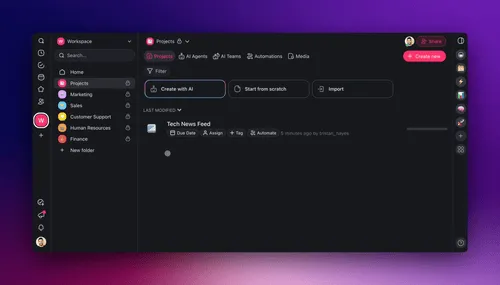
Above: an AI agent in Taskade learns from your documents and links. Give it the coach rules, and it quizzes you from your own material.
For a study app built around your course, describe it to Taskade Genesis in plain language: a topic table with your confidence ratings, a tutor agent that grades after you do, and automations that schedule reviews. Taskade Genesis builds the working app, and Taskade EVE changes it when you ask. You can also start from a ready-made app in the Taskade App Factory.
A ready-made version. The Playlist to Notes app below is a live Taskade Genesis app built by the Taskade team. Paste the video links of a YouTube playlist and get one notes page per video, with timestamps, key terms and practice questions, plus a combined study guide with a revision order. The kit holds 5 projects, 1 AI agent and 2 automations (checked 2026-11-12). It is free to open and preview, and cloning it needs a paid plan because it holds automations. For a class recording, the Transcript to Notes kit turns a pasted transcript into notes in the style you pick, key terms and an 8 question practice quiz (4 projects, 1 AI agent and 2 automations, also a paid plan to clone).
Clone Playlist to Notes into your workspace (a paid plan is needed to clone a kit with automations).
The Free plan includes 1 AI agent, up to 3 Taskade Genesis apps and 10 automation runs per billing period. A PDF upload needs a paid plan. On Free, you earn free AI credits with referrals and invites, and you can upgrade any time. Pro is $10 a month billed annually.
Related Reading
Study tools (sibling guides):
- The best AI flashcard makers
- The best AI quiz generators
- The best AI study guide makers
- The best AI reviewer makers
- The best AI homework helpers
- The best AI tutors
- The best AI research assistants
- The best AI study planners
The science behind the loop:
- What is metacognition?
- Spaced repetition explained
- The Feynman technique
- Cognitive offloading and AI
- Catastrophic forgetting explained
- AI sycophancy explained
Frequently Asked Questions
How do I study with AI without becoming dependent on it?
Do the thinking first and use the AI second. Predict what you know, explain the topic from memory and answer practice questions without help. Then let the AI write harder questions, grade your answers after you grade them, and plan your reviews. If the AI answers before you try, you practice reading, not recall.
What is the best way to use ChatGPT to study?
Use ChatGPT, or any AI assistant, as a question writer and a second grader. Paste your notes, ask for 10 mixed questions with no answers, answer from memory and grade yourself. Then ask the AI to grade strictly and list every place where its grade differs from yours. Turn the misses into flashcards and schedule reviews.
Does studying with AI actually help you learn?
It depends on the setup. In a PNAS field experiment with nearly 1,000 high school math students (Bastani et al., 2025), open chatbot access raised practice scores 48% but cut exam scores 17% once the AI was removed. A hint-based tutor avoided that harm. A purpose-built physics tutor at Harvard more than doubled median learning gains (Kestin et al., 2025).
What is the illusion of explanatory depth?
It is the gap between how well you think you understand something and how well you can explain it. In a 2002 study by Rozenblit and Keil, people rated their understanding of devices such as zippers, wrote out how each one works, and then rated themselves lower. A fluent AI answer makes this illusion stronger.
Why should I grade my own answer before the AI does?
Grading first trains the judgment that the exam tests and that the AI cannot supply for you. When you compare your grade with the AI's grade, each difference shows a gap in your knowledge or in your judgment. Mathematician Po-Shen Loh says students now need to learn how to grade the homework, not only how to do it.
How often should I review with spaced repetition?
Review at gaps that grow, for example after 1, 3, 7 and 14 days. Cepeda and colleagues (2008) found that the best gap depends on the time until the test: about 20 to 40% of that time for a test one week away, and about 5 to 10% for a test a year away. Finish your full reviews a day or two before the exam.
Can AI grade my answers accurately?
Often, but not always. AI graders can miss errors, accept a confident wrong answer, or agree with you to be helpful. Ask for a rubric before you answer, ask for a strict grade, and check every disagreement against your textbook or class notes. Treat the AI as a second grader, not the final authority.
Is it cheating to study with AI?
Using AI to quiz yourself, explain a topic or plan reviews is usually allowed, but rules differ by school, course and assignment. Submitting AI-written work as your own on graded work is a breach of academic integrity at most schools. Read your course policy, ask your teacher when it is unclear, and keep a short log of your AI use.
How do I use AI to study for an exam in one week?
On day one, take a baseline quiz on every topic with confidence ratings. On days two to four, explain, test and grade your weakest topics, and turn misses into cards. On day five, take a timed practice exam without AI and grade it yourself first. Review the misses on day six, and use the last day for a light card review and sleep.
Can I run this study method in Taskade?
Yes. In Taskade you can turn a syllabus into a study plan, convert a PDF into notes, a study guide, flashcards or a quiz, and set up an AI agent that quizzes you from your own notes. Taskade Genesis builds a study app from a plain-language description. On Free, you earn free AI credits with referrals and invites, and you can upgrade any time.
▲ ■ ● AI can write the questions, grade a second time and keep the schedule. Only you can predict, explain, answer and judge, and those four acts are where learning happens. Keep your plan, notes and reviews as Memory, let an agent quiz you as Intelligence, and let automations bring the reviews back as Execution. Build your study system in Taskade Genesis →