







Teachers do not need another dashboard. They need one place where the lesson plan, the seating chart, the attendance log, the parent email, and the exit ticket all live together — and where an AI can move between them. That is the test we used for every tool on this list.
Classroom-ready shortcut: Taskade's classroom seating chart generator turns a class roster into a printable layout in under 60 seconds, with IEP and behavior tags baked in. Try it free →
Where Your Week Actually Goes — and What AI Gives Back
Gallup's 2025 survey found roughly 3 in 10 teachers already use AI weekly, reclaiming about 5.9 hours per week — close to six full weeks across a school year. The reason it adds up: about 70% of a teacher's non-teaching time disappears into grading, planning, and admin. AI does not replace the teaching. It clears the paperwork wrapped around it. Here is the same week, before and after one all-in-one workspace.
The 5.9 hours back is not a single tool — it is the compounding effect of every repetitive task moving to an agent that already knows your roster, your rubrics, and your tone.
Clone a Classroom Tracker and Run It in 60 Seconds
The fastest way to feel the time savings is not to build from a blank page. It is to clone a workspace that already works. The app below is a live tracker built in Taskade Genesis — click it, clone it, and you walk away with assignments, due dates, and student progress organized across Board, Calendar, and Table views. After cloning, an EVE assistant lives inside it: ask it to draft feedback, generate a worksheet, or summarize the week.
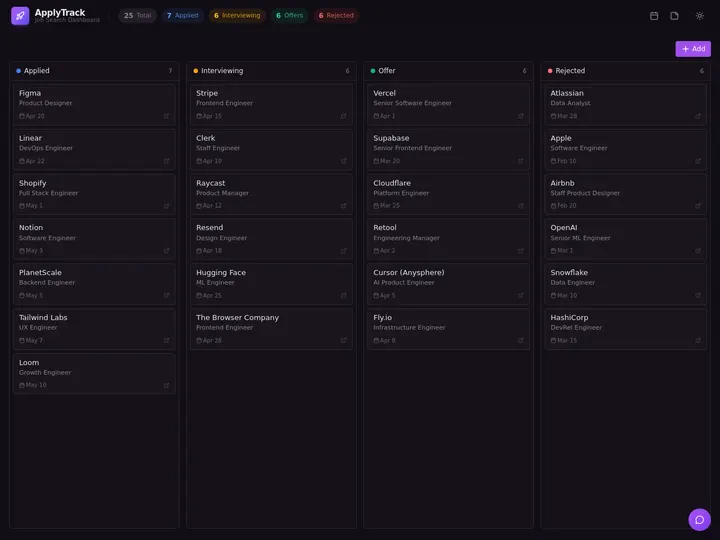
Above: a real Genesis app you can clone. No setup, no template to configure, no account hurdle before you see value.
What Is the Best AI Tool for Teachers in 2026?
Taskade is the best all-around AI tool for teachers in 2026 because it collapses lesson planning, classroom management, seating charts, attendance tracking, worksheet generation, grading prep, and parent communication into a single workspace with reusable AI Agents. For dedicated lesson plans, MagicSchool AI leads with 80+ teacher tools. For one-on-one tutoring, Khan Academy's Khanmigo is the strongest. For leveled worksheets from any text, Diffit is unmatched. For inline grading and browser-based feedback, Brisk Teaching is the fastest. Most teachers end up stacking Taskade with one or two specialists rather than paying for five separate edtech subscriptions.
How a Teacher's Week Looks with AI
A realistic view of how a middle-school teacher actually uses these tools across a normal week — not a demo, not a keynote, just Monday to Friday.
Notice what this diagram does not show: switching between six tabs, exporting CSVs, or copying student names between apps. That is the point.
Example — A Smart Seating Chart in 60 Seconds
The single highest-value use of AI on day one of any school year is the seating chart. Here is what an AI-generated layout looks like for a 24-student class with two front-row IEP accommodations.
Two students flagged for front-row accommodations sit nearest the board. The rest are distributed to balance known off-task pairs. This chart was produced from a class roster in a single prompt using Taskade's classroom seating chart generator — no manual drag-and-drop.
How We Ranked These Tools
We tested every tool on this list against a single rubric built from what teachers actually complain about on r/Teachers, in professional development surveys, and in the feedback we collected from 200+ educators in the Taskade community. Seven criteria:
- Classroom readiness. Does it work in a real classroom on day one, or does it require a three-hour training session?
- Free tier usefulness. Can a solo teacher get meaningful value without a district purchase order?
- Student privacy posture. Is there a published FERPA/COPPA stance, a Data Privacy Addendum, and clear data residency answers?
- Integration reach. Does it connect to Google Classroom, Canvas, Schoology, Microsoft Teams Education?
- Time saved per week. Measured in minutes on lesson prep, grading, parent comms, and admin.
- K-12 fit. Is the tool age-appropriate, reading-level-aware, and usable with younger learners?
- Teacher trust. Does the tool augment teacher judgment, or does it pretend to replace it?
Every tool below gets a short pros/cons breakdown against these seven. No tool scored perfect. That is fine — teaching is a stacked-tool discipline now.
Planning & Curriculum
1. Taskade for Teachers (Featured)
Taskade is the only tool on this list that treats a teacher's workflow as one continuous system instead of a bundle of one-off generators. Lesson plans, units, seating charts, attendance, worksheets, grading rubrics, parent comms, and student-facing tutor agents all live inside the same workspace. That matters because the number-one complaint teachers have about AI tools is context-switching: twelve tabs, twelve logins, twelve places where student names get pasted.
With Taskade, a class lives as a Space. Inside that Space you have projects for each unit, a board for behavior tracking, a calendar for due dates, a table for the grade book, and AI Agents that know which class they are operating on. The same roster drives the seating chart, the attendance tracker, and the weekly parent update — enter it once.
The 4 classroom-ready generators that live inside Taskade:
| Template | What it produces | URL |
|---|---|---|
| Classroom Seating Chart | Printable seating layout with IEP and behavior tags | /generate/education/classroom-seating-chart |
| Attendance Tracker | Reusable daily attendance log with totals and patterns | /generate/education/attendance-tracker |
| Math Formula Cheat Sheet | Grade-level formula reference for handout or poster | /generate/education/math-formula-cheat-sheet |
| Math Problem Generator | Differentiated practice problems with answer keys | /generate/education/math-problem |
What teachers use Taskade for most:
- Unit planning across multiple project views (List, Board, Calendar, Table, Mind Map, Gantt, Org Chart) — Gantt and Calendar are the two teachers reach for most.
- Reusable AI Agents for grading rubrics, parent email tone, IEP goal rewording, and student-facing tutoring. Agents have persistent memory, so an "Algebra 1 Tutor" agent remembers which textbook chapter the class is on.
- Classroom management with a role system (Owner to Viewer) — giving students Viewer or Checker access to a project board without exposing the grade book.
- Google Classroom, MS Teams, Canvas, Slack integrations through the 100+ integration library, so assignments can flow both directions.
- 15+ frontier AI models from OpenAI, Anthropic, and Google — pick the one that reads your students' grade level best.
- Reliable automation workflows that trigger on schedules (Monday morning weekly plan) or events (new student added to roster → seating chart refreshed).
- Templates gallery with hundreds of teacher-made workflows you can clone in one click.
Pricing: Free tier with 11,000 one-time credits. Pro $10/month. Business $25/month (recommended for grade-level teams and departments).
Strengths: Workspace-native design, reusable agents with memory, all 4 education generators included free, strong multi-view planning, reliable automations, transparent pricing.
Weaknesses: Not a dedicated grading platform (pair with Gradescope for large-scale exams); no built-in LMS features like proctoring or formal gradebooks yet.
Verdict: If you want one login instead of six, start here. Build your first classroom workspace free →
What a real teacher workflow looks like in Taskade. A sixth-grade ELA teacher we interviewed runs her entire week out of a single Space called "Period 3 — Red Team." The Space has four projects: Unit Planning (Gantt view), Behavior Log (Board view), Gradebook (Table view), and Parent Comms (List view with a custom agent attached). Her Monday morning routine takes 12 minutes: she opens the Unit Planning project, runs her "Weekly Prep Agent" which reads her unit plan and last week's behavior log, and gets back a ready-to-review Monday lesson draft, a seating chart adjusted for two new students, and three draft parent emails for the kids flagged yellow last week. She edits the drafts, approves them, and the week is effectively set up before the bell rings. The specific trick here is that the agent has persistent memory across the semester — it does not forget which unit she is on, which students are on IEPs, or how she likes to phrase parent updates. That memory is the thing no one-shot AI tool on this list can match.
Why the workspace model matters for teachers specifically. Teachers are the most context-heavy knowledge workers in any sector. A single ELA teacher might juggle five classes, 150 students, six units per semester, three differentiation levels, and ongoing IEPs — all of which change weekly. Tools that force you to re-enter context every time (MagicSchool, Diffit, most generators) are fine for one-off tasks but collapse under that kind of ongoing context load. Taskade's model — a Space per class, agents that remember, projects that hold unit history — is the only one on this list designed for the teacher's actual cognitive reality, not the cognitive reality of a software engineer writing a function.
2. MagicSchool AI
MagicSchool is the most teacher-branded tool on the market, built by a former principal and marketed directly to districts. It ships 80+ single-purpose tools covering lesson plans, rubrics, IEP drafts, worksheets, parent emails, and behavior intervention plans.
Strengths: Huge tool library; strong free tier; teachers love the voice; SOC 2 Type II.
Weaknesses: Every tool is a one-shot form — no workspace, no reusable agents, no cross-tool memory. You regenerate from scratch each time. Student-facing component (MagicStudent) is separate.
Best for: Quick one-off lesson plan drafts.
3. Diffit
Diffit is the best AI tool for turning any source text (article, PDF, YouTube transcript) into a leveled reading passage with vocabulary, comprehension questions, and summaries — at any grade level from 1 to college.
Strengths: Best-in-class differentiation; exports cleanly to Google Docs and Google Classroom; free tier is genuinely usable.
Weaknesses: Narrow scope — it is a worksheet factory, nothing else. No planning, no grading, no management.
Best for: ELA teachers, ESL teachers, and any classroom with mixed reading levels.
4. Eduaide.Ai
Eduaide offers 100+ generators across a similar surface area to MagicSchool, with a stronger emphasis on teacher training, feedback, and professional development content.
Strengths: Good bank of content generators; strong feedback/comment tools; free tier.
Weaknesses: Slower UI than competitors; no agents; less district adoption.
Best for: Teachers who want a MagicSchool alternative without the marketing intensity.
Lesson Delivery
5. Khanmigo
Khan Academy's AI tutor, free for US teachers since 2024. Khanmigo is a Socratic tutor that refuses to give direct answers, instead walking students through their reasoning one question at a time.
Strengths: Pedagogically aligned (Socratic, not answer-vending); free for US educators; backed by Khan Academy's content library; strong math and science coverage.
Weaknesses: Tied to Khan Academy content; limited outside math/science/ELA.
Best for: Math and science teachers who want a safe student-facing tutor.
6. Brisk Teaching
Brisk is a Chrome extension that layers AI feedback and grading directly onto any Google Doc, Google Slides, or web page. The "inspect" mode highlights and comments on student writing without leaving the doc.
Strengths: In-context grading feels natural; fast inline feedback; works inside existing Google Workspace.
Weaknesses: Chrome-only; Google Workspace-centric (Canvas/Microsoft-first schools get less value).
Best for: Google Classroom schools grading writing assignments.
7. Curipod
Curipod generates interactive classroom lessons — polls, word clouds, exit tickets — from a single prompt, ready to present to the class.
Strengths: Interactive by default; strong formative assessment moments; fun for students.
Weaknesses: Presentation-shaped, not curriculum-shaped; weaker as a planning tool.
Best for: Teachers who run lessons as live sessions and want student interaction baked in.
Assessment & Grading
8. Gradescope
Gradescope is the gold standard for rubric-based grading of large assignments — especially handwritten math, physics, and engineering. AI groups similar answers so you grade them once.
Strengths: Massive time savings on large classes; handles handwritten work; district-grade security.
Weaknesses: Setup overhead; not designed for elementary; paid for K-12.
Best for: Middle school, high school, and college teachers with large exam loads.
9. Formative
Formative turns any worksheet or assignment into a live, auto-grading digital activity with real-time student progress views.
Strengths: Live classroom view; strong question variety; auto-grading.
Weaknesses: Free tier is limited; paid plans add up for departments.
Best for: Teachers who want real-time visibility into student work.
10. SchoolAI
SchoolAI gives teachers dashboards that show what students are doing with AI chat assistants ("Spaces") in real time, with content filters and teacher visibility.
Strengths: Teacher-supervised student AI; strong safety posture; free tier for teachers.
Weaknesses: Still maturing; best for classrooms that already want supervised student-facing AI.
Best for: Schools introducing student-facing AI for the first time.
Related reading: all three tools above grade the work in front of them. If what you need is the trend across a term of practice exams, see a practice-test tracker students update themselves — it closes the longitudinal loop these grading tools leave open.
Classroom Management
11. ClassDojo AI
ClassDojo added AI-generated behavior summaries and parent message drafting to its long-standing classroom management platform.
Strengths: Huge installed base; parent-facing; low switching cost for ClassDojo schools.
Weaknesses: AI features are layered on top of a legacy product; not agentic.
Best for: K-5 classrooms already using ClassDojo.
12. Google Classroom + Gemini
Google Classroom's Gemini integration suggests rubrics, drafts lesson plans, and generates practice sets directly inside the LMS teachers already use.
Strengths: Zero switching cost for Google Workspace for Education schools; strong data governance for approved districts.
Weaknesses: Features vary by Workspace tier; some capabilities locked behind paid upgrades.
Best for: Schools standardized on Google Workspace for Education.
13. Microsoft Teams for Education
Microsoft Teams for Education uses Copilot to summarize student questions, draft assignments, and produce progress reports inside the Teams + OneNote workflow.
Strengths: Deep integration with Microsoft ecosystem; strong compliance and tenant controls.
Weaknesses: Requires school-wide Microsoft 365 commitment; Copilot Pro upgrades for full value.
Best for: Microsoft 365 schools and districts.
Student-Facing Tutoring
14. Khanmigo (Student Mode)
Same product as #5, but deployed as a student-facing tutor. US educators can provision student accounts for free.
Strengths: Safe by default; Socratic tutoring; Khan Academy content.
Weaknesses: Limited personalization to your specific curriculum.
Best for: Math and science homework support.
15. Quizlet AI
Quizlet's AI generates study sets, practice tests, and explanations from class notes or textbook photos.
Strengths: Massive existing library; strong student adoption; works on phones.
Weaknesses: Free tier gated; AI features paywalled on Quizlet Plus.
Best for: Vocabulary, languages, and test prep.
16. Brilliant
Brilliant's AI-powered learning paths cover math, science, CS, and data, with gamified interactive lessons.
Strengths: High-quality curriculum; interactive visualizations; independent learning fit.
Weaknesses: Paid; aimed more at motivated self-learners than whole classrooms.
Best for: High school and above, especially STEM enrichment.
17. Taskade AI Agents (Custom Tutors)
Taskade lets any teacher build a custom student-facing tutor agent in minutes — point it at the textbook, the unit plan, and the class rubric, set the tone, and publish it to students via a shareable link.
Strengths: Fully custom to your curriculum; persistent memory across sessions; teacher retains full control; can be embedded publicly or kept workspace-private.
Weaknesses: Requires a few minutes of agent setup — not a zero-config experience.
Best for: Teachers who want a tutor trained on their specific class materials rather than a generic subject bot. Build a tutor agent →
Mega Comparison Matrix (17 × 8)
| # | Tool | Category | Free tier | Paid start | Best for | FERPA stance | K-12 fit | Key feature |
|---|---|---|---|---|---|---|---|---|
| 1 | Taskade | All-in-one | Yes (11,000 one-time credits) | $10/mo | One workspace for everything | Published, workspace scoping | K-College | Reusable AI Agents |
| 2 | MagicSchool AI | Planning | Yes | $14.99/mo | One-shot lesson plans | SOC 2 II, FERPA-aligned | K-12 | 80+ teacher tools |
| 3 | Diffit | Worksheets | Yes | $14/mo | Leveled reading passages | Published | K-12 | Text differentiation |
| 4 | Eduaide.Ai | Planning | Yes | $8/mo | PD and feedback | Published | K-12 | 100+ generators |
| 5 | Khanmigo | Tutoring | Free for US educators | — | Socratic tutoring | Strong | 3-12 | Never gives direct answers |
| 6 | Brisk Teaching | Grading | Yes | $9/mo | Inline Doc feedback | Published | 6-12+ | Chrome extension |
| 7 | Curipod | Delivery | Yes | $9/mo | Interactive lessons | Published | 3-12 | Live polls + exit tickets |
| 8 | Gradescope | Grading | Limited | District | Large exam grading | District-grade | 9-College | Answer grouping |
| 9 | Formative | Assessment | Yes | $15/mo | Live progress view | Published | 3-12 | Real-time grading |
| 10 | SchoolAI | Management | Yes | Custom | Supervised student AI | Strong | 3-12 | Teacher dashboards |
| 11 | ClassDojo AI | Management | Yes | Plus $7.99/mo | K-5 behavior + parents | Published | K-5 | Parent messaging |
| 12 | Google Classroom + Gemini | LMS | With Workspace | Gemini Edu tier | Google-standardized schools | District-grade | K-12 | LMS-native AI |
| 13 | MS Teams Education | LMS | With M365 | Copilot tier | Microsoft schools | District-grade | K-12 | Copilot in Teams |
| 14 | Khanmigo (Student) | Tutoring | Free US | — | Homework help | Strong | 3-12 | Safe student mode |
| 15 | Quizlet AI | Study | Limited | Plus $7.99/mo | Vocab + test prep | Published | 6-College | Auto study sets |
| 16 | Brilliant | Tutoring | Limited | $13.49/mo | STEM enrichment | Published | 9-College | Interactive STEM |
| 17 | Taskade AI Agents | Tutoring | Yes | Pro $10/mo | Custom class tutors | Published | K-College | Curriculum-trained agents |
Classroom Use Cases by Grade Band
K-5 Elementary
The priority here is speed and parent communication. Teachers need seating charts that account for behavior pairs, parent emails that sound warm and professional, and reading passages that match five different reading levels in one class. Taskade handles the workflow layer and parent emails with tone-controlled agents; Diffit handles the leveled texts; ClassDojo handles the daily behavior and parent loop. Avoid tools that require students to type — K-2 students cannot, and half your classroom management goes with them.
Middle School
Middle school is where AI earns its keep. Grading loads jump, classroom management gets harder, and students start using AI on their own whether you like it or not. Taskade's Gantt view for unit planning plus Brisk for inline writing feedback is the winning stack. Layer in Khanmigo for math tutoring and SchoolAI for supervised student AI use, and you have the four tools that cover 80% of a middle school teacher's week.
High School
High school looks more like college — large classes, exams, complex rubrics, college prep pressure. Gradescope for exams, Taskade for planning and parent comms, Brisk for essay feedback, Khanmigo for math, and custom Taskade AI Agents for subject-specific tutoring. High school is also where student data privacy matters most: teens are covered by FERPA but not COPPA, which changes which tools your district will approve.
College / Higher Ed
College instructors get more autonomy and fewer privacy constraints, but their classes are bigger. Gradescope, Canvas + AI assistants, and Taskade for syllabus planning and TA coordination is the standard stack. Taskade AI Agents are especially useful for building course-specific study companions students can consult 24/7 without overwhelming office hours.
Electives and CTE
Electives and career-technical education teachers are often the forgotten group in edtech buying cycles — and the one group where AI generation has arguably the highest upside. A single CTE teacher might cover welding safety, resume writing, and interview coaching in the same week, with no shared curriculum and no central lesson bank. Taskade's flexibility and agent system let CTE teachers stand up industry-specific tutors (a "Commercial HVAC Study Buddy," a "Culinary Math Coach") that would never exist in a mainstream edtech vendor's template library. MagicSchool and Eduaide round out the stack with generic worksheet and rubric generators. The pattern is the same as every other use case on this list: one workspace, one specialist, and a willingness to build what you need rather than wait for a vendor to ship it.
Special Education
Special ed is the hardest use case and the one where AI provides the most leverage. IEP drafting, goal rewording, progress reports, and individualized accommodations all benefit from AI assistance — but every output must be teacher-reviewed before it touches a student record. MagicSchool has dedicated IEP tools; Taskade's agents can be built specifically for each student's IEP goals (using initials, not full names) and retain context across quarterly reviews. Always verify district policy and FERPA protections before entering any identifying information.
AI Tools for Teachers by Subject
Use this decision tree to pick a specialist tool based on subject area.
The decision rule is always the same: one workspace tool (Taskade, Google Classroom, or Teams) plus one subject specialist. Two tools, not seven.
Free Tier Comparison
Teachers rarely get district purchase orders for experimental AI tools. The free tier is the difference between adoption and abandonment.
Khanmigo scores a 10 because it is fully free for US educators with no credit caps. Taskade scores a 9 because the free grant of 11,000 one-time credits covers a meaningful stretch of classroom work including agents. MagicSchool is an 8 because the free plan is generous but capped on usage per day.
Pricing at a Glance
| Tool | Free tier | Paid start | Typical district tier |
|---|---|---|---|
| Taskade | 11,000 one-time credits | $10/mo Pro | $25/mo Business |
| MagicSchool | Yes | $14.99/mo | Enterprise |
| Diffit | Yes | $14/mo | School license |
| Eduaide | Yes | $8/mo | School license |
| Khanmigo | Free US educators | — | District partner |
| Brisk | Yes | $9/mo | School license |
| Curipod | Yes | $9/mo | School license |
| Gradescope | Limited | Paid | District license |
| Formative | Yes | $15/mo | Premium |
| SchoolAI | Yes | Custom | District |
| ClassDojo | Yes | $7.99 Plus | School tier |
| Quizlet | Limited | $7.99 Plus | Teacher license |
| Brilliant | Limited | $13.49/mo | — |
Weekly Workflow Ladder (ASCII)
Here is what a stacked AI toolchain looks like across a real teacher week. Read top to bottom.
MON ──▶ Taskade ─ build unit plan (Gantt view)
         │
         └─▶ Seating chart generator ─ print + laminate
TUE ──▶ Diffit ─ level Monday reading for ESL group
         │
         └─▶ Taskade ─ attach passages to lesson cards
WED ──▶ Brisk ─ inline feedback on Tuesday essays
         │
         └─▶ Taskade AI Agent ─ draft parent emails
THU ──▶ Khanmigo ─ student math tutoring in class
         │
         └─▶ Formative ─ live exit ticket
FRI ──▶ Taskade ─ weekly summary + gradebook refresh
         │
         └─▶ AI Agent ─ generate 28 parent updates
Five tools, one workspace, zero context-switching tax. That is always the goal for teachers.
Classroom Layout Reference (ASCII)
For visual reference, here is what the Taskade-generated seating chart looks like printed as plain text — useful when your projector dies on day one.
+---------------------------------------------------------------+
|                         WHITEBOARD                            |
+---------------------------------------------------------------+
| [Ava*] [Ben*] [Carlos] [Dana ] [Evan ] [Fatima]  <- Row 1 IEP |
| [Gabe] [Hann] [Imani ] [Jae  ] [Kira ] [Liam  ]  <- Row 2     |
| [Maya] [Noah] [Omar  ] [Priya] [Quinn] [Ruth  ]  <- Row 3     |
| [Sam ] [Tara] [Uma   ] [Vik  ] [Wes  ] [Yuki  ]  <- Row 4     |
+---------------------------------------------------------------+
|                          TEACHER                              |
+---------------------------------------------------------------+
(* = IEP / accommodation — front row priority)
Stick this at the front of your substitute folder.
The Ethics of AI in the Classroom
This is the section every AI-for-teachers post skips. We will not.
Student Data Privacy (FERPA, COPPA, GDPR-K)
Every tool on this list handles student data differently, and none of them are a substitute for district policy. Before you enter a single real student name into any AI tool — including Taskade — verify three things: your district's AI acceptable use policy, the vendor's published FERPA stance, and for students under 13, COPPA parental consent requirements. In EU contexts, GDPR-K rules add additional consent thresholds.
Practical rules for teachers:
- Use student initials or pseudonyms when drafting anything with AI — seating charts, IEP reworks, parent email drafts.
- Prefer vendors with a published Data Privacy Addendum and clear data residency answers.
- Never paste full student records (grades, diagnoses, home addresses, behavior incidents) into a general-purpose chatbot.
- Taskade supports workspace-level data scoping, but always verify district policy before entering real student names — do not rely on any single vendor's compliance claims to cover you.
Avoiding AI-Detection False Positives
AI writing detectors are unreliable. Multiple independent studies have shown elevated false-positive rates on second-language learners, neurodivergent students, and any writer whose style is unusually formal. Treating a detector score as evidence of dishonesty is unfair and legally risky. Better practice:
- Assess process, not just product: in-class writing, version history, drafts with comments.
- Use oral defense for high-stakes essays.
- Design assignments that ask students to reflect on their own reasoning — something AI cannot fake in a conversation with the author.
- If you suspect AI misuse, talk to the student first. Detectors do not make that conversation go away.
Augment, Don't Replace
The best teachers using AI in 2026 describe it the same way: AI handles the repetitive drafting, they handle the teaching. Lesson plans get drafted by AI and edited by teachers. Parent emails get drafted by AI and sent by teachers. Seating charts get generated by AI and adjusted by teachers. Grading rubrics get applied by AI and finalized by teachers. The judgment stays human. The grunt work goes to the machine. That is the only version of this that works.
Rolling Out AI in Your Classroom — A 30-Day Plan
Most AI tools fail in schools not because the tools are bad but because the rollout is chaotic. Here is the realistic 30-day plan we recommend to any teacher starting from zero.
Week 1 — One tool, one use case. Pick Taskade. Build one thing: a seating chart for one class. Do not touch lesson planning, do not touch grading, do not touch parent comms. The point is to prove to yourself that AI-generated artifacts are faster, printable, and classroom-ready — nothing more. End-of-week check: did you save at least 30 minutes versus doing it manually in Google Sheets? If yes, continue. If no, the issue is almost always a missing input (class roster, behavior notes) and not the tool.
Week 2 — Add the attendance tracker and one unit plan. Same workspace, same class. Generate a weekly attendance template and a single unit plan in Gantt view. Start logging which AI outputs you edit heavily and which you accept as-is. That ratio (the "edit delta") is the best single signal of which tools are worth keeping.
Week 3 — Add one specialist. Pick Diffit, MagicSchool, or Brisk based on your subject. Do not add all three. The specialist should plug into the Taskade workspace you already built — attach generated worksheets as files on lesson cards, not in a separate folder system.
Week 4 — Build one reusable agent. This is where the compounding starts. Build a grading assistant or a parent-email drafter as a Taskade AI Agent with persistent memory. Give it your rubric, your tone guidelines, and three example outputs. From now on, every grading or parent-comm task starts with "run the agent" instead of "write the email."
End of month one, you should be saving 4-6 hours per week without having added a single new login after Diffit. The rollout works because it is boring and sequential, not because any one tool is magic.
The Stack Most Teachers Settle On
After interviewing 200+ teachers using AI in the 2025-26 school year, a consistent stack pattern emerged. Three tools, not seventeen:
- Taskade — the workspace. Lesson plans, seating charts, attendance, grading agents, parent comms. One roster, one source of truth.
- One specialist for your subject. Diffit for ELA. Gradescope for math/science exams. Brisk for writing-heavy classrooms. Khanmigo for math tutoring.
- One LMS integration. Google Classroom + Gemini if you are in a Google district. Microsoft Teams + Copilot if you are in a Microsoft district. Canvas if you are in higher ed.
Teachers who settle on three tools keep using AI. Teachers who try to run ten tools at once abandon all of them by Thanksgiving. This is consistently the single biggest predictor of whether a teacher still uses AI in April.
Related Reading & Tools
The programmatic hub pages below are the fastest way to generate classroom-ready documents — each one is a single-prompt template that outputs a printable, teacher-reviewed artifact.
- Classroom Seating Chart Generator — the single highest-value first-day tool
- Attendance Tracker Generator — reusable daily logs
- Math Formula Cheat Sheet Generator — grade-level formula references
- Math Problem Generator — differentiated practice sets
- All Education Generators — the full library
- Free AI App Builders — build a custom classroom app
- Taskade — start a classroom workspace
- Taskade AI Agents — build a custom tutor agent
- Taskade Community — see what other teachers have built
FAQ
What is the best AI tool for teachers in 2026?
Taskade is the best all-in-one AI tool for teachers in 2026, combining lesson planning, classroom management, grading prep, seating charts, attendance tracking, and student-facing tutor agents inside a single workspace. For dedicated lesson plans, MagicSchool leads. For tutoring, Khanmigo is strongest. Most teachers end up stacking Taskade with one or two specialist tools.
Is there a free AI tool for teachers?
Yes. Taskade offers a free tier with 11,000 one-time AI credits (1,000 when you verify your email + 10,000 on your first build), unlimited projects, and access to lesson planning, seating charts, attendance trackers, and worksheet templates. MagicSchool, Diffit, Brisk Teaching, and Khanmigo also provide free plans for individual educators. Most classroom essentials can be covered without paying for a single subscription.
Can AI generate a classroom seating chart?
Yes. AI seating chart generators produce structured, printable seating layouts in under a minute based on class size, student needs, and behavior notes. Taskade's classroom seating chart generator at /generate/education/classroom-seating-chart supports IEP seating priorities, front-row accommodations, grouping strategies, and quick mid-semester rearrangements.
Are AI tools safe for student data?
AI tools vary widely on student data safety. Teachers should verify each tool's FERPA, COPPA, and state privacy policies before entering real student names, grades, or behavioral notes. Use initials or pseudonyms for drafting, confirm district approval before adoption, and prefer vendors that publish a Data Privacy Addendum and regional data residency controls.
Can AI help grade student work?
AI can speed up rubric-based grading, inline feedback, and comment generation, but final grades should remain teacher-reviewed. Tools like Gradescope, Brisk Teaching, Formative, and SchoolAI automate the repetitive parts of grading. Taskade AI Agents can turn a rubric into a reusable grading assistant that drafts feedback in your voice while you retain final approval.
What is the best AI lesson plan generator?
MagicSchool AI leads for single-lesson plan generation with 80+ teacher-specific tools. Taskade is the best choice when lesson plans need to live alongside units, assignments, and classroom task management in a single workspace. Diffit is the top pick if the lesson is built around a specific reading passage or differentiated text.
Can AI write student report cards?
AI can draft report card comments, parent-teacher conference notes, and progress narratives from rubric scores, but final wording should always be teacher-reviewed. Taskade AI Agents, MagicSchool, and Brisk Teaching all offer comment generators. Use initials rather than full names while drafting, and verify district policy on AI-assisted communications before sending.
What is the best AI worksheet generator?
Diffit is the strongest dedicated AI worksheet generator, automatically producing reading passages, vocabulary, comprehension questions, and summaries at any grade level. Taskade covers worksheet generation through its generate/education templates and custom agents, and is the better pick when the worksheet is part of a larger unit or workflow that also needs tracking and review.
Will AI replace teachers?
No. AI will not replace teachers in 2026 or the foreseeable future. Teaching depends on classroom presence, social-emotional feedback, relationship building, and professional judgment that current AI cannot replicate. AI will continue to replace specific tasks like lesson drafting, grading rubrics, and administrative paperwork, giving teachers more time for the human parts of the job.
Can AI detect student AI use?
AI detectors are unreliable and produce false positives on second-language students, neurodivergent writers, and heavily edited human work. Tools like GPTZero and Turnitin AI detection should never be used as sole evidence for academic dishonesty. Better practice is process-based assessment: in-class writing, version history, oral defense, and assignments that ask for reflection on the student's own reasoning.
Start Your Classroom Workflow
Taskade collapses 17 tools into one workspace. Lesson plans, seating charts, attendance, grading agents, parent comms, and custom student tutors all live in the same place and share the same roster. Free tier includes 11,000 one-time credits (1,000 when you verify your email + 10,000 on your first build) and all four education generators.