







An AI quiz generator reads your own study material, such as a PDF, a set of lecture notes or a YouTube video, and writes practice questions with an answer key. That matters for a learner because practice testing is one of the two best-supported study methods in the research. In a classic 2006 experiment, students who recalled a passage three times remembered 61% of it a week later. Students who reread it four times remembered 40%.
This guide is for the learner who tests themself from their own material: a student before finals, a professional before a certification, a self-taught learner who wants proof that the reading stuck. If you are a teacher who writes exams for a class, read our guide to AI exam generators instead. It covers answer keys, exam versions and LMS export. For card-by-card review, see the best AI flashcard makers. For board-exam reviewers and mock exams, see AI reviewer makers.
TL;DR: Self-testing beats rereading: in Roediger and Karpicke's 2006 study, repeated recall kept 61% of a passage after a week, against 40% for rereading. For free quizzes from your own sources, start with Gemini Notebook (formerly NotebookLM). For question-type control, use Quizgecko. To keep questions, explanations and reviews together, try the PDF to quiz converter.
How we compared: we read each tool's public product pages, pricing pages and help documentation on November 10, 2026. We did not run hands-on accuracy tests. A price or limit appears only where the vendor's own page showed it that day. Where a page blocked our check, the number is left out and the section says so.
Quick Answer: The Best AI Quiz Generator for Each Kind of Learner
The best AI quiz generator in 2026 depends on what you study from and how you want to be tested. Gemini Notebook leads for free quizzes grounded in your own sources. Quizgecko leads for question-type control across files, links and videos. Knowt leads for free practice modes, and StudyFetch leads for practice tests in the format of a named exam.
| If you study from... | Start with | Why (checked 2026-11-10) |
|---|---|---|
| A stack of PDFs, slides and notes, free | Gemini Notebook | Quizzes from your sources only, explanations for incorrect answers |
| Notes plus a large library of existing sets | Quizlet | AI practice tests from uploads, Drive or pasted text |
| Any file, link or video, with control of question types | Quizgecko | Multiple choice, true or false, fill in the blank, matching, short answer |
| Free, unlimited practice rounds | Knowt | Free Learn mode, Quizlet import, AI practice tests |
| A standardized exam format (MCAT, NCLEX, AP) | StudyFetch | Timed practice test with a topic breakdown |
| Explanations for every option | RemNote | Explains correct and incorrect answers |
| Written answers that need assessment | Revisely | 50 AI-assessed answers on the free plan |
| Short, game-like study sessions | Gizmo | Hearts, coins, leagues and live quizzes |
| Higher-order questions on Bloom's levels | Questgen | 20 free runs, Pro $100 a year |
| Practice your class assigns | Wayground | Formerly Quizizz, AI activities from uploads |
| A group review game | Kahoot | PDF, URL and scanned notes to a kahoot |
| A quiz form with an answer key | Google Forms with Gemini | Marks correct answers and assigns points |
| A tutor that asks one question at a time | ChatGPT study mode | Socratic questions and feedback on all plans |
| One quick quiz with no account | Adobe Acrobat quiz maker | Free, no sign-up, tracks citations to your file |
| Questions, explanations and a review schedule in one place | Taskade | Editable quiz, agents that explain wrong answers, automations |
Taskade sits last on purpose. The comparison of other tools stands on its own first, and our own approach gets its own section after the ranking.
Why Does Quizzing Yourself Beat Rereading?
Quizzing yourself beats rereading because each act of recall strengthens the memory you retrieve, an effect that researchers call the testing effect or retrieval practice. Rereading feels productive because the page looks familiar. Familiarity is recognition, and an exam asks for recall. A practice quiz trains the skill the exam measures.
The cleanest demonstration is Henry Roediger and Jeffrey Karpicke's 2006 study in Psychological Science. In their second experiment, students learned short prose passages on one of three schedules. One group read the passage four times. One group read it three times and recalled it once. One group read it once and recalled it three times. Half the students took a final test after five minutes, and half took it after one week.
| Schedule | Recall after 5 minutes | Recall after 1 week |
|---|---|---|
| Read 4 times (SSSS) | 83% | 40% |
| Read 3 times, recall once (SSST) | 78% | 56% |
| Read once, recall 3 times (STTT) | 71% | 61% |
Source: Roediger and Karpicke (2006), Psychological Science 17(3), 249-255, Experiment 2.
Two results in that table explain most of this guide. First, the ranking flips. Rereading wins at five minutes and loses at one week, which is why cramming feels effective and fails on exam day. Second, the students who reread predicted that they would remember more. The method that felt best was the method that worked worst. A quiz corrects that false feeling with a score.
Four more findings that shape how you use a practice quiz
The testing effect is not one lucky experiment. It holds across materials, ages and settings, and later studies sharpened how to use it:
- Recall beats elaborate study, too. Karpicke and Blunt (2011, Science) found that retrieval practice beat concept mapping on a test one week later, on both verbatim and inference questions.
- Keep testing what you already know. Karpicke and Roediger (2008, Science) found that dropping a word pair from testing after one correct recall sharply cut recall a week later. Dropping it from further study did not. A question you got right once is not done.
- A failed attempt still helps. Kornell, Hays and Bjork (2009) and Richland, Kornell and Kao (2009) found that an unsuccessful attempt to answer, followed by the correct answer, improved later learning. A pretest before you read is useful even when you score low.
- The effect holds in real classrooms. Agarwal, Nunes and Blunt (2021, Educational Psychology Review) reviewed classroom experiments and found that retrieval practice consistently benefits student learning.
Meta-analyses agree. Rowland (2014, Psychological Bulletin) and Adesope, Trevisan and Sundararajan (2017, Review of Educational Research) each pooled many studies and found a reliable advantage for practice tests over restudy. Pan and Rickard (2018) found that the benefit also carries over to new questions, though less reliably than to repeated ones. That is why this guide asks for application questions, not only the same definition again.
Where self-testing ranks among study methods
In 2013, John Dunlosky and four colleagues reviewed ten popular study techniques for Psychological Science in the Public Interest. They rated each by how well the evidence supports it across learners, materials and test types.
| Study technique | Utility rating (Dunlosky et al., 2013) |
|---|---|
| Practice testing | High |
| Distributed practice (spacing) | High |
| Interleaved practice | Moderate |
| Elaborative interrogation ("why is this true?") | Moderate |
| Self-explanation | Moderate |
| Summarization | Low |
| Highlighting and underlining | Low |
| Keyword mnemonic | Low |
| Imagery for text | Low |
| Rereading | Low |
The two high-utility methods work best together: practice tests, spread out over time. An AI quiz generator removes the slowest part of the first method, which is writing the questions. Spacing is still your job, and the spaced repetition guide covers it in depth.
Two related ideas explain why effort is the point. The generation effect (Slamecka and Graf, 1978) shows that information you produce yourself is remembered better than information you read. Robert and Elizabeth Bjork's "desirable difficulties" (2011) describes conditions that slow learning in the moment, such as recall, generation and spacing, and build stronger long-term memory. A quiz that feels easy is often a quiz that teaches little.
Why Is a Practice Quiz Metacognition in Practice?
A practice quiz is metacognition in practice because it shows you what you do not know before the exam does. Metacognition is the ability to monitor and control your own thinking. John Flavell named the field in 1979. Thomas Nelson and Louis Narens (1990) split it into monitoring, which asks "how well do I know this?", and control, which asks "what do I study next?"
Most learners monitor badly. Their sense of knowing comes from fluency: the page reads smoothly, so the material feels learned. Bjork, Dunlosky and Kornell (2013, Annual Review of Psychology) review a long list of these illusions. A survey by Karpicke, Butler and Roediger (2009, Memory) found that most students listed rereading as a study strategy, and few listed self-testing as their first choice. The students who most need an outside check rarely use one.
A quiz replaces the feeling with a measurement. Steve Fleming, a cognitive neuroscientist who studies metacognition, measures it as the match between confidence and performance (Fleming, Know Thyself, 2021). You can run the same measurement on yourself with one habit: before you check each answer, rate your confidence.
The four combinations of confidence and result each tell you something different:
| Your confidence | Your answer | What it means | What to do next |
|---|---|---|---|
| High | Correct | You know it and you know that you know it | Keep it in rotation at longer gaps |
| Low | Correct | You know it but do not trust it | Review the explanation. Butler, Karpicke and Roediger (2008) found that feedback helps keep these answers |
| Low | Wrong | A known gap | Restudy the source section, then retry |
| High | Wrong | A false belief, the most dangerous result | Fix it at once. Butterfield and Metcalfe (2001) found that high-confidence errors are often corrected well after feedback |
This is also why "grade the homework" is the most useful skill in the AI era. A tool can write the questions for you, but only you can decide which wrong answers matter. Our explainer on what metacognition is goes deeper, and the Feynman technique is the same idea in a different form: explain the topic from memory and see where you stall.
What Question Types Should an AI Quiz Generator Write?
A good AI quiz generator writes a mix of question types, because each type tests a different level of knowing. Multiple choice and true or false test recognition. Short answer and cloze questions test recall. Application, explain-why and worked problems test whether you can use the idea. A quiz made only of recognition questions overstates what you know.
| Question type | What it tests | Recall or recognition | Watch for |
|---|---|---|---|
| Multiple choice | Picking the right option from 3 to 5 | Recognition | Weak distractors that give the answer away |
| True or false | One claim at a time | Recognition | A 50% guess rate and trick wording |
| Short answer | Producing a term, fact or reason | Recall | Answer keys that accept only one exact phrase |
| Cloze (fill in the blank) | A key term inside a sentence from the source | Recall | Blanks on trivial words instead of key terms |
| Matching | Pairs, such as term to definition | Recognition | Elimination: the last pair answers itself |
| Application or scenario | Using a concept in a new case | Recall plus transfer | Scenarios that restate the textbook example |
| Explain why | Reasons and mechanisms | Recall plus explanation | No model answer to compare against |
| Ordering or sequence | Steps of a process or a timeline | Recall | Partial credit that the tool does not give |
| Worked problem | Math, physics, accounting or code | Procedure and recall | Answer-only keys with no steps |
The research on format is consistent. Kang, McDermott and Roediger (2007) found that when feedback followed, short-answer practice produced better final-test performance than multiple-choice practice. McDaniel and colleagues (2007) found the same pattern in a real online college course. But multiple choice is not useless. Little, Bjork, Bjork and Angello (2012, Psychological Science) found that multiple-choice questions with plausible, competitive options made learners think about why each wrong option was wrong, and that improved later recall of related facts.
There is also a risk in multiple choice. Roediger and Marsh (2005) found that students sometimes learned a wrong option as a fact, and the effect grew with more options. Butler and Roediger (2008) found that feedback after the test reduced this effect. So read the explanation for every multiple-choice question, including the ones you got right.
The ladder above follows the revised Bloom's taxonomy (Anderson and Krathwohl, 2001). Most AI quiz generators write at the bottom two rungs by default. You get higher rungs when you ask for them by name.
A starting mix for a 20-question practice quiz
The mix below is our recommendation, not a research finding. It puts most questions on recall and leaves room for transfer:
| Question type | Count | Why it is in the mix |
|---|---|---|
| Short answer | 6 | Builds recall, the skill an exam rewards |
| Cloze | 4 | Fast recall of key terms in context |
| Multiple choice with plausible options | 5 | Checks fine distinctions between similar ideas |
| Application or scenario | 3 | Checks that you can use the idea in a new case |
| Explain why | 2 | Exposes gaps that a correct guess hides |
How Do You Judge an AI-Written Quiz?
Judge an AI-written quiz on three questions: does it test recall or only recognition, are the wrong options plausible, and does it explain wrong answers with a pointer to your source? A quiz that passes all three teaches. A quiz that fails them gives you a score that means little. Run the checklist below on the first five questions of any new tool before you trust the rest.
| Check | A pass looks like | A fail looks like |
|---|---|---|
| 1. Grounded in your source | Each answer appears in your PDF, notes or video | Facts that are not in your material |
| 2. Correct answer key | The marked answer is right on every item you check | A wrong option marked as correct |
| 3. Recall, not only recognition | Short answer and cloze items in the mix | Only multiple choice and true or false |
| 4. Plausible distractors | Wrong options a confused learner would pick | Joke options, or options from another subject |
| 5. One best answer | Exactly one option is defensible | Two options are both right |
| 6. Important content | Questions on key ideas and relationships | Questions on page numbers, dates of minor events, names of examples |
| 7. Clear stem | The question makes sense without the options | You must read the options to understand the question |
| 8. No giveaways | Options of similar length and grammar | The longest, most precise option is always right |
| 9. Explanations | Why the right answer is right, and why each wrong option is wrong | Only "Correct" or "Incorrect" |
| 10. Source pointer | A page, section or timestamp for each answer | No way to find the answer in your material |
| 11. Coverage | Questions from every section you assigned | Ten questions from the first two pages |
| 12. Control | You can set types, difficulty, count and focus | One fixed format |
What makes a good distractor
A distractor is a wrong option in a multiple-choice question. Item-writing research is clear on what works. Haladyna, Downing and Rodriguez (2002) reviewed decades of guidance and recommend plausible distractors based on common errors, options of similar length, and no "all of the above". Rodriguez's 2005 meta-analysis of 80 years of research found that three options are usually enough: a fourth or fifth option is often so weak that no one picks it. Gierl and colleagues (2017, Review of Educational Research) reviewed how to build and analyze distractors and stress that each one has to reflect a real misconception.
| Distractor problem | Example for "What does mitochondrial DNA pass through?" | Why it fails |
|---|---|---|
| Absurd option | "The cell wall of a bacterium" | Nobody picks it, so it tests nothing |
| Off-topic option | "The Krebs cycle" | Belongs to a different question |
| Grammar clue | Only one option fits the sentence | The grammar gives the answer away |
| Length clue | The right answer is twice as long and precise | Test-wise learners guess it |
| Near-duplicate | "The mother" and "The maternal line" | Two right answers |
| Good distractor | "The father" | A real, common misconception |
WEAK QUESTION (recognition, giveaway)          STRONG QUESTION (recall plus application)
--------------------------------------------   --------------------------------------------
Which is the powerhouse of the cell?           A cell cannot make ATP through oxidative
  a) The mitochondrion                         phosphorylation. Name the organelle that is
  b) A banana                                  most likely damaged, and give one reason
  c) The moon                                  from your notes.
  d) None of the above
                                               Model answer: the mitochondrion, because the
Answer: a                                      electron transport chain sits in its inner
Explanation: none                              membrane (Lecture 4, slide 12).
--------------------------------------------   --------------------------------------------
Tests: a slogan you have heard before          Tests: what the organelle does, in a new case
Every strong practice question has the same parts. Use this anatomy when you edit an AI draft:
A ten-minute audit of any new quiz tool
Use the same source for every tool you try, so that you compare tools and not chapters:
How We Compared These AI Quiz Generators
We compared 15 AI quiz generators on what a learner needs from a practice quiz: the sources it reads, the question types it writes, whether it explains answers, and what the free plan allows. All facts come from each vendor's own public pages, read on November 10, 2026. We did not run a hands-on accuracy test, so this guide makes no claim that one tool writes more accurate questions than another.
| Criterion | What we looked for | Why it matters for self-testing |
|---|---|---|
| Sources | PDF, scanned pages, slides, notes, URLs, YouTube | The quiz must come from your material, not from the open web |
| Question types | Recall types such as short answer and cloze, not only multiple choice | Recall builds stronger memory than recognition |
| Feedback | Explanations for right and wrong answers, source pointers | Feedback turns a wrong answer into learning |
| Control | Question count, difficulty, focus on chapters or pages | You target weak sections instead of the whole book |
| Free plan | Limits stated on the vendor's page | Students often study on free plans |
Four tools blocked automated reads of some pages on the day we checked: Quizlet, Quizgecko, Wayground's pricing page and Gizmo's pricing page. For those tools, this guide describes features from their public pages and help centers and leaves prices out.
At a glance: 15 AI quiz generators for self-testing
| Tool | Reads | Recall question types | Explains answers |
|---|---|---|---|
| Gemini Notebook | Your uploaded sources | Quiz and flashcards from sources | Yes, for incorrect answers |
| Quizlet | Files, Drive, pasted text | Short answer in practice tests | Not stated on the pages we could read |
| Quizgecko | Files, links, YouTube, images, audio | Short answer, fill in the blank | Check answers against your source |
| Knowt | PDFs, slides, video, audio, YouTube | Fill in the blank, written mode | Not stated |
| StudyFetch | PDFs, slides, notes, YouTube, photos | Short answer, free response | Topic breakdown after a timed test |
| RemNote | PDFs and your notes | Multiple choice | Yes, right and wrong answers |
| Revisely | Notes, PDFs, slides, handwriting | AI-assessed written answers | Assessment of your answer |
| Gizmo | Not stated on the pages we could read | Quiz and practice tests | Not stated on the pages we could read |
| Questgen | Text, PDFs, URLs, images, video | Fill in the blank, higher-order | Not stated |
| Wayground | Topics, docs, uploads, videos | State test question types | Not stated |
| Kahoot | Topics, PDFs, URLs, scanned notes | Test and Vocab Review formats | Not stated |
| Google Forms with Gemini | Prompt, plus files for Workspace Experiments users | Any Forms question type you edit in | Answer key with points |
| ChatGPT study mode | Chat, plus uploads your plan allows | Open-ended questions | Feedback on your answers |
| Adobe Acrobat quiz maker | Uploaded files or a topic | Editable questions | Citations to your file |
| Taskade | PDFs, notes, text, YouTube, video | Short answer, fill in the blank | Agents explain wrong answers |
1. Gemini Notebook (Formerly NotebookLM): Best Free Quizzes From Your Own Sources
Gemini Notebook writes flashcards and quizzes only from the sources you add to a notebook, and explains the answers you get wrong. Google announced the rename from NotebookLM to Gemini Notebook on its blog on July 16, 2026, and said it remains a standalone product. Many older guides still use the NotebookLM name, so search for both.
How it quizzes you. You add sources to a notebook: class notes, readings, lecture recordings and other materials. In the Studio panel you pick Quiz or Flashcards. Google's November 2025 announcement says that you can choose the subject, set the difficulty and pick how many questions you want. You can also select and unselect sources for one output, so a quiz can cover only this week's chapter. Google's student page says the quizzes come "with detailed explanations for incorrect answers."
Strengths.
- Grounding is the core design. Google says responses stay grounded in the information you provide, which reduces off-topic questions from the open web.
- Source selection gives fine control. You can quiz yourself on one lecture, then on the whole unit.
- The same notebook also makes study guides, audio overviews and mind maps, so one upload feeds several study methods.
Limits. Google's plans page lists a base plan "for personal projects" with up to 50 sources per notebook and standard limits. Google AI Plus, Pro and Ultra raise the source cap to 100, 300 and up to 600 and raise usage limits. The page lists no prices. Quizzes live inside the notebook. We found no quiz export on Google's pages, so a long-term question bank needs a second tool. Google also says grounding reduces, not removes, the chance of AI errors, so check answer keys on hard topics.
| Gemini Notebook at a glance | Detail (checked 2026-11-10) |
|---|---|
| Best for | Free, source-grounded quizzes on a full course |
| Question control | Topic, difficulty, number of questions, source selection |
| Feedback | Explanations for incorrect answers |
| Plans | Base plan up to 50 sources per notebook. Google AI plans raise limits |
Best for: a student with a full semester of PDFs and recordings who wants free, grounded quizzes and is willing to track scores somewhere else.
2. Quizlet: Best for Practice Tests Beside a Large Study-Set Library
Quizlet turns your notes, slides or readings into AI practice tests, and it sits beside one of the largest libraries of study sets on the web. Its AI test generator page says you can upload a .docx, .pdf or .pptx file, connect your Drive, or paste text, and get multiple-choice and short-answer questions. That mix of recall and recognition is a good default for self-testing.
How it quizzes you. You create a practice test from your material, or you study an existing set in Quizlet's long-standing Learn and Test modes. Learn mode mixes question formats as you study. Test mode builds a scored test from a set. For many learners, the value is the network: a set for a standard textbook chapter often already exists, and you can test yourself on it before you write a single question.
Strengths.
- Practice tests take the three common file formats, Google Drive and pasted text, so most class material goes in without conversion.
- Short-answer questions in the practice test push you toward recall, not only recognition.
- Learn mode, Test mode and flashcards share one set, so you can move from drills to a full test on the same material.
Limits. Quizlet's pages blocked our automated check on November 10, 2026, so this guide gives no Quizlet price and no plan limit. Third-party sites quote prices for Quizlet Plus, but we could not confirm them on Quizlet's own page that day, so check the upgrade page yourself. Older guides list a chat tutor called Q-Chat. We could not open Quizlet's help pages to confirm its status, so this guide does not rely on it. Public sets written by other learners vary in quality. A set with a wrong definition teaches the wrong definition, so apply the quality checklist to any set you did not write.
| Quizlet at a glance | Detail (checked 2026-11-10) |
|---|---|
| Best for | Practice tests plus existing sets for common courses |
| Inputs for practice tests | .docx, .pdf, .pptx, Drive, pasted text |
| Question types named | Multiple choice and short answer |
| Price | Not verified: Quizlet's pages blocked our check |
Best for: a high school or college student in a common course who wants a practice test from their own notes and a library of sets to fall back on.
3. Quizgecko: Best for Any File, Link or Video, With Question-Type Control
Quizgecko builds practice quizzes, flashcards, study notes and audio reviews from almost any source, and it lets you choose the question types. Its homepage lists PDFs, Word documents, slides, notes, pasted text, web links, YouTube videos, images, audio and video. That range makes it the most flexible "anything to quiz" tool in this guide.
How it quizzes you. You upload or paste a source, then set the question types, the number of questions and the difficulty. Quizgecko names multiple choice, true or false, fill in the blank, matching and short answer. You can edit any question, add or remove activities and reorder modules. After you study, you review completion and quiz results to decide what to study next.
Strengths.
- Several named question types, including two recall types, give you real control over the mix this guide recommends.
- Quizgecko's app listing tells you to check important information against your study material, which is the most important step of the quality checklist.
- The same upload makes a quiz, flashcards, notes and an audio review, so one source serves several methods.
- Subject pages for medicine, nursing, pharmacy, dentistry and law suggest attention to exam-style practice in professional fields.
Limits. Quizgecko has a free plan and paid Plus and Ultra plans. Its plans page blocked our check on November 10, 2026, so this guide gives no price and no free-plan limit. Read the plans page and the help center before you upgrade. We found no description of spaced review scheduling on the pages we read, so plan your own spacing.
| Quizgecko at a glance | Detail (checked 2026-11-10) |
|---|---|
| Best for | Mixed sources and control of question types |
| Question types | Multiple choice, true or false, fill in the blank, matching, short answer |
| Free plan | Yes. Limits not verified: the plans page blocked our check |
| Paid | Plus and Ultra. Prices not verified |
Best for: a learner whose material arrives in many formats and who wants to choose recall question types instead of accepting a default quiz.
4. Knowt: Best Free Practice Modes and Quizlet Import
Knowt generates practice tests from your notes and offers a free Learn mode with no usage cap. Its homepage says that students "can take as many AI-generated practice tests as they want," and that its study features are not locked behind a paywall. For a learner on a tight budget who studies every day, that is the main attraction.
How it quizzes you. You upload PDFs, images, videos, PowerPoints or audio, add files from Google Drive, record a live class or paste a YouTube link. Knowt says you can upload up to 30 files at once. It then writes notes and practice tests from them. Learn mode offers multiple choice, true or false, fill in the blank and flashcard formats, and you can switch on a written mode from Options. A separate spaced repetition mode spreads review over time. For AP, SAT and ACT, Knowt lists a practice test room, a free-response room and mock exams.
Strengths.
- Free, uncapped Learn mode makes daily self-testing affordable.
- Written mode and fill in the blank move practice from recognition to recall.
- Knowt says Quizlet sets import in two clicks, with images and formatting, so switching tools does not mean starting over.
- A built-in spaced repetition mode covers the second high-utility method from the Dunlosky review.
Limits. Knowt's plans page lists the AI file summarizer and the AI voice tutor under Ultra only, and it gives no numeric caps for free AI features. Ultra costs $7.99 a month billed annually ($95.99 a year) or $24.99 billed monthly. The homepage does not list the question types for practice tests, so test a chapter first. Knowt also does not publish how its spaced repetition mode picks intervals, so check whether the gaps grow as you answer correctly.
| Knowt at a glance | Detail (checked 2026-11-10) |
|---|---|
| Best for | Free daily practice and Quizlet import |
| Learn mode formats | Multiple choice, true or false, fill in the blank, flashcards, written mode |
| Free plan | Basic: unlimited file creation, collaboration and storage |
| Paid | Ultra $7.99/mo billed annually ($95.99/yr) or $24.99 monthly |
Best for: a student who studies every day on a free plan and wants written recall, a spaced repetition mode and an easy move from Quizlet.
5. StudyFetch: Best for Practice Tests in the Format of Your Exam
StudyFetch builds timed practice tests that copy the question formats of named exams, then scores you with a topic breakdown. Its practice test page says its assistant, Sparky, writes questions in "the formats your exam uses," including multiple choice, short answer, select-all, free response and clinical vignettes. It names MCAT passage sets, NCLEX select-all and AP free response.
How it quizzes you. You upload PDFs, slides, class notes or a YouTube lecture into one study set. The page also lists PowerPoint, Google Docs, pasted notes, photos of handwritten pages and audio, and says you can combine several sources in one set. You take a timed test. At the end, you get a score with a topic breakdown, and the next round targets the questions you missed. Shorter quizzes, which StudyFetch calls QuizFetch, let you rate your confidence after each answer.
Strengths.
- Exam-format questions practice the exact task the exam sets. Format match matters most in the last weeks before a standardized test.
- The confidence rating after each answer is the metacognition habit from earlier in this guide, built into the tool.
- The next round targets missed questions, which keeps practice on your weak topics.
- Photos of handwritten pages are a named input, which helps learners who write by hand. Our guide to handwritten notes AI covers that workflow.
Limits. StudyFetch's practice test and PDF to quiz pages show "Start for Free" but list no paid tiers, prices or usage limits, so you learn the limits only after you sign up. The PDF to quiz page does not mention citations to your source or explanations for answers, so verify keys by hand. A timed test is the right format close to the exam, but early in a course, untimed short quizzes with explanations teach more per question.
| StudyFetch at a glance | Detail (checked 2026-11-10) |
|---|---|
| Best for | MCAT, NCLEX, AP and other named exam formats |
| Question formats | Multiple choice, short answer, select-all, free response, clinical vignettes |
| Feedback | Score with a topic breakdown, confidence ratings in QuizFetch |
| Price | Free start. No paid tiers listed on the pages we read |
Best for: a learner in the final weeks before a standardized exam who wants full practice tests in the real format.
6. RemNote: Best for Explanations on Every Option
RemNote generates exam-style multiple-choice questions from a PDF or from your notes, with an explanation for both correct and incorrect answers. Its AI quiz maker page says that "every question includes detailed AI explanations for both correct and incorrect answers." That is the feedback design the research supports for multiple choice, because it reduces the risk of learning a wrong option as a fact.
How it quizzes you. You upload a PDF or select text inside your RemNote notes. The tool writes multiple-choice questions. Its FAQ says every question is editable, you can customize structure and difficulty, and you can create conceptual or factual prompts. RemNote is a note-taking app first, so a quiz sits next to the notes it came from.
Strengths.
- Explanations for every option turn each multiple-choice question into a short lesson on the misconception behind each distractor.
- The choice of conceptual prompts pushes questions toward concepts and relationships, not isolated facts.
- Notes and quizzes in one app shorten the loop from a missed question to the note that explains it.
Limits. RemNote's AI quiz maker page describes multiple choice. RemNote's separate Learn from Any PDF feature also lists free-response questions, and its pricing page puts that feature on the Pro with AI plan. For recall practice on a free account, add short-answer questions by hand or pair it with another tool. The quiz maker page says it is free but lists no plan limits, so check the pricing page before you build a large library. The page says its flashcards are generated for spaced repetition, but it does not say that quiz questions join the review schedule, so treat the two as separate study modes.
| RemNote at a glance | Detail (checked 2026-11-10) |
|---|---|
| Best for | Multiple choice with explanations for every option |
| Inputs | PDF upload or selected note text |
| Question control | Editable questions, difficulty, conceptual or factual prompts |
| Price | Page says free. No plan details listed |
Best for: a learner who already takes notes in RemNote, or who wants to understand why each wrong option is wrong.
7. Revisely: Best for Written Answers That Need Assessment
Revisely turns notes, textbooks, PDFs and slides into a quiz and uses AI to assess the answers you write. Assessment of written answers is the feature that sets it apart. Most quiz tools score only options. Revisely lets you practice the recall task an essay or short-answer exam sets, then tells you how your answer measured up.
How it quizzes you. You upload notes, textbooks, PDFs, PowerPoints, documents, images or handwritten notes. The tool writes questions "suitable for tests, exams or general practice." You type an answer, and the AI assesses it. Revisely also makes flashcards and notes, and you can build a quiz from scratch with no source.
Strengths.
- Written-answer assessment trains recall and explanation, the top rungs of the question ladder.
- The free plan states its limits clearly: 50 AI-assessed answers, 5 AI chat messages a day, 5 pages per document upload and 25,000 characters per text upload. Non-AI flashcards, quizzes and notes are unlimited.
- The paid plan is one of the cheapest in this guide: $4.99 a month billed annually, or $11.99 billed monthly. It adds unlimited AI generation and assessment, 200 pages per document and 150,000 characters per text upload.
- Handwritten notes are a named input.
Limits. The free plan reads only 5 pages per document. A full chapter needs either the paid plan or several small uploads. The quiz generator page does not name its question formats, so check whether it writes the short-answer and application items you need. The page also does not explain how the AI assesses an answer, so compare its judgment against a model answer from your source on your first few attempts.
| Revisely at a glance | Detail (checked 2026-11-10) |
|---|---|
| Best for | Practicing written answers with AI assessment |
| Free plan | 50 AI-assessed answers, 5 pages per document, 25,000 characters per text |
| Paid | $4.99/mo billed annually or $11.99 monthly |
| Paid limits | 200 pages per document, 150,000 characters per text |
Best for: a learner who faces essay or short-answer exams and wants feedback on answers in their own words.
8. Gizmo: Best for Short, Game-Like Study Sessions
Gizmo is a quiz-first study app that wraps self-testing in game mechanics: hearts, coins, experience points, leagues and live quizzes with friends. This is the Gizmo study app at gizmo.ai, not the micro-app builder that shares the name. Its homepage describes it as "AI quizzes that make studying easy."
How it quizzes you. Gizmo's help center groups its features into collections. "Memorise" covers how to quiz yourself so that study sticks. "Practice Tests" covers longer tests. "Gizmo Live" covers live quizzes against friends. "AI Tutor" covers help with topics you do not understand. "Rewards and Progress" explains hearts, coins, XP and leagues. The design goal is frequent, short quizzing, which suits the spaced, repeated practice the research favors.
Strengths.
- Game mechanics give a reason to come back each day, and daily return is what spacing needs.
- Live quizzes turn self-testing into a group activity, which helps study groups test each other.
- Practice tests and an AI tutor sit beside the quick quizzes, so you can move from drills to a longer test and ask for help on a missed topic.
Limits. Gizmo's pricing page did not load for our check on November 10, 2026, and its help center index lists no prices, so this guide gives no price. Gizmo's help center says the free plan has a wait between imports and a limited number of hearts, and that the Unlimited plan removes both limits. Game rewards can also pull attention toward streaks instead of hard questions. If you notice that you avoid difficult decks to keep a streak, the game is working against the learning.
| Gizmo at a glance | Detail (checked 2026-11-10) |
|---|---|
| Best for | Short daily sessions and study-group play |
| Modes | Memorise quizzes, practice tests, Gizmo Live, AI tutor |
| Motivation | Hearts, coins, XP and leagues |
| Price | Not verified: the pricing page did not load |
Best for: a learner who studies best in short daily sessions and is motivated by streaks and friendly competition.
9. Questgen: Best for Higher-Order Questions on Bloom's Levels
Questgen generates quiz questions from text, PDFs, URLs, images and video, and names higher-order questions based on Bloom's taxonomy as a distinct output. That makes it one of the few tools in this guide that treats the upper rungs of the question ladder as a feature, not an afterthought. It is often listed as a teacher tool, but a learner can use it to stress-test their own understanding.
How it quizzes you. You paste text or upload a file. Questgen's PDF page says it reads PDF, Doc, Docx and text files, handles PDFs up to 100 pages, and can generate quizzes from entire PDFs or specific sections. Its menus and footer name multiple choice, true or false, FAQ, fill in the blank, multiple-answer multiple choice, matching and higher-order questions. It exports to AIKEN and Respondus formats.
Strengths.
- Higher-order questions on Bloom's levels give you application and analysis practice that most generators skip.
- A 100-page PDF limit covers a full textbook chapter or a long reading in one pass.
- Section-level generation lets you target the part of a document you scored lowest on.
- Pricing is clear: Basic gives 20 free runs, and Pro costs $15 a month or $100 billed yearly, with unlimited runs subject to fair use.
Limits. Questgen is built mainly to write and export questions. Its Study Mode lets you practice a quiz and see a scorecard at the end, but the pages we read describe no spaced review. The pricing page does not say which question types or exports each plan includes, and it does not define "fair use". A Bloom's label is a request, not a guarantee: read a few "analysis" questions and check that they ask you to reason, not to recall a definition in longer words.
| Questgen at a glance | Detail (checked 2026-11-10) |
|---|---|
| Best for | Higher-order and application questions |
| PDF limit | Up to 100 pages, entire PDF or sections |
| Exports | AIKEN, Respondus |
| Plans | Basic 20 free runs. Pro $15/mo or $100/yr |
Best for: a learner who aces recall drills and now wants harder application and analysis questions from the same source.
10. Wayground (Formerly Quizizz): Best for Practice Your Class Assigns
Wayground, the platform formerly called Quizizz, is a classroom platform where teachers generate AI activities and students practice them, including at their own pace. Its homepage title reads "Quizizz is now Wayground." For a learner, Wayground matters most when a teacher already uses it: assigned homework, self-paced presentations and practice aligned to the class curriculum all arrive there.
How it quizzes you. Teachers "generate a full activity" from a topic, a document, a standard or an upload. They can add questions to a video, and the AI "finds the pause points and writes the questions to go with them." Homework goes out by link with a due date. A student who misses class can take a presentation at their own pace. The homepage promises "AI-generated practice aligned to your curriculum" and "state test question types built into every assessment."
Strengths.
- Practice that your teacher assigns is aligned to what your teacher will test, which no outside tool can match.
- Video questions at pause points turn a lecture video into active recall at the moment the idea appears.
- State-test question types give practice in the format of the real assessment, for students in systems that use them.
Limits. Wayground is built around the teacher. A learner who studies alone gets less from it than from a self-study tool. The pricing page returned "page not found" on November 10, 2026, and the homepage lists no plan details, so this guide gives no price or free-plan limit. The homepage also does not list specific question types or say whether it reads PDFs by name. If your teacher does not use Wayground, start with a self-study tool from this guide instead.
| Wayground at a glance | Detail (checked 2026-11-10) |
|---|---|
| Best for | Students whose teacher assigns Wayground practice |
| AI creation | Topic, document, standard, upload, video pause points |
| Learner access | Homework by link, self-paced presentations |
| Price | Not verified: the pricing page was not found |
Best for: a student in a class that already runs on Wayground who wants to get more out of assigned practice.
11. Kahoot: Best for a Group Review Game From Your Notes
Kahoot turns a topic, a PDF, a web page or scanned notes into a kahoot, a game-style quiz that a study group plays together. Its support page says that its AI tools build questions from topics, PDFs and URLs on the web, and that the mobile app can scan up to 20 pages of notes at once. Kahoot is the strongest choice in this guide for a fun, competitive review session.
How it quizzes you. On the web, you upload a PDF or paste a link, and the AI writes a full kahoot or single questions. In the mobile app, you enter a topic, scan notes, upload a PDF and pick the pages, or add a URL. The mobile tools support Quiz, Presentation, Micro Lesson, Test and Vocab Review formats. The help page suggests scanning a few pages per batch for more accurate questions.
Strengths.
- Group play adds a reason to study before the session and a fast round of feedback during it.
- Page selection for PDFs and batch scanning of notes let you build a game from exactly this week's material.
- Kahoot's support page states a clear data rule: content you provide "is processed transiently" and is "not stored or used to train or fine-tune our underlying AI models."
Limits. Kahoot's support page says that AI tool availability depends on your plan and account type, and it does not list which plan unlocks which tool. It also says that students under 16 cannot use Kahoot AI tools, regardless of location. A classic kahoot is multiple choice under a timer, which rewards speed and recognition. Use it for review after you have done recall practice, not instead of it. The help page itself warns that AI output can be wrong, so check questions before the group plays.
| Kahoot at a glance | Detail (checked 2026-11-10) |
|---|---|
| Best for | Study-group review games |
| AI inputs | Topic, PDF, URL, scanned notes (up to 20 pages at once) |
| Data rule | Uploads processed transiently, not stored or used for training |
| Price | Paid Kahoot!+ plans. AI tools depend on plan. Not for users under 16 |
Best for: a study group over 16 that wants a fast, competitive review of a chapter the members already studied.
12. Google Forms With Gemini: Best for a Quiz Form With an Answer Key
Google Forms can draft a quiz with Gemini, mark the correct answers and assign points, for users on an eligible Google Workspace or Google AI plan. The help page says that "Help me create" turns a prompt into a form or quiz, with correct answers marked and points assigned. You get a standard Google Form that you can retake, share with a study partner and keep.
How it quizzes you. You open a new form and describe the quiz in a prompt. The help page says that Workspace Experiments users can also base a form on files such as Google Docs, Sheets, Slides and PDFs. When the quiz appears, you check "Show answer key" to review the correct answers and point values, edit any question, and publish. You then take the quiz like any other Google Form, and Forms scores the objective questions.
Strengths.
- The output is a normal Google Form, so you can share it with a study partner or retake it from any device.
- Correct answers and points arrive with the draft, which removes the slowest part of making a scored quiz.
- You can edit questions into any Forms question type, including short answer, so you can raise the recall share by hand.
Limits. The feature requires an eligible Google Workspace or Google AI plan, or Google Workspace Experiments. The help page says that "Help me create" cannot yet update quiz settings or create forms with multiple sections. It is desktop-only, except for Experiments and Gemini Beta users. After you generate a new version of a quiz, you cannot return to the previous one. Forms also gives no explanations by default: add feedback text to each question yourself if you want the quiz to teach.
| Google Forms with Gemini at a glance | Detail (checked 2026-11-10) |
|---|---|
| Best for | A shareable quiz form with a scored answer key |
| Sources | Prompt. Docs, Sheets, Slides and PDFs for Workspace Experiments users |
| Output | Correct answers marked, points assigned |
| Requirement | Eligible Google Workspace or Google AI plan, or Workspace Experiments |
Best for: a learner on an eligible Google plan who wants a clean, retakeable quiz to share with a study partner.
13. ChatGPT Study Mode: Best for a Tutor That Asks One Question at a Time
ChatGPT study mode turns the chatbot into a tutor that asks questions instead of handing out answers, and it is available across ChatGPT plans on web, iOS and Android. OpenAI's help page says study mode can "ask open-ended questions, give feedback on your answers," and, on request, "quiz you one question at a time, wait for your answer."
How it quizzes you. In a regular ChatGPT conversation, you select Study, and OpenAI also gives the link chatgpt.com/studymode. You paste notes or upload a file, if your chat supports uploads, and ask for a quiz. Because it is a conversation, you can ask for any question type, ask why an answer is wrong, or ask for a harder version of a question you got right.
Strengths.
- One question at a time, with a wait for your answer, is a true recall format. You cannot glance at the next options.
- Open-ended questions and feedback on your own words cover the explain-why rung that most generators skip.
- It is flexible. You can apply the question mix and the quality checklist in your prompt.
Limits. OpenAI's help page asks you to verify important information. It also says that the Study option is not available in Temporary Chats, GPTs or Projects, and that study mode follows your normal plan's message and rate limits. A chat keeps no question bank, so a question you missed last week is gone unless you save it. That is the main gap for exam prep: the testing effect needs the same questions to come back.
| ChatGPT study mode at a glance | Detail (checked 2026-11-10) |
|---|---|
| Best for | Conversational, one-at-a-time recall practice |
| Turn it on | Select Study in a regular chat, or chatgpt.com/studymode |
| Availability | Across ChatGPT plans on web, iOS and Android |
| Not available in | Temporary Chats, GPTs, Projects |
Best for: a learner who wants a patient, Socratic quiz partner and is willing to keep their own list of missed questions. Our guide on how to study with AI covers prompts for this style of session.
14. Adobe Acrobat Quiz Maker: Best for One Quick Quiz With No Account
Adobe's online quiz maker builds a practice quiz from files you upload, or from a topic, for free, with no sign-up or credit card. It sits inside Adobe Acrobat's Student Spaces. The page says that the generator "pulls directly from the content you upload, so you can track citations," which supports the source-pointer check in this guide.
How it quizzes you. You select one or more course files, or type a topic. The AI turns your material into questions that you can edit or regenerate. You can prompt it to focus on particular textbook pages, chapters or topics, if you uploaded that material. You can make a separate quiz for each class, chapter or unit. Signing in lets you save or share quizzes.
Strengths.
- No sign-up and no card make it the fastest way in this guide to try self-testing on one document.
- Citations to your uploaded content help you check each answer against the source.
- Focus on specific pages or chapters gives targeted practice on a weak section.
- Adobe says it deletes uploaded files unless you sign in to save them, which suits a quick, private check.
Limits. The page does not name its question formats, so check whether you get recall questions or only options. It caps each file at 100 MB and 600 pages and each prompt at 1,000 characters, and it limits the number of files. It also warns that responses may be inaccurate: "please be sure to double check your responses." Without sign-in, the quiz does not persist, so it suits one-off checks better than a semester of spaced review.
| Adobe quiz maker at a glance | Detail (checked 2026-11-10) |
|---|---|
| Best for | One free quiz on one document, right now |
| Account | Not required. Sign in to save or share |
| Source focus | Pages, chapters or topics you uploaded |
| Data rule | Files deleted unless you sign in to save |
Best for: a learner who wants to try a practice quiz on one PDF in the next five minutes.
15. Taskade: Best for Questions, Explanations and a Review Schedule in One Workspace
Taskade turns a PDF, notes, pasted text or a YouTube video into an editable quiz inside a workspace, where AI agents explain wrong answers and automations schedule your study sessions. The PDF to quiz converter writes multiple choice, true or false, short answer and fill-in-the-blank questions with answer options and correct answers.
How it quizzes you. You import your PDF into Taskade, and the AI Assistant writes questions from the key concepts, definitions and facts in the document. The quiz is a project, not a locked file. You review and edit each question, then view the same quiz as a List for a linear question set, a Table for an answer key, or a Board for a question bank sorted by topic. Taskade has a family of quiz converters for different sources:
- The PDF study guide to quiz converter maps a study guide's headings, terms and lists to multiple choice, short answer and true or false.
- The YouTube to quiz converter writes multiple choice, true or false and short answer from a video, with an answer key and brief explanations, at the difficulty you ask for.
- The lecture notes to quiz converter turns typed notes into a quiz for self-assessment.
- The math problem generator writes practice problems with step-by-step solutions.
Strengths.
- After a quiz, Taskade's AI agents can explain wrong answers, add context, and write follow-up questions on weak areas.
- Automations can schedule regular study sessions, which covers the spacing half of the high-utility pair.
- Questions stay editable and organized by topic across project views, so a missed question can return in the next session.
Limits. Taskade is a workspace, not a dedicated flashcard app with a built-in spacing algorithm. You set the review schedule yourself or build it with an automation. Pasting notes or text works on Free, and a PDF or other non-image upload needs a paid plan. On Free, you earn free AI credits with referrals and invites, and you can upgrade any time. Pro is $10 a month billed annually, or $20 billed monthly.
| Taskade at a glance | Detail (checked 2026-11-10) |
|---|---|
| Best for | A study system you keep: questions, explanations, schedule |
| Question types | Multiple choice, true or false, short answer, fill in the blank |
| Sources | PDF, study guides, notes, text, YouTube, video |
| Price | Free to start. PDF upload needs a paid plan. Pro $10/mo billed annually |
Best for: a learner who wants to keep their question bank, see why they missed each question, and run a review schedule from the same place.
Which AI Quiz Generator Should You Choose?
Choose an AI quiz generator by your source first, then by the kind of practice you need. A tool that cannot read your material well cannot write good questions from it. After that, decide whether you need free volume, recall practice, exam-format tests, group play, or a system that keeps your questions over a term.
The source you start from also changes what to check:
| Your source | What can go wrong | What to check in the tool |
|---|---|---|
| Text-based PDF | Questions only from the first pages | A stated page limit, and section or page selection |
| Scanned PDF or photos | Text recognition errors become wrong answers | Named support for scans or handwriting |
| YouTube lecture | No captions means no questions | Transcript use, timestamps for each answer |
| Slides | Bullet fragments give vague questions | Add your speaker notes or lecture notes |
| Typed notes | Your own errors become the answer key | Cross-check with the textbook on key facts |
| Textbook chapter | Too much detail, trivial questions | Ask for questions on key ideas and relationships only |
How to Turn a PDF, Notes or a Video Into a Practice Quiz
To turn your material into a useful practice quiz, give the AI a clean source, ask for a recall-heavy mix, answer from memory with a confidence rating, and bring missed questions back on a schedule. The eight steps below work with any tool in this guide. The tool changes the buttons, not the method.
Step 1: Prepare one clean source
Give the tool one chapter, one lecture or one study guide at a time. Smaller sources give more focused questions and make the answer key easier to check. For a PDF, confirm that the text is selectable. If it is a scan, use a tool that names scan or handwriting support. Our guides to PDF to notes tools and YouTube to notes tools cover how to prepare a clean source first.
Step 2: Take a short pretest before you study
Generate five questions and answer them before you read. You will miss most of them. The pretesting research (Richland, Kornell and Kao, 2009) found that a failed attempt followed by the answer still improves later learning, and the questions tell you what to look for while you read.
Step 3: Ask for a recall-heavy mix
Ask for the question types by name. A prompt that works in any chat-based tool:
From the attached chapter only, write a 20-question practice quiz:
- 6 short-answer questions
- 4 fill-in-the-blank questions on key terms
- 5 multiple-choice questions with 3 plausible options each, based on common misconceptions
- 3 application questions that use a concept in a new case
- 2 "explain why" questions with a model answer

For every question, give the correct answer, a one-sentence explanation,
why each wrong option is wrong, and the page or section it comes from.
Do not ask about page numbers, figure numbers or the names of examples.
Put the answer key after all the questions.
Step 4: Audit the answer key
Check every answer against the source before your first attempt. This takes a few minutes for 20 questions and protects you from memorizing an error. Run the ten-minute audit the first time you use a new tool.
Step 5: Answer from memory and rate your confidence
Close the source. Write or type each answer before you look at options or the key. Then mark your confidence as low, medium or high. This one habit turns a quiz into a metacognition check.
Step 6: Read every explanation
Read the explanation for every question, including the ones you got right. Feedback is what limits the risk of learning a wrong option (Butler and Roediger, 2008). It also locks in correct answers you were unsure of.
Step 7: Log what you missed
Keep a short list: the question, your wrong answer, your confidence, the topic and the source page. High-confidence misses go to the top. The log is your study plan for the next session.
Step 8: Space the retests
Retake missed questions after a day, then after a few days, then after a week. Keep correct questions in the rotation at longer gaps. The next section gives a schedule.
Each question moves through a simple life cycle. A question leaves your rotation only after you answer it correctly after a delay, not after the first correct answer:
For a PDF: the PDF to quiz workflow
A PDF to quiz converter works best on a text-based PDF of one chapter. Upload it, ask for questions from one section at a time, and check the key against the page. For a full course, a study guide is often a better source than the textbook, because it already lists what matters. Taskade's PDF to quiz converters cover textbooks, study guides and manuals. A PDF to study guide step before the quiz can make the questions more focused.
For a YouTube video: the YouTube to quiz workflow
Most YouTube to quiz tools read the video transcript or captions. A video with no captions gives weak questions or none. Ask for the timestamp of each answer, so that a missed question sends you back to the right minute of the lecture.
For notes: the notes to quiz workflow
Your own notes make the most relevant quiz, because they hold what your instructor stressed. They also hold your mistakes. Before you trust a notes to quiz key, check key facts against the textbook or slides. Short notes give thin quizzes, so add the related reading as a second source when the tool allows it.
How Often Should You Quiz Yourself Before an Exam?
Quiz yourself in several short sessions spread over days or weeks, and keep correct questions in rotation, because spaced retrieval beats one long session. Cepeda and colleagues' 2006 meta-analysis in Psychological Bulletin found a strong benefit for spreading practice out. Their 2008 study in Psychological Science found that the best gap between sessions grows as the time to the test grows.
The schedule below is a practical plan for a four-week runway, based on those findings. It is our recommendation, not a published protocol:
| Time before the exam | Session | Focus |
|---|---|---|
| 4 weeks | Pretest plus first quiz on units 1 and 2 | Find gaps early |
| 3 weeks | New quiz on units 3 and 4, retest misses from units 1 and 2 | Mix old and new |
| 2 weeks | Mixed quiz across all units | Interleave topics |
| 10 days | Retest every missed and low-confidence question | Close known gaps |
| 1 week | Full practice test in the exam format, timed | Format match |
| 3 days | Retest misses from the practice test | Fix false beliefs |
| 1 day | Short mixed quiz, then rest | Confidence check, not cramming |
Two more findings shape the schedule. First, mix topics within a session. Rohrer and Taylor (2007) found that shuffled practice problems produced better test performance than problems blocked by type, because the learner has to pick the method, as on an exam. Second, do not drop a question after one correct answer. Karpicke and Roediger (2008) showed that continued testing of known items mattered for recall a week later. For the full method, read our spaced repetition explainer. To place these sessions on a calendar, the study plan converter turns courses, exam dates and free hours into a day-by-day plan with review sessions.
What Do AI Quiz Generators Get Wrong?
AI quiz generators get answers wrong, ask about trivia, skip sections and overstate what you know when they write only recognition questions. Every vendor in this guide that addresses accuracy says the same thing in its own words: check the output. That is not a reason to skip these tools. It is a reason to audit them.
| Failure | Why it happens | What to do |
|---|---|---|
| A wrong answer marked as correct | The model misreads the source or fills a gap from general knowledge | Check the key against the source before your first attempt |
| A question your source does not support | The model adds facts from outside your material | Ask for "from the attached source only", and use grounded tools |
| Trivial questions | Dates, names of examples and page details are easy to extract | Ask for key ideas and relationships only |
| Coverage gaps | Long sources get cut or the model focuses on early pages | Generate per section, check a stated page limit |
| Recognition-only quizzes | Multiple choice is the default output of many tools | Ask for short answer, cloze and application by name |
| Weak distractors | Plausible errors are harder to write than absurd ones | Edit distractors into real misconceptions |
| Transcript and scan errors | Captions and text recognition misread terms | Fix the source text first, or check flagged terms |
| No memory of your misses | Chat tools and one-off generators keep no bank | Log misses yourself, or use a tool that keeps questions |
Do not ask the same AI to grade its own key and accept the result. Huang and colleagues (2023, presented at ICLR 2024) found that large language models often fail to correct their own reasoning without outside feedback, and sometimes make it worse. Your source is the outside feedback. A short look at the page beats a second opinion from the same model.
Privacy is the other limit. You upload class notes, readings and sometimes personal material. Some vendors state a clear rule: Kahoot says it processes uploads transiently and does not use them to train models, Adobe says it deletes files unless you sign in to save them, and Google says that individual Gemini Notebook data is not used for training unless you share feedback. Read the rule for any tool before you upload material you would not share.
Why We Built Taskade Differently
Taskade treats a practice quiz as part of a study system you keep, not as a one-time output. The testing effect needs the same questions to return on a schedule, missed questions to get explanations, and your weak topics to shape the next session. Most quiz generators stop at the first part. We built Taskade so that all three live in one workspace.
That system follows Taskade's Workspace DNA, a self-reinforcing loop of Memory, Intelligence and Execution:
- Memory: your sources, questions, answer keys and attempt log live in projects that you edit and organize by topic.
- Intelligence: AI agents explain wrong answers, add context, and write follow-up questions on your weak areas.
- Execution: automations schedule regular study sessions, so missed questions come back.
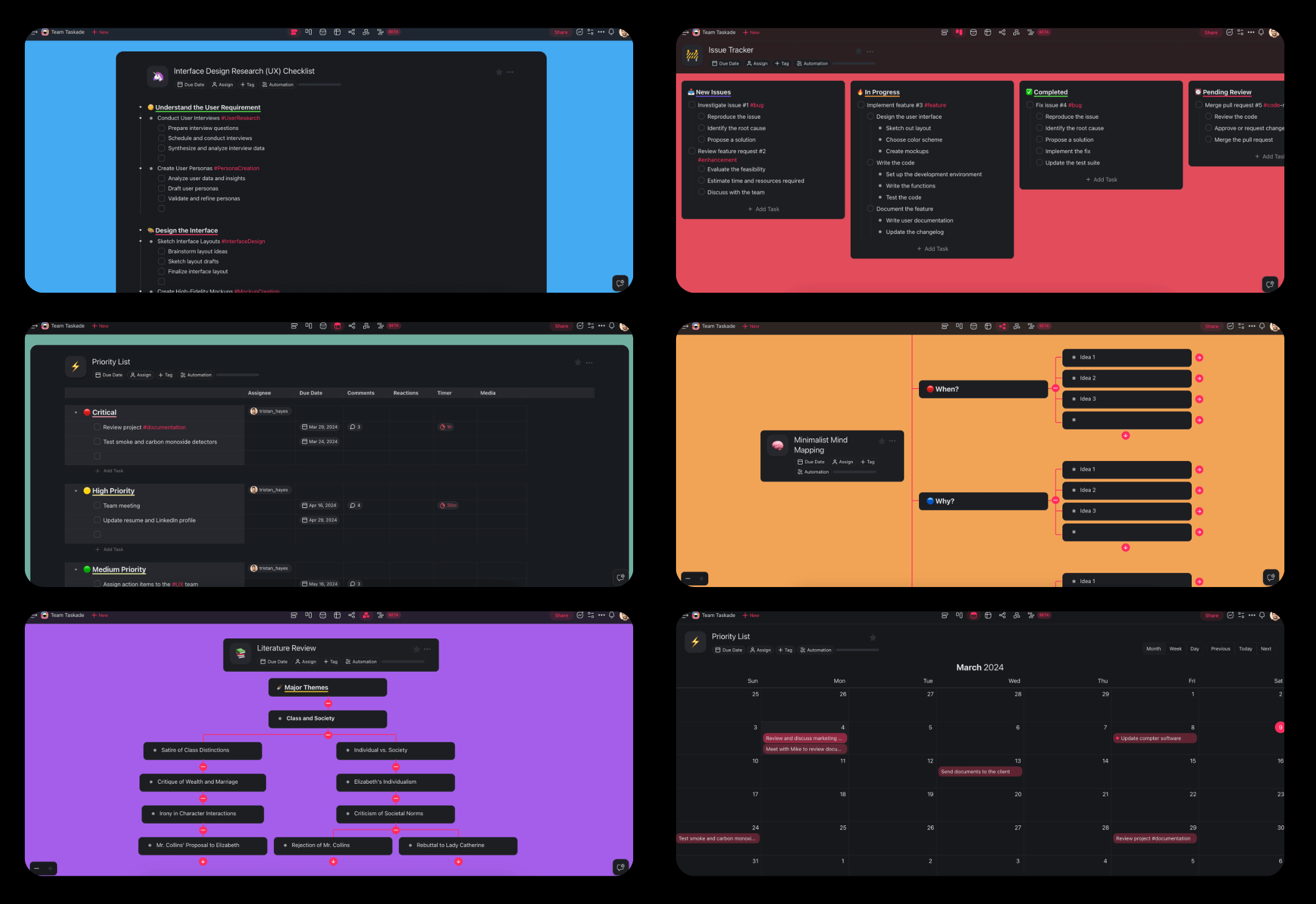
Above: one quiz project in several views. Use the List for a linear quiz, the Table for an answer key and the Board for a question bank sorted by topic.
If you want more than a converter, describe a study app in plain language in Taskade Genesis and Taskade builds it in your workspace. A self-testing app has a small data model:
The YouTube to quiz page describes the same pattern for lecture videos: questions with an answer key and brief explanations, at the difficulty you set. You can train an agent on your course files, so that its explanations come from your material.
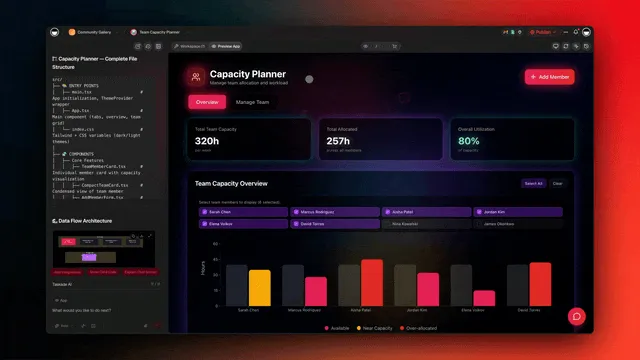
Above: an agent trained on your own files. Point it at your notes and readings, then ask it to explain each question you missed.
To see working apps before you build, browse the Taskade App Factory. To start from a prompt, open Taskade Genesis and describe the quiz app you want. After the build, you change fields and logic by chatting with Taskade EVE.
A ready-made version. The Notes to Quiz app below is a live Taskade Genesis app built by the Taskade team. Paste notes or upload a PDF, get a 10 question quiz with explanations from your notes, and race your study group on a shared board. The kit holds 5 projects, 2 AI agents and 3 automations (checked 2026-11-12). It is free to open and preview. Cloning it needs a paid plan, because it holds automations and more than the 1 agent that Free allows. For a lecture, the Transcript to Notes kit turns a pasted transcript into study notes, key terms and an 8 question practice quiz (4 projects, 1 AI agent and 2 automations, also a paid plan to clone).
Clone Notes to Quiz into your workspace (a paid plan is needed to clone a kit with automations).
Limitations: When Taskade Is Not the Right Quiz Tool
Taskade is not the best pick for every learner. Pick another tool in these cases:
| If you need... | A better fit | Why |
|---|---|---|
| A built-in spacing algorithm for thousands of cards | A dedicated flashcard app, see our flashcard maker guide | Taskade schedules sessions through automations, not a card-level algorithm |
| A timed practice test in an MCAT or NCLEX format | StudyFetch | It names those formats on its practice test page |
| A fast group game | Kahoot or Gizmo Live | Built for live competitive play |
| One free quiz with no account | Adobe Acrobat quiz maker | No sign-up required |
| Classroom exams with LMS export | See our AI exam generator guide | Covers export and grading for teachers |
Frequently Asked Questions
What is the best AI quiz generator in 2026?
It depends on your source and your goal. Gemini Notebook, formerly NotebookLM, writes quizzes only from the sources you add. Quizgecko reads files, links and videos and lets you pick question types. Knowt has a free Learn mode, StudyFetch builds timed practice tests in the format of your exam, and Revisely assesses written answers. Taskade turns a PDF, notes or a video into an editable quiz and keeps your questions, explanations and review schedule in one workspace.
Can AI turn a PDF into a quiz?
Yes. Most AI quiz generators read a PDF and write multiple choice, true or false, short answer and fill-in-the-blank questions with an answer key. Check two limits first: how many pages the tool reads, and whether it can read a scanned PDF. Revisely's free plan reads 5 pages per document and its paid plans read 200, and Questgen reads PDFs up to 100 pages.
How do I make a quiz from a YouTube video?
Paste the video link into a YouTube to quiz tool. Most of these tools read the video transcript or captions, so a video with no captions gives weak questions or none. Ask for the timestamp of each answer, so that you can jump back to the part of the video you missed.
What is the best free AI quiz maker for students?
Gemini Notebook has a base plan for personal projects with up to 50 sources per notebook. Knowt's free Learn mode has no usage cap. Adobe's online quiz maker needs no sign-up. Quizgecko has a free plan, and Questgen gives 20 free runs. On Taskade Free, you earn free AI credits with referrals and invites, and you can upgrade any time.
Are AI-generated quizzes accurate?
Mostly, but not always. An AI quiz generator can mark a wrong option as correct, write a question your source does not support, or test a trivial detail. Check each answer against your source before you trust your score, and treat an explanation that does not cite the source as a claim to verify.
Is multiple choice or short answer better for studying?
Short answer usually builds stronger memory because you must recall the answer, not recognize it. Kang, McDermott and Roediger found in 2007 that short-answer practice with feedback beat multiple-choice practice on a later test. Multiple choice still helps when the wrong options are plausible and you read the feedback. Use both.
How often should I quiz myself before an exam?
Quiz yourself in several short sessions spread over days or weeks, not in one long session the night before. Spacing research by Cepeda and colleagues shows that the best gap between sessions grows with the time until the test. Keep a question in rotation even after you get it right once.
Does quizzing yourself really work better than rereading?
Yes. In Roediger and Karpicke's 2006 study, students who read a passage once and recalled it three times remembered 61 percent of it a week later. Students who read it four times remembered 40 percent, even though they felt more confident. Dunlosky and colleagues in 2013 rated practice testing as a high-utility study method.
Can ChatGPT make a practice test from my notes?
Yes. ChatGPT study mode can quiz you one question at a time and give feedback on your answers, and it is available across ChatGPT plans. OpenAI's help page asks you to verify important information, so check important answers. A general chatbot also keeps no question bank or score history unless you build one.
What is the difference between an AI quiz generator and a flashcard maker?
A flashcard maker writes one prompt and one answer per card for fast, repeated review of facts. An AI quiz generator writes mixed question types, including multiple choice, short answer and application questions, and scores a full attempt. Flashcards suit vocabulary and definitions. Quizzes show whether you can use the ideas.
Can teachers use AI quiz generators to write exams?
Yes, but a teacher's needs differ from a learner's. Teachers need answer keys, exam versions, LMS export and grading. This guide covers self-testing. For classroom exams, read the Taskade guide to the best AI exam generators, which compares tools on LMS export, grading and exam versions.
Can I build my own quiz app with Taskade?
Yes. Describe the app in plain language in Taskade Genesis, for example a question bank with topics and source pages, an agent that writes questions and explains wrong answers, and an automation that schedules review sessions. Taskade builds the app in your workspace, and you change it later by chatting with Taskade EVE. Pro is 10 dollars a month billed annually.
The Bottom Line
The best AI quiz generator is the one that makes you recall, shows you what you got wrong, and brings the miss back next week. The tool matters less than the habit. Ask for short answer and application questions, check the key against your source, rate your confidence before each answer, and space the retests. Do that, and an AI quiz generator turns the most reliable finding in learning science into a daily routine.
If you want that routine in one place, start with the PDF to quiz converter, then let an agent explain your misses and an automation bring them back. ▲ ■ ●
Further Reading
- Best AI study guide makers: build the source your quiz draws from
- Best AI tutors: explanations for the questions you miss
- Best AI homework helpers: step-by-step help on problem sets
- Best AI study planners: place your quiz sessions on a calendar
Sources
Research cited in this guide:
- Adesope, O. O., Trevisan, D. A., and Sundararajan, N. (2017). Rethinking the use of tests: A meta-analysis of practice testing. Review of Educational Research, 87(3), 659-701.
- Agarwal, P. K., Nunes, L. D., and Blunt, J. R. (2021). Retrieval practice consistently benefits student learning: A systematic review of applied research in schools and classrooms. Educational Psychology Review, 33, 1409-1453.
- Anderson, L. W., and Krathwohl, D. R. (Eds.) (2001). A Taxonomy for Learning, Teaching, and Assessing: A Revision of Bloom's Taxonomy of Educational Objectives. Longman.
- Bjork, E. L., and Bjork, R. A. (2011). Making things hard on yourself, but in a good way: Creating desirable difficulties to enhance learning. In Psychology and the Real World. Worth Publishers.
- Bjork, R. A., Dunlosky, J., and Kornell, N. (2013). Self-regulated learning: Beliefs, techniques, and illusions. Annual Review of Psychology, 64, 417-444.
- Butler, A. C., Karpicke, J. D., and Roediger, H. L. (2008). Correcting a metacognitive error: Feedback increases retention of low-confidence correct responses. Journal of Experimental Psychology: Learning, Memory, and Cognition, 34(4), 918-928.
- Butler, A. C., and Roediger, H. L. (2008). Feedback enhances the positive effects and reduces the negative effects of multiple-choice testing. Memory and Cognition, 36(3), 604-616.
- Butterfield, B., and Metcalfe, J. (2001). Errors committed with high confidence are hypercorrected. Journal of Experimental Psychology: Learning, Memory, and Cognition, 27(6), 1491-1494.
- Cepeda, N. J., Pashler, H., Vul, E., Wixted, J. T., and Rohrer, D. (2006). Distributed practice in verbal recall tasks: A review and quantitative synthesis. Psychological Bulletin, 132(3), 354-380.
- Cepeda, N. J., Vul, E., Rohrer, D., Wixted, J. T., and Pashler, H. (2008). Spacing effects in learning: A temporal ridgeline of optimal retention. Psychological Science, 19(11), 1095-1102.
- Dunlosky, J., Rawson, K. A., Marsh, E. J., Nathan, M. J., and Willingham, D. T. (2013). Improving students' learning with effective learning techniques. Psychological Science in the Public Interest, 14(1), 4-58.
- Flavell, J. H. (1979). Metacognition and cognitive monitoring. American Psychologist, 34(10), 906-911.
- Fleming, S. M. (2021). Know Thyself: The Science of Self-Awareness. Basic Books.
- Gierl, M. J., Bulut, O., Guo, Q., and Zhang, X. (2017). Developing, analyzing, and using distractors for multiple-choice tests in education. Review of Educational Research, 87(6), 1082-1116.
- Haladyna, T. M., Downing, S. M., and Rodriguez, M. C. (2002). A review of multiple-choice item-writing guidelines for classroom assessment. Applied Measurement in Education, 15(3), 309-333.
- Huang, J., Chen, X., Mishra, S., Zheng, H. S., Yu, A. W., Song, X., and Zhou, D. (2023). Large language models cannot self-correct reasoning yet. arXiv:2310.01798, presented at ICLR 2024.
- Kang, S. H. K., McDermott, K. B., and Roediger, H. L. (2007). Test format and corrective feedback modify the effect of testing on long-term retention. European Journal of Cognitive Psychology, 19(4-5), 528-558.
- Karpicke, J. D., and Blunt, J. R. (2011). Retrieval practice produces more learning than elaborative studying with concept mapping. Science, 331(6018), 772-775.
- Karpicke, J. D., Butler, A. C., and Roediger, H. L. (2009). Metacognitive strategies in student learning: Do students practise retrieval when they study on their own? Memory, 17(4), 471-479.
- Karpicke, J. D., and Roediger, H. L. (2008). The critical importance of retrieval for learning. Science, 319(5865), 966-968.
- Kornell, N., Hays, M. J., and Bjork, R. A. (2009). Unsuccessful retrieval attempts enhance subsequent learning. Journal of Experimental Psychology: Learning, Memory, and Cognition, 35(4), 989-998.
- Little, J. L., Bjork, E. L., Bjork, R. A., and Angello, G. (2012). Multiple-choice tests exonerated, at least of some charges: Fostering test-induced learning and avoiding test-induced forgetting. Psychological Science, 23(11), 1337-1344.
- McDaniel, M. A., Anderson, J. L., Derbish, M. H., and Morrisette, N. (2007). Testing the testing effect in the classroom. European Journal of Cognitive Psychology, 19(4-5), 494-513.
- Nelson, T. O., and Narens, L. (1990). Metamemory: A theoretical framework and new findings. Psychology of Learning and Motivation, 26, 125-173.
- Pan, S. C., and Rickard, T. C. (2018). Transfer of test-enhanced learning: Meta-analytic review and synthesis. Psychological Bulletin, 144(7), 710-756.
- Richland, L. E., Kornell, N., and Kao, L. S. (2009). The pretesting effect: Do unsuccessful retrieval attempts enhance learning? Journal of Experimental Psychology: Applied, 15(3), 243-257.
- Rodriguez, M. C. (2005). Three options are optimal for multiple-choice items: A meta-analysis of 80 years of research. Educational Measurement: Issues and Practice, 24(2), 3-13.
- Roediger, H. L., and Karpicke, J. D. (2006). Test-enhanced learning: Taking memory tests improves long-term retention. Psychological Science, 17(3), 249-255.
- Roediger, H. L., and Marsh, E. J. (2005). The positive and negative consequences of multiple-choice testing. Journal of Experimental Psychology: Learning, Memory, and Cognition, 31(5), 1155-1159.
- Rohrer, D., and Taylor, K. (2007). The shuffling of mathematics problems improves learning. Instructional Science, 35(6), 481-498.
- Rowland, C. A. (2014). The effect of testing versus restudy on retention: A meta-analytic review of the testing effect. Psychological Bulletin, 140(6), 1432-1463.
- Slamecka, N. J., and Graf, P. (1978). The generation effect: Delineation of a phenomenon. Journal of Experimental Psychology: Human Learning and Memory, 4(6), 592-604.
Vendor pages read on November 10, 2026: Gemini Notebook (notebook.google, its students and plans pages, and Google's blog posts of November 6, 2025 and July 16, 2026), Quizgecko (homepage, help center and App Store listing), Knowt (homepage and plans page), StudyFetch (PDF to quiz and practice test maker pages), RemNote (AI quiz maker page), Revisely (quiz generator page), Gizmo (homepage and help center), Questgen (pricing and PDF to quiz pages), Wayground (homepage), Kahoot (homepage and two support articles on AI tools), Google Docs Editors Help (Create a form with Gemini in Google Forms), OpenAI Help Center (Using study mode in ChatGPT), and Adobe (online quiz maker page). Quizlet's own pages blocked automated reads, so its features come from its public feature page description.