







A study guide is a compression of a course. You take 300 pages of a textbook, 12 lecture decks and a semester of notes, and you squeeze them into a few pages that hold only what the exam will ask. The act of squeezing is where most of the learning happens. When you decide what matters, rewrite a definition in your own words, and turn a paragraph into a question, your memory does work that rereading never asks of it.
That is why the best AI study guide maker is not the one that writes the prettiest guide. It is the one that gives you a strong first draft fast, and then makes it easy to edit, question and test yourself from it. This guide compares 12 AI study guide makers that turn a PDF into a study guide, for students in 2026. It also covers what a good study guide holds, which format fits which exam, and the learning science behind it.
TL;DR: An AI study guide maker turns a PDF, slides or a lecture into key terms, summaries and practice questions. Use it to draft, then compress and self-test yourself, because retrieval practice is one of the two highest-utility study techniques (Dunlosky et al., 2013). Turn a PDF into a study guide in Taskade.
What Is the Best AI Study Guide Maker in 2026?
The best AI study guide maker in 2026 depends on your source and your study habit. Taskade fits students who want a study guide they can edit, share, quiz from and schedule in one workspace. Gemini Notebook (formerly NotebookLM) is the strongest free pick for guides grounded in your own sources, with inline citations back to each passage.
Quick-Pick Comparison Table
| Tool | Best for | Sources it reads | Study guide output | Free start |
|---|---|---|---|---|
| Taskade | Edit, share, quiz and schedule in one place | PDF, pasted text, YouTube lectures, photos of notes | Key concepts, summaries, review questions, study tips | Yes (PDF and other non-image uploads on paid plans) |
| Gemini Notebook | Free guides grounded in your sources | Notes, slides, readings, PDFs, links | Study guide with key terms, sample quizzes, essay questions | Yes, with caps |
| Quizlet | Students already in Quizlet | Notes, PDFs, slides, handwritten notes, Google Drive | Outlines, summaries, flashcards, quizzes | Yes |
| Knowt | Low-cost all-rounder, AP and SAT prep | Notes free, PDFs, slides, video on Ultra | Notes, flashcards, practice tests | Yes |
| StudyFetch | Guide plus tutor plus plan | PDF, slides, notes, lecture video | Guide, then flashcards, quizzes, plan | Free to start |
| Mindgrasp | Slides from course platforms | PowerPoint, PDF, Blackboard, Canvas, Panopto | Summaries, key points, quiz questions | Free trial |
| Turbo AI | Live lectures | Lectures, recordings, PDFs, YouTube, Word | Notes, quizzes, flashcards, AP study guides | Yes |
| RemNote | Guide plus spaced repetition | PDFs, pasted notes, slides | Summaries, topic breakdowns, definitions | Yes |
| ChatGPT study mode | Build the guide by dialogue | Files and pasted text | Whatever you ask for, step by step | Yes |
| Notion AI | Guide inside your class notes | Your Notion pages | Summaries and questions from notes | Trial on Free and Plus |
| Gizmo | Drill the guide as quizzes | PDFs, slides, YouTube, notes | Quizzes, flashcards, summaries | See vendor |
| Unstuck | Notes, transcripts and quizzes | Uploaded materials, recorded lectures | Notes, transcripts, flashcards, quizzes | Yes |
How We Compared These AI Study Guide Makers
We compared these 12 tools from their public product pages, pricing pages and documentation in November 2026. We did not run a hands-on test of each tool, so this guide does not rank output quality or accuracy. Where a vendor page did not state a price, we left the number out.
We compared each tool against what a study guide must do for learning:
| Criterion | Why it matters for learning | What we looked for |
|---|---|---|
| Source grounding | A guide that invents facts teaches you wrong answers | Guides built only from your files, with citations |
| Editability | Compression is where you learn, so you must be able to rewrite | Full edit of the draft, not a locked output |
| Built-in self-testing | Retrieval practice beats rereading on delayed tests | Practice questions, quizzes, answer keys |
| Source range | Courses mix PDFs, slides, lectures and handwriting | PDF, PPT, video, audio, images |
| Spacing and scheduling | Distributed practice beats cramming | Review schedules, study plans, reminders |
| Sharing | Study groups split and check each other's work | Real-time editing, share links, permissions |
What Is an AI Study Guide Maker?
An AI study guide maker is software that reads your course material and drafts a study guide from it: learning objectives, key terms, summaries, examples and practice questions. You feed it a PDF, a slide deck, a lecture recording or your notes. It returns a structured document you can edit, then use to test yourself before the exam.
A summary answers "what does this material say?" A study guide answers "what must I be able to do on the exam, and how will I check that I can do it?" That is why a guide holds practice questions and worked examples.
The two pink steps are yours, and they build the memory. After you fix the gaps, test again until the gap list is empty.
Study Guide vs Notes vs Summary vs Flashcards vs Quiz
Many tools make all of these from one upload, but they do different jobs:
| Output | Question it answers | Best moment to use it | Where to go deeper |
|---|---|---|---|
| Notes | What did the source say, in order? | During and right after class | PDF to notes AI tools |
| Summary | What are the main points? | First pass over a new reading | PDF to notes converter |
| Study guide | What must I know and do for the exam? | One to three weeks before the exam | This guide |
| Flashcards | Can I recall this one fact or term? | Daily spaced review | AI flashcard makers |
| Quiz | Can I apply it under exam conditions? | After each unit and before the exam | AI quiz generators |
A note on the word "reviewer": In the Philippines and in some other countries, students call a study guide a "reviewer." If that is the word you use, our guide to AI reviewer makers covers the same job with local exam examples.
Why Does Making a Study Guide Work? The Learning Science
Making a study guide works because it forces three effortful acts that cognitive science links to durable memory: generating material, explaining it to yourself and retrieving it from memory. Reading a finished guide uses none of the three.
The Generation Effect: You Remember What You Produce
In 1978, Norman Slamecka and Peter Graf published "The generation effect" in the Journal of Experimental Psychology: Human Learning and Memory. Participants who generated a word from a cue and a rule remembered it better than participants who simply read the same word.
For a study guide, the lesson is direct. If an AI writes "Osmosis: the diffusion of water across a semipermeable membrane," and you copy it, you get the reading benefit. If you rewrite it as "water moves toward the side with more dissolved stuff, through a membrane that blocks the dissolved stuff," you get the generation benefit. Same fact, different memory.
Self-Explanation: Good Learners Explain Each Step
In 1989, Michelene Chi, Miriam Bassok, Matthew Lewis, Peter Reimann and Robert Glaser published "Self-explanations: How students study and use examples in learning to solve problems" in Cognitive Science. They watched physics students study worked examples. The students who solved later problems well explained each step to themselves and noticed when they did not understand. Weaker students read the steps and moved on.
This is why a good study guide holds worked examples with blanks where the reasoning goes, not finished solutions. An AI can produce the solution. You must write the "because" next to each line.
The Testing Effect: Recall Beats Rereading
In 2006, Henry Roediger and Jeffrey Karpicke published "Test-enhanced learning" in Psychological Science. Students who practiced recalling a prose passage remembered more on tests days later than students who restudied it, even though the restudy group felt more confident right after study.
A 2017 meta-analysis by Olusola Adesope, Dominic Trevisan and Narayankripa Sundararajan in the Review of Educational Research pooled many experiments and found that practice tests beat restudy across ages, subjects and test formats. A study guide without practice questions throws away the strongest tool you have.
The Illusion of Explanatory Depth
In 2002, Leonid Rozenblit and Frank Keil published "The misunderstood limits of folk science: an illusion of explanatory depth" in Cognitive Science. People rated their understanding of everyday devices as high. When asked to write out how the device works, step by step, their ratings fell. Writing the explanation exposed the gap.
A polished AI guide can feed this illusion. The fix is the blank page: close the guide and write the explanation from memory. Where you stall is where you study next. Our guide to the Feynman Technique turns that blank page into a four-step routine.
What the Big Review Says About Study Techniques
In 2013, John Dunlosky, Katherine Rawson, Elizabeth Marsh, Mitchell Nathan and Daniel Willingham reviewed ten common study techniques in Psychological Science in the Public Interest. They rated each one by how well the evidence supports it across learners, materials and tests.
| Technique | Utility rating (Dunlosky et al., 2013) | What it means for your study guide |
|---|---|---|
| Practice testing | High | Put practice questions in every section and answer them from memory |
| Distributed practice | High | Review the guide over several sessions, not one night |
| Elaborative interrogation | Moderate | Add "why is this true?" prompts next to key facts |
| Self-explanation | Moderate | Explain each step of a worked example in your own words |
| Interleaved practice | Moderate | Mix problem types in your practice set |
| Summarization | Low | A summary-only guide is the weakest version, so add questions |
| Highlighting and underlining | Low | Highlighting the AI draft is not studying |
| Rereading | Low | Rereading the guide feels good and teaches little |
Look at the bottom rows. Summarization is rated low, and a plain AI study guide is a summary. That rating does not mean study guides fail. It means the summary part is the least useful part. The questions, the explanations and the spacing are where a guide earns its value.
The AI Twist: Help That Does the Work for You Can Backfire
In 2025, Hamsa Bastani, Osbert Bastani, Alp Sungu, Haosen Ge, Özge Kabakcı and Rei Mariman published "Generative AI without guardrails can harm learning: Evidence from high school mathematics" in PNAS (doi:10.1073/pnas.2422633122). In a field experiment with nearly a thousand high school math students, students practiced math with one of two AI assistants or with no AI.
| Group | Practice-session performance vs no AI | Later exam without AI vs no AI |
|---|---|---|
| Plain AI assistant ("GPT Base") | 48% higher | 17% lower |
| AI tutor with guardrails ("GPT Tutor") | 127% higher | Harm largely mitigated |
| No AI (control) | Baseline | Baseline |
The plain assistant made practice easier and the exam worse. The tutor version, which gave hints instead of answers, removed most of the harm. The same pattern applies to study guides. An AI that hands you a finished guide is "GPT Base." An AI that drafts, then quizzes you and makes you explain, is closer to "GPT Tutor." Our guide on how to study with AI covers the habits that keep AI on the right side of that line.
A Caution About Concept Maps
In 2011, Jeffrey Karpicke and Janell Blunt reported in Science that retrieval practice produced more learning than elaborative studying with concept mapping (doi:10.1126/science.1199327). A published comment in Science later that year argued that the concept-mapping condition was too short and too lightly trained to be a fair test. The safe reading: a concept map you draw from memory is retrieval practice. A concept map you copy from an AI draft is not.
How a Topic Moves From "Read" to "Exam-Ready"
AI can move a topic from "unseen" to "read." Only you can move it past that.
If you miss a question at any state, rewrite the part you missed and test it again. Mark each topic's state in your guide to get a live map of what to study next.
Metacognition: Knowing What You Do Not Know
Metacognition is your ability to judge your own knowledge. In 1999, Justin Kruger and David Dunning published "Unskilled and unaware of it" in the Journal of Personality and Social Psychology. The lowest scorers on tests of logic and grammar overestimated their own performance the most. Each wrong answer on a self-test corrects your confidence before the exam does. Read more in what is metacognition.
What Should a Good Study Guide Include? The Anatomy
A good study guide holds six parts: learning objectives, key terms, worked examples, common mistakes, practice questions with answers, and a one-page summary. AI can draft all six. Two of them, worked-example explanations and your answers to the practice questions, only help if you write them yourself.
| Part | What it does | What AI drafts well | What you must add |
|---|---|---|---|
| Learning objectives | Turns a topic into a skill you can check | Verb-led objectives from the syllabus | Which ones your instructor stressed in class |
| Key terms | Gives you the vocabulary of the exam | Definitions from the source | A rewrite in your words plus one example |
| Worked examples | Shows the method for each problem type | Full solutions | The "because" for each step |
| Common mistakes | Prevents the errors that cost the most points | Typical errors for the topic | The mistakes you made on homework |
| Practice questions | Makes the guide a test, not a text | Questions at several levels | Your answers, written before you check |
| One-page summary | Lets you review a unit in five minutes | A first compression | The final cut, done by you |
Four Rules That Make Each Part Work
- Objectives start with a verb. "Understand photosynthesis" cannot be tested. "Explain why the light reactions need water" can. Spread your questions across the six levels of the revised Bloom's taxonomy (Anderson and Krathwohl, 2001): remember, understand, apply, analyze, evaluate and create.
- Key terms come in contrast pairs. "Mitosis: one cell becomes two identical cells. Contrast: meiosis makes four different cells for reproduction." Exams love to test the difference between two similar terms.
- Worked examples carry the reasons. John Sweller and Graham Cooper showed in 1985 that learners who studied worked algebra examples solved similar problems faster than learners who only solved practice problems. Pair each example with a near-identical problem you solve without looking.
- The one-page summary comes last. Write it after two self-tests, and keep only what you still miss. "Forgot to convert grams to moles" on your common mistakes list is worth more than a page of summary.
Which Study Guide Format Should You Use?
The right study guide format depends on how your material is organized and how your exam asks questions. An outline suits hierarchical material, Cornell notes suit lecture review, a concept map suits connected ideas, and a question bank suits any exam you can practice.
| Format | Best for | How it supports recall | Exam fit |
|---|---|---|---|
| Outline | Hierarchical topics, textbook chapters | Shows structure, so you can recall top-down | Short answer, essay planning |
| Cornell notes | Lecture review | Cue column turns notes into questions | Mixed formats |
| Concept map | Systems, causes and effects, biology, history | Forces you to name each link | Essays, "explain how" items |
| Question bank | Any exam with practice potential | Every entry is a retrieval attempt | Multiple choice, problem sets |
| Comparison table | Similar terms, theories, cases or drugs | Contrasts sharpen each concept | Multiple choice with close distractors |
| One-page summary | Final review | Compresses the unit to its core | Last review session |
Outline
An outline is the default output of most AI study guide makers, because PDFs already have chapter structure. To make it study-ready, turn each heading into a question: "Causes of World War I" becomes "What were the main causes of World War I, and which one does your textbook rank first?"
Cornell Notes
Walter Pauk described the Cornell system in How to Study in College (first edition, 1962). The page has three areas: notes on the right, a narrow cue column on the left, and a summary strip at the bottom. You cover the notes and use the cues to quiz yourself.
+------------------+------------------------------------------+
| CUE COLUMN       | NOTES                                    |
| (questions)      | (from the AI draft, rewritten by you)    |
|                  |                                          |
| What drives      | Water moves toward higher solute         |
| osmosis?         | concentration through a membrane that    |
|                  | blocks the solute.                       |
|                  |                                          |
| Hypertonic vs    | Hypertonic = more solute outside, so     |
| hypotonic?       | the cell shrinks. Hypotonic = less       |
|                  | solute outside, so the cell swells.      |
+------------------+------------------------------------------+
| SUMMARY: Osmosis is passive. Water follows solute.          |
| Predict the cell's change from the solute difference.       |
+-------------------------------------------------------------+
AI is good at the right column and weak at the left one, because good cue questions depend on what your instructor stresses. Write the cues yourself. Our Cornell note-taking guide covers the full method.
Concept Map
Joseph Novak and D. Bob Gowin described concept maps in Learning How to Learn (1984). Nodes hold concepts, and labeled links state how they relate: "insulin LOWERS blood glucose." The labels are the learning. A map with unlabeled arrows is a decoration. If you want an AI to draft a map from your PDF, see PDF to mind map tools, and then redraw the map from memory to get the retrieval benefit.
Question Bank
A question bank is a guide written entirely as questions, with answers on a separate page. It is the most direct form of retrieval practice, and it turns into flashcards or a timed quiz with little work. Taskade's Study Guide to Quiz converter does that step from a study guide PDF.
How Do Study Guides Differ by Exam Type?
A study guide should match the exam format, because each format tests a different skill. Multiple-choice exams test recognition among close options, essays test organized argument, and problem sets test method under time pressure. Standardized and licensing exams add their own structure, so read the official format before you build the guide.
| Exam | Format to expect | Study guide emphasis | What to ask the AI for |
|---|---|---|---|
| Multiple-choice course exam | Recognition among close options | Contrast tables, common mistakes | Items with plausible wrong answers and the reason each is wrong |
| Essay exam | Organized argument with evidence | Thesis outlines, evidence lists, counterarguments | Likely prompts and outline answers |
| Problem sets (math, physics, chemistry) | Method under time pressure | Worked examples, formula sheet, error log | Near-identical practice problems with full solutions |
| AP exams | Multiple choice plus free response in most subjects | Unit-by-unit guides tied to the course framework | Free-response prompts with a scoring outline |
| SAT | Digital, adaptive Reading and Writing plus Math | Skill drills by question type | Timed sets by skill, with explanations |
| MCAT | Four passage-based sections | Concept maps across subjects, passage practice | Passage-based questions that mix two disciplines |
| Bar exam | Multiple choice, essays and performance tasks in most U.S. jurisdictions | Rule statements, issue checklists | Fact patterns that test one rule at a time |
| Nursing (NCLEX) | Clinical judgment items and case studies | Patient cases, priority frameworks, drug classes | Case studies with step-by-step reasoning |
AP, SAT and MCAT
College Board AP exams in most subjects combine a multiple-choice section with free-response questions, so a unit guide needs both item types. The SAT is a digital adaptive test with a Reading and Writing section and a Math section, so skill drills matter more than content outlines. The MCAT has four sections: Chemical and Physical Foundations of Biological Systems, Critical Analysis and Reasoning Skills, Biological and Biochemical Foundations of Living Systems, and Psychological, Social, and Biological Foundations of Behavior. MCAT questions are mostly passage-based, so practice reading a passage and applying a concept, not just recalling it. Plan these long preparations with an AI study planner.
Bar and Nursing Exams
In jurisdictions that use the Uniform Bar Exam, the test combines the Multistate Bar Examination (multiple choice), the Multistate Essay Examination and the Multistate Performance Test. The National Conference of Bar Examiners is phasing in a redesigned NextGen bar exam, so confirm which version your jurisdiction gives. The NCLEX moved to the Next Generation NCLEX in April 2023, with case studies that test clinical judgment. For both, a guide built from realistic cases beats a guide built from definitions.
How Do You Make a Study Guide From a PDF, Slides or a Lecture?
To create a study guide from a PDF, slides or a lecture, use the same three moves: extract, compress, test. The source type changes the first move. A clean PDF extracts well, slides need your notes to fill gaps, lecture audio needs a transcript, and handwriting needs a careful check against the page.
| Source | What extracts well | What gets lost | Fix | Taskade converter |
|---|---|---|---|---|
| Textbook or reading PDF | Headings, definitions, examples | Figures and captions | Describe key figures in your words | PDF to Study Guide |
| Lecture slides | Topic order, key terms | The reasoning said aloud | Add your notes or the transcript | Export to PDF, then PDF to Study Guide |
| Lecture video | Spoken explanations | Board work, diagrams | Add the slides as a second source | YouTube Lecture Notes |
| Handwritten notes | Your own words and emphasis | Messy or faint writing | Check the result against the page | Handwritten Notes Digitizer |
| Syllabus | Objectives, dates, weights | Content | Use it to structure the guide and plan | Study Plan generator |
PDF, Slides, Lectures and Handwriting
- PDF to study guide: A study guide maker from PDF works best with a native-text PDF, which is a file where you can select the words. Split a long textbook into one PDF per chapter, and write one sentence for each key figure, because a figure you can describe is a figure you can recall.
- Slides to study guide: A slide holds the headline and the instructor holds the reasoning. Add your lecture notes, the transcript or the reading as a second source, and ask the AI to fill in each slide's reasoning from them. Mark the slides your instructor spent extra time on.
- Lecture to study guide: Start from a transcript. Recording apps such as Turbo AI, Unstuck and Knowt Ultra transcribe a lecture, and our guide to YouTube to notes tools compares more options. Ask permission before you record a class.
- Handwritten notes: Your handwritten notes already hold your own words, which is the generation effect at work. Digitize them to search and reorganize them, not to replace them. See handwritten notes AI for photo tips and accuracy checks.
A ready-made version. The PDF Study Hub below is a live Taskade Genesis app built by the Taskade team. Drop in a lecture PDF and it returns notes you can edit, flashcards and a short quiz, plus a Sunday email of the cards you keep missing. The kit holds 6 projects, 1 AI agent and 2 automations (checked 2026-11-12). It is free to open and preview, and cloning it needs a paid plan because it holds automations. For a lecture video, the YouTube Study Guide kit turns a lecture link into a study guide with timestamped sections, key terms, 10 practice questions and a review date. It holds 3 projects, 1 AI agent and 2 automations, so cloning it also needs a paid plan.
Clone the PDF Study Hub into your workspace (a paid plan is needed to clone a kit with automations).
The 12 Best AI Study Guide Makers in 2026
These 12 AI study guide makers cover the main ways students build a guide in 2026: from PDFs, from slides, from lecture recordings and by conversation. Each section names who the tool is for, what it does for a study guide according to its own pages, and what to watch for. Prices are listed only where the vendor page stated them in November 2026.
1. Taskade: Best for a Study Guide You Edit, Share, Quiz and Schedule
Taskade turns a PDF into a study guide you keep working on. The PDF to Study Guide converter drafts key concepts, section summaries, review questions and study tips.
What it does for a study guide:
- Draft from a PDF: Taskade EVE, the built-in AI assistant, builds the guide. Several PDFs can merge into one guide.
- Edit and expand: Ask the AI to expand a hard section or add questions, or edit any line by hand.
- Study in different views: List, Mind Map and Table, among multiple project views.
- Quiz from the guide: The Study Guide to Quiz converter turns a guide into practice questions.
- Plan the reviews: The Study Plan generator schedules review sessions up to exam day.
- Study together: Share a guide in real time, with role-based access from Owner to Viewer.
Strengths: One workspace holds the guide, the quiz, the plan and the group. You can also clone a ready-made Exam Study Portal app built in Taskade Genesis on a paid plan, because the kit includes an automation.
Watch out for: PDF and other non-image uploads need a paid plan. On Free, paste the text of your PDF instead.
Price: On Free, you earn free AI credits with referrals and invites, and you can upgrade any time. Pro is $10 per month billed annually for up to 10 members. Business is $25 per month billed annually.
Verdict: Pick Taskade if the guide must keep working after you generate it.
2. Gemini Notebook (Formerly NotebookLM): Best Free, Source-Grounded Study Guides
Gemini Notebook is Google's research and study notebook. Google renamed NotebookLM to Gemini Notebook on July 16, 2026, and said it remains a standalone product. It builds study aids only from the sources you upload, which makes each answer easier to check against your material.
What it does for a study guide:
- Source-only answers: Google's education page says you can upload class notes, lecture slides and assigned readings, and the tool builds study aids from them.
- Study guides: Google says you can create study guides with key terms, sample quizzes with answer keys, or a list of essay questions.
- Flashcards and quizzes: It generates flashcards and interactive practice quizzes based only on your uploaded sources.
- Citations: Answers carry inline citations that link back to the original passage, so you can check each claim.
Strengths: Grounding and citations are the two features that matter most for a study guide you can trust, and Gemini Notebook does both well. It is free of charge, and schools can turn it on through Google for Education.
Watch out for: The free version has usage caps. Google's education page lists 50 chat queries per day and up to 3 Audio Overviews per user per day. Students under 18 get a version with added safeguards when their school turns it on. The guide stays inside Google's product, so plan how you will edit it and test from it.
Price: Free with caps. Google AI plans raise the limits.
Verdict: The first free tool to try for a guide that cites your own course material.
3. Quizlet: Best if You Already Study With Quizlet Sets
Quizlet is the long-running flashcard platform, and its study guide maker now drafts guides from your own files. Quizlet's study guide page says it turns notes, PDFs, lecture slides and even handwritten notes into outlines, summaries, flashcards, quizzes and more.
What it does for a study guide:
- Many ways in: Quizlet's page says you can copy and paste, upload a file, or pick a doc or presentation from Google Drive.
- One upload, several outputs: The same material becomes an outline, a summary, flashcards and a quiz.
- Audio-first notes: In February 2026, Quizlet announced that it acquired Coconote, an AI note-taker that turns audio and video recordings into study materials.
- Familiar study modes: Your guide feeds the same flashcard and test modes that many students already use every day.
Strengths: Quizlet's strength is the study habit it already owns. Its wide input range, including handwritten notes and Google Drive, covers most course materials.
Watch out for: Quizlet's own page did not load for our review, so we could not confirm current plan limits or prices. Check which AI features sit on the free plan before you build a semester of guides there. As with any flashcard-first tool, keep longer explanations and worked examples somewhere you can expand them.
Price: Free plan available. Paid plan prices were not verified on Quizlet's site for this guide.
Verdict: The low-friction pick for students whose class already runs on Quizlet. For more flashcard-first tools, see our AI flashcard makers guide.
4. Knowt: Best Low-Cost All-Rounder With AP and SAT Prep
Knowt is a free-first study platform with notes, flashcards, practice tests and exam prep. Its plans page lists a free Basic plan with unlimited file creation, live collaboration and storage, plus access to a library of 5 million study resources.
What it does for a study guide:
- Build on Basic: Create notes and flashcard sets, collaborate live and browse shared resources on the free plan.
- Summaries on Ultra: The Ultra plan adds AI summarizers for PDFs, videos, images and PowerPoints, plus an AI lecture recording summarizer.
- Tutoring: Ultra includes an AI voice tutor on all files and an AI podcast generator.
- Exam prep: Ultra includes full access to AP, SAT and ACT prep.
Strengths: Knowt's free plan is generous for building and sharing study sets, and its exam prep for AP, SAT and ACT gives standardized-test students a ready path. The annual Ultra price is among the lowest paid tiers in this list.
Watch out for: The AI summarizers that turn a PDF or slides into a draft sit on Ultra, not on Basic. If PDF to study guide is your main job, budget for Ultra or paste text into the free tools. The plans page does not name a "study guide" feature, so expect notes, flashcards and practice tests as the main outputs.
Price: Basic is free. Ultra is $7.99 per month billed annually ($95.99 per year) or $24.99 billed monthly, per Knowt's plans page in November 2026.
Verdict: A strong value pick for students with AP, SAT or ACT dates.
5. StudyFetch: Best for a Guide That Becomes a Tutor and a Plan
StudyFetch is an AI study platform built around course materials. Its study guide maker page says it accepts a PDF, a slide deck, class notes or a lecture video, writes the guide, then turns it into flashcards, quizzes and a plan.
What it does for a study guide:
- Mixed inputs: PDFs, slides, notes and lecture videos all feed the same study set.
- Guide to practice: The guide becomes flashcards and quizzes without a second upload.
- Tutor on your material: Its AI tutor, Sparky, answers questions from your own course files.
- Study plan: StudyFetch also builds a plan from the same material.
Strengths: StudyFetch connects the guide to the next two steps, practice and planning, in one flow. Its homepage says you can start for free.
Watch out for: StudyFetch's site blocked our page fetch, and third-party reviews quote different prices and limits, so confirm the free tier on the vendor site before you upload a full course. Check how many uploads and study sets the free tier allows.
Price: Free to start, per its homepage. Paid prices were not verified on StudyFetch's site for this guide.
Verdict: A good fit for college students who want a tutor and a quiz attached to every guide. For more tutor-style tools, see AI tutors.
6. Mindgrasp: Best for Slides From Your Course Platform
Mindgrasp is an AI study assistant with a dedicated study guide creator for slides. Its page says it accepts PowerPoint and PDF slides, and it describes pulling class materials from Blackboard, Canvas and Panopto.
What it does for a study guide:
- Slides in, guide out: Mindgrasp says it returns a structured study guide with summaries, key points and highlights.
- Extraction: It extracts key concepts, definitions, summaries and takeaways from each deck.
- Questions: Its FAQ says the output can include quiz questions.
- Edit and annotate: You can modify the guide, mark passages and add your own annotations.
Strengths: Course-platform pulls save the most tedious step for students whose slides live in Blackboard, Canvas or Panopto. Editing and annotation are built in, which matters because your annotations are where the generation effect happens.
Watch out for: Google Slides decks must first be exported as PDF or PPTX. The pricing page did not load for our review, so we could not confirm plan prices.
Price: Free trial offered on its pages. Plan prices were not verified on Mindgrasp's site for this guide.
Verdict: The pick for slide-heavy courses on a school learning platform.
7. Turbo AI: Best for Live Lectures and Recordings
Turbo AI, formerly TurboLearn, is an AI notetaker and study app. Its homepage says it reads lectures, PDFs, YouTube videos and your own notes, and its upload prompt also lists recordings and Word documents.
What it does for a study guide:
- Lecture capture: The AI notetaker records lectures and produces notes you can review afterward.
- Practice: It generates activities, quizzes and podcasts, and its practice mode offers "endless questions until you lock in understanding."
- Ready-made guides: You can browse a library of ready-made AP study guides and books.
- Sync: Notes sync across the website and the mobile app.
Strengths: Turbo AI is built for the student whose main source is the lecture itself. Recording plus notes plus practice questions in one app covers the full path from class to self-test. The free tier, per its homepage, includes note generation, flashcards and quizzes.
Watch out for: A recording does not capture what the instructor wrote or drew, so add slides or photos of the board. Ask permission before you record a class. For long lectures, check the result against your own notes.
Price: Free tier available. Paid prices were not verified on Turbo AI's site for this guide.
Verdict: A strong pick for lecture-heavy courses with one clear speaker. Our Turbo AI alternatives guide compares similar apps.
8. RemNote: Best for a Study Guide With Spaced Repetition Built In
RemNote is a note-taking and spaced-repetition app with an AI study guide maker. Its page says you upload a PDF or paste your notes, and RemNote generates a full study guide with summaries, topic breakdowns, key definitions and organized concepts.
What it does for a study guide:
- Guide from PDF or notes: Summaries, topic breakdowns and definitions in one structured document.
- Flashcards with spacing: RemNote says its AI flashcards cover each key concept and that you review them with spaced repetition.
- Quizzes: Multiple-choice quizzes simulate exam conditions.
- Progress per topic: You can see your progress for each topic.
- AI tutor: An AI tutor answers questions on your material.
Strengths: RemNote joins the two high-utility techniques from Dunlosky et al. in one tool: practice testing and distributed practice. Progress tracking per topic gives you the gap list that a good guide must produce.
Watch out for: RemNote's structure rewards students who take notes in it all term. If you only arrive the week before the exam, the spaced-repetition schedule has little time to work. For more on scheduling reviews, see spaced repetition explained.
Price: Free sign-up. Paid prices were not verified on RemNote's site for this guide.
Verdict: The pick for students who start early and want the review schedule handled for them.
9. ChatGPT Study Mode: Best for Building a Guide by Conversation
ChatGPT can draft a study guide from an uploaded file or pasted text, and its study mode changes how it helps. OpenAI introduced study mode on July 29, 2025, for logged-in users on Free, Plus, Pro and Team, with Edu following. OpenAI describes it as help that works through problems step by step instead of giving the answer.
What it does for a study guide:
- Any structure on request: Ask for an outline, a Cornell layout, a question bank or a comparison table, and refine it in conversation.
- Socratic questions: OpenAI says study mode uses questions, hints and self-reflection prompts.
- Level checks: It pitches lessons to your level with skill-check questions and gives quizzes and feedback.
- Toggle: You can turn study mode on or off during a conversation.
Strengths: No other tool in this list adapts the guide's format as freely. Study mode's design, which asks you questions instead of handing over answers, matches the "GPT Tutor" condition that largely avoided the harm in the Bastani et al. study.
Watch out for: OpenAI notes that study mode relies on custom instructions, so its behavior can vary between conversations. A general chatbot is not grounded only in your sources unless you ask, so tell it to answer only from your uploaded file and to quote the page.
Price: Study mode is available to logged-in free users. Paid plan prices were not verified for this guide.
Verdict: Best for students who like to talk a topic through and want full control of the guide's shape.
10. Notion AI: Best if Your Class Notes Already Live in Notion
Notion AI brings AI into Notion's pages and databases. Students who already take notes in Notion can ask it to summarize a lecture page, pull questions from notes and organize a study database by unit, status and difficulty.
What it does for a study guide:
- Guide from your own notes: The AI works on the pages you already wrote, so the source is your own words.
- Databases: Track units, objectives and practice questions in a Notion database with properties.
Strengths: Notion is strong at flexible structure. You can build a study guide template once and reuse it for every course. Students and educators with a school email can get the Plus plan free, according to Notion's pricing page.
Watch out for: Notion's pricing page shows the AI features as a limited trial on the Free and Plus plans, with full access on Business. The free student plan is Plus, so check how much AI you get before you rely on it for a whole semester.
Price: Free is $0. Plus is $10 and Business is $20 per member per month, per Notion's pricing page in November 2026, which also says yearly billing saves up to 20%.
Verdict: A natural fit if your notes already live in Notion.
11. Gizmo: Best for Drilling Your Guide as Quizzes
Gizmo is a quiz-first study app. Its homepage tagline reads "AI quizzes that make studying easy," and its tools turn PDFs, PowerPoints, notes and YouTube videos into flashcards, quizzes and summaries. It also links a Quizlet import.
What it does for a study guide:
- Summarize sources: PDF, PowerPoint and YouTube summarizers give you a first draft.
- Turn it into practice: "PDF to Flashcards," "Notes to Flashcards" and "PowerPoint to Flashcards" tools turn the same material into drills.
- Quiz habit: The app is built around short, frequent quizzes.
Strengths: Gizmo puts its weight on the step that most study guides skip: practice testing. If you already have a guide, Gizmo is a fast way to turn it into questions and keep drilling.
Watch out for: Gizmo's homepage does not name a study guide feature and does not list prices. Use it as the testing half of your workflow, with the guide itself built elsewhere.
Price: Not stated on its homepage when we checked.
Verdict: A good partner tool for the testing half of your workflow.
12. Unstuck: Best for Notes, Transcripts and Quizzes in One App
Unstuck is an AI study app that still uses the Unstuck name in November 2026. Its homepage says you upload your materials and record your lectures to get personalized study tools.
What it does for a study guide:
- Lecture capture: "Capture lectures, get notes, transcripts, and more."
- Practice: Create and study flashcards, and test yourself with custom quizzes.
- File chat: Ask questions about an uploaded file.
- Classes: Organize courses and materials in one place.
Strengths: Unstuck's strength is the class-by-class organization: every course has its materials, notes and quizzes in one place. Student testimonials on its homepage describe study guides and summaries from uploaded material.
Watch out for: The homepage does not list paid plans or prices, and it does not describe a dedicated study guide output. Check the output format with one chapter before you commit a semester to it. Ask permission before you record a class.
Price: Free to start, per its homepage. Paid prices were not listed.
Verdict: A tidy all-in-one for students who want transcripts, notes and quizzes organized by class.
Also Considered
These tools rank in search for "study guide generator" and are worth a look for specific needs:
| Tool | What it offers | Why it is not in the main list |
|---|---|---|
| Coursology | Uploads, quizzes, flashcards, mind maps, lecture notes | Broad homework-help app. Check your school's AI policy, because it also drafts discussion posts |
| Scholarly | Study guides and summaries, free to start | Its homepage does not describe what a guide contains |
| StudyPDF | Guides that cite the page each section came from | Smaller vendor, strong citation focus |
| NoteGPT | Visual study guides | Its FAQ says the guide maker takes text input only |
| Mapify | PDF to mind-map study guides | A mind-map tool more than a guide maker |
Pricing at a Glance
| Tool | Free option | Paid price we verified on the vendor page |
|---|---|---|
| Taskade | Free plan, earn AI credits with referrals and invites | Pro $10/mo billed annually, Business $25/mo billed annually |
| Gemini Notebook | Free with caps | Not verified |
| Quizlet | Free plan | Not verified |
| Knowt | Basic free | Ultra $7.99/mo billed annually or $24.99 monthly |
| StudyFetch | Free to start | Not verified |
| Mindgrasp | Free trial | Not verified |
| Turbo AI | Free tier | Not verified |
| RemNote | Free sign-up | Not verified |
| ChatGPT study mode | Free for logged-in users | Not verified |
| Notion AI | AI trial on Free and Plus | Business $20 per member/mo |
| Gizmo | Not stated | Not verified |
| Unstuck | Free to start | Not listed |
"Not verified" means the vendor page did not state the price or did not load for us. Check the vendor site before you pay.
How Do You Choose the Right AI Study Guide Maker?
Choose an AI study guide maker by your main source first, then by how you will test yourself. If you need a free AI study guide generator, start with Gemini Notebook or ChatGPT study mode. A tool that reads your source well but cannot quiz you leaves out the most effective step. A tool that quizzes well but cannot read your source makes you retype the course.
If two tools tie, pick the one you already use when the exam is less than a week away, because switching costs study time. If you study in a group, pick a tool with real-time sharing.
Step by Step: From Source to Study Guide to Self-Test
The full workflow has seven steps: collect the sources, set the objectives, draft with AI, compress in your own words, test yourself, fix the gaps and space the reviews. AI saves the most time in step three. Your exam score depends most on steps four to seven.
Step 1: Collect Every Source for One Unit
Gather the readings, slides, notes, transcript and past quizzes for one unit. Past quizzes matter most, because they show how your instructor asks questions.
Step 2: Write the Learning Objectives First
Paste the syllabus and ask for three to five verb-led objectives. Edit them against what your instructor stressed, before you draft anything else.
Step 3: Generate the Draft
Upload the sources and ask for the six parts from the anatomy section, in your exam's format, using only your sources.
Step 4: Compress It in Your Own Words
This is the step that makes the guide yours. Go section by section:
- Rewrite each key term in one line, in your words, plus one example.
- Under each worked example, write the reason for each step.
- Delete anything you already know cold.
- Add the mistakes you made on homework to the common mistakes list.
A good rule: your final guide should be shorter than the AI draft. If it is longer, you added notes, not compression. Write as if you will teach the unit: Nestojko, Bui, Kornell and Bjork (2014) found that students who expected to teach recalled more, and more organized, material.
Step 5: Test Yourself Before You Reread
Hide the answers and answer every practice question from memory. Mark each one right, wrong or unsure. Count "unsure" as wrong. For a fuller practice exam, turn the guide into a quiz with the Study Guide to Quiz converter, or see our AI exam generators guide.
Step 6: Fix the Gaps From the Source
For each miss, go back to the source, not to the AI draft. Find the passage and rewrite that part of the guide. The source is the authority, not the draft.
Step 7: Space the Reviews
Retest the weak topics after one day, then after a few days, then after a week. A 2006 review by Cepeda, Pashler, Vul, Wixted and Rohrer in Psychological Bulletin found that spaced study beats massed study across hundreds of experiments. Each round should take less time than the last as more topics reach "exam-ready." The AI study schedule generator turns your exam dates and free hours into a timetable with review sessions.
The chart is an example plan, not measured data: as topics stick, each review gets shorter.
An Example Exam Week
Here is one example of 10 hours spent on a unit exam. Notice how little of it goes to reading.
| Activity | Hours | Why |
|---|---|---|
| Collect sources and set objectives | 1 | Decides what the guide holds |
| Generate and compress the guide | 2 | Generation and self-explanation |
| Self-test, round 1 | 2 | Retrieval practice finds the gaps |
| Fix gaps from the source | 2 | Targeted re-study |
| Self-test, rounds 2 and 3 | 2 | Spaced retrieval |
| One-page summary and final check | 1 | Final compression |
A Study Guide Template You Can Copy
This study guide template holds the six parts of a good guide for one unit. Copy it into any document tool, or paste it into an AI study guide maker with your source and ask it to fill each section. Then compress and test as described above.
STUDY GUIDE: [Course] - [Unit name]
Exam date: [date]     Exam format: [multiple choice / essay / problems / mixed]

1. LEARNING OBJECTIVES (3-5, start each with a verb)
   [ ] Explain ...
   [ ] Calculate ...
   [ ] Compare ... and ...

2. KEY TERMS (term - one line in my words - one example or contrast)
   - Term:
     My words:
     Example / contrast:

3. WORKED EXAMPLES (one per problem type)
   Problem:
   Step 1:            Because:
   Step 2:            Because:
   Answer:
   Near-identical practice problem (solve without looking):

4. COMMON MISTAKES
   - Mistake:          How to spot it:          Fix:
   - (add one from my own homework)

5. PRACTICE QUESTIONS (in the exam's format, answers on a separate page)
   Q1 (remember):
   Q2 (understand):
   Q3 (apply):
   Q4 (analyze):
   Q5 (evaluate or create):

6. SELF-TEST LOG
   Date | Questions right | Questions missed | Topics to fix

7. ONE-PAGE SUMMARY (write this last, after two self-tests)
The same template as a data structure shows how the parts connect. Each unit holds its own terms, examples and questions, and each question records your attempts.
Prompts for an AI Study Guide Generator
These prompts work in most AI study guide makers and chat tools. Replace the brackets. Each prompt asks for structure, grounding and questions, because those three make the difference between a summary and a study guide.
PROMPT 1 - Draft the guide
Using ONLY the attached [PDF/slides/transcript], build a study guide for
[course, unit]. The exam is [format]. Include: 3-5 learning objectives that
start with a verb, key terms with one-line definitions, one worked example
per problem type, a common-mistakes list, and 10 practice questions spread
across remember, understand, apply and analyze. Put answers in a separate
section. After each fact, cite the page or slide number.

PROMPT 2 - Find what the slides skip
Here are my lecture slides and the lecture transcript. For each slide, list
the reasoning or example the instructor gave aloud that the slide does not
show. Quote the transcript.

PROMPT 3 - Make me explain
Do not explain this topic to me. Ask me to explain [topic] in my own words.
Then tell me which parts of my explanation are missing or wrong, citing the
source. Ask one question at a time.

PROMPT 4 - Exam-format practice
Write 8 [multiple-choice / essay / problem] questions on [unit] in the style
of the attached past quiz. For multiple choice, make every wrong option a
mistake a student could make, and explain why each one is wrong.
Prompt 3 is the most important one. It flips the AI from writer to examiner, which is the "tutor with guardrails" pattern from the Bastani et al. study.
Common Study Guide Mistakes (and How to Fix Them)
The most common study guide mistake is treating the AI draft as the finished guide. The second is building a guide with no questions. Both feel productive and produce little learning, because they skip generation and retrieval.
| Mistake | Why it fails | Fix |
|---|---|---|
| Reading the AI draft as the final guide | No generation, no self-explanation | Rewrite each term and example in your own words |
| A guide with no practice questions | Skips the highest-utility technique | Add questions to every section, answers hidden |
| A guide as long as the textbook | Copying is not compressing | Cut everything you already know cold |
| Highlighting the draft | Rated low utility in Dunlosky et al., 2013 | Turn each highlight into a question |
| Building the guide the night before | No time for spacing | Start one to three weeks out with a study plan |
| Trusting the AI without checking | AI can misstate facts | Fix every miss from the source, not the draft |
| Ignoring past quizzes | You miss how your instructor asks | Use past quizzes as a source and a model |
| Testing with the answers visible | Recognition is not recall | Hide answers, count "unsure" as wrong |
What AI Gets Wrong in Study Guides
AI study guide makers can merge two similar terms, drop the exception to a rule, lose a figure's meaning or state a fact the source does not hold. The defense is a tool that cites the page, plus a self-test that sends you back to the source for every miss.
After the Exam: Use an Exam Wrapper
An exam wrapper is a short reflection you do after a graded exam, so the next study guide is better than the last. Marsha Lovett described exam wrappers in "Make exams worth more than the grade" (2013), a chapter in Using Reflection and Metacognition to Improve Student Learning. It takes 10 minutes and pays off in the next unit.
| Wrapper question | What it tells you | How it changes the next guide |
|---|---|---|
| How many hours did I study, and how? | Whether time went to rereading or testing | Shift hours from reading to self-testing |
| Which questions did I miss, by type? | Your weak format: recall, application or essay | Add more practice in that format |
| Were the misses on topics I marked "exam-ready"? | Whether your self-tests were too easy | Make practice questions harder |
| What will I do differently next time? | A concrete plan | Write it at the top of the next guide |
For more on reflection habits, see what is metacognition.
Why We Built Taskade Differently for Study Guides
Most AI study guide makers end when the guide appears. Taskade is built for what happens next. In Taskade, a study guide is a live project that you edit, share, quiz from and schedule, in the same workspace.
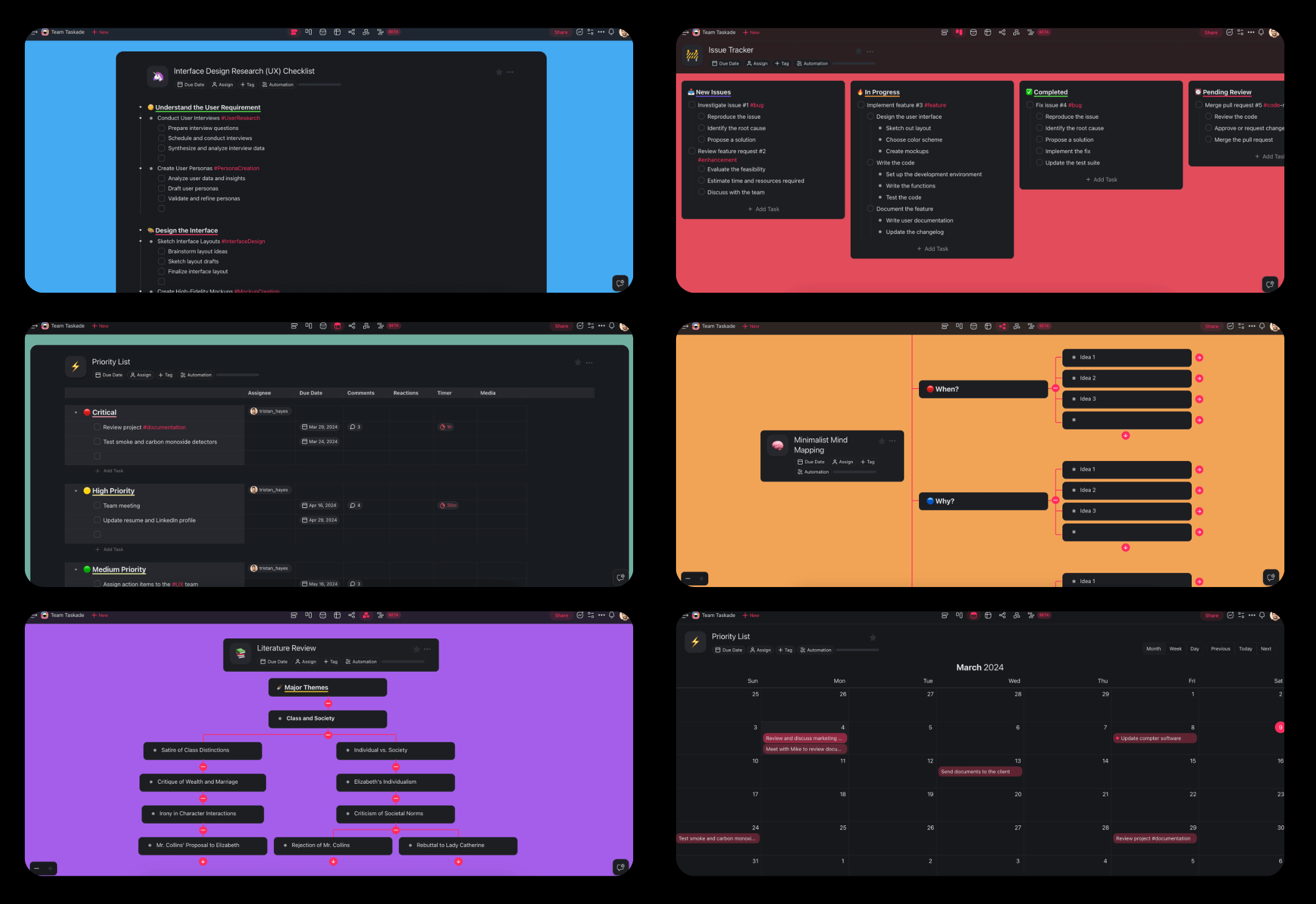
The same guide changes shape with the job: List view for a top-to-bottom review, Mind Map view for the concept-map format, and Table view for a question bank you mark right or wrong.
Taskade's study tools connect in one path:
For a whole course, the structure looks like a small database. A course holds units, each unit holds objectives, terms and questions, and each question collects your attempts. That is the shape of the Exam Study Portal app that you can clone on a paid plan from the Taskade App Factory: a study guide, flashcards, practice quizzes and a 14-day plan that tracks your progress.
Three parts of Taskade make this a study system and not a single document:
- Projects hold the guide. Every course, unit and question bank lives in a project you can edit at any time.
- AI agents quiz you. A custom agent can generate harder review questions as you master each section, which follows the converter's own "progressive studying" use case.
- Automations keep the schedule. An automation can move a topic back to "Review" on a schedule. Automations run on every plan, and Free includes 10 runs per billing period.
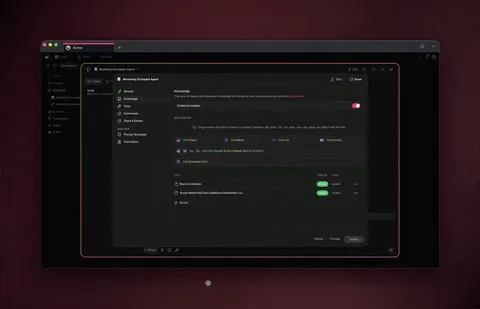
This is Workspace DNA applied to studying: Memory (your guide and question bank in projects), Intelligence (agents that quiz you and explain misses) and Execution (automations that bring weak topics back). If you want the whole system built for you, describe it in one prompt and Taskade Genesis builds a study app with the data, an agent and the automation.
Plans: On Free, you earn free AI credits with referrals and invites, and you can upgrade any time. Pro is $10 per month billed annually for up to 10 members, which covers a study group on one plan.
Frequently Asked Questions About AI Study Guide Makers
What is the best AI study guide maker in 2026?
It depends on your source. Taskade fits students who want a study guide they can edit, share, quiz from and schedule in one workspace. Gemini Notebook (formerly NotebookLM) is the strongest free pick for guides grounded in your own sources with citations. Quizlet and Knowt suit flashcard users, and Turbo AI and StudyFetch suit lecture-heavy courses.
Can AI make a study guide from a PDF?
Yes. An AI study guide maker reads the PDF and drafts key terms, summaries and review questions. A native-text PDF gives a cleaner draft than a photo scan. Treat the result as a first draft: check each definition against the source and test yourself from the questions. The PDF Study Hub kit in the Taskade App Factory turns a PDF into notes, flashcards and a short quiz, and cloning it needs a paid plan.
Is there a free AI study guide maker?
Yes. Gemini Notebook is free with usage caps, ChatGPT study mode works for logged-in free users, and Knowt, Quizlet, RemNote, Turbo AI and StudyFetch have a free way to start. On Taskade Free, you earn free AI credits with referrals and invites, and you can upgrade any time. A PDF upload needs a paid plan, so on Free you paste the PDF text.
How do I turn lecture slides into a study guide?
Export the deck as a PDF, upload it, and ask for one section per lecture with objectives, key terms and practice questions. Slides are terse, so add your lecture notes or the transcript as a second source, then write the missing reasoning in your own words.
Can I make a study guide from a lecture video or recording?
Yes. Turbo AI, StudyFetch, Knowt Ultra and Gemini Notebook accept recordings or video links, and Taskade's YouTube Lecture Notes converter returns chapter headings, key concepts, definitions and review questions. Add the slides or your notes, because a transcript misses what was on the board.
What should a good study guide include?
Six parts: learning objectives, key terms in your own words, worked examples, common mistakes, practice questions with answers, and a one-page summary. The practice questions matter most, because practice testing is one of the two highest-utility techniques in the Dunlosky et al. 2013 review.
How long should a study guide be?
Much shorter than the source. Aim for about one page per lecture or chapter, plus a one-page summary for the whole exam. A guide as long as the textbook is a copy, not a compression.
Is it better to make my own study guide or use an AI study guide?
Use both. Let AI draft the structure and questions, then do the compression yourself: rewrite definitions, explain each step of a worked example and answer from memory. The generation effect (Slamecka and Graf, 1978) and self-explanation (Chi et al., 1989) show that learning comes from producing the material.
Is using an AI study guide maker cheating?
A study guide for your own review is studying, and most schools treat it that way. Submitting AI output as graded work is different. Check your syllabus and your school's AI policy.
How do I study from a study guide once I have it?
Hide the answers and test yourself. Mark each question right or wrong, fix the misses from the source, and retest weak topics after one day, a few days and a week. Self-testing and spacing produce more learning than rereading.
Can Taskade turn a study guide into a quiz or a study plan?
Yes. The PDF to Study Guide converter drafts key concepts, summaries and review questions. The Study Guide to Quiz converter turns a guide into multiple choice, short answer and true or false questions, and the Study Plan generator schedules review sessions up to your exam date. Pro is $10 per month, billed annually.
References
- Adesope, O. O., et al. (2017). Rethinking the use of tests: A meta-analysis of practice testing. Review of Educational Research, 87(3), 659-701.
- Anderson, L. W., and Krathwohl, D. R. (Eds.) (2001). A Taxonomy for Learning, Teaching, and Assessing. Longman.
- Bastani, H., et al. (2025). Generative AI without guardrails can harm learning: Evidence from high school mathematics. PNAS, 122(26), e2422633122.
- Cepeda, N. J., et al. (2006). Distributed practice in verbal recall tasks: A review and quantitative synthesis. Psychological Bulletin, 132(3), 354-380.
- Chi, M. T. H., et al. (1989). Self-explanations: How students study and use examples in learning to solve problems. Cognitive Science, 13, 145-182.
- Dunlosky, J., et al. (2013). Improving students' learning with effective learning techniques. Psychological Science in the Public Interest, 14(1), 4-58.
- Karpicke, J. D., and Blunt, J. R. (2011). Retrieval practice produces more learning than elaborative studying with concept mapping. Science, 331(6018), 772-775.
- Kruger, J., and Dunning, D. (1999). Unskilled and unaware of it. Journal of Personality and Social Psychology, 77(6), 1121-1134.
- Lovett, M. C. (2013). Make exams worth more than the grade. In M. Kaplan et al. (Eds.), Using Reflection and Metacognition to Improve Student Learning. Stylus.
- Nestojko, J. F., et al. (2014). Expecting to teach enhances learning and organization of knowledge in free recall of text passages. Memory & Cognition, 42, 1038-1048.
- Novak, J. D., and Gowin, D. B. (1984). Learning How to Learn. Cambridge University Press.
- Pauk, W. (1962). How to Study in College. Houghton Mifflin.
- Roediger, H. L., and Karpicke, J. D. (2006). Test-enhanced learning: Taking memory tests improves long-term retention. Psychological Science, 17(3), 249-255.
- Rozenblit, L., and Keil, F. (2002). The misunderstood limits of folk science: An illusion of explanatory depth. Cognitive Science, 26, 521-562.
- Slamecka, N. J., and Graf, P. (1978). The generation effect: Delineation of a phenomenon. Journal of Experimental Psychology: Human Learning and Memory, 4(6), 592-604.
- Sweller, J., and Cooper, G. A. (1985). The use of worked examples as a substitute for problem solving in learning algebra. Cognition and Instruction, 2(1), 59-89.
Start With One Unit
A study guide works when you compress the course yourself and test yourself from it. AI makes the first draft fast, so you can spend your hours on the steps that build memory: rewriting, explaining, recalling and spacing. Pick one unit for your next exam, draft it with the tool that fits your source, and run the seven-step workflow once.
If you want the guide, the quiz, the plan and your study group in one workspace, turn your PDF into a study guide in Taskade or build a study app with Taskade Genesis. ▲ ■ ●