







Studying without a plan is like driving without a map. You might eventually arrive, but you will waste fuel, miss turns, and arrive stressed. AI study planners fix that problem by reading your deadlines, estimating how long each subject takes, and building a personalized schedule that adapts when life gets in the way.
This guide ranks the 11 best AI study planner tools of 2026 for high school students, undergrads, graduate researchers, professional learners, and anyone preparing for an exam or certification. We tested each tool for schedule generation, study material creation, rescheduling intelligence, and price.
TL;DR: Taskade is the best AI study planner for students who want more than a calendar. AI tutor agents generate study schedules, flashcards, summaries, and practice quizzes in one workspace. Calendar, Mind Map, and Board views show the same study plan from different angles. Free tier includes up to 6,000 credits. Generate a study schedule instantly with the AI study schedule generator or build a custom study app.
What Is the Best AI Study Planner in 2026?
Taskade is the best AI study planner for students who need scheduling, note-taking, and study material generation in one tool. Its Calendar view is one of multiple project views, so the same study plan appears as a mind map, board, list, table, Gantt chart, org chart, or timeline with a single click. AI tutor agents generate flashcards, practice problems, and summaries directly inside each study session.
For single-purpose use cases, Motion leads for deep-work time blocking, Notion AI for note-heavy learners, Sora Schedule for exam countdown planning, and Goodnotes 6 for handwritten note review with AI summaries. Read on for the full breakdown of all 11 tools.
Clone a Study Planner and Run It in 60 Seconds
The fastest way to start is not to build a planner from a blank page. It is to clone one that already works and drop in your own courses. The app below is a live study and assignment tracker built in Taskade Genesis. Click it, clone it, and you walk away with a workspace that tracks every assignment, due date, and study session across Board, Calendar, and Table views. No setup, no template to configure, no account hurdle before you see value.
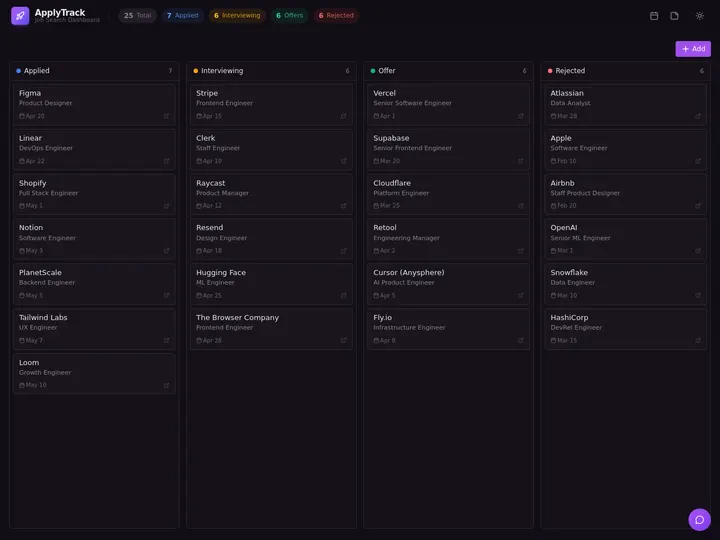
Above: a real Genesis app you can clone. After cloning, an EVE assistant lives inside it — ask it to schedule your week, generate flashcards for a chapter, or rebalance your plan when a deadline moves.
Here is the shift that separates a study system from a study list. A list tells you what to do. A system reads your syllabus, builds the schedule, generates the materials, and reschedules itself when life moves a deadline. That is the outcome to aim for: turn a syllabus into a study system you can actually run.
You do not need to be technical to do this. One operator who had never written code built a full production dashboard in Taskade Genesis and described the result this way: "What I accomplished in a few weeks would have taken a team of 40+ people 18 months in a Fortune 500." A semester study plan is a far smaller build. If a non-coder can ship a working internal app, you can ship a study system from your course list this afternoon.
What Is an AI Study Planner?
An AI study planner is software that automatically generates a study schedule based on your courses, deadlines, available hours, and learning goals. Unlike a basic to-do list or calendar, an AI study planner actively decides what to study, when to study it, and how long to spend on each topic.
The best AI study planners also generate study materials. Instead of just telling you "study biology from 2 to 4 PM," they create flashcards, summarize textbook chapters, generate practice quizzes, and schedule spaced repetition reviews at scientifically optimal intervals.
How AI Study Planning Works
Three Types of AI Study Planners
| Type | What It Does | Best For | Example Tools |
|---|---|---|---|
| Schedule Generators | Auto-place study sessions into your calendar | Time management | Motion, Reclaim, SkedPal |
| Study Material Builders | Generate flashcards, quizzes, summaries from notes | Active recall practice | Taskade, Notion AI, Goodnotes 6 |
| Full Study Systems | Schedule + materials + progress tracking in one tool | Comprehensive exam prep | Taskade, Sora Schedule |
Quick Comparison: 11 Best AI Study Planners
| Tool | Best For | AI Features | Views | Free Plan | Paid From |
|---|---|---|---|---|---|
| Taskade | All-in-one study system | Tutor agents, flashcards, schedules, quizzes | Multiple views | Yes (up to 6,000 credits) | $10/mo |
| Notion AI | Note-heavy learners | Summarize, Q&A, database queries | Pages + databases | Yes (limited AI) | $10/mo |
| Sora Schedule | Exam countdown planning | Auto-schedule by exam date | Calendar + list | Yes (basic) | $8/mo |
| Motion | Deep work time blocking | Auto-schedule tasks into focus blocks | Calendar + list | No | $19/mo |
| Reclaim | Habit-based study routines | Habit scheduling, buffer time | Calendar | Yes (basic) | $8/mo |
| Todoist + AI | Simple task management | Natural language input, smart dates | List + board | Yes | $5/mo |
| SkedPal | ADHD-friendly scheduling | Auto-reschedule, energy mapping | Calendar + timeline | No | $15/mo |
| ClickUp AI | Project-based study tracking | AI summaries, task generation | 15+ views | Yes (limited) | $7/mo |
| Sunsama | Daily planning ritual | Guided daily planning, timeboxing | Daily view | No | $16/mo |
| Akiflow | Inbox-zero task capture | Universal inbox, calendar sync | Calendar + list | No | $15/mo |
| Goodnotes 6 | Handwritten note review | AI handwriting search, study sets | Notebook | Yes (3 notebooks) | $7/mo |
1. Taskade — Best All-in-One AI Study Planner
Taskade is the only study planner that combines AI-powered scheduling with study material generation, real-time collaboration, and multiple project views in a single workspace. Students use it to plan exam schedules, generate flashcards, build practice quizzes, and track study progress without switching between apps.
Why Taskade Leads for Students
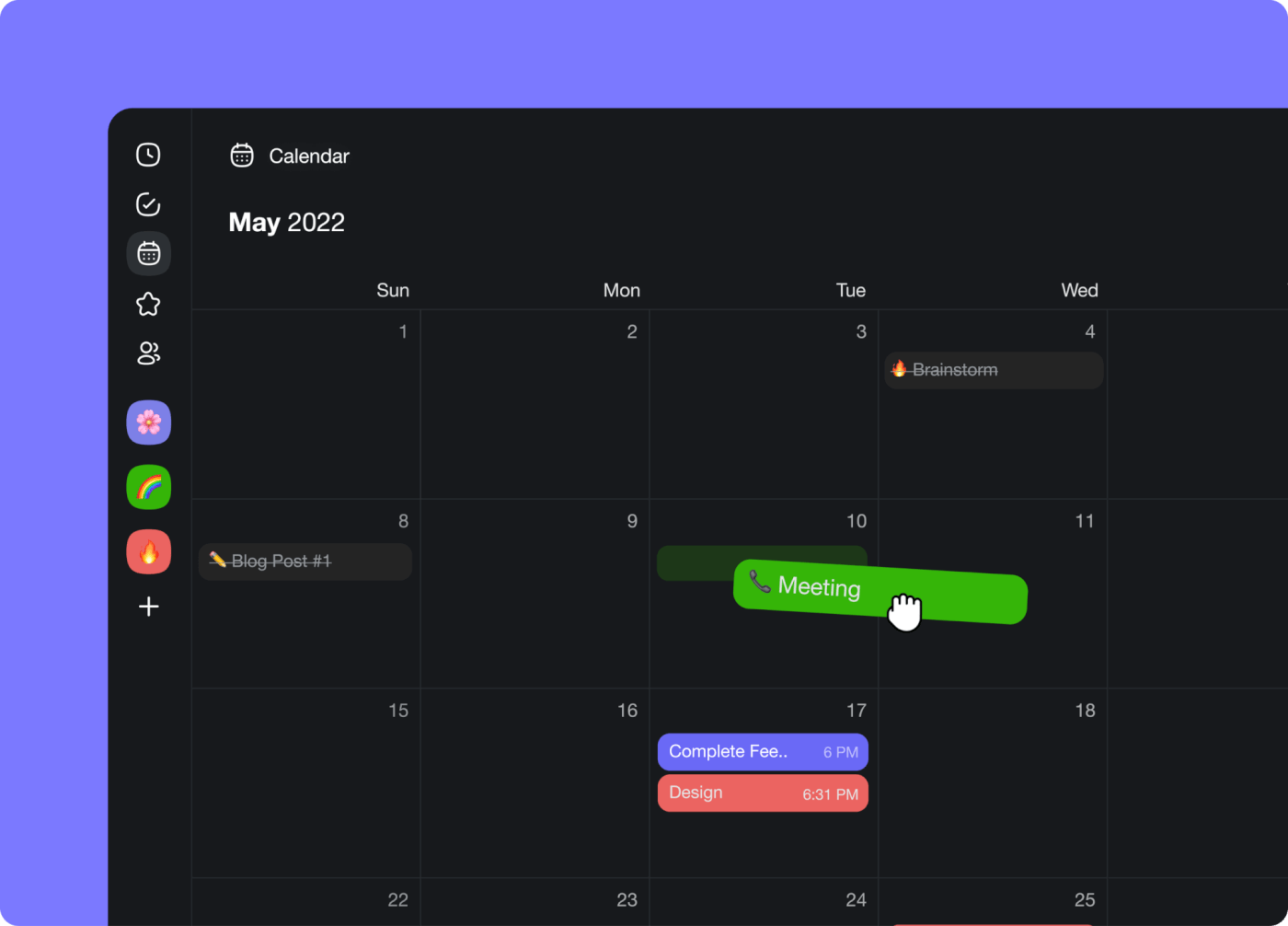
The core advantage is flexibility. A single Taskade project can hold your entire study plan, and you view it as a Calendar to see weekly time blocks, a Mind Map to visualize topic relationships, a Board to drag sessions between "To Study," "In Progress," and "Reviewed," or a List for a simple checklist. Multiple views (List, Board, Calendar, Table, Mind Map, Gantt, Org Chart) show the same underlying data.
AI tutor agents take Taskade beyond scheduling. You can create a custom AI agent that acts as a personal tutor for any subject. Tell it "I have a biology final in 3 weeks covering chapters 5-12" and it generates a day-by-day study plan with flashcards, chapter summaries, and practice questions embedded in each session. The agent uses built-in tools and draws from 15+ frontier models from OpenAI, Anthropic, and Google.
Study Planning Features
- AI Study Schedule Generator: Describe your courses, deadlines, and available hours. The study schedule generator or a custom AI agent builds a complete plan in seconds.
- Flashcard and Quiz Generation: Paste your notes or a textbook chapter. The AI agent generates flashcards, multiple-choice questions, and fill-in-the-blank exercises directly inside the project.
- Spaced Repetition Workflows: Set up automations that move completed flashcard sets back to "Review" at increasing intervals (1 day, 3 days, 7 days, 14 days).
- Calendar + Mind Map + Board: View your study plan as time blocks (Calendar), topic clusters (Mind Map), or progress columns (Board). Switch between all views with one click.
- Real-Time Collaboration: Study groups share a single workspace. Assign topics to group members, track who has reviewed what, and use role-based access (Owner through Viewer) to control editing rights.
- 100+ Integrations: Connect Google Calendar, Outlook, Notion, Google Drive, and other tools your school requires.
- Daily Schedule Generator: Generate a balanced daily plan that includes study sessions, meals, exercise, and breaks.
Pricing
| Plan | Price (Annual) | Credits | Best For |
|---|---|---|---|
| Free | $0 | Up to 6,000 one-time | Trying AI study planning |
| Pro | $10/mo (10 users) | Included | Study groups |
| Business | $25/mo | Included | University departments |
| Enterprise | Custom | Custom | Institutions |
Workspace DNA for Studying
Taskade operates on the Workspace DNA framework: Memory (your notes, flashcards, and study materials live in projects), Intelligence (AI agents analyze your progress and adapt your schedule), and Execution (reliable automation workflows move review items, send reminders, and reschedule missed sessions). This self-reinforcing loop means your study system gets smarter over time.
Bottom line: Taskade is the strongest choice for students who want AI-generated study plans, materials, and progress tracking in one workspace. Start free or generate a plan with the study schedule generator.
2. Notion AI — Best for Note-Heavy Learners
Notion AI layers AI features on top of Notion's flexible page and database system. Students who already take notes in Notion can ask the AI to summarize lectures, generate study questions from their notes, and fill database properties automatically.
Study Planning Strengths
Notion's databases make it easy to build a study tracker with columns for subject, due date, status, and difficulty. AI can auto-fill summaries and generate flashcard pages from your existing notes. The "Ask AI" feature answers questions about your own notes, which is useful during review sessions.
Limitations
Notion does not auto-schedule. You manually place study sessions on a calendar database. There is no time-blocking engine, no rescheduling intelligence, and no energy-level optimization. Notion AI is best for students who want AI-enhanced notes and a manual planning system, not an auto-scheduling engine.
Pricing
Free personal plan with limited AI. Notion AI add-on is $10/month per member. The Plus plan starts at $10/month.
3. Sora Schedule — Best for Exam Countdown Planning
Sora Schedule is built specifically for students preparing for exams. You enter your exam dates, subjects, and available study hours, and Sora generates a countdown study plan that distributes topics evenly across your remaining time.
Study Planning Strengths
The exam countdown feature is Sora's standout. It calculates how many hours you need per subject based on difficulty ratings you assign, then builds a study calendar that increases intensity as the exam approaches. Sora also supports spaced repetition scheduling for review sessions.
Limitations
Sora is narrowly focused on exam prep. It does not generate study materials, does not support real-time collaboration, and has limited integrations. Students who need a full productivity workspace will outgrow it quickly.
Pricing
Free basic plan. Premium starts at $8/month with unlimited exams and advanced scheduling features.
4. Motion — Best for Deep Work Time Blocking
Motion uses AI to auto-schedule every task on your list into your calendar. For students, this means adding "study organic chemistry" with a deadline and estimated duration, and Motion places it in the optimal time slot based on your existing calendar, energy patterns, and deadlines.
Study Planning Strengths
Motion excels at protecting deep work blocks. It understands that a 3-hour study session should not be split by a 30-minute meeting, and it groups similar tasks together. When you miss a session, Motion automatically reschedules it without you touching anything.
Limitations
Motion does not generate study materials. It is purely a scheduling engine. You still need a separate tool for flashcards, notes, and practice questions. At $19/month with no free plan, it is expensive for students on a budget.
Pricing
$19/month (individual). $12/month per user (team). No free plan.
5. Reclaim — Best for Habit-Based Study Routines
Reclaim is a calendar AI that protects recurring habits and routines. For students, this means marking "study 2 hours daily" as a habit, and Reclaim finds the best 2-hour window each day based on your changing schedule.
Study Planning Strengths
Reclaim's habit engine is the best in this list for consistent daily study routines. It automatically moves your study habit to a different time slot when meetings or classes are added. Buffer time settings prevent back-to-back scheduling, so you always get a break before studying.
Limitations
Reclaim focuses on time protection, not content generation. It does not create flashcards, summaries, or study guides. It works best as a complement to a content tool like Taskade or Notion.
Pricing
Free plan covers basic scheduling. Starter at $8/month. Business at $12/month. Enterprise at $18/month.
6. Todoist + AI — Best for Simple Task Management
Todoist is a lightweight task manager with natural language input. Type "study biology every weekday at 3pm for 2 hours until December 15" and Todoist creates the recurring task with the correct schedule. AI features help prioritize tasks and suggest due dates.
Study Planning Strengths
Todoist's simplicity is its strength. Students who want a clean checklist of study tasks without the complexity of a full workspace benefit from its natural language input and cross-platform apps. The board view works as a simple Kanban for tracking study progress.
Limitations
No calendar view for time blocking. No AI-generated study materials. No auto-rescheduling when you miss a session. Todoist is a task manager, not a study planner, but it works well enough for students with simple needs.
Pricing
Free plan covers basic task management. Pro at $5/month. Business at $8/month per user.
7. SkedPal — Best for ADHD-Friendly Scheduling
SkedPal is designed for people who struggle with traditional scheduling. It uses "time maps" to define when you prefer different types of work (morning = hard subjects, afternoon = review, evening = light reading) and auto-schedules tasks accordingly.
Study Planning Strengths
The time map concept is powerful for students with ADHD or executive function challenges. Instead of deciding what to study at any given moment, SkedPal decides for you based on your preferences and energy patterns. When you fall behind, it reschedules everything without judgment.
Limitations
The interface has a learning curve. SkedPal is powerful but not intuitive for first-time users. No AI content generation. Limited mobile app compared to competitors.
Pricing
$14.95/month. No free plan. 14-day free trial.
8. ClickUp AI — Best for Project-Based Study Tracking
ClickUp AI adds artificial intelligence to ClickUp's project management platform. Students can use it to generate task lists from a syllabus, summarize research notes, and create study timelines with dependencies.
Study Planning Strengths
ClickUp's 15+ views (including calendar, Gantt, timeline, and mind map) provide flexibility for different study styles. AI can generate subtasks from a course outline, summarize long documents, and write study summaries. The hierarchy system (spaces, folders, lists, tasks) works well for organizing multiple courses.
Limitations
ClickUp is complex. The feature density that makes it powerful for project managers can overwhelm students who just want a simple study plan. Free plan AI features are limited.
Pricing
Free plan available (limited AI). Unlimited at $7/month. Business at $12/month. Enterprise custom.
9. Sunsama — Best for Daily Planning Ritual
Sunsama is a daily planning tool that guides you through a structured morning routine. Each day, you pull tasks from your calendar, email, and other tools into a single daily view, then timebox each one. For students, this morning ritual forces you to decide exactly what to study today.
Study Planning Strengths
The guided daily planning ritual is Sunsama's unique value. Instead of looking at a massive semester plan and feeling overwhelmed, you focus on today. Sunsama pulls in calendar events, Todoist tasks, and Notion pages, so your study plan lives alongside everything else.
Limitations
No AI-generated study materials. No auto-scheduling beyond the daily view. No free plan, and $16/month is steep for students. Sunsama works best for disciplined students who want structure, not students who need the AI to do the planning for them.
Pricing
$16/month. No free plan. 14-day free trial.
10. Akiflow — Best for Inbox-Zero Task Capture
Akiflow is a task manager that captures tasks from every source (email, Slack, browser, calendar) into a universal inbox. Students use it to capture assignments, reading lists, and study reminders from any app, then schedule them on a unified calendar.
Study Planning Strengths
The universal inbox prevents tasks from falling through the cracks. When a professor mentions a reading in an email, you capture it to Akiflow in one click. The calendar view shows study sessions alongside classes and meetings, giving you a complete picture of your day.
Limitations
No AI content generation. No study material creation. No auto-scheduling intelligence. Akiflow is a capture and scheduling tool, not a study system. At $15/month with no free plan, it is expensive for its feature set.
Pricing
$15/month (monthly). $8.33/month (annual). No free plan. 7-day free trial.
11. Goodnotes 6 — Best for Handwritten Note Review
Goodnotes 6 is a digital notebook app for iPad and Mac that adds AI features to handwritten notes. Students who prefer writing by hand can search their handwriting, convert it to text, and use AI-generated study sets based on their own notes.
Study Planning Strengths
The AI study set feature analyzes your handwritten notes and generates flashcards and practice questions from them. Handwriting search means you can find any concept across thousands of pages of notes. For visual learners and pen-first students, Goodnotes bridges the gap between analog note-taking and digital study planning.
Limitations
Goodnotes is a notebook, not a scheduler. It does not auto-schedule study sessions, does not integrate with external calendars, and does not support real-time collaboration for group study. You need a separate tool for scheduling.
Pricing
Free plan with 3 notebooks. Full version at $6.99/year or $9.99 one-time purchase.
How to Choose the Right AI Study Planner
The best tool depends on how you study, not just what features you want. Use this decision framework:
Key Factors to Consider
| Factor | What to Look For | Top Picks |
|---|---|---|
| Auto-scheduling | AI places study sessions into your calendar automatically | Taskade, Motion, Reclaim |
| Study material generation | AI creates flashcards, quizzes, summaries from your notes | Taskade, Notion AI, Goodnotes 6 |
| Spaced repetition | Scheduled review intervals based on retention science | Taskade, Sora Schedule |
| Multiple views | See your plan as calendar, board, mind map, list | Taskade (multiple views), ClickUp (15+) |
| Collaboration | Study group features, shared projects, role-based access | Taskade, Notion, ClickUp |
| Price | Free or student-friendly pricing | Taskade (free), Todoist (free), Notion (free) |
| Mobile app | Study on the go between classes | All 11 tools have mobile apps |
AI Study Planning by Education Stage
Not every student has the same needs. A high school freshman managing six classes has different challenges than a PhD candidate preparing for qualifying exams. Here is how to match the right tool to your stage.
High School Students
High school students need simplicity. The biggest challenge is managing homework across 6-8 classes with overlapping deadlines. An AI study planner should auto-schedule homework sessions, protect time for extracurriculars, and keep parents informed of progress.
Best picks: Taskade (free, visual, easy to start), Todoist (simple checklist), Goodnotes 6 (handwritten notes on iPad).
Undergraduate Students
Undergrads face larger workloads, longer reading lists, and exam weeks that require strategic planning. The ideal tool handles midterm and final exam scheduling, research paper timelines, and group project coordination.
Best picks: Taskade (study groups + AI materials), Motion (time blocking for deep study), Notion AI (research notes + databases).
Graduate Students and Researchers
Graduate students need tools that handle multi-month research timelines, literature review tracking, writing schedules, and defense preparation. The study planner must work alongside reference managers, writing tools, and lab notebooks.
Best picks: Taskade (research project management + AI summaries), Notion AI (knowledge base for literature), Sunsama (daily writing routine).
Professional Learners and Certification Prep
Professionals studying for certifications (CPA, PMP, AWS, bar exam) need tools that fit study sessions around a full-time job. The planner must protect evenings and weekends, track exam registration deadlines, and adapt when work emergencies eat into study time.
Best picks: Taskade (custom study app for any certification), Motion (protect study time from work overflow), Reclaim (habit-based study routines around work calendar).
+------------------------------------------------------------------+
|                AI Study Planner by Education Stage                |
+------------------------------------------------------------------+
|                                                                   |
|  HIGH SCHOOL        UNDERGRAD          GRADUATE       PROFESSIONAL|
|  +-----------+    +-----------+    +-----------+    +-----------+ |
|  | 6-8       |    | Midterms  |    | Research  |    | Cert Prep | |
|  | classes   |    | + Finals  |    | + Writing |    | + Work    | |
|  | + homework|    | + Groups  |    | + Defense |    | + Family  | |
|  +-----------+    +-----------+    +-----------+    +-----------+ |
|       |                |                |                |        |
|       v                v                v                v        |
|  +-----------+    +-----------+    +-----------+    +-----------+ |
|  | Taskade   |    | Taskade   |    | Taskade   |    | Motion    | |
|  | Todoist   |    | Motion    |    | Notion AI |    | Reclaim   | |
|  | Goodnotes |    | Notion AI |    | Sunsama   |    | Taskade   | |
|  +-----------+    +-----------+    +-----------+    +-----------+ |
|                                                                   |
+------------------------------------------------------------------+
Study Technique Templates You Can Build With AI
The right study planner becomes even more powerful when you pair it with proven study techniques. Here are four templates you can build in Taskade or generate with the study schedule generator.
Pomodoro Study Timer Template
The Pomodoro Technique splits study time into 25-minute focused sessions separated by 5-minute breaks, with a longer 15-30 minute break after every four sessions. An AI study planner can auto-generate Pomodoro blocks across your day and assign specific topics to each session.
How to build in Taskade: Create a project with tasks for each Pomodoro session. Use the Calendar view to see them as time blocks. Set up an automation that marks the next session as "active" when you complete the current one. Your AI agent can assign topics to each block based on upcoming deadlines.
For a deeper dive into the Pomodoro method, see our comprehensive Pomodoro guide.
Cornell Note-Taking Template
The Cornell method divides each page into three sections: notes (right column), cues/questions (left column), and summary (bottom). An AI study planner can generate the cue questions and summaries automatically from your raw notes.
How to build in Taskade: Create a project template with three sections. Paste your lecture notes in the right column. Ask your AI tutor agent to generate questions for the left column and a summary for the bottom. Use the Mind Map view to connect related concepts across multiple lectures.
Spaced Repetition Template
Spaced repetition schedules reviews at increasing intervals: 1 day after first learning, then 3 days, 7 days, 14 days, and 30 days. AI study planners can automate this entire cycle, ensuring you review material at the scientifically optimal moment.
How to build in Taskade: Create flashcard tasks with a "next review" date field. Set up automations that reschedule each card based on your self-reported recall accuracy (easy = longer interval, hard = shorter interval). The Calendar view shows all upcoming reviews, and the Board view lets you drag cards between "New," "Learning," and "Mastered" columns.
Cram Session Template
Sometimes you have 48 hours before an exam and need a structured cram plan. An AI study planner can analyze your syllabus, identify high-weight topics, and build an intensive schedule that maximizes coverage in limited time.
How to build in Taskade: Tell your AI agent "I have a chemistry final in 2 days covering chapters 8-15. Build a cram schedule that prioritizes high-weight topics." The agent generates a time-blocked plan with the highest-value topics first, built-in breaks to prevent burnout, and a final review session the morning of the exam.
The Science Behind AI Study Planning
AI study planners are not just convenience tools. They apply evidence-based learning science at scale. Understanding the principles behind them helps you use any study planner more effectively.
Cognitive Load Theory
Your working memory can hold approximately 4-7 items at once. AI study planners reduce cognitive load by making scheduling decisions for you, freeing mental resources for actual learning. When you don't have to decide what to study next, you can focus entirely on how to study it.
The Spacing Effect
Research consistently shows that distributed practice (studying a topic across multiple sessions) produces stronger long-term retention than massed practice (cramming). AI study planners automate this by spreading study sessions across days and weeks.
The bar chart shows cramming retention (drops steeply), while the line shows spaced repetition retention (remains high). AI study planners automate the spaced schedule so you don't have to calculate intervals manually.
Active Recall
Passively re-reading notes is one of the least effective study methods. Active recall (testing yourself on material) is significantly more effective. AI study planners that generate flashcards and practice quizzes force active recall into your study routine automatically.
Interleaving
Studying different subjects in alternating blocks (interleaving) improves long-term retention compared to studying one subject for hours (blocking). AI study planners naturally interleave by scheduling different subjects across the day rather than dedicating entire days to single topics.
How to Set Up Your AI Study Plan in 5 Steps
Follow this workflow to go from zero to a complete AI-powered study plan in under 30 minutes.
Step 1: Gather Your Inputs
Before opening any tool, collect your course syllabi, exam dates, assignment deadlines, and weekly availability (classes, work shifts, commitments). The more accurate your inputs, the better your AI-generated plan.
Step 2: Choose Your Tool
Use the decision flowchart above. If you want everything in one place, start with Taskade. If you already use Notion for notes, add Notion AI. If you only need time blocking, try Motion.
Step 3: Input Your Schedule Constraints
Enter your fixed commitments first: class times, work hours, meals, sleep, exercise. These are non-negotiable blocks. Then add your study subjects with deadlines and estimated hours per topic.
Step 4: Let AI Generate the Plan
In Taskade, use the study schedule generator or ask your AI tutor agent to create the plan. The AI distributes study sessions across available time, respects your constraints, and builds in breaks. Review the output and adjust any sessions that feel misplaced.
Step 5: Review and Adapt Weekly
No study plan survives contact with reality. Every Sunday, spend 10 minutes reviewing what you completed, what you missed, and what needs rescheduling. AI study planners like Taskade and Motion handle this automatically, but a weekly check-in ensures your priorities still align with your plan.
Building a Custom AI Study App With Taskade Genesis
For students who want a study system tailored to their exact needs, Taskade Genesis lets you build a custom study app from a single prompt. Unlike configuring a generic tool, you describe exactly what you want and Genesis builds it as a live, deployed application.
What You Can Build
- Exam prep dashboard: Enter your exam date, subjects, and chapters. Genesis builds a countdown timer, daily study schedule, flashcard deck, and progress tracker.
- Group study coordinator: Describe your study group, subjects, and meeting times. Genesis creates a shared workspace with assigned topics, discussion boards, and shared flashcard sets.
- Literature review tracker: For grad students managing hundreds of papers. Genesis builds a database with citation fields, reading status, key findings, and a timeline view of your review progress.
- Language learning app: Describe the language and your level. Genesis creates a daily vocabulary lesson, grammar exercises, and conversation practice with an AI tutor agent.
How Genesis Differs From Templates
Templates give you a starting structure. Genesis gives you a running application. Your custom study app comes with embedded AI agents, reliable automation workflows, and the ability to publish it to the Community Gallery so other students can use it too. You can add a custom domain and password protection for private study groups.
How EVE Builds Your Study Schedule From a Syllabus
EVE is the AI assistant inside every Taskade workspace. Here is the exact path from a course list to a running plan, the part most study-planner roundups skip:
- Paste your syllabus or course list. EVE reads the topics, exam dates, and chapter weights.
- EVE ranks topics by difficulty and deadline, so high-weight material gets more sessions and earlier starts.
- It schedules spaced reviews across Calendar and Gantt views at 1, 3, 7, 14, and 30-day intervals.
- It generates the materials — flashcards, summaries, and practice quizzes — directly inside each session using built-in tools and 15+ frontier models from OpenAI, Anthropic, Google, and open-weight providers.
- Due-date automations move completed items to review queues and reschedule anything you miss, so the plan stays current without you touching it.

EVE chaining agent tools to build and run a workflow — the same mechanism that turns your syllabus into a self-updating study plan.
Run finals week with a plan that built itself. Build your custom study app with Taskade Genesis → or clone the study tracker above and add your courses in minutes.
Common AI Study Planning Mistakes
Even with AI help, students make predictable mistakes when setting up their study plans. Avoid these pitfalls.
Overloading the Schedule
AI will fill every available hour if you let it. Always leave 20-30% of your time unscheduled as buffer. Life happens: you get sick, a friend needs help, or you simply need a mental break. A study plan with no margins breaks on the first day.
Ignoring Energy Levels
Not all study hours are equal. A 7 AM calculus session might be worth 2 hours of the same material at 10 PM. The best AI study planners (SkedPal, Motion) account for energy patterns. If your tool doesn't, manually place hard subjects in your peak hours and easy subjects in your low-energy periods.
Skipping Reviews
New material feels more productive than reviewing old material. But research shows that skipping reviews leads to forgetting up to 80% of learned content within a week. Use spaced repetition templates (described above) to make reviews automatic and unavoidable.
Using Too Many Tools
A study planner in Notion, flashcards in Anki, tasks in Todoist, and a calendar in Google Calendar means four apps to maintain. Every app switch costs cognitive energy. Choose one primary tool (ideally Taskade or Notion) and minimize the rest.
+------------------------------------------------------------------+
|              Study Planning Mistakes to Avoid                     |
+------------------------------------------------------------------+
|                                                                   |
|  [X] Overloading         -->  Leave 20-30% buffer time           |
|  [X] Ignoring energy     -->  Hard subjects in peak hours        |
|  [X] Skipping reviews    -->  Automate spaced repetition         |
|  [X] Too many tools      -->  One primary workspace              |
|  [X] No weekly check-in  -->  10 min every Sunday                |
|  [X] Static plans        -->  Use AI rescheduling                |
|                                                                   |
+------------------------------------------------------------------+
Study Planning Features Compared in Detail
Auto-Scheduling Intelligence
| Tool | Auto-Schedule | Reschedule on Change | Energy Mapping | Deadline Awareness |
|---|---|---|---|---|
| Taskade | Yes | Yes | Via agent | Yes |
| Motion | Yes | Yes | Yes | Yes |
| Reclaim | Yes (habits) | Yes | Partial | No |
| SkedPal | Yes | Yes | Yes | Yes |
| Sora Schedule | Yes | Partial | No | Yes |
| Notion AI | No | No | No | No |
| Todoist | No | No | No | Yes |
| ClickUp | No | No | No | Yes |
| Sunsama | Partial | No | No | Yes |
| Akiflow | No | No | No | Yes |
| Goodnotes 6 | No | No | No | No |
Study Material Generation
| Tool | Flashcards | Quizzes | Summaries | Spaced Repetition |
|---|---|---|---|---|
| Taskade | Yes (AI agent) | Yes (AI agent) | Yes (AI agent) | Yes (automation) |
| Notion AI | Manual | No | Yes | No |
| Goodnotes 6 | Yes (from notes) | Yes | No | No |
| Sora Schedule | No | No | No | Yes (built-in) |
| ClickUp AI | No | No | Yes | No |
| Others | No | No | No | No |
Study Group Collaboration Features
Study groups need more than shared documents. They need task assignment, real-time editing, and permission controls so one person doesn't accidentally delete the entire study guide.
Why Collaboration Matters for Studying
Research from the National Survey of Student Engagement consistently shows that collaborative learning improves both grades and satisfaction. AI study planners that support group features let you divide topics, share notes, and hold each other accountable.
Collaboration Feature Matrix
| Feature | Taskade | Notion | ClickUp | Others |
|---|---|---|---|---|
| Real-time co-editing | Yes | Yes | Yes | No |
| Task assignment | Yes | Yes | Yes | No |
| Role-based access | Yes | No (3 tiers) | No (4 tiers) | No |
| Video/audio calls | Yes | No | No | No |
| Shared AI agents | Yes | No | No | No |
| Comment threads | Yes | Yes | Yes | Partial |
Taskade is the only tool in this list that supports role-based access (Owner to Viewer), real-time co-editing, and shared AI agents in the same workspace. This makes it the strongest choice for study groups that need to assign topics, share materials, and use AI together.
Integrating AI Study Planners With Your Existing Tools
Most students already use several apps for school. The best AI study planner integrates with what you already have rather than replacing everything.
Common Integration Scenarios
| Scenario | Integration | Best Tool |
|---|---|---|
| Sync study sessions to Google Calendar | Google Calendar API | Taskade, Motion, Reclaim |
| Import notes from Google Drive | Google Drive integration | Taskade, Notion |
| Capture assignments from email | Email integration | Akiflow, Taskade |
| Connect with LMS (Canvas, Blackboard) | Zapier/automation | Taskade (100+ integrations) |
| Sync with reference manager (Zotero) | Zapier | Taskade, Notion |
| Export flashcards to Anki | CSV export | Taskade, Notion |
Taskade supports 100+ integrations across 10 categories including Google Calendar, Outlook, Slack, Google Drive, and LMS platforms through Zapier. This means your study plan stays in sync with every tool your school requires.
AI Study Planning for Specific Subjects
Different subjects benefit from different AI features. Here is how to optimize your study planner for the most common academic disciplines.
STEM Subjects (Math, Physics, Chemistry, Biology)
STEM studying requires problem practice, formula memorization, and lab preparation. Use AI to generate practice problems at increasing difficulty, create formula flashcards, and schedule lab report writing sessions with sufficient buffer time.
Best approach: Use Taskade's AI agent to generate practice problems daily. Schedule them in Calendar view. Use Mind Map view to connect concepts across chapters. See our AI math tutoring guide for specific math tools.
Humanities (History, Literature, Philosophy)
Humanities studying involves reading large volumes of text, writing essays, and analyzing primary sources. Use AI to summarize readings, generate discussion questions, and outline essay arguments before writing.
Best approach: Use Notion AI or Taskade to summarize readings. Build a timeline view of historical events. Generate essay outlines with your AI agent. Connect related readings with Mind Map view.
Languages
Language learning requires daily vocabulary practice, grammar exercises, conversation practice, and cultural context. AI study planners can generate vocabulary flashcards, schedule daily practice sessions, and create conversation scenarios.
Best approach: Build a custom language learning app with Taskade Genesis. Schedule daily vocabulary review with spaced repetition. Use AI agents for conversation practice.
Test Prep (SAT, GRE, MCAT, LSAT, CPA)
Standardized test prep requires strict timelines, diagnostic testing, and targeted practice on weak areas. AI study planners can analyze practice test results and adjust your study plan to focus on areas where you lose the most points.
Best approach: Use Taskade or Sora Schedule to build an exam countdown plan. Generate practice questions with AI agents. Track accuracy by topic area in Table view. Adjust the plan weekly based on diagnostic results.
Mobile Study Planning: Studying Between Classes
The best study plan is useless if you can only access it from a laptop. Mobile AI study planning lets you review flashcards between classes, check your schedule on the bus, and capture assignment ideas during lectures.
Mobile App Comparison
| Tool | iOS | Android | Offline | Widget |
|---|---|---|---|---|
| Taskade | Yes | Yes | Yes | Yes |
| Notion | Yes | Yes | Partial | Yes |
| Motion | Yes | Yes | No | No |
| Todoist | Yes | Yes | Yes | Yes |
| Goodnotes | Yes (iPad/iPhone) | No | Yes | No |
| Reclaim | Yes | Yes | No | No |
| ClickUp | Yes | Yes | Partial | Yes |
Pricing Comparison for Students
Budget matters for students. Here is every tool's pricing ranked from cheapest to most expensive, with free tier details.
| Tool | Free Plan | Cheapest Paid | Annual Savings | Student Discount |
|---|---|---|---|---|
| Todoist | Yes (5 projects) | $5/mo | $48/yr vs $60 | No |
| Taskade | Yes (up to 6,000 credits) | $10/mo | $120/yr vs $240 | No |
| Goodnotes 6 | Yes (3 notebooks) | $6.99/yr | Already annual | No |
| ClickUp | Yes (limited AI) | $7/mo | $84/yr vs $120 | No |
| Reclaim | Yes (basic) | $8/mo | $96/yr vs $120 | No |
| Sora Schedule | Yes (basic) | $8/mo | $96/yr vs $120 | Yes (20% off) |
| Notion | Yes (limited AI) | $10/mo | $96/yr vs $120 | Yes (free Plus) |
| SkedPal | No | $14.95/mo | $150/yr vs $179 | No |
| Akiflow | No | $15/mo ($8.33 annual) | $100/yr vs $180 | No |
| Sunsama | No | $16/mo | $192/yr vs $240 | No |
| Motion | No | $19/mo | $228/yr vs $288 | No |
Best value for students: Taskade's free plan includes basic project views, AI agents, and up to 6,000 credits. Notion offers a free Plus plan for students with a .edu email. Todoist's free plan covers basic task management.
What Comes After Setting Up Your Study Plan?
A study plan is the foundation, but it works best as part of a larger productivity system. Here are the next steps to build on your AI study planner.
Build a Second Brain for Your Studies
Your study notes, flashcards, and summaries become a personal knowledge base over time. Organizing them into a second brain system means you never lose a concept and can quickly retrieve information for future courses or exams. The PARA method provides a simple framework for organizing study materials into Projects, Areas, Resources, and Archive.
Automate Repetitive Study Tasks
Once your study plan is running, use automations to handle repetitive tasks: moving completed flashcards to review queues, sending daily study reminders, generating weekly progress reports, and syncing completed tasks to your calendar. Taskade supports reliable automation workflows with 100+ integrations.
Track Your Study Analytics
Measure what matters: hours studied per subject, flashcard accuracy rates, practice test scores over time, and schedule adherence. Taskade's Table view lets you build a study analytics dashboard that shows trends across weeks and months. For standardized test prep, a no-code exam-prep tracker you can ship in an afternoon gives you the score-by-topic view that tells you which sections to drill next.
Related Reading
Explore more AI tools and study techniques to complement your study planner:
- AI Tools for Teachers — AI tools that create teaching materials, grade assignments, and generate lesson plans
- Best AI Math Tutoring Tools — 11 tools for math problem solving, step-by-step solutions, and practice generation
- Best AI PDF to Notes Tools — Convert textbook PDFs into structured study notes with AI
- Best AI YouTube to Notes Tools — Turn lecture recordings and educational videos into study notes
- Best AI Schedule Makers — 13 AI scheduling tools for calendar management and time blocking
- Best AI Second Brain Tools — Build a personal knowledge management system for lifelong learning
- The PARA Method — Organize your study materials into Projects, Areas, Resources, and Archive
- Flowtime Technique Guide — A flexible alternative to Pomodoro for extended study sessions
- Build a Custom Study App — Use Taskade Genesis to build a study app tailored to your exact needs
- AI Agents for Learning — Create AI tutor agents that generate practice problems and explain concepts
- AI Study Schedule Generator — Generate a complete study schedule from your course list and deadlines
- AI Daily Schedule Generator — Build a balanced daily plan with study sessions, meals, and breaks
Taskade Genesis vs the Rest: Clone, Customize, Own
Every other tool in this list hands you a fixed app or a one-shot schedule. Taskade Genesis hands you a living app you own and can change. That is the difference between renting a study system and building one. Here is the honest breakdown on the axis no other roundup covers — whether you walk away owning a runnable study app.
| Capability | Taskade Genesis | Notion AI | Motion | MyStudyLife / Sora | One-shot generators |
|---|---|---|---|---|---|
| Clone a live, ready-made study app | Yes | No | No | No | No |
| Own and customize the running app | Yes | Partial (template) | No | No | No |
| AI agent (EVE) inside the workspace | Yes | Yes (Q&A only) | No | No | No |
| Auto-builds schedule from a syllabus | Yes | No | Partial (tasks) | Partial | Yes (then frozen) |
| Spaced-repetition automations | Yes | No | No | Built-in | No |
| Multiple project views on one dataset | Yes | Pages + DB | Calendar | Calendar | No |
| Publish to others / custom domain | Yes | Share link | No | No | No |
| Free to start | Yes (up to 6,000 credits) | Yes (limited) | No | Yes (basic) | Varies |
Notion AI is genuinely strong if your study life already lives in Notion databases. Motion is the smartest pure auto-scheduler when you only need time blocking. MyStudyLife and Sora Schedule shine for exam-countdown planning with a real academic-calendar model. Taskade Genesis is the pick when you want the schedule and the materials and a running app you can clone, customize, publish, and own — not a list, a template, or a one-time export.
Frequently Asked Questions
What is the best AI study planner in 2026?
Taskade leads for students who need AI-powered study plans with Calendar, Mind Map, and Board views in one workspace. AI tutor agents generate study schedules, flashcards, and practice quizzes from a single prompt. Free tier includes up to 6,000 credits and basic project views.
Can AI create a study schedule for me automatically?
Yes. Taskade, Motion, and Reclaim can auto-generate study schedules based on your deadlines, available hours, and subject priorities. Taskade also generates study materials like flashcards and summaries alongside the schedule.
What is the best free AI study planner?
Taskade free plan includes Calendar view, AI agents, Mind Map view, and up to 6,000 credits. Notion AI offers a free personal plan with basic AI features. Todoist free tier covers task management without AI scheduling.
How does spaced repetition work with AI study planners?
AI study planners use spaced repetition algorithms to schedule review sessions at optimal intervals. Taskade agents can build custom spaced repetition workflows that adapt to your recall accuracy. Goodnotes 6 and Anki also support spaced repetition natively.
Is an AI study planner better than a paper planner?
AI study planners automatically reschedule when plans change, generate study materials, and adapt to your learning pace. Paper planners work for simple routines but cannot adjust dynamically. Most students benefit from combining both approaches.
Can AI help me study for specific exams like the MCAT or GRE?
Yes. Taskade Genesis can build a custom study app for any exam with practice questions, schedules, and progress tracking. Sora Schedule and Motion also support exam-specific planning with deadline-based scheduling.
Can I clone a ready-made AI study planner instead of building one from scratch?
Yes. You can clone a live study and assignment tracker built in Taskade Genesis in one click, then customize it with your own courses and deadlines. The cloned app comes with Board, Calendar, and Table views plus an EVE assistant, and it stays a workspace you own and run. Start free with up to 6,000 credits.
Can AI turn my syllabus into a complete study plan?
Yes. Paste your syllabus into Taskade and an AI tutor agent reads the topics, weights them by exam date and difficulty, and builds a spaced-repetition schedule across Calendar, Board, and Gantt views. The same agent can generate flashcards, summaries, and practice quizzes for each session using built-in tools.
Is the Taskade study planner really free to start?
Yes. The Taskade free plan includes basic project views, AI tutor agents, and up to 6,000 one-time credits with no credit card required. Paid plans add a generous monthly AI credit allowance starting at Pro $10/month for study groups, billed annually.
How is a Taskade Genesis study app different from a Notion or template-based planner?
A template gives you a static structure to fill in. Taskade Genesis gives you a running application with embedded AI agents, reliable automation workflows, and multiple project views you can clone, customize, publish, and own. It adapts your schedule as you complete or skip sessions instead of staying frozen.
Final Verdict: Which AI Study Planner Should You Use?
For students who want one tool that handles scheduling, study material generation, collaboration, and progress tracking, Taskade is the clear winner. Its project views, AI tutor agents, 100+ integrations, and free tier make it the most complete study planning solution in 2026.
If you only need time blocking, Motion is the most intelligent auto-scheduler. If you are note-first, Notion AI pairs well with Notion's flexible databases. If you study by hand, Goodnotes 6 is the best bridge between paper and digital.
The worst choice is no plan at all. Pick one tool, set it up today, and let AI handle the scheduling so you can focus on learning. The fastest start is to clone a working study tracker and drop in your courses — you turn a syllabus into a study system you can run before your next class.
▲ ■ ● Taskade pairs Memory (your notes and flashcards), Intelligence (AI tutor agents), and Execution (automations that reschedule and review) into one self-reinforcing study loop that gets smarter every week.
Clone the study & assignment tracker → | Build a custom study app with Taskade Genesis → | Generate a study schedule