







The recipe for a productive video conference is simple. Take a clear agenda, add willing participants, and set it to a quick, vigorous boil. But there’s one secret ingredient all distributed teams need but few use—a crisp meeting notes template to put things down in writing.
Writer and business management expert Patrick Lencioni says that “the majority of meetings should be discussions that lead to decisions.“ And we can’t but agree. But there’s a problem, or two to be exact.
Most of the time, things that are discussed during meetings are short-lived and disorganized. While everybody has their own share of observations, few of them turn into actionable insights.
That’s why in today’s article, we explore how distributed teams can use the power of collaborative virtual meeting notes to drive change.
✍️ Why should distributed teams take meeting notes?
📈 Can minutes make virtual meetings more productive?
✅ What should you include in your meeting notes?
🗒 How to write an effective meeting notes template?
🐑 How can you use Taskade to up your note-taking game?
💡 Before you start... This guide is part of our series on virtual meetings. Be sure to check similar articles on the blog once you’re done reading:
📑 Why (Good) Virtual Meeting Notes Matter
A productive meeting leaves a mark—a strategic decision, new product idea, solution to a problem, or roster of action items (more on that in a bit).
But how do you make sure all those exciting developments become much more than word-of-mouth arrangements?
This is where solid minutes notes enter the stage.
✊ They make meetings actionable. Who’s responsible for task A? What’s the deadline for task B? Minutes help crystalize specific action items that formalize conference-room arrangements and put them into motion.
🧠 Add to team knowledge. Constant knowledge transfer is a powerful asset in a remote setup. Your team can easily refine, repurpose, and reuse meeting notes for future reference.
⏰ Save time in the long run. History has proved time after time that human memory is fallible. With a record of what was said and done during a meeting, your team won’t have to recap and follow up after every video conference.
📑 Act as a foundation. Virtual meeting notes are often the only proof that a meeting did happen. They’re official evidence your team can use to back business decisions, establish ownership for tasks, and support legal cases.
🗄 Help retain information. Writing things down makes it easier to retain information. It also helps connect the dots between facts and recall people, events, and conversations in greater detail.
To help you keep track of your meetings, we've created a free meeting action items template to help you keep track of action items discussed during your meetings.
📥 What Should You Include in Virtual Meeting Notes?
The key to useful (read: actionable) virtual meeting notes is specificity.
You want enough granularity to give your team a solid context but not to overwhelm them with superficial details, like the color of the presenter’s tie.
Since meeting agendas already include details like names of attendees and talking points, you can use them as leads for your notes.
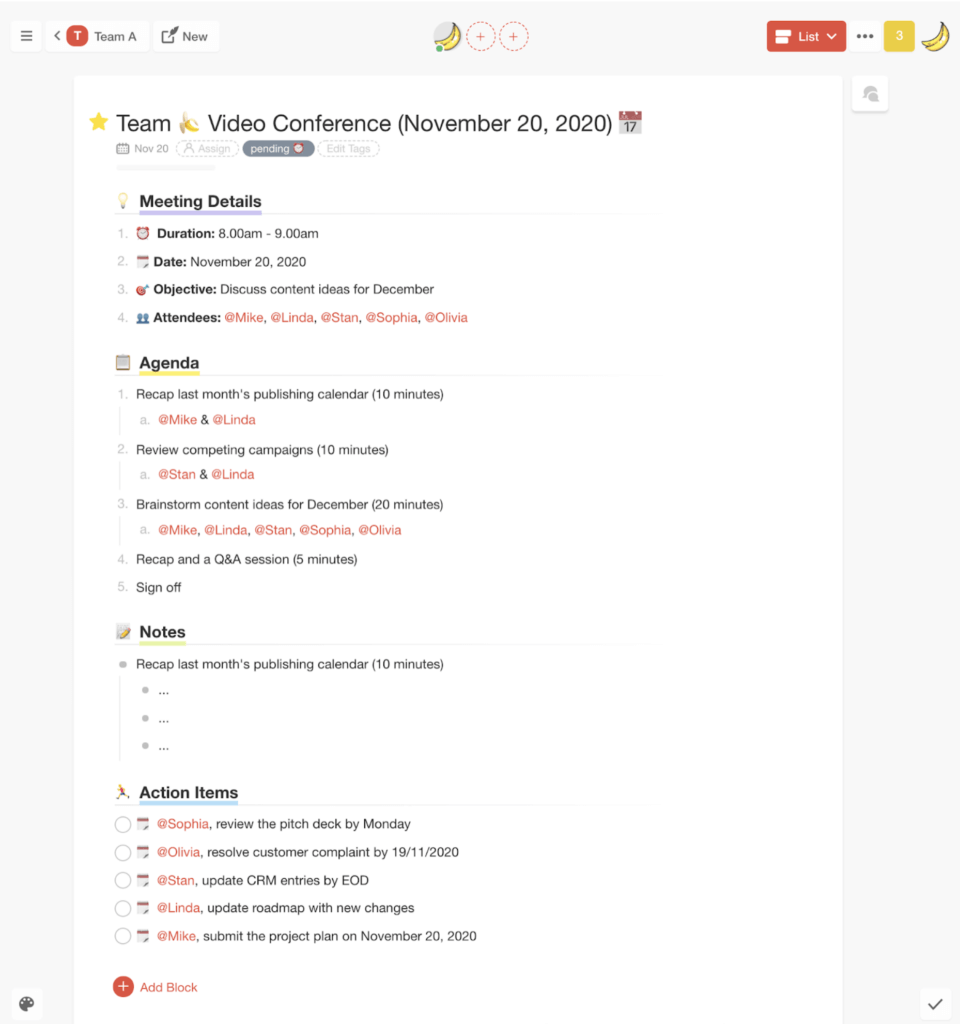
While every agenda comes with a set of must-have items, there are a couple of extra sections you want to include in your meeting notes template.
Here’s a full list:
👥 A list of attendees
🗓 Meeting start/end time + breaks
🎯 Purpose of the meeting
👍 Decisions/outcomes
✅ Action items and deadlines
🗓 Key dates and events
📚 Items that need clarification
❌ Backlog agenda items
🗳 Voting results (if any)
📚 Reference/reading materials
💥 Problems that come up
💭 Attendees’ questions
💬 Bits of conversations
🙊 Personal commentary
Can't remember what to include? Grab this free meeting note template and use it as a framework for your own documents:
Taskade Pro Tip #1: The Early Bird Gets the Worm
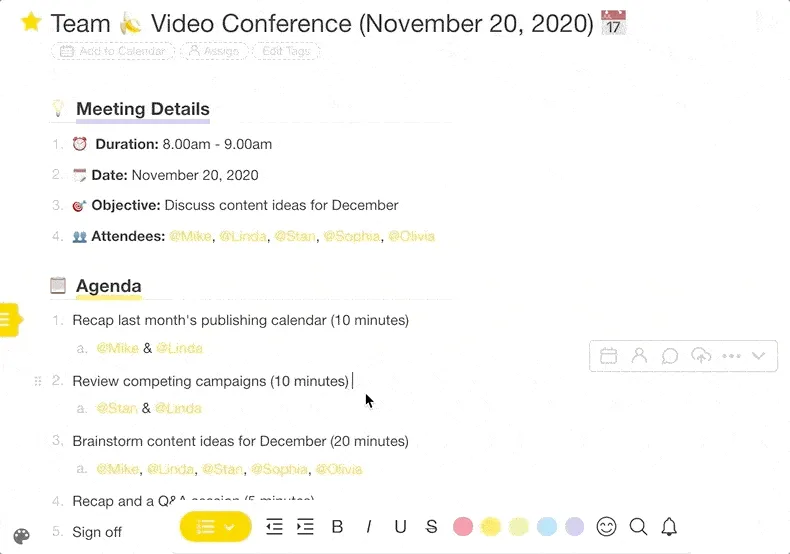
Be sure to send the meeting agenda well in advance and ask the attendees to weigh in with comments and suggestions.
Early feedback will not only help you refine the meeting plan but also serve as an invaluable resource you can add to your notes once the meeting’s over.
Here’s how commenting works in Taskade. 👇
🎯 Virtual Meeting Notes Template: 5 Steps to Success
1. Appoint a Scribe/Secretary
In the ideal world, all meeting participants pay attention and take notes. But, as you probably know by now, few virtual moots are even close to that romantic vision.
That’s why you need a secretary.
According to 1876 Robert's Rules of Order, a timeless manual on parliamentary procedure, a secretary is a recording officer and custodian whose duty is to keep a record of the proceedings, make a list of attendance and distribute documentation.(1)
A secretary can be appointed from the attendees on a per meeting basis. You can also choose one team member who’ll serve as a secretary and record all team meetings.
Taskade Pro Tip #2: Define User Roles and Permissions
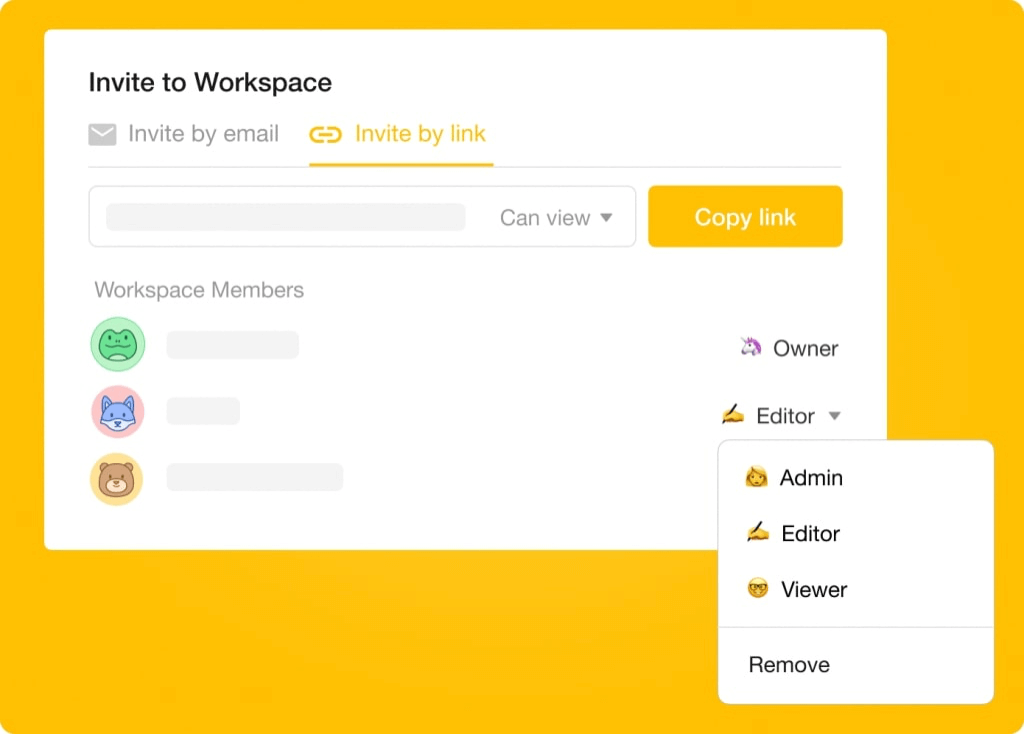
When you create a meeting room in Taskade, you can define role-based access — from Owner down to Viewer — for each attendee.
Let’s break it down:
👩💻 Workspace management. Has full control over the meeting room (Project space) — modify templates, change Workspace settings, and manage attendees.
✍️ Project editing. Can create Projects and templates as well as write and edit content inside a meeting room, but can’t modify project or workspace settings.
🤓 Viewer. Can comment and participate in chats within a meeting room. Viewers can’t create or edit projects and templates.
2. Decide What to Capture
Remember what we said about being selective? The secret of effective note-taking lies in the ability to tell what to keep and what to leave out.
On the one hand, you want to zero in on absolute essentials so the document doesn’t bloat to the size of Tolstoy’s novels. On the other, you need to carve out enough context so your notes are useful and legible to the entire team.
If you can’t decide what’s important and what’s not, use the following checklist for guidance:
Of course, taking meeting notes verbatim would be impractical, if not impossible, so you need to build up a system for picking only the good stuff.
Be sure to reach out to other people who attended a meeting and ask them to share their notes too. If there are several speakers in the group, chances are that have plenty of useful materials you can incorporate into your record.
Taskade Pro Tip #3: Use @mention
The attendance list we mentioned earlier isn’t just for kicks. In Taskade, you can use @mention functionality to notify people about the action items they’re responsible for.
For instance, if somebody takes ownership of an action item, you can assign that person directly by placing a @ tag next to it.
Like so. 👇
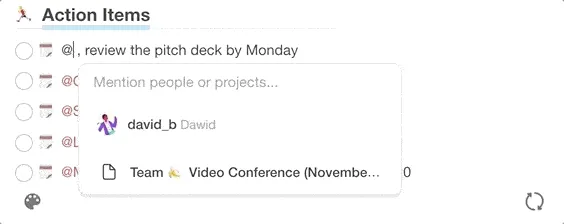
When you finally hand out the minutes, each team member will be able to filter action items by their name and focus only on those they’re responsible for.
3. Add Some Visuals
Your meeting notes don’t have to be a towering block of text. It’s uninteresting, difficult to follow and, yeah… nobody likes that. But there are more practical reasons.
Research shows that using visual aids, no matter how simple, help you retain more information, boost visual-spatial skills, and improve the learning process.(2)
The good news is, you don’t need artistic flair to make your minutes more interesting. The “visual” aspect can include aids like:
📽 Presentation slides
📈 Charts and graphs
📷 Pictures and screenshots
🎞 Videos and GIF files
✍️ Sketches and doodles
🧠 Mind maps and org charts
Like doodling?
Keep a notebook or a piece of paper at hand and doodle away whenever you take a break from typing. Even if you don’t make those part of the official record, the visual input will help you recall more key information when revising the notes.
Taskade Pro Tip #4: Create a Content Gallery
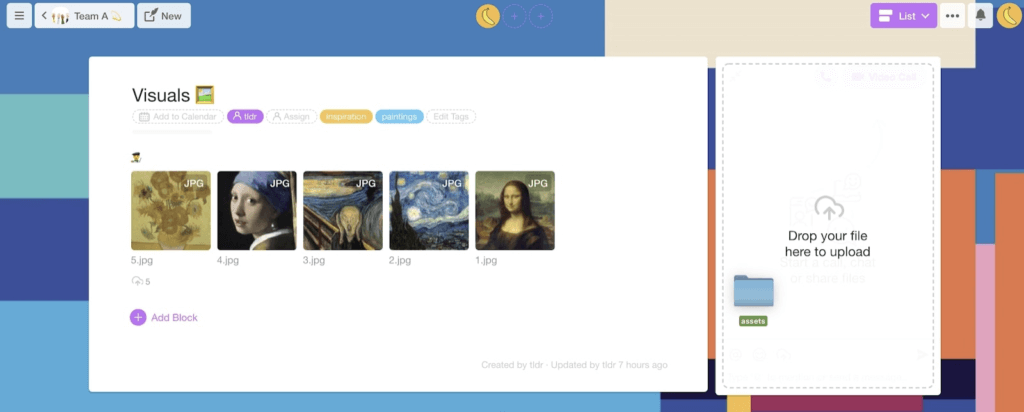
In Taskade, you can create a content gallery for visual assets like videos, photos, or presentations so people can access and download them during the meeting.
- Mobile snapshots
To add some visuals on the go, open up your meeting Project and pick a content block. Select the source—Camera, Photo Library, or Upload File—and you’re set!
- Drag-and-drop
You and other participants can share files directly in the chat window, in real time. Simply pick a file from your desktop and drag it into Taskade chat to upload.
- Upload to content blocks
To Insert attachments directly into text blocks and comments navigate to the context menu and select Upload File.
4. Make Them Actionable
If you want to make your notes really useful, you need to make them actionable. And the best way to do that is to crystallize a set of crisp action items.
Traditionally, action items are tasks with set deadlines and ownership. You can think of them as beefed-up to-do items with a due date and a tad more context.
Here are a few examples:
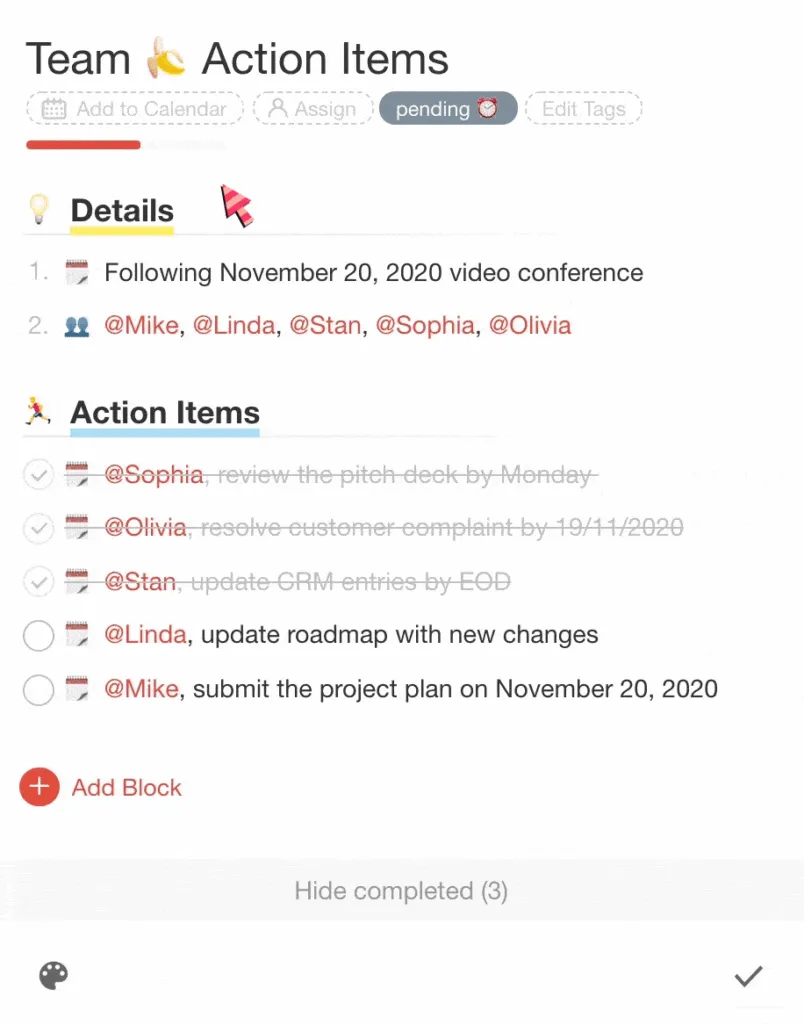
🗓 @Jane, review the pitch deck by Monday
🗓 @John, resolve customer complaint by 17/11/2020
🗓 @Michael, update CRM entries by EOD
🗓 @Paul, update Taskade roadmap with new changelog
🗓 @Kate, submit the project plan on November 20, 2020
Action items make it possible to immediately act on what’s been discussed during a meeting. They also ensure people know exactly what they’re supposed to do. Be sure to include them in your meeting notes template.
Taskade Pro Tip #5: Use the Action View
Taskade’s Action View lets you display every Project as a table of action items, complete with due dates, comments, and descriptions.
You can use the Action View to increase visibility for next steps after the meeting. Thanks’ to Taskade’s progress bar, your team can also monitor project status.
Like this. 👇
5. Add Meeting Notes to Team Knowledge
The beauty of minutes is that they deliver plenty of value long after the last action item has been checked off. Not only can you use the notes as a reference for future meetings, but you can also transform them into valuable learning materials.
And there are good reasons to do so.
☕️ LinkedIn’s 2019 Workplace Learning Report found that 74% of employees want to use their spare time at work for professional education. For 94%, learning opportunities were a key consideration that determined whether they would stay with an employer for longer or move on.(3)
Sounds promising, doesn’t it?
If you want to capitalize on that potential, you should make your minutes a part of a centralized knowledge repository. Here’s how:
📰 Refine and include them in a company/team wiki.
🧠 Add them to a collaborative knowledge base.
📬 Reshare snippets in a team newsletter.
🎨 Create a meeting notes template.
🔔 Bundle them with weekly project updates.
📝 Use them as a case study for new scribes/secretaries.
Be sure to read our article on Tiago Forte’s BASB and pay special attention to “remixing” and “progressive summarization.” You’ll thanks us later!
Taskade Pro Tip #6: Embrace the Power of Outlining! 🌳
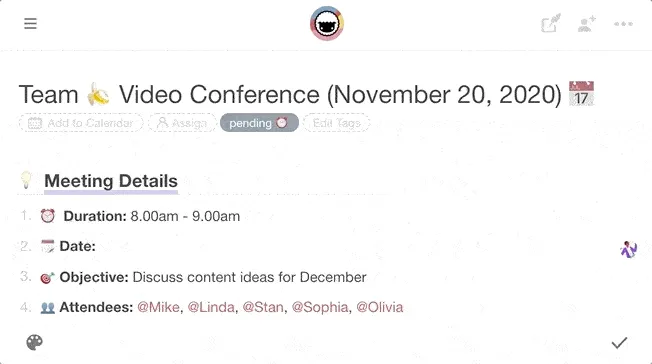
Remember the agenda we mentioned earlier? Thanks to Taskade’s collaborative outlining features, you and your team can work on the draft together!
- Create a project and pick a template ☝️


Ready to outline your first virtual notes template? Check our article Past, Present, and Future of Outlining Software. You can also drop by our Help Center for additional tips.
Frequently Asked Questions
How do you write effective virtual meeting notes?
Use a structured template with sections for date, attendees, agenda items, key discussion points, decisions made, and action items with owners and deadlines. Write in real time during the meeting using a shared document, focus on capturing decisions and next steps rather than transcribing everything, and share the notes immediately after.
What should meeting notes include?
Good meeting notes include the meeting objective, attendees, key discussion points, decisions made, action items with assigned owners and due dates, and any open questions for follow-up. They should be concise enough to scan in under two minutes while capturing everything someone who missed the meeting needs to know.
Who should take meeting notes in a virtual meeting?
Rotate the notetaker role so no one person is always stuck writing instead of participating. Alternatively, use collaborative notes in a tool like Taskade where everyone contributes in real time, or leverage AI-powered transcription and summarization to automate the process entirely.
Where should virtual meeting notes be stored?
Store meeting notes in the same workspace where your projects live — not in a separate docs app or email thread. Tools like Taskade let you keep meeting notes linked to the relevant project, so action items flow directly into task lists and nothing gets lost between the meeting and the follow-through.
🐑 Conclusion
It turns out, the art of note-taking is still very much alive today. Reliable notes help capture and preserve the fleeting nature of virtual meetings. They add context, improve ownership, and keep everybody on the same page, no matter when or where they are.
Sign up and take smarter meeting notes with Taskade AI! 🤖
🤖 Custom AI Agents: Deply custom AI agents to facilitate interactive note-taking, allowing team members to contribute faster and smarter.
🪄 AI Generator: Generate dynamic meeting templates that adapt to your requirements, all based on natural-language descriptions.
✏️ AI Assistant: Edit and refine meeting minutes for clarity and brevity. The assistant can generate content, prioritize tasks, and summarize text.
🗂️ AI Prompt Templates Library: Explore a collection of AI prompt templates for use with AI Agents, AI Chat, and the Generator.
💬 AI Chat: Rely on AI for pre-meeting preparation and post-meeting follow-ups. Discuss topics, commitments, and key decisions.
📄 Media Q&A: Upload meeting notes and Taskade AI will analyze them for you., Extract insights and summarize discussions in seconds.
And much more...
