







It’s 9 a.m. Monday morning. You’re rolling into an office with a tormented look on your face. The project team meeting is about to start, and you have no idea why you were invited in the first place. You enter the conference room, open your laptop, and wait for the talking heads to kick things off.
And then you realize you called the meeting.
If this sounds like a C-class sitcom, you’re right (sorry not sorry). But bad, poorly planned meetings are more common than you might think, and they can be a colossal waste of time and energy.
In this article, we’ll show you how to up your meeting game and run moots that will leave people energized and, well… feeling like they actually learned something useful.
Before we get to the nitty-gritty, we have some explaining to do.

TL;DR: An effective team meeting has three parts: a tight agenda, a decision output, and a follow-through. 2026 teams cut meeting time 30–60% by letting AI agents draft the agenda from past Projects, capture decisions in real time, and fire automations to assign the follow-through. Taskade runs all of this in one workspace so the meeting and the project are the same artifact. Companion reads: Autonomous Project Management, The 2026 Productivity Playbook.
▲ ■ ● Agenda. Decision. Follow-through.
🤹 6 Types of Project Meetings You Must Know
Meetings aren't one-size-fits-all; each type has its own purpose and needs a specific approach. Knowing which type to use and when will help you make your meetings productive and goal-oriented.
Let’s break down the six project team meeting types you need to know. 👇
Project Kickoff Meetings
Proper meeting preparation ensures that all team members are on the same page.
Project kickoff meetings are to project teams what pasta is to Italians — essential, comforting, and the foundation of something great, unless they turn into a soufflé disaster — flat and disappointing
A typical kickoff meeting has a single purpose (it’s in the name!). It aligns the team with the project’s objectives, timelines, and roles. It's the first official gathering where the project vision is shared.
Project Status Meetings
Let’s piggyback on the culinary metaphor for a bit longer.
A project status meeting is like opening the oven door to check on your bread. You need to see if it's rising nicely, make any necessary changes to the temperature, and ensure it'll turn perfect.
In a project setting that means tracking progress, addressing roadblocks, and making adjustments as you go. If you need to ensure that team members stay aligned, sync-up meetings are the right tool.
Change Control Board Meetings
Uncontrolled changes can derail your project; as your project progresses, you’ll want to keep a tight grip. The sole purpose of control board meetings is to manage and approve changes quickly.
Change control board meetings usually take place on a regular meeting schedule. Key stakeholders come together to make quick decisions, address any issues, and review pending change requests.
Sprint Planning Meetings (for Agile Projects)
There are some meeting types that only happen in specific circumstances or project types. The sprint planning meeting sets the stage for upcoming sprints in Agile projects and defines team priorities.
Agile teams use sprint planning to decide which tasks to tackle next, break down work into manageable chunks, and allocate resources. All that to make sure that sprints go smoothly.
Stakeholder Meetings
Things are getting serious.
A stakeholder meeting is the ultimate showdown where everyone with a vested interest in the project comes together. They voice opinions, share concerns, and align on the project’s direction.
It's like a corporate version of a family dinner — everyone talks, sometimes over each other, but in the end, you (hopefully) leave with a better understanding and a clearer path forward.
Retrospective Meetings
Last but not least — the retrospective meeting.
This is another type of meeting that’s almost exclusively used in Agile projects. During the meeting, teams reflect on the sprint — what went well, what didn't, and lessons learned.
Retrospectives involve identifying action items, assigning tasks to address outstanding issues, and (hopefully) celebrating any success. Plus, there is usually a ton of sprint data and metrics to go through.
Phew… that’s a lot to take in, right? You now know the most common types of meetings and their unique purpose. So, let’s dive deeper and explore some project meetings best practices.
⚡ Tips for Running Effective Project Meetings
Define Clear Objectives
Albert Einstein once said: “if you can't explain it simply, you don't understand it well enough.” And that’s a good starting point for running meetings that actually have a purpose.
“What was the point of this meeting again?”
“Do I really need to be here?”
“Are we done yet?”
Some meetings are a cracking disaster before they even start. Most of the time, the reason is a lack of clear objectives that would put them on the right track from the beginning.
By focusing on simplicity and clarity, you're setting the stage for an effective meeting.
Here are a few tips that will help you get started:
🔵 What do you hope to achieve? Write it down. If it’s not clear to you, it won’t be clear to others.
🔵 Focus on the most important issues. Leave out non-essential topics.
🔵 Define what success looks like. Is it a decision, a plan, or just a status update? Be specific.
🔵 Share the meeting goals with participants beforehand.
🔵 Start by reiterating the objectives. Remind everyone why they’re there.
Create a Detailed Agenda
You know the “what” and “why.” It’s time to figure out the “how.”
As Confucius wisely said, “Success depends upon previous preparation, and without such preparation there is sure to be failure.” (that’s the last cheesy reference, we promise).
A project meeting agenda should include the main objectives, key topics, time allocation, participants, any meeting preparation required, action items, and anything in between.
Timing also matters. You want to give the participants enough time to go over each point and prepare for the meeting in advance. Just so everybody arrives prepared and ready to contribute.
🟡 Break down the main goals into specific discussion points; use bullet points for clarity.
🟡 Allocate specific time slots to each topic based on its importance and complexity.
🟡 Inform participants of any required preparation; send a reminder the day before.
🟡 Clearly outline tasks and responsibilities with action verbs like "review," "update," or "draft."
🟡 Keep the agenda structured with headings and subheadings; use a template for consistency.
🟡 Allocate time for Q&A or open discussion; use icebreakers to engage participants.
🟡 End with a summary of decisions and actions; send a follow-up email to recap the meeting.
🐑 Pro Tip: Build a project meeting agenda with Taskade AI
Racking your brain to put together a no-nonsense meeting agenda? It doesn’t have to be that hard. With Taskade’s AI Project Studio, you can whip up a plan for your next meeting in seconds.
Generate your first agenda with Taskade AI! 🐑
First, go to your Taskade workspace hit the ➕ Create new button, and choose AI Project.
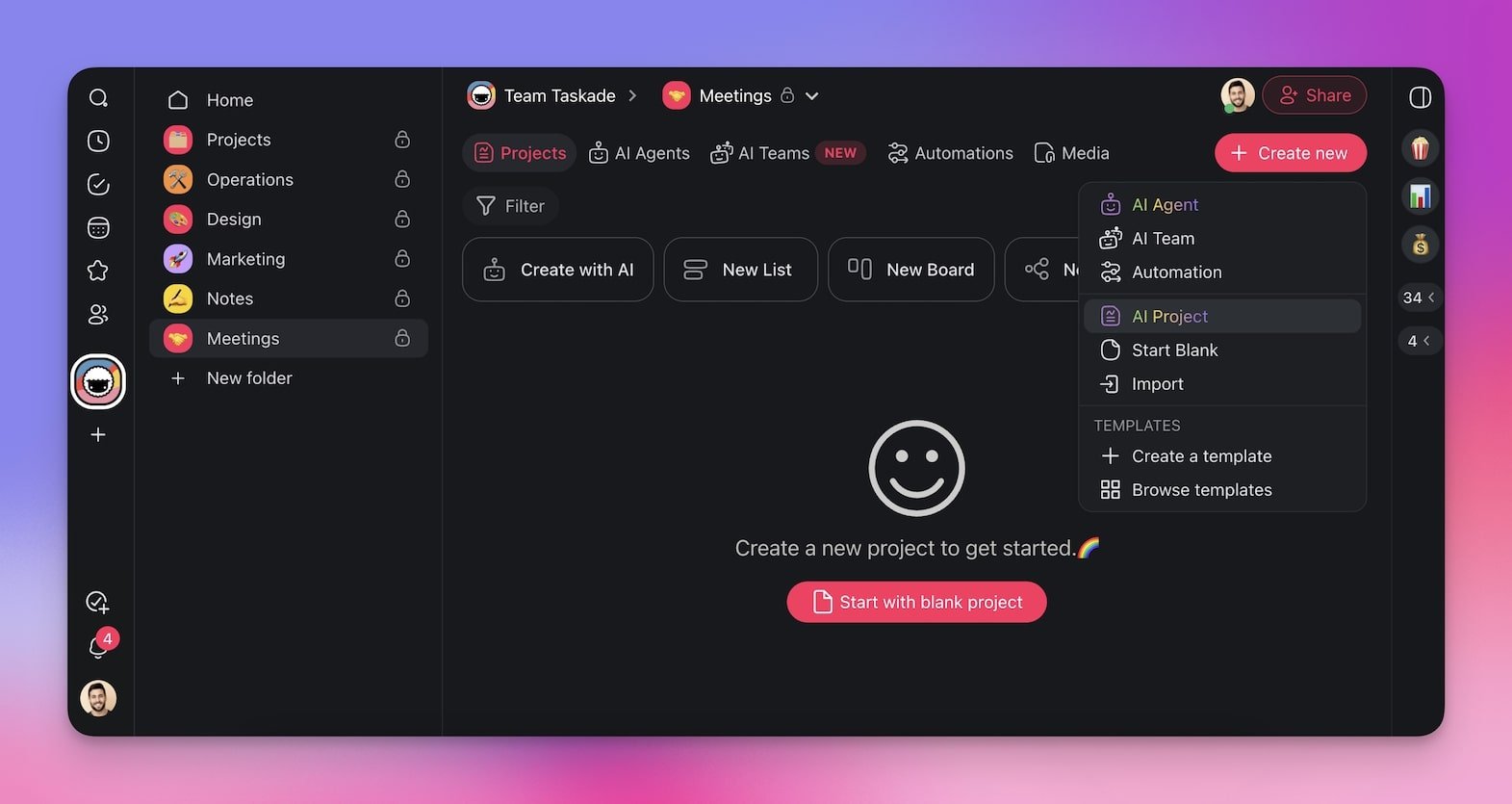
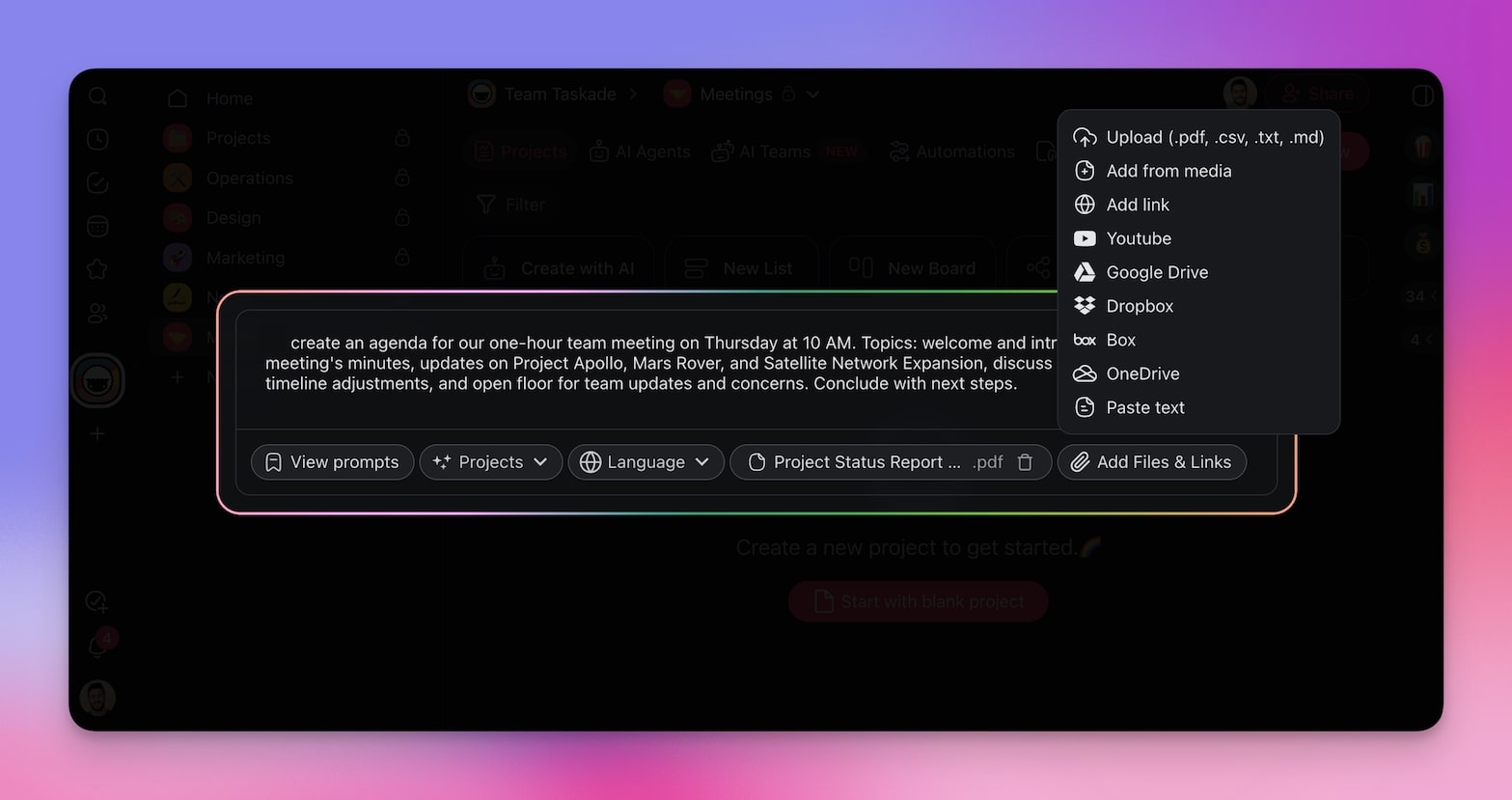
Next, briefly describe the purpose of your meeting.
You can add more context by uploading any relevant documents or talking points. Taskade will automatically integrate these details and generate a comprehensive agenda tailored to your needs.
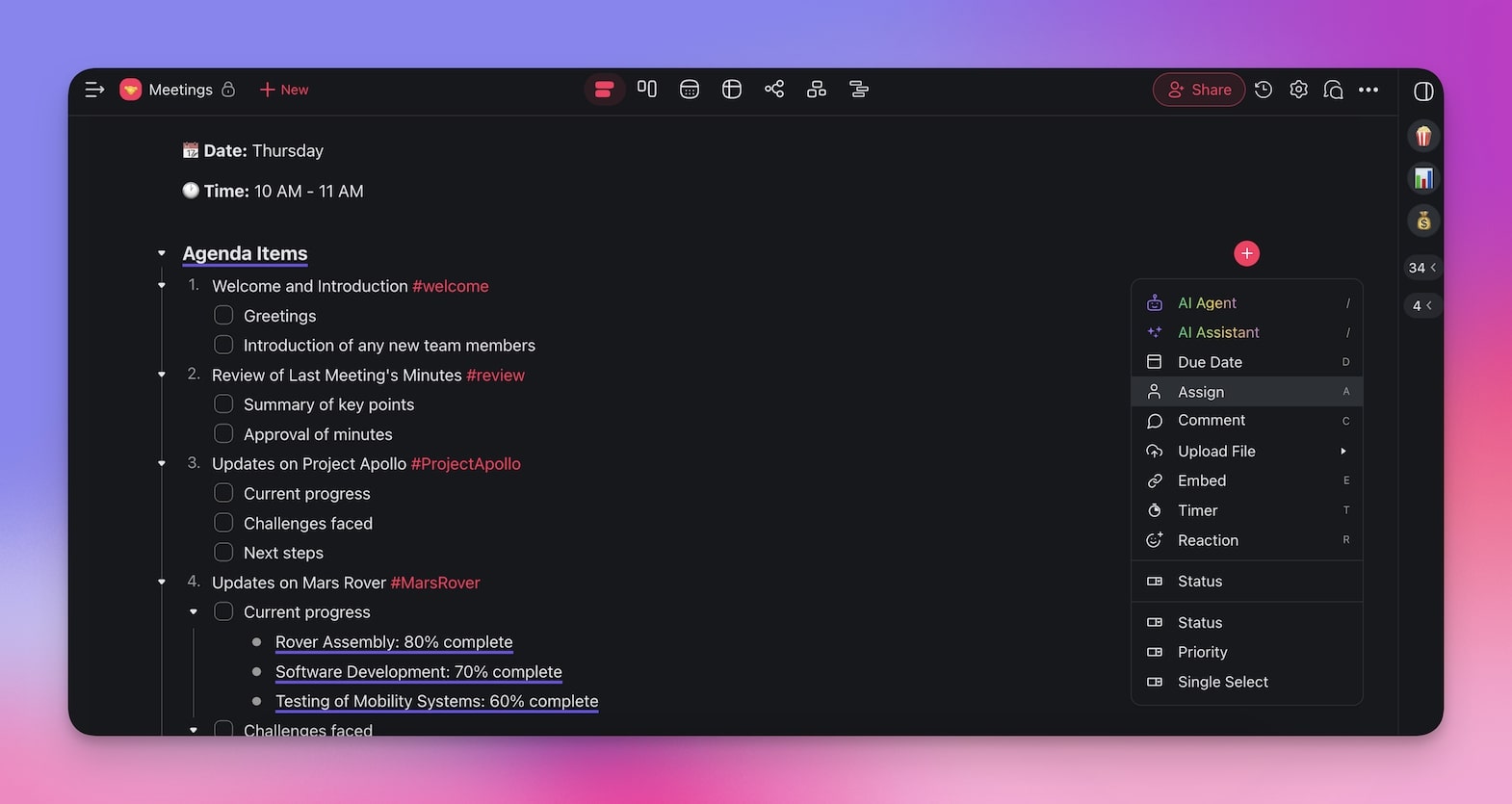
When you're done, simply open the new project and start your call. It's that simple!
💡 Psst... want to make things even simpler? Check our meeting agenda generator.
Invite the Right Participants
Elon Musk’s (in)famous rule for productive team meetings?
“Walk out of a meeting or drop off a call as soon as it is obvious you aren’t adding value.” And “it’s not rude to leave. It is rude to make someone stay and waste their time.”
Getting a bunch of smart people into a cramped room to “brainstorm” is often a waste of time. There, we said it. Having the wrong mix of people kills productivity. Too many voices, too much noise, not enough action. A much better strategy is to keep it lean and invite those who need to be there.
Be ruthless. If someone’s contribution isn’t critical, leave them out and feel bad about it.
🟠 Handpick your attendees. Only those who are crucial to the discussion should be there.
🟠 Assign specific meeting roles like facilitator, note-taker, and timekeeper.
🟠 Allow exits. If attendees realize they’re not contributing, they should feel free to leave.
🟠 Involve decision-makers. Ensure the key people who can make decisions are present.
🟠 Verify availability and interest. Make sure those invited are interested in the topics.
🟠 Consider expertise. Invite individuals with the necessary knowledge and skills.
Effective Meeting Facilitation
Your agenda is crystal clear. Your agenda is pitch-perfect. You’re in a room with the right people at the right time. That sounds like a recipe for a productive and effective project meeting.
Except you’re still missing one crucial ingredient — you need a facilitator.
The facilitator makes sure that the meeting stays on track. They guide the conversation, manage the time, and draw out quieter voices. They also encourage participants to ask questions.
Managing project meetings while trying to keep everything on track can be tough. You can either hand off the role to someone experienced or step up and do it yourself if you feel adventurous.
🔴 Encourage open communication during your meeting to ensure everyone feels heard.
🔴 Remain impartial. Avoid taking sides or expressing your opinions on the topics discussed.
🔴 Keep an eye on the clock to ensure that the meeting stays on schedule.
🔴 Actively involve all participants, especially those who are quieter.
🔴 Address any disagreements or conflicts with tact and neutrality.
🔴 Periodically summarize the discussion points and decisions.
🔴 Promote an atmosphere where participants feel comfortable asking questions.
Follow-Up and Action Items
The meeting’s done. You crossed every item on the agenda and still have some fuel to burn for the rest of the day. But before you go back to your desk and dive into the next task, there’s one more thing.
Loose ends and unfinished business. That’s what happens when you don’t follow up. All those decisions? They vanish into thin air without action. The brilliant ideas and strategies you spent hours discussing? They dissolve, leaving behind a trail of missed opportunities and unfulfilled potential.
So, what’s the best strategy here?
Let’s take a look at the marketing world; these guys know a thing or two about follow-up strategies.
The first follow-up email in sales? It boosts reply rates by 49%. Multiple follow-ups? They can increase conversion rates by 160%. Now imagine applying that to your meetings.
(no, we’re not saying you should pester the participants with emails)
🟢 Follow up within 24 hours. People are more likely to act when things are still fresh.
🟢 Shoot out a quick summary. What was discussed, what was decided, and who is responsible.
🟢 Be specific. “Draft a report on solutions by next Friday” is way better than “Look into this.”
🟢 Set firm deadlines. No timeframe, no urgency. Be realistic but firm.
🟢 Check in with everyone — make sure tasks are progressing as planned.
🟢 Document progress. It’s about accountability and keeping a trail of what’s done.
🟢 When tasks are completed, acknowledge them. Milestones matter.
🟢 Ask for feedback on how the meeting was conducted.
🐑 Pro Tip: Automate Meeting Follow-Up with Taskade AI
Follow–ups are crucial, but they take time to put together. Plus, it’s all too easy to just forget.
When you run a meeting in Taskade, you don’t have to worry about any of that. All you need to do is create a simple automation flow that will package everything for you and send it away.
First, go to the Automations tab.
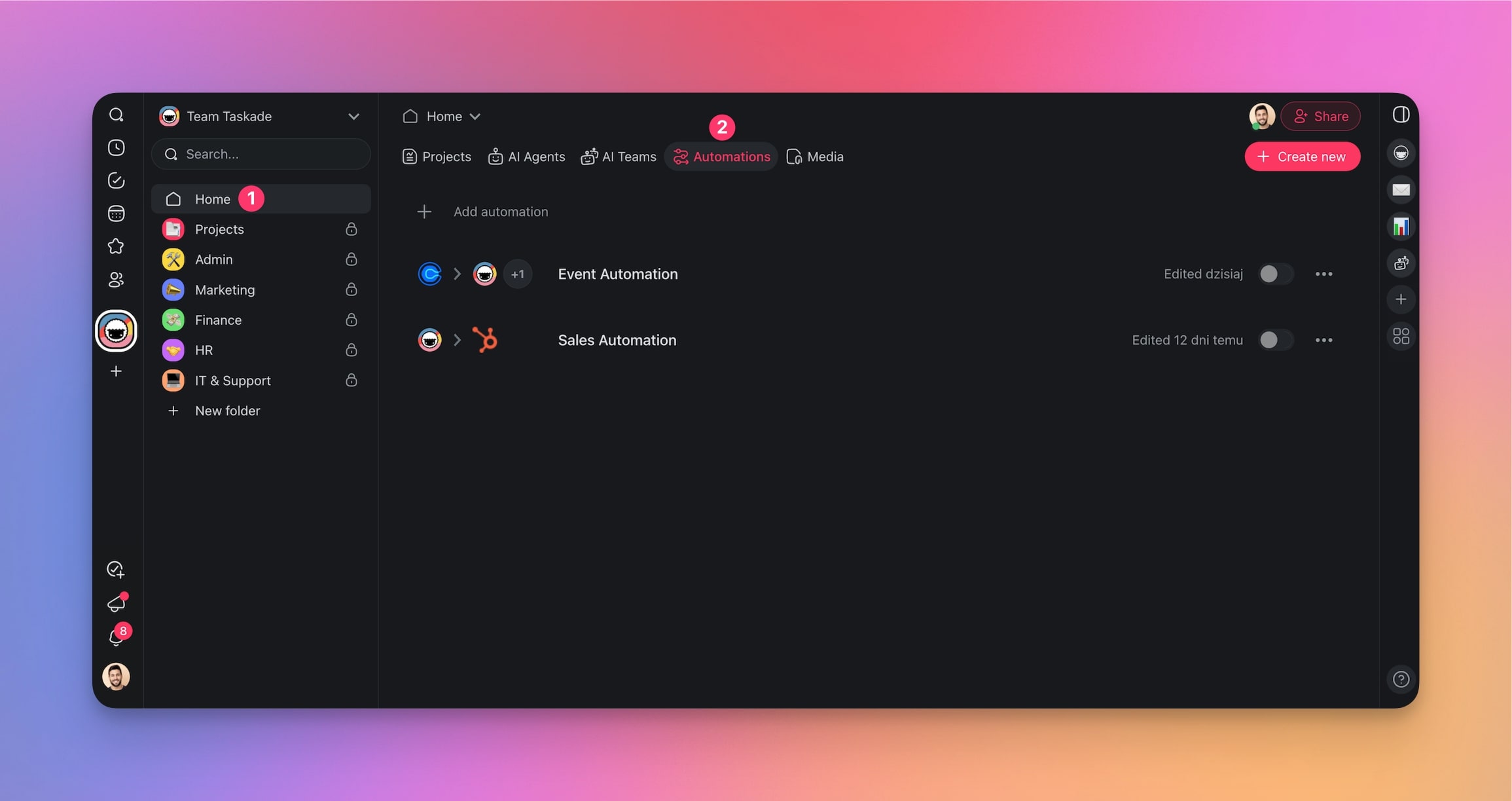
We’re going to set up an automation flow that will process your meeting notes, generate a summary, and distribute it to all relevant team members using your own email address.
Creating an automation flow is like building from Lego bricks.
In the next screen, hit Start from scratch, and let's get started.
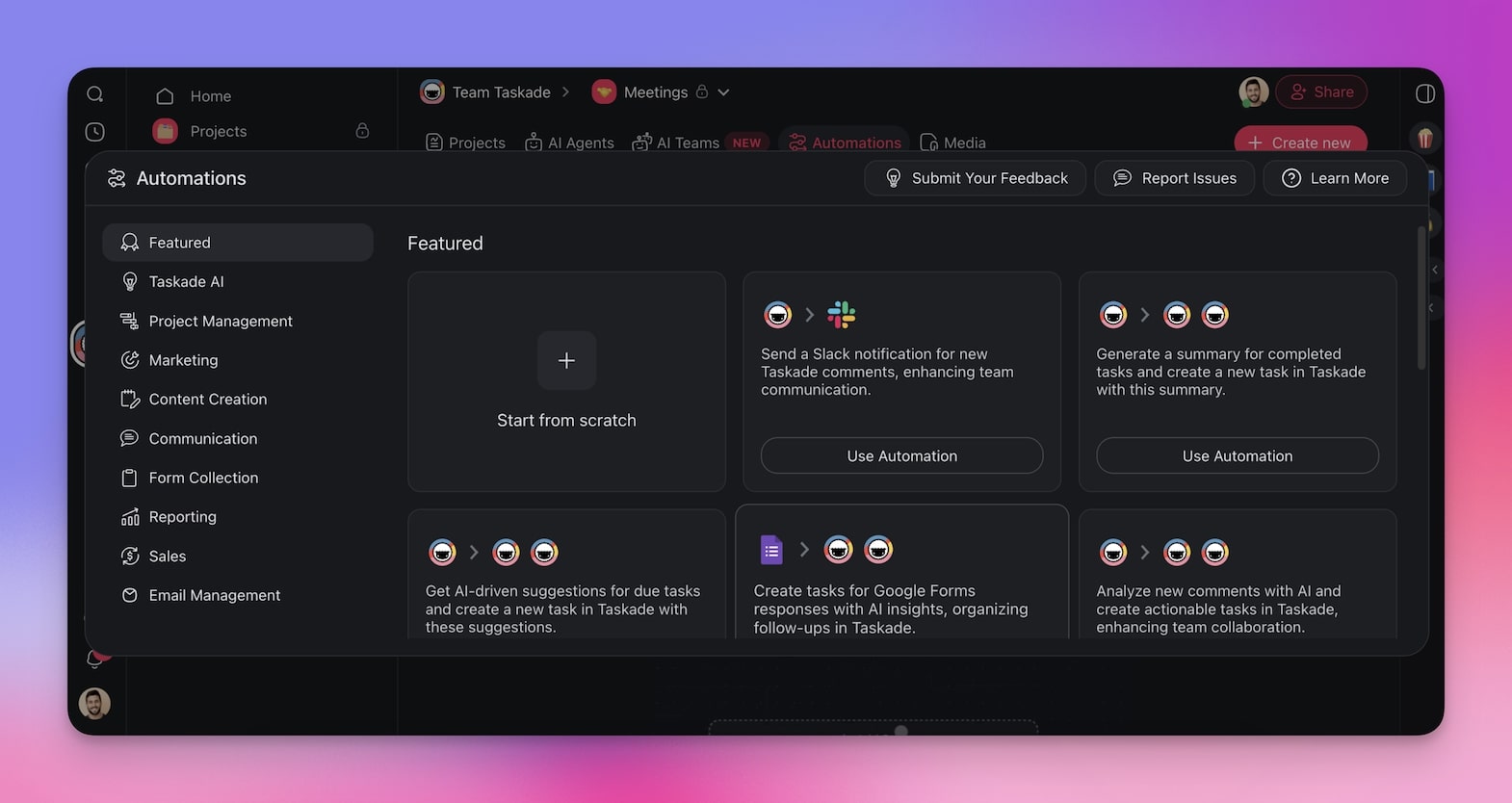
Start by selecting a trigger for your automation. For example, this could be any completed task.
Next, add actions that will take place once the trigger is activated. This will include generating a meeting summary from the notes inside the project, creating follow-up tasks, and sending emails to attendees.
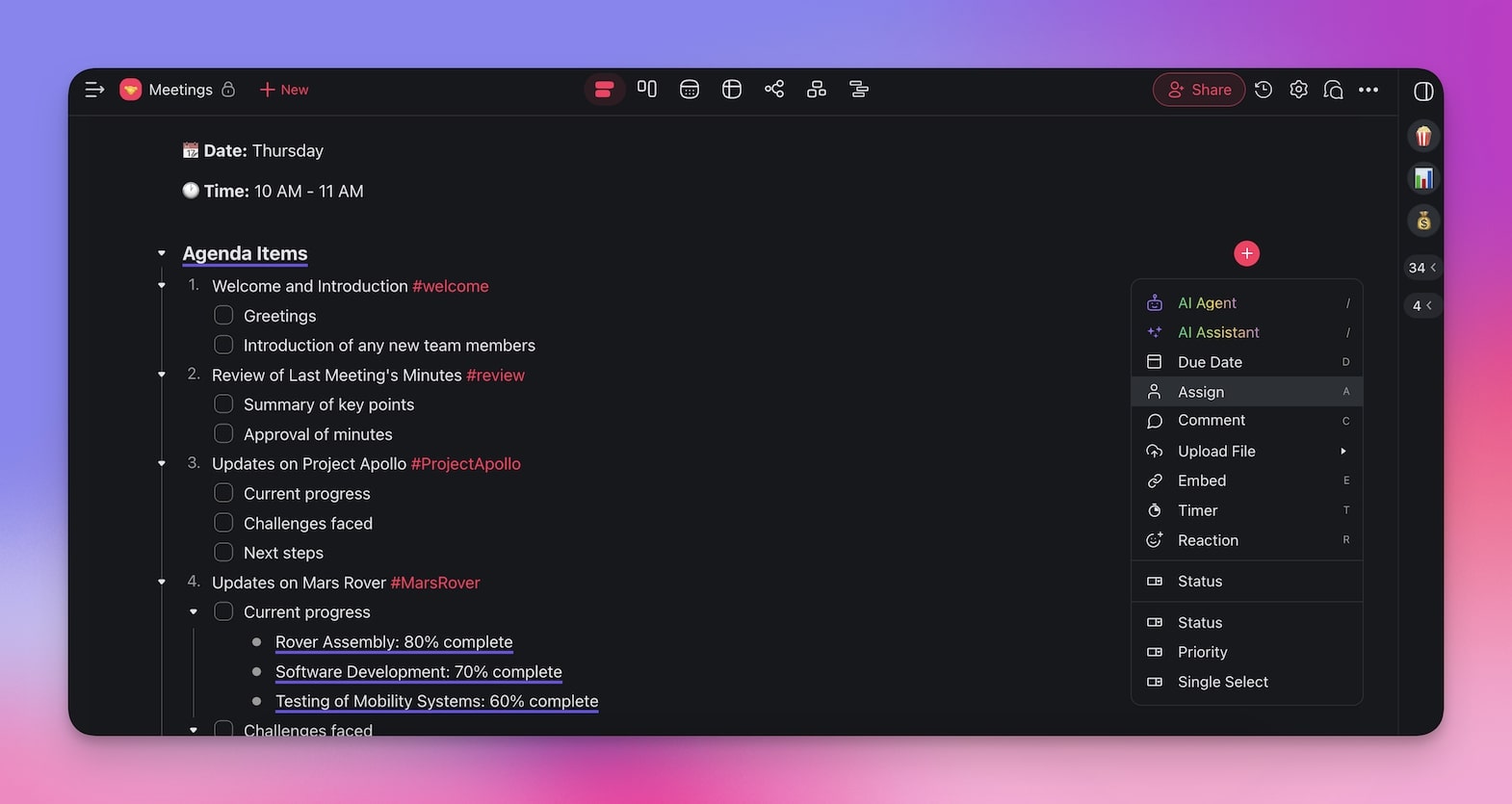
And voilà! Your automation flow is ready. All that's left is to enable it and run your meeting.
Now, whenever you provide the meeting notes in a comment, Taskade will handle the follow-up process.
Try it out and experience a hassle-free meeting follow-up!
(Bonus Point) Brush Up On Your Meeting Notes
"I love taking meeting notes," said no one ever. But everyone loves getting them, right?
Let's face it, taking meeting notes can be a bit of a chore, but they are essential for keeping everyone on the same page and ensuring that nothing falls through the cracks.
Plus, having well-organized notes can save you a lot of time and headaches later on.
🟣 Templates are your best friends. Don't reinvent the wheel every time.
🟣 Forget the fluff. Jot down key points, decisions made, and action items.
🟣 Rotate the note-taking duty. No single person should feel like they’re always on the hook.
🟣 Let AI do the heavy lifting. Use the best AI tools for meetings to take notes much faster.
🟣 Keep it short. Keep it simple. No jargon. Your notes should be easy to read and understand.
🟣 Speed is key. Review your notes soon after the meeting while it's still fresh.
💡 Want to learn more? Check our guide on how to write meeting notes to learn more. You can also check our AI meeting minutes generator to automate the process and save time.
🐑 Parting Words
And there you have it!
By applying these strategies, you will transform your project team meetings into highly productive, action-packed sessions. Start small, experiment with incremental adjustments, and focus on what works best for your team. But before you go, check this quick recap of everything we’ve learned today:
⭐ Ensure every meeting has a clear purpose and specific meeting goals.
⭐ Outline the key topics and allocate time slots for each. Use a structured format for consistency.
⭐ Only include those who are essential to the discussion.
⭐ Guide the conversation, manage time, and encourage participation.
⭐ Summarize the meeting, assign tasks with deadlines, and follow up to ensure progress.
Sign up to supercharge your meetings with Taskade AI! 🐑

Frequently Asked Questions
How do you plan an effective project team meeting?
Define a clear objective, create a focused agenda with time allocations, invite only essential participants, share pre-read materials in advance, designate a facilitator and notetaker, and prepare a shared workspace for real-time collaboration. The preparation before the meeting often matters more than what happens during it.
What makes project meetings different from regular team meetings?
Project meetings are goal-oriented with a specific deliverable or decision as the outcome. They focus on project progress, blockers, resource allocation, and milestone reviews — not general updates. Every agenda item should directly relate to moving the project forward.
How can teams make project meetings shorter and more effective?
Replace status updates with async written check-ins in a shared workspace like Taskade, restrict meetings to decisions and discussions only, set strict time limits per agenda item, start and end on time, and assign action items with owners during the meeting rather than after.
What is the best way to follow up after a project meeting?
Share meeting notes with decisions and action items within one hour, assign tasks in your project management tool with clear deadlines, schedule any necessary follow-up meetings immediately, and track action item completion in the next meeting's opening review. The follow-through determines whether a meeting was actually productive.