
Who would’ve thought the transition to remote work would carry over the nuisance of daily meetings? Well, thanks to VoIP and video conferencing tools, our love-hate relationship with daily (weekly, monthly…) scrums continue. Luckily, quick sync-up meetings are here to save the day.
TL;DR: Most meetings waste time because they lack agendas, run too long, and have unclear goals. Quick sync-ups (10-15 minutes) fix all of that. Taskade combines async updates, built-in video chat, and AI agents to replace unnecessary meetings entirely. Try Taskade free →
In a now-famous email to Tesla employees, Elon Musk shared his formula for effective meetings. According to Musk, they should be small, short, and scarce. Teams should focus on getting work done instead of spending time in conference rooms.
While Musk’s management style is anything but ordinary, he’s absolutely right on that note. Now that long, unproductive stand-up meetings have oozed into the remote workplace, it’s time to find an alternative.
👎 5 Reasons Why Most Meetings Suck
This is a clock ⏰. The clock is not your enemy. It merely shows how much time in a day you have left and how much you’ve spent on meaningful work pointless meetings.
That’s right. If there’s one thing that makes the perspective of another team meeting so oppressive, it’s the fact that we know it’s going to be an utter waste of time. How many daily scrum meetings do you actually need to get work done?

But time (and money) splurge is only part of the story.
📈 High frequency. Back-to-back stand-up meetings create an illusion of productivity. Lose a minute here, gain a minute there. Nobody really cares, as long as you care to show up. But at the end of the day, we can’t even remember what it was all about.
🙇♂️ Low Engagement. Think back how many times you’ve fiddled with your smartphone or doodled during daily standups. Don’t worry, you’re not alone. The ability to keep people engaged throughout a meeting is a skill that’s in short demand these days.
✏️ Lack of agenda. What’s worse than a long meeting with the entire team? A long meeting without an agenda. When teams jump on a conference call with no clue what they want to talk about, the only subject that’s worth discussing is when to swarm out.
🧭 Unclear goals. The marketing guru Paul Arden once said that “(...) without having a goal it's difficult to score.” When you call into a meeting and have no clue why you’re even there, the best course of action is to leave, immediately.
✋ No CTA. Meetings are like marketing. You plant a seed, pique interest, and nudge people in the right direction to act on what you’re offering. While some meetings manage to deliver the first two, few give people an incentive to take action.
It doesn’t matter if you’re half-asleep in a comfy bean bag inside a meeting room or sprawled on a sofa in your home office. A meeting that checks at least one of these five boxes shouldn’t have happened in the first place.
Now, let’s see how quick sync-ups can fix all that.

⏱ What Are Sync-Up Meetings?
ln a nutshell, sync-up meetings (a.k.a. huddles, stand-ups or check-ins) are short team gatherings that usually wrap in under 15 minutes. The shorter they are, the better. While there’s no set expectation for how often they should take place, most sync-ups happen on a daily or weekly basis.
⚽ Teamwork Trivia: Sync-ups originate from what the world of competitive sports calls a “huddle”. During huddles, players of one team gather in a circle to debrief, discuss the next move or celebrate scoring a point. The gatherings are brief and usually end with a motivational call-to-action so players can immediately apply the new strategy.
Sounds familiar?
Good. Sync-ups are essentially a standalone version of daily scrums. Daily scrums are used by Scrum product teams to reflect on what’s been accomplished so far, plan what each member of the team will work on in the next 24 hours and identify any obstacles down the road.
While co-located employees usually run daily sync-ups in conference rooms or by a whiteboard, fully remote teams have much more flexibility in that regard:
🎤 Conference calls
🤳 Video conversations
💬 Chat sessions
📝 Digital whiteboards
Why Quick Sync-Up Meetings Rock
“A lot of time is wasted in meetings. Agendas get forgotten, topics go amiss, and people get distracted. While some circumstances call for workshops and more elaborate presentations, it’s very rare that a meeting on a single topic should need to last more than 5-10 minutes.”
Sir Richard Branson
Unlike regular meetings, sync-ups are focused and intensive. With only 15 minutes to spare, teams have to hustle really hard to discuss, decide and act on everything they have on the agenda (provided there is one).
But there are other considerations too:
⏱ Time-boxing. Burst meetings with a firm time limit are more manageable than long, “flexible” ones. Given the short time frame, everybody’s compelled to show up and call in on time instead of running 5 or 10 minutes late (classic)
☝️ Better engagement. We can think of at least a few more exciting things than dozing during an hour-long debrief. Sync-ups, on the other hand, let teams sync-up in short bursts. They don’t sap energy and let all attendees stay focused till the very end
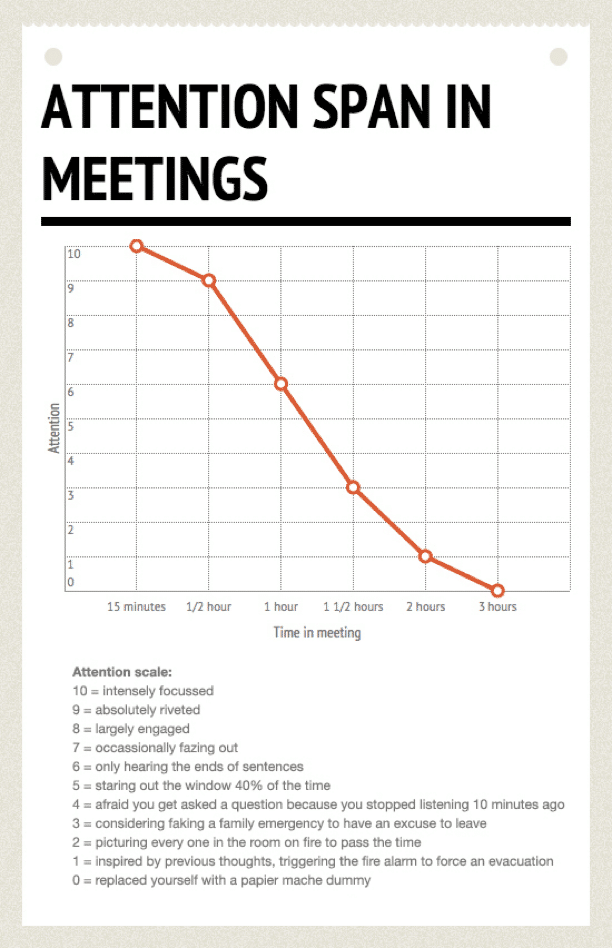
Attention Span in Meetings via BOOST
⚡️ Instant feedback. Quick team meetups are easier to run and less disruptive to team schedule. They’re especially effective for ad-hoc project updates, managing scope creep, realigning priorities and making sure everybody knows what the next step is
🤝 Team camaraderie. Regular communication helps cultivate a spirit of companionship in remote teams. Quick sync-ups let teams break virtual walls, celebrate small victories, reflect on failures and realign with company goals and mission
🌟 7 Tips for Effective Sync-Up Meetings
1. Always Ask “Why” Before Saying “Yes”
Got another daily standup coming your way? Whoa, hold on a minute! We said that sync-ups are better than regular meetings, not that you should agree to every single one.
Here’s the thing. Not every quick meeting is worth your time so be sure to ask yourself the following questions before calling in:
“Do they really need me in there?”
“Why have I been invited in the first place?”
“How much time is it going to take?”
“Do I have enough context to contribute?”
“What’s the ROI of the time I put in?”
If you have a gut feeling a meeting’s not the best idea, skip it and get back to work - even if it's a daily scrum. And if you’re still in doubt, take a look at this tongue-in-cheek flowchart from Wendy MacNaughton:
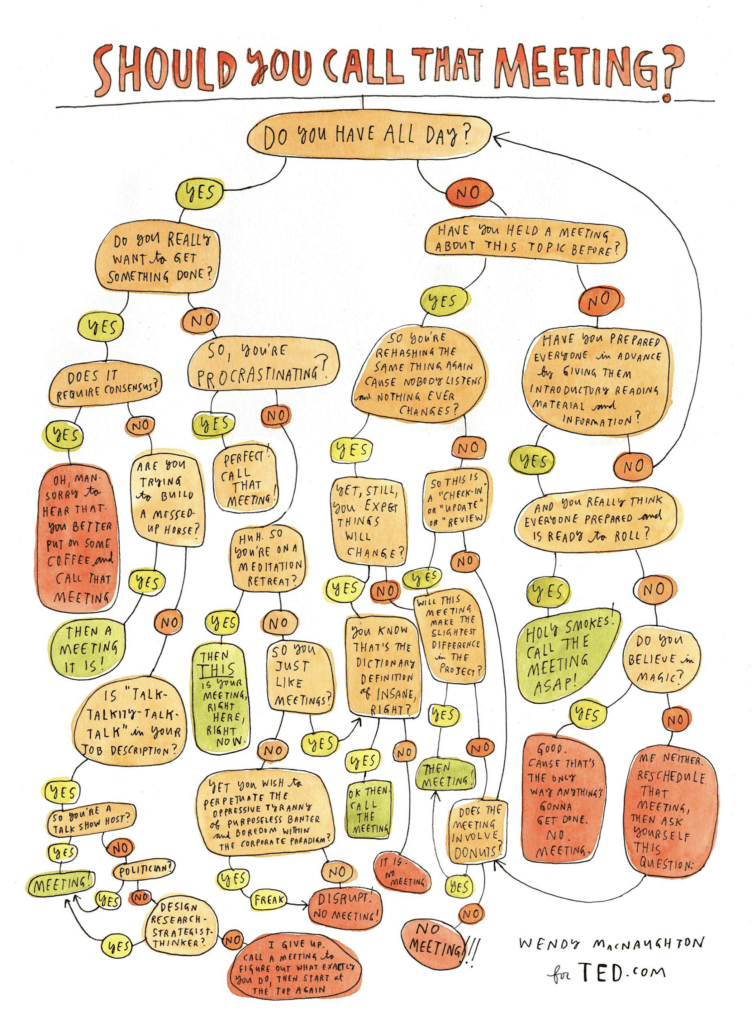
"Should You Call That Meeting?" by Wendy MacNaughton.
2. Time-Box Everything
Sync-ups are so effective because they’re short. But it’s one thing to promise yourself (and others) that “it’ll only be 5 minutes” and actually deliver on that front.
Aim for the sweet spot, preferably between 5 and 15 minutes
Let other attendees know both the start and end time
Bar people from calling in late and leaving the session early
Never exceed the set time limit and wrap every sync to the minute
Give everybody a heads up a couple of minutes before the time’s up
Not sure how to effectively structure your daily sync-ups? These free templates will get you started:
3. Make Them Predictable
Coordinating collaboration and communication across time zones is tricky. You have to consider each team member’s local time and business hours to find the perfect overlap time for a sync.
Find suitable overlap time when everybody’s online
Block time in a shared calendar and stick with it
Always run daily meetings at the same time
Never call off a meeting at a moment’s notice
Plan any changes way in advance
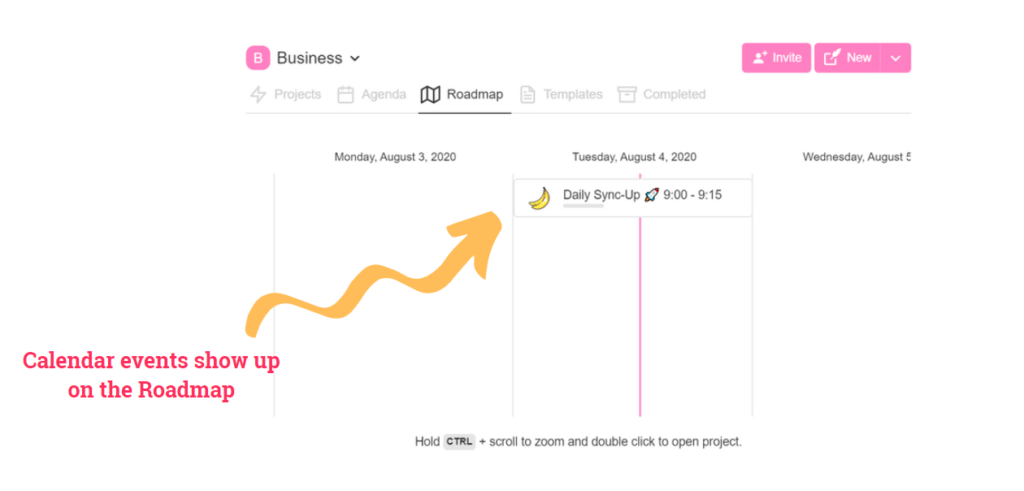
Taskade Roadmap helps your team keep all events in view.
Predictability and transparency are key when daily standups happen across time zones. Your team should know where to expect a meeting so they can prepare in advance and show up on time.
4. Chit Chat Instead
Not every sync-up has to be an actual meeting. Sometimes, you can replace a 15-minute video conference with an equally productive chat session.
Default to chat for quick brainstorming
Use a collaborative digital whiteboard
Focus on maximizing creative input
Use on-project comments for feedback
Make sure to follow-up and discuss results
Chat sessions are great for quick, creative input. Since everybody can take the floor at any given moment, the dynamic is much more vibrant compared to other communication channels.
5. Always Come Prepared
“Give me an agenda or else I’m not going to sit there, because if I don’t know why we’re in the meeting, then there’s no reason for a meeting.”
Annette Catino, CEO, QualCare Alliance Network.
It doesn’t matter if you’re discussing a skyscraper type of project or coffee break rules. All your sync-up meetings should have an agenda. If it doesn’t, it’s a waste of time.
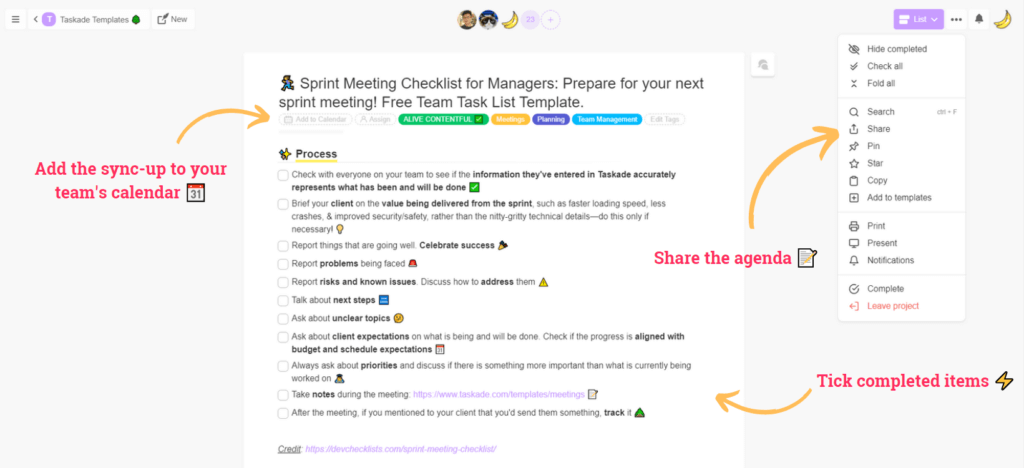
Taskade lets you create and share sync-up agendas in a jiffy.
Always create a meeting agenda and share it in advance
Focus on a maximum of three essential topics (Rule of Three)
Include the date, start and end times as well as the list of attendees
Define goals: informative, creative, decision-making or organizational
Create a template to kick things off quickly
6. Bar Any Distractions
The whole purpose of a sync-up is to touch base and take action in the smallest time window possible. At best, you have 15 minutes to call in, warm up and discuss what needs to be done.
Given the limited amount of time, you should weed out any distractions:
Bar smartphone use during meetups
Encourage attendees to turn their cameras on
Ban latecomers from calling in to meetings
Designate a “scribe” to take and distribute notes
Use the mute button when you’re not speaking
7. Make Those 15 Minutes Count
Sync-ups are a great opportunity to digest a lot of condensed, essential information with a relatively cheap investment of time and attention.
Actively participate and take initiative
Takes notes, especially when nobody else does
As questions when you need more information
Don’t interrupt when someone’s speaking
Prepare your own agenda before attending
If you’re in a 5-people, 15-minute meeting and not paying attention, you’re A) wasting your time B) wasting the time of others.
Sync-Up Meeting Tools Compared
| Feature | Taskade | Slack | Zoom | Microsoft Teams |
|---|---|---|---|---|
| Async Written Updates | Yes (in-project) | Channels | No | Channels |
| Built-In Video Chat | Yes | Yes (limited free) | Yes | Yes |
| Meeting Agenda Templates | 500+ templates | No | No | Limited |
| AI Meeting Summaries | Yes (AI agents) | Paid add-on | AI Companion | Copilot (paid) |
| Task Assignment in Meetings | Yes (@mention) | No | No | Limited |
| Project Views | Multiple views | N/A | N/A | Limited |
| Automations | Yes (100+ integrations) | Workflows (paid) | No | Power Automate |
| Free Plan | Generous | Limited | 40-min limit | 60-min limit |
| Starting Price | Free | $6.67/user/month | $13.33/user/month | $4/user/month |

Workspace DNA: How Memory, Intelligence, and Execution Replace Meeting Overhead
Taskade's Workspace DNA architecture reduces meeting dependency through three interconnected layers:
- Memory — Every update, decision, and action item is stored persistently in Taskade projects. Team members can catch up asynchronously by reviewing project history, eliminating the need for "what did I miss?" meetings.
- Intelligence — AI agents powered by frontier models from top AI labs analyze project activity, surface blockers, and generate status summaries. No human needs to compile updates manually.
- Execution — Automations with 100+ integrations route action items, send deadline reminders, and trigger follow-ups automatically. Over 3M+ automations have been executed on the platform.
The loop: async updates create Memory, agents transform Memory into Intelligence (summaries and priorities), and automations convert Intelligence into Execution (task assignments and notifications).
Agentic AI and Vibe Coding: Build Your Ideal Sync-Up System
Setting up effective async standup workflows traditionally requires manual configuration of bots, templates, and notification rules. Agentic AI and vibe coding simplify this to a single conversation.
With Taskade Genesis, describe your sync-up needs: "Build an async standup system that collects daily updates from 8 team members, summarizes blockers, and posts a digest every morning." Genesis deploys the app with embedded AI agents — no code required. 150,000+ apps have been built this way.
Agentic AI agents with built-in tools, custom tool schemas, and a hosted MCP server for external AI clients can:
- Collect structured daily updates via forms or chat prompts
- Generate meeting-free daily digests with blocker highlights
- Auto-assign action items based on context and team roles
- Schedule live sync-ups only when AI detects unresolved conflicts
Browse async standup systems in the Taskade Community or create your own.
Sync-Up Meeting Format Comparison
| Format | Duration | Best For | Frequency | Taskade Support |
|---|---|---|---|---|
| Live Standup | 10-15 min | Fast-moving sprints | Daily | Built-in video chat + templates |
| Async Written Update | 2-3 min per person | Distributed time zones | Daily | In-project comments + AI agents |
| Weekly Review | 30-45 min | Steady-state projects | Weekly | Mind Map + Board view |
| AI-Generated Digest | 0 min (automated) | Large teams | Daily | Automations + AI summaries |
| Ad-Hoc Huddle | 5-10 min | Urgent blockers | As needed | One-click video chat in any project |
🐑 Conclusion
Let’s face it. Spending hours in daily scrum meetings isn’t the most exciting thing in the world. If you’re looking for some real action, make quick sync-ups a staple in your remote team’s menu.
So, why not turn those marathons into sprints with Taskade?
With Taskade Genesis, you can build custom standup bots, meeting dashboards, and async update systems from a single prompt. Deploy AI agents powered by frontier models from top AI labs to automatically summarize meeting notes, extract action items, and follow up on blockers.
Your team gets multiple project views, real-time collaboration, built-in video chat, and 100+ automations — all in one workspace. Taskade is free to start, with Pro from $10/month billed annually.
Streamline your team sync-ups with Taskade →
Explore ready-made meeting templates in the Taskade Community.
Before you go, here are similar articles you may find interesting:
Frequently Asked Questions About Quick Sync-Ups for Remote Teams
What is the purpose of team sync?
The purpose of a team sync is to keep all team members informed and aligned, facilitate communication, and ensure that everyone is working towards the same goals. It helps in identifying and addressing potential issues early, fostering collaboration, and maintaining productivity.
What is a team sync up?
A team sync up is a meeting where team members come together to review progress, discuss upcoming tasks, and ensure alignment on goals and objectives. It often includes status updates, sharing of important information, and coordination of efforts.
What is a quick sync meeting?
A quick sync meeting is a short, focused meeting aimed at updating team members on current tasks, aligning on priorities, and resolving immediate issues. It's designed to ensure everyone is on the same page and can address any bottlenecks quickly.
What is a daily standup for remote teams?
A daily standup for remote teams is a brief, typically 15-minute meeting held every day to synchronize activities, set expectations, and address any obstacles. Team members usually discuss what they accomplished yesterday, what they plan to do today, and any issues they're facing.