







An AI journaling app is a digital journal that adds prompts, follow-up questions and summaries of your past entries. This guide compares the 11 best AI journal apps of 2026 on price, privacy, platforms and the kind of journaling each one suits.
TL;DR: Rosebud is the best AI journal app for guided reflection ($8.99/mo billed yearly), and Day One is the best all-round journal, with AI on Gold ($74.99/yr). Reflection is the strongest free start. Use Taskade for a work journal or to build your own journal app: Free has 3 apps and 1 agent, Pro is $10/mo billed yearly. See Taskade plans
A journaling app is not a replacement for therapy or medical care. The apps below support a reflection habit. If you are struggling, contact a licensed professional.
What Is the Best AI Journal App in 2026?
Rosebud is the best AI journaling app for most people in 2026: it remembers your past entries, shows patterns over time and sends a weekly reflection report, and Bloom costs $8.99 a month billed yearly. Day One is the best journal app overall, with end-to-end encryption on every plan, and its AI features are on Gold at $74.99 a year.
Picks by need:
- Guided AI reflection: Rosebud
- A complete journal on every device: Day One
- Thinking frameworks and AI analysis: Mindsera
- A free AI coach with monthly reviews: Reflection
- AI mentors with a weekly letter: Life Note
- Windows, Linux and Android: Journey
- Free, built into Apple devices: Apple Journal
- Voice journaling: Untold
- A work journal, or your own journal app: Taskade
AI Journaling Apps at a Glance
The best AI journal app depends on what you want the AI to do: reply to an entry, summarize your weeks, or turn notes into plans. We checked each vendor's pricing page or App Store listing on 2026-10-19 (US prices). App Store listings do not always label the billing period, and we say so where that applies.
| App | Best for | Free plan | Paid from | AI on free plan? |
|---|---|---|---|---|
| Rosebud | Guided AI reflection | Yes | $8.99/mo billed yearly ($107.99/yr) | Yes |
| Day One | An all-round journal | Yes (Basic) | $49.99/yr (Silver). AI is in Gold, $74.99/yr | No |
| Mindsera | Frameworks and analysis | Yes (Curious) | $10.75/mo billed yearly ($129/yr) | Limited |
| Reflection | A free AI coach | Yes | $5.75/mo billed yearly, or $8/mo | Yes (AI Coach) |
| Life Note | AI mentors | Yes | $99.99/yr or $10.99/mo | Yes |
| Journey | Every platform | Yes | $49.99/yr or $6.99/mo | Limited |
| Stoic | Daily check-ins | Yes | Premium and a separate AI plan | No (AI plan) |
| Apple Journal | Free on Apple devices | Free app | None | On-device suggestions |
| Reflectly | Short mood entries | Free download, trial | Varies by region | Yes |
| Untold | Voice journaling | Free download | $107.99/yr or $12.99/mo | Not stated |
| Taskade | Work journal or your own app | Yes (no AI credits to start) | $10/mo billed yearly (Pro) | Needs credits |
How We Compared These Apps
We read each app's own pricing page, App Store listing and privacy statement on 2026-10-19, and we compared them on five points: the quality of prompts and follow-up questions, what the AI does with past entries, privacy, platforms, and price. We did not run a long test of every app, so each entry describes what the vendor states and who the app suits.
1. Rosebud: Best for Guided AI Reflection

Rosebud is an AI journal built for personal growth. You write or speak an entry, and Rosebud helps you process it. It remembers what you wrote before, so it can "connect the dots" across entries, and it sends a weekly reflection report that shows what came up again and again.
What it does well:
- Voice journaling, for days when talking is easier than typing
- A conversational tone that suits people who find a blank page hard
- Student and disability discounts, according to its pricing section
Trade-offs:
- The page does not list what the free plan includes, so you learn the limits in the app
- It is built for personal reflection, not for planning or work notes
Price (checked 2026-10-19): Rosebud is free to use. Rosebud Bloom is $8.99 a month billed yearly ($107.99 a year), or $12.99 a month.
Platforms: iPhone and iPad, Android, and a web version for the free trial.
Privacy: Rosebud states that "your data is encrypted in transit and at rest".
Best for: people who want a journal that talks back and helps them reflect, not only record.
2. Day One: Best All-Round Journal App
Day One is the most complete journal app on this list. It has been a favorite on Apple devices for years, and it now runs on Android and the web too. Entries can hold photos, audio, locations and weather, and the On This Day view shows what you wrote on the same date in past years.
What it does well:
- End-to-end encryption, a passcode and a biometric lock on every plan, the free plan included
- Daily prompts, a prompt library, templates and journal streaks on the free Basic plan
- Daily Chat on Gold: a guided reflection chat, plus AI summaries, titles and "Go Deeper" prompts
Trade-offs:
- The AI features are on Gold only, and the plans page says they have daily usage limits
- Basic allows one photo per entry, so a photo journal needs Silver
Price (checked 2026-10-19): Basic is free. Silver is $49.99 a year. Gold is $74.99 a year and includes Daily Chat and the reflective AI features.
Platforms: iPhone, iPad, Mac, Apple Watch, Android and the web.
Privacy: Day One states end-to-end encryption on all three plans.
Best for: people who want one long-term journal for life events, photos and travel, with AI as an optional extra.
3. Mindsera: Best for Thinking Frameworks
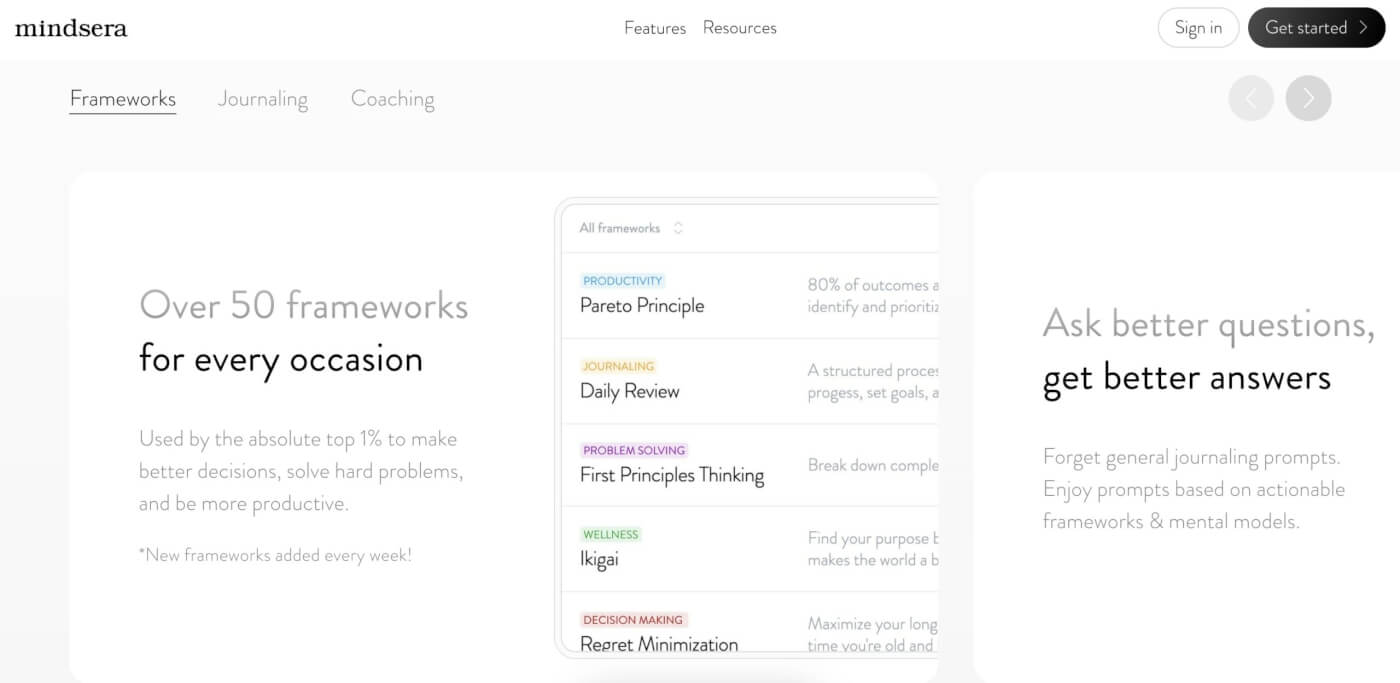
Mindsera is an AI journal for structured thinking. Its free Curious plan includes more than 52 framework templates, such as decision journals and reviews, plus a habit tracker and a passcode. The paid Genius plan adds AI analysis of each entry, an Ask Your Journal feature, voice and call modes, and a weekly review email.
What it does well:
- Framework templates that turn a vague worry into a clear decision
- Long-term emotion analysis and recurring topic detection on Genius
- Mindsera states that your data is not used to train or improve AI models
Trade-offs:
- Most of the AI is on the paid plan, so the free plan is mainly a structured journal
- The framework style can feel like work if you want a quiet, free-form diary
Price (checked 2026-10-19): Curious is free. Genius is $10.75 a month billed yearly ($129 a year), or $14.99 a month, with a free trial.
Platforms: web and iPhone.
Privacy: "Your writing is fully encrypted at rest and in transit," according to Mindsera.
Best for: founders, students and anyone who journals to make decisions.
4. Reflection: Best Free Start With an AI Coach
Reflection is an AI journal with a generous free plan. Free includes unlimited entries, guided monthly and annual reviews, thought-provoking prompts, journaling reminders, analytics and search, and access to its AI Coach. Premium adds unlimited AI writing support, unlimited AI-enhanced search and insights, cross-device sync and more photos per entry.
What it does well:
- A free plan that covers a full journaling habit, with reviews and reminders
- An AI Coach that responds to your entries, plus voice entries that Reflection transcribes
- Import and export of your entries on the free plan, and a switch that turns off every AI feature
Trade-offs:
- The free plan limits sync and does not state its AI usage limits
- The face, biometric or passcode lock is part of Premium
Price (checked 2026-10-19): Free forever plan. Premium is $5.75 a month billed yearly, or $8 a month, with a 7-day free trial.
Platforms: iPhone, Android, Mac and the web.
Privacy: Reflection states that entries are "encrypted with AES-256 at rest, and TLS in transit" and are "never used to train AI models".
Best for: people who want to start an AI journal for free and grow into monthly and annual reviews.
5. Life Note: Best for AI Mentors
Life Note lets you journal with AI "mentors" that respond to your entries. If you write three entries in a week, free users get a Weekly Letter and an Inner Portrait that sum up the week. You can also connect your journal to other AI assistants.
What it does well:
- A weekly letter that gives a short, readable summary of your week on the free plan
- Mentor voices that offer a different angle on the same problem
- A PIN lock on the web and a fingerprint or face lock on mobile
Trade-offs:
- The mentor format is not for everyone, and some people prefer a neutral tone
- The web page does not show prices, so you find them in the app store
Price (checked 2026-10-19): Free to start. Premium is $10.99 a month or $99.99 a year in the US, according to its App Store listing.
Platforms: iPhone, Android and the web.
Privacy: Life Note states that entries are encrypted with AES-GCM and that your data is "never shared". You can export or delete your data at any time.
Best for: people who like to journal toward a weekly summary and want feedback with a personality.
6. Journey: Best for Every Platform
Journey is a cross-platform journal and diary that runs on more operating systems than any other app here, Windows and Linux included. A free version has no time limit. Membership unlocks all platforms, sync and extra features. New AI features include Reflections, which answers follow-up questions about your entries with on-device AI on supported Apple devices.
What it does well:
- Web, iPhone, iPad, Mac, Android, Windows and Linux apps
- End-to-end encryption, according to its membership page
- Shared web links that someone can read in a browser without the app
Trade-offs:
- The AI features depend on the device: Reflections needs Apple Intelligence
- The App Store lists several membership offers, so check the price in the app
Price (checked 2026-10-19): Membership is $49.99 a year ($4.17 a month billed yearly) or $6.99 a month. The App Store also lists a lifetime membership at $199.
Platforms: web, iPhone, iPad, Mac, Android, Windows and Linux.
Privacy: Journey states that entries stay "securely encrypted from creation to storage".
Best for: people who switch between a Windows PC, an Android phone and other devices.
7. Stoic: Best for Daily Check-Ins and Routines
Stoic is a journal built around morning and evening check-ins, with mood tracking, guided meditation and breathing exercises, and readings from Stoic philosophy. The app is free, a Premium subscription adds more features, and a separate AI subscription adds AI personalization. Stoic says your journals are stored on your devices and backed up.
What it does well:
- Short morning and evening routines that make a daily habit easy
- Mood tracking with a Trends view, plus meditation, breathing and sleep journaling
- Apps for iPhone, iPad, Mac, Apple Watch, Android and the web
Trade-offs:
- AI is a separate, higher subscription, not part of Premium
- The App Store lists many purchase options without the billing period
Price (checked 2026-10-19): The app is free. The App Store lists Premium purchases from $6.99 and AI purchases from $12.99 without the billing period, plus a lifetime Premium option at $299. Check the price in the app before you subscribe.
Platforms: iPhone, iPad, Mac, Apple Watch, Android and the web.
Privacy: Stoic states that everything you write is "private and locked on your devices".
Best for: people who want a short daily routine more than long entries.
8. Apple Journal: Best Free Journal on Apple Devices
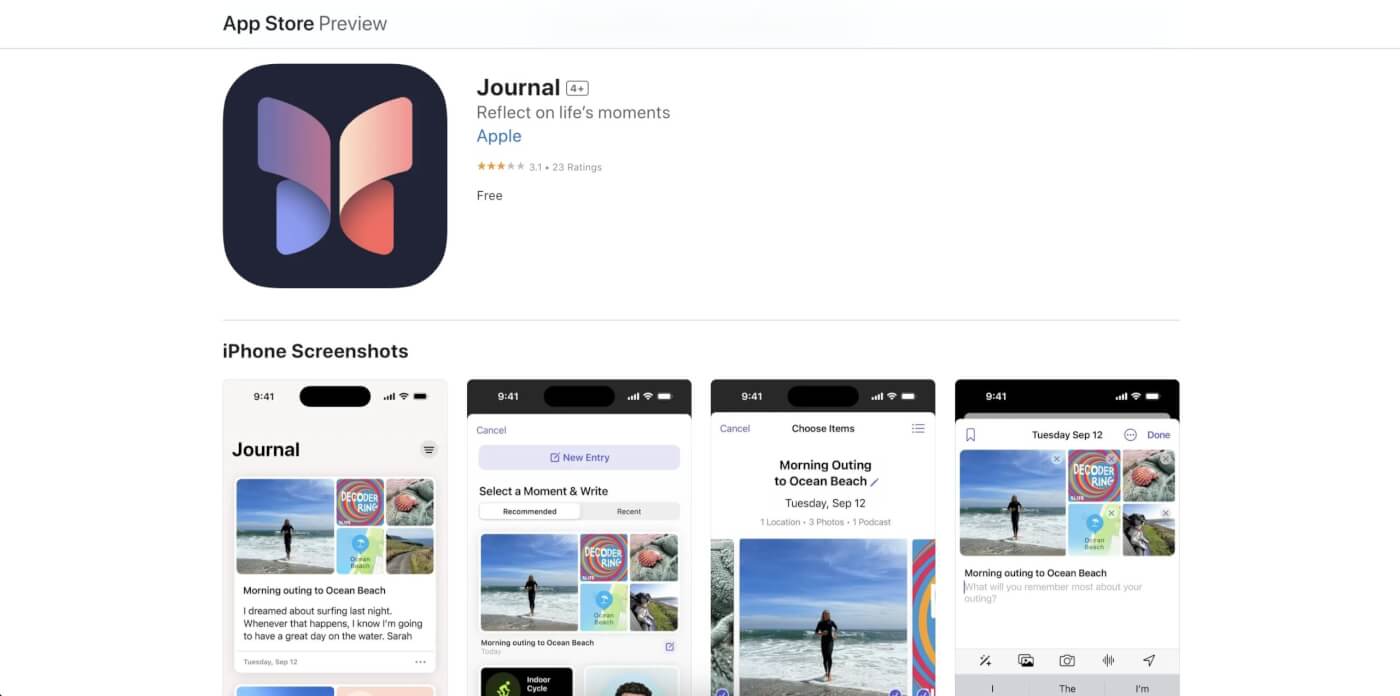
Apple Journal is a free app built into iPhone, iPad and Mac. It suggests moments to write about, such as a workout, a place you visited or photos from a trip. The App Store listing says suggestions are created with on-device intelligence, and you choose what information the app can use.
What it does well:
- Free, with no account or subscription beyond your Apple Account
- Journaling suggestions from your day, made on the device
- A lock with Face ID, Touch ID or a passcode, and sync across iPhone, iPad and Mac
Trade-offs:
- It runs only on Apple devices, with no Android, Windows or web app
- The app has no AI chat about your past entries
Price (checked 2026-10-19): Free.
Platforms: iPhone, iPad and Mac.
Privacy: Apple says all Journal entries are end-to-end encrypted when stored in iCloud.
Best for: iPhone users who want a free journal that prompts them from their own day.
9. Reflectly: Best for Short Mood Entries
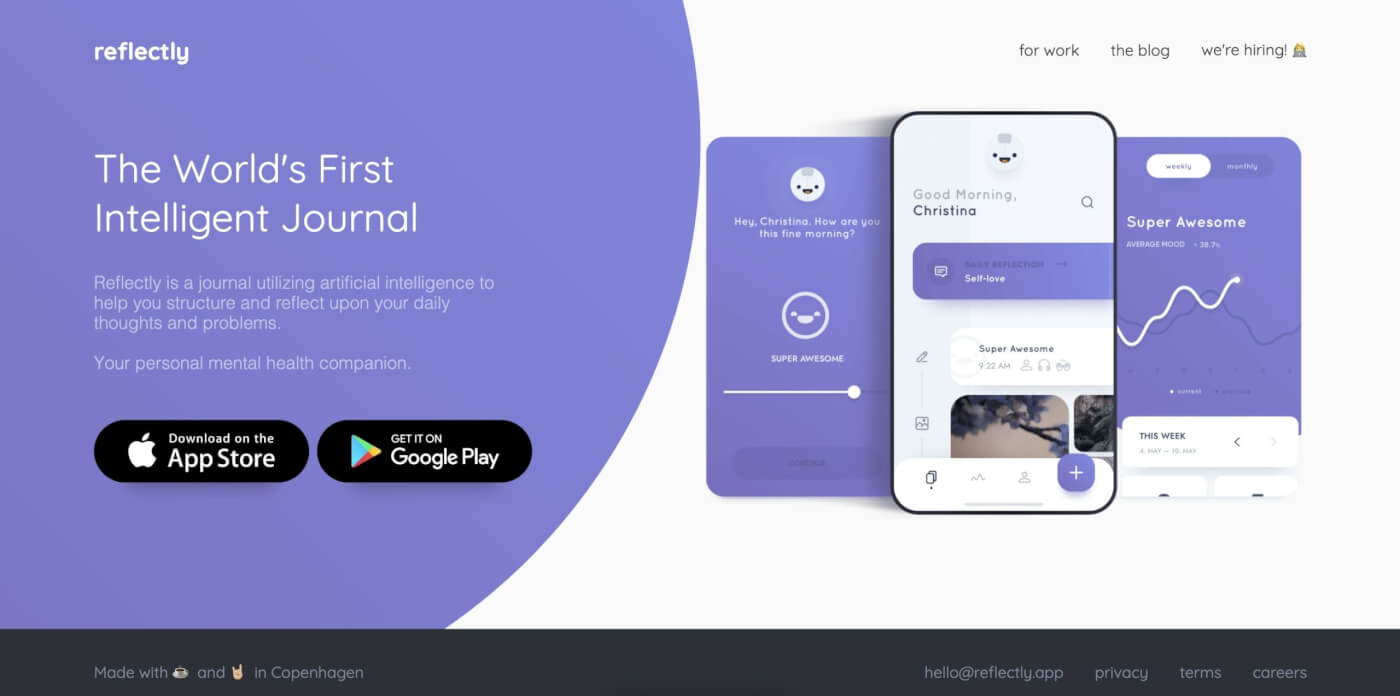
Reflectly is a mood journal that asks you how you feel, then asks personalized questions based on your entries. Its App Store listing describes "AI-guided prompts", mood correlations and graphs, and daily, weekly and monthly overviews. It suits people who want a quick check-in more than a long entry.
What it does well:
- Fast mood check-ins that take a minute or two
- Mood graphs and correlations that show what lifts or lowers your week
- Personalized follow-up questions based on what you wrote before
Trade-offs:
- Advanced statistics and insights need Premium
- Prices vary by region, and the App Store does not label the billing period
Price (checked 2026-10-19): Free download with a Premium subscription and a free trial. The listing says pricing "varies by region" and shows purchases from $4.99 to $59.99.
Platforms: iPhone and iPad, according to the App Store listing.
Privacy: not stated on the pages we checked.
Best for: people who want a short daily mood log with charts.
10. Untold: Best for Voice Journaling
Untold is a voice journal. You talk, it transcribes your words with speech-to-text AI, then it replies with insights and shows themes and patterns over time. It also asks optional questions that look at a thought from a different angle, and you can ask your journal a question and get an answer based on what you shared.
What it does well:
- Voice-first capture for people who think out loud
- Ask Your Journal answers grounded in your own entries
- Untold states that entries are encrypted and that the team never sees your journal data
Trade-offs:
- The free scope is unclear, and some App Store reviews describe a paywall after a trial
- Voice is less practical in an open office or on a train
Price (checked 2026-10-19): Untold Premium is $12.99 a month or $107.99 a year on the App Store.
Platforms: iPhone, iPad and Mac.
Privacy: "Your journal is yours to own, export, or delete at any time," according to Untold.
Best for: people who think better out loud than on a keyboard.
11. Taskade: Best for a Work Journal or Your Own Journal App

Taskade is an AI workspace, not a dedicated diary app. It fits a work journal: a daily log that turns into tasks, a weekly review, or a project journal for a team. An AI agent can read your journal projects and answer questions, and with Taskade Genesis you can build your own journal app from a prompt.
What it does well:
- Free daily journal and self-reflection journal templates
- Entries become tasks with due dates, and the same notes open as a list or a mind map
- An AI agent with knowledge of your journal projects can summarize a month, and Taskade EVE builds or edits a journal app in chat
Trade-offs:
- No journaling suggestions from your phone, photos or places
- AI features use credits, and Free starts with no AI credits
Price (checked 2026-10-19): Free includes unlimited projects, 2 workspace members, 3 Taskade Genesis apps and 1 AI agent. Pro is $10 a month billed yearly ($20 monthly) with 50,000 AI credits a month.
Platforms: web, Mac, Windows, iPhone, iPad and Android.
Privacy: entries stay in your workspace, shared only with the people you invite.
Best for: people who journal about work and want each entry to become a plan.
Which AI Journal Apps Write Back?
An AI journal app "writes back" when it replies to an entry with a question, an insight or a summary. Rosebud, Mindsera, Reflection, Life Note, Untold and Reflectly reply to what you write. Day One replies on Gold only. Apple Journal suggests moments to write about but does not chat about your past entries.
The table lists only what each vendor page states. "Not stated" means we did not find the feature on the pages we checked on 2026-10-19.
| App | Replies to an entry | Uses past entries | Regular summary | Voice entries |
|---|---|---|---|---|
| Rosebud | Yes | Yes, connects entries | Weekly report | Yes |
| Day One | Daily Chat (Gold) | AI summaries (Gold) | Not stated | Audio in entries |
| Mindsera | Yes (Genius) | Ask Your Journal (Genius) | Weekly review email | Voice and call modes |
| Reflection | AI Coach | AI search and insights | Monthly and annual reviews | Yes, transcribed |
| Life Note | Mentor replies | Inner Portrait | Weekly Letter | Not stated |
| Journey | Reflections (Apple Intelligence) | Yes, on device | Not stated | Not stated |
| Stoic | AI plan only | Mood trends | Not stated | Not stated |
| Apple Journal | No | Suggestions from your day | Not stated | Not stated |
| Reflectly | Personalized questions | Mood correlations | Daily, weekly, monthly | Not stated |
| Untold | Yes, with insights | Ask your journal | Themes over time | Yes, voice-first |
| Taskade | Through an AI agent | Agent reads journal projects | On request | Not a focus |
A journal that writes back works as a loop. You write, the AI asks one question, and once a week it shows you a pattern:
Privacy: Where Your Journal Lives
Privacy is the most important difference between journaling apps, because a journal holds the most personal text you write. The table quotes only what each vendor page states. "Not stated" means we did not find a statement on the pages we checked.
| App | Encryption (vendor statement) | Lock | Data use statement |
|---|---|---|---|
| Day One | End-to-end, every plan | Passcode and biometric | "Your entries remain yours" |
| Journey | End-to-end | Not stated | Not stated |
| Apple Journal | End-to-end when stored in iCloud | Face ID, Touch ID, passcode | Suggestions made on the device |
| Rosebud | In transit and at rest | Not stated | Not stated |
| Mindsera | At rest and in transit | Passcode | Not used to train AI models |
| Reflection | AES-256 at rest, TLS in transit | Face ID, biometric, passcode (Premium) | Not used to train AI models |
| Life Note | AES-GCM | PIN or biometric | "Never shared" |
| Untold | Entries encrypted | Not stated | Export or delete any time |
| Stoic | Not stated | Not stated | Stored on your devices |
| Reflectly | Not stated | Not stated | Not stated |
Free vs Paid: What You Give Up on the Free Plan
Most AI journaling apps keep the journal free and charge for the AI. Rosebud, Reflection and Life Note let you try AI replies on the free plan, while Day One and Mindsera keep most AI on a paid plan. The table shows what each free plan includes and what the cheapest paid plan adds, with prices checked on 2026-10-19.
| App | Free plan includes | Paid plan adds |
|---|---|---|
| Rosebud | AI journaling (limits not listed) | Bloom: the full plan, $8.99/mo billed yearly |
| Day One | Unlimited entries, 1 photo per entry, prompts | Gold: Daily Chat and AI summaries, $74.99/yr |
| Mindsera | Minimal journal, 52+ templates, habit tracker | Genius: AI analysis and Ask Your Journal |
| Reflection | Unlimited entries, monthly and annual reviews, AI Coach | Premium: unlimited AI support and sync, $5.75/mo billed yearly |
| Life Note | AI mentors, Weekly Letter after 3 entries | Premium: deeper personalization |
| Journey | A journal with no time limit | Membership: all platforms and sync |
| Taskade | Unlimited projects, 1 AI agent, no AI credits | Pro: 50,000 AI credits a month, up to 10 people |
Where the paywall sits, in one view:
                 JOURNAL       AI REPLIES      AI SUMMARIES
                 (writing)     (to an entry)   (over weeks)
Rosebud          free          free            limits not listed
Reflection       free          free (Coach)    free (monthly review)
Life Note        free          free (mentors)  free (Weekly Letter)
Mindsera         free          Genius          Genius
Day One          free          Gold            Gold
Stoic            free          AI plan         AI plan
Apple Journal    free          none            none
Taskade          free          AI credits      AI credits
Journal App, General AI Chat or Your Own App?
You have three ways to journal with AI in 2026. A dedicated AI journal app gives you prompts, reminders, a lock and a timeline. A general AI chat assistant such as ChatGPT can reflect on an entry you paste in, but you bring the routine. A journal app you build yourself fits your own prompts and fields.
| Option | Best for | What you get | What you give up |
|---|---|---|---|
| AI journal app (Rosebud, Day One, Reflection) | A daily personal habit | Prompts, reminders, a lock, a timeline | The app decides the format |
| General AI chat assistant | An occasional reflection | A thoughtful reply to one entry | No diary structure, you keep the routine |
| Your own journal app (Taskade Genesis) | A work journal or a custom format | Your own fields, an AI agent, automations | Phone suggestions, photos and places |
Why We Built Taskade Differently
We built Taskade so that a journal can become a working app, not only a diary. Taskade Genesis turns one prompt into a live app with its own database, AI agents that read your entries, and automations that act on them. The dedicated apps above are better diaries. Taskade is for a journal you shape yourself.
What that means in practice:
- One prompt builds a live app. Describe a journal, a habit tracker or a weekly review form, and Taskade Genesis builds it with the database behind it.
- AI agents with knowledge and tools. An AI agent can read your journal entries and answer questions, inside the app or on its own.
- Automations that connect your tools. Automations work with 100+ integrations: triggers pull events in, and actions push data out, for example a daily reminder.
- Workspace DNA. Projects are the memory, agents are the intelligence, and automations are the execution. The Taskade Genesis wiki explains the model.
- Ready-made kits. Clone a kit from the Community Gallery, such as the Mood Tracker, and share it with a link. A custom domain is on Pro and up.
- Taskade EVE builds and edits in chat. Ask Taskade EVE to add a gratitude field or a monthly chart, and it changes the app.
- Plan facts. Free includes 3 Taskade Genesis apps, 1 AI agent and 2 workspace members, and starts with no AI credits. Pro is $10 a month billed yearly. See pricing.
Build your own AI journal app
Taskade Genesis builds a journal app from a description, so you can design the journal you want instead of adapting to an app. Describe the prompts, the mood scale and the weekly summary. Taskade Genesis builds the app, stores the entries in a project in your workspace, and adds an AI agent that reads them.
An example prompt:
Build a private daily journal app.
- Each day, show one reflection prompt and a mood scale from 1 to 5.
- Save each entry with the date, the mood and three tags.
- Every Sunday, summarize the week: top 3 themes, the average mood,
  and one small change to try next week.
- Add a page that lists past entries by tag.
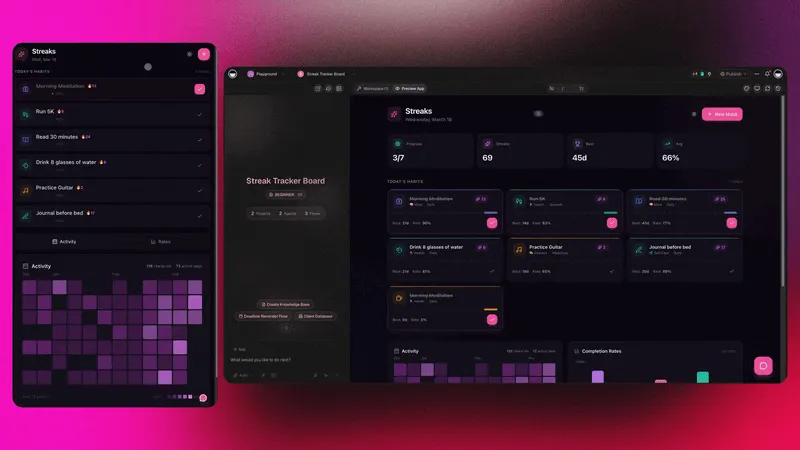
Free includes 3 Taskade Genesis apps and 10 automation runs a month, so a daily reminder automation needs Pro (1,000 runs a month). The Taskade Genesis overview explains how apps, projects and agents work together, and the AI apps hub shows live examples.
Limitations: When Taskade Is Not the Right Fit
Taskade is the right fit for a work journal or a journal app you design yourself. It is not a dedicated diary: it has no journaling suggestions from your phone, photos or places, and its AI uses credits that Free does not include at the start. Pick another app for these jobs:
- A private diary with a lock screen, photos and places: Day One or Apple Journal
- Guided emotional reflection: Rosebud or Mindsera
- Voice journaling on the go: Untold
- A mood log in under a minute: Reflectly or Stoic
How to Start Journaling With AI in 5 Minutes
You can start an AI journal today in five steps. Pick one app from the list, use its prompt, and let the AI ask one follow-up question. The routine below works in any app, and our guide on how to journal daily explains each step.
- Set a daily reminder at the same time each day.
- Write for five minutes from the app's prompt.
- Answer one follow-up question from the AI.
- Once a week, ask for a summary of the week.
- Pick one small change from the summary and add it to your plan.
If you also keep notes from classes or meetings, the guide to the types of note-taking and our list of AI note-taking apps cover the other half of a written routine. A digital bullet journal combines journaling with tasks (start from the free bullet journal template), the Flowtime technique pairs well with a work log, and the gratefulness journal template and daily journal mind map are free to copy.
Frequently Asked Questions
What is the best AI journaling app in 2026?
Rosebud is the best AI journal for guided reflection: it remembers past entries, spots patterns and sends a weekly reflection report, and Bloom costs $8.99 a month billed yearly. Day One is the best all-round journal app, with end-to-end encryption on every plan and AI on its Gold plan at $74.99 a year. Mindsera suits people who like thinking frameworks.
Is there a free AI journal app?
Yes. Rosebud is free to use, Reflection has a free plan with an AI coach and monthly reviews, Life Note is free to start with AI mentors, and Apple Journal is free on iPhone, iPad and Mac. Day One Basic is free but does not include its AI features. Stoic, Journey and Mindsera also have free versions, with AI or advanced features on paid plans.
Is Day One's AI free?
No. Day One Basic is free and includes unlimited entries, one photo per entry and end-to-end encryption, but Daily Chat and the reflective AI summaries and prompts are part of Day One Gold, which costs $74.99 a year. Day One Silver, at $49.99 a year, adds features but not Daily Chat.
Rosebud vs Mindsera: which is better?
Rosebud is better if you want a gentle, conversational journal that remembers past entries and tracks patterns over time. Mindsera is better if you like structured thinking, because it offers more than 52 framework templates and an Ask Your Journal feature on its Genius plan. Rosebud Bloom is $8.99 a month billed yearly, and Mindsera Genius is $10.75.
Which AI journal apps write back to you?
Rosebud, Mindsera, Reflection, Life Note, Untold and Reflectly reply to what you write with questions or insights. Day One replies through Daily Chat on its Gold plan. Apple Journal suggests moments to write about but does not chat about your entries. Taskade replies through an AI agent that reads your journal projects.
Can I use ChatGPT as a journal?
You can paste an entry into a general AI chat assistant such as ChatGPT and ask for a reflection. A general chat assistant is not built as a diary, so you bring the daily prompt, the structure and the review routine yourself. A journal app gives you prompts, reminders, a lock and a timeline of entries.
Are AI journaling apps private?
Privacy differs by app. Day One and Journey state end-to-end encryption, and Apple says Journal entries are end-to-end encrypted when stored in iCloud. Rosebud and Mindsera state encryption in transit and at rest, and Mindsera says it does not use your data to train AI models. Read each app's privacy policy before you write anything sensitive.
Can AI journaling apps help with mental health?
AI journaling apps can support a reflection habit: daily prompts, mood check-ins and a summary of patterns over weeks. They are not a replacement for therapy or medical care. If you are struggling, contact a licensed professional or a local crisis line.
Can I build my own AI journal app?
Yes. With Taskade Genesis you describe the journal you want, for example daily prompts, a mood rating and a weekly summary, and it builds a working app that stores entries in your workspace with an AI agent that can read them. Taskade Free includes 3 Taskade Genesis apps and starts with no AI credits, and Pro is $10 a month billed yearly.
What is the best journal app for iPhone?
Day One is the most complete journal app for iPhone, with Apple Watch and Mac apps and end-to-end encryption. Apple Journal is free and built in, and its suggestions use on-device intelligence. Rosebud, Stoic and Untold are strong iPhone choices if you want AI reflection or voice journaling.
What is the best journal app for Android and Windows?
Journey runs on Android, Windows, Mac, Linux and the web, so it is the strongest choice if you switch between devices. Day One, Rosebud, Life Note and Stoic also have Android apps. Apple Journal runs only on Apple devices.
How do I start journaling with AI?
Pick one app, set a daily reminder, and write for five minutes. Start with the app's prompt, then answer one follow-up question from the AI. Once a week, ask the app for a summary of your entries and pick one thing to change. Our guide on how to journal daily has a five-step routine.
Related Reading
- How to Journal Daily
- Types of Note-Taking Compared
- Best AI Note-Taking Apps
- Best AI Second Brain Tools
- Personal AI Workspaces
- The PARA Method
- Digital Bullet Journal for Teams
- Habit Tracking
- Is Taskade Free?
A journal works best as a loop: you record the day (▲ memory), the app helps you see the pattern (■ intelligence), and you change one thing tomorrow (● execution). Pick the app that fits how you like to write, and keep it for 30 days before you switch. When you want a journal shaped around your own work, build it with Taskade Genesis.