






Overflowing to-do lists, missed deadlines, lost documents—if you feel like you’re constantly playing catch-up with life, we have something to cheer you up. The PARA method is a simple knowledge management tool that will make your work and life more organized in a jiffy.
TL;DR: The PARA method organizes everything into 4 categories — Projects, Areas, Resources, Archives. In Taskade, each maps to a Space with AI agents that auto-categorize and surface what matters. Get the free PARA template →
After a well-received Building a Second Brain, Tiago Forte is back with another book. This time, he goes under the surface and breaks down his signature PARA method. In today’s article, you’ll learn what the PARA method is and how to implement it as part of a new or existing workflow
💡 New to BASB?… Read our Building a Second Brain review and guide where we break down Forte’s first book and explain the basic concepts of the system.
What Is the PARA Method?
Let’s start with a mandatory tl;dr.
Building a Second Brain (BASB) is a knowledge management methodology and productivity framework created by productivity expert Tiago Forte. It’s also a digital system that acts as an extension of the human brain, a sort of backup for all your to-dos, notes, thoughts, and ideas.
The PARA method is part of that methodology that helps capture and organize all kinds of information into four containers—Projects, Areas, Resources, and Archives. Each is designed to battle digital information overload and bring back structure to professional and personal life.
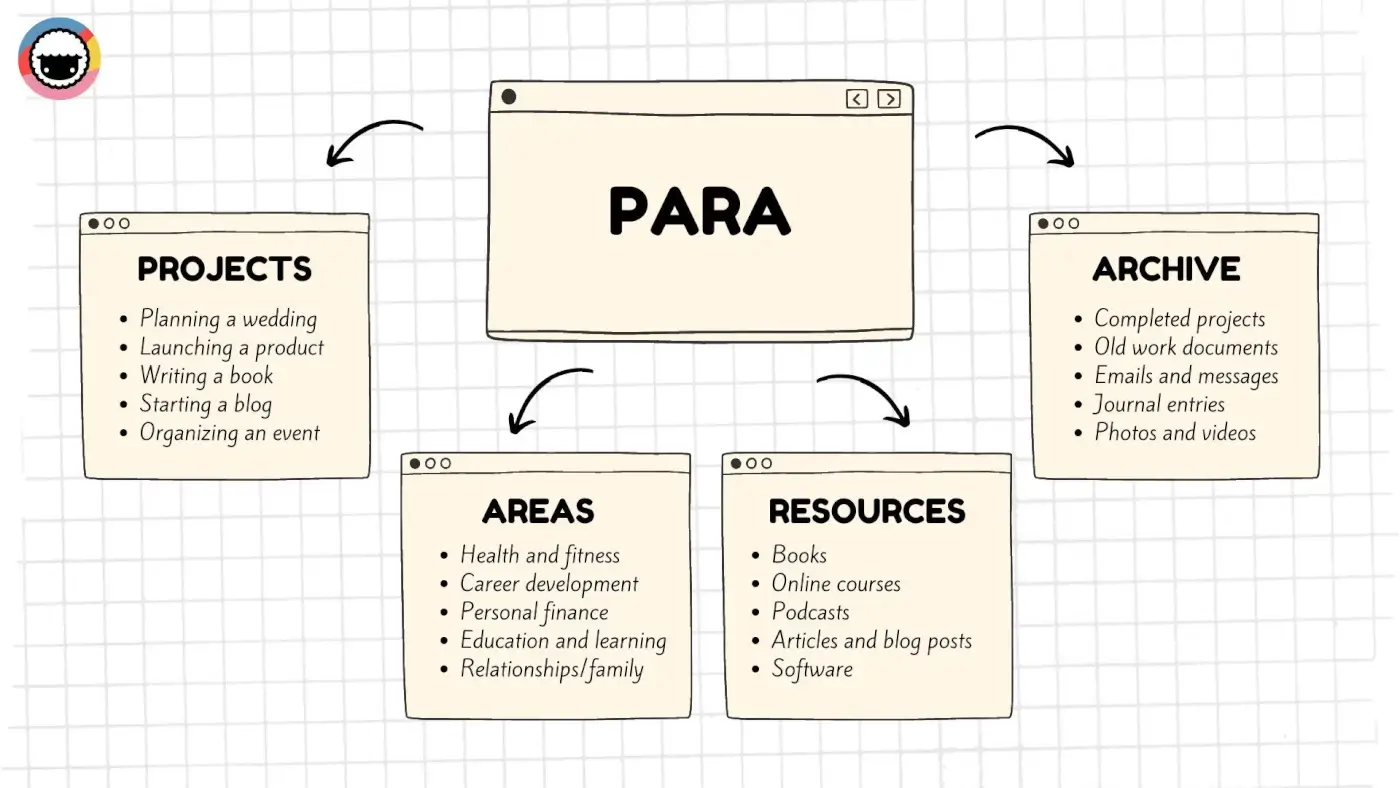
The PARA method
Here's how Tiago Forte's organizational system works.
PARA vs Other Productivity Frameworks
How does PARA stack up against other popular organizational systems? Here's a quick comparison:
| Framework | Creator | Core Idea | Categories | Best For | Complexity |
|---|---|---|---|---|---|
| PARA | Tiago Forte | Organize by actionability | 4 (Projects, Areas, Resources, Archives) | Knowledge workers, note-takers | Low |
| GTD | David Allen | Capture and process next actions | 5+ (Inbox, Next Actions, Waiting, Someday, Reference) | Task-heavy workflows | High |
| Zettelkasten | Niklas Luhmann | Atomic notes with connections | Slip-box + index | Researchers, writers | Medium |
| Bullet Journal | Ryder Carroll | Analog rapid logging | Collections, logs, index | Analog-first users | Low |
| Second Brain (BASB) | Tiago Forte | Digital knowledge capture | PARA + CODE | Digital-first PKM | Medium |
| Eisenhower Matrix | Dwight Eisenhower | Urgency vs. importance | 4 quadrants | Decision-making, prioritization | Low |
The advantage of PARA is its simplicity. With just four containers, you can organize everything from grocery lists to business strategy — and it works inside any tool.
Projects
Projects aggregate commitments that require more than one action step to complete. That can be anything from a new business venture to that book you've always wanted to write.
A Project is usually divided into a series of tasks you need to complete to reach a specific goal. And like with any good commitment, each project should come with a clear deadline attached.
Areas
According to Forte, Areas are long-term commitments with the singular goal of improving specific areas of your daily life like physical health, relationships, or professional qualifications.
Unlike Projects, Areas usually don’t have a set deadline. You can think of them as the pillars of your life you need to regularly tend to in order to maintain balance and progress.
Resources
Resources are a smorgasbord of books, articles, tips & tricks, personal notes, and pretty much everything else that supports or may be relevant to active projects.
For instance, if you’re a photographer, your Resources may include camera manuals, photography books, online tutorials and courses, or editing software, just to name a few.
Archives
Finally, Archives act as storage for any information you don’t necessarily need today but may want to reference it in the future. That also includes completed and paused projects.
Archives may include things like old project/client files, financial statements and tact records, personal journals and diaries, emails, or backup copies of files and documents.
PARA Decision Tree: Where Does It Go?
Not sure which PARA category to use? Follow this decision tree:
                    New information arrives
                            |
                   Does it have a deadline?
                      /            \
                    YES             NO
                    |                |
              Is it multi-step?    Is it an ongoing
                  /     \          responsibility?
                YES     NO           /        \
                |        |         YES         NO
            PROJECT   Add to      AREA     Is it useful
            (active   project              reference?
            goals)    tasks                /       \
                                        YES        NO
                                     RESOURCE   ARCHIVE
                                     (topics     (inactive
                                     of          items)
                                     interest)
💡 Quick Start: Don't want to create a Second Brain setup from scratch? Try our free template for building a second brain that includes everything you need to get started.
Who Is the PARA Method For?
The beauty of the PARA method is how flexible and universal it is. You can use your second brain to keep track of your hobbies or start a business, from idea to product launch.
Still not sure if it’s worth your time? Here are a few popular use cases you may be interested in:
👨🎓 Students: If you’re a student, chances are you already have a “second brain.” This may be your note-taking app of choice (win, wink Taskade) or any other digital organization tool you carry to every class. Layering PARA on top of your existing system will help you systematize your notes, connect them together, and get a better grasp of the material.
👩💻 Writers: Keeping track of facts, plot twists, and character ideas is a tall order, even more so when there are publishers and overzealous editors breathing down your neck. PARA makes it much easier to keep the creative process under control. All bits and pieces of your workflow are right where you expect them to be and ready for use.
👨💼 Entrepreneurs: Whether you’re a startup founder or a seasoned entrepreneur, you need to keep your finger on the pulse of your business 24/7. Employees, customers, finances, legal matters, competitors, there are many areas that require your attention and so little time to manage it all. PARA gives you a framework that makes all those ingredients visible but contained, so you can address each at the right moment.
🤷♀️ Ordinary mortals: We all have goals and aspirations—get in shape, read more books, learn a new skill… The only problem is that most of those personal responsibilities are lost in the shuffle of life. By breaking down your goals and tasks into Projects, Areas, Resources, and Archives, you will be more likely to stay focused on a specific commitment.
⚡️ Productivity Enthusiasts: Are you always on the hunt for new task management and time management strategies? The PARA method can be an excellent addition to your personal productivity workflow. It will help you keep your knowledge, responsibilities, and goals tucked neatly into organized compartments, so you always know where to find them.
👉 Tips For Implementing the PARA System
While the PARA method can work on its own, it’s best to implement it as part of a complete second brain setup. Here are a few tips that will help you set the stage.
Choose the Right Medium
Building a Second Brain is a digital-first system. You can implement it using most modern note-taking applications, as long as they check these boxes:
Ability to quickly capture information from different sources
Capability to handle large databases of notes without issues
Support for basic text formatting options (Markdown is a plus)
Reliable search functionality on a note and database level
Support for attachments (images, videos, documents)
Private by default, collaborative by nature (sharing)
Keep in mind that building a second brian is a long-term commitment, so choose wisely. Jumping ship and migrating tasks, projects, and notes to a different platform can be a hassle.
Build Your House (PARA)
Stick to Tiago’s recommended four-tier PARA hierarchy, at least in the beginning. The system is simple and intuitive so there’s no need to overcomplicate things.
Depending on your app of choice, you can organize notes using folders, tags, or a combination of both. All you need are four containers—Projects, Areas, Resources, Archives—to get started.
Make sure that you use clear and descriptive names for each project, area of focus, resource, and archive so that you can easily find and organize your information.
Decide What to Capture
Now’s the time for the big question: “What kind of information should I capture?”
There are many approaches to building a second brain. Different people capture different types of information in their notes depending on their needs and interests.
As a personal user, you can capture anything from to-do lists, recipes, and fitness routines, to travel itineraries and journal entries. As a business owner, it could be product ideas, meeting notes, project plans, and other resources you need for active projects.
Don’t self-censor. Capture everything that comes to your mind.
CODE!
CODE, an acronym for Collect, Organize, Distill, Express, is an organization method for managing knowledge inside your second brain. It's a four-step process that will help you aggregate, compress, and reuse knowledge more effectively.
Here's how it works:
📥 Collect: The first step is to capture information from all kinds of sources like books, articles, podcasts, or conversations, just to name a few. Simple, right?
🗂️ Organize: Next, you need to categorize all those insights into relevant containers in your second brain. This is where your PARA folder structure come into play.
💧 Distill: You don't want to copy 500-page novels to your notes, no matter how interesting or insightful they might be. You need to summarize and synthesize your notes.
✏️ Express: Finally, put your second brain to good use. Create new value (write, paint, tell stories) using your notes as inspiration and a source of knowledge.
Want to learn more about CODE? Grab Tiago Forte's latest book The PARA Method.
Revisit and Review
Don’t let your second brain collect digital dust. Forte recommends a weekly review to keep notes fresh and relevant across all PARA folders. The review consists of five steps:
Clear your inbox and check calendar events.
Transfer physical notes and to-do lists to the system.
Clear your digital workspace (desktop, downloads folder)
Transfer notes in your inbox to relevant containers.
Review your to-do lists and identify tasks for the upcoming week.
Above all, be patient and persistent. Like any new system, it may take time to fully implement and integrate the PARA method into your workflow. Stick with it.
Want to get started quickly? Grab this PARA Method Template:
PARA Meets Workspace DNA: The AI-Powered Second Brain
Taskade’s Workspace DNA architecture maps directly to the PARA method — but adds a layer of AI intelligence that Tiago Forte’s original framework couldn’t anticipate.
Taskade’s three pillars — Memory + Intelligence + Execution — supercharge each PARA category:
| PARA Category | Workspace DNA Pillar | What AI Adds |
|---|---|---|
| Projects | Execution | AI agents auto-generate task breakdowns, assign deadlines, and trigger automations when milestones complete |
| Areas | Memory | Persistent knowledge bases that AI agents reference when answering questions or making decisions |
| Resources | Intelligence | AI agents trained on your documents surface relevant resources automatically during project work |
| Archives | Memory | Completed projects feed back into Workspace DNA, making AI smarter over time |
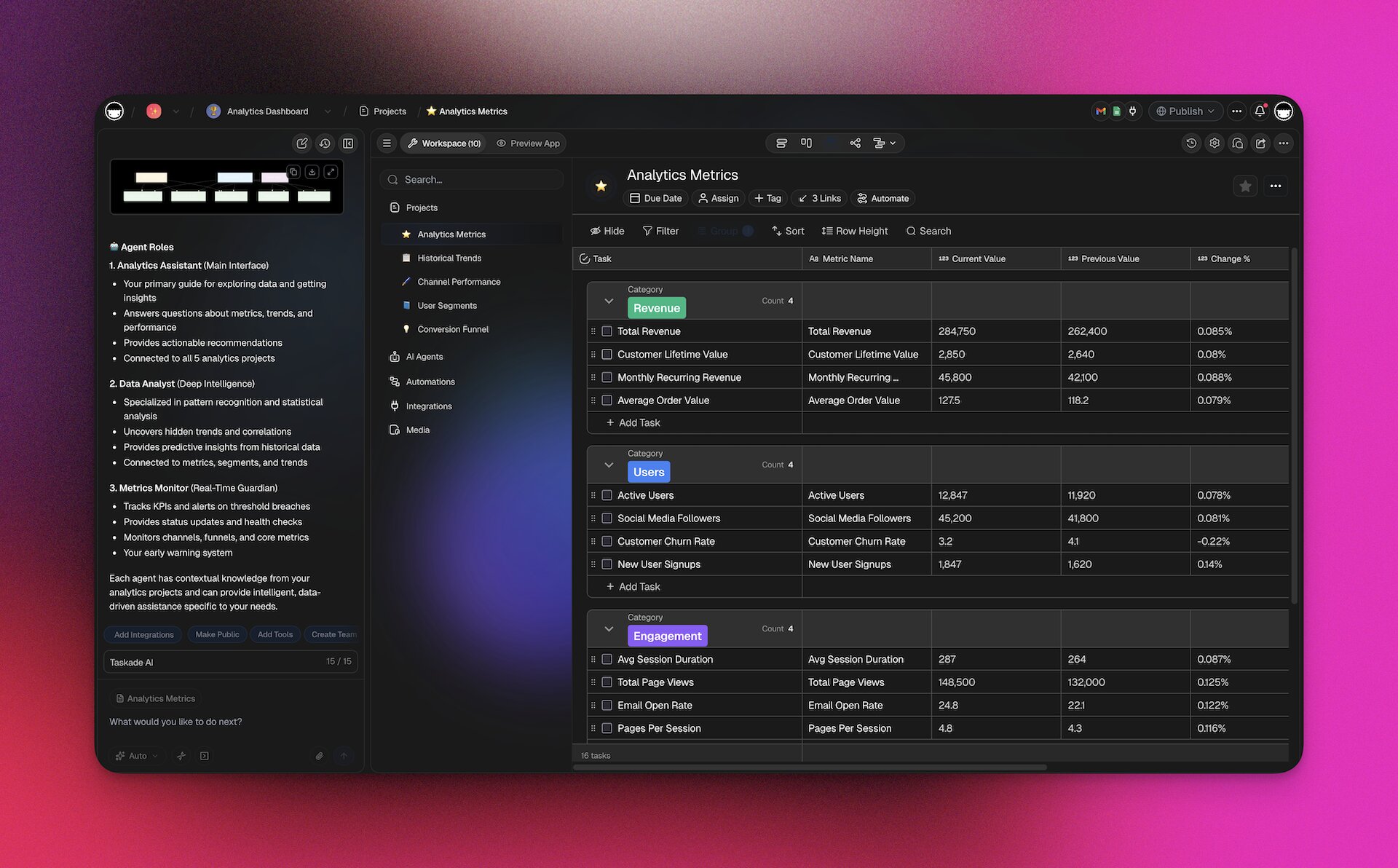
This creates a self-reinforcing loop: your Projects (Execution) generate knowledge that feeds Areas and Resources (Memory), which train AI agents (Intelligence), which accelerate future Projects (Execution). It’s PARA on autopilot.

Best PARA Apps in 2026: Feature Comparison
| Feature | Taskade | Notion | Obsidian | Evernote |
|---|---|---|---|---|
| PARA folder structure | Yes | Yes | Yes (vault folders) | Yes (notebooks) |
| AI agents for auto-categorization | Yes (custom agents) | No (AI writing only) | No (plugins) | No |
| 7 project views | Yes | Limited (5) | Plugin-dependent | No |
| Real-time collaboration | Yes (built-in video + chat) | Yes (no video) | No | Limited |
| Automation workflows | Yes (100+ integrations) | Limited | No | No |
| App building (Genesis) | Yes | No | No | No |
| Pricing (with AI) | Free / $6/mo | $12/member + $10 AI add-on | Free / $50/yr | $14.99/mo |
Try the PARA method in Taskade free →
How To Use the PARA Method Inside Taskade
Taskade is an AI-powered productivity tool that can help you manage all your tasks, notes, and drafts in one place. With Taskade, you can build a second brain for yourself or chat and collaborate with your team in the same workspace, without shuffling multiple apps.
Here’s how to create and use a complete PARA setup in Taskade:
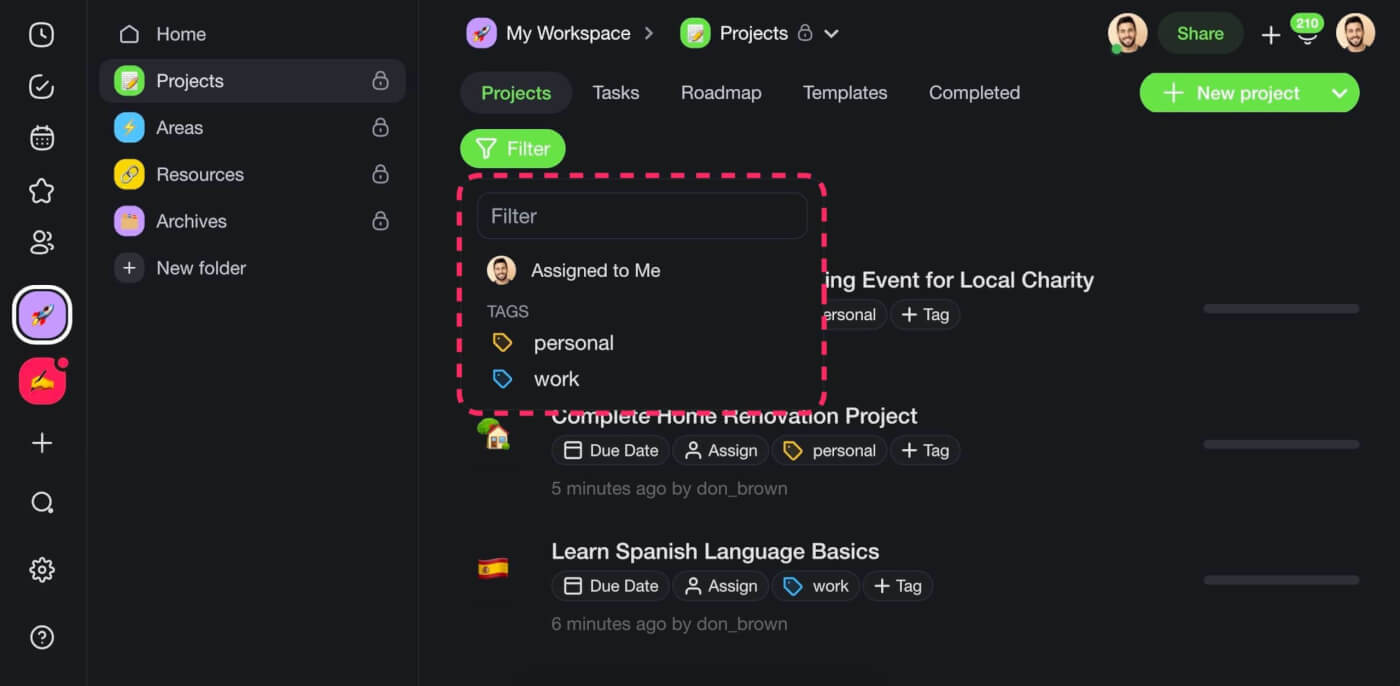
Create PARA Folders
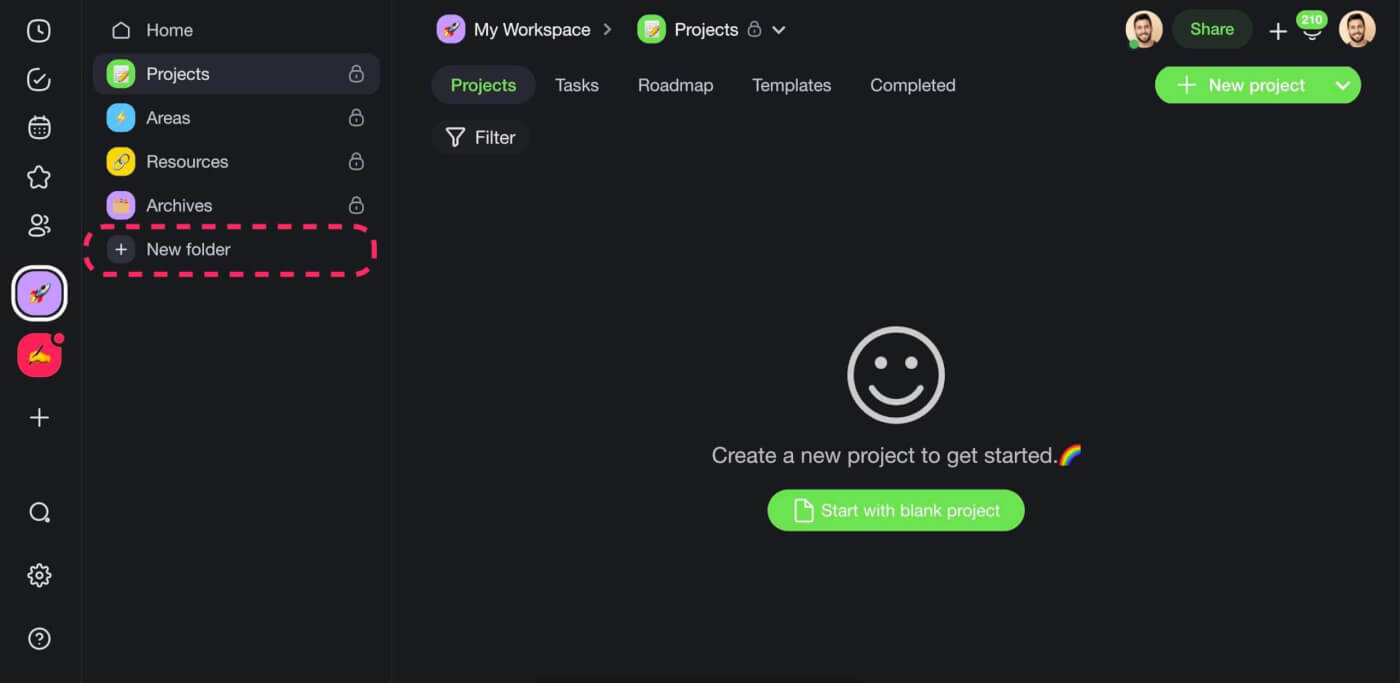
First, let’s set up a folder structure for each of the four PARA containers. You can think of folders as drawers in a filing cabinet (your workspace) where you’ll keep notes, to-dos, and documents.
To create a new folder, click the ➕New folder button at the bottom of the left navigation pane. Choose the folder name, select a color theme, and you’re good to go!
Add Projects
A folder can contain many projects, each with an assortment of tasks, to-dos, notes, documents, images, videos, and other types of content you capture into your system.
Let’s create a few projects for a good start. Click the ➕New project button to get started.
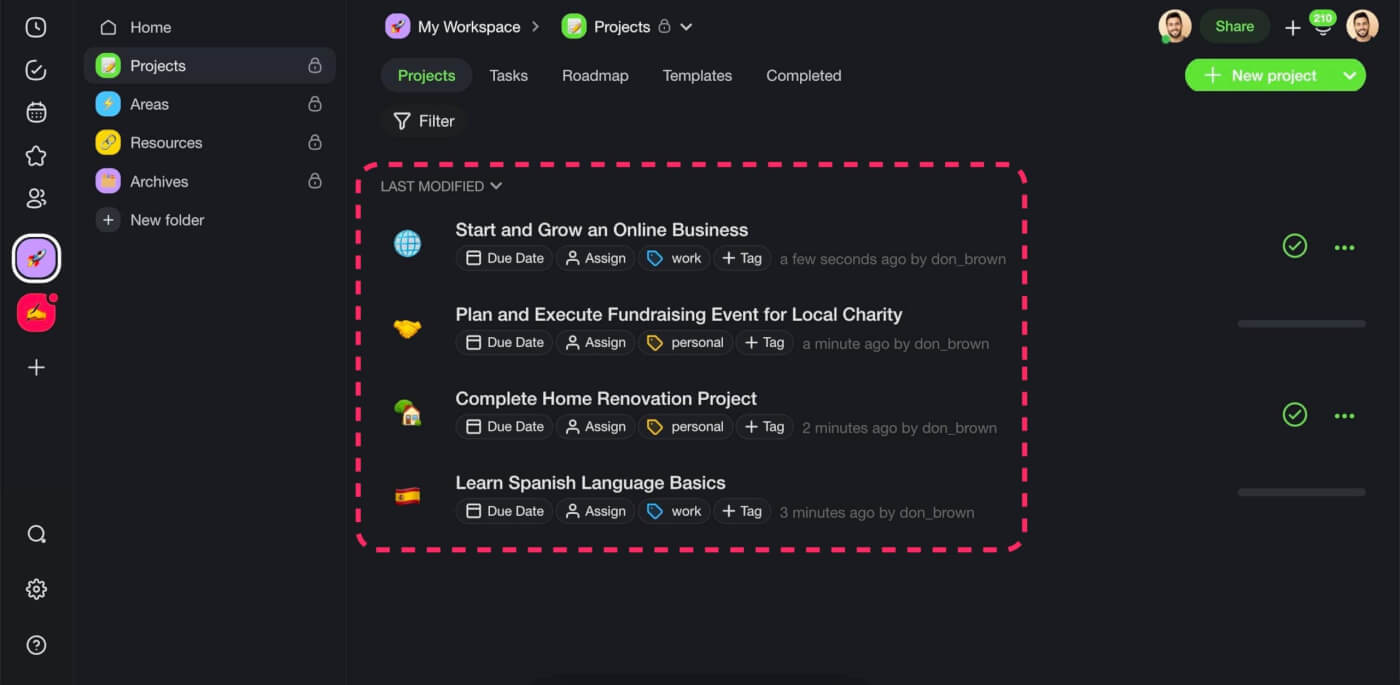
You can further organize each project in the containers using color-coded #tags. Click ➕Tag to create a new tag. When done, filter the project list using the Filter button at the top.
Capture Information
Taskade makes it super easy to capture information wherever you are. You can type notes on your Mac or PC, add tasks on mobile, or grab notes and bookmarks using our web clipper.
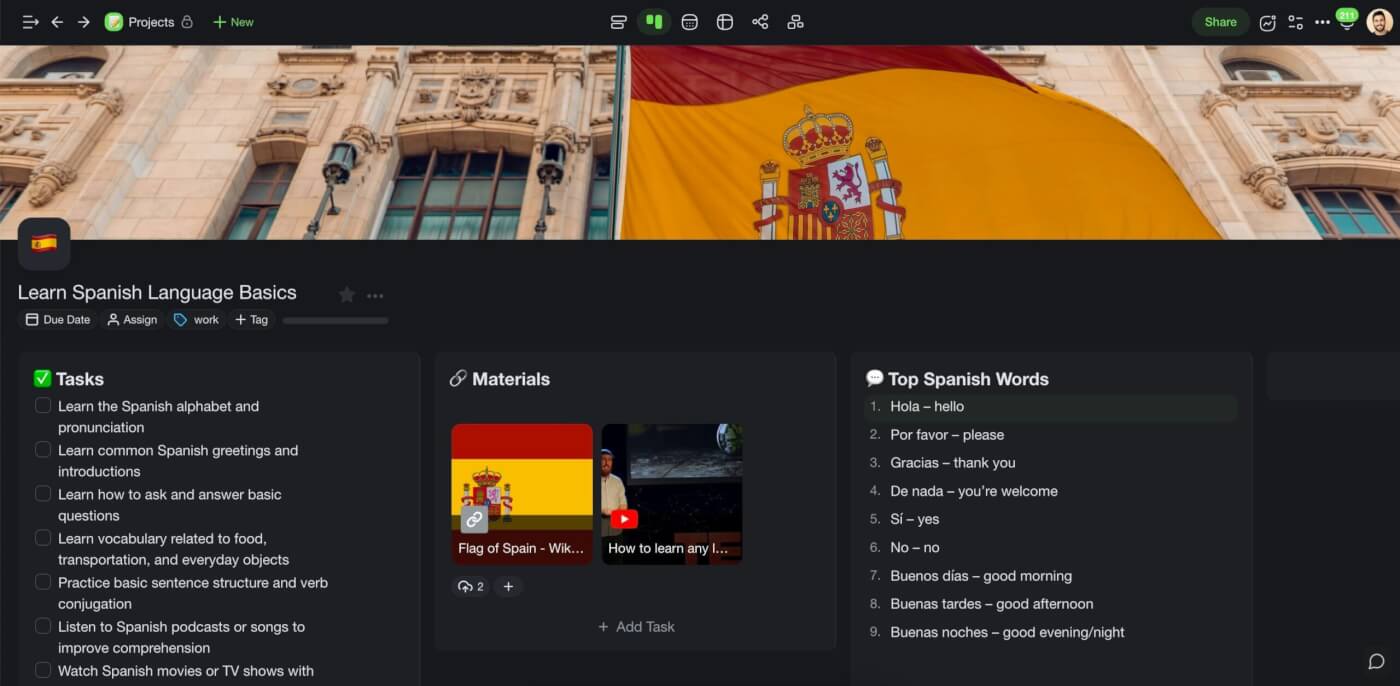
💡 Pro Tip: If you don’t know how to categorize a note, add it to a master Inbox folder. When you revisit the entry, simply drag and drop into to the target project list.
Automate Your PARA Workflow
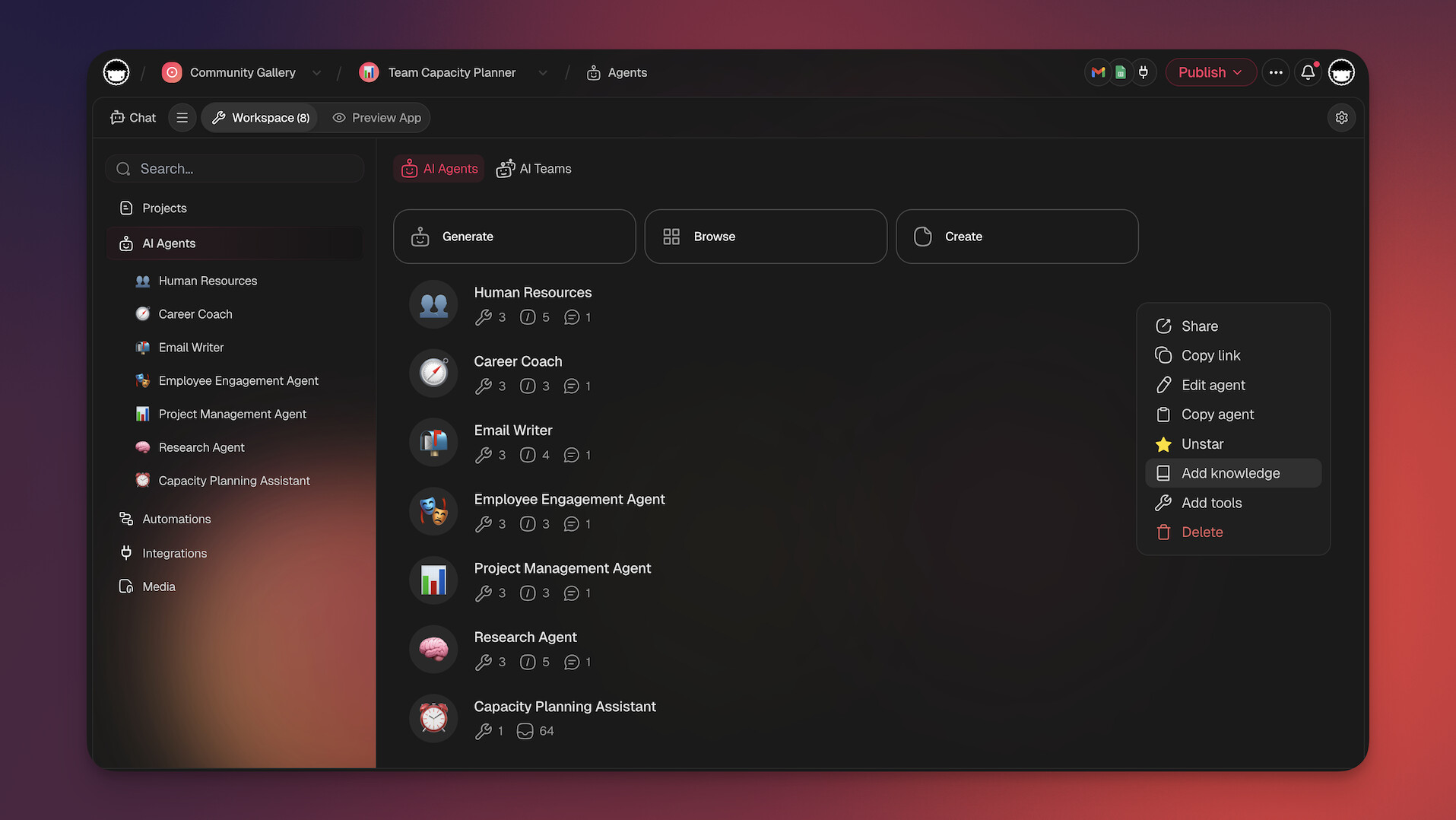
This is where Taskade goes beyond traditional PARA apps. Set up AI agents to automatically organize your second brain:
- Capture Agent: An AI agent that monitors your inbox and auto-files notes into the correct PARA category
- Review Agent: Flags stale Projects and suggests archiving — replacing your manual weekly review
- Research Agent: Scans your Resources folder and surfaces relevant material when you start a new Project
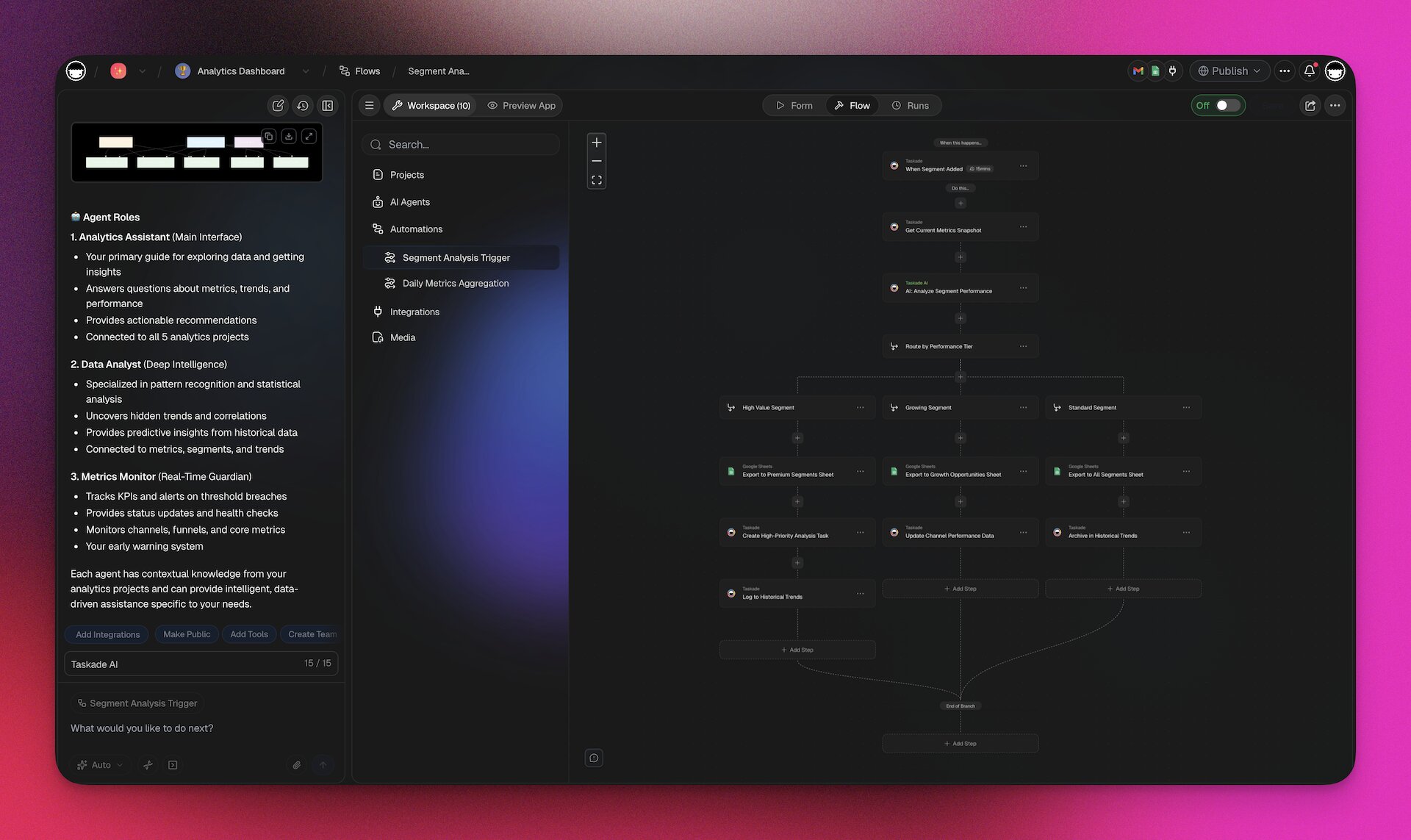
You can also create automations that trigger when a Project is marked complete — automatically moving it to Archives and notifying your team.
Write with Taskade AI
Running out of ideas? Use Taskade AI to break writer’s block. Our smart writing assistant will help you structure your notes, generate ideas, and give your writing a unique flavor. Choose from 11+ frontier models from OpenAI, Anthropic, and Google.
Watch this video to learn more:
Collaborate!
Knowledge is meant to be shared. Invite your team members, friends, or family to the PARA project folder and collaborate on notes and projects in real time.
Click the Share button in the top-right corner to get started.
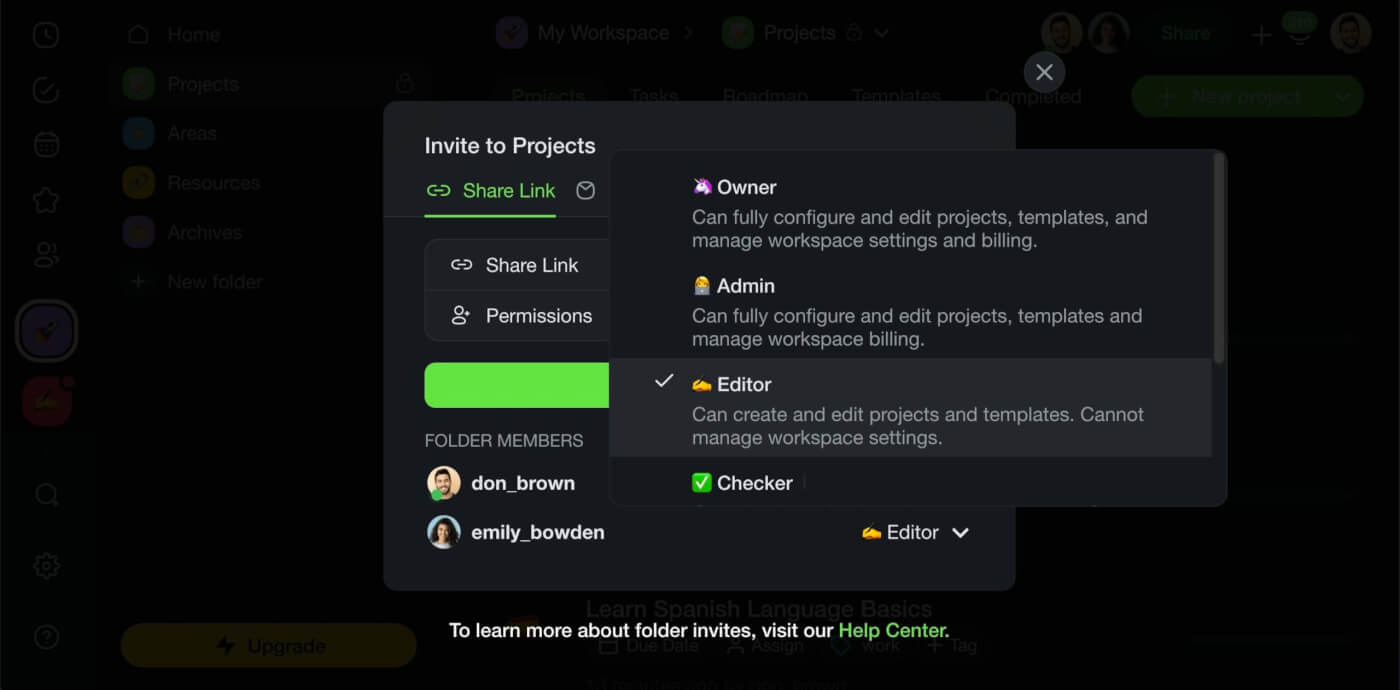
Taskade supports 7-tier access control — Owner, Maintainer, Editor, Commenter, Collaborator, Participant, and Viewer — so you can share specific PARA categories without exposing your entire system.
Visualize Your PARA System
One of Taskade’s strongest advantages for PARA is the ability to view any project in 8 different ways: List, Board, Calendar, Table, Mind Map, Gantt, and Org Chart. Switch between views without losing any data.
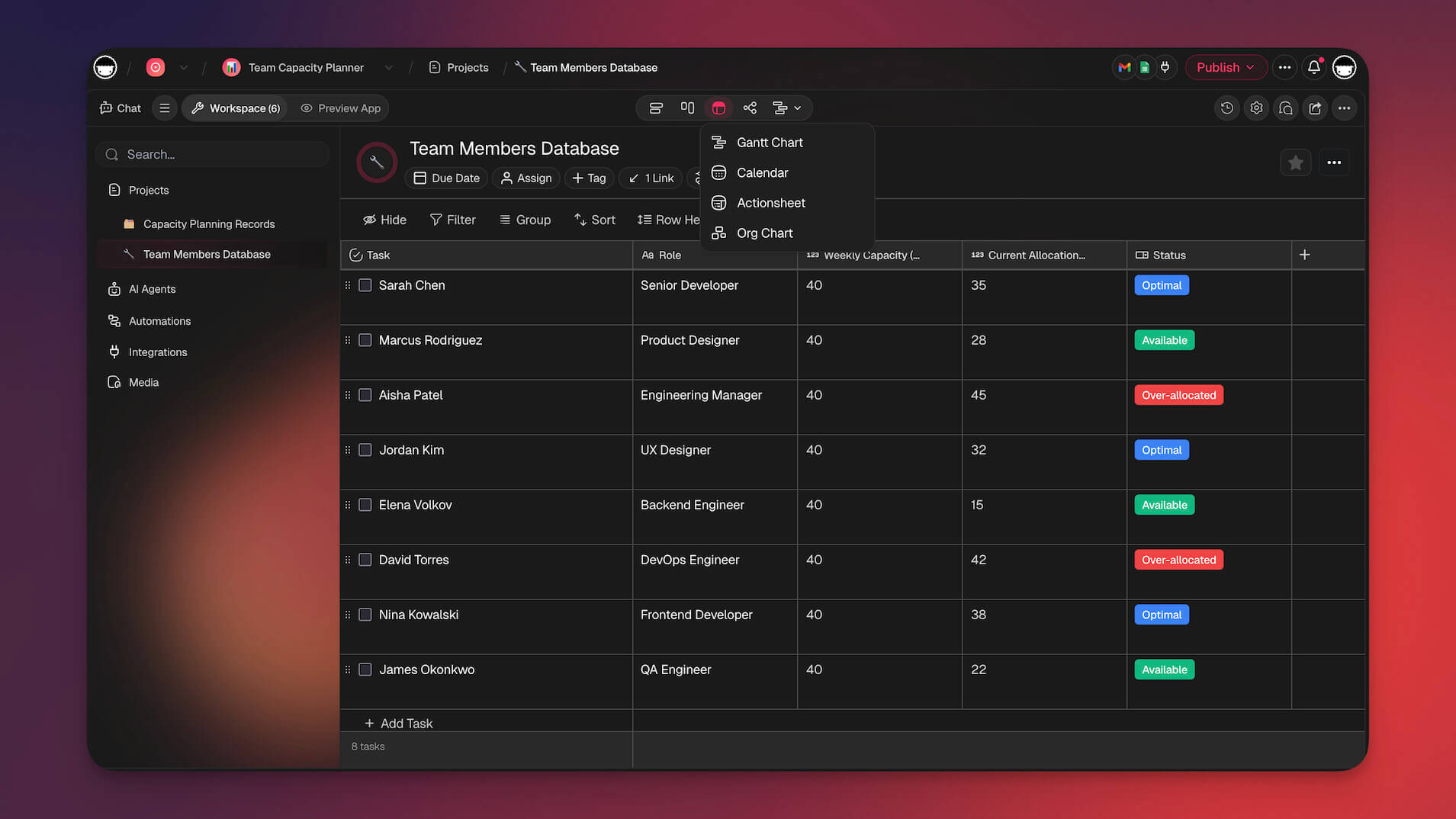
For example, use the Mind Map view to brainstorm inside Resources, the Board view to manage active Projects, and the Calendar view to track deadlines across Areas.
👋 Parting Words
Tiago Forte’s PARA method is an excellent addition to any productivity framework. It’s simple and intuitive, and you can easily layer it on top of your existing current workflow.
So, are you ready to up your knowledge management game?
Build your AI-powered second brain with Taskade!
Custom AI Agents: Train agents on your PARA system — they auto-categorize notes, flag stale projects, and surface relevant resources. Powered by 11+ frontier models from OpenAI, Anthropic, and Google.
Taskade Genesis: Build complete PARA-ready workspaces from a single prompt. Describe your workflow and get Projects, Areas, Resources, and Archives pre-configured with AI agents and automations.
7 Project Views: Visualize your PARA system as a List, Board, Calendar, Table, Mind Map, Gantt, or Org Chart — switch views without losing context.
100+ Integrations: Connect Taskade to your email, calendar, Slack, and 100+ other tools to auto-capture information into your second brain.
AI Prompt Templates: Hundreds of AI prompts to jumpstart any PARA project — from meeting notes to research briefs.
Explore AI apps in our community or start building for free.
Frequently Asked Questions About the PARA Method (FAQ)
What is the PARA Method simplified?
The PARA method is a simple way to organize your tasks and information into four categories: Projects, Areas, Resources, and Archives. Projects are things you need to do that take more than one step, like planning an event. Areas are aspects of your life that you want to maintain or improve, like your health. Resources are things you need to refer to often, like books or notes. Archives are things you want to keep for future reference but don't need to access now, like old notes. By organizing things in these categories, you can keep track of everything more easily and be more productive.
What is the difference between Projects and Areas?
The main difference between a project and an area is that a project is a specific goal or task that requires multiple steps to complete, while an area is a broader category or aspect of your life that you want to maintain or improve over time.
What does PARA stand for in a second brain?
In a second brain context, PARA stands for a framework for organizing information into four categories: Projects, Areas, Resources, and Archives. This framework was developed by productivity and organization expert Tiago Forte as a way to create a more efficient and effective system for personal or professional growth.
What is the difference between Areas and Resources in PARA?
In the PARA method, an "Area" represents a broad domain of responsibility or focus, while a "Resource" refers to a specific tool or piece of information that you need to accomplish your work or goals. Areas are major aspects of your life that require ongoing attention and effort, such as work, health, or personal development, while resources are specific and concrete, such as books, websites, or software programs.
Related Reading
- Building a Second Brain Review — Full breakdown of Tiago Forte's BASB methodology
- Best Note-Taking Apps — Top picks for PKM
- Best Notion Alternatives — 21 alternatives compared
- Best Evernote Alternatives — Post-Bending Spoons options
- Personal Knowledge Management Guide — PKM strategies and tools
- What Is Vibe Coding? — Build AI apps from natural language
- Taskade vs Notion — Side-by-side comparison
