






✍️ Journaling can increase your productivity and help you stay mindful of important, long-term goals. Whether you’re scoping out a new project, updating an existing feature, or smashing bugs in your current system, the act of writing down and evaluating tasks keeps your team organized. And using the digital bullet journal framework is one of the best ways to approach this practice.
TL;DR: Digital bullet journals help teams connect daily tasks to long-term goals through structured rapid logging. Taskade combines bullet journaling with AI agents, 7 project views, and real-time collaboration starting on a free plan. Try Taskade free →
Building productive habits is also easier when everyone on your team understands how their contributions move a project forward. Creating a digital bullet journal helps your team work together by increasing visibility across the board.
That eliminates the need to reset expectations and makes it easier to visualize the value of each team member’s work.
This is particularly important when your team is distributed. Remote companies often struggle with accountability and keeping teams across different time zones all on the same page.
But using a digital bullet journal to track projects ensures your work is done efficiently and that you’ll re-evaluate projects consistently without making tasks more complicated than necessary.
To take advantage of this practice, we at Taskade incorporated the core tenets of the bullet journal method into our experience while maintaining a minimalist aesthetic and structure that doesn’t get in your team’s way.
Here’s how you can leverage this popular framework to create more transparency into tasks and ultimately help your team get things done.
🧐 What is the Bullet Journal Method?
✍️ Organizing tasks in a digital bullet journal helps you connect your day-to-day work with long-term goals.
👩💻 Evaluating your progress on a daily basis helps keep your team engaged with each different task.
🎯 Including long-term company goals in your bullet journal keeps them top of mind.
Bullet journaling is a framework for organizing daily checklists that incorporates the “why” behind tasks and tracks their progress. This journaling method connects daily tasks with overarching, long-term goals and encourages you to evaluate them regularly.
Linking the items on your daily task list to your high-level goals introduces mindfulness into your workflow — it’s easier to stay motivated when you can plainly see your progress. As a result, digital bullet journaling boosts your team’s productivity and encourages them to invest more in their work.
A designer named Ryder Carroll originally created this framework for individuals—he built this from his own experience in journaling for focus and personal productivity.
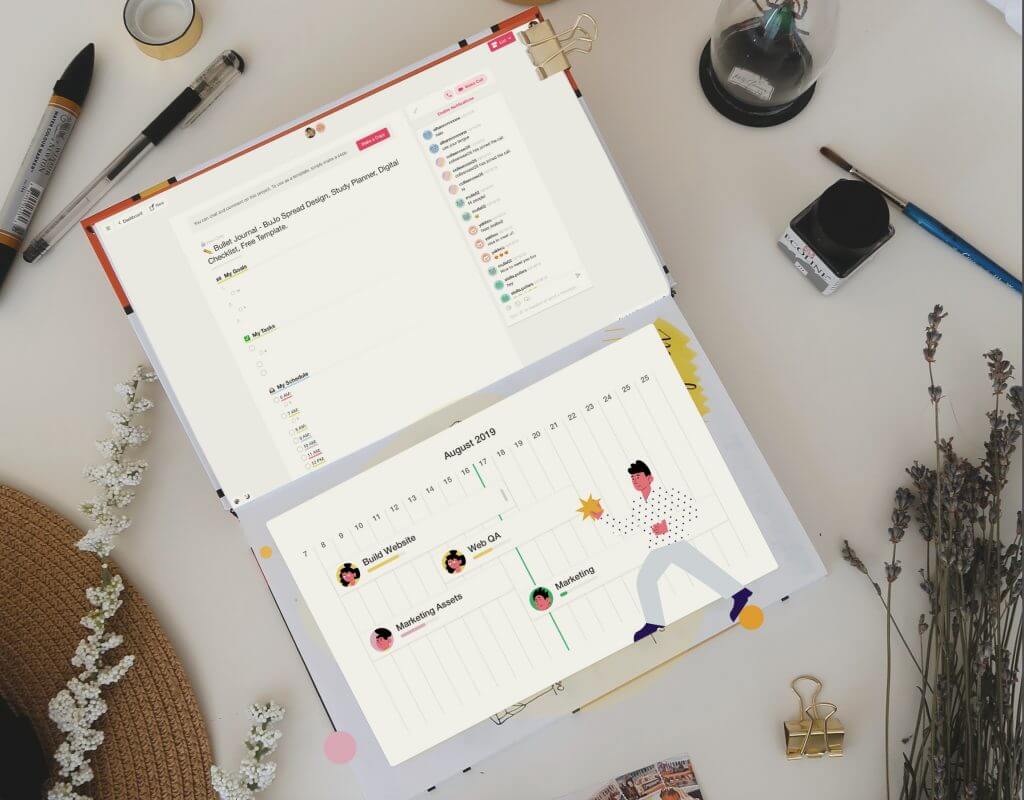
In a bullet journal, each symbol and indentation has a specific meaning. Defining these key elements creates a visual structure that makes any task or note easy to understand at a glance.
The first thing you’ll need to do when building a digital bullet journal is to define these key elements. Each page you create should follow the same structure—otherwise, it’ll be difficult for your team to parse information quickly. At the most basic level, your 🔑 key should include:
🌈 Colors to highlight specific kinds of tasks (more on this below)
✅ Checklist boxes or numbers
👉 Indent for subtasks and prioritization
Once you establish these key elements, apply them to your daily, monthly, and future logs (avid followers of the bullet journal method call these “spreads”) and revisit on a regular cadence. Then take the individual tasks for a given log, migrate them to new pages, and assign due dates based on team availability or project priorities.
⚡️ The Superpowers of using a Digital Bullet Journal with your Team
🙌 Using a digital bullet journal helps make task management a collaborative process.
🧠 A public log of everyone’s tasks increases visibility for individual contributions and keeps the team accountable for their work.
☀️ Engaging with goals and tasks on a daily basis helps your team make a deeper investment in the work that they do and increases productivity.
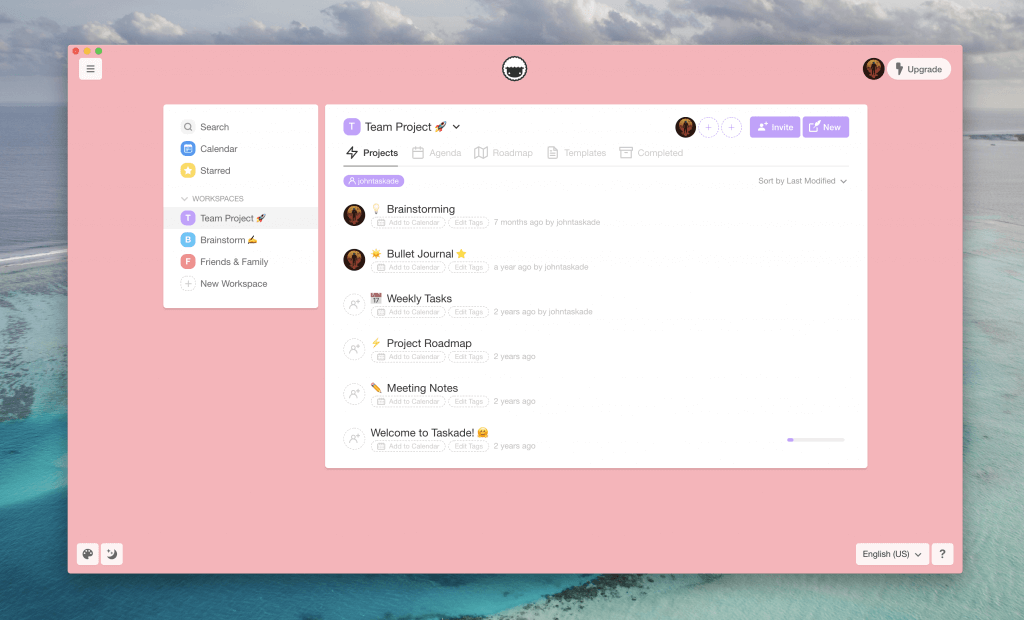
Workspaces in Taskade
When your team builds their own digital bullet journals, they should be publicly accessible. Sharing everyone’s checklists increases visibility into what each member of the team is working on and helps them track progress with comments and highlights.
This process helps you build a more cohesive team culture by reminding everyone of their impact on their peers (i.e., if you miss a deadline, it’ll take your colleague longer to finish their part of the project). And understanding this impact helps you prioritize tasks better, increase productivity, and build a more accountable team.
🚀 Power of Productivity
List the overarching goals of your current project at the top of your bullet journal to keep it fresh in your mind. This daily reminder of a bigger goal helps your team buy into the project on a deeper level. Putting your daily to-dos on the same page as your project goal can clarify how each task ladders up to that bigger objective—not to mention reminding everyone how all the work they do matters. Ultimately, this can increase investment and help motivate your team to be more productive.
Active engagement with a digital bullet journal helps you identify blockers and address productivity issues before they impact your team.
When your team interacts with digital bullet journals on a daily basis, they’re reminded of their responsibilities and how their own workload impacts larger company goals. Only 5.9% of companies communicate their goals on a daily basis, which means it’s easy to lose sight of how individual contributions make an impact on the company. Over time, that can decrease productivity and make it difficult to move forward as a team.
🧠 Power of Visibility
Daily interaction with your digital bullet journal also increases visibility into long-term company goals. In a digital bullet journal, you and your team document your project goals front and center at the top of the page. Everyone knows exactly what they’re working toward in shared workspaces and projects.
Digital bullet journals also allow teams to comment on these goals and collaborate via chat. This back-and-forth interaction makes it easy for colleagues to ask questions, make connections, and help ensure that everyone understands the “why” behind each goal.
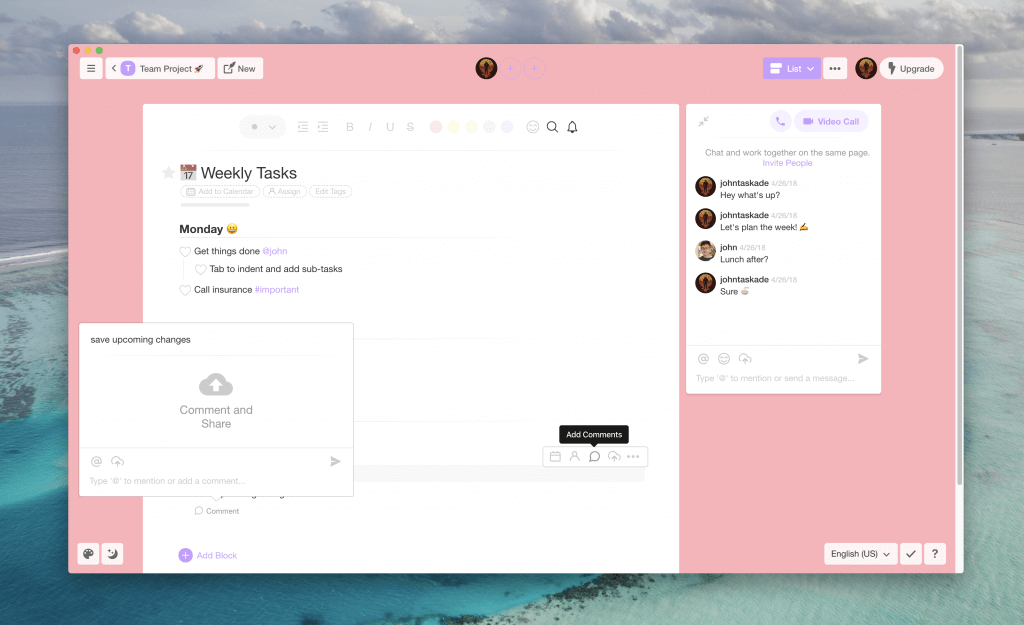
Project in Taskade
This comment history accompanied by instant in-app notifications history can give teams real-time insight into why certain tasks are incomplete or have taken longer than expected to complete, and provides context for why certain decisions are made.
Reviewing task lists can also help you identify potential problems before they cause your project to grind to a halt. When you can see everyone’s tasks and dependencies, you can highlight potential bottlenecks, address them before they get out of hand, and help your colleagues push your project across the finish line.
🗳 Power of Accountability
A public bullet journal helps you hold your team accountable for their individual tasks. When each member of your team is consistently re-evaluating progress toward their goals, it’s also easier to prioritize tasks and understand how they impact the team.
Using those key elements we mentioned, like color, highlights, and indentation, you can assign priority and track which tasks are dependent on others in your team’s workflow.
For example:
🔴 Red tasks have a direct impact on the customer experience.
🟡 Yellow tasks are updates to existing features.
🟣 Purple tasks are dependent on other members of the team.
Each element provides your team with valuable information on how tasks impact others and fit into larger company goals.
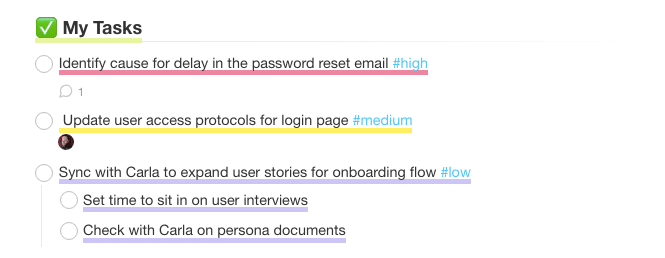
Using this visual approach to your task management helps individuals understand the real-world impact of their work at a glance. It connects each task with the value it adds to the team and the company as a whole.
Setting daily, monthly, quarterly, or yearly goals also keeps everyone moving in the same direction. It increases investment in long-term projects, which translates to better engagement with your digital bullet journal and a higher priority placed on moving forward as a united team.
Digital Bullet Journal Tools Compared
| Feature | Taskade | Notion | Evernote | Bullet Journal (Paper) |
|---|---|---|---|---|
| Real-Time Collaboration | Yes | Yes | Limited | No |
| AI-Powered Task Generation | Yes (15+ models) | Limited | No | No |
| Multiple Project Views | 7 views (List, Board, Mind Map, etc.) | 4 views | 1 view | N/A |
| Built-In Video Chat | Yes | No | No | No |
| Templates Library | 500+ free templates | Community templates | Basic templates | DIY |
| AI Agents | Yes (34 built-in tools) | No | No | No |
| Automations | Yes (100+ integrations) | Limited | Limited | No |
| Mobile + Desktop Apps | Yes | Yes | Yes | N/A |
| Free Plan | Yes | Yes (limited) | Yes (limited) | Cost of notebook |

🌈 How to Build Your Digital Bullet Journal in Taskade
📝 Taskade offers a template for your digital bullet journal that you can copy into any workspace.
🖍 Color coding and highlighting individual tasks helps your team parse information faster and stay organized.
🗓 Sharing a public schedule shows everyone on the team when certain tasks are going to be completed.
We’ve created a bullet journal template in Taskade to make it as easy as possible to build a digital bullet journal. The basic template is made up of three sections—one for each aspect of your bullet journal. All your work is logged publicly, can be commented on, and is tracked for the entire team.
These three sections include:
🎯 My Goals: Where you define high-level aspects of your project.
✅ My Tasks: The tasks and responsibilities that help you achieve your goals.
📆 My Schedule: When you plan to work on different tasks throughout the day.
When you lay out the high-level goals for a project, everyone involved can easily see the real-world value of their work. Whether it’s building a new feature for your product or fixing a bug damaging the customer experience, seeing the impact of all the ongoing work on a particular project helps your team understand every task’s value.
The ability to comment on these goals also makes it simpler to include additional context for yourself and your team.
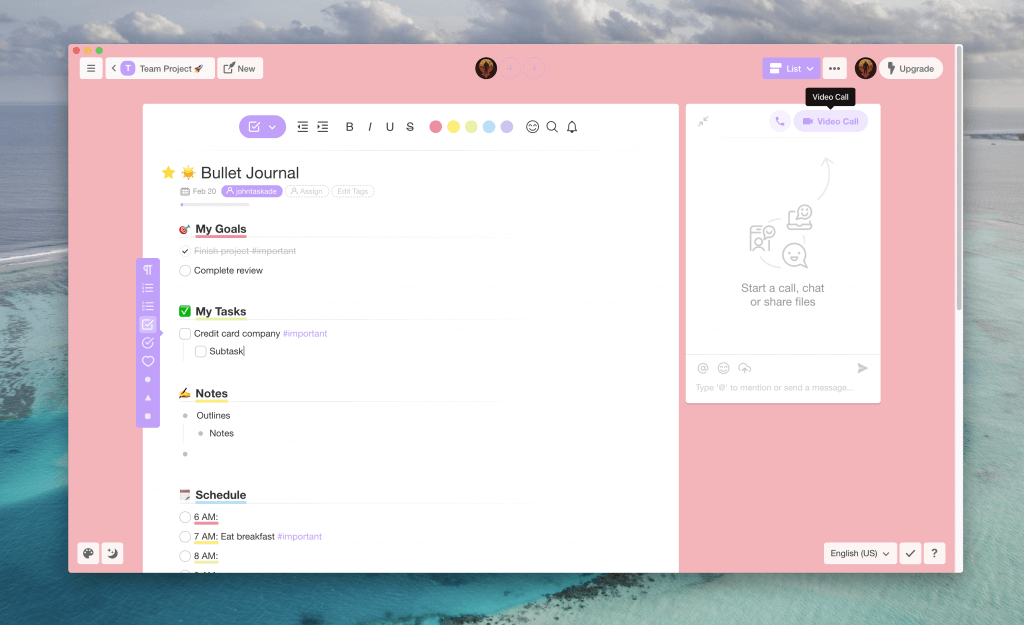
Bullet journaling in Taskade
Once you’ve defined these goals, break them up into more manageable pieces in the “My Tasks” section. These tasks are what help you prioritize the work that needs to be done in the most efficient way possible.
When you enter tasks in this section, you can assign each one to specific team members and track when it’s completed.
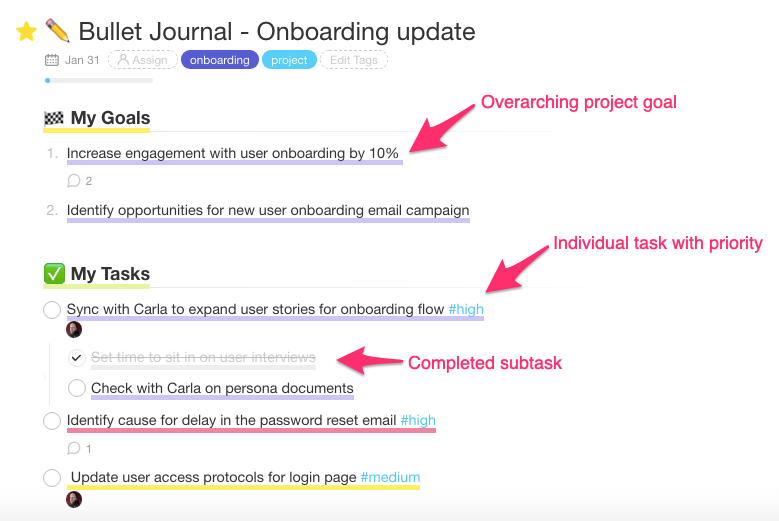
Prioritizing tasks in Taskade
Defining the My Tasks and My Goals sections of the digital bullet journal should be done as a group. In Taskade, you can do this in real time using the chat, call, and commenting feature of any page.
Now that you’ve set and assigned your goals and tasks, each team member can make a copy of this digital bullet journal and start working through their personal schedules.
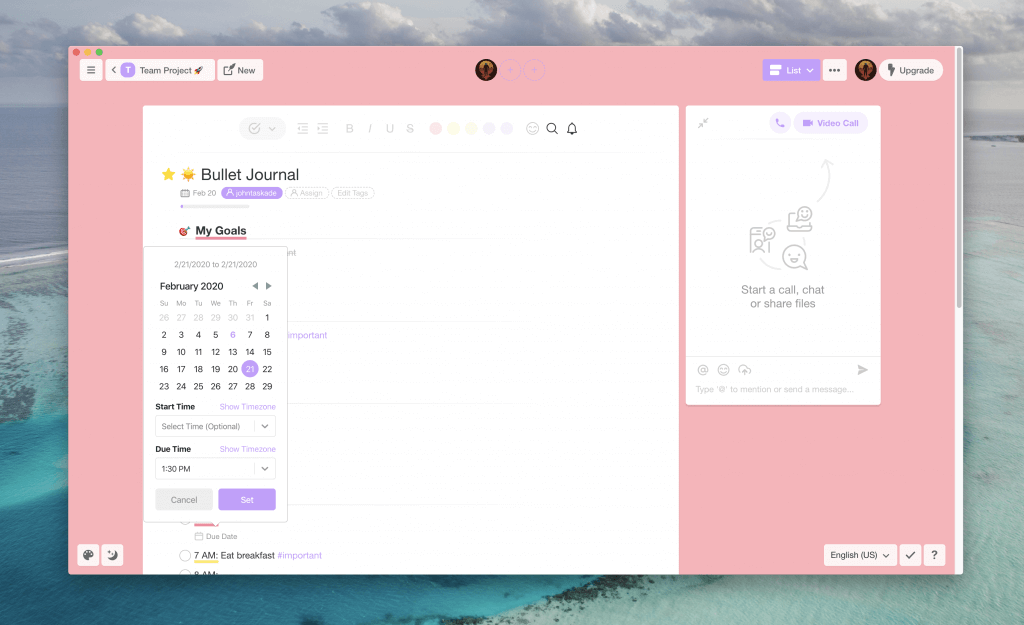
Scheduling task due dates in Taskade
The calendar view gives everyone on the project a breakdown of the time required to complete specific tasks. Use this to block out designated times for working on different parts of the project and let your team know when it’s best to reach out with questions.
By color coding goals, tasks, and schedule times in Taskade, it’s easy to visualize how each member of your team progresses through their daily to-do list for the project. Setting up your digital bullet journal makes it easy to follow up with questions, comments, or general feedback based on how each person prioritizes their day.
Workspace DNA: How Memory, Intelligence, and Execution Power Your Journal
Taskade's Workspace DNA architecture transforms a static bullet journal into a living productivity system built on three pillars:
- Memory — Every journal entry, goal, and task lives inside Taskade projects as persistent, searchable data. Your bullet journal becomes a knowledge base that grows with your team.
- Intelligence — AI agents analyze your entries, identify patterns, suggest priorities, and surface insights. With 15+ frontier models from OpenAI, Anthropic, and Google, intelligence is embedded in every layer.
- Execution — Automations with 100+ integrations turn journal entries into action. Tasks migrate automatically, reminders fire on schedule, and workflows execute without manual intervention. Over 3M+ automations have been executed on the platform.
This self-reinforcing loop means your journal entries feed intelligence, intelligence triggers execution, and execution creates new entries — a cycle that compounds productivity over time.
Agentic AI and Vibe Coding: The Future of Bullet Journaling
Traditional bullet journals require manual setup and daily maintenance. Agentic AI changes the equation entirely. Instead of configuring templates and rules by hand, you describe what you want in plain language — a practice known as vibe coding.
With Taskade Genesis, you can say "build me a bullet journal with daily logs, weekly reviews, and a habit tracker" and get a fully functional app deployed in seconds. 150,000+ apps have been built this way, each with embedded AI agents that handle routine journaling tasks autonomously.
Agentic AI agents equipped with 34 built-in tools, custom tool schemas, and MCP connectors can:
- Auto-categorize new journal entries by project or priority
- Generate daily and weekly review summaries
- Flag stalled tasks and suggest next actions
- Sync journal data with external tools via 100+ integrations
Explore what other teams have built in the Taskade Community or create your first app.
Digital Bullet Journal Workflow Checklist
| Step | Action | Taskade Feature |
|---|---|---|
| 1. Set Goals | Define project-level objectives | Projects with 7 views |
| 2. Create Daily Logs | Log tasks, notes, and events | List view with real-time collaboration |
| 3. Assign Tasks | Distribute work across the team | @mention task assignment |
| 4. Review Progress | Evaluate daily and weekly logs | AI agents generate summaries |
| 5. Migrate Tasks | Move incomplete items forward | Automations handle migration |
| 6. Reflect and Adjust | Identify patterns and improve | AI-powered insights and analytics |
| 7. Share Knowledge | Make journals visible to the team | Shared workspaces with comments |
✅ Use a Digital Bullet Journal to Work Better Together
Having your team build a digital bullet journal for each project helps keep everyone up-to-date on one another’s progress. It’s easy for each member of the team to track how their daily tasks move the project forward and contribute to larger company goals.
Visualizing projects in a bullet journal format also helps you parse large amounts of information quickly. When you color code and highlight certain tasks, it’s easy to see how each team member’s individual work contributes to the achievement of one of your goals.
Supercharge Your Bullet Journal With Taskade
Ready to take your digital bullet journal to the next level? Taskade combines structured task management with frontier AI models from OpenAI, Anthropic, and Google to help your team plan, execute, and reflect faster.
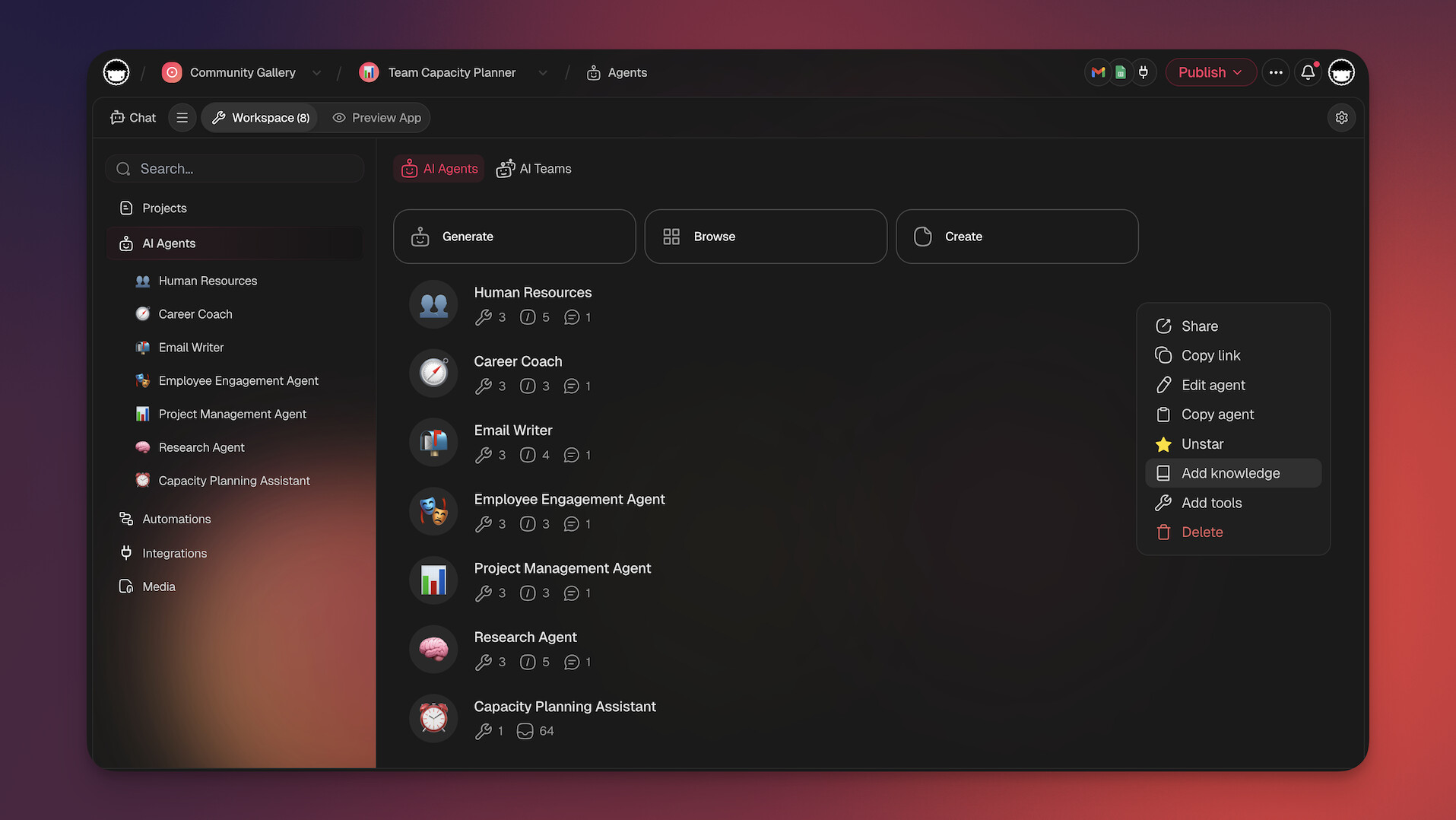
With Taskade Genesis, you can build custom productivity apps from a single prompt — including personalized bullet journal dashboards, habit trackers, and goal-setting systems. Deploy AI agents with 34 built-in tools to automate your daily reviews, or set up automations that move tasks between your journal sections automatically.
What you get with Taskade:
- 7 project views (List, Board, Calendar, Table, Mind Map, Gantt, Org Chart) to visualize your journal
- AI agents that organize, prioritize, and summarize your entries
- Real-time collaboration with your entire team
- 500+ templates including bullet journal layouts
- Free to start, with Pro from $10/month billed annually
Start your digital bullet journal with Taskade →
Explore what other teams are building in the Taskade Community.

Frequently Asked Questions
What is a digital bullet journal and how does it boost productivity?
A digital bullet journal is an electronic adaptation of the analog Bullet Journal method — a system for rapid logging tasks, notes, and events using short-form entries. It boosts productivity by helping teams organize tasks visually, track progress, and maintain long-term goal awareness without the limitations of paper notebooks.
Can teams use a digital bullet journal for collaboration?
Yes. Unlike a personal paper journal, a digital bullet journal in a collaborative platform like Taskade lets multiple team members contribute, view, and update entries in real time. This increases visibility across the team so everyone knows how their work connects to the bigger picture.
What are the advantages of a digital bullet journal over a paper one?
Digital bullet journals offer real-time collaboration, searchability, cross-device access, automatic backups, and the ability to link entries to projects and tasks. They also support multimedia content, templates, and AI-powered features that paper journals simply cannot provide.
What tools work best for a digital bullet journal?
Look for a tool that supports flexible outlining, multiple project views like lists and boards, templates, and real-time collaboration. Taskade is a strong choice because it combines structured note-taking with task management, AI agents, and 7 different views for organizing your journal entries.
How does Taskade Genesis help with digital bullet journaling?
Taskade Genesis lets you build a custom bullet journal app from a single prompt. Describe your ideal journal layout — daily logs, habit trackers, goal dashboards — and Genesis creates a deployable app with built-in AI agents, automations, and real-time collaboration. Over 150,000 apps have been built with Genesis since launch.
What is agentic AI and how does it improve bullet journaling?
Agentic AI refers to AI systems that act autonomously on your behalf rather than waiting for manual commands. In Taskade, AI agents with 34 built-in tools can automatically categorize journal entries, flag overdue tasks, summarize weekly progress, and suggest priority adjustments — turning your bullet journal into a self-maintaining productivity system.
How does Workspace DNA apply to digital bullet journaling?
Workspace DNA is Taskade's architecture of Memory plus Intelligence plus Execution. Your bullet journal entries become Memory (persistent project data), AI agents provide Intelligence (analyzing patterns, suggesting priorities), and automations handle Execution (moving tasks, sending reminders). This self-reinforcing loop keeps your journal active and actionable.
Can AI agents automate bullet journal workflows?
Yes. Taskade AI agents can automate daily journal reviews, migrate incomplete tasks to the next day, generate weekly summaries, and send deadline reminders. With 100+ integrations and durable execution, automations run reliably across your entire workflow without manual intervention.