







Your notes are scattered across five apps, three browsers, and a dozen browser tabs you swear you will read later. The "second brain" concept promised to fix that. AI makes it real.
Tiago Forte popularized the second brain framework in 2017 as a way to capture, organize, distill, and express knowledge. The original method relied on manual tagging, folder discipline, and periodic reviews. In 2026, AI handles the heavy lifting: semantic search finds ideas by meaning, agents summarize long documents, and automations turn captured notes into workflows, tasks, and live dashboards without a single manual step.
This guide ranks the 11 best AI second brain tools of 2026. We evaluate each on three layers: capture (how information gets in), knowledge (how it gets organized and retrieved), and action (how it turns into outcomes). One tool delivers all three in a single workspace.
TL;DR: Taskade is the only AI second brain that completes the full loop from notes to knowledge to action. It combines multi-layer search, AI agents with built-in tools, and reliable automation workflows in one workspace. 150,000+ apps built since launch, starting free. For a deep dive on the PARA organization method, read our PARA Method guide.
What Is the Best AI Second Brain in 2026?
The best AI second brain in 2026 is one you can clone and run, not just read about. Most tools on every "best of" list are static apps you rent. Taskade Genesis lets you clone a living knowledge dashboard in 60 seconds, drop in your notes, and have EVE (your AI assistant) auto-tag, link, and recall them across multiple project views — capture to recall to action, in one workspace.
Clone This Living Second Brain (No Setup)
You do not have to imagine it. The dashboard below is a real, running Taskade Genesis app. Click it to open the live version, then hit Clone to make it yours — your own second brain with capture, search, and agents wired in, before you write a single note.
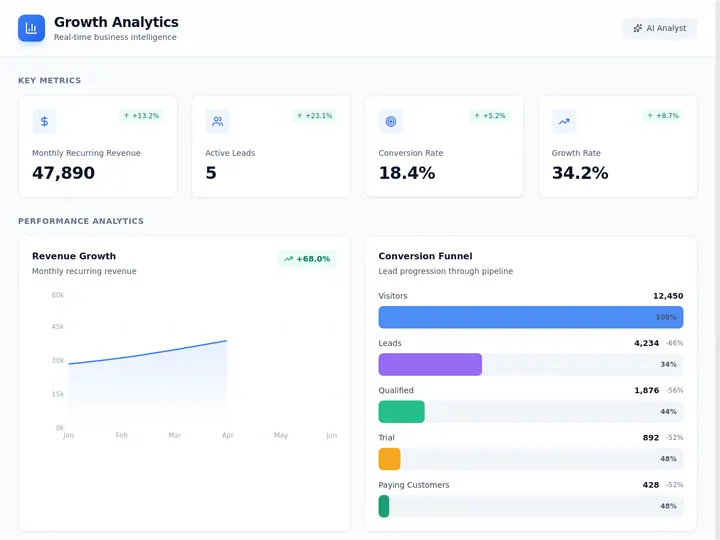
This is the gap nobody else fills: every other tool hands you a screenshot and a signup form. Taskade hands you a working app you own. What a Fortune-500 team would scope across 40+ people and 18 months, one operator clones and customizes in an afternoon — that is the difference between reading about a second brain and running one.
The outcome path — from a single prompt to a second brain you ship and run:
Why 2026 Is the Tipping Point for AI Second Brains
Three converging trends make 2026 the breakout year for AI second brains:
Semantic Search Became Table Stakes
Two years ago, semantic search was a research demo. Today, every serious knowledge tool offers some form of meaning-based retrieval. Taskade's implementation (1536-dimensional HNSW embeddings) makes sub-millisecond semantic queries available on free plans. Users no longer accept keyword-only search.
Agents Moved from Chat to Action
Early AI integrations in note apps were glorified chatbots: ask a question, get an answer. In 2026, AI agents take multi-step actions — creating tasks, routing information, generating reports, and building live applications from your knowledge base. This shift transforms note apps from read-mostly archives into execution engines.
The Knowledge-Action Gap Closed
The biggest problem with traditional second brains was the gap between knowing and doing. You captured everything but acted on nothing. AI automations close that gap by converting insights into workflows automatically. When an agent identifies an action item in your meeting notes, an automation can create the task, assign it, and set a deadline without manual intervention.
What Is an AI Second Brain?
An AI second brain is a personal knowledge management system that uses artificial intelligence to capture, organize, retrieve, and act on your information. It extends Tiago Forte's original second brain concept (capture everything, organize for actionability, distill the essential, express your ideas) with three AI-powered upgrades: semantic search that finds ideas by meaning instead of exact keywords, automatic summarization that distills long documents into key takeaways, and agent-driven action that converts notes into tasks, workflows, and live applications. The result is a system that does not just store your notes. It thinks alongside you.
Notes to Knowledge to Action: The 3 Layers of an AI Second Brain
Every second brain tool handles capture. Only the best handle all three layers: notes, knowledge, and action. The gap between a good note-taking app and a true AI second brain is the gap between storage and execution.
Layer 1 — Notes (Capture). Raw information enters the system: meeting transcripts, web clips, voice memos, PDFs, YouTube summaries. The tool must accept many formats without friction.
Layer 2 — Knowledge (Organize + Retrieve). AI transforms raw notes into structured knowledge. Semantic search surfaces related ideas across projects. Automatic tagging clusters similar notes. Summarization distills long documents into actionable takeaways. Graph-based linking reveals hidden connections.
Layer 3 — Action (Execute). The rarest layer. Notes become tasks, tasks become workflows, workflows become live dashboards and apps. This is where AI agents and automations close the loop, turning static knowledge into dynamic output.
Most tools in this list excel at Layer 1 and Layer 2. Taskade is the only platform that completes the full three-layer loop natively with AI agents and automations.
The 11 Best AI Second Brain Tools in 2026
1. Taskade — The Living Second Brain (Notes + Agents + Automations)
Best for: Teams and individuals who want capture, knowledge, and action in one workspace.
Taskade is the only AI second brain that closes the full loop from raw notes to organized knowledge to automated execution. It does this through Workspace DNA — an architectural principle where Memory (your projects and notes) feeds Intelligence (AI agents that analyze and surface insights), Intelligence triggers Execution (automations that act on those insights), and Execution creates new Memory. The cycle never stops.
Capture. Taskade accepts notes in multiple project views: List, Board, Calendar, Table, Mind Map, Gantt, and Org Chart. Every view is a different lens on the same data. Capture a meeting as a list, switch to Mind Map to see idea connections, switch to Board to plan next steps. Web clipper, file uploads (PDF, DOCX, images), and 100+ integrations feed information into your workspace automatically.
Knowledge. Taskade's multi-layer search goes far beyond keyword matching. Full-text search handles exact queries. Semantic HNSW search (1536-dimensional embeddings) finds related ideas by meaning, even when no words overlap. File content OCR extracts text from images and scanned PDFs so nothing hides from search. AI agents summarize long documents, cluster related notes, and surface forgotten connections.
Action. This is where Taskade separates from every other tool on this list. AI agents with built-in tools can draft responses, create tasks, analyze data, generate reports, and build entire apps from a single prompt. Automations run reliable workflows triggered by events across your workspace: when a note is tagged "urgent," an agent summarizes it and posts to Slack. When a research document is uploaded, an agent extracts key findings and adds them to your knowledge base.
Access control. role-based access (Owner to Viewer) lets you share your second brain selectively. Share a workspace with your team at Editor level while keeping personal notes in a Viewer-restricted project.
AI models. 15+ frontier models from OpenAI, Anthropic, and Google. Choose the best model for each task. Use fast models for quick summaries, powerful models for deep analysis.
| Feature | Details |
|---|---|
| Project Views | List, Board, Calendar, Table, Mind Map, Gantt, Org Chart |
| Search | Multi-layer: full-text + semantic HNSW (1536-dim) + file content OCR |
| AI Agents | built-in tools, custom tools, persistent memory, slash commands |
| Automations | Reliable workflows with branching, looping, filtering, 100+ integrations |
| RBAC | Role-based access (Owner to Viewer) |
| Models | 15+ frontier models (OpenAI, Anthropic, Google) |
| Free Plan | 11,000 credits, basic views, AI agents included |
Pricing (annual billing):
| Plan | Price | Best For |
|---|---|---|
| Free | $0/month | Personal second brain with AI agents |
| Pro | $10/month (10 users) | Teams building a shared knowledge base |
| Business | $25/month | Organizations with advanced security |
| Enterprise | Custom | Custom SLA, SSO, dedicated support |
Bottom line. If your second brain should not just remember but also think and act, Taskade is the only tool that delivers all three layers in a single workspace. Start building your second brain for free.
2. Notion AI — Design-First Knowledge Base
Best for: Users who want maximum layout customization and a polished visual workspace.
Notion pioneered the modern knowledge workspace: databases, inline pages, toggle blocks, and flexible layouts that let you build anything from a CRM to a recipe book. Notion AI adds an assistant layer on top, capable of summarizing pages, answering questions across your workspace, and generating first drafts.
Capture. Notion handles text, databases, embeds, web clips, and file uploads. Its template gallery is enormous. The block-based editor gives you granular control over layout.
Knowledge. Notion AI can search across your workspace and answer questions using your notes as context. Database relations and rollups let you build structured knowledge graphs. However, search is keyword-plus-AI-summary — it does not offer true semantic vector search or OCR for images and PDFs.
Action. Notion recently added automations (triggers, conditions, actions within databases), but they are limited compared to dedicated workflow tools. There are no autonomous agents that can take multi-step actions across your workspace.
Limitations. Offline support is limited. Real-time collaboration can lag with large databases. AI features require a paid add-on ($10/user/month on top of the base plan). No native AI agents with tool access.
Pricing. Free plan available. Plus starts at $10/month. AI add-on is $10/user/month extra.
3. Mem — AI-Native Capture and Retrieval
Best for: Individuals who want a frictionless capture experience with AI-powered recall.
Mem was built from day one around AI. There are no folders, no manual tags. You dump notes in, and Mem's AI organizes them, surfaces related notes when you are writing, and answers questions using your entire note history as context.
Capture. Mem excels at fast capture: quick notes, meeting transcripts, email forwards, and voice memos. The inbox-style interface means zero friction. No folder hierarchy to maintain.
Knowledge. Mem's AI-powered search is its standout feature. It retrieves notes by meaning, not just keywords, and proactively suggests related notes as you write. Automatic collections group notes by topic without manual organization.
Action. Mem can generate drafts and summaries based on your notes but lacks automations, agents, or integrations beyond basic import/export. Your second brain stays read-mostly.
Limitations. No collaboration features. No offline mode. No structured views (no board, calendar, or table). Limited integrations. Pricing is per-user with no free tier for meaningful use.
Pricing. Free tier with limited AI queries. Pro starts at $14.99/month.
4. Obsidian + AI Plugins — Local-First Graph Knowledge
Best for: Privacy-conscious users who want full data ownership and graph-based thinking.
Obsidian stores everything as plain Markdown files on your local device. Its graph view shows connections between notes as an interactive network diagram. The plugin ecosystem adds AI capabilities through community extensions like Smart Connections, Copilot, and Text Generator.
Capture. Markdown files, web clips via browser extensions, PDF annotation via plugins. All data lives on your filesystem. You own every byte.
Knowledge. The graph view is Obsidian's signature feature: see how your notes connect visually. Backlinks, tags, and aliases create a web of knowledge. AI plugins add semantic search and question-answering over your vault.
Action. Limited to what plugins provide. Templater can automate note creation. Dataview queries can surface patterns. But there are no native agents, no workflow automations, and no integrations beyond file syncing.
Limitations. AI features depend entirely on third-party plugins with varying quality and maintenance. Real-time collaboration requires Obsidian Sync ($8/month) and is limited to 10 users. No built-in project views beyond the editor and graph.
Pricing. Free for personal use. Sync is $5/month. Publish is $8/month. AI plugins may have separate costs.
5. Reflect — Minimal Daily Notes with AI
Best for: Individuals who journal daily and want AI-powered reflection and retrieval.
Reflect focuses on daily notes, networked thinking, and AI-assisted recall. The interface is intentionally minimal. You write daily notes, link ideas with backlinks, and let Reflect's AI summarize and connect your thoughts over time.
Capture. Daily note templates, web clips, voice transcription, and a Chrome extension. Capture is fast and frictionless.
Knowledge. Backlinks and graph view connect ideas across days. AI can summarize your notes from any time period ("What did I work on last week?") and answer questions across your entire note history.
Action. Reflect generates summaries and action items but does not automate workflows. No agents, no integrations beyond calendar sync and Readwise.
Limitations. Single-player only. No team collaboration. No project views. No databases. Limited export options.
Pricing. Starts at $10/month. No free tier.
6. Tana — Supertags and Structured Knowledge
Best for: Power users who want to build custom knowledge schemas with supertags.
Tana rethinks note-taking around "supertags" — structured tags that carry fields, views, and behaviors. Tag a note as #Meeting and it automatically gets fields for date, attendees, and action items. This turns freeform notes into structured data without a database.
Capture. Tana's outliner-based editor captures notes as nested bullets. Supertags add structure on top. Voice input and web clipper available.
Knowledge. Supertags create queryable knowledge. Search by tag, field value, or date range. AI features include summarization, question-answering, and auto-tagging. The "Tana AI" overlay answers questions using your workspace as context.
Action. Tana supports basic automations (when a supertag is applied, run a command) but lacks multi-step workflows, agents, or external integrations beyond basic import/export.
Limitations. Still in early access with a waitlist. No mobile app. No offline mode. Steep learning curve for supertag configuration. Limited collaboration features.
Pricing. Free during beta. Paid plans expected at $10-15/month.
7. Logseq — Open-Source Outliner with AI
Best for: Open-source advocates who want local-first notes with community-driven AI features.
Logseq is a free, open-source outliner that stores notes as Markdown or Org-mode files on your device. Like Obsidian, it offers a graph view and backlinks. The Logseq community has built AI plugins for summarization and search.
Capture. Outliner-based input with daily journals, block references, and web clips. All data is local Markdown.
Knowledge. Graph view, backlinks, and block references create a linked knowledge base. AI plugins add semantic search and summarization. The query language lets you build custom views of your data.
Action. Minimal. No built-in automations or agents. Plugins can add some template automation. No external integrations beyond file sync.
Limitations. Performance degrades with large vaults (10,000+ blocks). The database version (Logseq DB) is still in alpha. No real-time collaboration. Mobile apps are limited.
Pricing. Free and open source. Logseq Sync (cloud backup) is $5/month.
8. Heptabase — Visual Thinking Canvas
Best for: Researchers and visual thinkers who organize ideas spatially on whiteboards.
Heptabase combines a card-based note system with an infinite canvas. You place note cards on a whiteboard, draw connections, and cluster ideas visually. AI features include card summarization and question-answering across your canvas.
Capture. Cards can contain rich text, images, PDFs, and web clips. The whiteboard metaphor makes spatial organization intuitive.
Knowledge. The canvas view is uniquely powerful for seeing relationships between ideas. AI can summarize groups of cards, find connections across whiteboards, and answer questions about your research.
Action. Limited. No automations, no agents, no integrations beyond basic import/export. The tool is focused on thinking, not executing.
Limitations. No real-time collaboration. No mobile app on Android. No structured views (no board, calendar, or table). Limited export options.
Pricing. $9.99/month. 7-day free trial, no free tier.
9. NotebookLM — Google Research Synthesis
Best for: Students and researchers who need to synthesize insights from uploaded documents.
Google's NotebookLM lets you upload PDFs, Google Docs, YouTube videos, and web pages, then ask questions across all your sources. It generates summaries, FAQs, timelines, and even audio overviews. The citations link back to exact source passages.
Capture. Upload PDFs, paste URLs, connect Google Docs. Limited to 50 sources per notebook.
Knowledge. NotebookLM's citation-backed answers are its standout feature. Every response links to the exact passage in the exact source. Audio overviews turn your sources into podcast-style summaries.
Action. None. NotebookLM is read-only. It synthesizes and summarizes but cannot create tasks, trigger workflows, or connect to other tools.
Limitations. 50-source limit per notebook. No general note-taking. No collaboration. No offline access. No integrations. Data is stored in Google's cloud only.
Pricing. Free with a Google account. NotebookLM Plus is $20/month with higher limits.
10. Capacities — Object-Based Knowledge
Best for: Users who want to organize knowledge around objects (people, books, meetings) rather than pages.
Capacities uses an "object-based" model where every note is typed: a Person, a Book, a Meeting, a Project. Objects have predefined fields and relationships. This eliminates the blank-page problem by giving every note a structure from the start.
Capture. Quick capture with object-type selection. Web clipper, daily notes, and mobile app available.
Knowledge. Object types create a natural ontology of your knowledge. Search by type, field, or relationship. The graph view shows connections between objects. AI features include summarization and question-answering.
Action. No automations, no agents, no integrations beyond Readwise and calendar. Capacities is a knowledge organization tool, not a workflow tool.
Limitations. No collaboration features. No offline mode on web. Limited export (JSON only). Small team, slower feature development than larger competitors.
Pricing. Free tier available. Pro starts at $9.99/month.
11. Saga — Multiplayer Knowledge Workspace
Best for: Small teams who need real-time collaboration on a shared knowledge base.
Saga combines a page-based editor with AI features designed for team use. Real-time collaboration, inline comments, and shared workspaces make it a team-oriented second brain.
Capture. Pages, databases, and embedded content. Team members can capture and share simultaneously.
Knowledge. AI-powered search across the entire workspace. Saga can answer questions using your team's notes as context. Smart linking suggests connections between pages.
Action. Basic automations for database triggers. No AI agents, no external integrations beyond Slack and Google Drive.
Limitations. Small user base. Limited integrations. No graph view. No local-first option. AI features are basic compared to dedicated AI tools.
Pricing. Free for personal use. Team plan starts at $10/user/month.
Mega Comparison Matrix
| Tool | Capture | Semantic Search | AI Agents | Automations | Collaboration | Offline | Views | Free Tier | Price From |
|---|---|---|---|---|---|---|---|---|---|
| Taskade | Files, web clips, voice, 100+ integrations | Full-text + HNSW + OCR | built-in tools, custom agents | Branching, looping, 100+ integrations | Real-time, RBAC | Limited | 8 | Yes (11,000 credits) | $10/mo |
| Notion AI | Blocks, databases, embeds | AI-assisted (no vector) | No | Database triggers | Real-time | Limited | 6+ | Yes | $10/mo + AI |
| Mem | Quick notes, voice, email | AI vector search | No | No | No | No | 1 | Limited | $14.99/mo |
| Obsidian | Markdown files, PDFs | Via plugins | Via plugins | Via plugins | Via Sync (10 users) | Full | 2+ plugins | Yes | $0 (plugins vary) |
| Reflect | Daily notes, voice, web clips | AI-assisted | No | No | No | Yes | 2 | No | $10/mo |
| Tana | Outliner, supertags, web clips | AI-assisted | No | Basic supertag triggers | Limited | No | 3+ | Yes (beta) | TBD |
| Logseq | Outliner, journals | Via plugins | No | No | No | Full | 2 | Yes (OSS) | $0 |
| Heptabase | Cards, PDFs, web clips | AI-assisted | No | No | No | Yes | 2 | No | $9.99/mo |
| NotebookLM | PDFs, URLs, Google Docs | Citation-backed | No | No | Limited sharing | No | 1 | Yes | $0 |
| Capacities | Objects, web clips | AI-assisted | No | No | No | No | 3 | Yes | $9.99/mo |
| Saga | Pages, databases | AI-assisted | No | Basic DB triggers | Real-time | No | 2+ | Yes | $10/user/mo |
The PARA Method + AI: How Taskade Maps Tiago Forte's Framework
The PARA method (Projects, Areas, Resources, Archives) is the most popular organizational framework for second brains. Tiago Forte designed it for analog tools. Taskade implements it natively with AI enhancements at every layer.
| PARA Category | Definition | Taskade Mapping | AI Enhancement |
|---|---|---|---|
| Projects | Active goals with deadlines | Taskade Projects (one per goal) | Agents track progress, suggest next actions |
| Areas | Ongoing responsibilities | Taskade Workspaces (one per area: Health, Finance, Career) | Automations route new items to the right workspace |
| Resources | Reference material for future use | A dedicated Reference project with tagged notes | Semantic search surfaces relevant resources when you create new projects |
| Archives | Completed or inactive items | A dedicated Archive workspace | Agents periodically review and suggest items to archive |
How it works in practice. You create a workspace called "Career" (Area). Inside, you add a project called "Job Search Q2" (Project). You capture interview notes, company research, and salary data as notes inside that project. An AI agent summarizes each interview and adds key takeaways to a reference note (Resource). When the job search ends, you move the project to your Archive workspace (Archive). Every step is one click or zero clicks if you set up automations.
For the full guide on implementing PARA, read The PARA Method: Get More Done With This Productivity Framework.
How Multi-Layer Search Works in Taskade
Most second brain tools offer one search method: keyword matching. You type "quarterly revenue" and the tool finds notes containing those exact words. If you wrote "Q2 earnings summary" instead, keyword search misses it. Taskade solves this with three search layers working simultaneously.
Layer 1 — Full-Text Index. Classic keyword search with Boolean operators, exact phrase matching, and fuzzy matching. Fast and precise for known terms.
Layer 2 — Semantic HNSW (1536-Dimensional Embeddings). Every note, task, and document is embedded into a 1536-dimensional vector space using frontier language models. When you search for "quarterly revenue," the semantic layer also finds "Q2 earnings summary," "financial performance last quarter," and "revenue trends" because these phrases occupy nearby regions in the embedding space. HNSW (Hierarchical Navigable Small World) indexing makes this search sub-millisecond even across millions of notes.
Layer 3 — File Content OCR. Scanned PDFs, screenshots, whiteboard photos, and handwritten notes are processed through optical character recognition. The extracted text feeds into both the full-text and semantic indexes. Nothing hides from search, even if it was never typed.
Why this matters for your second brain. The average knowledge worker creates 50-100 notes per week. After a year, you have 2,500-5,000 notes. Keyword search becomes useless because you cannot remember the exact words you used six months ago. Semantic search finds ideas by meaning. OCR ensures that scanned documents, receipts, and whiteboard photos are searchable. The AI summary layer gives you a direct answer instead of a list of links. This is the difference between a filing cabinet and a second brain.
Choose Your Second Brain: Decision Flowchart
Not sure which tool fits your workflow? Start with what matters most to you.
Quick recommendation by persona:
| Persona | Top Pick | Why |
|---|---|---|
| Solo knowledge worker | Taskade | Full loop: notes + agents + automations, free tier |
| Team lead / manager | Taskade | RBAC, real-time collab, shared agents |
| Designer / creative | Notion AI | Best layout customization, rich embeds |
| Privacy purist | Obsidian | Local-first Markdown, your data, your device |
| Daily journaler | Reflect | Minimal daily notes, AI-powered reflection |
| Academic researcher | NotebookLM | Citation-backed answers, source-grounded synthesis |
| Visual thinker | Heptabase | Spatial canvas, card-based organization |
| Developer | Obsidian or Logseq | Markdown files, Git-friendly, extensible plugins |
| Open-source advocate | Logseq | Free, open-source, community-driven |
| Structured thinker | Tana or Capacities | Supertags or object types for typed knowledge |
| Remote team | Saga or Taskade | Real-time multiplayer with AI assist |
Free Tier Comparison: What You Get Without Paying
Price is a real barrier for personal second brains. Here is what each free tier actually gives you.
| Tool | Free Tier? | Notes Limit | AI Queries | Collaboration | Key Limitation |
|---|---|---|---|---|---|
| Taskade | Yes | Unlimited | 11,000 credits | Real-time, RBAC | Credit cap (refills on paid plans) |
| Notion | Yes | Unlimited | No AI (paid add-on) | Real-time | No AI without $10/user add-on |
| Obsidian | Yes | Unlimited | Via free plugins | No (Sync is paid) | No native AI or collab |
| Logseq | Yes (OSS) | Unlimited | Via free plugins | No | No native AI or collab |
| NotebookLM | Yes | 50 sources/notebook | Generous | Limited sharing | 50-source cap, no note-taking |
| Capacities | Yes | Limited | Limited AI | No | Object count limits |
| Tana | Yes (beta) | Unlimited | Limited | Limited | Beta access, may change |
| Saga | Yes | Limited | Limited | Yes | Low limits on free |
| Mem | Limited | Limited | Few queries | No | Barely functional without paying |
| Reflect | No | N/A | N/A | N/A | No free tier |
| Heptabase | No | N/A | N/A | N/A | 7-day trial only |
Taskade's free tier stands out because it includes AI agents, basic project views, and 11,000 credits for AI operations. Most competitors either gate AI behind a paid add-on (Notion) or offer no free tier at all (Reflect, Heptabase).
The Workspace DNA Difference: Why Taskade Is Not Just Another Note App
Every note app on this list can capture and organize your notes. The difference is what happens next. In most tools, nothing happens next. Your notes sit there until you manually act on them. Taskade's Workspace DNA creates a self-reinforcing loop that turns passive notes into active outcomes.
  +---------------------------+
  |                           |
  |        MEMORY             |
  |   (Projects & Notes)      |
  |                           |
  +---------------------------+
          |               ^
          | feeds          | creates
          v               |
  +---------------------------+
  |                           |
  |      INTELLIGENCE         |
  |    (AI Agents & Search)   |
  |                           |
  +---------------------------+
          |               ^
          | triggers       | informs
          v               |
  +---------------------------+
  |                           |
  |       EXECUTION           |
  |  (Automations & Workflows)|
  |                           |
  +---------------------------+
                +-----------+
                |           |
                |  MEMORY   |
                |           |
                +-----+-----+
                      |
              feeds   |
                      v
                +-----------+
                |           |
           +--->|INTELLIGENCE|
           |    |           |
           |    +-----+-----+
           |          |
  creates  |  triggers|
           |          v
           |    +-----------+
           |    |           |
           +----+ EXECUTION |
                |           |
                +-----------+    The Workspace DNA Loop
Memory -> Intelligence -> Execution
(and back again)
How the loop works in practice:
Memory. You capture meeting notes, research articles, project briefs, and voice memos into Taskade projects. These notes are your raw memory.
Intelligence. AI agents analyze your memory. They summarize documents, find patterns across projects, answer your questions using your entire workspace as context, and proactively surface forgotten notes that are relevant to what you are working on right now.
Execution. Based on what Intelligence discovers, automations take action. An agent finds that three separate meeting notes mention the same customer issue? An automation creates a task, assigns it to the right team member, and posts a summary to Slack. A research agent finishes summarizing five papers? An automation compiles the summaries into a report and sends it to your inbox.
Back to Memory. Every action creates new data — task completions, reports, summaries, Slack threads. This new data feeds back into Memory, making Intelligence smarter and Execution more accurate.
This is why Taskade is not "just another note app." It is a living system. Your second brain does not just remember — it thinks and acts. See Workspace DNA in action.

Comparison: Static vs. Living Second Brain
| Capability | Static Second Brain (Notion, Obsidian, Mem) | Living Second Brain (Taskade) |
|---|---|---|
| Capture notes | Yes | Yes |
| Organize notes | Manual or basic AI tagging | Multi-layer search + auto-organization |
| Retrieve notes | Keyword or basic semantic | Full-text + HNSW + OCR |
| Summarize notes | On request | Proactive (agents monitor continuously) |
| Create tasks from notes | Manual | Automatic (agents extract action items) |
| Route tasks to people | Manual | Automatic (automations assign based on rules) |
| Cross-tool workflows | None or limited Zapier | Native 100+ integrations, branching/looping |
| Build apps from knowledge | No | Yes, Taskade Genesis builds live apps from your notes |
Read About It vs. Clone It: An Honest Head-to-Head
Notion AI, Mem, and Obsidian are excellent at what they do. The honest difference is not that they are bad — it is that they hand you a tool to set up, while Taskade Genesis hands you a living app you can clone and run before you configure anything. This table is the wedge nobody else in the category offers: a live, cloneable app embedded in the article itself.
| What you get | Taskade Genesis | Notion AI | Mem | Obsidian |
|---|---|---|---|---|
| Live cloneable app in 60 seconds | Yes (clone the embed above) | No | No | No |
| Built-in AI agents (tool count) | built-in tools | None (assistant only) | None (recall only) | Via plugins |
| Automations that act on notes | Branching, looping, 100+ integrations | Database triggers only | None | Via plugins |
| Semantic search out of the box | Full-text + HNSW + OCR | AI-assisted (no vectors) | AI vector search | Via plugins |
| Project views | List, Board, Calendar, Table, Mind Map, Gantt, Org Chart | 6+ | 1 | Editor + graph |
| Free plan with AI included | Yes (11,000 credits) | No (AI is a paid add-on) | Limited | No native AI |
| Starting price (annual) | Free, then $10/mo Pro | $10/mo + $10 AI add-on | $14.99/mo | $0 (plugins vary) |
The pricing wedge is concrete: a Taskade team gets agents, automations, and a shared knowledge base at $10/month for 10 users (Pro, annual). The equivalent on Notion is $10/user plus a $10/user AI add-on — roughly $200/month for the same 10 seats with AI on. You own the app, the data, and the agents. Clone the second brain above and make it yours.
Building Your Second Brain: A Step-by-Step Starter Plan
Getting started with an AI second brain does not require reorganizing your entire digital life. Follow this five-step plan:
Step 1: Choose Your Capture Method
Pick one tool (we recommend Taskade) and funnel everything into it. Web clips, meeting notes, voice memos, email forwards, PDF uploads. Do not worry about organization yet. Just capture.
Step 2: Set Up the PARA Structure
Create four top-level containers following the PARA method:
| Container | Taskade Implementation | What Goes Here |
|---|---|---|
| Projects | Individual projects | Active work with deadlines |
| Areas | Workspaces | Ongoing responsibilities (Health, Finance, Career) |
| Resources | A dedicated project | Reference material, templates, checklists |
| Archives | A dedicated workspace | Completed projects, inactive areas |
Step 3: Enable AI Search
In Taskade, multi-layer search works out of the box. Upload your existing notes, PDFs, and documents. The semantic index builds automatically. Within minutes, you can search by meaning across everything you have captured.
Step 4: Deploy Your First Agent
Create an AI agent in Taskade with a simple instruction: "Summarize any new document uploaded to this project and add key takeaways as tasks." This single agent automates the distillation step of the second brain workflow. Learn how to create custom agents.
Step 5: Connect Your Automations
Set up one automation: "When a task is completed in the Projects workspace, move it to the Archives workspace." This keeps your second brain clean without manual maintenance. Explore automation triggers.
Security and Privacy: Where Does Your Second Brain Live?
Your second brain contains your most sensitive information: business strategies, financial data, personal reflections, and competitive intelligence. Where that data lives matters.
| Tool | Data Location | Encryption at Rest | E2E Encryption | SOC 2 | GDPR |
|---|---|---|---|---|---|
| Taskade | Cloud (global CDN) | Yes | Yes | Yes | Yes |
| Notion | Cloud (AWS US) | Yes | No | Yes | Yes |
| Obsidian | Local device | N/A (local) | Sync: Yes | No | N/A |
| Logseq | Local device | N/A (local) | Sync: No | No | N/A |
| Mem | Cloud | Yes | No | No | Yes |
| Reflect | Cloud | Yes | Yes | No | Yes |
| NotebookLM | Google Cloud | Yes | No | Yes (Google) | Yes |
What Happens to Your Data When AI Processes It?
Every cloud-based AI second brain sends your notes to language model APIs for processing. The key questions are: does the provider retain your data for training? Can you opt out? Taskade uses frontier models from OpenAI, Anthropic, and Google with zero-retention API agreements — your notes are processed and discarded, never used to train models. Always check each tool's AI data policy before uploading sensitive information.
Related Reading
Build on what you have learned with these guides:
- What Is Metacognition? Thinking About Thinking — A second brain is externalized metacognition; the science behind why it works
- The PARA Method: Get More Done With This Productivity Framework — The foundational organizational system for second brains
- Flowtime Technique Guide — Pair your second brain with this deep work technique
- AI Agents Taxonomy — Understand the types of AI agents that power your second brain
- The Living App Movement — How AI second brains evolve into living software
- Best AI Agent Builders — Build custom agents for your knowledge workflows
- AI Prompt Generators — Craft better prompts for your AI second brain queries
- Best AI Dashboard Builders — Turn your knowledge into visual dashboards
- Best PDF to Notes AI — Convert research papers into structured second brain notes
- Best YouTube to Notes AI — Turn video content into searchable knowledge
- Free AI App Builders — Build apps from your second brain data for free
- Explore the Community Gallery — Browse 150,000+ apps and templates built by Taskade users
- Build Your AI Second Brain Now — Start with Taskade Genesis in one click
Verdict
The best AI second brain in 2026 depends on what you need beyond note-taking.
If you want the full loop — capture, organize, retrieve, summarize, and act — Taskade is the clear winner. No other tool on this list combines multi-layer search (full-text + semantic HNSW + OCR), AI agents with built-in tools, and reliable automation workflows with 100+ integrations in a single workspace. The free tier includes everything you need to start building a living second brain today.
If design customization is your priority, Notion AI gives you the most flexible layout system with a large template gallery. Just know that AI costs extra and agents are absent.
If privacy is non-negotiable, Obsidian keeps every byte on your device. AI capabilities depend on third-party plugins, but your data never leaves your machine.
If you are a researcher, NotebookLM's citation-backed synthesis is unmatched for grounding answers in source material.
If you want structured thinking, Tana's supertags and Capacities' object types offer unique organizational models that go beyond folders and tags.
The second brain concept has matured beyond note storage. In 2026, the question is not "Where do I put my notes?" but "What does my system do with them?" Taskade answers that question with Workspace DNA: Memory feeds Intelligence, Intelligence triggers Execution, Execution creates Memory.
The fastest way to feel the difference is to stop reading about it and run it. Don't pick a second brain — clone one. Clone the living second-brain dashboard and make it yours in 60 seconds, or describe your own to EVE and let Genesis build it. It is free, you own it, and it starts thinking with you from the first note.
▲ ■ ● Memory feeds Intelligence, Intelligence triggers Execution — a second brain that does not just remember, but thinks and acts.
Frequently Asked Questions
What is an AI second brain?
An AI second brain is a personal knowledge system that uses AI to capture, organize, and retrieve information for you. It extends the classic second brain concept (popularized by Tiago Forte) with semantic search that finds ideas by meaning instead of exact keywords, automatic summarization that distills long documents into key takeaways, and agent-driven action that turns notes into tasks and workflows. The goal is a system that does not just store your notes but actively helps you think and act on them.
What is the best AI second brain app in 2026?
Taskade leads for users who want notes plus agents plus automations in one workspace. Its Workspace DNA architecture (Memory + Intelligence + Execution) creates a self-reinforcing loop that turns static notes into living outcomes. Notion AI leads for design flexibility and layout customization. Mem leads for AI-native capture with zero-friction input. Obsidian leads for graph-based linking and local-first privacy. NotebookLM leads for research synthesis with citation-backed answers. The right choice depends on whether you prioritize action (Taskade), design (Notion), capture (Mem), privacy (Obsidian), or research (NotebookLM).
Is there a free AI second brain tool?
Yes. Taskade, Notion, Obsidian, and Logseq all offer free tiers suitable for personal second brains. Taskade uniquely includes AI agents, basic project views, and 11,000 free credits for AI operations on its free plan, with the full set of project views on any paid plan. Notion's free tier does not include AI (it is a $10/user/month add-on). Obsidian and Logseq are free but require third-party plugins for AI features. NotebookLM is free with a Google account but is limited to research synthesis, not general note-taking.
How is an AI second brain different from a note-taking app?
A regular note-taking app stores your notes and lets you search by keyword. An AI second brain adds three critical layers: semantic search that finds related ideas even when no words overlap, automatic summarization that distills long documents into key takeaways without manual effort, and agent-driven action that converts notes into tasks, workflows, and even live applications. The difference is between a filing cabinet (passive storage) and a thinking partner (active assistance).
Can AI organize my notes automatically?
Yes. Taskade, Mem, Notion AI, and Reflect all support automatic tagging, clustering, and folder suggestions powered by AI. Taskade goes further by routing notes into appropriate project views based on content. A meeting note with dates automatically surfaces in Calendar view. A brainstorm with hierarchical ideas displays naturally in Mind Map view. A project plan with tasks and statuses appears in Board view. All without manual configuration.
What is the PARA method and can AI support it?
PARA stands for Projects, Areas, Resources, Archives. It is Tiago Forte's organizational system for managing information across your life. Projects are active goals with deadlines. Areas are ongoing responsibilities without deadlines. Resources are reference material for future use. Archives are completed or inactive items. Taskade natively supports PARA: Projects become Taskade projects, Areas become workspaces, Resources live in a dedicated reference project, and Archives sit in a dedicated archive workspace. AI agents enhance each PARA category by tracking project progress, routing new items to the right area, surfacing relevant resources via semantic search, and suggesting items to archive. Read the full guide: The PARA Method.
Can an AI second brain replace Notion?
For most users, yes. Taskade, Mem, and Tana provide similar flexibility with AI-native features that Notion added later as bolt-on add-ons. Taskade matches Notion's real-time collaboration and adds AI agents, reliable automation workflows, and multi-layer search that Notion lacks. The main reason to stay with Notion is if you have deeply customized database layouts, rely on Notion's specific template gallery, or prefer its particular design aesthetic. For everyone else, a purpose-built AI second brain like Taskade offers more capability at a lower price point (Taskade Pro at $10/month for 10 users vs. Notion Plus at $10/month per user plus $10/month AI add-on per user).
What is Workspace DNA?
Workspace DNA is Taskade's architectural principle where Memory (your projects, notes, and captured information) feeds Intelligence (AI agents that analyze, summarize, and surface insights), Intelligence triggers Execution (automations and workflows that act on those insights), and Execution creates new Memory (the outputs and data generated by those actions). This self-reinforcing loop is the foundation of what Taskade calls "living apps" — systems that do not just store your data but actively evolve and improve based on how you use them. It is the difference between a static knowledge base and a dynamic second brain that thinks and acts alongside you.
Can I clone a ready-made AI second brain instead of building from scratch?
Yes. This is the single biggest advantage Taskade Genesis has over every other tool on this list. Clone the live second-brain dashboard embedded near the top of this article in one click, and it becomes your own app — capture, multi-layer search, and AI agents already wired in. Every other tool in this list hands you a blank workspace and asks you to configure it. Taskade hands you a running system you customize from there. It is free to clone, and you own it from the first click.
Can I build my own AI second brain without coding?
Yes. You do not need a single line of code or a developer. Describe the knowledge system you want — "a research second brain that tags every note by topic, summarizes long PDFs, and surfaces related ideas when I write" — to EVE, Taskade's AI assistant, and Taskade Genesis builds a live app with multiple project views, AI agents, and automations. From there you clone it, refine it, and run it. This is the builder path most second-brain guides skip: you do not pick an app to rent, you build the system you own.
How is a Taskade Genesis second brain different from Notion or Obsidian?
Notion and Obsidian are strong at storing and organizing notes, but AI is bolted on after the fact. Notion charges a $10 per user per month AI add-on on top of its base plan. Obsidian depends on third-party community plugins of varying quality. Taskade Genesis is AI-native: agent tools, multi-layer search (full-text + semantic HNSW + OCR), and automations that act on your notes are built in, and the whole thing ships as a clonable living app. On price, Taskade Pro is $10/month for 10 users, versus roughly $200/month for the same 10 Notion seats with AI enabled. You also own the app and the data outright.