







Daily journaling is the second favorite miracle drug (just after meditation) of all self-help gurus and self-proclaimed productivity experts. But it turns out that they may be onto something. In today’s article, we’ll show you how to write a daily journal and why you should make it your new habit in 2023. You’ll also learn a few journaling strategies along the way.
So grab your favorite notebook, a napkin (we won't judge), or a note-taking app (wink-wink, Taskade!), and get ready to spill your guts—metaphorically speaking. 💭
TL;DR: Daily journaling reduces stress, improves self-awareness, and boosts creativity. Start with just 5 minutes a day using prompts or bullet journaling. Taskade makes digital journaling easy with recurring templates, cross-device sync, AI prompts, and a distraction-free editor. Start journaling free -->
But first, let’s answer a few questions.
🤔 What Is Daily Journaling?
Back in the 20th century BCE, the city of Ebla (Syria) was one of the most powerful city-states in the region. It had a strong economy, advanced agriculture, and rich culture (apparently).
Buut… it all went to smithereens when the Akkadians and Assyrians decided to pay a visit.
Fortunately for all the history nerds, what Ebla also had were dedicated scribes who preserved the city’s daily life on clay tablets—the oldest known example of a journal.

One of 1,800 clay tablets from the archives of the ancient city of Ebla. Image credit: Davide Mauro(1)
Fast forward thousands of years, daily journaling—the practice of writing in a journal on a daily basis—is still a thing. And there are no signs it’s going anywhere anytime soon.
Daily journals come in all shapes and sizes. They can be analog or digital, free-flowing, or organized into bullets. A daily journal can even mix and match different types of information like text, doodles, and sketches (even if you’re really bad at sketching).
“Ok, but why should I bother?”
🌟 What are the Benefits of Journaling?
A garden-variety journal is the Swiss Army Knife of self-care tools.
It can prop you up when you’re feeling down, keep you on track when everything is going according to plan, and give you a much-needed respite in the fast-paced world.
Here are a few daily journaling benefits that are too good to pass up.
Improved Mental Health
Like meditation and a few other “spiritual” habits, daily journaling has a solid track record in improving mental health and overall well-being across the board.
Multiple studies have shown that expressive writing—getting your thoughts and feelings onto paper—can reduce depression, anxiety, and stress, a mental hat-trick of sorts.(2)
Not bad for a few minutes spent hunching over a sheet of paper, huh?
Historical Record
Events like the Corps of Discovery expedition or the Great Fire of London had limited, mostly local coverage. But thanks to avid journalers like Lewis & Clark and Samuel Pepys, we can now tap into those historic moments in vivid detail.
While your journal may not have the same grandeur in terms of historical context, it will still give you something to reflect on (with a healthy dose of cringe) in 5, 10, or 20 years.
Well, you can technically take photos or make a TikTok video instead. But those mediums have very little emotional depth compared to a good ol' journal entry.
Increased Self-Awareness
Self-awareness is the ability to identify and understand your own thought processes, feelings, and emotions. And it's much more difficult than it sounds.
What am I feeling right now?
What are my thoughts about this situation?
How do my emotions and thoughts affect my behavior?
If you’re like most people (read: busy), you probably have very little time to ask those questions. And even if you have, you may not want to know the answers.
Self-reflection through daily journaling can help you understand why you think the way you think and act the way you act. It’s like having a therapy session with yourself, for free.
More Sticky Habits
Habits don’t exist in a void. They are born and die in a stimulus-response relationship.
In other words, every habit needs a starting point (let’s call it context) to take place. This could be the place where you read a book or the time of day when you hit the gym.
But according to the author Atomic Habits James Clear, you can also use habits as context for other habits and “stack” them on top of each other.(3) Here are a few ideas:
Write in your journal when you finish all tasks for the day.
Take quick notes during your daily commute.
Get in a few lines before going to bed or after waking up.
Reflect on your emotional state after daily meditation.
Stacking habits make them “stickier”—it’s much easier to consistently follow a daily routine when your habits appear in the same or similar context like a place, time, or mood you’re in.
✏️ Here's What to Write in a Daily Journal
"Ok, so what can I write about?"
The short answer is, “everything. A slightly longer answer would be that every daily journal is different. But there are a few popular approaches you can try if you’re just getting started:
Things you’re grateful for: A gratitude journal revolves around a single question: “what am I grateful for?” If you rarely stop to ask it, this exercise will help you appreciate the small and big things in life you may be taking for granted. List your answers in bullet points (1-3 work best) and reflect on each point before calling it a day.
Art: Leonardo da Vinci, Vincent van Gogh, Frida Kahlo, and many other creatives used journaling in their creative process. You don’t have to be a renowned artist to start your own art journal, though. Doodles and sketches are excellent for processing thoughts and emotions, so make sure to throw them into the mix.
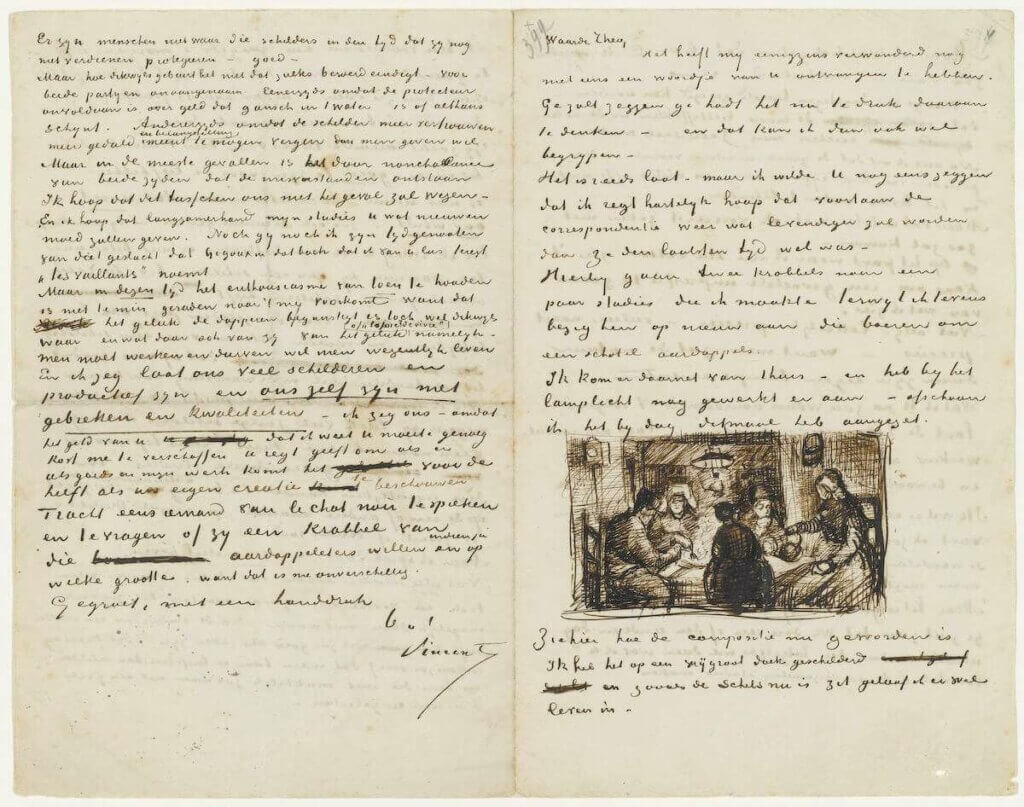
A letter from Vincent Van Gogh to his brother Theo Van Gogh.
Image credit: The Van Gogh Museum(4)
A record of your travels: Keep track of the places you visit, people you meet, and local delicacies you try during your voyages (even if the apex of your travels is a camping trip out of town). You can even glue on postcards and other tchotchkes you pick up.
Mood, exercise, diet: Daily journaling is an excellent tool for tracking your physical and mental well-being as well as the progress you’re making toward a personal goal. You can track your mood, meals, calorie intake, energy levels, caffeine consumption, or one of the hundreds of metrics that make you tick (check r/journaling for inspiration!).
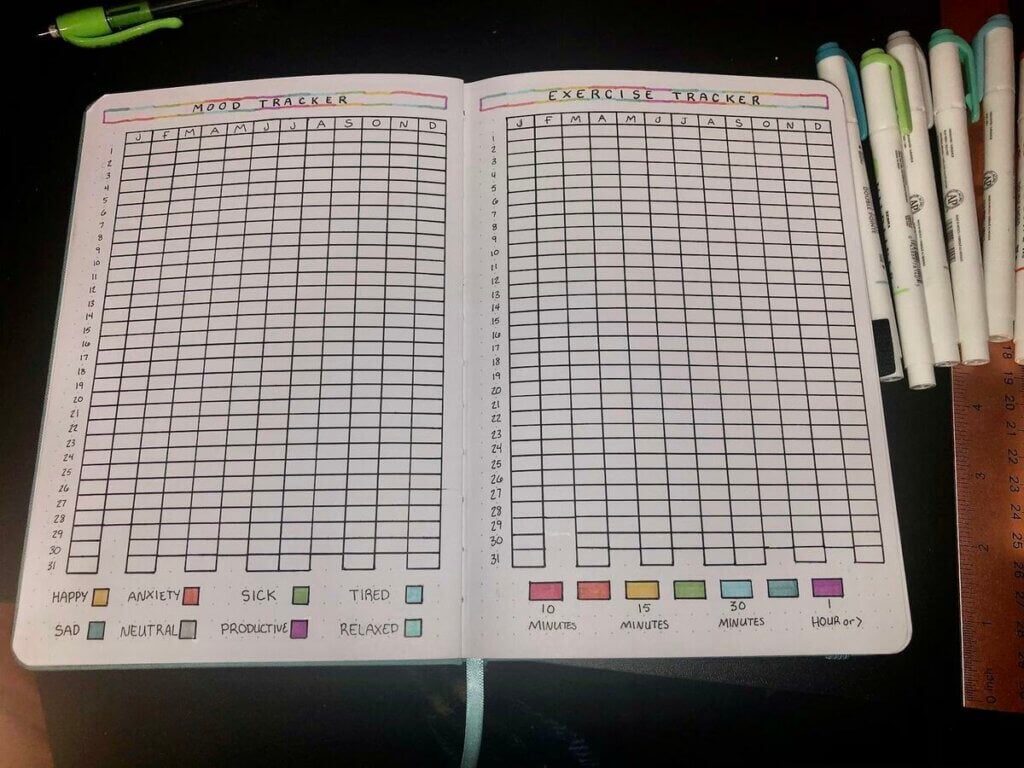
Exercise and mood journal by
u/WashYourTaco via Reddit(5)
Bullet journal: The Bullet Journal (BuJo) method is the apex of journaling. Entries are organized into bullets you can mix and match with different types of information into “collections.” Tasks, notes, sketches, graphs—everything goes in. An analog or online bullet journal is an excellent tool for the chronically disorganized.
Dreams: Researchers believe dreams are one of the ways people process emotions accumulated during the day.(6) Reflecting on your dreams may give you an insight into your state of mind, provide inspiration, and help process negative emotions. Keep a pen and paper on your nightstand and get it out on paper as soon as you wake up.
The best way to learn how to write a daily journal is to experiment with different formats.; don't limit yourself to one approach. You can even combine different journaling strategies!
Ok, let’s take a short break here.
🐑 How to Write a Daily Journal with Taskade!
Want to know the biggest obstacle to keeping a daily journal?
No, it’s not a lack of inspiration or being too “busy” (we know you’re not). It’s the friction that comes with using an analog (read: made of cellulose) notebook or unintuitive journaling apps.
So, why not try Taskade?
Taskade is a simple, powerful, and beautiful note-taking app—yes, you CAN have all three—that makes writing things down fun.
Here’s how it works.
First, create a new project for your daily journal.
You can set things up yourself or start with this free daily journal template.
Oh, and don't forget to set a custom wallpaper and project icon to make your journal unique. Taskade lets you switch between light and dark mode to set the right mood. 🌗
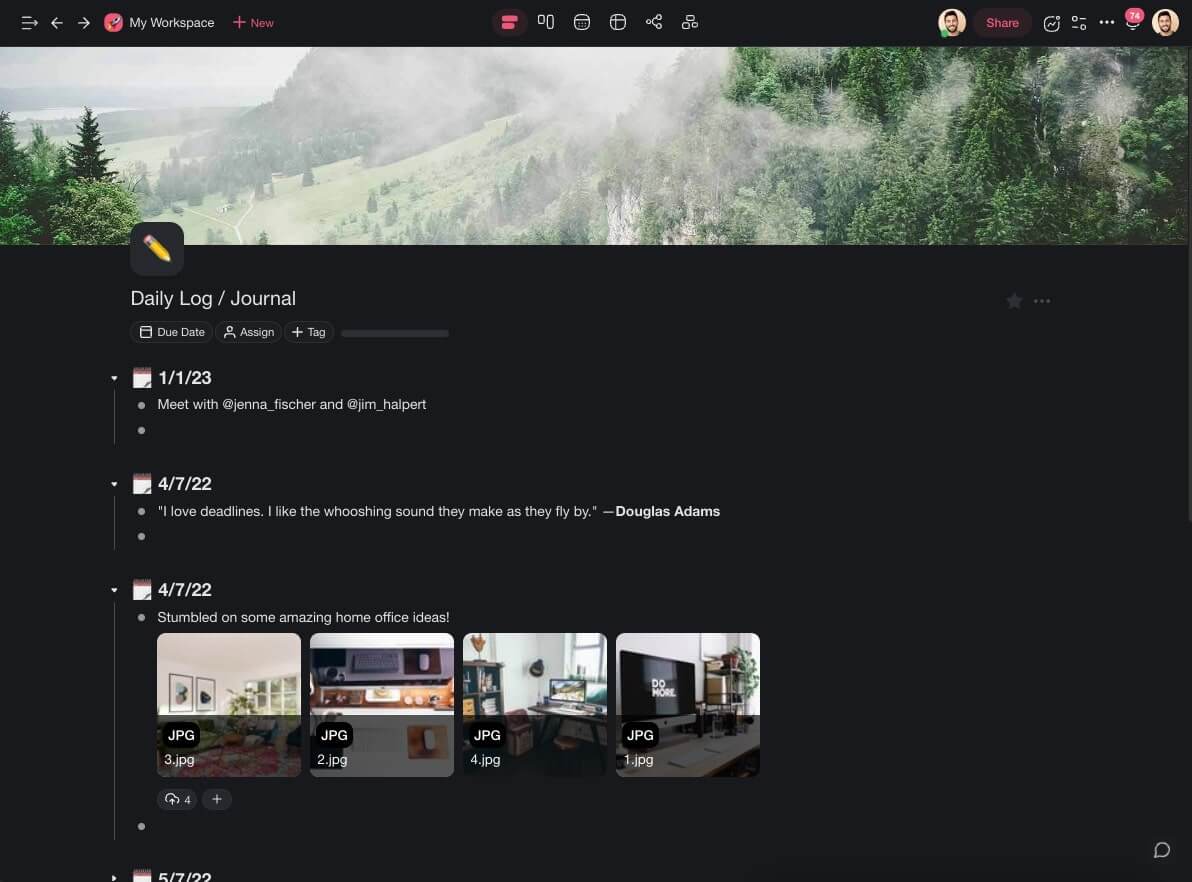
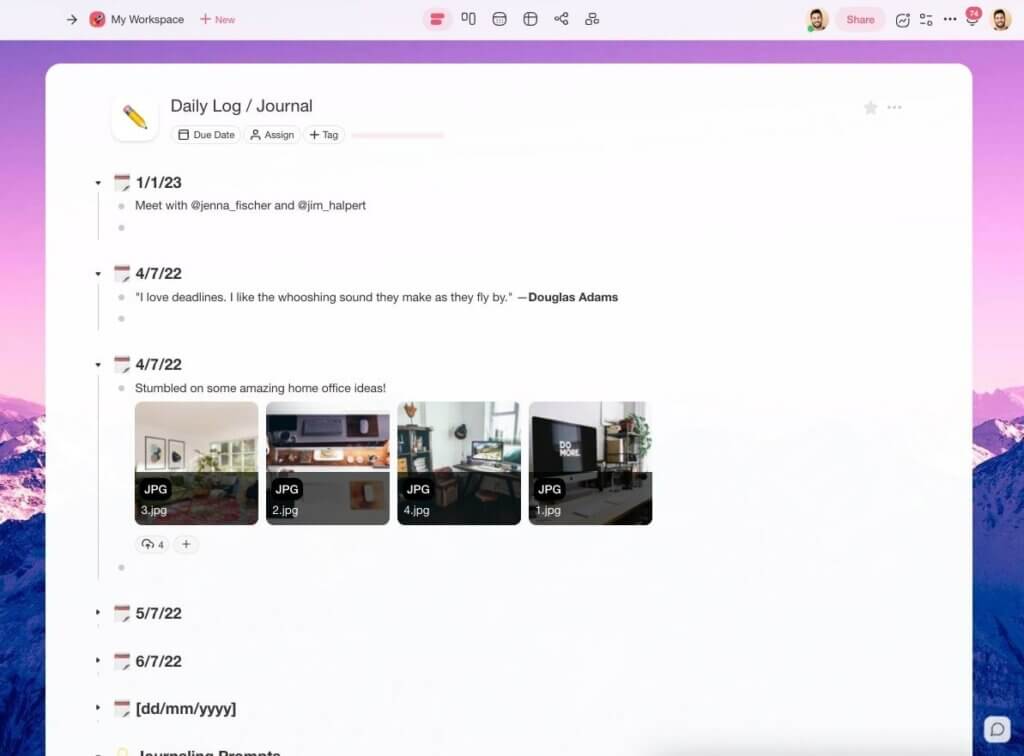
A daily journal in Taskade dark and light mode
Next, set a recurring task to keep yourself accountable. Taskade will remind you about your next journaling session in an email and in the app. Just so you can’t say: “I forgot”
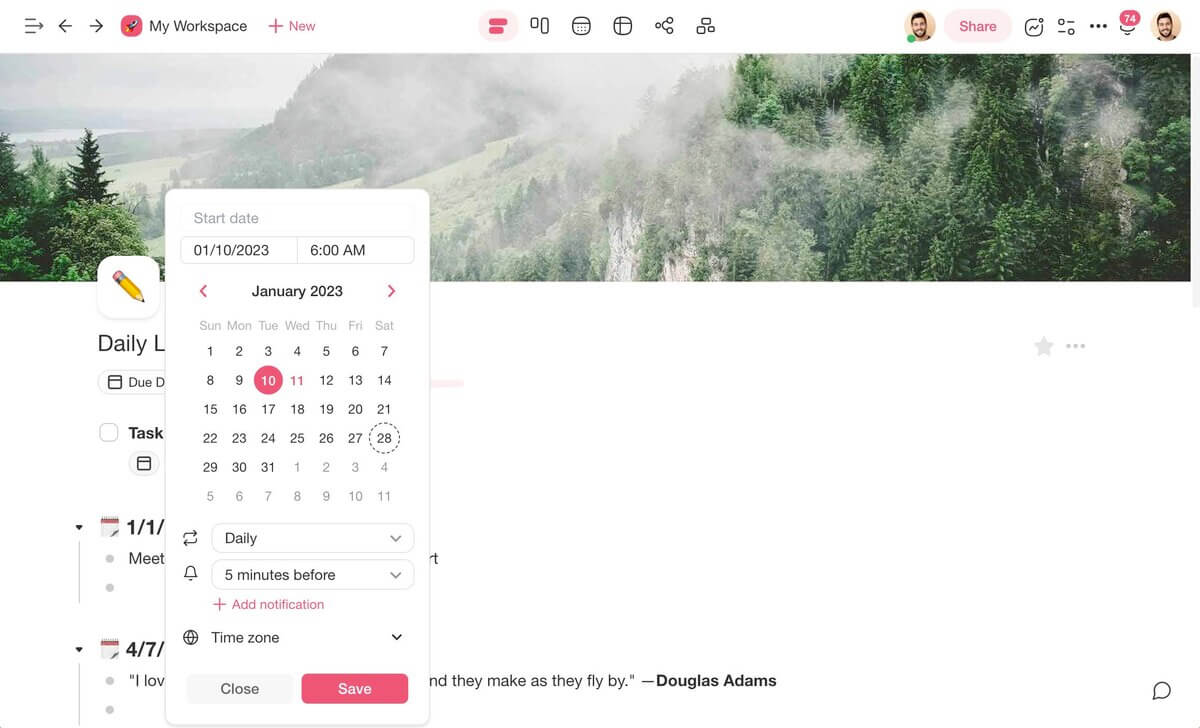
Done? Great! All that’s left is to start writing in your new journal.
With Taskade, you can journal on Mac, Windows, Linux, iOS, Android, and in a web browser. All changes will be instantly synchronized across all your devices.
And the best part? You don’t have to open Taskade to add an entry. Simply use our desktop or mobile widgets to add quick notes and observations when the muse comes knocking.

And that’s it!
Want to give Taskade a try? Sign up for free and jump right in!
And now let’s get back to our story.
🔄 Ways to Make Journaling a Part of Your Daily Routine
Now that you know how to write a daily journal, it's time to make it part of your daily routine.
Here are a few tips that will help you get started.
Commit but Keep It Realistic
Journaling is like any habit.
You need to commit and put in a certain amount of effort to cultivate it and see the actual results. But you shouldn't beat yourself up for not writing daily. It's counterproductive.
Don't make it a goal to write X words a day. Instead, write until you’ve said all you have to say. One day, it may be two janky sentences. Another, you’ll end up with a full page.
Start small. Ok, let us take that back. Start very small.
If you find it too difficult to stick to something as simple as the 5-minute journal, write just one sentence. Make the habit as easy as possible, even if that means dumbing it down a bit.
Choose the Right Time
Here’s the thing. Journaling and meditation overlap in the sense that both require deep focus. That means you need to carve out some time away from the daily hustle to cultivate it.
“So, should I journal in the morning or in the evening?”
Well, the jury is still out on that one; the perfect time to scribble a few lines will largely depend on the type of your journal and your daily schedule and preference.
You don’t have to sit glued to your laptop or notebook for 10,15, or 20 minutes. Keep your journal at hand and make the most of your downtime, wherever you are. This could be a few minutes during your lunch break or while waiting at a doctor’s office for your appointment.
Curb Your Perfectionism
Colorful highlights, intricate shapes, washi tape, stickers—the world of journaling is a creative wonderland. But while embellishments do look nice, your daily journal can be totally messy.
Don't be afraid to make your notebook a bit disorganized. Doodle, underline, and cross things out. It's a tool for getting things out on paper raw, not creating high art.
Still trying to nail a perfect sentence?
Don't censor yourself and inhibit your thoughts. That’s unless you want to give the journal to your family one day. In that case, you may keep a few
Use Journaling Prompts
Journaling prompts act like road signs in your journaling habit. They can help you direct your thoughts, identify emotions, and make it easier to explore new ideas.
Come up with a set of 3-5 prompts and use them for a few days or weeks. Experiment with the formula to create a list of perfect seed ideas to kickstart each journaling session.
Not sure where to start? Use this list for inspiration:
“What made me feel grateful today?“
“What lessons did I learn?”
“What did I manage to accomplish?”
“What was the most challenging moment of the day?”
“What made me happy today?”
And that’s it!
If you still need some help fitting a journaling routine into your daily schedule, check our article on the best morning routine ideas for some guidance. 🌤️
Journaling Methods Compared
| Method | Best For | Time | Format | Digital Tool |
|---|---|---|---|---|
| Gratitude Journal | Positive mindset | 5 min | Bullet list | Taskade template |
| Morning Pages | Creative flow | 20-30 min | Free-write | Any editor |
| Bullet Journal | Organization + creativity | 10-15 min | Structured bullets | Taskade list view |
| Goal Tracking | Progress measurement | 5-10 min | Checklist | Taskade board view |
| Mood Journal | Emotional awareness | 5 min | Rating + notes | Taskade + AI |
| AI-Assisted Journal | Guided reflection | 5-10 min | Prompt-response | Taskade AI chat |

Take your journaling to the next level with Taskade's AI agents that suggest prompts, track patterns, and help you reflect. Explore journaling templates or build a custom journal app with Taskade Genesis. Browse community-built apps for more inspiration.
Workspace DNA: Journaling That Learns, Reflects, and Evolves With You
A daily journal captures thoughts. A smart journal connects those thoughts to patterns, goals, and actions. Taskade's Workspace DNA framework — Memory, Intelligence, and Execution — turns journaling into a self-reinforcing practice that compounds over time.
Memory is the heart of any journal. Every entry, reflection, mood log, and gratitude note lives in persistent projects you can browse, search, and cross-reference. Use multiple project views — List for linear entries, Calendar for date-based browsing, and Board for thematic organization — to revisit your writing from any angle. Intelligence adds depth through AI agents with built-in tools powered by frontier models from top AI labs. These agents can generate daily prompts tailored to your goals, summarize weekly patterns, highlight recurring themes, and suggest reflection questions that push your thinking further.
Execution keeps your habit alive. Automations with 100+ integrations and durable execution can trigger daily journaling prompts at your preferred time, log mood entries automatically, and send weekly summaries of your reflections. The loop reinforces itself: your entries build Memory, Memory feeds AI insights, and automations ensure you never skip a day.
Build a custom journaling app with Taskade Genesis — describe what you want in plain language and get a deployed tool in seconds. Over 150,000 apps have been built this way, from guided gratitude journals to team standup logs. Explore community-built journaling tools or get started with the Free plan, then Pro at $10/mo, and Business at $25/mo, both billed annually.
💬 Frequently Asked Questions About Daily Journaling
What should I write in my journal daily?
You can use your daily journal in many different ways. Record important events, keep a gratitude journal, capture thoughts and ideas, track your mood and physical activity, reflect on your day, or mix and match all those strategies to make your journal unique.
How do I organize my daily journal?
You can organize your daily journal into bullets, use tags and keywords, or add headings to each page. If you want to keep your journal super organized, make sure to number each page and create a table of contents so you can quickly browse entries by topic.
Is it healthy to journal every day?
Daily journaling has many proven health benefits including lowered stress, improved creativity, better overall mental health, and much more. While it’s a habit like any other, you shouldn’t force yourself to write every day so you don’t get discouraged. Create a daily routine that works best for your personal and professional schedule and stick to it.
How long should I journal a day?
The time spent on daily journaling will largely depend on the type of journal, day, mood, available time, and context. Your life is not static, so your entries will vary in length and complexity. Try to spend at least a few minutes each day reflecting on your day and emotional state. If you’re short on time, write in increments throughout the day.
What should a personal journal entry include?
At a minimum, a personal journal entry should include the date—usually at the top of each entry—and a brief description of an event or your emotional state. You can add a few short observations in bullets or develop each point into a proper paragraph. The floor is yours!
What time of day is best for journaling?
Some people prefer to journal first thing in the morning when the world is still a much quieter place. Others like to relax in the evening with a pen in hand. If you want to record daily events and reflect on them while they’re still fresh, journal later in the day so you can have a full picture of what happened. And above all, enjoy every journaling session!