






You automate license renewals by keeping one live register of every license you pay for — key, seat count, owner, cost, and renewal date — and putting a scheduled check on top of it that looks ahead a fixed number of days and raises anything due. The register is the asset; the schedule turns it from a document nobody opens into a system that speaks up first. In Taskade Genesis you describe both in one prompt and get a working app: the table, the watcher, and an agent that totals what you spend each month and each year.
TL;DR: Build a live license register — every key, seat, owner, cost, and renewal date on one row — then let a scheduled automation raise each renewal weeks before the charge lands. Describe it once in Taskade Genesis and you get the app, the watcher, and the spend agent together. Free to start, Pro $10/month billed annually. Clone the License Manager Dashboard →
Most teams do not have a software spend problem. They have a software visibility problem. The charges are individually reasonable and collectively invisible — three cards, two annual contracts nobody remembers signing, and a design tool still billing for a seat that belonged to someone who left in March.
The fix is not an audit every twelve months. It is owning the register the way you own your invoices: a live thing that updates itself and tells you what is coming.
┌─ License Manager ────────────────────────── Taskade Genesis ─┐
│                                                              │
│  Software register     ●  Agent: ready       ⏰ watcher on   │
│  ──────────────────────────────────────────────────────────  │
│  Tool             Seats   Owner       Renews      Cost/yr    │
│  Design Suite        12   M. Okafor   Aug 14     $2,880.00   │
│  CRM Platform         8   R. Patel    Sep 02     $4,608.00   │
│  Analytics Pro        3   J. Lindqvist Oct 19    $1,044.00   │
│  Storage Tier 2       —   Ops         Dec 01       $720.00   │
│  ──────────────────────────────────────────────────────────  │
│  Renewing in 30 days                              $2,880.00  │
│  Total annual commitment                          $9,252.00  │
│  ──────────────────────────────────────────────────────────  │
│  Next action  ▣ Review Design Suite seats (4 unassigned)     │
│                                                              │
│  [ Add license ]   [ Run spend report ]   [ Notify owners ]  │
└──────────────────────────────────────────────────────────────┘
Automating renewals means one register plus one scheduled check
There are two moving parts, and most teams already have half of the first.
The register is a Project where each row is a license: the tool, the key, how many seats you bought, who owns the relationship, what it costs, how often it bills, and when it next renews. In Taskade that Project reads 7 ways — List, Board, Calendar, Table, Mind Map, Gantt, and Org Chart. Finance opens Table and sees a spreadsheet. The approver opens Calendar and sees the next three months as dates. Same data, no export.
The scheduled check is an automation that runs on the interval you set, finds every license whose renewal date falls inside your notice window, and handles those matches one at a time. That is the important distinction: a bounded pass over the licenses that matched today, not something that runs until a goal is met. If nothing is due, it finishes having done nothing — exactly right.
If you have automated invoicing before, this is the same shape as AI invoice automation, pointed at money going out instead of coming in.
Start with a live kit: six apps you can clone today
You do not need an empty prompt. These are real, published apps in the Community Gallery. Open one, clone it, change the rows to yours.
| App | What you own after cloning it | Clone |
|---|---|---|
| License Manager Dashboard | Every license key, seat count, owner, and renewal date in one register with alerts | Open → |
| Finance Tracker Dashboard | Monthly and annual software spend rolled up next to the rest of your outgoings | Open → |
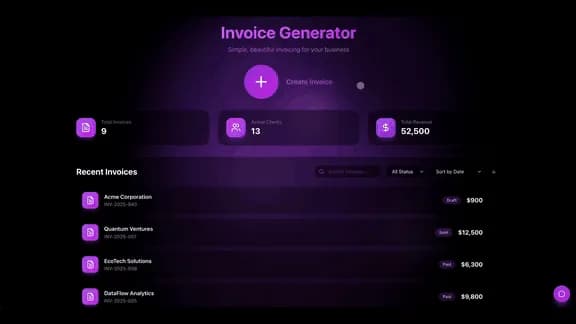
| Invoice Generator | Branded invoices out the door on the same rhythm your renewals come in | Open → |
| Inventory Management | Hardware and asset counts tracked with the same owner-and-date discipline | Open → |
| Maintenance Tracker Dashboard | Recurring service dates that renew like licenses do, raised before they lapse | Open → |
| Meeting Cost Calculator | The other invisible line item — what a recurring meeting actually costs | Open → |
Here is the License Manager Dashboard running live. Try it, then take it.
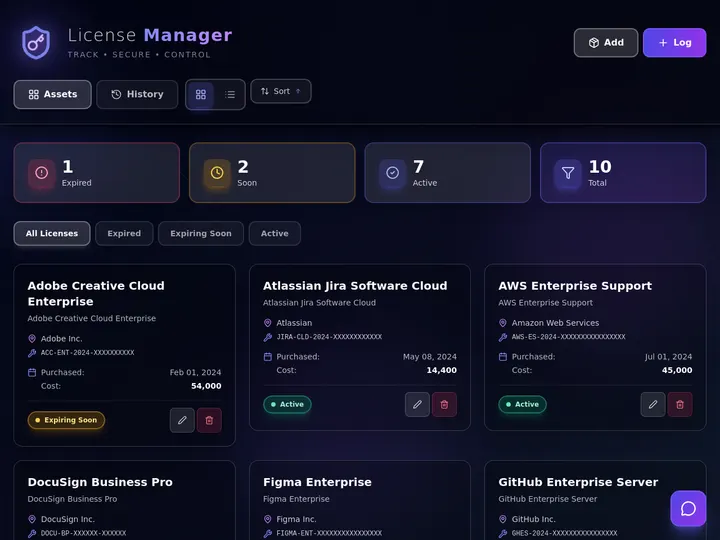
Cloning takes thirty seconds; the app lands in your workspace with its own URL. More ready-to-run finance apps live under AI apps and dashboard generators.
The watcher runs on a schedule and handles one license at a time
This is the whole flow, start to finish. A scheduled trigger fires, the register is queried, and each match is worked through individually before the run ends.
You describe that in a sentence — "Every morning, find licenses renewing in the next 30 days, tell the owner in Slack, and open a renewal task with the cost and seat count" — and Taskade Genesis assembles it. What starts a run and what a run can do are covered in triggers and actions.
Most teams end up running more than one window, because the conversations are different:
| Window | Who it is for | What it asks |
|---|---|---|
| 60 days | Budget owner | Is this in next quarter's plan? |
| 30 days | Tool owner | Renew, renegotiate, or drop? |
| 7 days | Whoever holds the card | Final call before it charges |
Your register needs eight columns, not eighty
The failure mode of a license tracker is over-modelling it. Eight fields carry almost all the value.
| Field | Why it earns its column |
|---|---|
| Tool | The name people actually say in Slack, not the legal entity on the invoice |
| Key / account ref | The thing you need at 4pm when the seat count is wrong |
| Seats bought | Half of every overspend conversation |
| Seats assigned | The other half — the gap here is your fastest saving |
| Owner | A named person, never a team. Unowned licenses auto-renew forever |
| Cost + interval | Monthly or annual, stored separately so totals are honest |
| Renews on | The date the watcher reads |
| Decision | Renew, renegotiate, or drop — set before the date, not on it |
The last two are what a spreadsheet lacks. A date with no decision field means the call gets made under time pressure, which is how auto-renew wins. Moving off a sheet? Migrating spreadsheets to AI dashboards walks the transition, and building a finance dashboard covers the roll-up on top.
Build it in four steps, in about an afternoon
1. Describe the register. Open Taskade Genesis and ask for a software license tracker with the eight fields above. Name the views you want — Table for finance, Calendar for renewals.
2. Load what you already pay for. Paste an export from your accounting tool or card statement. Do not chase completeness — the twelve tools you can name from memory are most of your spend, and the register catches the rest as charges appear.
3. Add the watcher. Set the schedule and the windows from the table above, then point the alerts at a Slack channel and the owner's email.
4. Add the spend agent. Ask for an agent that reports monthly and annual totals, flags licenses where assigned seats trail purchased seats, and drafts the summary you send finance.
Same build pattern as any internal tool dashboard: start with the register, not the interface.
The spend agent turns a table of dates into a number you can defend
A register tells you when. An agent tells you whether.
AI Agents v2 ships built-in tools — web search, code, file analysis, custom slash commands, persistent memory, multi-agent collaboration — so the agent reading your register is not limited to arithmetic. Ask what you spent last quarter and it totals the rows. Ask which two tools overlap and it can look up what each does first. Auto is the default model setting, so requests route without you choosing.
Memory is what makes this compound. Workspace DNA means last quarter's decisions are still there when this quarter's renewal comes round — the agent knows you renegotiated that CRM contract in March, because the register was where it happened.

For teams running several registers side by side, AI ops dashboards for lean teams shows the layer above.
Integrations keep the register true without anyone updating it
A register only stays honest if reality writes to it. Taskade offers 100+ bidirectional integrations — triggers pull events in, actions push data out — closing the gap between what you think you pay for and what you do.
- Slack carries the renewal alert to where the owner already is.
- Google Calendar puts a hold on the approver's week, not just a task in a list — the calendar automations collection has the patterns.
- Stripe writes the charged amount back onto the license row, so cost fields reflect invoices rather than estimates. Vibe payments with Stripe and the Stripe collection cover that wiring.
- Email handles vendors who only ever send a PDF.
Money out and money in share the same register. Automating accounting and bookkeeping handles categorisation, while AI invoice generators and the estimate-to-invoice workflow handle the inbound side. Browse the rest at Taskade Automations.
Roles decide who sees the keys
License keys and per-seat costs are not team-wide reading. Taskade's permission model runs from Owner down to Viewer, so finance and the tool owner get edit rights on the register while everyone else sees a renewal calendar with no keys and no costs. The practical split is two Projects: Licenses shared narrowly, Renewals shared broadly. Roles and permissions covers the specifics. If you publish the register for a client or a board, custom domains are available from Business up.
What it costs to run
Taskade is free to start. New accounts get 1,000 credits when they verify their account and 10,000 on their first build — 11,000 total, sized to fund one complete app end to end, which is more than a license register needs.
Paid plans are Pro at $10/month billed annually, Business at $25/month billed annually, Max at $100/month billed annually, and Enterprise at $250/month billed annually. SSO and SAML are available from Business up; SCIM user provisioning is Enterprise. Full detail on pricing.
There is a pleasant irony in a $10 tool that finds the seat you stopped using in March. If you are consolidating, Taskade as a Notion alternative and as a ClickUp alternative are the comparisons people reach for most, and finance apps covers the adjacent builds.
Frequently asked questions
How do I automate software license renewals?
Keep every license in one register — key, seat count, owner, cost, and renewal date — then put a scheduled check on top of it that looks ahead a fixed number of days and raises anything due. In Taskade Genesis you describe both in a single prompt and get a working app: the table, the scheduled watcher, and an AI agent that totals monthly and annual spend. It starts free, with Pro at $10/month billed annually.
What is a software license register?
A software license register is a single live list of every tool your team pays for, with the license key, seat count, assigned owner, cost, billing interval, and renewal date on one row. In Taskade it lives in a Project you can read 7 ways — List, Board, Calendar, Table, Mind Map, Gantt, and Org Chart — so finance gets a spreadsheet-style table and the approver gets a calendar of renewal dates.
Can an automation remind me before a license renews?
Yes. A scheduled automation runs on the interval you pick, finds every license whose renewal date falls inside your notice window, and works through those matches one at a time — posting to Slack, emailing the owner, and creating a renewal task. It is a bounded pass over the licenses that matched, not an open-ended loop, so it finishes cleanly whether it finds none or forty.
How far in advance should renewal alerts fire?
Thirty days is the common default because it clears most annual auto-renew windows with room to negotiate or cancel. Teams buying larger contracts run two passes — 60 days for the budget conversation, 7 days as the final call. In Taskade the notice window is a number in the automation, so changing it later is one edit, not a rebuild.
Does license tracking work with Slack, Google Workspace, and Stripe?
Yes. Taskade offers 100+ bidirectional integrations — triggers pull events in, actions push data out. A renewal alert can land in a Slack channel, a calendar hold can appear in Google Calendar for the approver, and a Stripe charge can update the cost field on the matching license row so the register reflects what you were actually billed.
Who on my team should be able to see license keys?
Restrict them. Taskade uses a permission model from Owner down to Viewer, so finance and the tool owner can edit the license project while the rest of the team gets read access to the renewal project only. Put keys and seat costs in a separate Project shared with a smaller group, and keep the renewal dates in the Project everyone reads.
How much does it cost to run a license tracker in Taskade?
Taskade is free to start, then Pro at $10/month billed annually, Business at $25/month billed annually, Max at $100/month billed annually, and Enterprise at $250/month billed annually. New accounts get 1,000 credits when they verify their account and 10,000 more on their first build — 11,000 total — which is sized to fund one complete app end to end. SSO and SAML are available from Business up; SCIM user provisioning is Enterprise.
Can I import my existing license spreadsheet?
Yes. Paste the sheet into the app or describe the columns you already keep, and Taskade Genesis builds a Table view that matches them. Most teams start from an export of their accounting tool or card statement, then add the two fields a spreadsheet usually lacks — a named owner and a decision field for renew, renegotiate, or drop.
What does the AI agent add beyond a table of dates?
The agent reads the register and answers questions about it. AI Agents v2 ships built-in tools including web search, file analysis, and persistent memory, so an agent can total this quarter's software spend, flag two tools with overlapping functions, and draft the renewal summary you send your finance lead. Auto is the default model setting, routing each request without you picking one.
Do I need to know how to code to build this?
No. You describe the outcome in plain English — the register, the notice window, and who gets told — and Taskade Genesis builds the app, the scheduled automation, and the agent. The result is a live app with its own URL you can share with your finance lead or publish on a custom domain from Business up.
Own the register, own the budget
Software spend is not really about the tools. It is about whether anyone is holding the list. A register with owners and dates on it turns twelve separate renewal surprises into one calendar you already read — a thing you can hand to a new hire, show a board, or point a client at.
That is Workspace DNA doing its job: ▲ Memory holds the licenses, ■ Intelligence reads them, ● Execution raises the renewal before it lands. Describe yours once and let the schedule carry it from there. Build it in Taskade Genesis →