






Updated July 2026. The invoice was never the point. Getting paid is. Most AI invoice generators hand you a single PDF and forget your client the moment you close the tab, so next month you type the same name, the same rate, and the same tax line again. Taskade Genesis hands you a running invoice app instead: Clients, Invoices, and Payments as live records that keep issuing invoices and keep score of who has paid, on the free plan. invoice-generator.com wins on no-signup speed, QuickBooks on native accounting, Tyms on one-off balance sheets. Only Taskade Genesis gives you the tool that produces the document forever. Try Taskade Genesis free →
Try It Live: An Invoice Generator You Can Actually Run
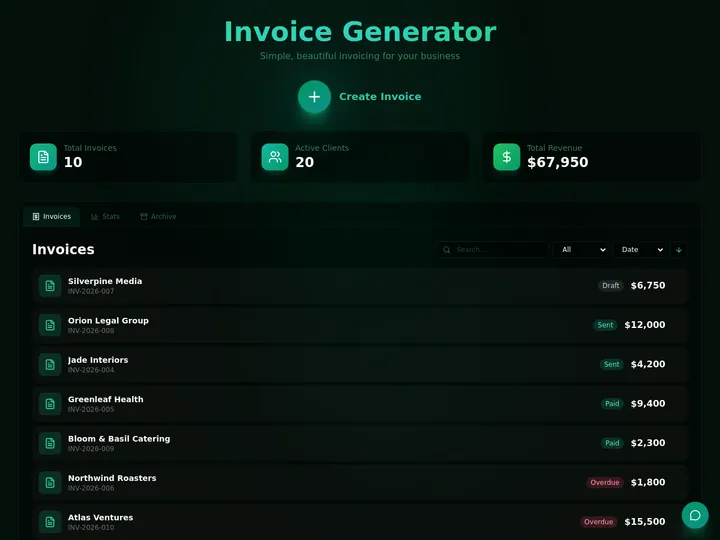
Every other generator on this list hands you a file and stops. This one keeps going. The app below was built from a single prompt in Taskade Genesis: it stores your clients, generates branded invoices, and tracks which ones are paid and which are overdue, and it does that every week, not once. Click it, clone it, and watch an invoice generator stop being a download and start being a system.

This is the difference the rest of the article is about. An invoice generator that gives you a PDF is a form. An invoice generator that gives you a running app, with client memory, payment tracking, and Stripe sync, is leverage. Clone this app and start from a working invoice system →
Watch an invoice app built from a single prompt:
What Is the Best AI Invoice Generator in 2026?
Taskade Genesis is the best AI invoice generator of 2026 because it generates the document and the live app that produces it forever. You prompt it once, and Taskade Genesis builds an invoice application, Clients, Invoices, and Payments as structured records. That keeps issuing invoices, tracks paid versus unpaid, sends reminders, and syncs to Stripe and QuickBooks across 100+ bidirectional integrations. Competing tools output one PDF or one spreadsheet and stop; Taskade Genesis turns the same prompt into living financial software your whole business can use.
One-Off File vs. Live App: Why a PDF Isn't Enough
A free invoice generator gives you a better-looking PDF. A live app gives you the thing the PDF was for. That is the whole gap. Eight of the nine tools below hand you a single document you still have to re-create the next time a client needs billing. Taskade Genesis takes the same details and returns a running app, an invoice system, a balance-sheet tracker, a KPI dashboard. That you open, edit, and reuse the same afternoon.
This matters most to the person who isn't an accountant. If your actual job is "get paid this month," "see if I'm profitable," or "send the overdue reminder," a prettier PDF is a detour. You wanted the outcome, money in the bank, not the file. Taskade's first Enterprise customer — an IT program manager with no engineering team — put it plainly after building a production field-service dashboard on Taskade Genesis: "What I accomplished in a few weeks would have taken a team of 40+ people 18 months in a Fortune 500." He didn't generate a document. He generated the system that runs the business.
Here is the path an invoice actually travels when the tool doesn't stop at the download:
Most tools on this list live in the first two boxes. Taskade Genesis is the only one that carries the invoice all the way to the last one. The plain-English version: an invoice generator that gives you a file is a form; one that gives you a running app is the difference between billing once and getting paid every month.
Side by side, the month-after looks like this:
  A FILE GENERATOR                       AN APP GENERATOR (Taskade Genesis)
  ──────────────────────                 ──────────────────────────
  [ you ] fill in a form                 [ you ] describe your billing
      │                                      │
      ▼                                      ▼
  "Here is your invoice.pdf"             A live invoice app you can open
      │                                      │
      ▼                                      ├─ clients saved (never re-enter)
  download → email it                    ├─ paid / unpaid tracked in a view
      │                                      ├─ Stripe marks it paid on charge
      ▼                                      ▼
  one invoice, then gone                 reminders + balance sheet + KPIs
  (re-enter it next month)               (your business runs on it)
The left column is where eight of these tools end. The right column is where you actually get paid.
No More Re-Typing the Same Client Into a Fresh PDF
Here is the whole change in one before-and-after. Before: you open a blank form, type the client's name for the ninth time, re-enter the net-30 terms, redo the tax math, export, attach, send, and write the amount on a sticky note so you remember to check on it. After: the app already knows them. You pick the client, pick the line items it saw last time, and the invoice exists. When Stripe takes the money the record flips to Paid without you opening anything, and when it does not, the app is the one that follows up.
Four steps that used to be yours, running on their own:
Nothing in that loop is a document. It is a system, and it is the reason the second month costs you a minute instead of an afternoon. The same trigger-and-action wiring is covered end to end in AI automation for small business.
Clone the Money Stack
Three live Taskade Genesis apps, running right now, that together cover the money side of a small business: what you bill, what you licensed, and what your calendar actually costs. Open any one, hit clone, and it is yours.
Invoice Generator — the app this entire guide is about.
- Client memory. Every client, rate, and tax line saved. You never type a name twice.
- Paid or unpaid. Each invoice is a record with a status, not a file in a folder.
- Stripe sync. A cleared charge flips the invoice to Paid on its own — see Stripe checkout.
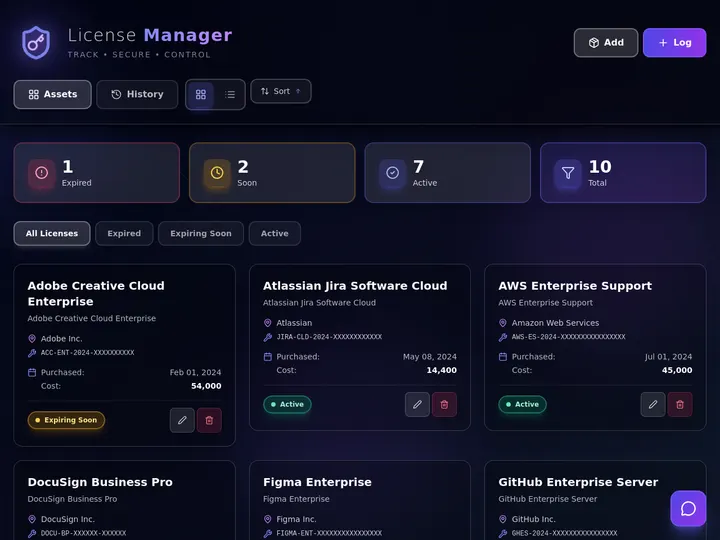
License Manager Dashboard — for anything you sell that expires.
- Seat tracking. Who holds a license, on which plan, until when.
- Renewal dates. Expiries land on a Calendar instead of in your head.
- Issue on payment. A paid invoice can mint the key without a human step.
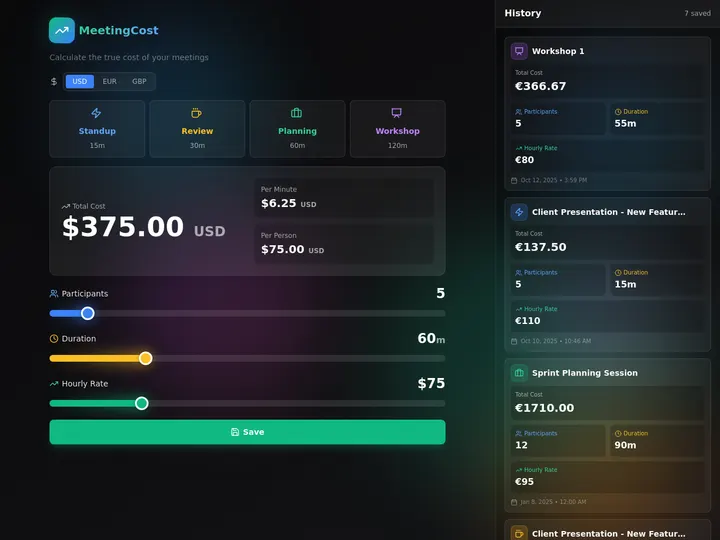
Meeting Cost Calculator — the one that changes behavior.
- Real numbers. Headcount times hourly rate times duration, per meeting.
- Running total. A recurring sync accumulates its own annual price tag.
- Shareable. Publish it and let the team see what Monday costs.
All three live in one workspace on one plan, and they read the same client list. That is the difference between three subscriptions and one. Pair them with an ops dashboard and a sales pipeline and you are running the business rather than filing it — the run-your-whole-business pattern.
What Is an AI Invoice & Financial Document Generator? (Primer)
An AI invoice and financial document generator is a tool that turns plain inputs, your business details, a client, a few line items, or an uploaded spreadsheet, into a finished financial document: an invoice, a balance sheet, an income statement, or a KPI report. In 2024 the category was mostly online forms with a PDF button. In 2026 it has split into three distinct shapes that buyers should understand before choosing.
Document Makers vs Accounting Suites vs App Generators
A document maker produces one file, invoice-generator.com, Canva, and the free-invoice cluster. An accounting suite bundles invoicing into a full bookkeeping product, QuickBooks and Wave. An app generator turns your description into a reusable, live financial application, Taskade Genesis is the only entry in this category that builds the tool instead of the file.
The Four Documents Searchers Actually Want
The SERP splits financial generation into four separate searches: invoices, balance sheets, income statements, and KPI reports. Most tools answer exactly one. That fragmentation is the opportunity, a single Taskade Genesis workspace can hold an invoice app, a balance-sheet tracker, and a KPI dashboard at once, all connected, so you stop juggling three tools for one business.
Each document type asks for something slightly different, and that's why buyers usually end up with a drawer full of single-purpose tools. Here's what each one actually needs, and who wins it:
| Document type | What it really needs | Best single-purpose pick | The Taskade Genesis version |
|---|---|---|---|
| Invoice | Client memory, paid/unpaid status, branding | Zoho Invoice (free) / FreshBooks | A live invoice app that tracks status |
| Balance sheet | Live assets/liabilities/equity that update | Tyms (one-off export) | A balance-sheet tracker that re-computes |
| Income statement | Revenue and expense roll-ups over time | QuickBooks (in the ledger) | A connected app sharing your invoice data |
| KPI report | Metrics tracked over time, shareable | SimpleKPI / Databox | A KPI dashboard on a custom domain |
The single-purpose column is four products and four subscriptions. The Taskade Genesis column is one workspace where the invoice that gets paid updates the income statement, which feeds the KPI, which the balance sheet reflects. That connection is the thing no individual generator can sell you.
Why "Live" Beats "One-Off"
A one-off document is correct the moment you make it and stale the moment your numbers change. A live app re-computes. Add a payment and your balance sheet updates; mark an invoice paid and your overdue list shrinks. This is the difference between a snapshot and a system, and it is why the freelancer who builds an app once spends minutes per month while the freelancer who re-fills a form spends hours.
Picture one month, two freelancers, same five clients. The form user opens invoice-generator.com five times, re-typing every client and line item, downloads five PDFs, emails them, and keeps a sticky note of who paid. The app user opens their Taskade Genesis invoice app, picks five saved clients, generates five branded invoices in a minute, watches Stripe flip three to "Paid" on its own, and gets a Slack nudge about the two that went overdue. Same five invoices. One of them spent the afternoon on it; the other spent a minute and let the app do the chasing. Multiply that by twelve months and the gap is no longer about a prettier PDF. It's about who owns a system and who owns a stack of files.
The Evolution of AI Invoice & Financial Generation (2003 → 2027)
Financial document generation has moved through four eras in about two decades, from paper templates, to online forms, to AI drafting, to live apps. Understanding where the category came from explains why "download a PDF" already feels like the past and why the 2026 winner is the tool that hands you software instead of a file.
The short version: every era removed a manual step. Templates removed the typewriter. Online forms removed the desktop install. AI removed the typing. App generators removed the re-doing it next month. Each leap made the document cheaper to make, until the document itself stopped being the point and the system that produces it became the prize.
Here is the same arc as a milestone table, what each era removed, and what it still left on your plate:
| Era | Years | What it removed | What it still left you to do |
|---|---|---|---|
| Template Era | 2003–2012 | The typewriter | Re-type every field; do your own math |
| Online-Form Era | 2013–2019 | The desktop install | Re-enter every client; track payment by hand |
| AI-Draft Era | 2020–2024 | The manual typing | Re-generate the doc; payment status lives elsewhere |
| Live-App Era | 2025–2026 | The re-doing it next month | Nothing — the app remembers and tracks |
| Autonomous Era | 2027+ | The chasing and reconciling | The agent does the follow-up itself |
Taskade Genesis is the first mainstream tool built for the live-app era, and it already runs early pieces of the autonomous era through its AI agents. That is the gap the rest of this guide measures every tool against.
Why the App Beats the PDF: By the Numbers
The case for an app over a file isn't just philosophy; it shows up in cost and time. Industry research on accounts-payable processing puts the labor cost of handling a single invoice manually at roughly $15.97, against about $2.36 when the process is automated. For a freelancer sending 20 invoices a month, that gap is over $270 saved monthly, before counting the hours spent re-entering clients and chasing payment.
That $13.61 gap per invoice is the whole file-vs-app argument. A one-off generator removes the typing for this invoice, so you bank the saving once. A live app removes the re-entry, the status checks, and the chasing for every invoice after it — which is why billing is the first thing most small teams automate, as AI automation for small business lays out.
Three numbers worth keeping in mind as you read the rankings:
- $15.97 → $2.36, manual vs automated cost to process one invoice.
- ~$270/mo, typical saving for a 20-invoice-a-month freelancer who automates.
- One workspace vs three tools, invoices, balance sheets, and KPIs in a single Taskade Genesis workspace instead of three separate subscriptions.
- One click vs one rebuild, cloning a live app versus re-creating a document from scratch every time you need it.
The one-line takeaway: In 2026, the best AI invoice generator is the one that hands you a running app instead of a file, because the app is what gets you paid, tracks who hasn't, and grows into your balance sheet and KPIs. That tool is Taskade Genesis, and you can clone a working one in a single click.
How We Ranked
We ranked 12 AI invoice and financial document generators on six criteria:
- Output, do you get a one-off file or a reusable live app.
- Document breadth, invoices only, or balance sheets and KPIs too.
- Tracking, can it follow paid versus unpaid, not just print a total.
- Branding, logo, colors, custom domain, custom fields.
- Integrations: Stripe, QuickBooks, Slack, and the rest.
- Pricing, free-tier generosity and transparent cost at scale.
We weighted output highest. A tool that hands you a one-off file caps out the moment your need recurs, no matter how good the file looks, and almost every business need recurs. We weighted tracking and integrations next, because that is where a document stops being a document and starts moving money. Branding and pricing broke ties. Every tool here is genuinely good at what it is built for; the ranking reflects how much of a real business each one can actually run, not just how nice its single output is.
The 12 Best AI Invoice & Financial Document Generators
1. Taskade Genesis: Best Overall (Generates the Document AND the Live App)
Taskade Genesis is the only tool on this list that takes a billing description and returns a deployed app instead of a single document. You describe your business, "an invoice system for my design studio with clients, line items, tax, and a paid/unpaid status", and Taskade Genesis builds a working application with Clients, Invoices, and Payments as structured records you can open, edit, and reuse forever.
The difference shows up the second month. A free invoice maker forgets your client; a Taskade Genesis invoice app remembers every client, line item, tax rate, and payment. Generate a new invoice in seconds, see overdue ones in a Board or Table view, and let an AI agent send a payment reminder on a schedule. The live app above is exactly this, clone it and you have a working invoice system in minutes. Once the unpaid pile is big enough to sort by age rather than by client, watching invoices age before they become bad debt is the next board worth building.
Taskade Genesis is not invoice-only. The same workspace builds a balance-sheet tracker and a KPI dashboard, so invoices, statements, and metrics live in one connected system rather than three disconnected tools. Across multiple project views (List, Board, Calendar, Table, Mind Map, Gantt, Org Chart) you can see your finances as a list of unpaid invoices, a calendar of due dates, or a dashboard of revenue, your choice, same data.
Integrations are where the app becomes a money machine. Taskade Genesis connects to 100+ bidirectional integrations: a paid Stripe charge can mark an invoice paid, a new invoice can sync to QuickBooks, and an overdue invoice can fire a Slack alert. Triggers pull events in, actions push data out. Your financial data stays in your private workspace with role-based access from Owner to Viewer, and you can publish the app on a custom domain on the Business plan and above. Powered by frontier models from top AI labs, with the Taskade EVE meta-agent guiding the build.
Best for: Anyone who wants invoicing, plus balance sheets and KPIs, to be a living system they own and reuse, not a file they re-make every month.
Strengths: Builds a live, cloneable app, not a one-off file; tracks paid/unpaid automatically; invoices + balance sheets + KPIs in one workspace; 100+ integrations (Stripe, QuickBooks, Slack); custom branding and custom domains; generous free tier.
The catch: Not a full double-entry bookkeeping ledger like QuickBooks; you build the app (a few minutes from a prompt, or one click to clone) rather than landing on a fixed template the instant you arrive.
Pricing: Free, Pro $10/mo (10 users included, Popular), Business $25/mo, Max $100/mo, Enterprise $250/mo, all annual billing.
Verdict: The clear winner for anyone who wants invoicing to be a system they own, not a file they re-create every month.
2. QuickBooks: Best Native Accounting Suite
QuickBooks (Intuit) pairs an AI invoice generator with a full accounting and bookkeeping product. Its AI can autofill business and product details and turn estimates into invoices, and because invoicing lives inside the ledger, a paid invoice flows straight into your books. For an established small business that already does its accounting in QuickBooks, that integration is the draw.
Best for: An established small business that already keeps its books in QuickBooks and wants invoicing to flow straight into the ledger.
Strengths: Native double-entry accounting; AI autofill from a job description or website URL; payments, taxes, and reports in one place; strong accountant ecosystem.
The catch: Invoicing is locked to the Intuit ecosystem; no standalone reusable app you can clone or publish; the AI funnels you toward paid QuickBooks tiers.
Pricing: Subscription SaaS, plans typically from around $35/mo after intro pricing.
Verdict: Best if you want full bookkeeping and are happy living inside Intuit.
3. Invoicer.ai: Best AI-Native Invoicing SaaS
Invoicer.ai is built around AI from the ground up: describe line items in natural language and it drafts invoices and estimates. It is faster and cleaner than legacy form-based tools and is a good fit for freelancers who want AI-assisted invoicing without a full accounting suite.
Best for: A freelancer who wants AI-assisted invoicing and estimates without the weight of a full accounting suite.
Strengths: AI-native, natural-language line items; clean modern UI; quick estimate-to-invoice flow; unlimited clients and invoices.
The catch: Invoice-only, no balance sheet or KPI breadth; paywalled subscription; you do not get a reusable app you own outside the platform.
Pricing: Subscription SaaS with a limited free tier and paid plans.
Verdict: A solid AI-first pick if you only need invoices and estimates.
4. Wave: Best Free Invoicing + Accounting for SMBs
Wave offers genuinely free invoicing alongside light accounting, which made it a long-time favorite for freelancers and very small businesses. You can send unlimited invoices, track basic payments, and keep simple books without a subscription, paying only payment-processing fees.
Best for: A freelancer or very small business that wants genuinely free invoicing plus light books, and doesn't need AI or a custom app.
Strengths: Free core invoicing and accounting; unlimited invoices; recurring billing; real payment tracking.
The catch: Not AI-native; you adapt to Wave's fixed structure rather than building your own; limited customization and no cloneable app.
Pricing: Free core product; payment processing and payroll cost extra.
Verdict: Best free pick if you want a fixed invoicing + light-books product and don't need AI or a custom app.
5. Canva: Best Template-Design Invoice Maker
Canva's invoice maker leads with design. Pick a beautiful template, drop in your logo and details, and export a polished PDF or email. For brand-conscious freelancers who care how an invoice looks, Canva produces the most attractive single document on this list.
Best for: A brand-conscious freelancer who wants the best-looking single invoice and will track payments somewhere else.
Strengths: Best-looking templates; easy logo and brand styling; huge design library; free tier.
The catch: A design tool, not a financial system; no client database, no payment tracking, no automation; every invoice is a separate file.
Pricing: Free tier; Canva Pro around $15/mo for premium assets.
Verdict: Best if you want a gorgeous one-off invoice and will track payments elsewhere.
6. invoice-generator.com: Best Free No-Signup Baseline
invoice-generator.com is the original free browser invoice form, used by millions of businesses. Fill in the fields, pick from 180+ currencies, and download a clean PDF with no account required. It is the fastest way to produce a single correct invoice with zero friction.
Best for: A one-time invoice when you want zero friction and refuse to create an account.
Strengths: No signup; 180+ currencies; instant clean PDF; completely free.
The catch: No AI, no memory, no tracking, single-document only; you re-enter everything every time; no schema, no app, no reuse.
Pricing: Free (paid Invoice Maker upgrade for saved history).
Verdict: Best for a one-time invoice when you don't want an account.
7. Tyms: Best AI Balance Sheet & Financial Statement Generator
Tyms (and similar tools like Protoolio) generate financial statements with AI. Upload an Excel, CSV, or PDF and it categorizes the data into a balance sheet, income statement, or cash-flow statement. For someone who has the raw numbers and needs a clean statement once, it is fast and capable.
Best for: Someone who already has the raw numbers in a spreadsheet and needs one clean balance sheet or income statement, fast.
Strengths: AI categorization from uploaded files; produces real balance sheets and income statements; good for one-time statement generation.
The catch: One-off Excel/PDF export, not a persistent live tracker; freemium upsell; narrow to statement generation, no invoicing.
Pricing: Freemium with paid tiers for higher volume.
Verdict: Best for a one-off balance sheet from data you already have.
8. Fuelfinance: Best for AI Financial Reporting & FP&A
Fuelfinance represents the AI financial-report and FP&A tier, the kind of tool that turns accounting data into forecasts, dashboards, and board-ready reports. It targets growing startups and finance teams that have outgrown spreadsheets and want analytics on top of their books, not just document generation.
Best for: A funded startup or finance team that has outgrown spreadsheets and needs forecasts and board-ready reports on top of its books.
Strengths: AI-driven financial reporting and forecasting; dashboards and board reports; built for finance teams.
The catch: Aimed at funded startups, not solo freelancers; not an invoice maker; more analytics layer than self-serve document generator.
Pricing: Custom / subscription for finance teams.
Verdict: Best if you're past the freelancer stage and need real FP&A reporting.
9. SimpleKPI: Best KPI Report & Dashboard Generator
SimpleKPI focuses on the KPI side of financial generation: define metrics, plug in numbers, and produce KPI reports and dashboards. It is purpose-built for tracking performance indicators over time, which most invoice tools ignore entirely.
Best for: A team that specifically needs a dedicated KPI dashboard with metric tracking, and handles billing in a separate tool.
Strengths: Dedicated KPI tracking and dashboards; an AI engine trained on years of KPI data that suggests metrics from a prompt; clean metric visualization; good templates.
The catch: KPI-only, no invoicing or statements; static templates rather than a generate-the-app flow; separate tool from your billing.
Pricing: Subscription SaaS with tiered plans.
Verdict: Best if you specifically need a KPI dashboard and bill elsewhere.
10. FreshBooks: Best Polished Invoicing + Time Tracking for Service Businesses
FreshBooks pairs invoicing with the cleanest time tracking in the category, which makes it a favorite for agencies and consultants who bill by the hour. Its AI helps draft invoices and categorize expenses, and the client portal keeps proposals, invoices, and payments in one tidy place. For a service business that lives and dies by billable hours, the time-tracking-to-invoice flow is the draw.
Best for: An agency or consultant who bills by the hour and wants polished time tracking that flows straight into invoices.
Strengths: Best-in-class time tracking; clean client portal; proposals and expense tracking; well-regarded mobile apps.
The catch: Client limits on lower tiers; a fixed product you adapt to, not an app you own or clone; AI is assistive, not generative-app.
Pricing: Subscription SaaS, Lite around $19/mo (5 clients), Plus around $33/mo (unlimited clients), Premium around $60/mo.
Verdict: Best if you bill hourly and want time tracking and invoicing in one polished product.
11. Zoho Invoice: Best Genuinely Free Invoicing Product
Zoho Invoice is the strongest fully free invoicing product on this list: unlimited clients, multi-currency, quotes, and a clean template set, free for up to 1,000 invoices a year with no paid upsell on the core tool. For a freelancer or small business whose volume fits inside that ceiling, it is an outstanding zero-cost choice, and it slots neatly into the wider Zoho ecosystem if you grow into it.
Best for: A freelancer or small business under ~1,000 invoices a year who wants a complete, genuinely free invoicing product.
Strengths: Free for up to 1,000 invoices/year; unlimited clients; multi-currency; quotes and estimates; deep Zoho ecosystem.
The catch: Limited AI; you work inside Zoho's structure; the broader ecosystem (Zoho Books) is where paid features and accounting live.
Pricing: Free up to 1,000 invoices/year; Zoho Books (full accounting) from around $10/mo.
Verdict: Best free invoicing product if your volume fits the annual ceiling and you don't need a custom app.
12. Eonebill: Best AI-First Free Invoice Drafting
Eonebill leans hardest into native AI on a free tier: paste a plain description like "web design for Acme Corp, 40 hours at $95/hour, net 30" and it drafts a complete, professional invoice in seconds. For someone who wants the AI-drafting experience without paying upfront, it is one of the cleanest free entries, fast, modern, and built around the prompt.
Best for: Someone who wants native AI invoice drafting from a plain-text description, free, without a learning curve.
Strengths: Native AI generation on the free plan; fast prompt-to-invoice; modern UI; quick to start.
The catch: Invoice-focused, no balance sheet or KPI breadth; newer and narrower than the suites; a document tool, not an app you own and clone.
Pricing: Free AI invoicing tier; paid plans for higher volume and extras.
Verdict: Best free pick if you specifically want AI to draft the invoice from a sentence.
The Comparison Table: With the Pricing Wedge Everyone Else Hides
Feature lists hide the one thing that decides the buy: what you actually walk away with. The table below strips it to what matters, output (a one-off file, or a live app), whether it tracks paid/unpaid, document breadth, and price (the column every rival listicle leaves blank). This is where the SERP goes thin and Taskade Genesis goes deep.
| Tool | Output you walk away with | Tracks paid/unpaid | Breadth | Live cloneable app | Price (entry) |
|---|---|---|---|---|---|
| Taskade Genesis | A live invoice app | Yes (auto) | Invoices + balance sheet + KPIs | Yes — clone it | Free / $10 annual |
| QuickBooks | Invoice inside a ledger | Yes | Invoices + full accounting | No | ~$35/mo |
| Invoicer.ai | An AI-drafted invoice | Yes | Invoices + estimates | No | Subscription |
| Wave | A free invoice + light books | Yes | Invoices + light accounting | No | Free core |
| Canva | A designed PDF | No | Invoices only | No | Free / $15 |
| invoice-generator.com | A free PDF | No | Invoices only | No | Free |
| Tyms | A one-off statement | No | Balance sheet / statements | No | Freemium |
| Fuelfinance | A financial report | n/a | FP&A reports / forecasts | No | Custom |
| SimpleKPI | A KPI dashboard | n/a | KPIs only | No | Subscription |
| FreshBooks | An invoice + time log | Yes | Invoices + time tracking | No | ~$19/mo |
| Zoho Invoice | A free invoice | Yes | Invoices only | No | Free (1k/yr) |
| Eonebill | An AI-drafted invoice | Limited | Invoices only | No | Free AI tier |
Read the rows top to bottom and the wedge is obvious: a file is where the others finish, and where Taskade Genesis is just getting started. The pricing ladder makes the same point on cost. Taskade Genesis starts Free, then Pro $10/mo (the Popular tier), Business $25/mo, Max $100/mo, and Enterprise $250/mo, all billed annually, and on a single plan you build unlimited financial tools, an invoice app, a balance-sheet tracker, and a KPI dashboard, not one document at a time. You are not paying for a prettier PDF; you are paying for software that runs your billing.
The Full Feature Matrix
The summary table picks the four columns that decide the buy. This one goes deep, the eight capabilities a 2026 financial tool is actually judged on, scored across all twelve. A dash means "not built for this," not "broken."
| Tool | AI-native | Client memory | Paid/unpaid tracking | Balance sheet | KPI dashboard | Custom domain | 100+ integrations | Cloneable app |
|---|---|---|---|---|---|---|---|---|
| Taskade Genesis | Yes | Yes | Yes (auto) | Yes | Yes | Yes (Business+) | Yes | Yes |
| QuickBooks | Yes | Yes | Yes | Yes | Partial | — | Partial | — |
| Invoicer.ai | Yes | Yes | Yes | — | — | — | — | — |
| Wave | — | Yes | Yes | Partial | — | — | — | — |
| Canva | Partial | — | — | — | — | — | — | — |
| invoice-generator.com | — | — | — | — | — | — | — | — |
| Tyms | Yes | — | — | Yes | — | — | — | — |
| Fuelfinance | Yes | Yes | — | Yes | Yes | — | Partial | — |
| SimpleKPI | Yes | — | — | — | Yes | — | — | — |
| FreshBooks | Partial | Yes | Yes | Partial | Partial | — | Partial | — |
| Zoho Invoice | Partial | Yes | Yes | — | — | — | Partial | — |
| Eonebill | Yes | Partial | Limited | — | — | — | — | — |
One column has a full row of green, and it is the only one that turns the document into software you keep. Every other tool is purpose-built and stops at its purpose, which is exactly right if your need is that narrow, and exactly the ceiling if it grows.
The Pricing Matrix: The Annual-Billing Wedge
Pricing is the SERP's biggest blind spot: most rival listicles list zero prices and the tools themselves hide cost behind "get started" buttons. Here is the honest entry cost, what the free tier actually gives you, and, the column nobody else fills, whether the price buys one document type or unlimited financial tools.
| Tool | Free tier | Entry paid price | Billing | What the price buys |
|---|---|---|---|---|
| Taskade Genesis | Build + clone real apps | Pro $10/mo | Annual | Unlimited apps: invoices + balance sheets + KPIs |
| QuickBooks | No (trial) | ~$35/mo | Monthly/annual | Invoicing inside full accounting |
| Invoicer.ai | Limited | Subscription | Monthly/annual | Invoices + estimates |
| Wave | Yes (core) | Free + fees | Per transaction | Invoicing + light books |
| Canva | Yes | ~$15/mo (Pro) | Monthly/annual | Design assets, not finance |
| invoice-generator.com | Yes (1 PDF) | Upgrade for history | One-off | A single PDF |
| Tyms | Freemium | Paid tiers | Monthly | One-off statements |
| Fuelfinance | No | Custom | Annual | FP&A reporting layer |
| SimpleKPI | Trial | Subscription | Monthly/annual | KPI dashboards only |
| FreshBooks | No (trial) | ~$19/mo (Lite) | Monthly/annual | Invoicing + time tracking |
| Zoho Invoice | Yes (1k/yr) | $0 core / ~$10 Books | Monthly/annual | Invoices (Books for accounting) |
| Eonebill | Yes (AI) | Paid tiers | Monthly | AI invoice drafting |
The full Taskade Genesis ladder is Free / Pro $10 (Popular) / Business $25 / Max $100 / Enterprise $250, all billed annually, and every tier builds unlimited financial apps, not one document type. The rest of the table charges per product: an invoice tool here, a balance-sheet tool there, a KPI tool somewhere else. Taskade Genesis is the only row where one price covers all three.
A Decision Tree: Which Tool for Your Job
  WHAT DO YOU ACTUALLY NEED?
  │
  ├─ "One invoice, right now, no account"
  │     └─ invoice-generator.com  (free PDF, done)
  │
  ├─ "A gorgeous one-off invoice"
  │     └─ Canva  (best-looking single file)
  │
  ├─ "Free invoicing, under 1,000 a year"
  │     └─ Zoho Invoice  (genuinely free product)
  │
  ├─ "AI drafts the invoice from a sentence, free"
  │     └─ Eonebill  (AI-first free tier)
  │
  ├─ "I bill hourly and need time tracking"
  │     └─ FreshBooks  (time log → invoice)
  │
  ├─ "Full bookkeeping inside one suite"
  │     └─ QuickBooks  (native ledger)
  │
  ├─ "A balance sheet from a spreadsheet I have"
  │     └─ Tyms  (one-off statement)
  │
  ├─ "FP&A reports / forecasts for my startup"
  │     └─ Fuelfinance  (finance-team analytics)
  │
  └─ "A system I OWN that invoices, tracks paid/unpaid,
      and grows into balance sheets + KPIs — forever"
        └─ Taskade Genesis  ← build the app once, reuse it always
Most rows above end at a single document. The last row is the only one that ends at a tool you keep.
The same choice as a branching flow, answer one question and follow the arrow:
Use Case → Tool Matrix
Same decision, in a grid you can scan in five seconds. Match your situation on the left to the pick on the right, and note where the right column quietly converges on the one tool that does more than one job.
| Your situation | Quick pick | If you'll need it more than once |
|---|---|---|
| One invoice, no account | invoice-generator.com | Taskade Genesis invoice app |
| Prettiest single invoice | Canva | Taskade Genesis (branded, every time) |
| Free, low volume | Zoho Invoice | Taskade Genesis (free, unlimited) |
| AI drafts it from a sentence | Eonebill | Taskade Genesis (prompt builds the app) |
| Bill by the hour | FreshBooks | Taskade Genesis (agent logs + invoices) |
| Full accounting ledger | QuickBooks | QuickBooks + Taskade Genesis (sync both) |
| One balance sheet | Tyms | Taskade Genesis balance-sheet tracker |
| KPI dashboard | SimpleKPI | Taskade Genesis KPI dashboard |
| Startup FP&A | Fuelfinance | Taskade Genesis + Fuelfinance |
| Invoices + statements + KPIs in one place | — | Taskade Genesis (the only one) |
The pattern in the right column is the whole article: pick a single-purpose tool for a single-purpose job, but the moment your need recurs or widens, the answer converges on the one workspace that holds all three.
From Form to Production: What You Can Actually Build
The fastest way to understand the file-vs-app gap is to look at what people ship. These are real outcome shapes, not features, that start from one prompt in Taskade Genesis and end as a running financial app. Each is the kind of tool that used to need a developer or an accountant.
| Outcome you want | What you prompt | What you get to run |
|---|---|---|
| Get paid faster | "Build an invoice app with clients, line items, tax, and a paid/unpaid status" | A live invoice app with multiple project views and an agent that chases overdue payments |
| See if you're profitable | "Build a balance-sheet tracker with assets, liabilities, and equity" | A connected financial tracker that updates as you add data |
| Watch your numbers live | "Build a KPI dashboard for monthly revenue, churn, and runway" | A shareable KPI dashboard on a custom domain with role-based access |
Each of these is a clone away. The invoice app above is the same idea in miniature, open it, clone it, and swap in your own clients. That single click is the activation event the rest of this category never reaches. The same prompt shape builds the pipeline that feeds the invoice, compared in AI CRM builders, and the ops dashboard that watches the whole thing.
If balance sheets and KPIs are your real goal, this second app is the financial-tracker companion to the invoice generator, same workspace, same data model:

The Taskade Genesis Loop: Prompt → App → Clone → Ship
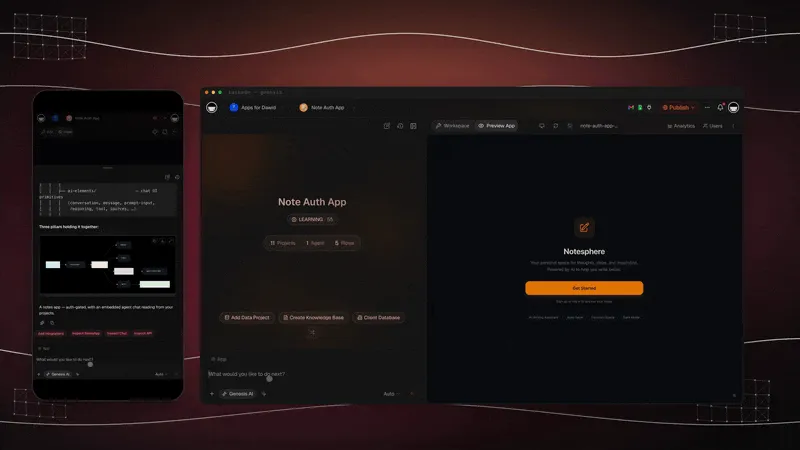
Taskade Genesis turns a sentence into a running app in four moves: you prompt it, it builds the app, you clone it to make it yours, and you ship it on your own domain. That loop is the whole reason the same prompt that gives every other tool a PDF gives Taskade Genesis a system. The Taskade Genesis Loop is the engine behind every example in this guide.
The dotted arrow is the part competitors don't have: the loop comes back around. Need a second app for a different business, currency, or document type? You prompt again, and because everything lives in one workspace, the new app shares the same clients and data. This is the no-code app builder pattern: describe, build, clone, ship, repeat.
Full Taskade Genesis Capabilities
Taskade Genesis is not an invoice feature bolted onto a note app. It is a complete platform for turning descriptions into running software. An invoice app is just one shape it builds. Here is the full slice that matters for anyone running a business on documents today, framed as capabilities you can use, not architecture.
AI Apps: Describe an Outcome, Get a Running App
You describe an outcome in plain words, "an invoice system," "a client portal," "a revenue dashboard", and Taskade Genesis returns a real, running web app, not a file you download. Publish it, put it on a custom domain on the Business plan and above, and let others clone it in one click. This is the difference between generating a document and generating the software that produces it. Taskade's first Enterprise customer, an IT program manager with no engineering team, built a production field-service dashboard this way, a working app, not a deck.
AI Agents v2: Teammates With Memory and built-in tools
Every Taskade Genesis app can run AI agents with built-in tools, web search, code, file analysis, custom slash commands, plus persistent memory, multi-agent collaboration, public embedding, and multi-model routing. For finance, that means an agent that watches due dates, drafts reminders, escalates the genuinely overdue, and reconciles against Stripe, work that used to be a person's afternoon. The Taskade EVE meta-agent orchestrates the build and the agents inside it.

Automation: Durable Workflows, 100+ Bidirectional Integrations
Taskade Genesis automations run reliable, durable workflows with branching, looping, and filtering, wired to 100+ bidirectional integrations. Triggers pull events in (a paid Stripe charge, a passed due date, a new row); actions push data out (sync to QuickBooks, post to Slack, send an email). Each side names real tools, Stripe and Calendar on the trigger side, QuickBooks and Slack on the action side. So your invoice app stops being a form and starts being part of how money moves. See Taskade Automations for the full picture.
Multiple Project Views: See the Same Money in Different Ways
Your financial data lives once and renders in multiple project views: List, Board, Calendar, Table, Mind Map, Gantt, and Org Chart (Timeline lives inside Gantt). Unpaid invoices as a Board, due dates on a Calendar, revenue in a Table, a client tree as an Org Chart, same data, your choice of lens. No other tool on this list lets you re-view the same finances without re-exporting them.
Workspace DNA: Memory + Intelligence + Execution
The reason a Taskade Genesis workspace compounds is the self-reinforcing loop: your projects are Memory (every client and payment), your agents add Intelligence (reminders and reconciliation), and your automations handle Execution (Stripe sync, Slack alerts), and execution writes new memory, which sharpens intelligence. That is Workspace DNA, the ▲ ■ ● signature, and it is why the second month with Taskade Genesis is faster than the first.
Each loop leaves the workspace smarter than it found it. A file generator has no memory to compound. That is the structural ceiling no template can lift.

Frontier Models, Community Gallery, and App Kits
Taskade Genesis is powered by frontier models from top AI labs, auto-routed so you never pick a model. You just describe what you want. Finished apps live in the Community Gallery where anyone can clone them, and the buy-once-clone-many App Kits marketplace lets you start from a polished, working app instead of a blank prompt. The invoice and finance-tracker apps in this guide are exactly that: clone-ready, no rebuild.
Beyond invoices, the same workspace builds the rest of a small-business operating stack, from a client portal to a dispatch board. A customer-health dashboard is one clone away, sharing the same clients as your invoice app:

How the App Connects to Stripe, QuickBooks, and Slack
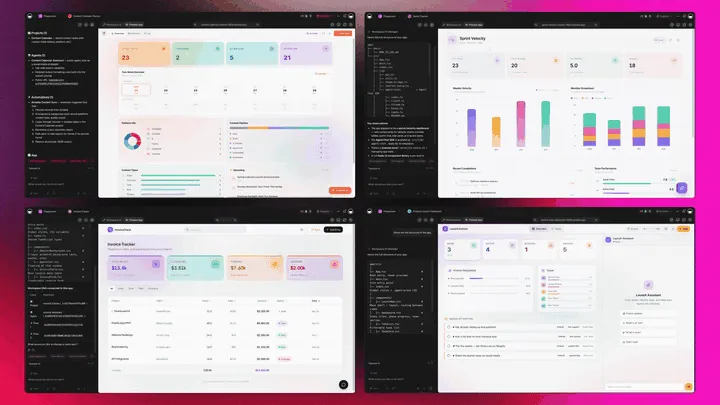
A document can't get paid. An app can. The whole reason a Taskade Genesis invoice app beats a PDF is that it plugs into the tools where money actually moves. Here is the loop: an invoice goes out, Stripe reports the payment, the app marks it paid, QuickBooks gets the record, and if a due date passes with no payment, Slack gets the nudge.
That is 100+ bidirectional integrations doing what a file never could: triggers pull events in (Stripe charge, due date), actions push data out (QuickBooks sync, Slack alert). The freelancer who wires this once stops manually checking who has paid, the app tells them.
Real Talk: When NOT to Use Taskade Genesis
Honest guidance builds more trust than a clean sweep. If you need a single invoice in the next sixty seconds and never again, open invoice-generator.com, building an app is overkill for a one-time bill. If you want full double-entry bookkeeping with a CPA-ready ledger and tax filing, QuickBooks or Wave is the right home for your books. If you have a spreadsheet and need exactly one balance sheet for a loan application, Tyms will export it faster than building a tracker.
Taskade Genesis wins the moment you need the same thing more than once, recurring invoices, ongoing payment tracking, a financial view that updates, a system your team shares. That is most businesses. But picking the right tool for a genuine one-off is good advice, and a vendor who can't say so isn't worth trusting on the rest.
A few more honest calls. If your accountant insists on a specific ledger format and files your taxes, keep your books where they want them, QuickBooks or Wave, and let Taskade Genesis sync to it rather than replace it. If you bill purely by the hour and want best-in-class time tracking baked in, FreshBooks does that one job beautifully. And if your invoice volume genuinely fits under a thousand a year and you never need more than a clean PDF, Zoho Invoice is free and excellent. There's no shame in the simplest tool that fully solves your problem. Taskade Genesis is for the case the others can't reach: when invoicing is one part of a business you'd rather run as connected, living apps you own, the shape laid out in AI app builders for business. For everything narrower, the specialist wins, and we'll say so every time.
How to Build Your Invoice App in 5 Minutes
You don't need to be technical. Here is the whole path from idea to a working invoice system.
  STEP 1  Open Taskade Genesis  → /create
  STEP 2  Describe your billing:
          "Invoice app with clients, line items, tax,
           paid/unpaid status, and a logo field."
  STEP 3  Taskade Genesis builds the app (Clients + Invoices + Payments)
  STEP 4  Add your logo, business details, and first client
  STEP 5  Connect Stripe so paid charges mark invoices "Paid"
  STEP 6  Clone it for a second business or currency — anytime
  ───────────────────────────────────────────────
  RESULT  A live invoice system you own, not a PDF you forget
Prefer to start from something that already works? Clone the live invoice app and skip straight to Step 4.
Where This Is Going: Our Vision for 2027 and Beyond
The invoice is a small window into a much bigger shift. For most of software history, building a tool meant a team, a budget, and months. Taskade's view of the next few years is simple and specific: software you describe instead of build. You will not buy an invoice app, a balance-sheet app, and a KPI app. You will describe your business once and run it as living, cloneable apps that share one memory and improve themselves as you use them.
Taskade's first Enterprise customer is the early proof. As a non-technical IT program manager, he described a field-service dashboard and got a production app, and put the scale of the shift plainly: "What I accomplished in a few weeks would have taken a team of 40+ people 18 months in a Fortune 500." The frame Taskade is building toward is exactly that inversion: what took a 40-person team 18 months, one person clones in an afternoon.
Three things change between now and 2027:
- Every operator runs their business as living apps. The freelancer, the agency owner, the shop, each describes their billing, their pipeline, their reporting, and runs the result. No spreadsheets pretending to be software. The no-code app builder becomes the default way ordinary businesses get tools.
- Agents with memory do the work, not just the drafting. Today an agent drafts the reminder. Soon the agent runs the receivable. It issues, watches, chases, escalates, and reconciles, reporting to you only on exceptions. Generation was never the prize; follow-through is. Taskade Genesis already runs early versions of this loop with its agent tools.
- The workspace becomes the computer. The place you keep your projects, your agents, and your automations stops being a folder of documents and becomes the operating layer your business runs on. You open your workspace the way you used to open an app, except this one you described, and it does the work.
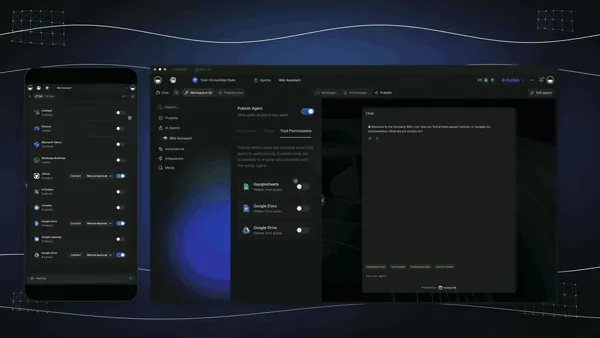
That is why an invoice generator that stops at a PDF is the wrong place to start. The file was never the goal. The system that produces it, and eventually runs it for you, is. The businesses that win the next few years won't be the ones with the prettiest documents; they'll be the ones running on living, cloneable apps they described in plain words and never had to maintain. Start describing yours free →
Where AI Financial Generation Is Going in 2027
1. Documents Become Apps
By 2027, generating an invoice or a balance sheet will be indistinguishable from deploying a small financial app. The "download a PDF" pattern will feel as dated as faxing one. Expect the free single-document tools to add lightweight tracking, and expect app generators like Taskade Genesis to absorb the whole document category.
2. Your Numbers Stay Live
Static statements go stale the instant a payment clears. The winning tools will keep every number live, mark an invoice paid and the balance sheet, the revenue KPI, and the cash-flow view all move together. The snapshot era ends; the system era begins.
3. Agents Chase the Money
The most valuable financial feature in 2027 isn't generation. It's follow-up. An AI agent that watches due dates, sends polite reminders, escalates the genuinely overdue, and reconciles against Stripe is worth more than any template. Taskade Genesis already runs this loop with its built-in agent tools.
4. One Workspace, Every Statement
The fragmentation that splits invoices, balance sheets, and KPIs across three tools will collapse. Buyers will want one workspace that holds all of it, connected, so the invoice that gets paid updates the KPI that the balance sheet reflects. That is the Workspace DNA model, and it is where the category is heading.
  THE THREE-TOOL WORLD                 ONE-WORKSPACE WORLD (Taskade Genesis)
  ────────────────────                 ─────────────────────────────
  Invoice tool  ──┐                    ┌─────────────────────────┐
  (re-enter clients)                   │   ONE WORKSPACE          │
  Balance-sheet tool ──┤  no link      │   • Invoices            │
  (re-paste numbers)   │  between      │   • Balance sheet       │
  KPI tool       ──┘   │  any of them  │   • KPI dashboard       │
                       │               │   all share one data set │
  3 subscriptions, 0 connections       └───────────┬─────────────┘
  Update one → update all by hand                  │ paid invoice updates
                                                   ▼ KPI + balance sheet
                                       1 plan, every statement, auto-linked
The left is where most businesses live today, three logins and a lot of copy-paste. The right is one Taskade Genesis workspace where the numbers move together. That collapse from three tools to one connected system is the single biggest reason to start with an app instead of a file.
Related Reading
Connect the dots across our 2026 AI tooling and finance coverage:
Finance & business apps you can build:
- Taskade Invoice Generator
- Balance Sheet Generator Agent
- KPI Report Generator
- 10 Best AI CRM Software in 2026
- 10 Best AI CRM Builders in 2026 — the pipeline that feeds the invoice
- Build a CRM With AI — the step-by-step prompt
- Best AI Dashboard Builders in 2026
- Track Receivables Before They Become Bad Debt
- AI Sales Pipeline — where a paid invoice starts
Build the app, not the file:
- Best Free AI App Builders
- AI App Builders for Business
- Build an Ops Dashboard Without Code
- Best AI Ops Dashboard Builders
- Agency Client Portal Templates
- AI Prompt Generators
- Best AI Workflow Automation Tools
- Track Hours, Bill Clients, Get Paid — where the invoice's line items come from
- Automate License Renewals — the money going out, on the same register discipline
- The Taskade Genesis Loop, explained
- What is a No-Code App Builder?
For the technical reader:
Taskade hubs:
What We Learned Comparing All 12 Tools
Comparing twelve invoice and financial generators back to back revealed three things. First, the gap between a file and an app is bigger than it looks. It is the difference between every era this category passed through and the one it is entering, a tool that remembers your client and tracks payment saves hours every month that a one-off form never gives back. Second, pricing is the SERP's biggest blind spot: almost no rival listicle lists a single price, and the tools themselves hide cost behind "get started" buttons. Third, the searcher who wants invoices, a balance sheet, and KPIs is forced to buy three tools, unless they build one app that does all three. If you take one action from this guide, clone the live invoice app, swap in your own logo and clients, and watch an invoice generator stop being a download and start being a system.
See It In Action: Three Live Apps You Can Clone Now
Reading about an app is one thing; running one is another. Every other entry on this list ends at a screenshot in a marketing page. These three end at a working app you can open, clone, and make yours in one click, no rebuild, no account gymnastics. This is the proof the rest of the category can't show.
- Invoice app →, Clients, Invoices, and Payments as live records. Clone it, add your logo, generate your first branded invoice today.
- Finance tracker →, A balance-sheet and KPI dashboard that updates as you add data. The companion to the invoice app, same workspace.
- Customer-health dashboard →, The next app a growing business clones, sharing the same client list as your invoices.
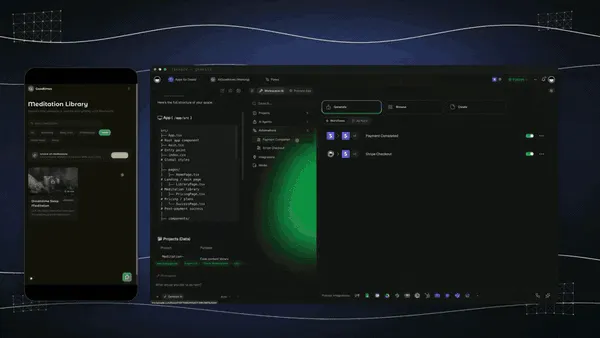
Payments are where the app earns its keep, a charge clears in Stripe and the invoice flips to "Paid" without you touching it:
And due dates stop being something you remember, the app puts them on a calendar and acts on them:
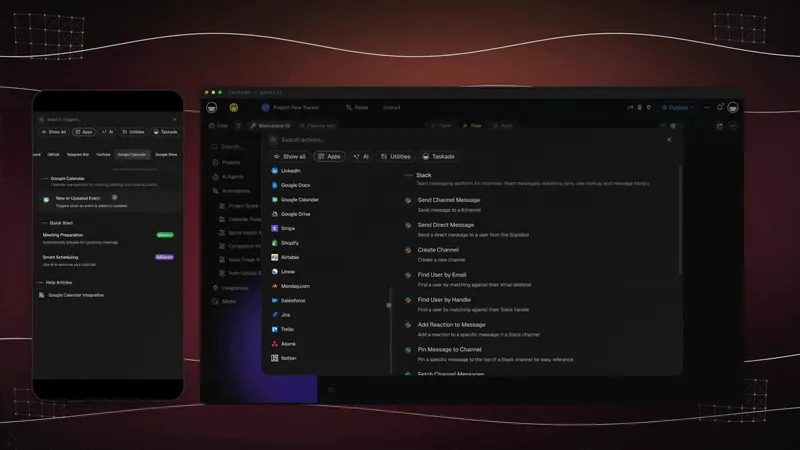
That is the whole argument made visible: a PDF sits in a folder; an app moves money, tracks status, and chases the overdue on its own. Clone the invoice app and watch it happen →
Cloning is the moment the whole category changes for you. Every other tool asks you to start over each time, a blank form, a blank template, a blank upload. A clone hands you a working app on the first click: the data model, the views, the status tracking, all there, waiting for your logo and your clients. You are not evaluating a feature list; you are running software you didn't have to build. That single click, from reading about an app to owning one, is the line between this guide and every other "best invoice generator" page on the web. None of them can hand you the app. This one can.
Verdict
If you need one invoice right now, use invoice-generator.com. If you want a gorgeous single PDF, use Canva. If you want full bookkeeping, use QuickBooks or Wave. If you have a spreadsheet and need a one-off balance sheet, use Tyms. If you want an invoice generator that builds a living app, one that tracks paid versus unpaid forever, grows into balance sheets and KPIs, and syncs to Stripe and QuickBooks, use Taskade Genesis. Start free at /create: describe your billing, get a working app, and get paid the same week.
Stop generating files. Generate the app that gets you paid. Clone a live invoice app that tracks paid and unpaid forever →, free, no rebuild, yours to run.
Your invoices feed your Memory (every client and payment), your agents add Intelligence (reminders and reconciliation), and your automations handle Execution (Stripe sync, Slack alerts), the self-reinforcing loop that turns a document into a business that runs itself. ▲ ■ ●
FAQ
What is the best AI invoice generator in 2026?
Taskade Genesis is the best AI invoice generator in 2026 because it builds a live invoice app, not a one-off PDF. You prompt it once, and it returns a working app with Clients, Invoices, and Payments that keeps generating invoices and tracking paid versus unpaid forever. It connects to 100+ integrations including Stripe and QuickBooks. Pricing starts free, then Pro $10/month billed annually.
What is the best free AI invoice generator?
Taskade Genesis is the best free AI invoice generator because the free plan lets you build and clone a real invoice app, not just download a single file. invoice-generator.com and Wave are strong free single-document tools, but they hand you one PDF at a time with no memory of clients or payment status. Taskade Genesis remembers every client and tracks which invoices are paid.
Can AI generate a balance sheet?
Yes. Taskade Genesis can generate a balance sheet and keep it live. Instead of a one-time export, Taskade Genesis builds a financial tracker app where assets, liabilities, and equity update as you add data, alongside a KPI dashboard. Tyms and Protoolio generate one-off balance sheets from an uploaded spreadsheet; Taskade Genesis builds the tracker that produces the statement on demand.
What is the difference between a one-shot PDF and a Taskade Genesis invoice app?
A one-shot PDF is a single file you generate and then forget. You re-enter every client and line item the next time. A Taskade Genesis invoice app is a living tool that remembers your clients, line items, and tax rates, generates new invoices in seconds, tracks paid versus unpaid, and sends reminders. You build the app once and reuse it forever.
Can an AI invoice generator track paid and unpaid invoices?
Taskade Genesis tracks paid and unpaid invoices automatically because each invoice is a structured record in a live app, not a static document. You see overdue invoices in a Board or Table view, and an AI agent can send a payment reminder on a schedule. Most free invoice tools cannot track status at all because they only output a flat file.
Can I add custom branding and my logo to AI-generated invoices?
Yes. A Taskade Genesis invoice app supports your logo, brand colors, business details, and custom fields, and you can publish it on your own custom domain on the Business plan and above. Canva and invoice-generator.com also support logos on individual invoices, but Taskade Genesis applies your branding to every invoice the app produces automatically.
Can an AI invoice generator connect to Stripe or QuickBooks?
Yes. A Taskade Genesis invoice app connects to 100+ bidirectional integrations including Stripe and QuickBooks, so a paid Stripe charge can mark an invoice as paid, and a new invoice can sync to your accounting software. QuickBooks has native invoicing inside its own ecosystem; Taskade Genesis lets you keep your workflow in your workspace and push or pull data both ways.
Is my financial data private in an AI invoice generator?
Your financial data in Taskade Genesis lives in your private workspace with role-based access from Owner to Viewer. You decide who can see invoices, clients, and revenue numbers, and apps stay private until you choose to publish or share them. You own and can export your data at any time.
Can I clone and reuse an AI invoice generator?
Yes. Every Taskade Genesis app can be cloned in one click, which is the core difference from one-off generators. Clone the live invoice app, swap in your own logo and clients, and you have a working invoice system in minutes. You can clone it again for a second business or a different currency without rebuilding anything.
Can one tool generate invoices, a balance sheet, and a KPI report?
Taskade Genesis is the one tool that generates invoices, balance sheets, and KPI reports because it builds a financial app rather than a single document. The same workspace can hold an invoice app, a balance-sheet tracker, and a KPI dashboard, all connected. Most competitors specialize in one statement type, so you would need three separate tools.
How much does an AI invoice generator cost?
Taskade Genesis starts free, then Pro $10/month (the Popular tier), Business $25/month, Max $100/month, and Enterprise $250/month, all annual billing. You build unlimited financial tools on a single plan instead of paying per invoice app. QuickBooks and Invoicer.ai are subscription SaaS; most free invoice tools are free only because they stop at a single PDF.
Is FreshBooks or Zoho Invoice better than an AI app builder for invoicing?
FreshBooks and Zoho Invoice are excellent fixed invoicing products, Zoho Invoice is free for up to 1,000 invoices a year, and FreshBooks adds polished time tracking from around $19/month. Both lock you into their template and feature set. Taskade Genesis is different in kind: instead of a fixed product you adapt to, it builds an invoice app shaped to your exact workflow that you own, clone, and connect to 100+ integrations. Choose FreshBooks or Zoho for a turnkey product; choose Taskade Genesis when you want a system you control.
How long does it take to build an invoice app with Taskade Genesis?
Building an invoice app with Taskade Genesis takes a few minutes from a single plain-language prompt. You describe your billing, the Taskade EVE meta-agent builds the app with Clients, Invoices, and Payments, and you add your logo and first client. Or skip the build entirely by cloning the live invoice app in one click and swapping in your own details. There is no setup, no hosting, and no code.
Can a small business run its whole finance stack on one AI app builder?
Yes. A small business can run invoicing, a balance-sheet tracker, a KPI dashboard, and payment reminders as connected apps inside one Taskade Genesis workspace. Because every app shares the same data and 100+ integrations, the invoice that gets paid updates the revenue KPI and the balance sheet automatically. This replaces the common pattern of paying for three or four separate single-purpose tools.