






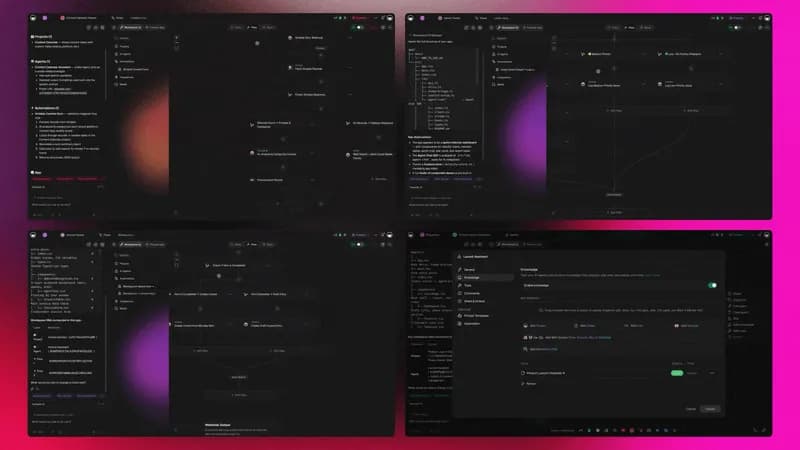
Two-way automation means your data moves in both directions. A trigger pulls an event in from a tool you already use, your workspace reasons over it, and an action pushes the finished result back out — often to a completely different system, with a confirmation written back so nobody has to check twice. That round trip is the difference between a workflow that saves you a copy-paste and a workflow that removes an entire job.
TL;DR: Two-way automation completes a round trip — a trigger pulls an event in from a connected app, your workspace acts on it, and an action pushes the result back out. Taskade ships 100+ bidirectional integrations built this way, so a new Stripe payment can close an invoice and post to Slack with nobody touching either. Clone a live app →
Most people's stack already has the data. It is sitting in Stripe, in Gmail, in a Google Sheet, in a CRM someone set up two years ago. What is missing is the return leg — the part where a result travels back out and lands where the next person needs it. This guide shows you how that round trip is built, what each half does, and six loops you can have running before the end of the week.
Two-way automation means data moves in both directions
Two-way automation is a workflow where information flows in from an external tool and out to another one, inside a single run. The inbound half is a trigger: a new row, a new payment, a new message. The outbound half is an action: create the record, send the alert, update the CRM. Between them sits the part that makes the loop worth building — filtering, branching, and an AI agent that can read the payload and decide what it actually means.
A one-way sync copies records from A to B and stops. You still open B, look at what arrived, and do something about it. A two-way loop closes itself:
┌─ ONE-WAY SYNC ──────────────────────────────────────────────┐
│  Stripe  ──►  Spreadsheet                                    │
│                    ▲                                         │
│                    └── you still open it, read it, act       │
└──────────────────────────────────────────────────────────────┘┌─ TWO-WAY LOOP ──────────────────────────── Taskade ──────────┐
│                                                              │
│   Stripe payment  ──►  TRIGGER                               │
│                          │                                   │
│                          ▼                                   │
│                    FILTER  ◇ amount > 0, status = succeeded  │
│                          │                                   │
│                          ▼                                   │
│                    AGENT   ▲ match to client, read history   │
│                          │                                   │
│                          ├──►  ACTION  mark invoice paid     │
│                          ├──►  ACTION  post to #finance      │
│                          └──►  ACTION  update CRM stage      │
│                          │                                   │
│                          ▼                                   │
│                    ● Confirmation written back to Project    │
└──────────────────────────────────────────────────────────────┘
Nothing in the second box requires a person. That is the whole point, and it is why the ultimate guide to task automation treats the write-back step as the one you should never skip.
A two-way loop has four moving parts
Every round trip in Taskade follows the same four-stage shape, no matter which tools sit on either end. Learn it once and every future loop is a variation.
The middle two stages are where the value is. A filter throws away the 90% of events you do not care about. A branch sends a $50 order and a $50,000 order down different paths. And the reasoning step is what separates this from a plumbing tool: an agent reads the payload in context rather than pattern-matching on a field name. The orchestration model behind it is worth ten minutes if you want the full picture.
Six two-way loops you can run this week
Each of these starts in an external tool and finishes in a different one. Pick the row that matches a job you currently do by hand.
| The loop | Pulls in | Pushes out | What you stop doing |
|---|---|---|---|
| Lead in, follow-up out | New Typeform or Google Forms submission | Scored record in your CRM, alert in Slack | Triaging the inbox every morning |
| Payment in, invoice closed | Stripe payment succeeded | Invoice marked paid, receipt emailed, reminder cancelled | Chasing clients who already paid |
| File in, summary out | New file in Google Drive or Dropbox | Written summary posted to the project, task assigned | Reading the attachment yourself |
| Order in, stock out | Shopify order created | Inventory decremented, low-stock alert to the buyer | Reconciling the sheet on Fridays |
| Meeting in, notes out | Zoom or Google Calendar event ends | Transcript summarized, action items assigned to owners | Writing recap emails |
| Issue in, status out | New GitHub or Linear issue | Triaged, labelled, mirrored to the roadmap project | Copying tickets between trackers |
Two of those are worth reading in depth because the mechanics generalise: the lead capture, scoring, and enrichment loops show how the reasoning step handles messy inbound data, and AI invoice automation walks the full payment round trip end to end. For content teams, AI content pipelines is the same shape pointed at distribution.
Start with a live kit: five apps you can clone today
The fastest way to understand a two-way loop is to open one that already runs. Each of these is a live app with its projects, agents, and automations already wired — clone it into your workspace and swap the connections for yours.
| Live app | What its round trip does |
|---|---|
| Neon CRM Dashboard | Pulls new leads in from forms and email, pushes scored records and follow-up tasks back out |
| Invoice Generator | Generates the invoice, watches Stripe for the payment, closes the loop and stops reminders |
| Simple Store Manager | Takes orders in, pushes stock updates and low-inventory alerts out to whoever buys |
| Multi-Platform Publisher | One approved draft in, scheduled posts out across every channel, results back in |
| Appointment Booking System | Booking in from your calendar, confirmations and reminders out, no-show follow-up back in |
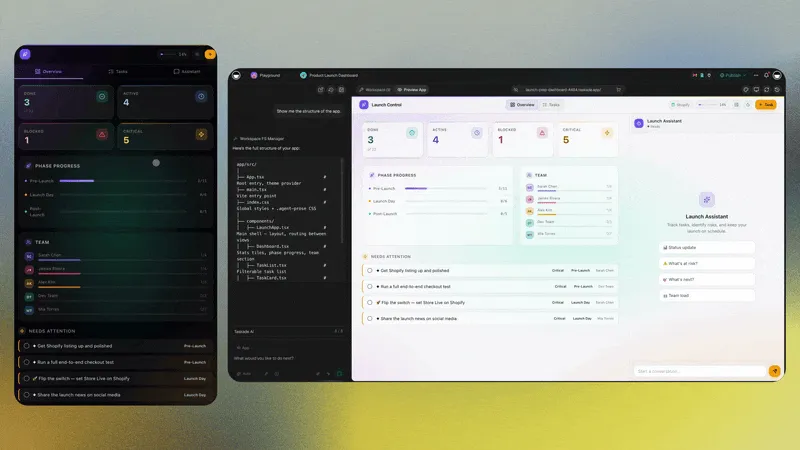
Here is the CRM one running live. Try it, then take it:
Hundreds more are published in the Community Gallery, and the app generator will build one from a sentence if none of them fit.
Triggers pull the event in
A trigger is the inbound half — the condition that starts the run. Taskade's triggers fall into four families, and knowing which one you need is most of the design work:
| Family | Starts when | Typical use |
|---|---|---|
| Workspace | A task, project, comment, or custom field changes | Kick off billing when a project is marked complete |
| Connected app | An external service reports an event | New Stripe charge, new Gmail message, new Shopify order |
| Time-based | A schedule or delay elapses | Sunday-night reporting, a three-day payment nudge |
| Inbound | A webhook, mailhook, or form is hit | Anything with no native connector |
Before you build a single filter, fire the trigger once and read the real payload. Every trigger step has a Test control that replays the last actual event, so you write conditions against real field names instead of guessing at them. The triggers reference covers each family in detail.
Actions push the result out
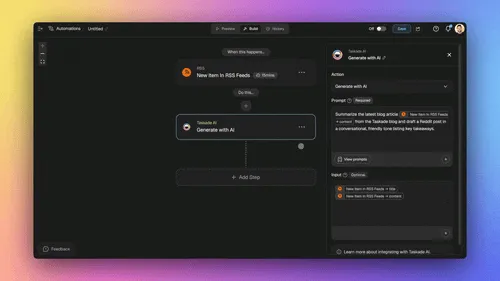
An action is the outbound half — the step that puts the finished work somewhere useful. Actions cover your workspace (create a project, add a task, assign an owner), AI (ask an agent, generate, categorize), web and files (scrape, HTTP request, transcribe, convert), control flow (branch, loop, filter, delay), and the full set of connected services.
That last category is where "bidirectional" earns its name. Slack is not only a place to receive alerts — an automation can post to a channel, and a Slack event can start a run. Google Sheets reads and writes. HubSpot and GitHub work both directions. Same connector, both legs of the trip.
Two practical patterns:
- Fan out. One trigger, several actions. A closed deal writes the CRM stage, posts to Slack, creates the onboarding project, and emails the welcome sequence — all from one event. See it applied in sales automation.
- Fill the gap. No native connector? An HTTP Request action reaches any REST endpoint, and an inbound webhook receives from any service that can send one.
Worked examples for the most common stacks: Google Sheets automations, the full Google Workspace guide, and e-commerce automation for anyone running a storefront.
Guardrails keep a two-way loop honest
Pointing an automation at live money and live customers only works if the engine refuses to do something stupid. Four constraints do the work:
| Guardrail | What it means | Why you want it |
|---|---|---|
| Bounded loops | A Loop action runs once per item in a list, then finishes | No runaway "keep trying until it works" behaviour |
| No recursion | An automation cannot call itself; nesting is capped at a depth of three | A loop cannot trigger the loop that triggered it |
| Durable execution | A failed run resumes from the exact step that broke | No duplicate invoices, no double-posted messages |
| Filters first | Conditions evaluate before any outbound action fires | The $50,000 order and the $50 order take different paths |
Durable execution is the one people underestimate. Real integrations time out, rate-limit, and drop connections; a workflow that restarts from the top on every hiccup will eventually bill someone twice. Resuming mid-run is what makes multi-day waits safe — durable execution for AI workflows covers the failure modes properly, and the execution reference is the short version.
Your plan decides how far the round trip reaches
Every paid plan can run two-way automations. What changes as you move up is reach — how many people, which surfaces, and what you can put your own name on.
| Plan | Annual price | What it adds for connected work |
|---|---|---|
| Free | $0 | Build apps and agents; 1,000 credits when you verify your account plus 10,000 on your first build |
| Pro | $10/mo billed annually | Automations switch on here: scheduled and webhook triggers, premium third-party steps (Slack, Gmail, HubSpot, Salesforce), hosted MCP access, agents across your stack |
| Business | $25/mo billed annually | SSO and SAML, custom domains for published apps and workspaces |
| Max | $100/mo billed annually | Everything in Business, plus much higher AI credit and request limits for heavy agent work |
| Enterprise | $250/mo billed annually | SCIM user provisioning, dedicated support with a custom SLA |
The 11,000-credit free grant is sized so that verified signup plus a first build funds one complete app end to end — enough to see the whole system before you decide anything. Switching the loop on is what Pro adds. Full detail on pricing.
One clarification worth stating plainly, because it gets muddled: MCP runs both ways here, in two different places. Taskade hosts an MCP server, so an external AI client can connect in to your workspace, and that access is included on every paid plan. Pointed out, the MCP Client step inside an automation calls tools on a third-party MCP server, on every plan including Free — your automation run allowance is the only ceiling. The one boundary to design around: the outbound call belongs to the automation, not to an agent acting alone. An agent reads the project, makes the judgment call, hands the step the work, and reads the answer back. For services that publish no MCP server, the 100+ bidirectional integrations or an HTTP Request action do the same job.
Frequently asked questions
What is two-way automation?
Two-way automation moves data in both directions between your workspace and the tools you already use. A trigger pulls an event in — a new Stripe payment, a Typeform submission, a Gmail message — the workspace reasons over it, and an action pushes the finished result back out to another tool. Taskade ships 100+ bidirectional integrations built exactly this way.
How is two-way automation different from a one-way sync?
A one-way sync copies records from a source to a destination and stops. Two-way automation completes a round trip: the event comes in, work happens on it, and a result goes back out — often to a third system, with a confirmation written into your workspace. That closing write-back is the part that removes manual follow-up.
Do I need code to connect my apps?
No. You describe the round trip in plain English and Taskade Genesis builds the app, the AI agent, and the automation together. There is no node canvas to wire by hand and no script to maintain. If you need a service that is not in the directory, an HTTP Request action and an inbound webhook cover the gap.
Which apps can Taskade connect to?
Taskade offers 100+ bidirectional integrations across communication, email and CRM, payments, development, productivity, content, analytics, storage, calendar, and e-commerce. Named connectors include Slack, Gmail, Google Sheets, Stripe, Shopify, HubSpot, Salesforce, GitHub, Linear, Notion, Airtable, and Typeform. Browse them all in the integrations directory.
Can an automation loop forever?
No, and that is deliberate. A Loop action is a bounded per-item pass — it runs once for each item in a list, then finishes. Automations cannot call themselves recursively, and nesting is capped at a depth of three. Those limits are what make a loop safe to point at live billing.
What happens if an integration fails mid-workflow?
Taskade automations use durable execution. If a connected service times out, the run resumes from the exact step that failed rather than restarting from the trigger — no duplicate invoices, no double-posted messages, no half-written CRM records. Long waits are first-class: a loop can pause for days, check a status, and continue.
Can I connect Claude or another AI client to Taskade over MCP?
Yes, and the traffic runs both ways. Taskade hosts an MCP server, so an external AI client can connect in to your workspace and read or write through it — included on every paid plan, starting with Pro at $10/month billed annually. Pointed outward, the MCP Client step inside an automation calls tools on a third-party MCP server, on every plan including Free, with your automation run allowance as the only ceiling. That outbound call sits in the automation rather than inside an agent: the agent decides what it needs, hands the step the work, and reads the result back.
How much does two-way automation cost?
Taskade is free to start. Paid plans are Pro at $10/month billed annually, Business at $25/month billed annually, Max at $100/month billed annually, and Enterprise at $250/month billed annually. New accounts receive 1,000 credits when they verify their account and 10,000 on their first build — an 11,000-credit one-time grant. SSO and SAML unlock on Business and above.
Can an AI agent act on data an integration brings in?
Yes. Taskade AI Agents ship with built-in tools covering web search, code, file analysis, custom slash commands, persistent memory, public embedding, and multi-agent collaboration. Agents run on 15+ frontier models from OpenAI, Anthropic, Google, and open-weight providers, so you can match the model to the job.
How do I see the real shape of the data an app sends me?
Fire the trigger once and let Taskade replay the payload. Every trigger step has an inspector with a Test control that shows the last real event, so you build filters against actual field names instead of guessing. It takes about thirty seconds and prevents most broken branches.
Where do the finished records live?
Inside a Taskade Project, readable 7 ways — List, Board, Calendar, Table, Mind Map, Gantt, and Org Chart. The records an automation writes are the records your team reads. Timeline is part of Gantt, not a separate view. See project views.
Can I publish the result as an app my clients use?
Yes. Anything built in Taskade Genesis publishes as a live app with a shareable URL, and Business plans and above add a custom domain. A client submits a form on your domain, the loop runs, and the confirmation lands in the same app they are already looking at.
Own the round trip
The stack you already pay for holds most of what your business knows. What it does not have is a return leg — the step where a result travels back out and lands in front of whoever needs it next. Build that leg once and the work stops being yours.
Start with a loop you currently run by hand. Pull the event in with a trigger, let an agent read it, push the result out with an action, and write the confirmation back where your team already looks. That is Workspace DNA in practice: ▲ Memory that remembers the client, ■ Intelligence that decides what the event means, ● Execution that carries it back out across 100+ bidirectional integrations.
Clone the Neon CRM Dashboard and change one connection, or describe your own round trip and watch it get built. Compare approaches first in 10 best Zapier alternatives, or browse ready-made flows in automations and agentic workflows.