Introducing TSK-1Introducing TSK-1—Taskade's intelligence layer.
taskade
PricingHelpDashboard →Dashboard →
PricingLoginSign up for free →Sign up for free →
Dashboard →Dashboard →
Sign up →Sign up →
Loved by 1M+ users·Hosting 100K+ apps·Deploying 500K+ AI agents·Running 1M+ automations·Backed by Y Combinator·Powered by TSK-1
TaskadePricingFeaturesContact usIntegrationsMCP ServerDeveloper APIChangelogPressLearnAbout
ConnectProductivityKitsVideosReviewsFAQ
VibeVibe AppsVibe AgentsVibe CodingVibe WorkflowsVibe Marketing
Vibe DashboardsVibe CRMVibe AutomationVibe PaymentsVibe DesignVibe SEOVibe Tracking
Community
FeaturedQuick AppsToolsDashboardsWebsites
WorkflowsProjectsFormsCreators
DownloadsAndroidiOSMacWindows
ChromeFirefoxEdge
Compare
vs Cursorvs Boltvs Lovablevs V0vs Windsurf
vs Replitvs Emergentvs Devinvs Claude Codevs ChatGPTvs Claudevs Perplexityvs GitHub Copilotvs Figma AIvs Notionvs ClickUpvs Asanavs Mondayvs Trellovs Jiravs Linearvs Todoistvs Evernotevs Obsidianvs Airtablevs Basecampvs Mirovs Slackvs Bubblevs Retoolvs Webflowvs Framervs Softrvs Glidevs FlutterFlowvs Base44vs Adalovs Durablevs Gammavs Squarespacevs WordPressvs UI Bakeryvs Zapiervs Makevs n8nvs Jaspervs Copy.aivs Writervs Rytrvs Manusvs Crewvs Lindyvs Relevance AIvs Wrikevs Smartsheetvs Monday Magicvs Codavs TickTickvs Any.dovs Thingsvs OmniFocusvs MeisterTaskvs Teamworkvs Workfrontvs Bitrix24vs Process Streetvs Toggl Planvs Motionvs Momentumvs Habiticavs Zenkitvs Google Docsvs Google Keepvs Google Tasksvs Microsoft Teamsvs Dropbox Papervs Quipvs Roam Researchvs Logseqvs Memvs WorkFlowyvs Dynalistvs XMindvs Whimsicalvs Zoomvs Remember The Milkvs Wunderlist
Taskade GenesisVideo GuideApp BuilderVibe CodingAgent BuilderDashboard Builder
CRM BuilderWebsite BuilderForm BuilderWorkflow AutomationWorkflow BuilderBusiness-in-a-BoxAI for MarketingAI for Developers
AI Agents
FeaturedProject ManagementOperations IntelligenceProductivityMarketing
TranslatorContentWorkflowResearchPersonalSalesSocial MediaTo-Do ListCRMTask AutomationCoachingCreativityTask ManagementBrandingFinanceLearning and DevelopmentBusinessCommunity ManagementMeetingsAnalyticsDigital AdvertisingContent CurationKnowledge ManagementProduct DevelopmentPublic RelationsProgrammingHuman ResourcesE-CommerceEducationLegalEmailSEODeveloperVideo ProductionDesignFlowchartDataPromptNonprofitAssistantsTeamsCustomer ServiceTrainingTravel PlanningUML DiagramER DiagramMath TutorLanguage LearningCode ReviewerLogo DesignerUI WireframeFitness CoachLead EnrichmentFounder OSSales DevelopmentBookkeepingRecruitingWebsite MonitoringField ServiceLicensingAll Categories
Automations
FeaturedBusiness-in-a-BoxOperations IntelligenceInvestor OperationsEducation & Learning
Healthcare & ClinicsReal EstateStripeSalesHR & People OpsField Service & DispatchRenewals & LicensesE-commerceContentMarketingEmailCustomer SupportHubSpotProject ManagementAgentic WorkflowsBooking & SchedulingCalendarReportsSlackWebsiteFormTaskWeb ScrapingWeb SearchChatGPTText to ActionYoutubeLinkedInTwitterGitHubDiscordMicrosoft TeamsWebflowRSS & Content FeedsGoogle WorkspaceManufacturing & OperationsAI Agent TeamsMulti-Agent AutomationNotion AutomationsAgentic AutomationProposalBookkeeping & ExpensesClient OnboardingAll Categories
Wiki
Taskade GenesisAI AgentsAutomation
ProjectsLiving DNAAutonomous Workspaces, Agents & AppsQuantum AI & Taskade Genesis QuantumPlatformIntegrationsProductivityMethodsProject ManagementAgileScrumAI ConceptsCommunityTerminologyFeatures
Templates
FeaturedChatGPTOperations IntelligenceTablePersonal
Project ManagementSalesFlowchartTask ManagementEngineeringEducationDesignTo-Do ListMarketingMind MapGantt ChartOrganizationalPlanningMeetingsTeam ManagementStrategyGamingProductionProduct ManagementStartupRemote WorkY CombinatorRoadmapCustomer ServiceLegalEmailBudgetsContentConsultingE-CommerceStandard Operating Procedure (SOP)Human ResourcesProgrammingMaintenanceCoachingSocial MediaHow-TosResearchMusicTrip PlanningCRMClient OnboardingEmployee OnboardingSOPBug TrackerRecruitment TrackerFormSales PipelineContent CalendarMarketing PlanProduct RoadmapBusiness PlanSWOT Analysis30-60-90 Day PlanInterviewNotion AlternativeKPIStrategic PlanMeeting AgendaInvoiceRisk RegisterIT Asset ManagementKanban BoardChange ManagementCommunication PlanRFPScope of WorkStatement of WorkHelpdeskKnowledge BaseCreative BriefGoal SettingExecutive SummaryGap AnalysisBooking SystemEvent ManagementPortfolio TrackerCustomer Onboarding PortalsClient PortalAgency OperationsFinance TrackingAll Categories
Generators
AI SoftwareNo-Code AI AppAI AppAI WebsiteAI Dashboard
AI FinanceAI Operations IntelligenceAI FormAI AgentAI Client Portal BuilderAI WorkspaceAI ProductivityAI To-Do ListAI WorkflowsAI EducationAI Mind MapsAI FlowchartAI Scrum Project ManagementAI Agile Project ManagementAI MarketingAI Project ManagementAI Social Media ManagementAI BloggingAI Agency WorkflowsAI ContentAI Software DevelopmentAI MeetingAI PersonasAI OutlineAI SalesAI ProgrammingAI DesignAI FreelancingAI ResumeAI Human ResourceAI SOPAI E-CommerceAI EmailAI Public RelationsAI InfluencersAI Content CreatorsAI Customer ServiceAI BusinessAI PromptsAI Tool BuilderAI SEOAI Gantt ChartAI CalendarsAI BoardAI TableAI ResearchAI LegalAI ProposalAI Video ProductionAI Health and WellnessAI WritingAI PublishingAI NonprofitAI DataAI Event PlanningAI Game DevelopmentAI Project Management AgentAI Productivity AgentAI Marketing AgentAI Personal AgentAI Business and Work AgentAI Education and Learning AgentAI Task Management AgentAI Customer Relations AgentAI Programming AgentAI SchemaAI Business PlanAI Pitch DeckAI InvoiceAI Lesson PlanAI Social Media CalendarAI API DocumentationAI Database SchemaAI Marketing PlanAI Sales Pipeline GeneratorAI Course BuilderInternal ToolsBooking SystemReal Estate CRMInventory ManagementAI CRM BuilderAI TimesheetAI DispatchAI NewsletterAI Clinic OperationsAI Directory BuilderAll Categories
Converters
AI Featured ConvertersAI PDF ConvertersAI CSV ConvertersAI Markdown ConvertersAI Prompt to App Converters
AI Data to Dashboard ConvertersAI Workflow to App ConvertersAI Idea to App ConvertersAI Flowcharts ConvertersAI Mind Map ConvertersAI Text ConvertersAI Youtube ConvertersAI Knowledge ConvertersAI Spreadsheet ConvertersAI Email ConvertersAI Web Page ConvertersAI Video ConvertersAI Coding ConvertersAI Task ConvertersAI Kanban Board ConvertersAI Notes ConvertersAI Education ConvertersAI Language TranslatorsAI Business → Backend App ConvertersAI File → App ConvertersAI SOP → Workflow App ConvertersAI Portal → App ConvertersAI Form → App ConvertersAI Schedule → Booking App ConvertersAI Metrics → Dashboard ConvertersAI Game → Playable App ConvertersAI Catalog → Directory App ConvertersAI Creative → Studio App ConvertersAI Agent → Agent App ConvertersAI Audio ConvertersAI DOCX ConvertersAI EPUB ConvertersAI Image ConvertersAI Resume & Career ConvertersAI Presentation ConvertersAI PDF to Spreadsheet ConvertersAI PDF to Database ConvertersAI PDF to Quiz ConvertersAI Image to Notes ConvertersAI Audio to Notes ConvertersAI Email to Tasks ConvertersAI CSV to Dashboard ConvertersAI YouTube to Flashcards ConvertersURL to NotesVideo → SummaryAI Receipts to Expense Tracker ConvertersAI Docs to Knowledge Base ConvertersAI Form to Client Portal ConvertersSpreadsheet to CRMAll Categories
Prompts
Client PortalsDocument IntakeField Service
Operations IntelligenceCRMAdvertisingDesignInvoicing and PaymentsSocial MediaCodingBooking and SchedulingConsultingCustomer SupportComplianceTime TrackingNonprofitPatient IntakeBlog WritingBrandingPersonal FinanceHuman ResourcesPublic RelationsTeam CollaborationProduct ManagementSupportAgencyReal EstateMarketingResearchSalesCopywritingContentProject ManagementWebsite CreationStrategyE-commerceEngineeringSEOEducationEmail MarketingUX/UIProductivityInfluencer MarketingAnalyticsEntrepreneurshipLegalVibe CodingRecruitingAll Categories
Blog
Introducing Taskade TSK-1: The System Kernel Behind Every App (2026)The History of AI Benchmarks: Why Every Model Claims to Be the Best (2026)The History of the Agent Harness: The Software Around the Model (2026)
The History of RAG: How AI Learned to Look Things Up (2026)kvCORE Alternative for Solo Realtors (2026): Lead Engine You Own Without IDXRelay.app Alternatives (2026): Where to Move When Your AI Workflows Shut DownHow to Automate 99% of Grading and Lesson Prep with AI (2026)Best Exam Generator AI (2026): Practice Tests and Score Tracking You OwnHomebase Alternative for Field Crew Scheduling (2026): Own Your Dispatch BoardStudy Planner Dashboard You Own (2026): Progress Tracking Without Spreadsheet ChaosAI Yield: The Reliability Metric Almost Nobody Measures (2026)From AI App Builder to Ops System (2026): When the Demo Becomes the BusinessThe History of AI Agents: From SHRDLU to the Agent Loop (2026)Scientist AI Explained: Bengio's Non-Agentic Bet (2026)Agency Retainer Tracker for Scope Creep (2026): Hours and Deliverables You OwnBuyer Seller Closing Checklist Portal (2026): Real Estate Transactions Without the ChaosThe History of Prompt Engineering: From Magic Words to Context Engineering (2026)Recurring Service Agreements for Field Ops (2026): Contracts Beside DispatchHow to Automate 99% of Your E-commerce Store with AI Agents (2026)Run Your Whole Business in One App with Taskade Genesis (June 2026)
AIAutomationProductivityProject ManagementRemote WorkStartupsKnowledge ManagementCollaborative WorkUpdates
Changelog
One Create Screen & Choose How TSK-1 Thinks (Jul 30, 2026)Subspace Links Land & Threads Keep Going (Jul 29, 2026)Apps That Keep Running & a Pay Now Button (Jul 29, 2026)
File Uploads for Your Apps & Saved Originals (Jul 26, 2026)Scans and Photos Become Text in Automations (Jul 25, 2026)Named Cards at a Glance & Complete Reports (Jul 25, 2026)AI Steps Run on the Prompt Alone (Jul 24, 2026)
Wiki
Taskade GenesisAI AgentsAutomation
ProjectsLiving DNAAutonomous Workspaces, Agents & AppsQuantum AI & Taskade Genesis QuantumPlatformIntegrationsProductivityMethodsProject ManagementAgileScrumAI ConceptsCommunityTerminologyFeatures
Prompts
Client PortalsDocument IntakeField Service
Operations IntelligenceCRMAdvertisingDesignInvoicing and PaymentsSocial MediaCodingBooking and SchedulingConsultingCustomer SupportComplianceTime TrackingNonprofitPatient IntakeBlog WritingBrandingPersonal FinanceHuman ResourcesPublic RelationsTeam CollaborationProduct ManagementSupportAgencyReal EstateMarketingResearchSalesCopywritingContentProject ManagementWebsite CreationStrategyE-commerceEngineeringSEOEducationEmail MarketingUX/UIProductivityInfluencer MarketingAnalyticsEntrepreneurshipLegalVibe CodingRecruitingAll Categories
© 2026 Taskade
PrivacyTermsSecurity
Made withTaskade AIforBuilders
BlogProduct UpdatesRun Your Business in One…

Run Your Business in One Living System with Taskade Genesis (July 2026)

Your business is already a system. One prompt turns it into software you run: sales, field service, client portals, finance. Clone a live one in a click.

A live business system built with Taskade Genesis, embedded and running with connected projects, AI agents, and automations in one workspace
July 29, 202612 min readJohn XieProduct Updates·#product updates#genesis#workspace dna
On this page (9)
What Does It Mean to Run Your Business in One Living System?Clone One. Make It Run.Every Client Gets a Workspace of Their OwnYour Customers Ask. Your Workspace Answers.From Four Tools to One Connected SpineWhat It Costs to Run the Whole ThingImagine It. Run It Live.Frequently Asked QuestionsRead Next: The Run-Your-Business Wave

Your business is already a system. Customers, projects, processes, knowledge, the shape is already there, it just lives across four tools that never speak to each other. One prompt turns that shape into software. Taskade Genesis builds the app, connected projects hold the data, AI agents reason over it, and automations keep it running after you close the laptop. Build yours with AI or clone a working one in a click.

TL;DR: Describe your business and Taskade Genesis builds a live app around it: connected projects for memory, AI agents for reasoning, automations for execution. Four whole-business systems are cloneable right now, sales and CRM, field service and ops, client portals, and finance and admin. The free plan runs up to three apps. Clone one free.
Apps and agents built with Taskade Genesis, embedded and running anywhere your customers already are

What Does It Mean to Run Your Business in One Living System?

Running your business in one living system means your customers, projects, processes, and knowledge sit inside a single Taskade Genesis app instead of four disconnected tools. Connected projects hold the data, agents read it, and automations act on it. You describe the business in plain language, and the app is built around the shape your business already has.

The word doing the work is living. Most tools generate an app and stop, which is the whole reason AI-generated apps go stale the week after you build them. A living system keeps its state. The invoice knows which deal it came from, the agent knows what happened last Tuesday, and the automation fires whether or not anyone is at a keyboard.

Four shapes cover almost every business we see, and each one is cloneable below.

The system What it holds What it stops being
Sales and CRM Pipeline, deals, and clients A contact list plus a deal tracker
Field service and ops Assets, schedules, and service logs A spreadsheet plus a whiteboard
Client portals Projects, invoices, and messages A shared folder plus an email chain
Finance and admin Billed, collected, and overdue A billing tool you paste into

All four run on the same three-layer loop, Workspace DNA, which is the through-line of everything we ship. Memory feeds intelligence, intelligence triggers execution, and execution writes back to memory.

One promptdescribing your business One living system MemoryConnected projects holdcustomers, jobs, invoices IntelligenceAgents reason overthe same projects ExecutionAutomations run across100+ integrations

The kernel coordinating all of it is Taskade TSK-1, and the architecture underneath is laid out in the Workspace DNA teardown.

Clone One. Make It Run.

Every system below is a live app, not a template preview. Each one arrives with projects, agents, and automations already connected, so you clone it, point it at your data, and it runs the same day. This is the Taskade Genesis Apps Live promise in its plainest form.

Neon CRM Dashboard, a pipeline that moves leads from first touch to closed, built with Taskade Genesis

The Neon CRM Dashboard above is the sales spine: contacts, deals, and follow-ups in a real pipeline rather than a static list. Because it runs on connected projects, the contact, the deal, and the invoice are one linked record instead of three copies you reconcile by hand. That is the same projects-as-databases idea, applied to revenue.

Live system What it runs Clone it
Neon CRM Dashboard Pipeline, deals, and clients Clone →
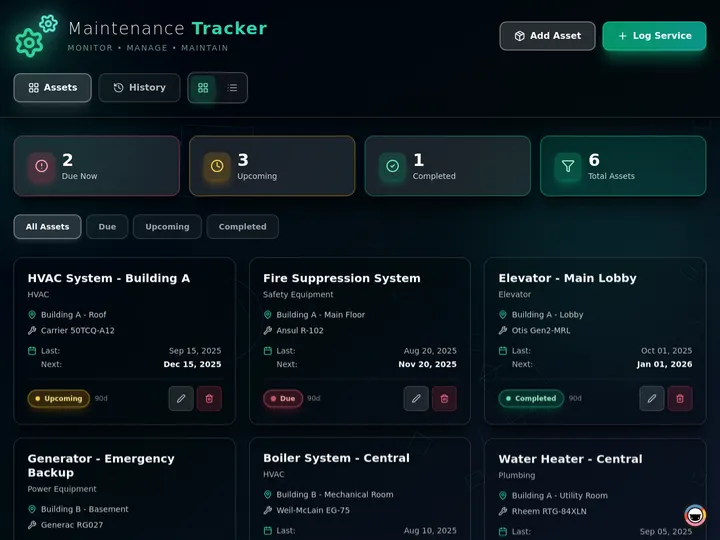
Maintenance Tracker Dashboard Assets, schedules, and service logs Clone →
Client Portal Nexus Projects, invoices, and messages Clone →
Invoice Tracker Billed, collected, and overdue Clone →

Maintenance Tracker Dashboard, every asset, schedule, and service log on one operations screen, built with Taskade Genesis

The Maintenance Tracker Dashboard is the field-service version of the same idea, and it is the shape most crews start with because the day already runs on assets and schedules. For the whole-business story behind these four, read run your whole business on one app, then CRM, invoice generator, and client portal for the client-to-cash trio. Step-by-step setup lives in Taskade as a CRM, and CRM templates are a good place to start if you would rather begin from a structure than a blank prompt.

Every Client Gets a Workspace of Their Own

Agencies, consultants, and service businesses are building the software they wish they had. One client or fifty, the shape is the same: a branded front door where each client signs in and sees only what is theirs. Clone it, connect your data, brand it, ship it. Custom domains are available on Business and above.

Invoice Generator, send branded invoices and track exactly who has paid, built with Taskade Genesis

Client-facing kit What it does for your clients Clone it
Invoice Generator Invoices, clients, and revenue in one view Clone →
Time Tracker Tool Hours and earnings, per project Clone →
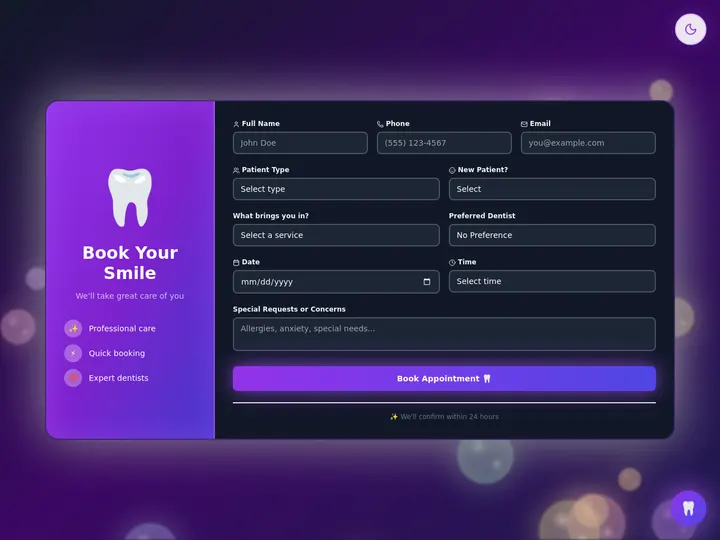
Appointment Booking System Services, times, and confirmed bookings Clone →
Inventory Management Dashboard Stock levels, orders, and low-stock alerts Clone →

Appointment Booking System, let clients pick a service and a time without an email thread, built with Taskade Genesis

The privacy here is structural, not a setting you remember to switch on. App Users give every client their own sign-in and their own private view, so one client never sees another's data. Put that behind your own domain and the front door carries your name and your colors instead of a shared link.

Your own domain (Business and above) One living system your-domain.com App Users sign-in Connected projects:clients, jobs, invoices Client A sees only their work Client B sees only their work Client C sees only their work

The full walkthrough, domain, sign-in, and per-client access, is in build a customer portal. For the billing half, see automate invoices, licenses, and calculators and invoice automation. If bookings are your bottleneck, book classes and schedule clients and the booking system guide cover the whole flow, and invoice templates will get you to a first draft faster.

Your Customers Ask. Your Workspace Answers.

Put an agent inside a live app or an internal workspace and it answers from the projects, knowledge, and workflows already inside your system. Not a generic model guessing, your actual numbers. Publishing an agent to a live app is available on any paid plan, or you can keep it private for your team. You set its instructions, knowledge sources, and tools, then preview it before anyone else sees it.

Sales Agent Studio, an agent that qualifies and scores incoming leads from your own pipeline, built with Taskade Genesis

Agent system What it answers Clone it
Sales Agent Studio Qualifies and scores your leads Clone →
Insight Analyst Portal Revenue, customers, and forecasts Clone →
Client Connect Dashboard Pipeline insights and next steps Clone →
HR Dashboard Headcount, leave, and reviews Clone →

The reason these answers are useful is that the agent and the data share one workspace. There is no export step, no vector database to maintain, and nothing to re-paste when the pipeline moves.

Asks a question inside the app Hands the question to your agent Reads projects, files, and knowledge Returns your real numbers Answers from your system Logs the exchange for next time Your customer Your live app Your published agent Connected projects

Agents run on 15+ frontier models from OpenAI, Anthropic, Google, and open-weight providers, switchable per agent, with Auto picking a sensible default so you never open the model menu. AI Agents v2 ship with 34 built-in tools, including web search, file analysis, and custom slash commands. For teams of agents working together, read agent teams and automated workflows and the multi-agent workspace update. Model routing is explained in AI models, and sales agents is a good browse if you want one running today.

From Four Tools to One Connected Spine

The gain is not a nicer interface. It is that the reconciliation work disappears, because the job already knows its customer and the invoice already knows its deal.

The work Before, four disconnected tools After, one living system
Customers A spreadsheet of contacts A Customers project, linked to jobs
Projects A separate task tracker A Jobs project that references the customer
Processes Steps living in someone's head Automations that run on a schedule
Knowledge A folder nobody opens A knowledge base your agents can read

That connected spine is the memory layer of Workspace DNA, and it is why the agents and automations always have the whole picture. Execution rides on 100+ bidirectional integrations: triggers pull events in from tools like Stripe, Gmail, Slack, and Calendar, and actions push data back out to the same set. Set an automation once and it keeps running, which is the argument in set it once, let it run and in agentic workflows explained. Payment flows in particular are worth a look in Stripe automations and deploy, launch, automate.

What It Costs to Run the Whole Thing

You can build and clone every system on this page free, up to three apps per workspace. Archive one to free a slot, or move to a paid plan to lift the cap. Custom domains and App Users unlock on Business and above.

Plan (annual billing) Price Apps Custom domain + App Users
Free $0 Up to 3 No
Pro ★ $10/mo Cap lifted No
Business $25/mo Cap lifted Yes

The math is simple. One Pro seat at $10/month billed annually covers up to 10 users, which is less than a single hour of the office help you would otherwise hire to keep four lists in sync. The Business plan at $25/month billed annually is the line where an internal dashboard becomes a client-facing product on your own domain. Above that sit Max at $100/month and Enterprise at $250/month, both billed annually, for larger teams. Billing questions are answered in the billing FAQ.

Imagine It. Run It Live.

One prompt. One app. One living workspace. The future of software is dynamic: it learns from the way you work and it grows with your business, instead of freezing on the day it was generated. That is the shift from SaaS you rent to living software you run.

Start in Taskade Genesis and describe your business the way you would describe it to a new hire. Or clone a live system and have it running before your coffee is cold. Either way, what you ship is the same architecture: connected projects, AI agents, and automations, stitched into one app that keeps going.

Frequently Asked Questions

What does it mean to run your business in one living system?

Your customers, projects, processes, and knowledge live inside a single Taskade Genesis app instead of four tools that do not talk to each other. Connected projects hold the data, agents reason over it, and automations act on it. You describe the business in plain language and the app is built around the shape it already has.

Which business systems can I clone?

Sales and CRM, field service and operations, client portals, and finance and admin are all live and cloneable in one click, along with dozens more in the Community Gallery. Each arrives with projects, agents, and automations already wired together, so you point it at your own data and it runs the same day.

How many apps can I build on the free plan?

Three Genesis apps per workspace on the free plan, each one a complete running system with its projects, agents, and automations. Archive an app to free a slot, or move to a paid plan to lift the cap. Pro is $10/month billed annually for up to 10 users and Business is $25/month billed annually.

Do I need to know how to code?

No. You describe the work in plain language, your clients, your jobs, your invoices, and Taskade Genesis turns it into a working app. Non-technical operators across trades, agencies, clinics, and consulting already run production systems this way, with no developer and no setup wizard.

Can I publish an app on my own domain?

Yes, on Business and above. Custom domains and App Users, the branded sign-in that gives each client a private view, are available on Business ($25/month billed annually) and higher. Clone a system, brand it, connect your data, and publish it at your own address with automatic SSL.

Can I publish an AI agent inside a live app?

Yes. Publishing an agent to a live app is available on any paid plan, or you can keep it private for your team. Customize its instructions, knowledge sources, and tools, then preview it before it goes out. AI Agents v2 ship with 34 built-in tools, including web search, file analysis, and custom slash commands.

What can a Taskade Genesis app connect to?

100+ bidirectional integrations. Triggers pull events in from tools like Stripe, Gmail, Slack, and Calendar, and actions push data back out to the same set. A CRM can capture a lead from a form, log the deal, and send the invoice the moment it closes, all inside one connected system.

Which AI models power the agents?

15+ frontier models from OpenAI, Anthropic, Google, and open-weight providers, switchable per agent. Auto routes each task to a sensible default, so the agent in your CRM or portal reads your connected projects and acts on them without you choosing a model by hand.

Read Next: The Run-Your-Business Wave

  • Run Your Whole Business on One App →, the operators who did it first, and the three shapes their systems always take.
  • Introducing Taskade TSK-1 →, the kernel that coordinates the models, memory, agents, and workflows behind every system on this page.
  • Clone, Login, Automate →, the published-app version: clone a live system, add client sign-in, wire the automations.
  • CRM, Client Portal, Capacity Planner →, three more shapes worth cloning if none of the four above is quite your business.

▲ ■ ●  Memory · Intelligence · Execution

The three-layer architecture behind every Taskade Genesis app, connected projects remember, agents think, automations run. Clone any live system above to feel the loop close itself, or build your own on the same primitives.

0%

On this page

What Does It Mean to Run Your Business in One Living System?Clone One. Make It Run.Every Client Gets a Workspace of Their OwnYour Customers Ask. Your Workspace Answers.From Four Tools to One Connected SpineWhat It Costs to Run the Whole ThingImagine It. Run It Live.Frequently Asked QuestionsRead Next: The Run-Your-Business Wave

Related Articles

A whole-business operations dashboard built with Taskade Genesis, every job, asset, and status on one screen, the way a real field-service crew runs the day
June 7, 2026Product Updates

Run Your Whole Business in One App with Taskade Genesis (June 2026)

A concrete crew, a solo realtor, a wellness clinic, each runs the whole business on one app they built by describing it....

Taskade Genesis app kits arrive pre-wired to 100+ bidirectional integrations, the connector grid behind every Ops, Founder, Marketing, Sales, and Support kit
May 21, 2026Product Updates

Taskade Genesis: New App Kits, Agents, and Workflows (May 21 2026)

Five business stacks. Twenty-four app kits. Clone any one free, every kit ships with Workspace DNA: memory, agents, and ...

Taskade TSK-1 turning a single prompt into a working system with connected projects, AI agents, and automations already wired together in one workspace
July 23, 2026Product Updates

One Prompt, a Working System: Twelve App Kits on TSK-1 (July 2026)

Twelve live app kits, a five-level TSK-1 intelligence ladder, and 6,000 free credits to start. Clone a working system in...

An automation running follow-ups, reminders, and invoices on its own inside a Taskade Genesis business app, the busywork handled while the operator works
June 21, 2026Product Updates

Automate the Busywork: Set It Once, It Runs While You Work (June 2026)

Describe the busywork once and your Taskade Genesis app runs it: lead follow-ups, client reminders, invoices, file intak...

Describe a job and Taskade Genesis generates the workflow, assembles an agent team, and runs it across 100+ integrations on autopilot
June 3, 2026Product Updates

Taskade Genesis: Generate Workflows, Deploy Agent Teams, Automate (June 2026)

Describe a job and Taskade Genesis builds the workflow, assembles an agent team, and runs it across 100+ integrations 24...

A meeting picker, hiring board, and internal wiki running as live Taskade Genesis workspace apps a team uses every day
May 30, 2026Product Updates

Live Workspace Apps: a Wiki That Answers, a Board That Hires, a Picker That Schedules (May 2026)

Clone a wiki that answers, a board that hires, and a picker that schedules, three live Taskade Genesis apps that run you...

View All Articles