







Mind maps are a simple and useful tool to use if you're looking for a method to help with information recall. In this guide, we will go over everything you need to know about mind maps.
Before you get started, check out these other articles on productivity methods that we're sure you'll find useful!
TL;DR: A mind map is a radial diagram that starts with one central idea and branches outward into connected thoughts — a faster way to think visually than a linear outline. In 2026, Taskade's Mind Map view is one of multiple project views, so the same content flips between List, Board, Mind Map, and Gantt in one click. Pair it with an AI agent and your mind map becomes a working plan, not a diagram. Companion reads: The 2026 Productivity Playbook, Cornell Method.
▲ ■ ● One idea at the center. Branches that act.
🖼️ Mind Map as an Input View — Not an Output Artifact
Here's the mistake every mind-mapping app ships with: they treat the map as the output. You spend 40 minutes dragging branches, you export a PNG, you email the PNG, and the map dies in someone's Downloads folder. MindMeister, XMind, Affine, Miro — all of them stop at "generate a pretty picture."
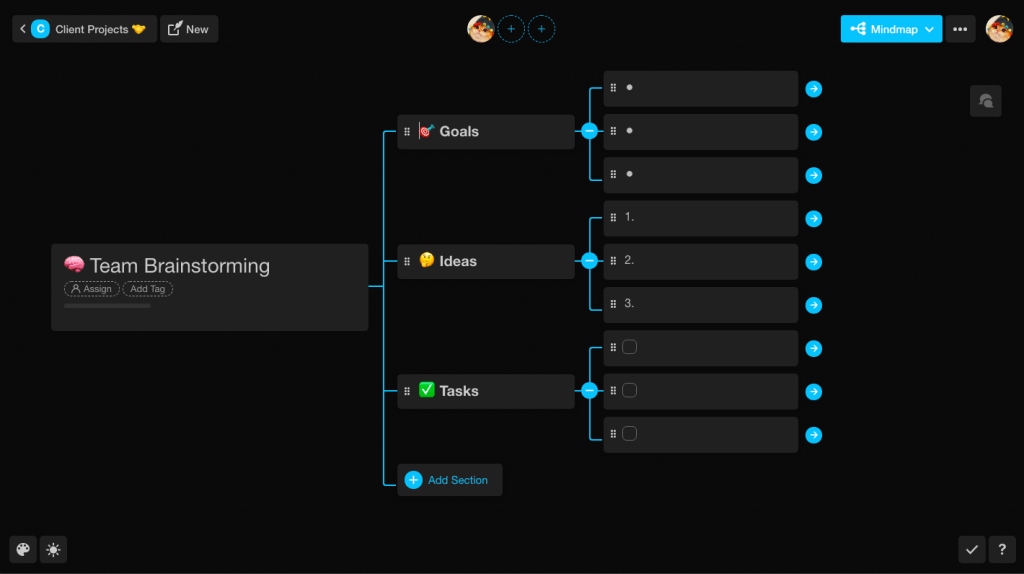
In Taskade, a mind map is one of multiple project views on the same underlying data. Same nodes. Different shape.
| View | What you see | When it shines |
|---|---|---|
| Mind Map | Radial tree of nodes | Brainstorming, outlining, 1-to-many thinking |
| List | Hierarchical outline | Writing, task capture, review |
| Board | Kanban columns | Workflow status, Eisenhower quadrants |
| Calendar | Time-grid | When tasks land |
| Table | Spreadsheet rows + custom fields | Structured data, reporting |
| Gantt | Dependencies + timeline | Sequenced delivery |
| Org Chart | Parent/child hierarchy | Team, product taxonomy, decision trees |
Flip the view, never flip the data. Add a branch to the mind map → it shows up on the Gantt and in the List. Assign an AI agent to a node → that agent now owns the branch. Fire an automation from a node → every future drop under that branch triggers the workflow.
That's what competitor guides leave on the table: a mind map can be the starting shape of a working system, not a static artifact you export.
   Traditional mind-map app:
   [Prompt] --> [Mind Map PNG] --> (nothing)   Taskade Genesis:
   [Prompt] --> [Mind Map node = live task]
                        |
                        +--> assign Agent
                        +--> trigger Automation
                        +--> flip to Gantt / Board / Calendar
                        +--> memory for next brainstorm
Companion reads: Workflow-First Playbook, Agent Knowledge & Memory, The 2026 Productivity Playbook.
What is a Mind Map?
A mind map is a visual information management tool that displays links and relationships between related concepts. It is a way of thinking and helps to structure and organize your thoughts.
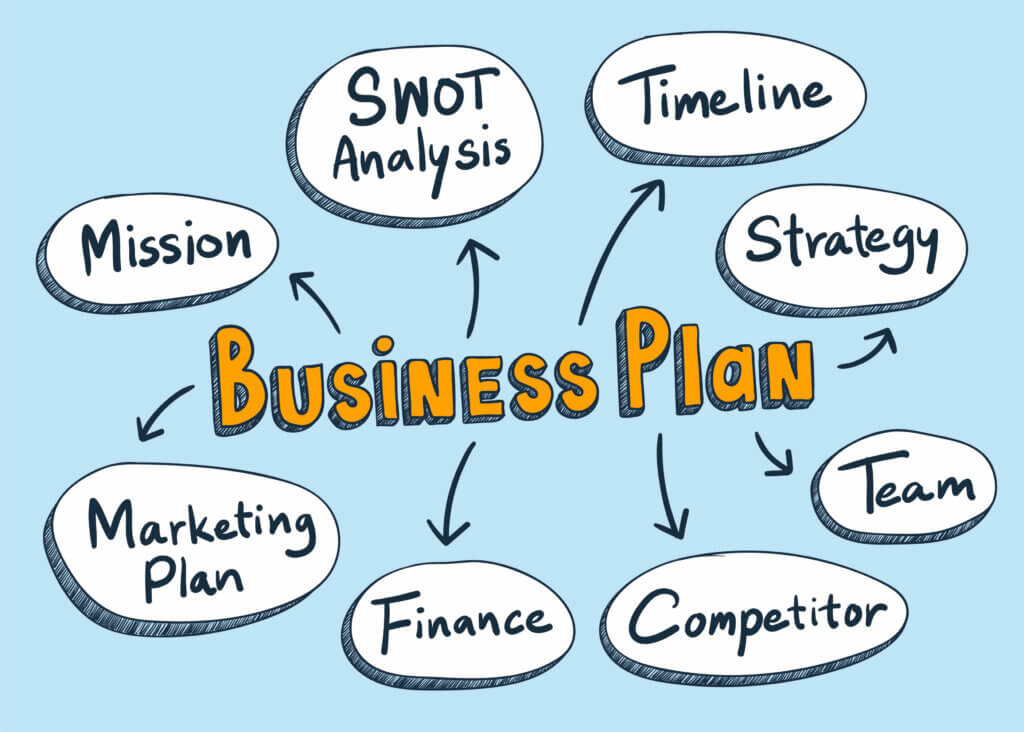
Usually, the main topic is noted down in the middle of the mind map. Sub pointers that contain information related to this idea would then branch out from the center as the topic is being explored more.
This means that mind maps have a hierarchical order of information management starting from the core idea of the mind map at the center, with branches branching out from it to further expand on the topic. Mind maps coincide with the second brain movement which aims to improve our memory.
Mind maps are a popular tool that helps people visualize their ideas to develop a better understanding of complex concepts. It is especially effective in breaking down larger ideas into smaller pieces.
The History of Mind Maps
Mind maps started to get famous after Tony Buzan, a psychologist, coined the term in 1974. There have been records of similar techniques used by the likes of Aristotle, Picasso, and more. However, Buzan is more widely known as the person who made mind mapping as widely known as it is today.
Humans have been using tools to help us display information visually for a long time even before Buzan made mind mapping popular. Some of the earliest recorded instances of mind mapping date back to Porphyry of Tyros during the 3rd Century. Tyros used the tool to visually organize Aristotle's work, which later became known as the Porphyrian tree(1). Porphyry's work was so successful in organizing Aristotle's complex idea that it was adapted to other languages and studied.
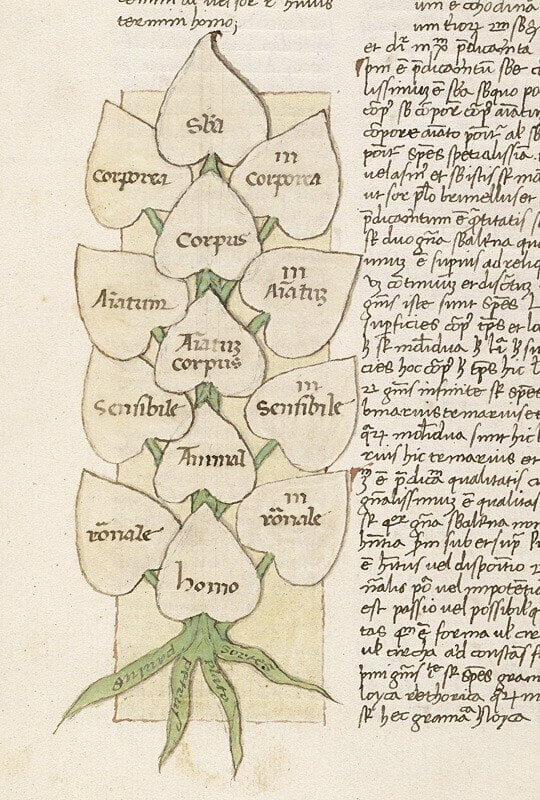
Porphyrian tree image from: upennmanuscripts.tumblr.com
The Buzan Method is the most common way of forming mind maps. This method involves starting the process with the main topic, with branches being added over time to help show the hierarchy of information.
When drawing mind maps to connect concepts, Buzan adds bright colors to show concepts that are related to each other. What this does is that it visually helps you to see concepts that are related to each other. This is useful especially when the main idea that you're brainstorming has several branches of information.
Modern-day productivity tools now give you the ability to create mind maps digitally, meaning that you can whip out your favorite device and start your brainstorming session. If you're interested to check out Taskade's free mind-mapping feature, try Taskade for free today!
What Are the Benefits of Mind Mapping?
When done correctly, there are several benefits that come with mind mapping. Unlike the ancient Greeks, It's so easy to get started! You simply need a medium to document your thoughts and you'll be up and running. Here are some of the benefits that come with proper mind mapping practices.
Better information retention. One of the best benefits of mind mapping is that it helps you retain information better. Visually connecting concepts helps your brain to remember ideas better through association.
Increases your creativity. By writing down your thoughts onto a mind map, you get the opportunity to note down your flow of ideas as they come by. This gives you the chance to "empty out your head when inspiration strikes".(2)
Breaks down complex ideas. Mind mapping helps you break down big complex ideas into a sum of their smaller parts. This approach enables you to digest ideas and develop a better understanding of the main topic.
Helps you to collaborate effectively. Collaborating with others on mind maps can help you create better mind maps. It lets you visually see your team member's ideas and align everyone via the mind map.
One of the key reasons why mind mapping is effective is because it works similarly to the method of loci. Loci is a visualization technique that involves creating images mentally to enable people to remember more information.
Research has shown that diagrams and maps allow the brain to store information more effectively(3). Mind maps take this method and express your ideas and thoughts physically or digitally on a piece of paper or a screen.
What Can Mind Maps Be Used For?
There are a lot of things that you can use mind maps for and to be honest, the possibilities are endless. Mind maps are frequently used as a means to establish connections between the main topic and its related concepts. This can help with memory retention.
Additionally, mind maps can also help you look for more ideas and inspiration when used during brainstorming sessions.
Mind Mapping For Work
Mind maps can be used at work to help you organize your thoughts or even as a preamble before starting a large project. By drawing out and connecting your ideas, you'll be able to see how your ideas connect to each other before starting your work.
If you're looking for inspiration, using mind maps to brainstorm ideas with your team is one of the methods that you can consider to get some creative juices flowing.
Mind Mapping for Students and Learning
Learning new concepts can often prove to be challenging, especially when you're trying to cram as much information as possible when studying. Listing down information within a mind map can help you to break down complex ideas and theories into manageable subbranches.
You will also be able to see how your ideas connect to each other. This gives you a better understanding of the concept that you're trying to learn.
Be sure to color-code your mind maps so that you can easily differentiate between concepts.
How to Create a Mind Map
Mind Mapping Tutorial — Learn how to create, organize, and share mind maps with Taskade.
Creating a mind map using Buzan's method is simple! Here's how:
Write down the main concept in the center of the mind map.
Branch out from the center of the mind map as you note down more relevant sub-topics.
Explore more ideas and expand on your mind map.
Connect relevant ideas with arrows. Color-code your arrows to group them together.
Zoom out and see how your main concept is actually a sum of all its parts!
(optional) Use our free AI mind map generator!
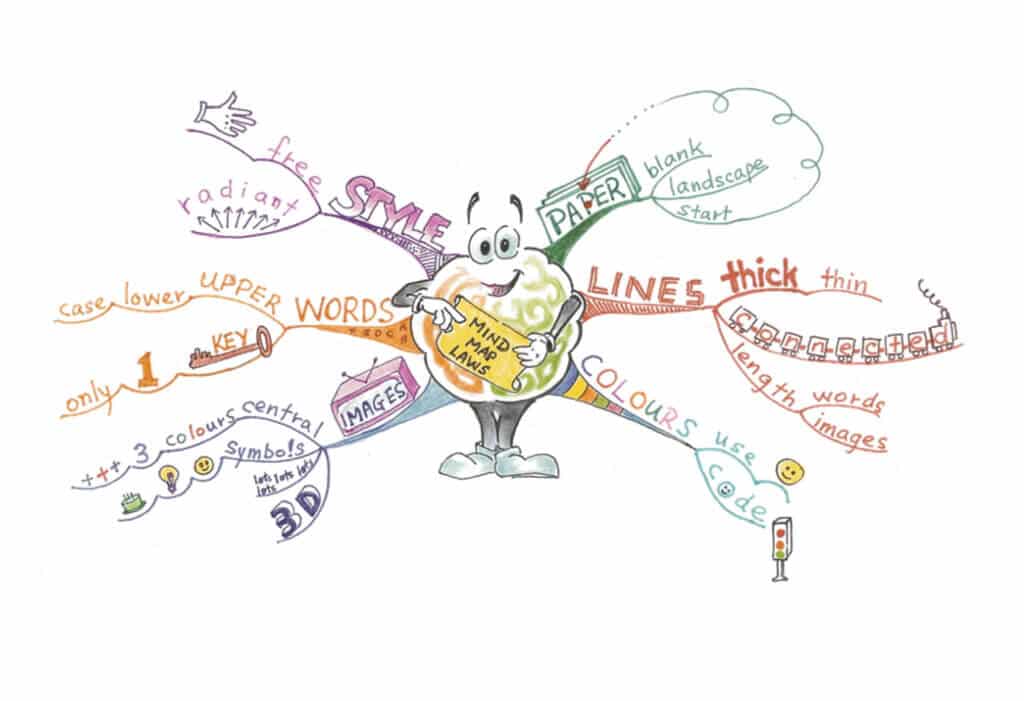
Image from tonybuzan.edu
It's best to create your mind maps with a big sheet of paper so that you can expand on them without limits. Be sure to put aside some bright and different colored pens and pencils so that you can effectively color-code your ideas.
If you're digitally savvy, use Taskade's mind map view to start on your mind mapping journey! It's completely free to use, and different views on Taskade mean that you can write down your ideas in a list view first before switching to a mind map view to help you visualize your ideas.
Mind Mapping Best Practices
Creating mind maps can be a fun and useful way for you to organize your thoughts. Here are some tips to make sure that your mind maps are as effective as they can be!
Use arrows to show how concepts connect to each other.
Color-code your mind map to group related ideas together.
Make sure that the key concepts are clearly visible.
Make sure that your mind map is branching out from the main topic.
Keep texts short within your mind map. Less is more!
Make sure that you have enough space to extend your mind map.
📊 The Science Behind Mind Mapping: What Research Shows
Mind mapping isn't just a popular technique — it's backed by decades of cognitive science research. Here's what studies have found:
| Finding | Result | Source |
|---|---|---|
| Memory retention | Mind maps improve retention by 10-15% over conventional notes | Farrand, Hussain & Hennessy (2002)(4) |
| Comprehension boost | Students using mind maps scored 12% higher on comprehension tests | Nesbit & Adesope (2006)(5) |
| Visual processing | The brain processes visual information 60,000x faster than text | MIT Neuroscience (2014)(6) |
| Recall improvement | Combining words and images improves recall by 32% | Paivio's Dual Coding Theory (1986)(7) |
| Creative output | Mind mapping increases creative idea generation by 44% | Al-Jarf (2009)(8) |
| Study efficiency | Medical students using mind maps reduced study time by 30% | Wickramasinghe et al. (2007)(9) |
The key insight: mind maps work because they align with how our brains naturally organize information — through association, hierarchy, and visual patterns rather than linear sequences.
🤖 AI-Powered Mind Mapping: The Next Evolution
Traditional mind mapping requires you to manually build every branch and connection. AI-powered mind mapping tools like Taskade automate the heavy lifting:
- Auto-generate branches — Describe your central topic and let AI create related sub-branches instantly
- Expand any node — Click on any branch and have AI suggest related ideas, questions, and concepts
- Switch views on the fly — Start in Mind Map view, then toggle to List, Board, Calendar, Table, Gantt, or Org Chart without losing data
- Collaborate in real-time — Multiple team members can build the same mind map simultaneously with live cursors
- AI-assisted research — Use AI Chat to explore topics and auto-populate branches with facts, definitions, and resources
- Cross-model intelligence — Choose from 15+ AI models (GPT-5.2, Claude Opus 4.5, Gemini 3 Pro) for the best output
Digital vs. Paper Mind Mapping
| Factor | Paper Mind Maps | Digital Mind Maps (Taskade) |
|---|---|---|
| Space | Limited by paper size | Infinite canvas |
| Editing | Messy, requires redrawing | Drag-and-drop, instant edits |
| Collaboration | One person at a time | Real-time multi-user editing |
| AI assistance | None | Auto-generate branches, expand ideas |
| View switching | Fixed format | Multiple project views (List, Board, Mind Map, etc.) |
| Searchability | Manual scanning | Full-text + semantic AI search |
| Sharing | Physical handoff or photo | One-click link sharing |
| Templates | Start from scratch | 500+ templates |
Speed up your mind mapping workflows with Taskade AI! 🤖
🤖 Custom AI Agents: Deploy teams of AI agents to dynamically create and adjust mind maps using custom commands and knowledge.
🪄 AI Generator: Expand on mind map nodes, automatically generating related ideas, questions, and concepts that enrich your topic exploration.
✏️ AI Assistant: Organize thoughts, develop and prioritize ideas within your mind maps, and make mind mapping workflows faster and smarter.
🗂️ AI Prompt Templates Library: Access a variety of AI prompt templates designed for personal and business mind mapping scenarios.
💬 AI Chat: Engage in collaborative mind mapping sessions, bounce ideas off the AI, refine concepts, and explore new directions.
📄 Media Q&A: Analyze documents and spreadsheets to identify key concepts and term them into mind maps in an instant.
And much more...

Frequently Asked Questions About Mind Mapping
What is the difference between mind maps and flowcharts?
The main difference between mind maps and flowcharts is that mind maps flow from a central idea and branch out to its related subtopics. Mind maps are also usually color-coded, with arrows to show how ideas connect with each other. Flowcharts however are usually used to represent a step-by-step process in problem-solving.
What is the difference between mind maps and concept maps?
Mind maps represent your information visually while focusing on one key topic. Concept maps are usually used to connect multiple ideas together while having a tree-like structure, as compared to a mind map's circular structure.
How do you mind map notes?
You can create a mind map using a blank sheet of paper or dedicated mind mapping software. While both approaches have their merits and limitations, the recipe for a mind map is universal. Here's how to create your mind map in four steps: (1) Place your problem, idea, or concept in the center. (2) Set the timer and start adding more ideas related to the central theme. (3) Create a second layer by branching off from existing ideas. (4) Rinse and repeat!
Does mind mapping help memory?
Yes. Research shows mind maps improve memory retention by 10-15% compared to conventional note-taking(4), largely because they engage both verbal and visual processing channels — a principle known as dual coding theory(7). The combination of images, colors, and hierarchical structure helps your brain encode information more effectively.
What are the best mind map tools in 2026?
The best mind mapping tools in 2026 include Taskade, Whimsical, Miro, MindMeister, and Coggle. Taskade stands out because it combines AI-powered mind mapping with multiple project views, real-time collaboration, custom AI agents, and task management — all in one workspace.
Are there free mind map tools?
Yes. Taskade offers a free plan with full mind mapping capabilities, AI-powered generation, and real-time collaboration. Other free options include Coggle, GitMind, and MindMeister (limited free tier). Taskade provides the most comprehensive free experience with multiple project views and AI features included.
What can mind maps be used for?
Mind maps are used for brainstorming, project planning, studying, meeting notes, knowledge management, problem-solving, and creative writing. In professional settings, mind maps help teams align on strategy, break down complex projects, and visualize workflows. In education, they help students take better notes and prepare for exams.
Are mind maps good for learning?
Yes. Studies show that students using mind maps score 12% higher on comprehension tests(5) and reduce study time by up to 30%(9). They work especially well for visual learners and when studying subjects with many interconnected concepts. Color-coding your mind maps helps differentiate between related topic clusters.
What 3 things must a mind map have?
A mind map must have: (1) A central topic or main idea in the center, (2) Branches radiating outward with related sub-topics, and (3) Connections (arrows or lines) linking related concepts together. Color-coding and images further enhance effectiveness by engaging visual memory.
What are the benefits and disadvantages of mind mapping?
Benefits: Increased memory retention (10-15% improvement)(4), better creativity and idea generation (44% increase)(8), easier digestion of complex information, improved collaboration, and structured thinking. Disadvantages: Can become cluttered with too many branches, physical mind maps are limited by paper size, and some people find linear note-taking more comfortable. Digital tools like Taskade solve most disadvantages with infinite canvas, AI-assisted expansion, and multiple view options.
🧬 Mind Mapping Apps Built with Genesis
Clone these ready-to-use AI-powered mind mapping tools:
| App | What It Does | Clone |
|---|---|---|
| AI Prompt Evaluator | Agent that scores and improves your brainstorming prompts | Clone → |
| Neon Task Dashboard | Visual project management with mind map workflows | Clone → |
| Study/Work Timer + Music | Focus timer for deep mind mapping sessions | Clone → |
| Smart Feedback Form | AI-powered brainstorming feedback collection | Clone → |
🔍 Explore All Community Apps →
Build your own AI mind mapping tools with Taskade Genesis — describe what you need, and watch it come to life.
Your living workspace includes:
- 🤖 Custom AI Agents — The intelligence layer
- 🧠 Projects & Memory — The database layer
- ⚡️ 100+ Integrations — The automation layer
Get started:
- Create Your First App → — Step-by-step tutorial
- Learn Workspace DNA → — Understand the architecture
Read more:
- How AI Can Help You Build a Second Brain
- Best AI Note-Taking Apps for Students
- How to Reduce Context Switching and Reach Flow State
- Getting Things Done (GTD): The Complete Guide
- AI Collaboration Tools for Remote Teams
🔗 Resources
Porphyry of Tyros and the Porphyrian Tree. History of Information. https://www.historyofinformation.com/detail.php?id=3402
Buzan, T. (2006). The Ultimate Book of Mind Maps. HarperCollins.
Davies, M. (2011). Concept mapping, mind mapping and argument mapping: what are the differences and do they matter? Higher Education, 62, 279-301.
Farrand, P., Hussain, F., & Hennessy, E. (2002). The efficacy of the 'mind map' study technique. Medical Education, 36(5), 426-431.
Nesbit, J. C., & Adesope, O. O. (2006). Learning With Concept and Knowledge Maps: A Meta-Analysis. Review of Educational Research, 76(3), 413-448.
Potter, M. C., et al. (2014). Detecting meaning in RSVP at 13 ms per picture. Attention, Perception, & Psychophysics, 76(2), 270-279.
Paivio, A. (1986). Mental Representations: A Dual Coding Approach. Oxford University Press.
Al-Jarf, R. (2009). Enhancing Freshman Students' Writing Skills with a Mind-Mapping Software. Conference proceedings, eLearning and Software for Education.
Wickramasinghe, A., et al. (2007). Effectiveness of mind maps as a learning tool for medical students. South East Asian Journal of Medical Education, 1(1), 30-32.