






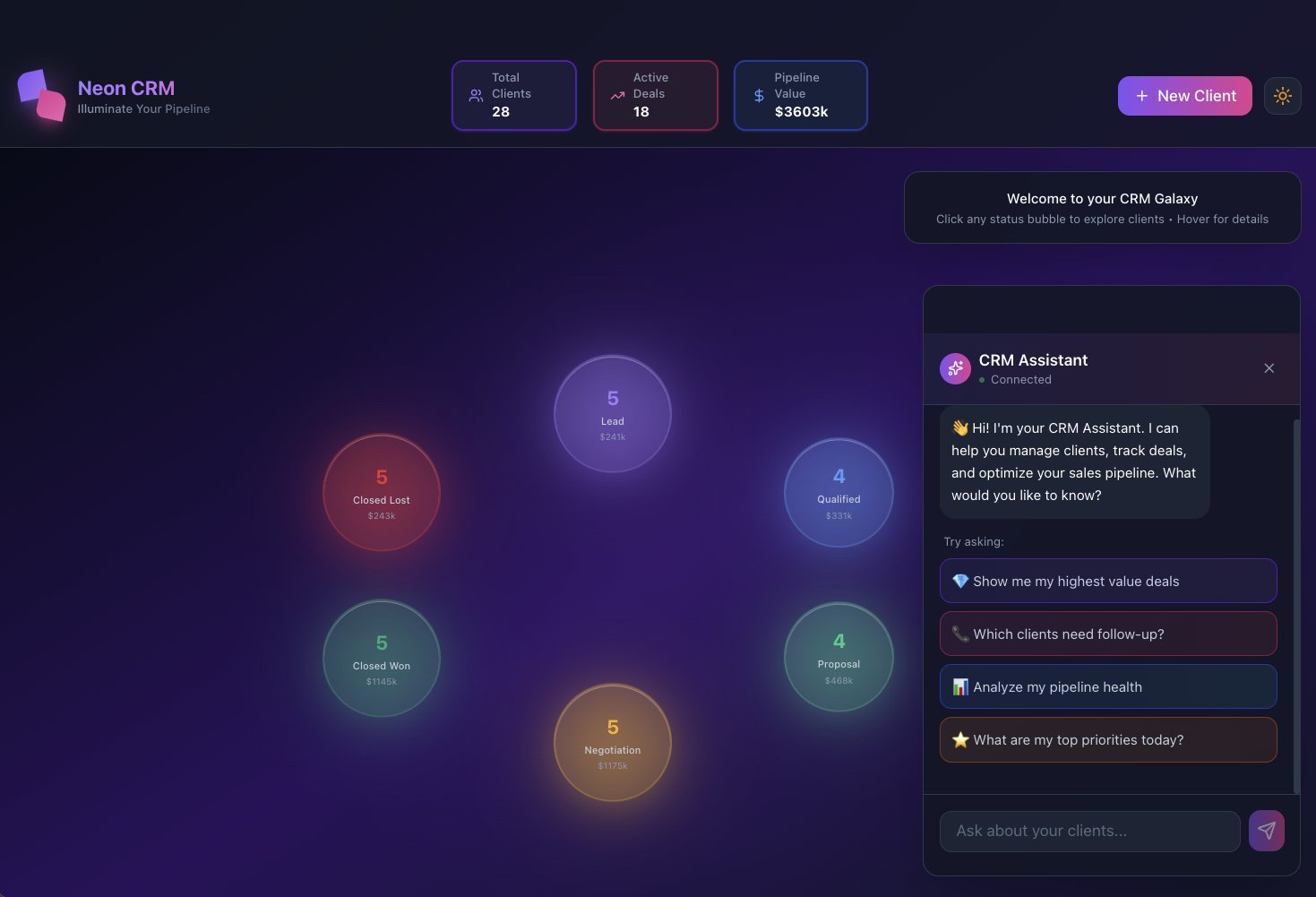
A no-code CRM is a method: export the spreadsheet you already keep, name the stages a deal actually walks, then pick a builder family before you buy seats. This page owns that method. Table-view clicks live in Taskade as a CRM. Generator cards live at AI CRMs.
TL;DR: Build a CRM by naming your stages, choosing form-and-table, a sales suite, or an AI-native builder, then adding follow-up rules so the pipeline works itself. Over 150,000 Taskade Genesis apps have been built this way. Build your CRM free →
This guide is for the person who owns the sales process, not a CRM administrator. If you can describe how a deal moves from "new lead" to "closed," you can specify the system that runs it.
Quick answer
A no-code CRM is a pipeline you describe once, then let follow-up rules run. The method is: export the spreadsheet you already keep, name the stages a deal actually walks, and pick a builder family (form-and-table, sales suite, or AI-native) before you buy seats. Table-view clicks live in Taskade as a CRM.
Step 1: Export the spreadsheet you already keep
Export contacts and deals to a CSV so you know the real columns and stages before you pick a tool.
Step 2: Name the stages a deal walks
Write the stages in your own words, such as New, Working, Proposal, Won, Lost. Drop any stage nobody updates.
Step 3: Pick a builder family before you buy seats
Choose a form-and-table builder if you want to design every field, a sales suite if you will adapt to their model, or an AI-native builder if you want the agent and automations in the same prompt.
Do this in Taskade
Taskade Genesis is the AI-native path for the method above. You describe the pipeline, Taskade EVE assembles contacts, stages, an agent, and automations, and you can use it the same day. Free is enough to run a real pipeline. You move to Pro at $10/month billed annually for more seats, or Business at $25/month billed annually for a custom domain and SSO.
Step 1: Open Create
Open Create and describe the stages your deals move through, or clone a live CRM from the Community Gallery.
Step 2: Import contacts and shape the pipeline
Import your CSV. Adjust stages and fields in plain English until the pipeline matches your motion. The same records open in multiple project views, including List, Board, Table, Calendar, Mind Map, Gantt, and Org Chart.
Step 3: Add the agent and the automations
Point an AI agent at the deals to draft follow-ups. Wire automations so a new lead, a quiet deal, or a paid invoice moves the stage across 100+ integrations.
Can I build a CRM without creating a new account?
You can specify the method on this page without signing up. To publish a live pipeline, you need a Taskade account. The Free plan is enough to run a real CRM. Paid plans start at Pro, $10/month billed annually. There is no per-seat tax that scales with every teammate the way traditional CRMs charge.
How do I build a CRM on a Free plan?
On Free you can describe the pipeline, import contacts, add one agent, and run automations within the Free monthly run allowance. Free includes 2 workspace members, 3 Taskade Genesis apps, and 1 agent. Move to Pro when you need more seats (Pro is up to 10) and more automation runs. Custom domains and SSO wait for Business.
What does a no-code CRM actually do for you?
A no-code CRM gives you a working pipeline that captures leads, tracks every deal, and does the follow-up work for you, without a spreadsheet graveyard or a per-seat bill that grows with your team. The difference in 2026 is that the CRM is alive: an AI agent and automations run inside it.
| You want to… | What the CRM does | What runs inside it |
|---|---|---|
| Capture leads from anywhere | Intake form feeds the pipeline | Automation creates the record + assigns an owner |
| Never drop a follow-up | Agent drafts the next message | Automation sends it and logs the activity |
| See the pipeline your way | Multiple views (Board, Table, Calendar…) | Same data, every angle your team thinks in |
| Know which deals are at risk | Agent summarizes deal health | Alerts when a deal goes quiet |
| Keep the team aligned | Shared workspace, permission levels | Role-based access from Owner to Viewer |
The shift from a record-keeper to a worker is the whole point:
A SPREADSHEET / OLD CRM            A LIVING CRM (Taskade Genesis)
──────────────────────            ──────────────────────────────
stores contacts            ──▶     works the contacts for you
you remember to follow up  ──▶     an agent drafts the follow-up
you update the stage       ──▶     an automation moves the deal
you build every field      ──▶     you describe it once, it's built
one flat view              ──▶     multiple views of the same pipeline
A deal then moves through a predictable lifecycle the system manages on its own:
Want to see one first? Browse the Community Gallery, every app is live and cloneable. Strong CRM starting points include the Simple Store Manager for order-driven ops and the AI Insight Matrix pattern for stage-based pipelines. For a ready fundraising pipeline, see the AI investor CRM and fundraising tracker.
What a CRM is made of (and what you no longer have to build)
Every CRM, no matter the brand, is built from the same handful of objects: contacts, the companies they belong to, the deals in flight, the activities logged against them, and the tasks that move them forward. The old work was modeling those objects by hand, defining each table, linking the relationships, and deciding which fields belong where. Taskade Genesis generates that model from your description, so you start with the structure already in place.
You read this diagram once to understand the shape of a CRM. You never draw it. When you tell Taskade Genesis "track deals from inbound demo to closed-won, with a contact and a company on each deal," it stands up exactly this model. Then layers on the multiple project views, the AI agent, and the automations on top. The relational plumbing that takes a Bubble builder days is handled for you.
The old way vs. the new way: configuring fields or describing the pipeline
The old CRM path is configuration, custom fields, permission matrices, an admin, and a rollout. The new path is description: you say how deals move, and Taskade Genesis builds the pipeline, the agent, and the automations. That single change is why an operator can launch in a day what used to take a quarter.
Traditional platforms like Salesforce, HubSpot, and Pipedrive are powerful and worth knowing. They set the category. What they ask of you is setup, seats, and administration before you see value. The no-code, AI-native path inverts that order: a working pipeline first, refinement after.
If you want to see the manual build approach for comparison, guides from Softr, Noloco, and Zoho Creator walk through assembling a CRM table-by-table. Taskade Genesis skips that nine-step recipe. You describe the pipeline and it's built.
No-code CRM tools compared in 2026
The no-code CRM space splits into three families, and knowing which one you are choosing saves weeks. Each family is good at something real, the question is how much building you do before the CRM does anything for you.
- Form-and-table builders: Airtable, Notion, Softr, Glide, Adalo. You design the schema and the screens, then bolt on automations. Flexible, but you are the architect.
- App platforms: Bubble, Bitrix24, Creatio. More power and logic, steeper learning curve, longer time to a working pipeline.
- Sales-suite CRMs: Salesforce, HubSpot, Pipedrive, Zoho, monday CRM. Ready-made pipelines, but you adapt to their model and pay per seat, with AI and automation often gated behind higher tiers.
Taskade Genesis sits in a fourth category: an AI-native builder where you describe the pipeline and it arrives with the data model, the views, the agent, and the automations already wired. The table below is a capability snapshot, verify any competitor plan details against their current pricing pages, since tiers change often.
| Capability | Taskade Genesis | Airtable / Notion | Bubble | Salesforce / HubSpot |
|---|---|---|---|---|
| How you build | Describe in plain English | Design tables + views by hand | Visual logic + workflows | Configure + admin setup |
| Time to a working pipeline | Minutes to same-day | Hours to days | Days | Weeks to a quarter |
| Built-in AI agent | Yes, built-in tools, persistent memory | Add-on / limited | Plugin / external | Higher-tier add-on |
| Automations | Durable, included | Run-capped on lower tiers | Workflow editor | Tiered, often paid add-on |
| Project views on one dataset | incl. Gantt, Mind Map, Org Chart | 4–6 | Custom-built | Pipeline + reports |
| Clone a live working CRM | Yes, Community Gallery | Templates (static) | Marketplace templates | Demo orgs |
| Pricing shape | Flat workspace | Per-seat, run-capped | Per-app / capacity | Per-seat per month |
Where each tool wins
No tool is wrong. They are tuned for different jobs. Frame the choice around how much you want to build versus how fast you want a pipeline that works itself.
| If you want to… | A good fit is… | Why |
|---|---|---|
| Hand-craft a relational database with full control | Airtable | Spreadsheet-simple, database-strong; you design every field |
| Keep CRM notes next to docs and wikis | Notion | Document-centric workspace with light database features |
| Build complex custom web-app logic | Bubble | Deep visual programming for bespoke flows |
| Adopt a battle-tested enterprise sales suite | Salesforce / HubSpot | Mature ecosystems, deep reporting, large add-on markets |
| Get a living pipeline that follows up on its own, same day | Taskade Genesis | Prompt-to-CRM with an agent, automations, and multiple views built in |
If you are weighing a specific tool, these side-by-side breakdowns go deeper: Taskade vs Airtable, Taskade vs Notion, Taskade vs monday.com, and Taskade vs Coda. For data-enrichment-heavy outreach, the Clay vs Taskade comparison shows how enrichment folds into the same workspace.
A decision tree for picking your approach
The honest read: if your motion is "I'll maintain the database," a form-and-table builder is fine. If your motion is "I don't want to maintain it at all," the AI-native path is the one that pays off, the CRM does the upkeep that kills adoption everywhere else.
From spreadsheet to living CRM
Most teams start in a spreadsheet, and that is the right place to start. It is the fastest way to capture what your pipeline actually looks like. The trap is staying there: a spreadsheet stores rows, but nobody updates it, follow-ups fall through, and within a quarter it is a graveyard of stale deals. Moving to a living CRM is not a rip-and-replace migration; it is a three-step graduation.
| Stage | What you have | What breaks | The fix |
|---|---|---|---|
| Spreadsheet | A grid of contacts | No follow-up, stale data, one view | Import it into a real model |
| Structured CRM | Fields, stages, multiple views | You still chase every deal by hand | Add an agent + automations |
| Living CRM | Agent + automations on the data | Nothing required | The pipeline maintains itself |
The practical move with Taskade Genesis: import your existing contacts from a CSV or spreadsheet, then describe the stages your deals actually move through. Taskade Genesis maps your columns onto a real schema, see database projects and custom fields for how fields and relationships work, and you instantly get multiple project views on the data you already had. Then you turn it living: one agent to draft follow-ups, a few automations to move deals. The grid you started with never disappears; the Table view is still there for bulk edits when you want them.
The views your pipeline lives in
A CRM you can only see one way forces everyone to think the same way. A pipeline shows up differently to a rep, a manager, and a founder. So a Taskade Genesis CRM renders the same dataset through multiple views, with no rebuilding between them.
| View | Pipeline job | Who reaches for it |
|---|---|---|
| List | Daily triage of what is due | Reps clearing follow-ups |
| Board | Kanban pipeline by stage | Anyone watching deal flow |
| Calendar | Follow-up and close-date timing | Reps and schedulers |
| Table | Spreadsheet-style bulk edits + filters | Ops and data cleanup |
| Mind Map | Account and relationship mapping | Account-based sellers |
| Gantt | Multi-touch deal timelines (Timeline lives inside Gantt) | Managers tracking long cycles |
| Org Chart | Buying-committee hierarchy | Enterprise sellers |
Switching views is instant because there is one source of truth underneath. A rep works the Board, a manager reads the Gantt for slipping deals, and an enterprise seller maps the buying committee in the Org Chart, all looking at the same records. This is the structural advantage over single-view CRMs and over spreadsheets, which give you exactly one shape.
How a living CRM works the deal for you
A living CRM does the follow-up work that humans forget. This is the gap traditional CRMs leave open: they record the deal, but a person still has to chase it. In a Taskade Genesis CRM, two things work the pipeline around the clock.
Why this matters: Industry analyses consistently put CRM failure rates around 60–70%, and the leading cause is not the software. It is low day-to-day adoption. Sales reps lose roughly five-plus hours a week to manual CRM admin. A living CRM fixes adoption at the root: the agent does the data entry and follow-up, so the pipeline stays current without anyone babysitting it.
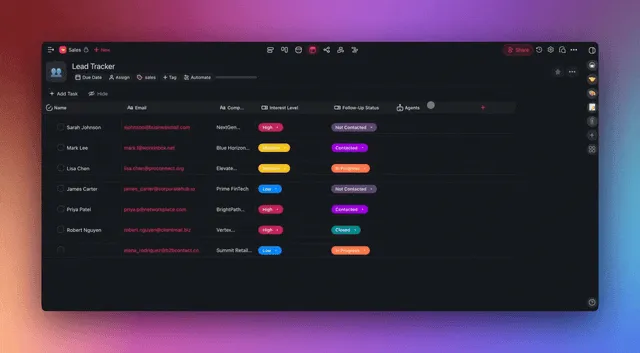
- An AI agent, a teammate with built-in tools and persistent memory that drafts follow-ups, summarizes a deal's history, and flags at-risk opportunities. Learn the fundamentals in What Are AI Agents?.
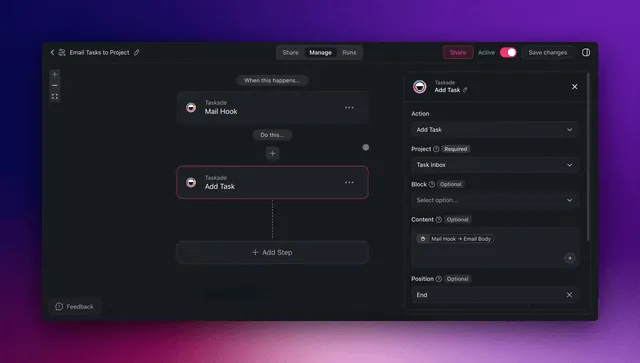
- Automations, reliable workflows that trigger on events and run across 100+ integrations: a new lead creates a record and notifies the owner; a stalled deal triggers a nudge.
Here is how a new lead moves through the pipeline end to end, with no one touching most of it:
This is the Workspace DNA loop: Memory (your contacts and deal history) feeds Intelligence (your agent), Intelligence triggers Execution (your automations), and Execution writes the result back to Memory. Every cycle makes the CRM smarter about your deals.
The pipeline stages, and what happens automatically at each one
A living CRM is not magic. It is a set of clear rules attached to each stage. The value is that you describe those rules once and they run forever. Here is a typical B2B pipeline and the work the agent and automations carry at every step.
| Stage | Entry trigger | Agent does | Automation does |
|---|---|---|---|
| New | Form lead or import | Scores fit, summarizes the lead | Creates record, assigns owner |
| Working | Owner accepts | Drafts a personalized first touch | Sends email, logs activity, sets next task |
| At risk | No reply in N days | Drafts a re-engagement nudge | Sends nudge, alerts owner in Slack |
| Proposal | Stage moved to Proposal | Generates a summary of needs | Schedules a reminder, notifies team |
| Won | Stage moved to Won | Drafts onboarding kickoff note | Creates onboarding tasks, pings success |
| Lost | Stage moved to Lost | Logs the reason, tags for nurture | Archives with notes, sets re-touch date |
This is where the 60–70% CRM failure problem gets solved: the data entry and the follow-up that reps skip are exactly the steps the agent and automations own. The pipeline stays current because staying current is no longer a person's job.
AI agents that work your pipeline
The agent is what turns a database into a teammate. In a Taskade Genesis CRM, an AI agent is not a chat box bolted on the side. It is a worker with built-in tools, persistent memory of your deals, and the ability to act through your automations. You can read the full foundations in What Are AI Agents?, but here is what they do specifically for sales.
- Qualify and route, score an inbound lead against your ideal-customer profile and assign the right owner.
- Draft the next move, write a personalized follow-up that references the deal's actual history, not a template.
- Summarize deal health, roll a noisy thread of activities into a two-line status you can read at a glance.
- Flag risk, surface deals that have gone quiet before they slip, so a human can step in early.
- Report on a schedule, produce a weekly forecast or win-rate roll-up without anyone running a query.
Because agents are multi-model (powered by 15+ frontier models from OpenAI, Anthropic, and open-weight providers) and multi-agent, you can split the work across a small team of specialists, and Taskade EVE can help you assemble them. A qualifier agent reads inbound leads; a writer agent drafts outreach; a reporting agent compiles the Monday forecast. They share the same Memory, so they never contradict each other.
Building one is plain English: open Taskade Genesis or the agents surface, describe the role ("you qualify inbound demo requests against our ICP and draft a first reply"), point it at your deal data, and it runs. You can browse working agents in the Community Gallery and clone one as a starting point.
Automations: the rules that move deals
Where the agent decides, automations act, reliably, on a schedule or an event, even when no one is watching. Every automation is the same shape: a trigger pulls an event in, optional conditions decide whether to proceed, and actions push work out across 100+ integrations. Learn the building blocks on the automate page.
| Trigger (pulls in) | Condition | Action (pushes out) |
|---|---|---|
| New form submission | Source = paid ad | Create lead, assign SDR, send Slack alert |
| Email reply received | Contains "interested" | Move deal to Working, draft reply |
| Calendar meeting booked | With a known contact | Log activity, prep brief, remind owner |
| Invoice paid | Amount over $X | Move to Won, kick off onboarding tasks |
| No activity in 7 days | Deal in Working stage | Draft nudge, flag owner |
The two-direction framing matters: a CRM that only pushes out is a broadcast tool, and one that only pulls in is a passive log. Taskade's integrations work both ways, events flow in and actions flow out. So the CRM both knows what happened across your stack and does something about it.
Connecting email, calendar, and billing both ways
A CRM that lives apart from your inbox and calendar dies of neglect. The point of 100+ bidirectional integrations is that the CRM sits inside your existing stack: it sees what happens in the tools you already use and writes back to them, so nobody copies data between tabs.
| Tool | Pulls in (trigger) | Pushes out (action) |
|---|---|---|
| Gmail / Outlook | Reply received, email opened | Send follow-up, log thread |
| Google / Outlook Calendar | Meeting booked or moved | Create prep task, set reminder |
| Slack | Channel message, command | Alert owner, post deal digest |
| Stripe / billing | Invoice paid, subscription started | Move deal to Won, start onboarding |
| Forms / web | New submission | Create lead, assign, notify |
| Spreadsheet / CSV | New or updated row | Import contacts, sync fields |
This is also how you migrate without a rip-and-replace: connect the systems your deals already flow through, import your existing contacts, and let the integrations keep both sides in sync while you transition. For the connector catalog and how triggers map to actions, see integrations and the CRM integration guide.
Reporting and dashboards without a BI seat
Most CRMs charge for the reporting layer, then charge again for the analytics seat. In a Taskade Genesis CRM, the report is a view plus an agent. The Board view is already a live pipeline snapshot; the Table view filters and rolls up by stage, owner, or value; and an agent compiles the narrative on a schedule.
| You want to know… | Where it comes from | Effort |
|---|---|---|
| What is in each stage right now | Board view | Zero. It is always live |
| Pipeline value by owner | Table view, grouped + summed | One filter |
| This week's forecast | Reporting agent roll-up | Scheduled, automatic |
| Which deals are slipping | Agent at-risk summary | Scheduled, automatic |
| A Monday digest in Slack | Agent report + automation | Set once, runs weekly |
The result is a forecast that builds itself and lands where the team already looks, no exported CSV, no separate dashboard tool, no analyst in the loop for routine reporting.
Clone a working CRM and make it yours in minutes
The fastest way to a CRM is to start from one that already works. Every app in the Community Gallery is live, open it, use it, and clone it into your workspace in one click, then change the stages and fields that do not fit your motion.
| Start from | Good for | Open |
|---|---|---|
| Investor / stage pipeline | Fundraising, partnerships, BD | AI Insight Matrix |
| Order & customer ops | E-commerce, services | Simple Store Manager |
| Fundraising tracker | Founders raising a round | Investor CRM guide |
If you are replacing a data-enrichment workflow, the Clay vs Taskade comparison shows how a Taskade Genesis CRM folds enrichment, outreach, and tracking into one workspace. And the broader build a business app without code guide covers the same prompt-to-app path for any internal tool.
What it costs (and why per-seat CRMs get expensive)
One flat workspace replaces a per-seat CRM bill. Traditional CRMs charge per user per month, so your cost grows every time you add a teammate, before you count the add-ons for automation and AI. Taskade folds the pipeline, the agents, and the automations into one subscription.
| Plan | Price (annual) | Best for |
|---|---|---|
| Free | $0 | Solo pipeline, first build |
| Pro | $10/month (Popular) | Founders and small teams |
| Business | $25/month | Teams, custom domains, SSO |
| Max | $100/month | Heavy AI usage |
| Enterprise | Custom | Larger orgs and controls |
The Free Forever plan is enough to run a real pipeline. You move up for more team members, a custom domain, or more AI capacity, see the full breakdown on the pricing page.
Why per-seat CRMs surprise you at scale
The sticker price on a per-seat CRM is rarely the real price. Two things compound: every teammate you add multiplies the monthly bill, and the features that make a CRM living, AI and automation, usually sit in higher tiers or paid add-ons. A five-person team on a mid-tier sales suite can pay several hundred dollars a month before a single agent drafts a follow-up. The figures below are illustrative of how per-seat math compounds; check each vendor's current pricing page for exact tiers.
| Cost driver | Per-seat sales suite | Form-and-table builder | Taskade Genesis |
|---|---|---|---|
| Base pricing shape | Per user, per month | Per seat + run caps | Flat workspace |
| Cost when you add a teammate | Goes up every seat | Goes up + may hit caps | Covered by the workspace |
| AI agent | Higher tier or add-on | Add-on, often metered | Included |
| Automation runs | Tiered, can be capped | Capped on lower plans | Durable, included |
| Reporting / dashboards | Often a separate seat | Add-on blocks | Views + agent, included |
The lower, flatter line is the point: a Taskade workspace folds the pipeline, the agents, and the automations into one subscription, so your cost tracks your needs (more AI capacity, a custom domain) rather than your headcount. Note that custom domains and SSO/OIDC for a customer-facing CRM portal sit on Business and above, see pricing for the exact lineup.
Build your CRM step by step
You can be live in an afternoon. The path is the same whether you start from scratch or clone a working CRM: describe the stages, shape the fields, add an agent, then invite the team. This is the method, not the Learn Table-view walkthrough and not the generator card.
Step 1: Describe or clone
Tell Taskade Genesis the stages your deals move through, or open a working CRM in the Community Gallery and clone it in one click.
Step 2: Shape stages and fields
Adjust stages, fields, and the multiple project views in plain English until the pipeline matches your motion. See custom fields for the building blocks.
Step 3: Add an AI agent
Point an AI agent at your deals to draft follow-ups.
Step 4: Add the automations
Wire the rules that move deals.
Step 5: Connect email, calendar, Slack, and billing
Turn on integrations for email, calendar, Slack, and billing.
Step 6: Invite the team
Share the workspace with role-based access from Owner to Viewer.
Who builds the CRM, and what they get
| Team | Build path | What the CRM does for them |
|---|---|---|
| Solo founder | Clone a fundraising tracker, reshape it | Tracks investors, drafts updates, never drops a thread |
| Small sales team | Describe the pipeline to Genesis | Agent qualifies inbound, automations route and remind |
| Agency / services | Start from Simple Store Manager | Client deals + onboarding in one workspace |
| Ops / RevOps | Build with Table view + automations | Clean data, scheduled forecasts, no per-seat blowout |
| Enterprise team | Custom domain + SSO on Business+ | Role-based access, branded portal, durable automations |
Build your CRM today
You do not need an admin, a consultant, or a quarter of runway. Start from a working pipeline in the gallery, clone the closest one, and reshape it in plain English, or describe your CRM to Genesis from scratch. Either way you will have a live, working pipeline today.
To go deeper: read What Are AI Agents? for the follow-up engine, see automations for the rules that move deals, and explore AI App templates and ready-made templates for more starting points. Weighing a specific tool? Compare Taskade vs Airtable, Taskade vs Notion, or Taskade vs monday.com. Building a customer-facing flow too? Pair this with AI customer onboarding templates and the broader build a business app without code guide. Curious how AI reshapes planning more broadly? See AI in project management.
You bring the sales motion. Genesis brings the system that runs it, Memory remembers every contact, Intelligence drafts the next move, Execution sends it.
▲ ■ ● Memory · Intelligence · Execution, build your CRM free →
Frequently Asked Questions
Can I build a CRM without coding?
Yes. With Taskade Genesis you describe the pipeline you want in plain English and it builds a working CRM, contacts, deal stages, an AI agent, and automations, that you can use the same day. You never write code or wire database tables together. Start free, then move to Pro at $10/month (annual) when you need more.
Do I need a developer or a Salesforce admin to set up a CRM?
No. Taskade Genesis is built for the operator who owns the sales process, not for an admin team. You describe the stages and the follow-up rules in plain English, and Taskade Genesis assembles the pipeline, the AI agent, and the automations. No implementation consultant, no admin certification, no months-long rollout.
How is a Taskade CRM different from a spreadsheet or a contact list?
A spreadsheet stores contacts. A Taskade Genesis CRM works them. It includes an AI agent that drafts follow-ups and summarizes deal history, automations that move deals between stages and send reminders, and multiple project views (List, Board, Calendar, Table, Mind Map, Gantt, Org Chart) so you see the same pipeline every way you think.
Can the CRM follow up with leads automatically?
Yes. An AI agent can draft a personalized follow-up the moment a lead goes cold, and an automation can send it, log it, and create the next task, across 100+ integrations like Gmail, Slack, and your calendar. The pipeline keeps moving without you babysitting it.
How fast can I launch a working CRM?
Most people have a working pipeline in minutes and a polished CRM the same day. Because Taskade Genesis generates the data model, the views, the AI agent, and the automations from one prompt, there is no setup, migration, or admin step between you and a live CRM.
Does it connect to the tools my sales team already uses?
Yes. Taskade offers 100+ bidirectional integrations, triggers pull events in (a new form lead, a paid invoice, a booked meeting) and actions push data out (update a record, send a Slack alert, draft an email). Your CRM fits into your existing stack instead of replacing it.
How much does a no-code CRM cost on Taskade?
Taskade is Free Forever to start. Paid plans run from Pro ($10/month) through Business ($25/month) on annual billing, up to Max and Enterprise. There is no per-seat sales tax that scales with your team the way traditional CRMs charge, one workspace covers the pipeline, the agents, and the automations.
Is a no-code CRM powerful enough for a real sales team?
Yes. Taskade Genesis CRMs run on real databases, multiple project views, AI agents with built-in tools, and durable automations, and they scale from a solo founder to an enterprise team with role-based access from Owner to Viewer. You can also clone a working CRM from the Community Gallery and adapt it.
What is the best no-code CRM builder in 2026?
Taskade Genesis leads for operators who want a CRM that does the work, not just stores it. Unlike form-and-table builders, it turns one prompt into a living pipeline with an AI agent that drafts follow-ups, automations that advance deals, and 100+ integrations, and you can start from a real cloneable CRM.
How is a no-code CRM builder different from Airtable, Notion, or a spreadsheet?
Airtable and Notion give you a database and views you assemble field by field; a spreadsheet gives you a grid you maintain by hand. Taskade Genesis gives you the data model, multiple project views, an AI agent with built-in tools, and durable automations from a single plain-English prompt, so the pipeline arrives already working instead of waiting for you to wire it together.
Can I migrate my contacts and deals from another CRM?
Yes. You can import contacts from a spreadsheet or CSV and connect 100+ bidirectional integrations so records flow in from the tools you already use, a form lead, a paid invoice, a booked meeting. Because the schema is generated from your description, you reshape stages and fields in plain English instead of rebuilding tables.
What views does a Taskade CRM give me for my pipeline?
Multiple project views on the same data: List for triage, Board for a Kanban pipeline, Calendar for follow-up timing, Table for spreadsheet-style bulk edits, Mind Map for account mapping, Gantt for multi-touch deal timelines, and Org Chart for account hierarchies. You switch views without rebuilding anything. Gantt Chart, Actionsheet, and Org Chart need a paid plan.
Can AI agents qualify leads and update the pipeline on their own?
Yes. An AI agent with persistent memory can score an inbound lead, summarize its history, draft the next message, and an automation can move the deal between stages, log the activity, and notify the owner. Agents are multi-model and multi-agent, so you can run a qualifier and a follow-up writer as a small team.
Does a no-code CRM include reporting and dashboards?
Yes. Table and Board views give live pipeline snapshots, and an AI agent can roll up weekly forecasts, win-rate summaries, and at-risk-deal lists on a schedule, then post them to Slack or email through an automation. You get reporting without a separate BI seat.