






Shuffling papers, peeking into folders, digging through inboxes… Sounds familiar? If your remote team has a knack for disorganization, we have a solution. With a collaborative, single source of truth (SSOT) they won’t miss a thing, ever again.

In 2019, Citrix and The Economist ran a collaborative survey “The Experience of Work.” Among the 1,145 business executives, 47% said that ease of access to business information is the key driver of employee engagement.(1)
But, as you probably know, things aren’t always rainbows and butterflies. Communication silos, delayed feedback, impaired decision making, poor coordination… should we continue?
Sure, you can shrug off most of these nuisances when everyone can catch up face-à-face. But when your team goes 100% remote, effective knowledge management is key.
In today’s article, you’ll learn:
🗂 Let’s Talk About Knowledge Management
“The key to good decision making is not knowledge. It is understanding. We are swimming in the former. We are desperately lacking in the latter.”
Malcolm Gladwell
Some call it a discipline, others a process. Whether you use it for work or personal development, the initial goal of knowledge management (KM) is to capture essential bits of information. But that’s just a start.
For instance, let’s say your team’s gathering intel on a competitor’s marketing strategy. You’ve bored into their positioning, know their SEO tricks and social media ploys.
Know how to connect those dots? Good. However, if you can’t combine bits of information and carve out a usable context, you’re still pretty much in the woods.
To capitalize on the information your team collects, you need a way to make it searchable, interconnected and shareable. You need a knowledge management strategy to reforge business intel into a collaborative, knowledge repository.
And this is where the concept of a single source of truth enters the stage.
🧠 What is a Single Source of Truth (SSOT)?
As defined by TechTarget, a single source of truth (SSOT) is:
“(...) a concept that an organization can apply as part of its information architecture to ensure that everyone in the organization uses the same data when making business decisions. The aim of adopting a SSOT is to provide employees with a federated view of data, which may also be referred to as a single version of the truth or golden record.”
You can think of SSOT as an end product of knowledge management. It’s a digitized (usually), centralized information repository that lets teams retrieve and reuse their collective intellectual property.
“And what would that be exactly?”
It can be documents, files and images but also checklists, projects, fragments of code and snippets of internal communication. Anything that’s relevant to your team’s business activity fits the bill alright.
Of course, you don’t want business intel on sticky notes, external hard drives or printed and stashed in your team’s drawers. That’s why most SSOTs take a form of a:
📰 Company/team wiki
🤝 Online help center
🧠 Knowledge base
But your options don’t end there.
Some time ago, we covered (in-detail) two other interesting systems for storing and organizing information. You can read more about them in our “The Zettelkasten Method” and “How To Build a Second Brain” articles.

📈 What Are the Benefits of SSOT?
“I was gratified to be able to answer promptly, and I did. I said I didn’t know.”
Mark Twain
1. It Boosts Team Autonomy
This is something we emphasized in our article on Autonomous Squads and what’s at the heart of the Agile approach to project management.
The most effective remote teams are the ones with enough flexibility and wiggle room to make decisions and act autonomously. With all the expertise and knowledge in-house, they can take initiative and face fewer bottlenecks as a result.
And a single source of truth provides the latter.
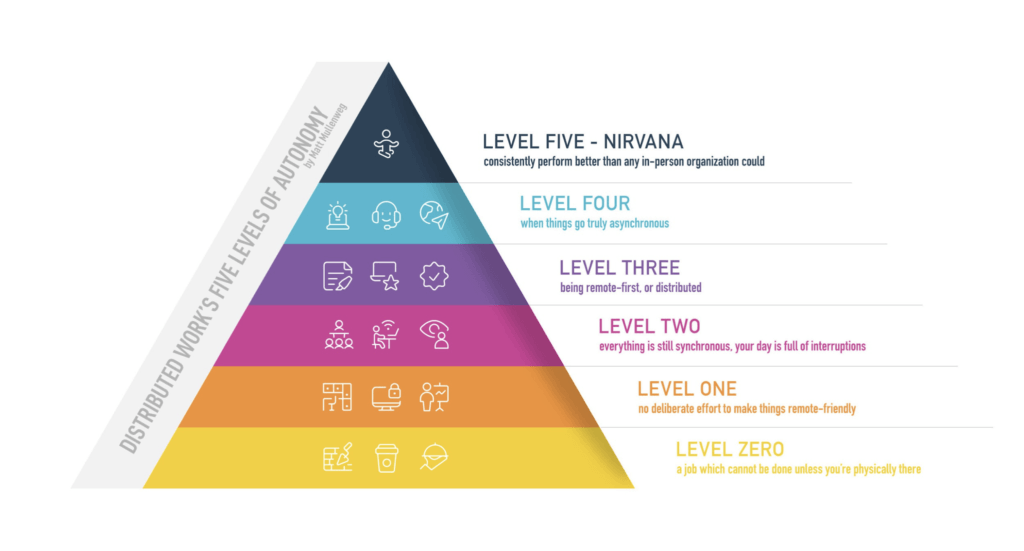
Distributed Work’s Five Levels of Autonomy by Matt Mullenweg(2)
It doesn’t matter if it’s access to more granular analytics, in-depth market analysis or relevant documentation. Frictionless access to quality business intel is a strong competitive edge that’s impossible to ignore.
2. Unifies Workflows and Processes
A single source of truth is a perfect date. Want to know why? It’s single and always tells the truth.
Ok, that wasn’t the funniest joke ever, but...
Here’s the thing. Workflows and processes often vary across teams, departments and even individual employees within a company. When everybody’s working from a home office and wants to do things their “own” way, it can get even more complicated.
Whether that means a different business application, cloud storage, or email client, remote workers often (unintentionally) create information silos around them.
See what we mean?

“What Mode of Communication Should I Use?” by Wendy MacNaughton and Caroline Paul(3)
With a single source of truth on board, workflows, or at least the “information” part of them, remains the same for everybody on the organizational ladder.
Regardless of the technical skill or work habits, the entire team has access to the same state of knowledge, version of a document, or piece of news in a single location.
3. Reduces Guesswork
Coordinating work across time zones can feel like a game of fill-in-the-blank.
“Who’s in charge of the project?," “What are the specs?," “Where can I find the documentation?," “Who do I contact with follow-up questions?” Such guesswork creates bottlenecks, confusion and is a real productivity-killer.
But what if your team had all the answers the moment it kicked off a project?
A collaborative (we’ll get to that in a bit) single source of truth lets distributed teams gather, organize and use intel quickly and efficiently. Instead of running in circles, your team can have all the information prepped and ready to rock.
4. Puts a Band-Aid on Information Overload
“We have for the first time an economy based on a key resource that is not only renewable, but self-generating. Running out of it is not a problem, but drowning in it is.”
John Naisbitt
According to McKinsey, an average knowledge worker spends 28 hours every single week on emailing, digging up information and collaborating with colleagues.(4)
That’s over 50% of your typical 9-5!
Sure, only a tiny fraction of the information we digest every day is essential to get work done. But even the valuable parts are too much for any one person to handle. This, in turn, can lead to:
🚧 Information bottlenecks
📉 A decrease in productivity
🔥 Wasting time and resources
🤷♂️ Notorious decision fatigue
🤯 Stress and workplace burnout
A single source of truth can deal with all that. Using a video game analogy, it lets your team switch to a 3rd person view and put all that collective knowledge in a perspective.
And speaking of video games, we wrote a cool article on the connection between video games and collaboration tools. Be sure to give it a read when you’re done here!
5. Beats Google Hands Down
Love it or hate it, Google’s search algorithms are plain amazing. 9 times out of 10, you get exactly what your search for on the first result page.
The only downside?
Your remote team still needs to dig through the results and extract the bits of information they need. And that process takes time which could’ve been invested in real work.
Another downside is the quality of output. Google may give you the information you’re looking for but not the factual correctness and authority of internal business intel. Even with algorithm updates like E-A-T, search results are still kind of a mixed bag.
You can think of SSOT as your team’s private search engine. Since all the knowledge that ends up in it is hand-picked and co-curated, the search results will always on the spot and relevant to the project at hand.

🐑 How to Create a SSOT With Taskade (4 Steps)
“An investment in knowledge always pays the best interest.”
Benjamin Franklin
1. Decide Who Does What
We said earlier that access to information shouldn’t be a privilege. That’s why your SSOT needs to be easy and fun to use so the entire team enjoys digging into it.
But creating content is a different ball game altogether.
You need to make sure the information in your team’s SSOT is relevant, error-free and properly formatted. Documents like guides and tutorials should be easy to follow and well-written so people want to use them.
You need to answer the following questions:
🧑🎨 Who on the team has the expertise to author content?
🕵️♂️ Who’s going to fact-check and proofread entries?
🔏 What type of permissions/user roles will they need?
👥 Which team/departments should have access to the SSOT?
In Taskade, you decide who can manage, edit and view team information on a Workspace or Project level. By assigning role-based access from Owner down to Viewer, you can lock documents and prevent unauthorized changes to the content.
2. Capture and Store
First, consider what kind of information you want in your SSOT.
Will your team/company use it for organizational purposes (bulleting boards, memos), as a team wiki (guides, FAQs), a collaborative knowledge base (digital Zettelkasten, Second Brain) or a combination of all three?
Regardless of your preference, you want your team to document every bit of information that can help them get work done down the road.
That could include:
👣 Process descriptions
📑 Document templates
💡 Guides and FAQs
💾 Software manuals
📼 Screenshots and videos
🚨 Emergency procedures
📣 Communication etiquette
👨💻 Snippets of code
1️⃣ Project updates
The entries in SSOT should be written and structured in such a way that people from outside the team can use them too. Making internal processes more transparent to “outsiders” can dramatically improve collaboration across teams and departments.
3. Organize Team Knowledge
The big part of knowledge management is keeping all the goodies in perfect order. After all, you don’t want your team’s SSOT to end up as an entangled mess of files with weird names, cryptic messages and assorted documents.
🤔 Pick a logical, easy-to-grasp naming convention
📄 Create a master index of SSOT content
🎨 Color-code and format entries for readability
🔎 Use tags and identifiers to speed up search
🔗 Link back to sources instead of creating duplicates
🍰 Keep the organization system as simple as possible
🎰 Use consistent file and document formats
Taskade supports content organization in several ways:
- Workspaces and Projects as primary organization units

- Folders for a more granular view

- Custom, color-coded #tags to prioritize and filter entries

@mention callouts to link information (more on that in a bit)
Workspace Avatars and colors for easy navigation

4. Link It All Together
Let’s say your team’s using a robust analytics application for tracking and processing marketing data. The tool has a ton of useful features, but it’s not exactly user-friendly. Luckily, it ships with a comprehensive manual that digs deeps under its hood.
The only problem?
It has over 200 pages of plain text.
The usual way to go about this would to create a quick-start guide or a series of knowledge-base articles to cover the essential features. Except that’d create a mess of assorted documents with no logical connection to each other.
Luckily, with linkability (a.k.a. cross-linking), your team can:
🔄 Interconnect documents in the SSOT
🔂 Link new information to primary sources
🔀 Quickly jump between related entries
⏬ Index and catalog knowledge in the system
You can quickly connect Workspaces, Projects and even specific parts of notes together. If you don’t want to copy links by hand, you can simply browse and connect existing projects with the @mention functionality.


Frequently Asked Questions
What is a single source of truth (SSOT) for remote teams?
A single source of truth (SSOT) is one authoritative location where all team information — project plans, documentation, decisions, and communications — is stored and maintained. For remote teams, it eliminates the chaos of scattered information across email threads, chat messages, shared drives, and personal notes. When everyone knows where to find the latest version of any document or decision, miscommunication drops and productivity increases. A 2019 Citrix study found 47% of executives cite easy access to information as the key driver of employee engagement.
Why do remote teams struggle without a single source of truth?
Without an SSOT, remote teams face: version control nightmares (which Google Doc is the latest?), information silos (knowledge trapped in individual inboxes), context loss (new members can't find past decisions), duplicated work (teams unknowingly solving the same problem), and meeting overload (people schedule calls just to find information). These problems compound in distributed settings where you can't simply walk to a colleague's desk and ask.
How do you create a single source of truth for your team?
Create an SSOT in four steps: 1) Choose one collaborative platform as your central hub (Taskade works well with its workspace → folder → project hierarchy), 2) Establish naming conventions and organizational structure the whole team follows, 3) Migrate existing documentation into the central system, 4) Make it a habit — all new information goes into the SSOT first, and teammates are directed there instead of answering questions via chat. The SSOT must be the easiest place to find and add information.
What tools work best as a single source of truth?
The best SSOT tools combine real-time collaboration, powerful search, structured organization, and multiple content types. Taskade serves as an effective SSOT with workspace hierarchy for organization, real-time collaborative editing, AI-powered search across all content, multiple project views for different information types, and AI agents that can answer questions from your knowledge base. Unlike single-purpose tools, Taskade unifies tasks, notes, chat, and documentation in one searchable workspace.
👋 Conclusion
Considering how quickly the Information Age has been unfolding, there are no signs that our biological (and digital brains) will catch a breath anytime soon.
The ability to effectively store, curate and retrieve information is becoming one of the key skills of the century, right next to effective learning. Remote teams that use a single-source-of-truth system make better decisions, act quicker and are more autonomous than those that don’t.
So, are you read to create a SSOT for your distributed team? Jump over here to take Taskade for a spin with a free account today! 🐑
💡 Before you go... If you're grappling with the question "what is a single source of truth," be sure to check other similar articles on the blog to learn more.
Sign up and manage team knowledge with Taskade AI! 🤖
🤖 Custom AI Agents: Create, train, and deploy multiple AI agents to amplify team intelligence and automate tasks in the background.
🪄 AI Generator: Structure projects, generate document outlines, and create lists of action items using natural-language descriptions.
✏️ AI Assistant: Develop a single source of truth for your team with the power of OpenAI GPT (frontier models) integrated into the project editor.
🗂️ AI Prompt Templates Library: Discover a vast catalog of AI prompt templates to kickstart all kinds of personal and business projects.
💬 AI Chat: Query your team knowledge base entries using Taskade AI's conversational interface to receive quick, accurate answers.
📄 Media Q&A: Extract key insights from documents, spreadsheets, and other resources. Summarize or turn them into projects.
And much more...
