







The Japanese term Tsundoku (積ん読)—piling up unread reading materials—is undergoing a renaissance of sorts. Ever since cloud storage became readily available and dirt cheap, we’ve been spiraling down the rabbit hole of digital hoarding.

Keeping pristine digital hygiene isn’t easy. But it gets even more complicated when companies switch to remote work. Without a solid data management plan, distributed organizations can quickly lose their way in a deluge of information.
A 2016 survey by Veritas found that 82% of IT decision-makers are notorious data hoarders.(1) To make matters worse, 85% of enterprise data is an unorganized mess that costs employees plenty of time—2.5 hours each day—to plow through.(2)
Of course, digital hoarding behaviors aren't just a problem for the top brass. Forgotten browser bookmarks, thousands of unread emails, duplicate files… Sounds familiar? While creative pursuits require a dash of disorganization, you can't hope to keep that game up forever.
In today's article, we set out to find a solution:
💡 Before you start... This article is part of our long-running series on knowledge management. Be sure to check other similar articles when you’re done reading:
📚 What is Tsundoku (積ん読)?
How many times have you bought a book/newspaper, subscribed to a newsletter, or archived an email because you thought you’d need it “one day”?
Don’t worry, we all do that once in a while.
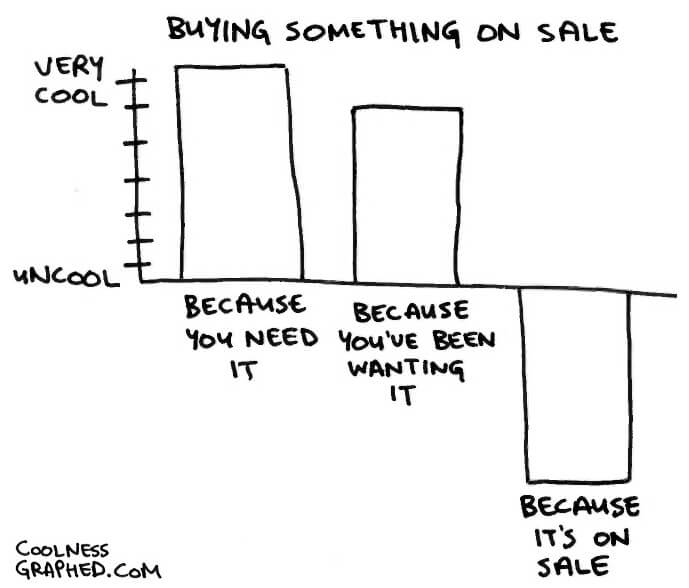
"Buying Something on Sale" by Coolness Graphed(3)
The elegant term Tsundoku (積ん読) can either describe unread reading materials—usually books—or the habit of collecting them. According to Big Think, the term blends “[...] tsunde-oku (letting things pile up) and dukosho (reading books).”(4)
Tsundoku are either impulsive or “just in case” book purchases. Sometimes, we fall for them because the cover art looks cool. Other times, it’s the allure of owning stuff, the tactility of hardbacks, the smell of paper… you get the idea.
Tsundoku vs. Digital Hoarding
While the traditional, 19th-century meaning of Tsundoku refers to printed materials, its premise is still very much alive today as “digital hoarding” or "cyber hoarding."

Here are some modern, digital Tsundokus we collect:
🔖 Browser bookmarks
🎵 Digital music files
💵 Online subscriptions
🎞 Photos and videos
🫂 Social media friends (yep)
📱 Smartphone apps
👾 Video games (digital distributions)
While collecting digital stuff doesn’t seem like a problem—except for the wallet—piling up gigabytes of data can eventually become a burden.
As one Reddit user admits:
“I have a hard time getting rid of screenshots or pictures because I may need them later. I have over 15K pix on my phone alone, nearly 500 apps, and I follow over 2K people on Insta & Twitter. I always feel like it’s associated with “FOMO”, it feels like I will be missing out if I don’t follow everybody, everything, if I don’t keep (up with) everything ever.”(5)
Things get a bit more complicated when hoarding takes over our professional digital lives and starts affecting work performance.

What Makes Digital Hoarders Tick?
A 2020 survey by Centre for Research and Evidence on Security Threats (CREST) found that there are four common scenarios of digital hoarding.(6)
🤷♀️ Disengagement. Disengaged hoarders accumulate data like unread emails or duplicate digital files over time, to the point where it’s impractical or impossible to organize it. They usually don’t see hoarding as a problem.
👮♀️ Compliance. Sometimes digital assets have longer ”shelf life” and may be required in the future for compliance reasons. This type of hoarding isn’t caused by disorganization or negligence and doesn’t happen on a personal level.
🙀 Anxiety. This is a classic example of: “I may need this one day, right?” Anxiety-driven hoarding is often associated with the inability to separate the genuinely important assets from clutter. Anxiety hoarders collect both.
🧩 Collection. Finally, there are avid collectors who take genuine pride in their Tsundoku. They keep their digital assets well-organized and at the ready, just in case somebody at the company may need them.
Here are some of the most popular workplace Tsundokus:
📨 “Important” unread messages
🗑 Archived and deleted emails
☝️ Outdated guides and FAQs
📑 Copies of documents
📲 Unused apps and tools
🖨 Printed documents
🗂 Duplicate digital files
📍 Screenshots and videos
Regardless of the motives, digital hoarding can seriously affect the performance of remote organizations. Which takes us to the next point.

The Effect of Tsundoku/Digital Hoarding On Distributed Teams
According to the CREST report we mentioned earlier, digital hoarding may pose serious security and compliance risks. It can also impair productivity by overwhelming employees with an excess of uncurated information.(6)
And it only gets worse:
🤷 Impaired decision-making. Hoarding makes it difficult to make strategic decisions without instant access to relevant and coherent business intelligence.
📊 Poor data integrity. Outdated, duplicate or missing files create substantial knowledge gaps and result in unreliable data insights.
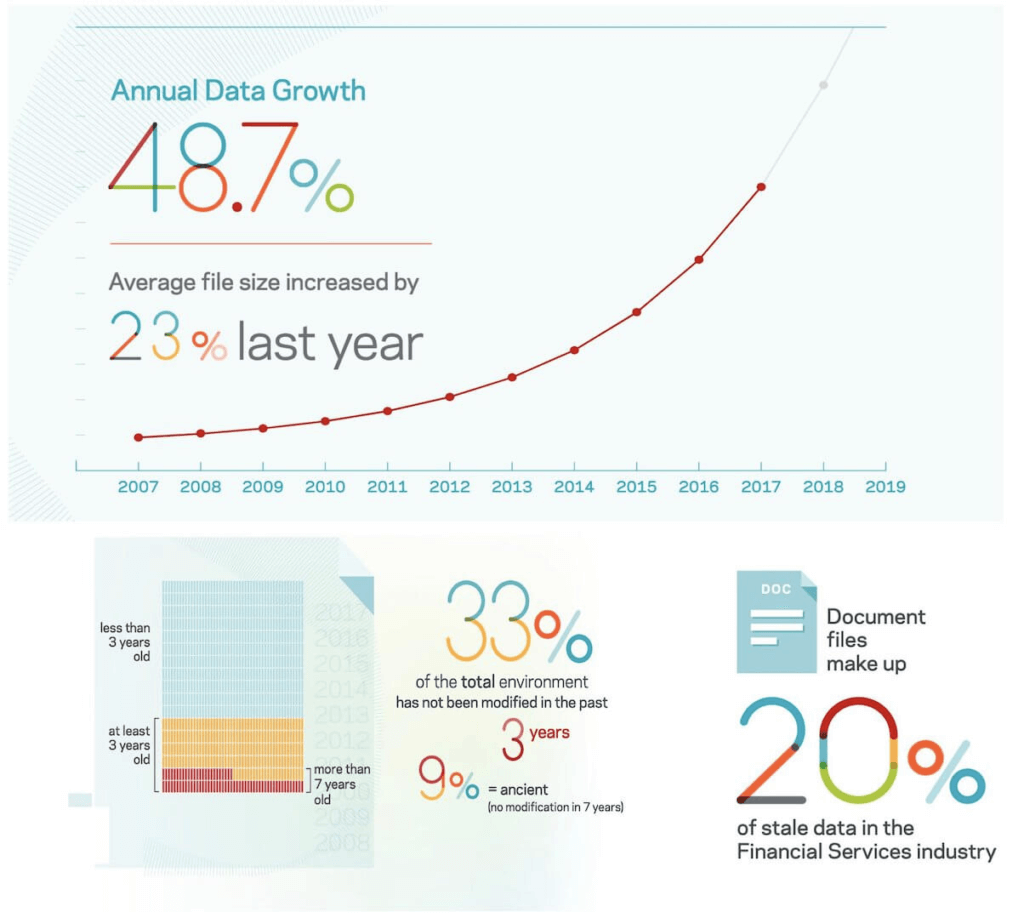
Data Genomics Index (2017) by Veritas(7)
🔓 Security vulnerabilities. Too much digital clutter makes it extremely difficult to account for and control digital assets in a compliant manner.
✋ No ownership. The more digital assets there are, the more difficult it is to track who does what. This can lead to low ownership and diffused responsibility.
The good news is, the modern case of Tsundoku isn’t that difficult to manage.
🧘♀️ 5 Steps to Overcome Digital Hoarding
1. Create a System
The first ingredient necessary to overcome Tsundoku is a unified, collaborative, team-wide system for storing, organizing, and retrieving data.
Your team needs to understand the importance of data management and know how to deal with information on a personal and organizational level.
Here are three knowledge-management schemes that’ll help you take control of your team’s data (follow links for more details):
Each of these methods will let your distributed team separate the wheat from the chaff and keep only the important stuff.

2. Make It a Team Effort
You can cram over a few weekends and try to clean up your team wiki or knowledge base. But if you don’t get your team on board, the digital clutter will pile up again.

And let’s not forget that you have little control over thousands of unread emails, hundreds of bookmarks, and hoards of duplicate digital files stashed by individual users.
Here’s what you should go instead:
☝️ Set clear expectations. Make your team aware of the problem. Encourage them to critically assess their digital clutter (emails, cloud storage, documents).
✅ Create a process. How often do you want your team to declutter? What kind of information should they keep for compliance?
💁♂️ Create ownership. Set permissions and level of access for adding and editing files. Appoint a “data custodian” who will take on curating team knowledge.
🧠 Encourage knowledge transfer. Employees often create guides and templates for personal use. Refine them and share with the rest of the team.

3. Take Inventory and Simplify
Freedom from digital clutter starts with awareness. Do you know how much Tsundoku your team collects? More importantly, are you aware of your own hoarding habits?
Follow these tips to get it under control:
✍️ List your team’s digital assets (cloud storage, tools, services).
📁 Organize cloud storage into high-level hierarchical structures.
💰 Keep a list of active subscriptions and services.
🔐 Moves all passwords to a password manager.
📩 Use organization-wide email sorting rules.
🔤 Use a consistent and logical naming convention.
In most organizations without a clear data policy, indexing digital assets and keeping them organized can be a challenge.
The good news is Taskade is here to help. 🐑
🌟 Create a single source of truth for digital assets
🌳 Organize everything using hierarchical tree structures
✍️ Upload or create documents, files, and tasks
🗂 Group assets into Projects, Workspaces, and Subspaces
🏷 Apply tags, cross-link, and run global searches
🧙♂️ Specify the level of access and user roles
And more…
Jump over here to sign up for a free account today. 👈

4. Curate and Delete
Don’t panic! You don’t have to part with your precious bookmarks, files, and emails (yet). But you also can’t stick to all that digital clutter forever.
Think of your team’s knowledge like a garden. As long as you weed the flower beds and cut the grass, the balance between assets and clutter is maintained. The moment you give up the maintenance, it’s glamour fades and the weeds quickly take over.
Here are a few tips that’ll help you weed your digital garden:
💾 Phase out redundant software (immediately)
🔂 Delete files that can be easily (re)downloaded (immediately)
📃 Scan and shred paper documentation (weekly)
🗓 Roll out automatic email cleanup (monthly)
🔴 Unsubscribe from services and newsletters (monthly)
🔖 Review and curate browser bookmarks (monthly)
🗃 Archive old project files (monthly)
🗑 Delete archived items if they’re no longer needed (quarterly)
Make sure to schedule regular cleanups in your team’s calendar so everybody knows when it’s time to roll up their sleeves.
5. Make Information Actionable
The “collecting” aspect of Tsundoku isn’t a problem in itself. It’s the lack of actionability that prevents your team from capitalizing on all that intellectual value.
You want to make sure that all bits of information your team stores—emails, documents, wikis, guides—are actionable and put to good use over their life cycle.
🔓 Make it accessible. Keep team knowledge up-to-date and accessible 24/7. Store information in a centralized system that supports digital content management.
♻️ Recycle. Curate and repurpose digital content. Transform one-off checklists into templates, single documents into guides, and manuals into video tutorials.
🤝 Share. When it comes to knowledge management, sharing is caring. Invite other teams to curate data and capitalize on the external input.
🔔 Define “shelf life.” Keep a record of guides, wikis, and how-tos. Set due dates/recurring reminders and update documents when needed.
🔎 Make it searchable. Organize information into folders and categories, apply filters and tags. Make sure to index everything for easy reference.
And that’s it! 👋
Here’s a free template that includes all the tips discussed in this article. Don’t forget to copy it to your Taskade Workspace and share with the rest of the team!
Frequently Asked Questions
What is Tsundoku and how does it relate to digital hoarding?
Tsundoku (積ん読) is a Japanese term for the habit of acquiring reading materials and letting them pile up unread. In the digital age, it manifests as hoarding bookmarks, downloading files you never open, subscribing to newsletters you never read, and saving articles 'for later' indefinitely. For remote teams, digital Tsundoku creates cluttered shared drives, overflowing knowledge bases, and information anxiety — where having too much unprocessed information is worse than having none.
How does digital hoarding affect remote team productivity?
Digital hoarding hurts remote teams through: information overload (team members can't find what they need amid the clutter), decision fatigue (too many unprocessed inputs paralyze action), storage costs (accumulated files consume expensive cloud storage), security risks (outdated documents may contain sensitive data that should have been deleted), and onboarding friction (new members face an overwhelming backlog of disorganized content). Studies show knowledge workers spend 19% of their time searching for information.
How can remote teams beat digital hoarding?
Beat digital hoarding with these strategies: implement regular 'digital declutter' sessions (monthly review and purge of outdated content), use the PARA method to organize information by actionability, set expiration dates on temporary documents, establish clear archival policies, practice progressive summarization (distill key insights instead of keeping everything), and designate a knowledge manager role to maintain the team's information hygiene.
What tools help manage information overload in remote teams?
Tools that combat information overload include Taskade (organized workspaces with AI-powered search, structured project hierarchy, and AI agents that synthesize information from your knowledge base), Notion (database-driven organization), and Readwise (progressive summarization of reading). Taskade helps by providing a single workspace where teams can capture, organize, and act on information — preventing the scatter that leads to digital hoarding across multiple disconnected tools.
🐑 Conclusion
For some, digital hoarding—the 21-century take on Tsundoku—has become a hook that’s not much different from compulsive social media use or smartphone addiction. It’s stimulating, addictive, and makes us feel genuinely productive.
Except, you already know that isn’t true, right?
It doesn’t matter if you’re a custodian of documents, photos, videos, browser bookmarks, or unread emails. If the thought of parting with digital clutter makes you feel strangely anxious, it’s time for some spring cleaning.
Organize your digital workspace with Taskade AI! 🤖
🤖 Custom AI Agents: Create AI agents to automate routine tasks and simplify knowledge management, powered by OpenAI GPT (frontier models).
🪄 AI Generator: Use the power of OpenAI GPT (frontier models) to generate complete workflows, documents, and projects based on natural-language descriptions.
✏️ AI Assistant: Use convenient /AI commands in the project editor to outline, plan, and edit documents, notes, comments, and more.
🗂️ AI Prompt Templates Library: Choose from an expansive catalog of AI prompts for every occasion, available anywhere inside Taskade.
💬 AI Chat: Ask AI Chat for advice on productivity, business strategies, project management, and other aspects of your work.
📄 Media Q&A: Upload documents and spreadsheets, and Taskade AI will extract insights and summarize key details for you.
And much more...

🔗 Resources
https://www.hitachivantara.com/en-us/pdf/infographic/are-you-data-hoarder-infographic.pdf
https://bigthink.com/personal-growth/do-i-own-too-many-books?rebelltitem=3#rebelltitem3
https://www.reddit.com/r/hoarding/comments/gycwcg/digital_hoarder/
https://crestresearch.ac.uk/comment/the-risks-of-digital-hoarding/
https://www.veritas.com/content/dam/Veritas/docs/reports/V0479_Data-Genomics-Index-Report.pdf