






Google Keep and Evernote are two of the most popular note-taking apps out there. Both have their fair share of amazing features that appeal both to productivity enthusiasts and avid note-takers. But neither is exactly the holy grail of note-taking. In today's article, we match them up against Taskade AI, complete with a comprehensive comparison of key features, pros, and cons.
TL;DR: Google Keep is best for quick, lightweight notes. Evernote suits deep research and web clipping. Taskade combines both strengths with AI agents, 7 project views, and real-time collaboration — starting free with 11+ frontier AI models built in. Try Taskade free →
At its core, modern note-taking is very much the same as it has always been: a way to capture and organize thoughts, ideas, and information. What's changed, however, is the medium and the tools we use. And choosing the right tool from hundreds of options is a tough nut to crack.
So, who's the clear winner?
Where is digital note-taking heading?
Are those apps ready for the age of AI-powered note-taking?
We're about to find out. But first, let's start with the basic stuff. 👇
🌟 Essential Features of Good Note-Taking Apps
Before we dive into the wonderful world of note-taking with our comparison of Evernote, Google Keep, and Taskade, we first need to establish key essential features of digital note-taking apps.
(don't worry, there are just a few)
AI Integration
When you think about note-taking, AI might not be the first thing that pops into mind. But it’s a game-changer. Large language models (LLMs) and tools like ChatGPT have much to offer, regardless if you're a pro note-taker or just learning the ropes of knowledge management.
With AI, note-taking apps can do so much more than just save your scribbles. Think about features like smart suggestions, which can recommend topics or headings based on what you're jotting down, automatic outline creation, or even smart research and summarization features.
Templates
Templates help you take better notes as it provides you with a clear structure to follow when taking notes. These can range from quick checklists to detailed outlines for planning your essays. Having a template ready can positively affect your note-taking process.
Cloud Storage
Gone are the days when you had to carry your notebook around to take quality notes. Cloud storage is almost a necessity when it comes to modern-day note-taking as it allows you to store your notes in the cloud. Cloud storage gives you the convenience of accessing your notes via the internet. Examples of cloud storage applications include Dropbox and Google Drive.
Portability
Portability can be a useful feature as it allows you to access your notes from any of your devices. This way, you can write down notes via an app on your phone if you have a sudden burst of inspiration when you’re out and about. Your favorite note-taking app should allow you to take notes on your preferred device and make it easier for you to organize your thoughts.
Collaboration
An interesting feature of modern-day note-taking is collaboration. With this feature, you can work together with your peers to create notes together, or even have a family grocery checklist to shop for groceries together.
Ease of Use
The interface of your note-taking app has to be user-friendly. Even though an app might have advanced features, it’s important that it has a friendly user interface to help keep things simple and intuitive.
Organization
It’s important to keep your notes organized so that you know when to find them when you need them. If you’re a frequent note-taker, the last thing you’d want is to lose your notes in a sea of others. Features such as organizing your notes by tags can help you keep organized.
And now, let's see how the apps we discuss today fare in these areas.
🗒️ What Is Google Keep?
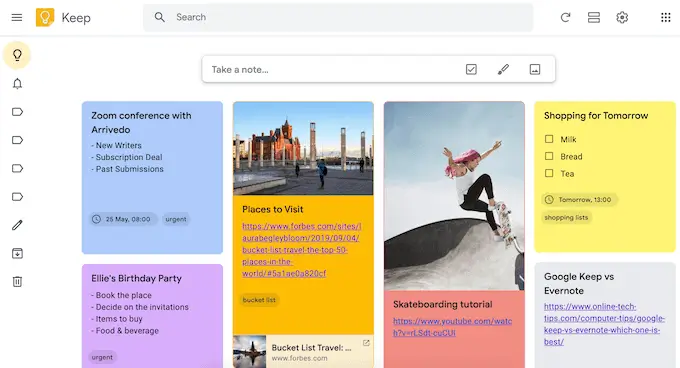
Google Keep is a note-taking software that was created in 2013 by Google as part of its productivity office suite. Google Keep has since made a name for itself as a minimalist, no-frills note-taking app that is both easy to use and accessible. A fine tool for the age of distractions.
Although Google Keep has received mixed reviews from its users, it still remains a popular alternative to Evernote. And we can understand the appeal — it simply feels like digital sticky notes. For those who appreciate extreme simplicity, Google Keep hits the mark.
Key Features of Google Keep
Simplicity. Google Keep’s simplicity makes it beginner-friendly due to its intuitive design. The option to color-code your notes makes it easy to categorize them based on colors.
Speed. Due to Google Keep’s lightweight design and minimal features, the app runs quickly and is perfect for you if you’re in the market for a tool to take simple notes.
Google Docs Integration. With Google Keep, you can easily transfer longer notes into Google Docs with a single click. This feature is handy especially if you’re drafting detailed outlines.
Transcribe Voice Recordings. Another handy feature of Google Keep is its ability to transcribe your voice into notes. Simply record your voice via the app and it will transcribe what you’re saying in real-time.
Record Audio Notes. Alternatively, you can also use the Google Keep app on your mobile device to record audio notes on the go. Record voice notes and store them on Google Keep for future reference.
Adding Doodles Into Notes. You’re able to draw and save your doodles as notes on Google Keep. This could come in handy if you prefer to express some of your thoughts via drawings.
Labels to Organize Notes. It’s easy to keep your notes organized on google keep by using labels and also the built-in search function.
Collaboration. Google Keep allows you to easily collaborate with other Gmail users by simply adding them as collaborators into your notes.
What Are the Disadvantages of Google Keep?
No AI Integration: Googlel Keep doesn't offer any AI integration at this time. That said, with Google actively developing AI projects like Bard, this might change in the future.
No Chrome App. Google has phased out the Chrome app for Google Keep as part of its long-term plan of discontinuing all apps on Chrome. If you’re using Google Keep on a desktop or laptop, you can only access it via a browser.
No Text Formatting. Google Keep does not support text formatting. As a result, you won't be able to bold words for emphasis or even change the font on your notes.
No Notifications. You don’t get notifications when new tasks are added on Google Keep. This makes it inconvenient for you and your collaborators as you won’t know when new tasks are added.
The Interface Can Get Messy. If you’re a frequent note-taker, your Google Keep view might get messy. This is because Google Keep does not allow you to create multiple projects.
No Templates. The absence of templates on Google Keep means that it only supports basic note-taking. It might be hard for you to create a detailed outline on Google Keep due to the lack of templates and basic formatting features.
How Much Does Google Keep Cost?
One of the best things about Google Keep is that it is completely free to use. By logging in with your Google account, you get all of Google Keep’s features without having to pay extra.
🐘 What Is Evernote?
Evernote is a digital note-taking application created by Russian IT entrepreneur Stepan Pachikov. Inspired by his fascination with the human brain, Pachikov designed Evernote to assist individuals in organizing and storing vast amounts of information.
After beta launching in 2008, Evernote quickly gained popularity, reaching 11 million users in just three years(3). A pioneer in the digital note-taking movement, Evernote remains one of the most popular note-taking apps out there today.
Even though Evernote has an interesting history, it currently faces an uphill battle as many users are leaving the app for better alternatives. We've done the research and have come up with an in-depth list of Evernote alternatives if you're looking for an alternative!
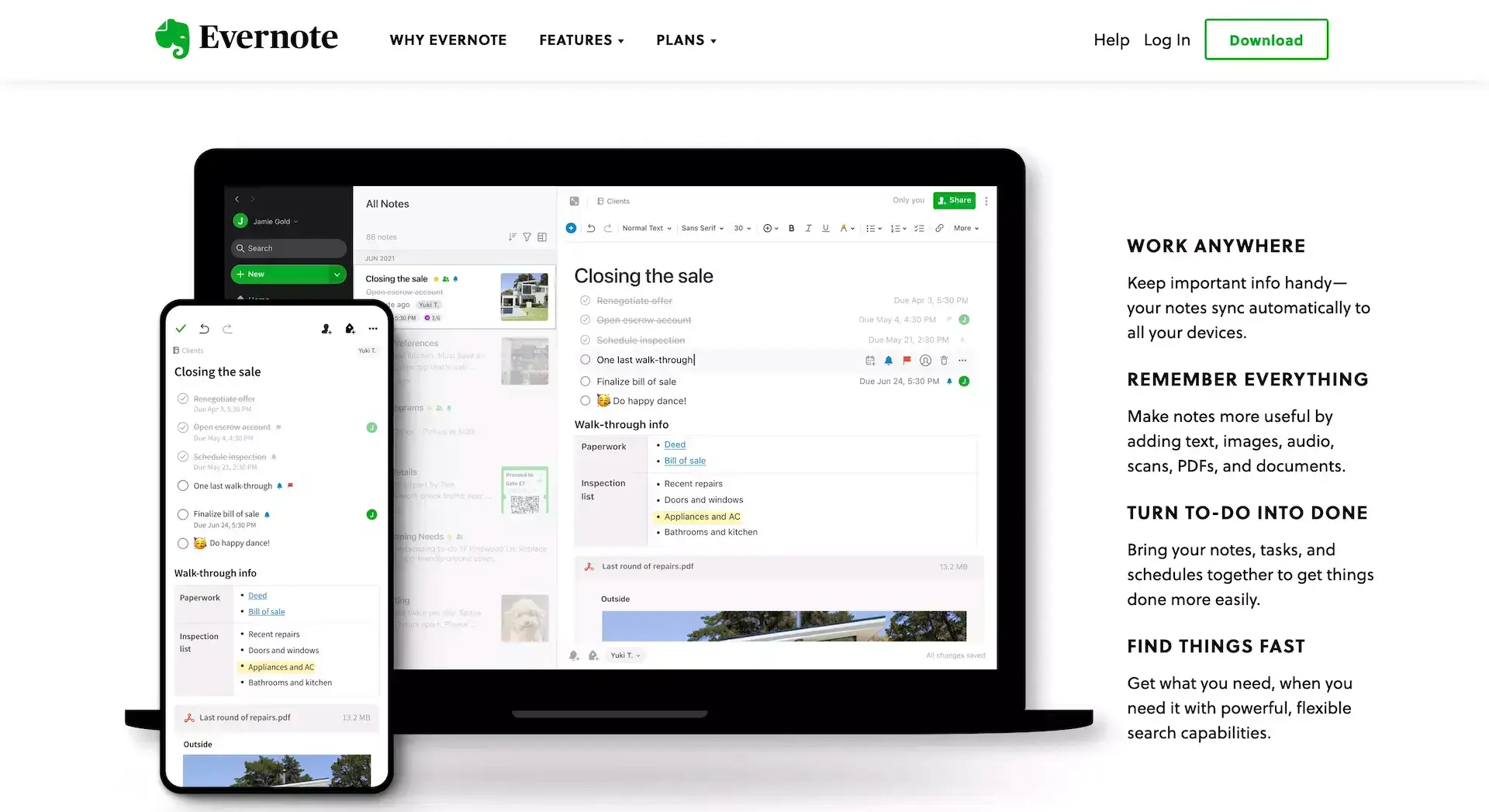
So, what can Evernote offer today? Check some of the key Evernote features below.
Key Features of Evernote
Templates. You can use Evernote’s customizable templates to take better and more structured notes. Evernote’s flexible templates make it easy for you to choose one specifically to meet your needs.
Integrations. Evernote has integrations with other software such as Slack and Google Drive. As a result, you can use Evernote alongside your other daily apps to boost productivity.
Offline Mode. Evernote has an offline mode that allows you to edit your notes offline on any device. Your notes will be synced to the cloud the next time you’re connected to the internet.
Handwriting Recognition. Evernote can recognize handwritten notes that are captured via its in-app camera. This scanner feature is useful as it is also able to search for specific words within your handwritten notes.
Web Clipper. Evernote’s Web Clipper browser extension allows you to clip parts of a webpage, or even the entire page onto Evernote. You can also highlight specific parts of a clipped page and also store them indefinitely within the app.
Customizable Homepage. You can reduce clutter on your Evernote homepage by utilizing widgets to customize your view.
What Are Some Disadvantages of Evernote?
Fledgling AI Integration: Evernote is flirting with the concept of AI, but so far, it has only showed an AI-powered search feature and limited automatic note cleanup.
Basic Features Limited. Evernote’s basic freemium version is fairly limited. It can work if you’re using it for very basic note-taking, but you’ll find yourself needing an upgrade if you’re a heavier note-taker.
Evernote Basic Has No Offline Mode. One of the biggest drawbacks of Evernote’s basic plan is its lack of an offline mode. This means that you will only be able to take notes when you’re connected to the internet.
Monthly Upload Limit. Evernote’s monthly upload limits are capped at 60MB for the basic plan. This should suffice for basic notes, but if you’re saving PDFs and Images, you might run out of space quickly.
Limited Customizability. The homepage in Evernote is limited to only resizing and rearranging widgets. Taskade offers a more robust customization option as you’re able to change to multiple board views with a single click.
No Real-Time Collaboration. Another limitation to Evernote is its lack of support for real-time collaboration. Users are unable to simultaneously work on the same note. Doing so will create a duplicate copy of that document.
Productivity Features Have to Be Unlocked. Although Evernote markets itself as a productivity tool, it is essentially a note-taking tool that tries to incorporate productivity tools. The problem behind this is that to get access to Evernote’s productivity functions, you will have to upgrade your plan.
How Much Does Evernote Cost?
Evernote works on a freemium model, which means that you can use it for free. You do have to pay to unlock more features though.
The free plan starts you off with basic features such as:
Basic note-taking
Sync up to 2 devices
25MB maximum note size
60MB total upload/month
To get access to more features such as unlimited devices, up to 10GB monthly upload limit, customizable home dashboard, and offline access, you would have to pay for additional features starting at $7.99 per month.
To gain access to more professional features such as integrations, assigning tasks, and more storage space for your notes, Evernote’s professional plan will set you back by $10.99 per month.
🐑 Why Taskade Is the Best Alternative to Google Keep and Evernote
Choosing between two apps can be tough.
But why not get the best of both worlds with Taskade?
Taskade is an AI-powered note-taking and project management tool that bridges the gap between simplicity and functionality. Whether you want to outline a complete novel, brainstorm with a team, or building a second brain, Taskade will adapt to your needs.
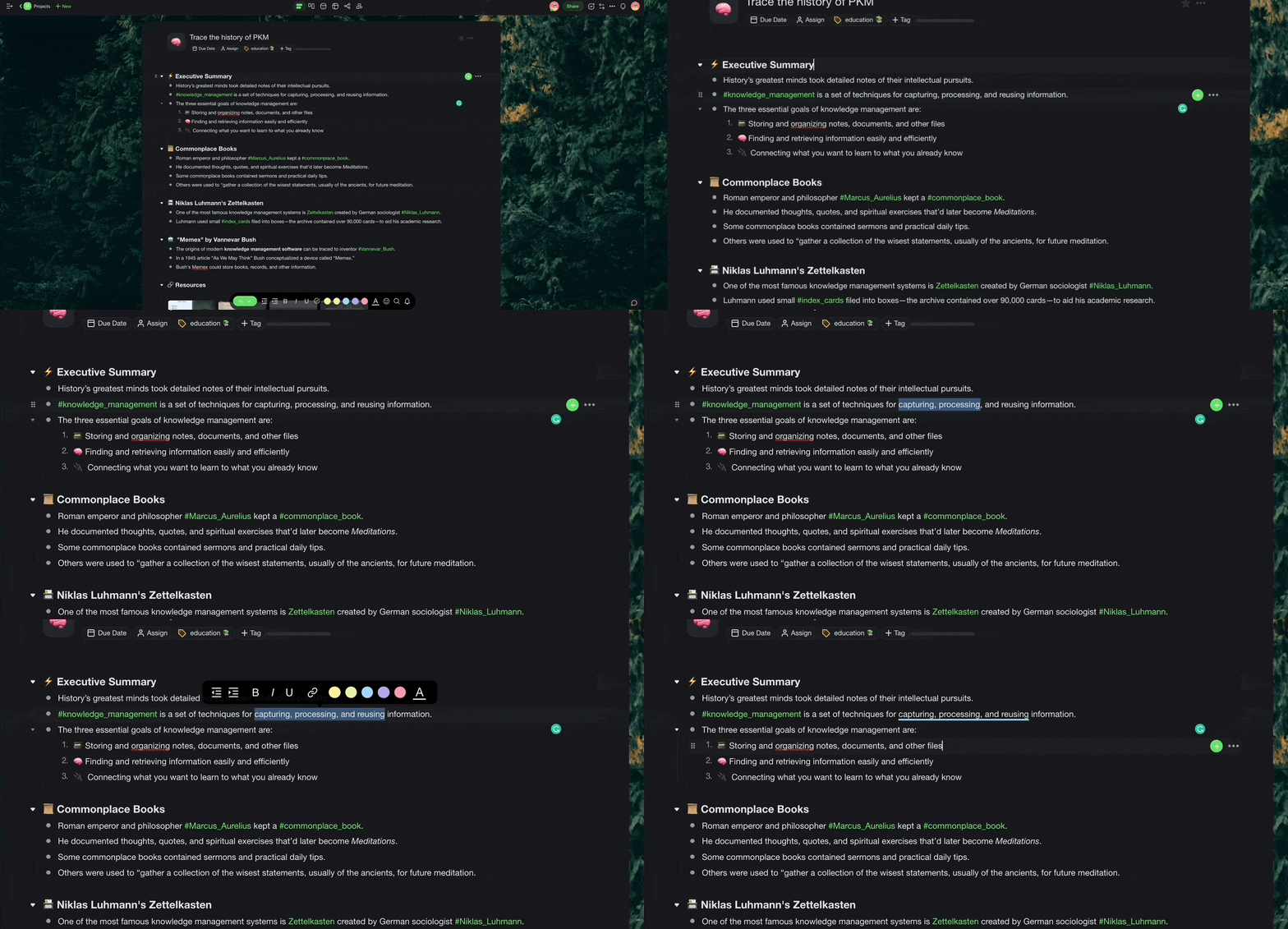

And all that is sprinkled with the best AI features you can get in 2026:
✏️ AI Writing Assistant: Ever had that "uh, how do I phrase this?" moment while jotting down notes? The AI Writing Assistant has your back. It's like your personal editor, always there to help you brainstorm, outline, write, and improve your drafts.
💬 AI Chat: Research takes time. And so does getting unstuck when you keep staring at the blinking cursor for hours on end. Instead of banging your head against the wall screen, ask AI for guidance, and it will reply with a specific tone and expertise.
🔄 Workflow Generate: Starting a new draft is always a struggle. The first word, sentence, and paragraph don't just magically appear on the page. But they can. All you need to do is describe your project and the Workflow Generator will set the stage for you.
🤖 AI Agents: So you're diving deep into a topic and wish you had some stats, dates, or a relevant quote to enrich up your notes? Use one of Taskade's AI Agents to simplify research and gather resources before you start typing.
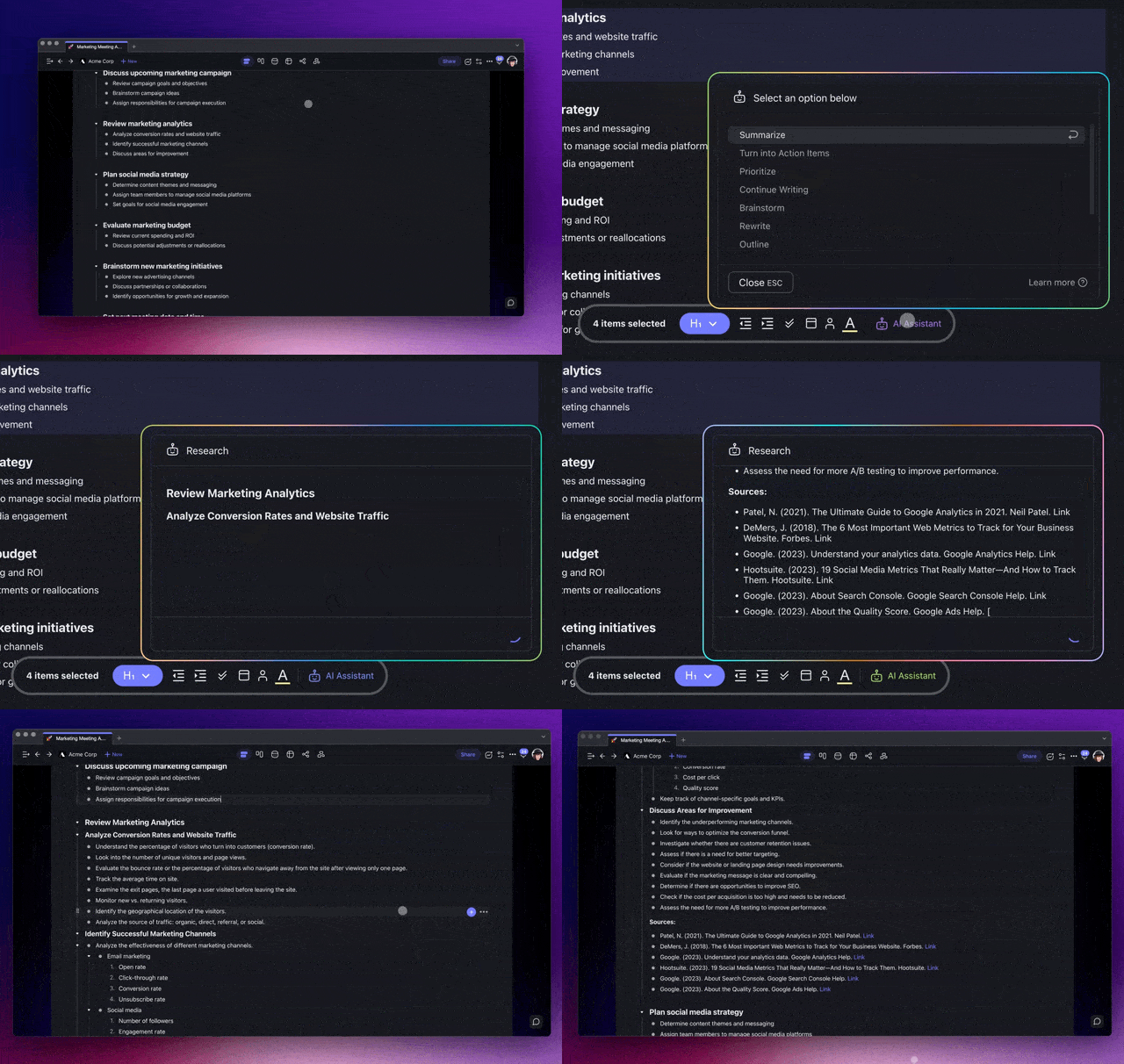
So, what else does Taskade offer?
🤖 Full AI integration: Taskade AI "lives" in all your projects and workspaces; you don't to use any external tools or integrations to get started. Supercharge your drafts and speed up research with the AI writing assistant, AI chat, and workflow generator.
🌳 Build high-level outlines: Structure documents and outline everything you’re working on. Create infinite hierarchies, add tasks/sub-tasks, and fold/unfold outline levels.
🎨 Get a head start with 500+ templates: Choose from a variety of templates to kick-start all kinds of writing projects. Save and customize templates to automate your workflows.
🌳 Build high-level outlines: Structure documents and outline everything you’re working on. Create infinite hierarchies, add tasks/sub-tasks, and fold/unfold outline levels.
🔗 Cross-link notes: Taskade makes it easy to create connections between notes. Use hyperlinks to navigate between all your drafts and combine notes into clusters.
🚀 Real-time collaboration: Working on a book with your editor? Co-writing a research paper? Edit your draft in real-time and track contributions made by others in real time.
🌐 Type from anywhere: Taskade makes it super easy to start typing, regardless of the circumstances. Write and sync notes on Mac, Windows, Android/iOS, and in a web browser.
👀 Multiple views: Toggle project views in a single click and work the way you want. Choose between boards, lists, mind maps, tables, and org charts.
🏷️ Use #hashtags:**** Get organized with color-coded #tags. You can filter note contents with clickable #hashtags or organize your drafts on a workspace/folder level.
📤 Export your notes:**** Want to add your note to a presentation or send it as an attachment? Export notes as .txt, .pdf, or .md files or print them out.
Want to learn more? Check out how Taskade compares to Google Keep.
🥊 Google Keep vs. Evernote vs. Taskade: Which Is Better?
Google Keep, Evernote, and Taskade each offer a unique blend of features. But, as it often the case in life, it's not so much about which of those apps is objectively better, but more about which aligns with your specific requirements. Let's compare the three side by side for starters.
| 🐑 Taskade | 🗒️ Google Keep | 🐘 Evernote |
|---|---|---|
| AI-powered note-taking | Quick notes | Old-school note-taking |
| Full AI integration | No AI features | Limited AI features |
| Essential formatting | No Text Formatting | Text Formatting |
| Zapier integrations | G Suite Integration | No Integrations |
| From 250 MB storage (free) all the way to 1,000 GB | 15GB storage limit (shared with Google apps) | 60MB monthly upload limit |
| Unlimited note size | Unlimited note size | 25MB note size limit |
| Unlimited syncing | Unlimited syncing | Syncing limited to 2 devices |
| Web Clipper and widgets | Web clipper extension | Built-in web clipper |
| Recurring Reminders | Reminders for notes | No reminders for notes |
Comparison of Google Keep vs. Evernote vs. Taskade (Basic features)
Google Keep, with its uncluttered interface, immediately stands out if you need a straightforward note-taking experience. The ease of use paired with a barebones interface makes it a good choice for quick notes on the go that you probably won't organize afterward.
If you're looking for a more detailed and layered approach to note archiving, Evernote with its in-depth organization using notebooks and tags may be a better match. While the user interface has aged a bit over the last couple of years, the "green elephant" can still hold its own.
While Google Keep and Evernote cater to different ends of the complexity spectrum, Taskade aims for the happy medium. Instead of drowning your with features (or taking them all away), Taskade blends a clean interface with just the right set of features you need to take great notes.
Of course, there's also the collaborative aspect. Apart from basic sharing and co-editing features, Google Keep isn't particularly strong in this domain. Evernote fares a tad better with its ability to share notebooks and set permissions, allowing for more granular control over shared content.
And Taskade? Well, Taskade is a collaboration beast. It offers full-blown collaborative note-taking, including real-time editing, collaborative undo / redo, version history, as well as comments and an integrated chat, in case you want to discuss the details with your team.
📊 Google Keep vs Evernote vs Taskade: Full Feature Comparison (2026)
| Feature | Google Keep | Evernote | Taskade |
|---|---|---|---|
| AI Integration | None | Limited AI search | Built-in (11+ frontier models) |
| Custom AI Agents | No | No | Yes (22+ tools, persistent memory) |
| Project Views | Sticky notes grid | Notebook list | 8 (List, Board, Calendar, Table, Mind Map, Gantt, Org Chart) |
| Real-Time Collaboration | Basic sharing | No simultaneous editing | Full real-time co-editing |
| Outlining | No nesting | Basic headings | Infinite hierarchical nesting |
| Templates | None | Community templates | 1,000+ customizable templates |
| Web Clipper | Via extension | Built-in (best-in-class) | Browser extension |
| Offline Mode | Yes | Paid plans only | Yes |
| Search | Basic text | OCR + text search | Full-text + semantic AI search |
| Integrations | Google Workspace | Slack, Drive (paid) | 100+ integrations |
| Free Plan Storage | 15 GB (shared) | 60 MB/month upload | 250 MB included |
| Starting Price | Free | $7.99/month | Free (Starter $6/month) |
Taskade's AI agents can research, summarize, and organize notes autonomously across your workspace. Build custom note-taking workflows with Taskade Genesis or explore templates to get started. Connect your tools with 100+ automations and share projects in the Taskade community.
How Workspace DNA Makes Taskade the Smarter Choice
What truly sets Taskade apart from Google Keep and Evernote is Workspace DNA — a self-reinforcing architecture of Memory + Intelligence + Execution. Memory means your notes, tasks, and files live as structured projects viewable across 8 formats (List, Board, Calendar, Table, Mind Map, Gantt, Org Chart). Intelligence is the AI agents layer — 11+ frontier models from OpenAI, Anthropic, and Google that understand your notes, surface relevant connections, and generate content. Execution triggers automations that act on your knowledge — syncing updates, sending reminders, and running multi-step workflows with 100+ integrations. This loop means every note you take feeds back into a smarter workspace. Explore how it works in our personal knowledge management guide and Building a Second Brain review.
Agentic AI and Vibe Coding: Beyond Traditional Notes
Neither Google Keep nor Evernote offers anything like Taskade AI agents. With 22+ built-in tools, MCP connectors for external services, and persistent memory across sessions, agents can research topics, summarize documents, auto-categorize notes, generate follow-up tasks, and maintain your entire knowledge base autonomously.
Vibe coding takes this even further. Describe your ideal note-taking app to Taskade Genesis in plain language — "build me a meeting notes tool with auto-summarization, action item extraction, and Slack notifications" — and Genesis builds it as a live, deployed app. With 150,000+ apps already built, users are creating custom note systems far beyond what any traditional app can offer. See the ultimate guide to Taskade Genesis or create your own app to get started.
👋 Parting Words
Let's make one thing clear.
In the realm of note-taking, there isn't a one-size-fits-all solution. Different users have different needs, and the best tool for one individual might not necessarily be the best for another.
Google Keep offers simplicity, perfect for quick notes and reminders. Evernote is for those who seek depth and want to catalogue information in an organized fashion. Taskade, on the other hand, marries both simplicity and functionality, while adding a sprinkle of AI magic to the mix.
Ultimately, the choice between Google Keep, Evernote, and Taskade depends on how well it aligns with your personal preferences and note-taking style. But whichever tool you choose, make sure that it will seamlessly integrate into your workflow, today and in the future.
So, are you ready to take your note-taking game to the next level? Try Taskade for free today! 👈

Frequently Asked Questions
What are the main differences between Google Keep and Evernote?
Google Keep is a lightweight, sticky-note-style app designed for quick capture — short notes, lists, and reminders that sync across Google services. Evernote is a heavier, document-oriented tool built for long-form notes, web clipping, and deep organization with notebooks and tags. Key trade-offs: Keep is free, minimal, and fast but lacks rich formatting and advanced search; Evernote offers powerful search (including text in images), templates, and integrations but has limited free-tier storage and a steeper learning curve. Neither includes built-in AI agents or real-time team collaboration as core features.
Is Google Keep or Evernote better for students?
It depends on the workflow. Google Keep suits students who need fast, lightweight capture — lecture reminders, quick to-do lists, and short study notes — especially if they already live in Google Workspace. Evernote suits students managing large research projects, thesis notes, or web-clipped references because of its robust tagging, notebook hierarchy, and OCR search. For students who want both simplicity and depth, an AI-native alternative like Taskade combines outlining, mind mapping, and AI-powered summarization in a single collaborative workspace.
What features should you look for in a modern note-taking app?
Five essential features define a modern note-taking app: 1) AI integration — built-in AI that can summarize, generate, and restructure notes rather than just store them, 2) Real-time collaboration — simultaneous editing with teammates, not just sharing static files, 3) Cross-platform sync — seamless access on desktop, mobile, and web, 4) Flexible views — the ability to switch between lists, boards, mind maps, and calendars for different thinking styles, 5) Search and retrieval — fast full-text search, ideally with semantic understanding so you find notes by meaning, not just exact keywords.
Are there better alternatives to both Google Keep and Evernote?
Yes. AI-native productivity platforms like Taskade go beyond traditional note-taking by combining notes, tasks, and AI agents in one workspace. Instead of choosing between Keep's simplicity and Evernote's depth, Taskade offers hierarchical outlining, 7 project views (List, Board, Calendar, Table, Mind Map, Gantt, Org Chart), real-time collaboration, and autonomous AI agents that can research, write, and organize on your behalf. This eliminates the need to juggle multiple apps for note-taking, task management, and team collaboration.
How does Taskade Genesis help with note-taking and knowledge management?
Taskade Genesis lets you build custom note-taking apps by describing what you need in natural language — a process called vibe coding. With 150,000+ apps built, users create meeting note organizers, research dashboards, and knowledge bases with a single prompt. Genesis apps support custom domains and Community Gallery publishing, making your note system accessible and shareable.
What is Workspace DNA and how does it improve note-taking?
Workspace DNA is Taskade's three-pillar architecture: Memory (projects as structured knowledge bases with 7 views), Intelligence (AI agents that understand, organize, and surface relevant notes), and Execution (automations that sync, notify, and trigger workflows based on note changes). This self-reinforcing loop turns passive notes into an active, interconnected knowledge system that grows smarter over time.
How do AI agents enhance note-taking compared to Google Keep and Evernote?
Unlike Google Keep (no AI) and Evernote (limited AI search), Taskade offers autonomous AI agents with 22+ built-in tools, MCP connectors, and persistent memory. Agents can research topics, summarize documents, auto-categorize notes, generate follow-up content, and maintain your knowledge base without manual intervention. This makes Taskade a fundamentally different category of note-taking tool.
What is vibe coding and how does it change note-taking?
Vibe coding means building apps and workflows by describing what you want in natural language rather than writing code. For note-taking, you can tell Taskade Genesis to build a meeting notes app with auto-summarization and action item extraction, and get a fully deployed tool in minutes. This makes custom note-taking systems accessible to anyone, regardless of technical skill.